Sold by: Edge Delta
Deployed on AWS
Edge Delta is a telemetry-native AI SRE that continuously understands, investigates, and operates production. Its AI Teammates reason over the live logs, metrics, traces, and events flowing through Edge Delta Telemetry Pipelines, so they catch issues early, find the root cause with its evidence, and propose fixes that wait for your approval.
4.4
Overview


Video
Edge Delta SRE Teammate

Video
Introducing Edge Delta Workflows

Video
Redis Caching Troubleshooting with AI Teammates

Video
Reviewing GitHub PRs using AI Teammates
Image
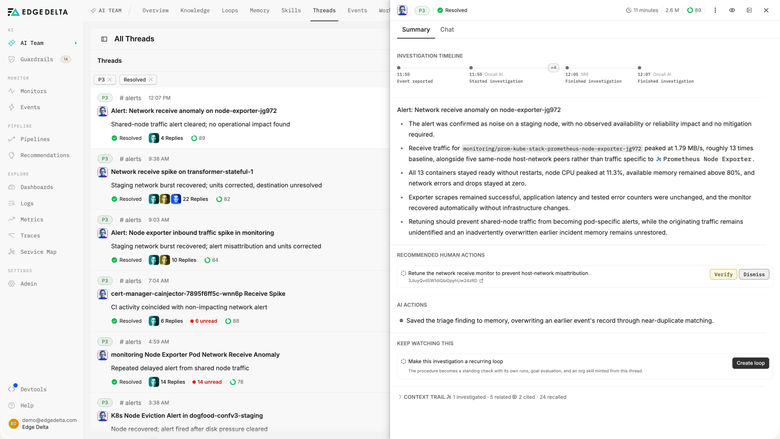
Detection starts in your telemetry
Image
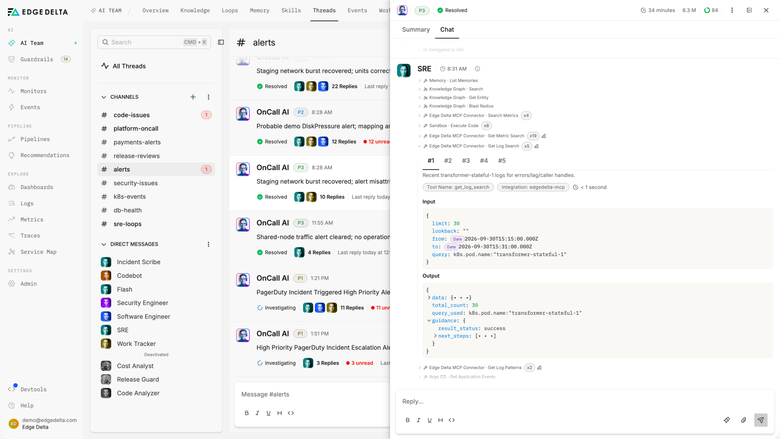
The investigation is already running
Image
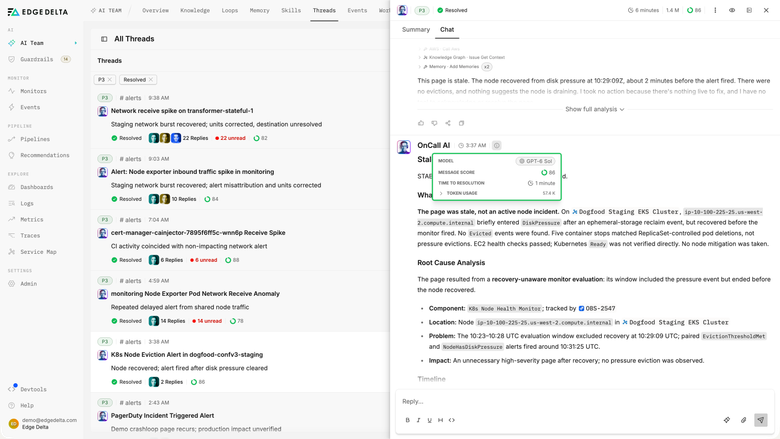
A root cause with its evidence
Image
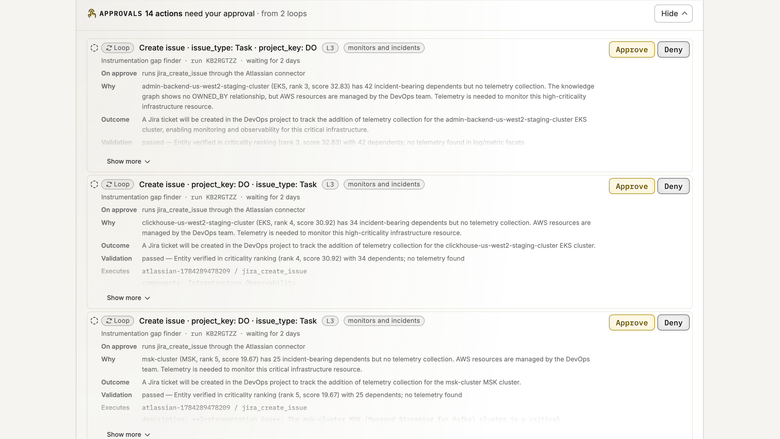
Every write waits for approval
Image
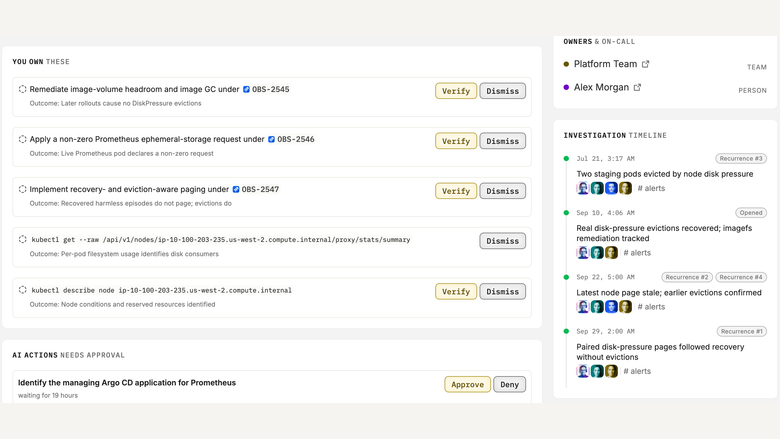
Fixes are verified in the telemetry
Image
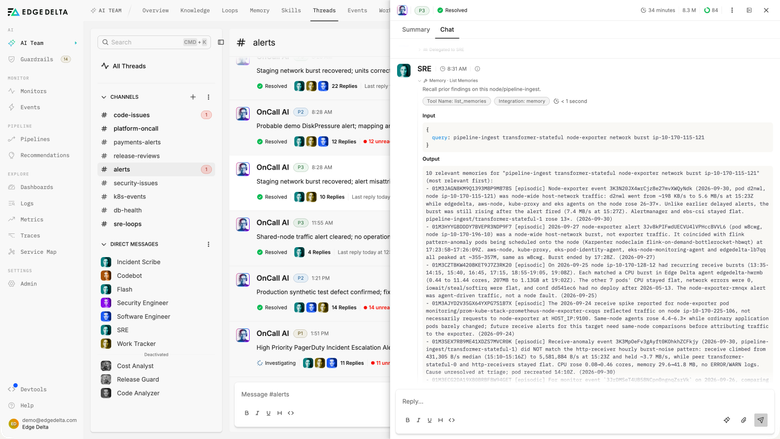
Each investigation feeds Production Memory

Video
Product video
Edge Delta is a telemetry-native AI SRE that continuously understands, investigates, and operates production. Most AI SREs begin work after an alert fires and query observability tools from the outside. Edge Delta's AI Teammates reason directly over the telemetry layer, on the live logs, metrics, traces, and events flowing through its Telemetry Pipelines, so they hold Production Context before an incident starts.
The teammates run one loop on every incident: detect abnormal behavior, investigate across telemetry and change history, reason to a root cause backed by evidence, act through approval-gated Workflows, verify the fix against before-and-after telemetry, and learn by adding the incident to persistent Production Memory. The same Production Context serves SRE, security, and software engineering teammates, which is the path toward Autonomous Production.
Four teammates ship out of the box: SRE, Security Engineer, Software Engineer, and Work Tracker. They connect to the tools teams already run, including Kubernetes, AWS, PagerDuty, GitHub, Jira, and Linear. Teammates start at the Propose trust level, where they read freely and draft changes but apply nothing without your approval. Every action is recorded on the issue, down to the pull request that carried the fix.
Teams can start with a free 14-day trial, no credit card required. Annual contracts and private offers are available through AWS Marketplace.
Highlights
- Detects issues on live telemetry. AI Teammates learn baselines from the logs, metrics, traces, and events in Edge Delta Telemetry Pipelines and open investigations before anyone writes an alert for the problem.
- Returns a root cause with its evidence. Each investigation correlates telemetry, deployments, and change history, then posts the root cause with the supporting logs, metrics, and traces attached.
- Keeps a person in control. Teammates start at the Propose trust level and apply nothing without approval, then verify each fix against before-and-after telemetry and save the incident to Production Memory.
Details
New
Introducing multi-product solutions
You can now purchase comprehensive solutions tailored to use cases and industries.

Features and programs
Trust Center

Access real-time vendor security and compliance information through their Trust Center powered by Drata or Vanta. Review certifications and security standards before purchase.
Financing for AWS Marketplace purchases
AWS Marketplace now accepts line of credit payments through the PNC Vendor Finance program. This program is available to select AWS customers in the US, excluding NV, NC, ND, TN, & VT.

Pricing
Pricing is based on the duration and terms of your contract with the vendor. This entitles you to a specified quantity of use for the contract duration. If you choose not to renew or replace your contract before it ends, access to these entitlements will expire.
Additional AWS infrastructure costs may apply. Use the AWS Pricing Calculator to estimate your infrastructure costs.
Dimension | Description | Cost/12 months |
|---|---|---|
Ent - ED - Telemetry Pipelines (Edge) 5TB - 12 Months - $146,000 | Edge Delta Telemetry Pipelines (Edge). Process/forward observability and security data to any downstream destination using Edge Fleets. 5000 GB of raw data ingest daily. 12 month term. Annual discounted cost of $146,000 | $10,950.00 |
250 GB/day | Ingest up to 250 GB of raw data per day | $27,375.00 |
500 GB/day | Ingest up to 500 GB of raw data per day | $54,750.00 |
1 TB/day | Ingest up to 1 TB of raw data per day | $109,500.00 |
1GB/Day | For organizations that need control and flexibility over growing volumes of telemetry data. | $36.50 |
100 GB/day | Up to 100 GB per day raw data ingest | $3,650.00 |
36.5 TB for 12 Months | Customer has 12 months to send 36.5 TB of raw data ingest into Edge Delta Pipelines | $3,650.00 |
Dimensions summary
These contract options bill on how much raw telemetry data you ingest. Several dimensions set a daily ingest ceiling, scaling from 1 GB per day up through 100 GB, 250 GB, 500 GB, and 1 TB per day. Two dimensions use total volume instead of a daily cap: one covers 36.5 TB across a 12-month term, and one covers 5 TB daily under a 12-month Telemetry Pipelines (Edge) commitment. You pick the dimension that matches your data volume. Pricing rises as the ingest capacity you commit to increases.
Top-of-mind questions for buyers
Raw data ingest is the volume of observability and security data you send into the pipelines before any filtering or processing. This includes logs, metrics, traces, and events from your sources. Pipelines process and route this data to downstream destinations. The amount counted is measured at ingest, not after optimization.
Daily-cap dimensions set a ceiling on how much raw data you can ingest each day, from 1 GB up to 1 TB. Total-volume dimensions give you a fixed pool instead: 36.5 TB to use across 12 months, or 5 TB daily under a 12-month Telemetry Pipelines (Edge) commitment. Total-volume suits uneven daily usage.
Each daily-cap dimension sets a ceiling for raw data ingest per day. If your volume outgrows that ceiling, you would move to a dimension with higher daily capacity. Pricing rises as the committed ingest capacity increases. For details on exceeding a committed amount, contact the vendor.
edgedelta.com
Helpful?
Vendor refund policy
Refunds are not available

Legal
Vendor terms and conditions
Upon subscribing to this product, you must acknowledge and agree to the terms and conditions outlined in the vendor's End User License Agreement (EULA) .
Content disclaimer
Vendors are responsible for their product descriptions and other product content. AWS does not warrant that vendors' product descriptions or other product content are accurate, complete, reliable, current, or error-free.
Delivery details
Software as a Service (SaaS)
SaaS delivers cloud-based software applications directly to customers over the internet. You can access these applications through a subscription model. You will pay recurring monthly usage fees through your AWS bill, while AWS handles deployment and infrastructure management, ensuring scalability, reliability, and seamless integration with other AWS services.
Support
Vendor support
Contact for further information info@edgedelta.com
AWS infrastructure support
AWS Support is a one-on-one, fast-response support channel that is staffed 24x7x365 with experienced and technical support engineers. The service helps customers of all sizes and technical abilities to successfully utilize the products and features provided by Amazon Web Services.
Updated weekly
By Edge Delta
By New Relic
Top
50
In Security Observability, Monitoring and Observability
Top
10
In Generative AI, Log Analysis
Top
10
In Migration, Monitoring, Continuous Integration and Continuous Delivery
Sentiment is AI generated from actual customer reviews on AWS and G2
Functionality
Ease of use
Customer service
Cost effectiveness
Positive reviews
Mixed reviews
Negative reviews
AI generated from product descriptions
Real-time Telemetry Analysis
AI Teammates reason directly over live logs, metrics, traces, and events flowing through Telemetry Pipelines to detect abnormal behavior and catch issues before alerts fire.
Root Cause Investigation with Evidence
Investigations correlate telemetry data, deployments, and change history to identify root causes with supporting logs, metrics, and traces attached as evidence.
Approval-Gated Workflow Automation
AI Teammates operate at Propose trust level, drafting changes and proposing fixes through approval-gated Workflows without applying actions without explicit approval.
Multi-Discipline AI Teammates
Four specialized AI Teammates ship out of the box: SRE, Security Engineer, Software Engineer, and Work Tracker, each reasoning over the same Production Context.
Integration with Production Tools
Connects to Kubernetes, AWS, PagerDuty, GitHub, Jira, and Linear to access deployment history, change records, and incident management systems for comprehensive context.
AI-Powered Root Cause Analysis
Automatically investigates alerts and pinpoints root causes with 5x faster analysis capabilities.
Natural Language Query Interface
Enables querying of observability data using conversational natural language to identify issues and receive actionable insights.
Real-Time Anomaly Detection
Detects system anomalies in real-time to prevent incidents before they impact users.
OpenTelemetry Integration
Supports standardized OpenTelemetry integration for unified data collection across logs, metrics, and traces in cloud-native environments including Kubernetes, serverless, and microservices.
Multi-Tiered Storage Architecture
Implements multi-tiered storage and data management capabilities to optimize telemetry data retention and reduce storage costs.
Telemetry Data Ingestion and Analysis
Ingests, analyzes, and alerts on metrics, events, logs, and traces in a unified platform
Full-Stack Observability
Visualizes and troubleshoots entire software stack in one connected experience with integrated AWS service monitoring including Amazon EKS, AWS Lambda, AWS Kinesis, Amazon CloudWatch, and AWS Distro for OpenTelemetry
Anomaly Detection and Alert Correlation
Automatically detects anomalies, correlates issues, and reduces alert noise through applied intelligence capabilities
Agentless SAP Monitoring
Provides agentless monitoring for ABAP systems with support for SAP RISE, ECC, S/4HANA, BTP, CALM, Fiori, Ariba, PI/PO, and BW with 175+ monitoring points including CPU, HANA/non-HANA databases, RFC details, background jobs, and IDoc insights
Tag-Driven Dashboard and Alerting
Implements dynamic, tag-driven approach to dashboards and alerting for infrastructure visualization and configuration monitoring
Standard contract
No
No
No
Customer reviews
Computer Software
Good Experience
Reviewed on Apr 17, 2024
Review provided by G2
What do you like best about the product?
It is a complete tool for data analysis and log reviewing. It's possible to create triggers and a dashboard that can ease the daily tasks. As on investigating with customer support tickets, it helps on properly see the information on a good speed.
What do you dislike about the product?
It is impossible to format the rendering of data in a more clustered manner to help a quick overview of data.
What problems is the product solving and how is that benefiting you?
Quickly looking into data and logs
Mateus S.
Good experience
Reviewed on Apr 06, 2024
Review provided by G2
What do you like best about the product?
Ease of Use when searching for logs. Also the support by the edge team looking into the requests from my team.
What do you dislike about the product?
The fact that the logs weren't almost real time
What problems is the product solving and how is that benefiting you?
Looking into logs at day by day. It was a complete tool at all
Luana A.
It was a good experience
Reviewed on Mar 05, 2024
Review provided by G2
What do you like best about the product?
We can retrieve data from a long date range, and it is great for maintenance and incident tracks.
What do you dislike about the product?
The interface of the product is not very user friendly.
What problems is the product solving and how is that benefiting you?
It helps us to be more aware and better keep track of our application performance.
Amit M.
Early adopter, not achieving the full benefits from the solution
Reviewed on Jan 28, 2024
Review provided by G2
What do you like best about the product?
Cost savings is the main benefit that I see
What do you dislike about the product?
The team does not grok it and they do not systematically integrate it into their workflows
What problems is the product solving and how is that benefiting you?
Log analysis in an efficient way
Dhanush J.
Manager SRE & Monitoring
Reviewed on Aug 14, 2023
Review provided by G2
What do you like best about the product?
The capability of optimizing the log stream and write custom shell scripts on the agent.
What do you dislike about the product?
The dashboarding capability is not fully mature and also the monitors section can be enhanced.
What problems is the product solving and how is that benefiting you?
- Log Optimization.
- Many of our monitors use custom shell scripts for logs and metrics with the custom metrics feature we are able to create custom alerts.
- Many of our monitors use custom shell scripts for logs and metrics with the custom metrics feature we are able to create custom alerts.