
Sold by: Sober Agentic Infrastructure
Deployed on AWS
VAREK checks every action an AI agent attempts against your policy before it runs. Only SATISFIED actions execute; everything else is refused at the Linux kernel boundary.
Overview
Image
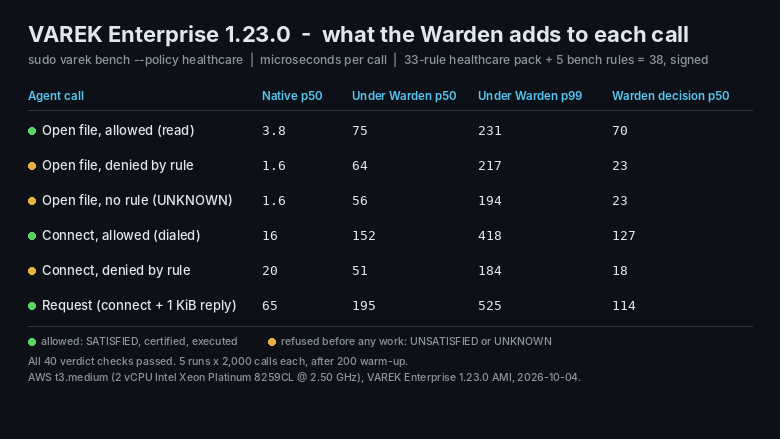
Per-call cost on t3.medium (varek bench)
Image
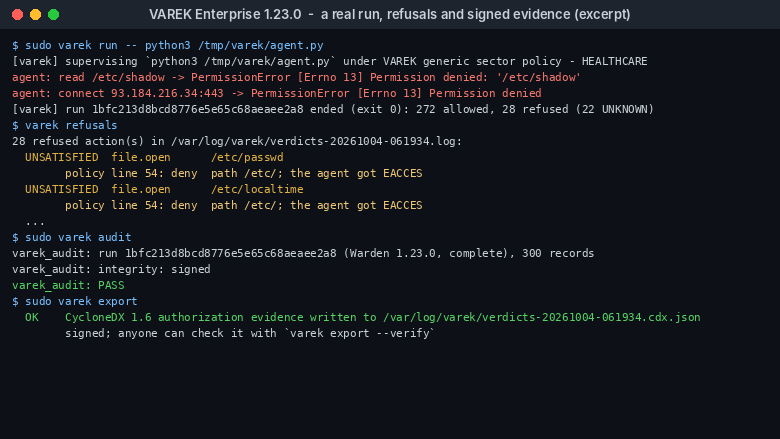
Real run: refusals, audit and signed evidence

Video
Product video
AI agents now call tools, run code and change production systems on their own. Guardrails and behavioral monitoring score risk and let most actions through. VAREK decides before execution: each action is checked against your policy, and anything VAREK cannot show is allowed is refused.
How it works
- An SMT decision procedure returns one of three verdicts for every action: SATISFIED, UNSATISFIED or UNKNOWN. Only SATISFIED actions run, and UNKNOWN is never treated as a pass.
- The Warden enforces each verdict at the Linux kernel boundary through seccomp-BPF and seccomp user-notify, so an agent cannot argue its way past a refusal.
- Every SATISFIED verdict carries a certificate that an independently written checker must accept before the action runs.
Evidence auditors can verify
Every decision is recorded in a SHA-256 hash chain with Ed25519-signed checkpoints. Records export as signed CycloneDX 1.6 authorization evidence that anyone holding your public key can verify.
Policy packs
The image includes maintained policy packs mapped to HIPAA Section 164.312 technical safeguards and to SOC 2, so security teams start from a working baseline instead of a blank policy. The packs support your compliance program; they do not certify it.
Your data stays in your account
Apart from the AWS License Manager entitlement check, VAREK sends no data out of your account. Off-host anchoring of the authorization log is optional and runs only when you configure it.
Works with your agent stack
Enforcement happens on the host, not inside the model, so VAREK works with Amazon Bedrock AgentCore, open-source agent frameworks and in-house code. Launch the agent under varek run and every action it takes is decided first.
Open-source foundation
The VAREK runtime is open source under the MIT license, and its architecture is patent-pending. VAREK Enterprise adds maintained policy packs, enterprise support with response targets, onboarding sessions and security advisories delivered before public disclosure.
Why VAREK Enterprise
- Pre-execution, not after the fact: actions are allowed or refused before they run.
- Fail-closed: anything that cannot be shown to be allowed is refused.
- Kernel-level enforcement through seccomp-BPF and seccomp user-notify.
- An independently checked certificate for every allowed action.
- Tamper-evident, signed evidence in CycloneDX 1.6.
- No data leaves your account apart from the license check.
Highlights
- Deny by default at the kernel boundary: an SMT decision procedure returns SATISFIED, UNSATISFIED or UNKNOWN for every action an AI agent attempts. Only SATISFIED actions execute; UNSATISFIED and UNKNOWN are refused through seccomp-BPF and seccomp user-notify. Measured with varek bench on a t3.medium (v1.23.0, p50): refused calls are decided in 18 to 23 microseconds, and an allowed file open adds about 72 microseconds.
- Evidence auditors can verify: every verdict is recorded in a SHA-256 hash chain with Ed25519-signed checkpoints and exports as signed CycloneDX 1.6 authorization evidence. Policy packs are mapped to HIPAA Section 164.312 technical safeguards and SOC 2, and every refusal traces back to the policy line that decided it.
- Works with any agent stack: enforcement runs on the host, not in the model, so Amazon Bedrock AgentCore, open-source frameworks and in-house agents work without SDK changes. Launch the agent under varek run on Amazon Linux 2023 in your own AWS account.
Details
Sold by
Categories
Delivery method
Delivery option
64-bit (x86) Amazon Machine Image (AMI)
Latest version
Operating system
AmazonLinux 2023
Deployed on AWS
New
Introducing multi-product solutions
You can now purchase comprehensive solutions tailored to use cases and industries.

Features and programs
Financing for AWS Marketplace purchases
AWS Marketplace now accepts line of credit payments through the PNC Vendor Finance program. This program is available to select AWS customers in the US, excluding NV, NC, ND, TN, & VT.

Pricing
Pricing is based on the duration and terms of your contract with the vendor. This entitles you to a specified quantity of use for the contract duration. If you choose not to renew or replace your contract before it ends, access to these entitlements will expire.
Additional AWS infrastructure costs may apply. Use the AWS Pricing Calculator to estimate your infrastructure costs.
Dimension | Description | Cost/12 months |
|---|---|---|
VAREK Enterprise Tier A (Standard) | VAREK Enterprise with standard support: 8 business hour response for critical issues, policy packs, evidence export and security advisories. | $75,000.00 |
VAREK Enterprise Tier B (Priority) | VAREK Enterprise with priority support: 4 business hour response for critical issues with a video call on request, policy packs, evidence export and security advisories. | $150,000.00 |
Vendor refund policy
Refund requests are reviewed case by case. Email support@soberagents.ai with your AWS account ID and the reason; we respond within two business days. Approved refunds are issued through AWS Marketplace.

Legal
Vendor terms and conditions
Upon subscribing to this product, you must acknowledge and agree to the terms and conditions outlined in the vendor's End User License Agreement (EULA) .
Content disclaimer
Vendors are responsible for their product descriptions and other product content. AWS does not warrant that vendors' product descriptions or other product content are accurate, complete, reliable, current, or error-free.
Delivery details
64-bit (x86) Amazon Machine Image (AMI)
Amazon Machine Image (AMI)
An AMI is a virtual image that provides the information required to launch an instance. Amazon EC2 (Elastic Compute Cloud) instances are virtual servers on which you can run your applications and workloads, offering varying combinations of CPU, memory, storage, and networking resources. You can launch as many instances from as many different AMIs as you need.
Version release notes
Fixes the VAREK Enterprise license check: on 1.23.0 the HIPAA and SOC 2 packs could not be selected. The instance role now needs license-manager:CheckoutLicense and license-manager:CheckInLicense. Also: Core packs allow /usr/share read-only; anchor forwarder unit fixed. Deployment guide: github.com/kwdoug63/varek/blob/main/docs/aws-deployment-guide.md
Additional details
Usage instructions
Launch and connect
-
Launch the AMI on an x86_64 instance, t3.medium or larger, with your own EC2 key pair.
-
Connect over SSH as ec2-user. Password login is disabled. The recommended security group allows SSH from any address; restrict it to your own IP range before launch.
-
To use your VAREK Enterprise subscription, attach an IAM instance role that allows license-manager:CheckoutLicense and license-manager:CheckInLicense. Without it, VAREK runs as VAREK Core.
Set up (about five minutes)
varek policy list # shows the policy packs sudo varek init --pack hipaa # or soc2, healthcare, finance, ... sudo varek doctor # confirms the host is ready sudo varek preflight --run # a real trial run, then its audit
Before production, replace the example paths and addresses in /etc/varek/policy.txt with your own. Then run varek policy check.
Run your agent
sudo varek run -- python3 /path/to/your_agent.py
Every action the agent takes is decided before it executes. Only SATISFIED actions run; UNSATISFIED and UNKNOWN actions are refused, and the agent receives a permission error.
Review and produce evidence
sudo varek refusals # what was refused, and which policy line decided it sudo varek audit # re-checks certificates, hash chain and signatures sudo varek export # signed CycloneDX 1.6 authorization evidence sudo varek bench # what mediation costs per call on this host
Verdict streams are written to /var/log/varek. Evidence files can be verified by anyone holding /etc/varek/log.key.pub, using varek export --verify FILE --pubkey log.key.pub.
Network and data
VAREK sends no data out of your instance. Off-host anchoring of the authorization log is optional and runs only if you configure it. The license check calls AWS License Manager in your account.
Help
varek --help lists every command. Documentation: https://varek-lang.org . Support: support@soberagents.ai .
Support
Vendor support
Contact
Email support@soberagents.ai with the severity in the subject line: 1 Critical, 2 High or 3 Normal. For billing or refund questions, put Billing in the subject line. Support hours are 8:00 to 18:00 US Central time, Monday to Friday, excluding US federal holidays.
Response targets
- Tier A (standard): critical 8 business hours, high 2 business days, normal 3 business days.
- Tier B (priority): critical 4 business hours with a video call on request, high 1 business day, normal 2 business days.
Included with every subscription
- HIPAA and SOC 2 policy packs with updates
- CycloneDX evidence export guidance
- Onboarding sessions
- Security advisories delivered before public disclosure
Supported versions
SAI supports the current and previous minor release of VAREK Enterprise on Amazon Linux 2023.
AWS infrastructure support
AWS Support is a one-on-one, fast-response support channel that is staffed 24x7x365 with experienced and technical support engineers. The service helps customers of all sizes and technical abilities to successfully utilize the products and features provided by Amazon Web Services.
Similar products

High-speed context governance platform for AI agents with sovereign infrastructure and secure data controls.
Straiker provides agentic AI security for the agents your enterprise builds, buys, and deploys on AWS, whether they run internally or power customer-facing products. Discover and inventory agents, continuously red-team them, stop malicious behavior at runtime, and contain compromised agents with an agentic kill switch. Straiker integrates with Amazon Bedrock AgentCore and is available through AWS Marketplace.

Kore.ai provides an advanced AI agent platform designed to help enterprises transform work, service, and processes with intelligent automation, orchestration, and AI insights. It enables deployment of AI agents at enterprise scale.
Authorization consulting for teams building with Cedar, Amazon Verified Permissions, and Amazon Bedrock AgentCore.
Customer reviews
No customer reviews yet
Be the first to review this product . We've partnered with PeerSpot to gather customer feedback. You can share your experience by writing or recording a review, or scheduling a call with a PeerSpot analyst.