
Sold by: delega.ai
Deployed on AWS
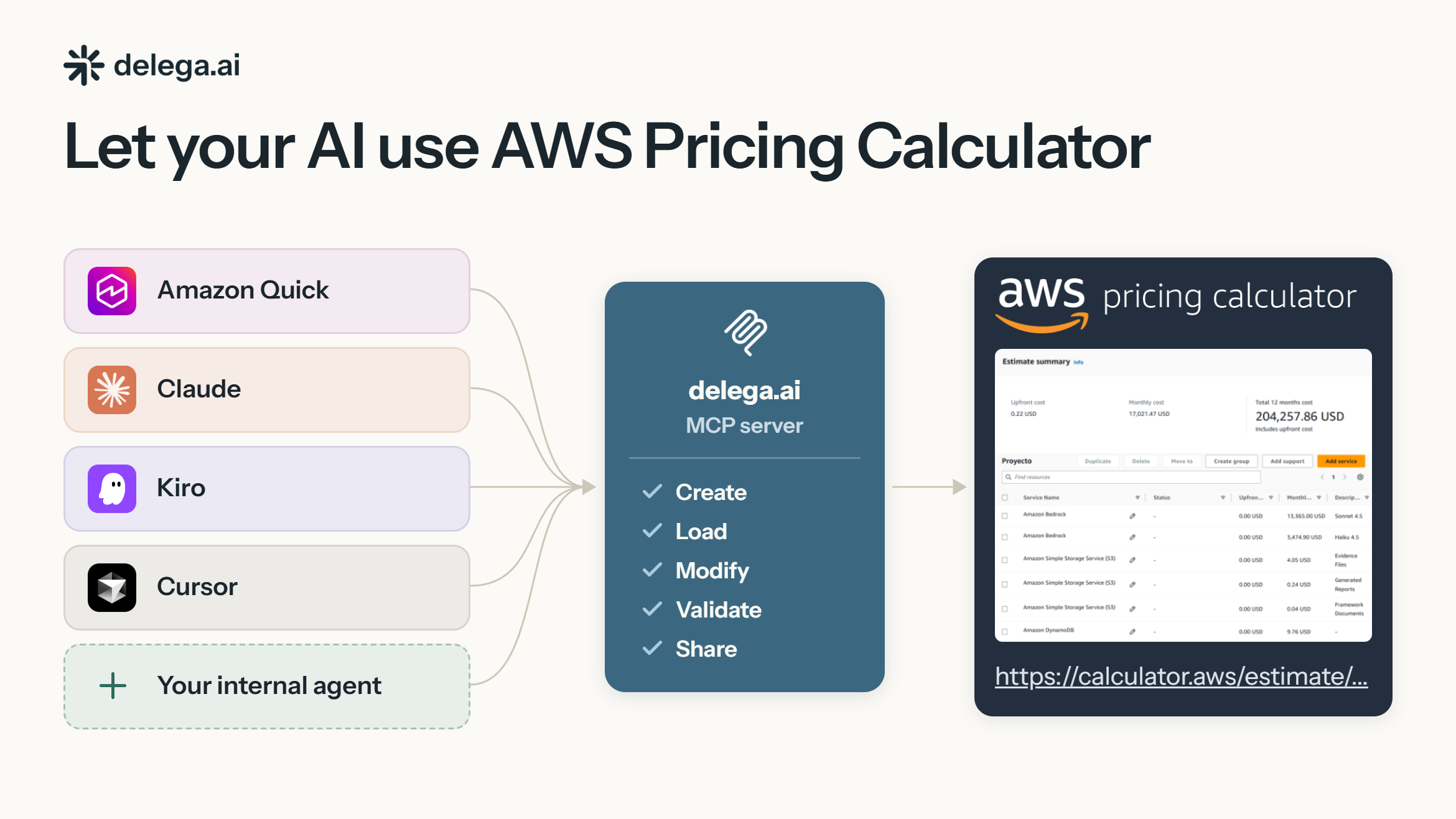
Enable your preferred AI agent to create real AWS Pricing Calculator estimates. The delega.ai MCP server lets Amazon Quick, Claude, Kiro, Cursor, Codex, and custom internal agents create, load, and modify estimates, returning an official, editable calculator.aws URL. Use it for AWS Partner proposals and funding workflows, or to estimate project costs with a shareable AWS Pricing Calculator estimate.
Overview
Image
AI to Pricing Calculator
Image
Common Use Case Examples
Image
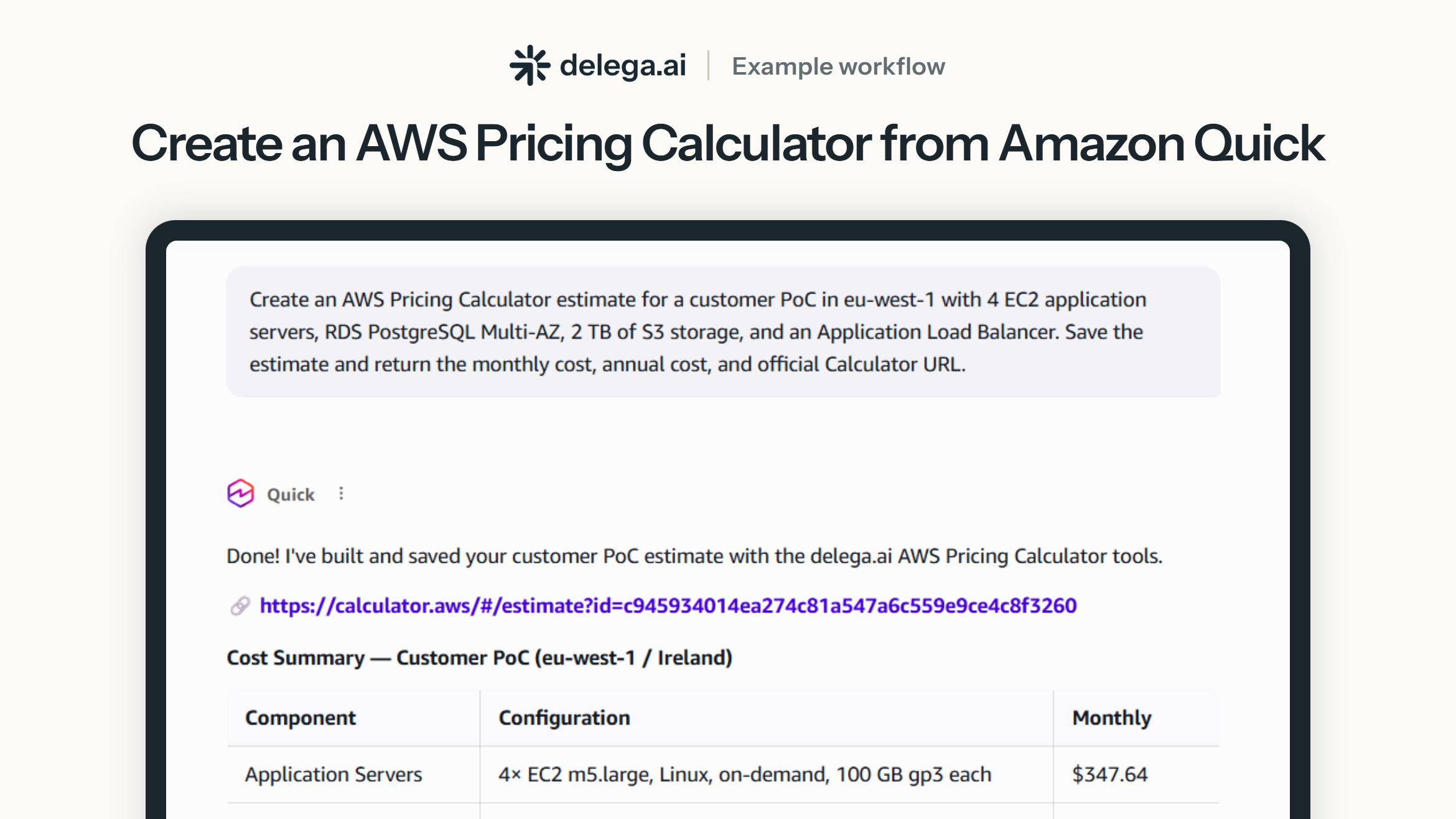
Amazon Quick Workflow Example
Image
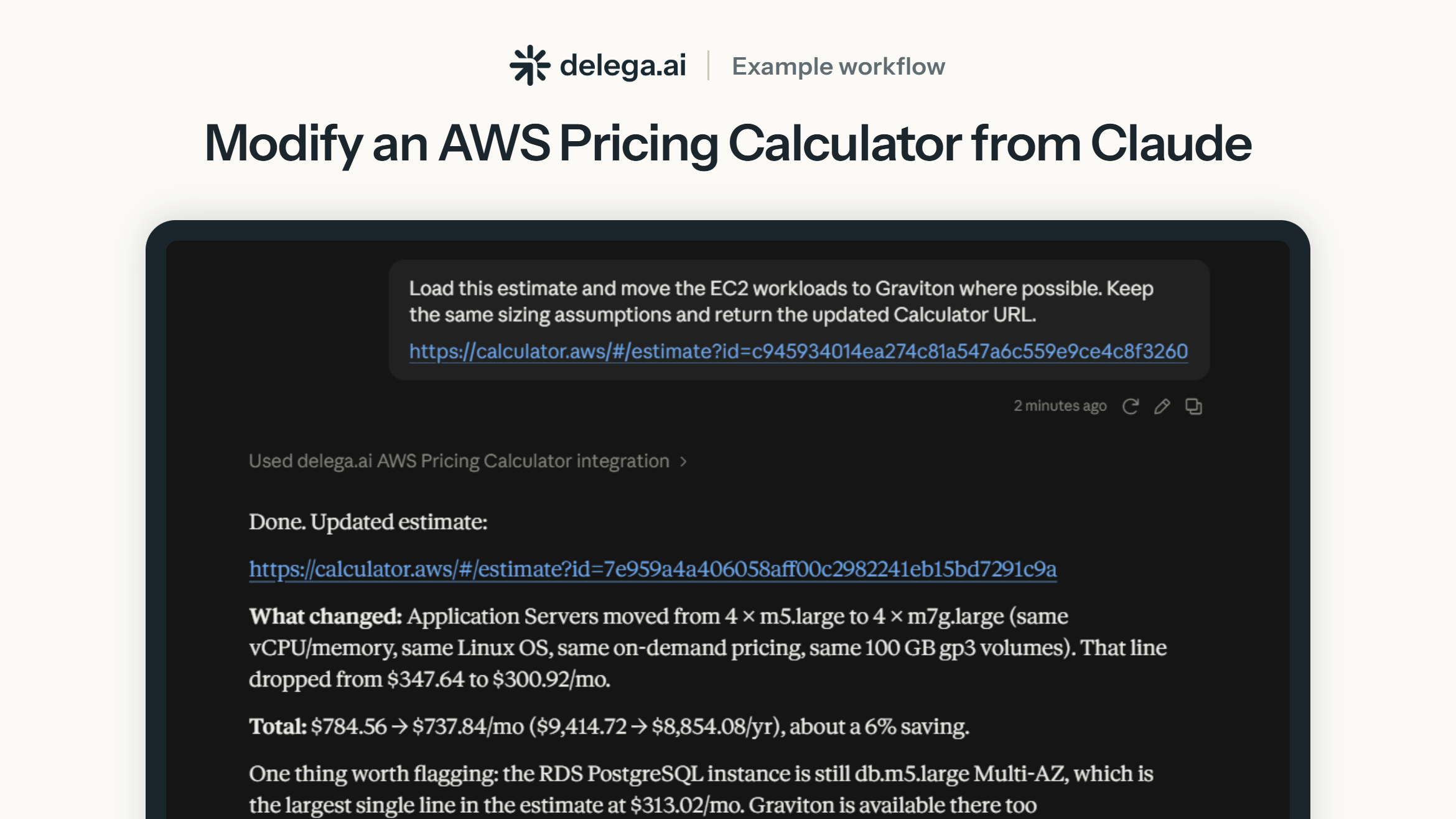
Claude Workflow Example
Image
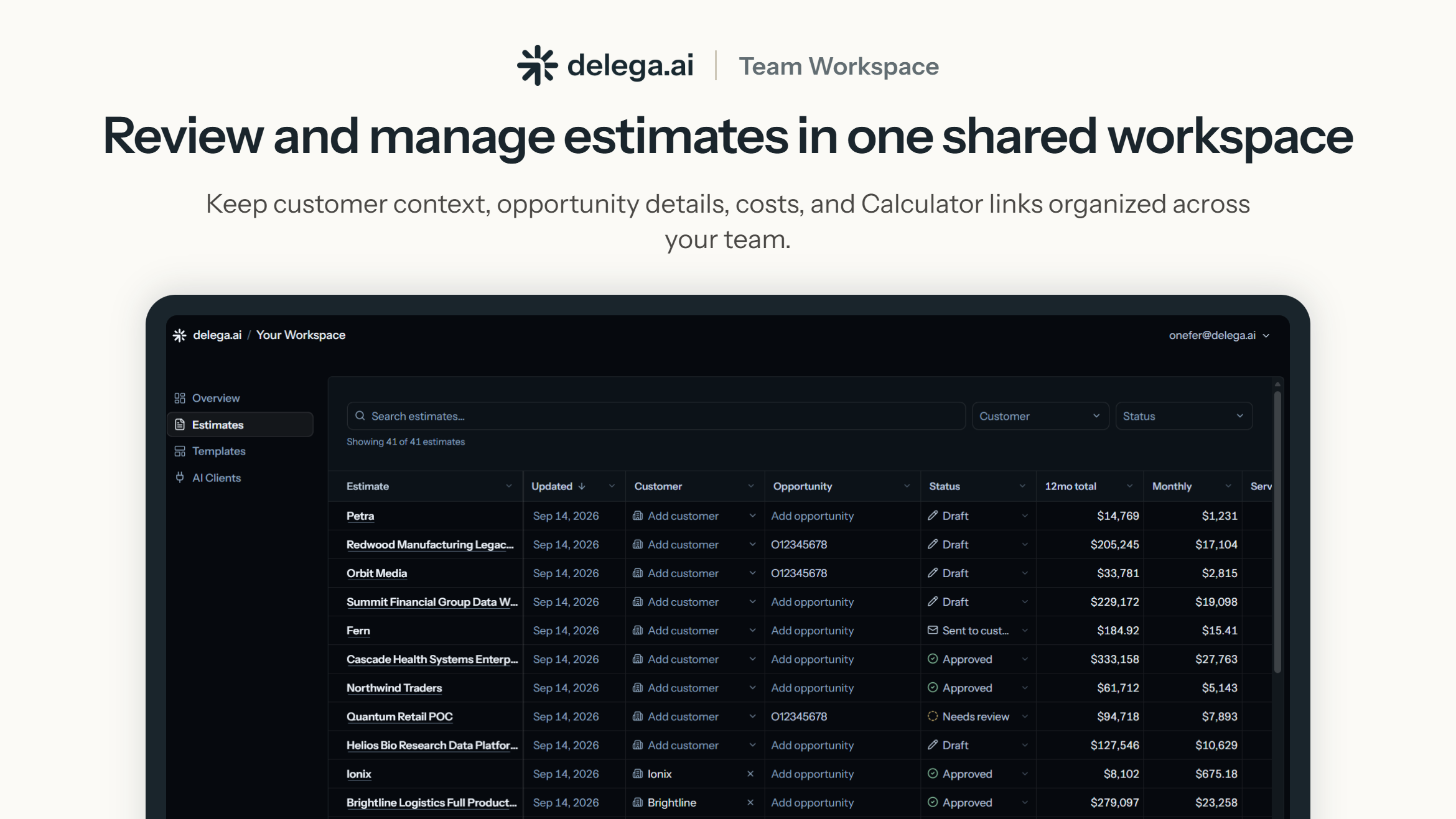
Shared Team Workspace Detailed Estimate View
The delega.ai AWS Pricing Calculator MCP turns AWS Pricing Calculator into a tool your AI agent can use. Connect the managed MCP server to Amazon Quick, Claude, Kiro, Cursor, Codex, or your own custom agent, then create and update real AWS Pricing Calculator estimates directly from natural-language instructions.
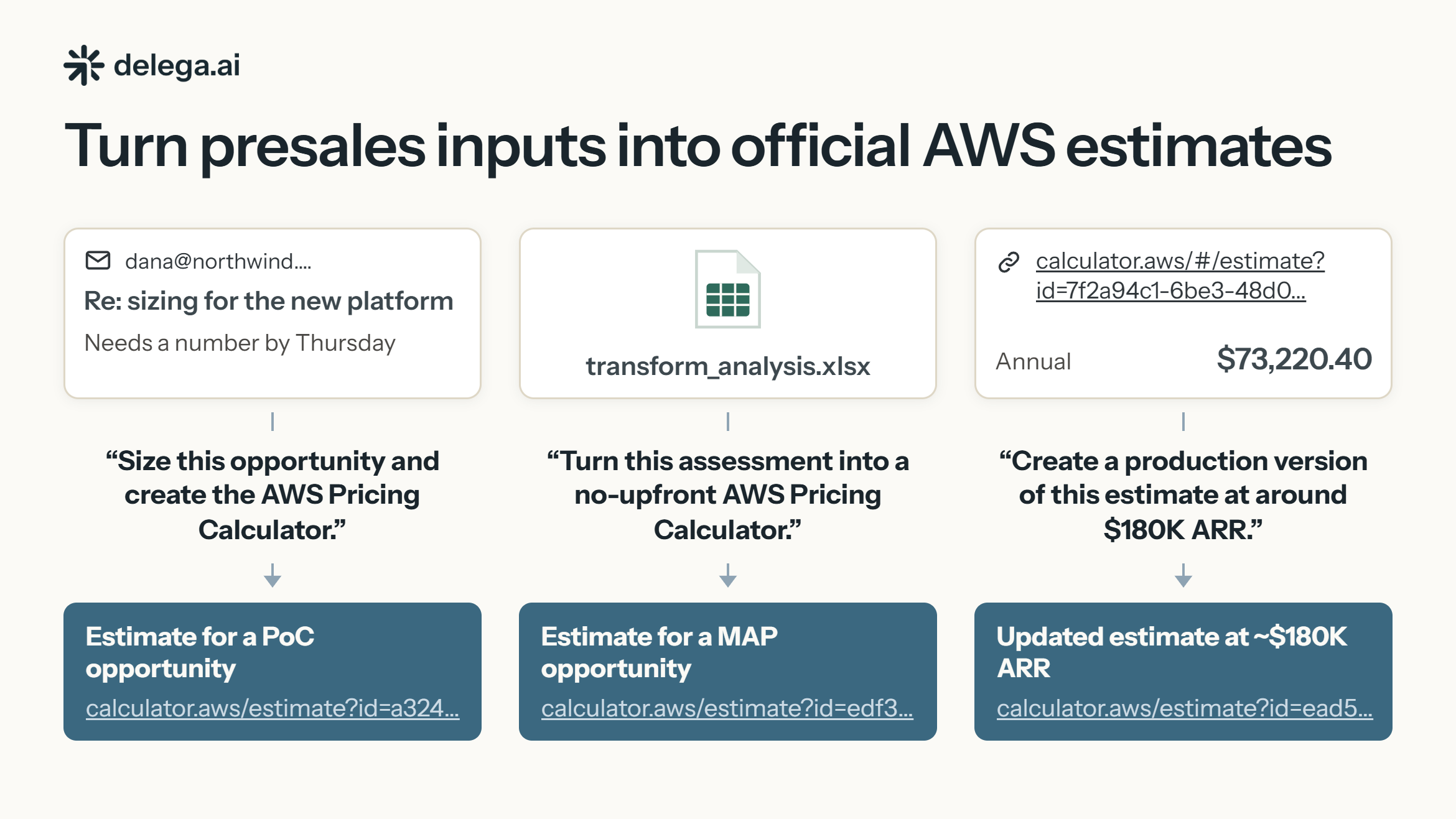
Start from customer notes, technical requirements, an architecture or service list, a project repository, assessment outputs such as AWS Transform, or an existing calculator.aws estimate.
Your AI client or agent can:
- Create new estimates from project or customer context
- Load and revise existing estimates instead of rebuilding them manually
- Configure complex AWS Pricing Calculator options across supported AWS services
- Iterate on sizing, pricing options, and target spend as an opportunity evolves
- Save and return an official, editable calculator.aws URL ready to share with customers and internal teams
The MCP tools use a built-in validation loop that helps AI agents work through complex Calculator configurations. As services are configured, delega.ai provides feedback about missing, incompatible, or incomplete settings so the resulting estimate is guaranteed to be valid in AWS Pricing Calculator, ready for use in customer proposals and funding requests.
Customer data stays with your AI provider. Customer documents, project files, and full prompts are not uploaded to delega.ai. The MCP only receives the Calculator configuration data required to create and update the estimate.
As an AWS Partner, use the delega.ai AWS Pricing Calculator MCP for funding, customer proposals, migration sizing, PoC and production estimates, and project cost estimation. Give your team access to a shared delega.ai workspace as a single place to review, track, and manage generated Calculator estimates across teammates and AI clients.
Highlights
- Real AWS Pricing Calculator estimates: Create and update official calculator.aws estimates ready to share with customers and use in AWS workflows.
- Works with the AI tools you already use: Connect Amazon Quick, Claude, Kiro, Cursor, Codex, or your own internal agents through MCP.
- Built for complex, iterative estimates: Load existing estimates, revise configurations, and use built-in validation feedback to help your AI handle incomplete or incompatible Calculator settings.
Details
Sold by
Delivery method
Integration protocol
Type
Deployed on AWS
New
Introducing multi-product solutions
You can now purchase comprehensive solutions tailored to use cases and industries.

Features and programs
Financing for AWS Marketplace purchases
AWS Marketplace now accepts line of credit payments through the PNC Vendor Finance program. This program is available to select AWS customers in the US, excluding NV, NC, ND, TN, & VT.

Pricing
Pricing is based on the duration and terms of your contract with the vendor. This entitles you to a specified quantity of use for the contract duration. If you choose not to renew or replace your contract before it ends, access to these entitlements will expire.
Additional AWS infrastructure costs may apply. Use the AWS Pricing Calculator to estimate your infrastructure costs.
Dimension | Description | Cost/month |
|---|---|---|
Team Workspace | One Team Workspace: unlimited internal members and Calculator usage. | $199.00 |
Dimensions summary
This listing offers a single pricing option: one Team Workspace, billed under a contract. You pay one flat price for the workspace rather than per person or per estimate. The workspace covers unlimited internal members and unlimited use of the Calculator tools. Pricing does not scale with team size or the number of estimates you create. There are no per-seat or per-calculator charges. Because there is only one dimension, you choose it as a whole. Access to the workspace connects through an MCP-compatible AI tool.
Top-of-mind questions for buyers
An internal member is a colleague at your organization who connects to the shared workspace. You can add any number of members without extra charges. They share one workspace, its estimate history, and can create or revise estimates using the Calculator tools.
No. The Team Workspace charges one flat price regardless of how many estimates you create. Revisions, validation runs, and re-saves within an estimate do not add charges. Cost does not scale with estimate volume or team size.
No. The workspace does not require AWS credentials, IAM roles, or account permissions. It creates and revises AWS Pricing Calculator estimates, not live AWS infrastructure. You connect through an MCP-compatible AI tool using OAuth or an API key.
delega.ai
Helpful?
Vendor refund policy
Fees are non-refundable after purchase except where required by applicable law. If you believe a charge was made in error or delega.ai failed to provide the purchased service, contact support@delega.ai within 14 days of the charge. We review requests individually. Approved refunds are processed through AWS Marketplace. Disabling renewal prevents future charges but does not refund the current contract period.

Legal
Vendor terms and conditions
Upon subscribing to this product, you must acknowledge and agree to the terms and conditions outlined in the vendor's End User License Agreement (EULA) .
Content disclaimer
Vendors are responsible for their product descriptions and other product content. AWS does not warrant that vendors' product descriptions or other product content are accurate, complete, reliable, current, or error-free.
Delivery details
API-Based Agents & Tools
API-Based Agents and Tools integrate through standard web protocols. Your applications can make API calls to access agent capabilities and receive responses.
Additional details
Usage instructions
MCP
Overview
The delega.ai MCP server lets supported AI clients create, revise, validate, save, and retrieve AWS Pricing Calculator estimates through natural-language instructions.
MCP endpoint: <https://calculator.delega.ai/mcp>
The server does not require access to your AWS account and cannot provision infrastructure, purchase AWS services, or access AWS billing data.
Prerequisites
- Subscribe to Calculator Team through AWS Marketplace.
- Complete account setup and connect the subscription to a delega.ai Workspace.
- Use an MCP-compatible AI client that supports remote HTTPS servers.
- Sign in through OAuth when prompted. API-key authentication is also available for clients that do not support OAuth.
No AWS access keys, IAM roles, or permissions in your AWS account are required.
Connect an AI client
OAuth is the recommended authentication method. Add the following remote MCP endpoint to your client:
<https://calculator.delega.ai/mcp>
Client-specific setup guides:
For clients that require manual configuration, use:
{ "mcpServers": { "delega-aws-calculator": { "url": "https://calculator.delega.ai/mcp" } } }If the client does not support OAuth, create an API key in the delega.ai connection settings and send it as a bearer token:
Authorization: Bearer <API_KEY>
Treat API keys as secrets and revoke unused keys from the dashboard.
Available tools
The server provides tools to:
- create an isolated estimate;
- search the AWS Pricing Calculator service catalog;
- add, configure, rename, inspect, and remove services;
- discover valid service-field options;
- validate and save an estimate;
- generate an official AWS Pricing Calculator share URL;
- load and revise an existing Calculator URL;
- search the Workspace’s previously saved estimates.
Common tool names include create_estimate, search_services, add_services, describe_services, list_field_options, set_service_fields, rename_services, remove_services, save_estimate, load_estimate, and search_saved_estimates.
Create your first estimate
After connecting the server, ask your AI client:
Use the delega.ai Pricing Calculator tools to create an estimate. Use any relevant context available in this conversation or ask one concise question about what I’m building. Create, validate, and save a reasonable first-pass estimate, making necessary assumptions explicit. Return the AWS Pricing Calculator URL and ask whether I want to refine it using actual usage requirements or a target monthly or annual spend.
The client should create the estimate, configure the applicable AWS services, validate it, save it, and return a shareable Calculator URL.
Saved estimates are available at:
Notes
- Results are not AWS invoices, quotes, or pricing guarantees.
- The server does not inspect your AWS account or actual resource usage.
- It does not deploy, modify, or delete AWS infrastructure.
- Connection and estimate access are scoped to the delega.ai Workspace associated with the Marketplace subscription.
Support
For setup help or connection problems, contact <support@delega.ai>.
Resources
Vendor resources
Support
Vendor support
Priority support Team customers receive priority support for product setup, AI client connections, estimate workflows, and product issues, with an initial response within 48 hours. support@delega.ai
AWS infrastructure support
AWS Support is a one-on-one, fast-response support channel that is staffed 24x7x365 with experienced and technical support engineers. The service helps customers of all sizes and technical abilities to successfully utilize the products and features provided by Amazon Web Services.
Similar products

The Wiz Model Context Protocol (MCP) Server acts as an MCP-compatible service that translates plain-language queries into Wiz-specific operations, like querying resources, or assessing risks.

Asana offers a Model Context Protocol (MCP) server, accessible via app integration, which allows AI assistants and other applications to access the Asana Work Graph from beyond the Asana platform. This server provides a way to interact with your Asana workspace through various AI platforms and tools that support MCP.

Structured agent access to Elasticsearch: Query indices using natural language via a standardized protocol -- no custom APIs needed
TSL provides architecture, consulting and management services that compliment the AWS infrastructure services greatly accelerating your time to benefit from cloud computing. Specifically, we focus on High Performance Computing architectures in the AWS cloud, we provide AWS cloud HPC readiness assessments, and AWS cloud HPC strategy adoption and implementation
Customer reviews
No customer reviews yet
Be the first to review this product . We've partnered with PeerSpot to gather customer feedback. You can share your experience by writing or recording a review, or scheduling a call with a PeerSpot analyst.