
Sold by: Cloud Infrastructure Services
Deployed on AWS
AWS Free Tier
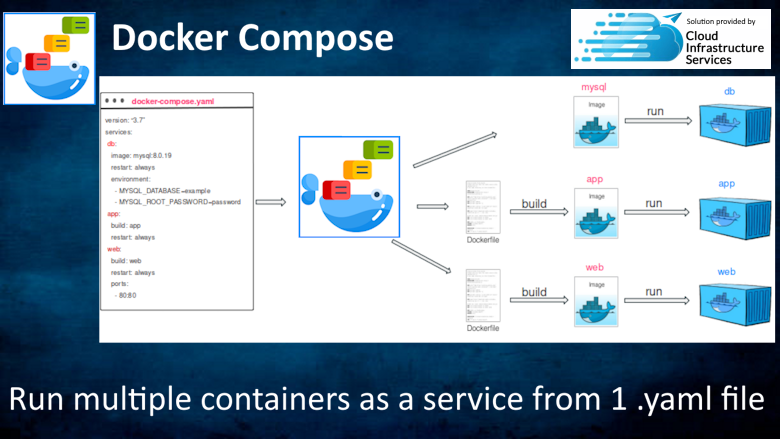
This product has charges associated with it, which includes support from Cloud Infrastructure Services. Docker compose is a simple yet powerful tool that is used to run multiple containers as a single service. The Compose file provides a way to document and configure all of the applications service dependencies (databases, queues, caches, web APIs, etc)
Overview
Docker Compose on Ubuntu 24.04
This is a repackaged open source software product wherein additional charges apply for support & maintenance.
Docker Compose is a powerful tool for defining and running multi-container Docker applications on AWS. Using a simple YAML file, developers can easily configure application services, networks, and volumes, making it a breeze to spin up complex environments for both development and production on AWS EC2 instances. Docker Compose allows for streamlined orchestration of containers, making it an essential tool for DevOps and development teams leveraging AWS infrastructure.
Docker Compose is a simple yet powerful tool that is used to run multiple containers as a single service. For example, suppose you have an application which requires Apache as a web server and MySQL as a database service running on AWS. In this case by Docker Compose, you can create one single file (docker-compose.yml) which will create both the containers as a single service without starting each separately, optimizing your AWS resource utilization.
The Compose file provides a way to document and configure all of the application's service dependencies (databases, queues, caches, web service APIs, etc). Using the Compose command line tool you can create and start one or more containers for each dependency with a single command (docker-compose up), perfect for AWS deployment automation.
Docker Compose Features
- Define Multi-Container Applications with Simple YAML Configuration - Streamlined for AWS deployment workflows
- Automated Service Setup with Dependency Management - Integrates seamlessly with AWS services like RDS and ElastiCache
- Efficient Scaling and Resource Allocation - Optimized for AWS EC2 instance types and Auto Scaling
- Integrated Volume and Network Configuration for Secure Isolation - Compatible with AWS VPC and security groups
- Consistent, Reproducible Environments for Development and Production - Across AWS regions and availability zones
- Quickly launch environments with docker-compose up - To match AWS production configurations
- Consistent, reproducible setups - For faster development cycles on AWS infrastructure
- Effortless movement between local, AWS cloud, and CI/CD setups - Using AWS CodePipeline and CodeDeploy
- Works seamlessly on AWS - Supporting hybrid and multi-cloud deployments with AWS services
- Flexible service scaling - To handle varying workloads with AWS Auto Scaling integration
- Configure CPU and memory allocations - For each container to optimize AWS EC2 performance and costs
- Custom network configurations - For secure, isolated environments using AWS VPC
- Secure communication channels - Between containers through Docker networks and AWS security groups
- Supports Docker CLI and AWS ECR - Integrates into AWS CI/CD workflows with CodeBuild and CodePipeline
- Works alongside Docker for efficient container management - On AWS ECS and EKS
- Compatible with Docker Swarm and Amazon EKS - For orchestration in AWS production environments
- AWS CloudFormation Integration - Deploy Docker Compose applications using Infrastructure as Code
- Amazon ECS Integration - Run multi-container applications with managed orchestration
- AWS Fargate Support - Serverless container deployment without managing EC2 instances
Docker Compose commonly replaces alternatives like Docker Swarm, Minikube, and manual scripting, offering a more straightforward solution for multi-container applications on AWS infrastructure while integrating with native AWS container services.
Disclaimer: Docker is a registered trademark of Docker Inc and is licensed under Apache License V2. This image is maintained by Cloud Infrastructure Services. No warranty of any kind, express or implied, is included with this software. Use at your risk, responsibility for damages (if any) to anyone resulting from the use of this software rest entirely with the user. The author is not responsible for any damage that its use could cause.
Highlights
- When you are developing software, the ability to run an application in an isolated environment and interact with it is crucial. The Compose command line tool can be used to create the environment and interact with it.
- The Compose file provides a way to document and configure all of the applications service dependencies (databases, queues, caches, web service APIs, etc). Using the Compose command line tool you can create and start one or more containers for each dependency with a single command (docker-compose up).
- Run multiple containers as a single service using 1 yaml file. Scale and manage your apps faster & efficiently.
Details
Delivery method
Delivery option
64-bit (x86) Amazon Machine Image (AMI)
Latest version
Operating system
Ubuntu 24.04
Deployed on AWS
New
Introducing multi-product solutions
You can now purchase comprehensive solutions tailored to use cases and industries.

Features and programs
Financing for AWS Marketplace purchases
AWS Marketplace now accepts line of credit payments through the PNC Vendor Finance program. This program is available to select AWS customers in the US, excluding NV, NC, ND, TN, & VT.

Pricing
Pricing is based on actual usage, with charges varying according to how much you consume. Subscriptions have no end date and may be canceled any time.
Additional AWS infrastructure costs may apply. Use the AWS Pricing Calculator to estimate your infrastructure costs.
If you are an AWS Free Tier customer with a free plan, you are eligible to subscribe to this offer. You can use free credits to cover the cost of eligible AWS infrastructure. See AWS Free Tier for more details. If you created an AWS account before July 15th, 2025, and qualify for the Legacy AWS Free Tier, Amazon EC2 charges for Micro instances are free for up to 750 hours per month. See Legacy AWS Free Tier for more details.
Dimension | Cost/hour |
|---|---|
t2.medium Recommended | $0.03 |
t2.micro | $0.03 |
t3.micro | $0.03 |
t2.nano | $0.03 |
r5d.24xlarge | $0.03 |
m3.xlarge | $0.03 |
r4.16xlarge | $0.03 |
r5a.2xlarge | $0.03 |
t3a.2xlarge | $0.03 |
m5.xlarge | $0.03 |
Dimensions summary
You pay by the hour for this software running on Ubuntu 24.04 with support. Pricing is usage-based, billed per hour of runtime. The dimensions are not feature tiers. Instead, each one matches a specific AWS EC2 instance type, from small general-purpose sizes to large memory-, compute-, storage-, and GPU-optimized machines. Your hourly rate depends on which instance type you select to run the server. Larger or specialized instances carry different rates than smaller ones. You choose the instance that fits your workload size and performance needs, and the hourly cost follows that choice.
Top-of-mind questions for buyers
Each hourly unit is one running EC2 instance of the type you select. The instance comes with Ubuntu 24.04, Docker Engine Community, and Docker Compose preinstalled and configured. Vendor support is included. You are billed for each hour the chosen instance runs.
The software rate meters running hours only. A stopped instance does not accrue software charges. You may still owe separate AWS fees for attached storage while the instance is stopped, but those are billed by AWS, not through this listing.
Yes. Your hourly rate follows the instance type you run. Moving to a different type applies that type's rate for the hours it runs. You can select the size that matches your container workload, and the cost adjusts to your choice.
cloudinfrastructureservices.co.uk
Helpful?
Vendor refund policy
We do not currently support refunds, but you can cancel at any time.

Legal
Vendor terms and conditions
Upon subscribing to this product, you must acknowledge and agree to the terms and conditions outlined in the vendor's End User License Agreement (EULA) .
Content disclaimer
Vendors are responsible for their product descriptions and other product content. AWS does not warrant that vendors' product descriptions or other product content are accurate, complete, reliable, current, or error-free.
Delivery details
64-bit (x86) Amazon Machine Image (AMI)
Amazon Machine Image (AMI)
An AMI is a virtual image that provides the information required to launch an instance. Amazon EC2 (Elastic Compute Cloud) instances are virtual servers on which you can run your applications and workloads, offering varying combinations of CPU, memory, storage, and networking resources. You can launch as many instances from as many different AMIs as you need.
Version release notes
Latest OS patches installed. Simply run 'sudo apt-get update' to install the latest OS patches.
Additional details
Usage instructions
Scroll down to 'Getting Started' on the following URL: https://cloudinfrastructureservices.co.uk/how-to-setup-docker-compose-on-ubuntu-in-azure-aws-gcp/
Resources
Vendor resources
Support
Vendor support
Email support, contact us through our website our getting started guide
AWS infrastructure support
AWS Support is a one-on-one, fast-response support channel that is staffed 24x7x365 with experienced and technical support engineers. The service helps customers of all sizes and technical abilities to successfully utilize the products and features provided by Amazon Web Services.
Updated weekly
By Cloud Infrastructure Services
By Askforcloud LLC

By Max Pen Test
Top
100
In Backup & Recovery
Sentiment is AI generated from actual customer reviews on AWS and G2
Functionality
Ease of use
Customer service
Cost effectiveness
Positive reviews
Mixed reviews
Negative reviews
AI generated from product descriptions
Multi-Container Orchestration
Ability to define and run multiple containers as a single service using YAML configuration files with automated setup and dependency management.
Service Dependency Configuration
Documentation and configuration of application service dependencies including databases, queues, caches, and web service APIs through Compose files.
Resource Allocation and Scaling
Configuration of CPU and memory allocations per container with flexible service scaling capabilities to handle varying workloads.
Network and Volume Management
Integrated volume and network configuration for secure container isolation with custom network configurations and secure communication channels between containers.
Container Orchestration Integration
Compatibility with Docker Swarm, Amazon EKS, AWS ECS, and AWS Fargate for multi-container application deployment and management.
Penetration Testing Tools
Includes more than 600 penetration testing tools targeted towards information security tasks such as penetration testing, security research, computer forensics, reverse engineering, vulnerability management and red team testing.
Operating System Distribution
Debian-based Linux distribution with Filesystem Hierarchy Standard (FHS) compliance for easy location of binaries, support files, and libraries.
Wireless Device Support
Wide-ranging wireless device support for various network security testing scenarios.
Customization Capability
Completely customizable distribution allowing users to modify configurations and tools according to specific security assessment requirements.
Open Source Development Model
Open source Git tree with transparent development model accessible for review and contribution by the security community.
Preinstalled Security Tools
Over 600 preinstalled tools for information security tasks including penetration testing, forensics, scanning, reconnaissance, exploitation, privilege escalation, and exfiltration.
Wireless and Bluetooth Auditing
Wireless and Bluetooth assessment tools including Aircrack-ng, Kismet, and Ubertooth for auditing 802.11 networks and Bluetooth devices.
Exploitation and Privilege Escalation
Exploitation tools such as Metasploit Framework, sqlmap, and John the Ripper for testing vulnerabilities and escalating privileges within systems.
Web Application Security Testing
Web application analysis tools including Burp Suite, Nikto, and OWASP ZAP for comprehensive web application security assessment.
Automated Configuration Auditing
Scripts and validators for checking S3 bucket permissions, analyzing IAM policies, validating security group rules, verifying VPC flow log configuration, and checking CloudTrail monitoring status.
Standard contract
Customer reviews
No customer reviews yet
Be the first to review this product . We've partnered with PeerSpot to gather customer feedback. You can share your experience by writing or recording a review, or scheduling a call with a PeerSpot analyst.