Sold by: Madarson IT
Deployed on AWS
AWS Free Tier
This product has charges associated with it for Podman, Buildah, Skopeo, RDP, and Cockpit optimization. Madarson IT pre-configured Ubuntu 24.04 LTS AMI with Podman, Buildah, Skopeo, RDP, and Cockpit for secure, rootless container management and deployment.
These options are for Ubuntu 24.04 LTS Container Management AMI - Podman & RDP Access.
View 1 other optionOverview

Image
Podman

Image
Ubuntu 24.04 Desktop
Image
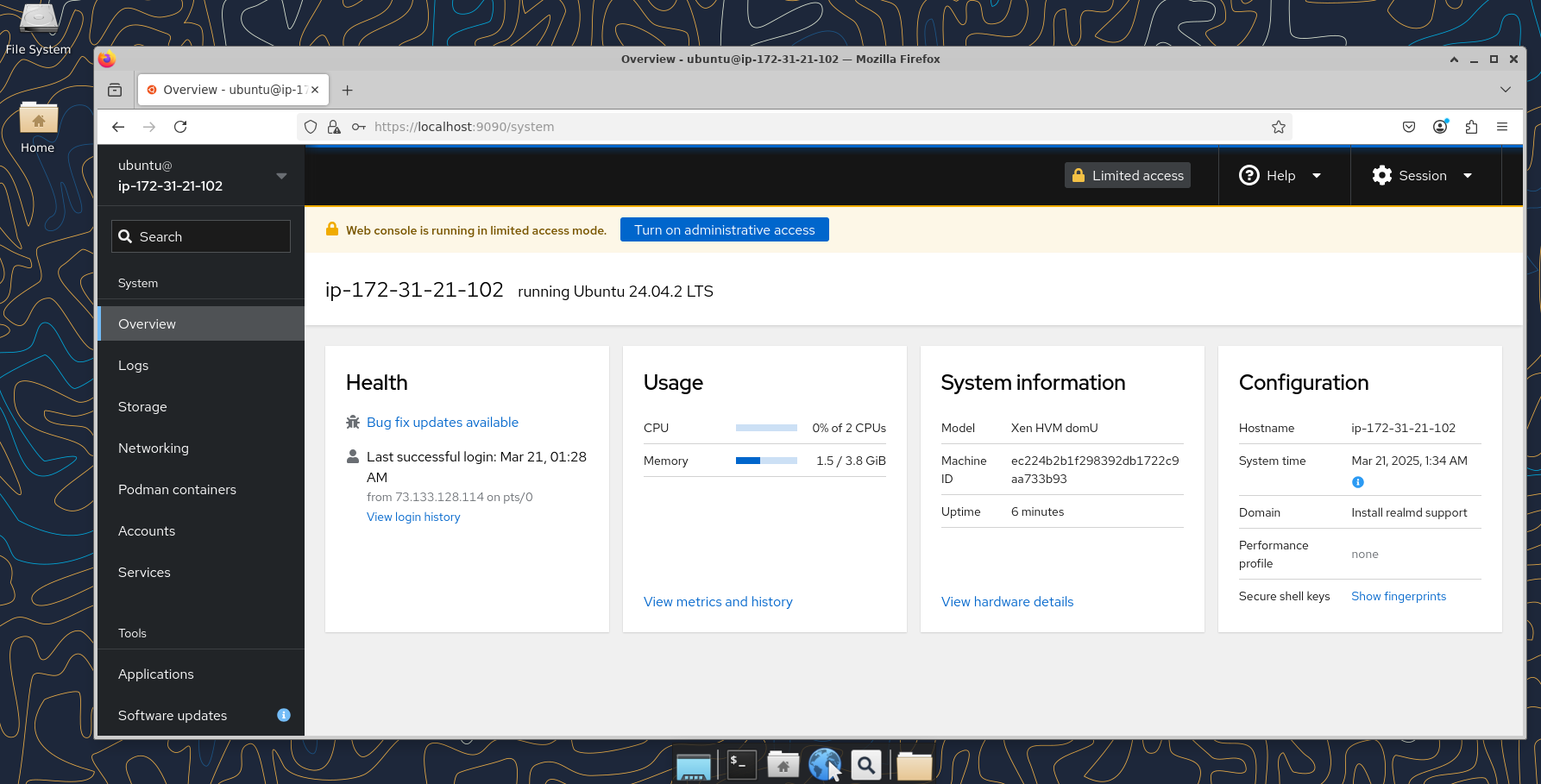
Cockpit Web Interface
Madarson IT Ubuntu 24.04 LTS Container Management AMI
This is a repackaged open-source software product. Additional charges apply for the pre-configured optimization of Podman, Buildah, Skopeo, xrdp, and Cockpit integration.
A production-ready Ubuntu 24.04 LTS EC2 desktop image with Podman, Buildah, and Skopeo pre-installed, configured, and optimized for secure, rootless container management. This AMI eliminates manual setup so your team can begin building, running, and transferring container images immediately after launch.
What You Get
- Ubuntu 24.04 LTS: The latest long-term support release from Canonical, providing stability, performance, and regular security updates through 2029.
- Podman: A rootless, daemonless container engine with zero daemon processes running by default - fully compatible with Docker CLI and Dockerfile syntax.
- Buildah: Streamlined container image building directly from scratch or Dockerfiles in rootless environments.
- Skopeo: Inspect, copy, and sign container images across registries including Amazon ECR without requiring a running daemon.
- Remote Desktop (xrdp): Pre-installed and configured xrdp server for seamless RDP access to the full Ubuntu desktop environment (port 3389).
- Cockpit Web Interface: Browser-based server and container management at port 9090, pre-integrated with Podman for GUI-based container operations.
How It Works
- Launch the AMI on your chosen EC2 instance.
- Open security group ports 3389 (RDP) and 9090 (Cockpit).
- Connect via RDP client or access Cockpit at https://your-server-ip:9090 .
- Start running containers with Podman, build images with Buildah, or transfer images with Skopeo - all without root access.
Key Differentiators
- Pre-Integrated Cockpit and Podman: Unlike stock Ubuntu installs, Cockpit is configured to communicate with Podman's socket, giving you a graphical container management interface out of the box.
- Rootless by Default: All container tools operate without root privileges, eliminating an entire class of privilege escalation vulnerabilities.
- OCI-Compliant: Full compatibility with Open Container Initiative standards ensures your images work across any compliant runtime or registry.
- Docker-Compatible CLI: Teams migrating from Docker can use familiar commands and Dockerfile syntax with no retraining required.
Use Cases
- DevOps CI/CD Pipelines: Build images with Buildah, push to Amazon ECR with Skopeo, and run integration tests with Podman - all rootless and daemon-free.
- Small Development Teams: A 3-5 person team can share a single instance via RDP, each running isolated containers without conflicting daemon states.
- Regulated Environments: Organizations requiring rootless container execution for compliance can deploy without additional hardening steps.
- Microservices Development: Run multiple isolated services simultaneously using Podman pods with Kubernetes-compatible YAML definitions.
Security Architecture
- Zero daemon processes running by default reduces the attack surface.
- Rootless container execution prevents container breakout from gaining host root access.
- OCI-compliant image signing with Skopeo enables supply chain verification.
- Ubuntu 24.04 LTS receives regular security patches from Canonical.
Why Choose Madarson IT
- Immediate Productivity: Skip hours of manual installation, configuration, and integration - start managing containers right after launch.
- Comprehensive Toolchain: Podman, Buildah, and Skopeo together cover the entire container lifecycle from build to run to distribute.
- Long-Term Stability: Ubuntu LTS ensures five years of security updates and support from Canonical.
- Multi-Cloud Experience: Madarson IT publishes hardened and customized images across AWS, GCP, and Azure Marketplaces.
Disclaimer: The trademarks mentioned in this offering are owned by the respective companies. Madarson IT does not provide commercial licenses for any third-party product.
Highlights
- Rootless and Daemonless Container Toolchain: Podman, Buildah, and Skopeo run without root privileges or a central daemon, eliminating the Docker socket attack vector. All three tools are pre-installed, configured, and integrated - start building, running, and transferring container images immediately after launch without manual setup or dependency resolution.
- Cockpit Web Interface Pre-Integrated with Podman: Manage containers, monitor system resources, and administer your server through a browser-based dashboard at port 9090 - no SSH required. Cockpit is pre-configured to communicate directly with Podman's socket, providing graphical container lifecycle management out of the box unlike standard Ubuntu installations.
- Full Container Lifecycle in One AMI: Buildah handles image creation from Dockerfiles or from scratch, Podman runs and orchestrates containers with Kubernetes-compatible YAML, and Skopeo copies and signs images across Amazon ECR, Docker Hub, and private registries. Combines RDP desktop access and Cockpit web management so teams can work via GUI or command line from any device.
Details
Sold by
Delivery method
Delivery option
64-bit (x86) Amazon Machine Image (AMI)
Latest version
Operating system
Ubuntu 24.04
Deployed on AWS
Features and programs
Financing for AWS Marketplace purchases
AWS Marketplace now accepts line of credit payments through the PNC Vendor Finance program. This program is available to select AWS customers in the US, excluding NV, NC, ND, TN, & VT.

Pricing
Pricing is based on actual usage, with charges varying according to how much you consume. Subscriptions have no end date and may be canceled any time.
Additional AWS infrastructure costs may apply. Use the AWS Pricing Calculator to estimate your infrastructure costs.
If you are an AWS Free Tier customer with a free plan, you are eligible to subscribe to this offer. You can use free credits to cover the cost of eligible AWS infrastructure. See AWS Free Tier for more details. If you created an AWS account before July 15th, 2025, and qualify for the Legacy AWS Free Tier, Amazon EC2 charges for Micro instances are free for up to 750 hours per month. See Legacy AWS Free Tier for more details.
Dimension | Cost/hour |
|---|---|
m5a.large Recommended | $0.05 |
t2.micro | $0.025 |
t3.micro | $0.05 |
i2.8xlarge | $0.80 |
c5a.2xlarge | $0.20 |
c3.2xlarge | $0.10 |
g5.4xlarge | $0.40 |
i3.large | $0.05 |
t2.small | $0.025 |
i3.8xlarge | $0.80 |
Dimensions summary
You pay by the hour based on the EC2 instance type you run this AMI on. Software billing is uniform across all instances; your cost changes with the compute size you pick. The list spans many families: general-purpose (t2, t3, m3, m4, m5a, m7i-flex), compute-optimized (c3, c5, c5a), memory-optimized (r3, r5, r5a, r6a, x1e, z1d), storage-optimized (i2, i3, i7ie, d3), and GPU instances (g2, g3, g5, p2, p3). Larger instances with more CPU, memory, storage, or GPUs cost more per hour. You choose the size that fits your container workload.
Top-of-mind questions for buyers
You run a security-hardened Ubuntu 24.04 LTS image with Podman for container management and RDP for remote desktop access. The software is pre-configured and ready at boot. Your hourly rate reflects both this software license and the EC2 instance type you launch it on.
Hourly software charges apply only while the instance runs. A stopped or powered-off instance stops accruing software charges. You may still pay underlying AWS storage fees for the attached volume, but the software license meters running hours only.
Yes. The software billing is the same across all instance types, but the total hourly rate scales with the compute size you choose. Moving from a small general-purpose type to a GPU or memory-optimized type raises your per-hour cost. You can resize to match your workload.
madarsonit.com
Helpful?
Vendor refund policy
There is no refund policy for this image.

Legal
Vendor terms and conditions
Upon subscribing to this product, you must acknowledge and agree to the terms and conditions outlined in the vendor's End User License Agreement (EULA) .
Content disclaimer
Vendors are responsible for their product descriptions and other product content. AWS does not warrant that vendors' product descriptions or other product content are accurate, complete, reliable, current, or error-free.
Delivery details
64-bit (x86) Amazon Machine Image (AMI)
Amazon Machine Image (AMI)
An AMI is a virtual image that provides the information required to launch an instance. Amazon EC2 (Elastic Compute Cloud) instances are virtual servers on which you can run your applications and workloads, offering varying combinations of CPU, memory, storage, and networking resources. You can launch as many instances from as many different AMIs as you need.
Version release notes
Ubuntu 24.04 LTS with Pre-configured Podman, Buildah, Skopeo && RDP|GUI Access
Additional details
Usage instructions
Allow inbound SSH access in your security group (TCP port 22) To connect to your instance using the Amazon EC2 console: Open the Amazon EC2 console at https://console.aws.amazon.com/ec2/ .
In the navigation pane, choose Instances. Select the instance and choose Connect. Choose the EC2 Instance Connect tab. For Connection type, choose Connect using EC2 Instance Connect. Access the ec2 with the default username: "ubuntu"
For GUI|RDP Access: Allow inbound TCP port 3389 (RDP) Create a password for ubuntu user for RDP login using the CLI command: "sudo passwd ubuntu" Launch RDP program and enter the ubuntu credentials
Access Podman via Cockpit GUI: Additionally, subscribers can manage Podman containers through the Cockpit web interface by opening TCP port 9090 in their security group. Access Cockpit at https://<Your-Server-IP>:9090 for an intuitive container management experience.
Resources
Vendor resources
Support
Vendor support
Madarson IT Support
For technical assistance, product questions, or to discuss private offers and compliance solutions, contact the Madarson IT team:
- Email: info@madarsonit.com
- Website: madarsonit.com
Getting Started
After launching the AMI, open the following ports in your EC2 security group:
- Port 3389 (TCP) for RDP remote desktop access
- Port 9090 (TCP) for Cockpit web management interface
Connect via any RDP client to access the full Ubuntu desktop, or open https://your-server-ip:9090 in a browser for Cockpit container management.
Support Scope
Madarson IT provides assistance with:
- Initial AMI configuration and connectivity issues
- Podman, Buildah, and Skopeo usage within the pre-configured environment
- RDP and Cockpit access troubleshooting
- Guidance on container workflows and best practices
For private offers, custom configurations, or volume licensing discussions, reach out to info@madarsonit.com with your requirements.
AWS infrastructure support
AWS Support is a one-on-one, fast-response support channel that is staffed 24x7x365 with experienced and technical support engineers. The service helps customers of all sizes and technical abilities to successfully utilize the products and features provided by Amazon Web Services.
Similar products
This product has charges associated with it for the pre-configured container management environment. Madarson IT pre-configured Ubuntu 22.04 LTS AMI with Podman, Buildah, Skopeo, RDP, and Cockpit - ready for secure, rootless container management on AWS EC2.
This product has charges associated with it for GUI and RDP pre-configuration. Pre-configured Ubuntu 24.04 LTS cloud desktop by Madarson IT. Launch on AWS EC2 and connect instantly via any RDP client - no VNC needed.
This product has charges associated with it for Podman, Buildah, and Skopeo optimization. Pre-configured Ubuntu 24.04 LTS AMI with Podman, Buildah, and Skopeo optimized for secure, rootless container management on AWS EC2 by Madarson IT.
This product has charges associated with it for Docker optimization, RDP GUI configuration, and Cockpit web management setup. Pre-configured Ubuntu 24.04 LTS AMI with Docker, Cockpit web management, and RDP desktop access - deploy containerized apps in minutes without manual setup.
Customer reviews
No customer reviews yet
Be the first to review this product . We've partnered with PeerSpot to gather customer feedback. You can share your experience by writing or recording a review, or scheduling a call with a PeerSpot analyst.