
Sold by: Cloud Certainty
Deployed on AWS
An in-account alternative to Amazon WorkSpaces Secure Browser. Zero-trust remote browser isolation that runs entirely in your own AWS account: each user gets an ephemeral, isolated Chromium session streamed to their browser, with admin control over clipboard, file transfer, printing and web access. Pay as you go per active user and per minute of session time, or a flat monthly Team or Business plan.
Overview
Video
Cloud Certainty Secure Browser: 3-minute demo
Image
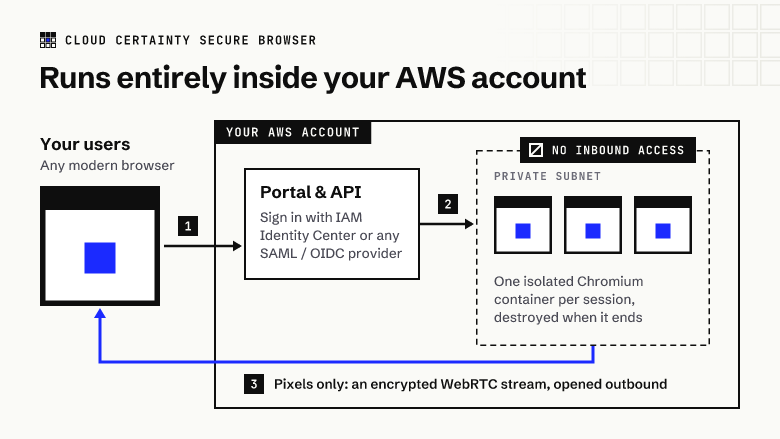
Runs entirely inside your AWS account
Image
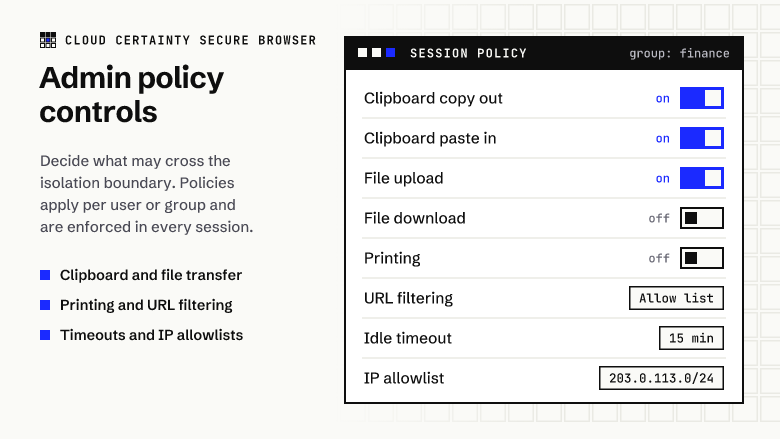
Admin policy controls per user and group
Image
Zero trust, private apps without a VPN
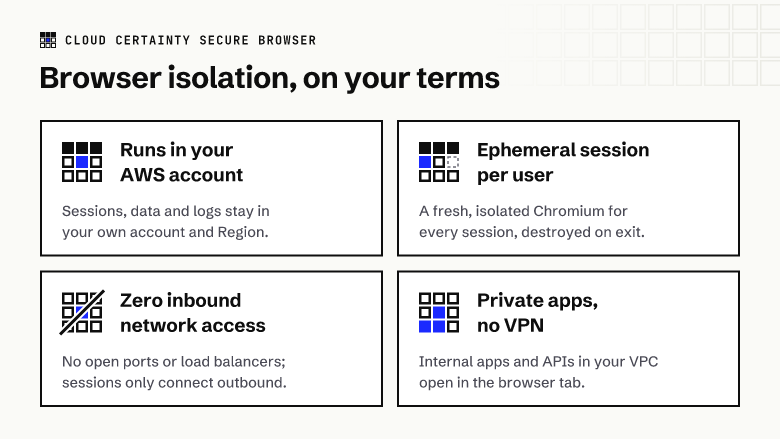
Cloud Certainty Secure Browser is an in-account alternative to Amazon WorkSpaces Secure Browser, which stops accepting new customers. It gives your workforce, contractors and third parties secure access to internal web applications and the internet without exposing devices or networks. Web content runs in a disposable Chromium session in your own AWS account and is streamed to the user as pixels. Nothing executes on the endpoint, and no data reaches it unless your policy allows.
Everything runs in your AWS account and VPC. One CloudFormation stack deploys a serverless control plane and an admin portal that users sign in to through AWS IAM Identity Center or any SAML 2.0 or OIDC identity provider. Each session is a single-use container that accepts no inbound network connections. It is created when the user clicks Start and destroyed when they finish, go idle or hit the maximum session length. Media is end-to-end encrypted and relayed through managed TURN, so no public IPs or load balancers are needed. Sessions can reach private applications in your VPC, so users do not need a VPN.
Administrators define policy profiles per user or group: clipboard copy and paste in each direction; file upload and download with a size limit; printing; URL allowlists and blocklists, homepage and bookmarks; developer tools, extensions and incognito mode; idle, disconnect and maximum session timeouts; and an IP allowlist for the portal. Every session and configuration change is recorded in an audit log in your account.
Pricing: pay as you go at 5.00 USD per active user per month plus 0.002 USD per minute of session time (about 0.12 USD per hour, billed per minute), or a flat Team plan (up to 50 users) or Business plan (up to 250 users) with unlimited session time; each further user above a plan is 5.00 USD a month. A plan covers one deployment (one CloudFormation stack); each deployment meters on its own. Plans are available monthly, chosen in the admin portal, or as a yearly contract with two months free: buy one unit of one plan per deployment (a deployment uses only its highest plan, and further units or plans are not used). You also pay for the AWS infrastructure the sessions use in your account; when nobody is browsing, that cost is close to zero.
Highlights
- In-account alternative to Amazon WorkSpaces Secure Browser: sessions, browsing data and audit logs stay in your VPC. Deploy with one CloudFormation stack and sign in through IAM Identity Center, SAML or OIDC.
- Zero trust by design: one ephemeral container per session with zero inbound network access, end-to-end encrypted streaming, least-privilege IAM, and automatic destruction at the end of each session.
- Flexible pricing: pay as you go per active user and per minute of session time, or a flat monthly Team or Business plan with unlimited usage, monthly or as a yearly contract.
Details
Sold by
Categories
Delivery method
Supported services
Delivery option
Amazon ECS (Fargate) via AWS CloudFormation
Latest version
Operating system
Linux
Deployed on AWS
New
Introducing multi-product solutions
You can now purchase comprehensive solutions tailored to use cases and industries.

Features and programs
Financing for AWS Marketplace purchases
AWS Marketplace now accepts line of credit payments through the PNC Vendor Finance program. This program is available to select AWS customers in the US, excluding NV, NC, ND, TN, & VT.

Pricing
Pricing is based on actual usage, with charges varying according to how much you consume. Subscriptions have no end date and may be canceled any time. Alternatively, you can pay upfront for a contract, which typically covers your anticipated usage for the contract duration. Any usage beyond contract will incur additional usage-based costs.
Additional AWS infrastructure costs may apply. Use the AWS Pricing Calculator to estimate your infrastructure costs.
Dimension | Description | Cost/unit |
|---|---|---|
Active users | Per user who starts at least one session in the month. Pay as you go. | $5.00 |
Session minute | Per minute of browser session time (about $0.12 per hour). Pay as you go. | $0.002 |
Team plan | Billed once a month per deployment. Up to 50 active users, unlimited session time. | $250.00 |
Business plan | Billed once a month per deployment. Up to 250 active users, unlimited session time. | $1,000.00 |
Vendor refund policy
Billed through AWS Marketplace by active user, session minute and plan. For a billing question contact info@cloudcertainty.com within 30 days of the charge and we will investigate with AWS Marketplace.

Legal
Vendor terms and conditions
Upon subscribing to this product, you must acknowledge and agree to the terms and conditions outlined in the vendor's End User License Agreement (EULA) .
Content disclaimer
Vendors are responsible for their product descriptions and other product content. AWS does not warrant that vendors' product descriptions or other product content are accurate, complete, reliable, current, or error-free.
Delivery details
Amazon ECS (Fargate) via AWS CloudFormation
Supported services: Learn more
- Amazon ECS
Container image
Containers are lightweight, portable execution environments that wrap server application software in a filesystem that includes everything it needs to run. Container applications run on supported container runtimes and orchestration services, such as Amazon Elastic Container Service (Amazon ECS) or Amazon Elastic Kubernetes Service (Amazon EKS). Both eliminate the need for you to install and operate your own container orchestration software by managing and scheduling containers on a scalable cluster of virtual machines.
Version release notes
Sign-in through Cloud Certainty Hub and OIDC installs again; Chromium 156 security update. Release notes: https://cloudcertainty.com/secure-browser/releases/0.4.1 Upgrade: update the stack with the 0.4.1 template URL and keep the current parameter values.
Additional details
Usage instructions
Documentation: https://cloudcertainty.com/secure-browser/docs/getting-started/
Prerequisites: a VPC with private subnets that have outbound internet access (for example through a NAT gateway), in an AWS Region that offers Kinesis Video Streams WebRTC, Amplify Hosting and Amazon Cognito.
-
Launch the stack with this link. It opens AWS CloudFormation with the template already selected; check the Region in the console's top bar before you create the stack: https://console.aws.amazon.com/cloudformation/home#/stacks/quickcreate?templateURL=https://cloudcertainty-secure-browser-us-east-1.s3.us-east-1.amazonaws.com/0.4.1/main.yaml&stackName=secure-browser The template URL, the same for every Region, is: https://cloudcertainty-secure-browser-us-east-1.s3.us-east-1.amazonaws.com/0.4.1/main.yaml Terraform users can deploy the same template with the module cloudcertainty/secure-browser/aws, version 0.4.1.
-
Set VpcId, TaskSubnetIds, BootstrapAdminEmail and IdentityProvider (IAMIdentityCenter, SAML, OIDC or CognitoOnly). Acknowledge that the stack creates IAM resources with custom names. Creation takes about 10 minutes. During creation a one-time installer task from this container image copies the application into a private S3 bucket in your account.
-
Identity provider:
- IAM Identity Center or SAML: create a custom SAML 2.0 application using the SamlAcsUrl and SamlAudienceUri stack outputs, assign users or groups, then update the stack and set SamlMetadataUrl to the application's SAML metadata URL.
- OIDC: store the client secret in AWS Secrets Manager and set OidcIssuer, OidcClientId and OidcClientSecretArn. Register https://<CognitoDomain output>/oauth2/idpresponse as the redirect URI.
- CognitoOnly: the bootstrap admin receives an invitation email.
- Open the PortalUrl stack output, sign in as the bootstrap admin, set policies under Admin, and start a secure browser session.
Billing: pay as you go per active user a month and per minute of browser session time, or a flat Team (up to 50 users) or Business (up to 250 users) plan per deployment (one CloudFormation stack), monthly or as a yearly contract (buy one unit of one plan per deployment; further units or plans are not used). On a plan, users above its limit are billed as extra users. Choose the plan in the admin portal under Settings, Billing plan; a yearly contract is detected automatically. The stack reads its AWS Marketplace agreement (us-east-1) to find a contract. The AWS infrastructure the stack uses (Fargate, Kinesis Video Streams, Lambda, and so on) is billed to your account separately.
Upgrades: update the stack with the new version's template URL and keep the current parameter values. The admin console shows when a new version is available.
Support: info@cloudcertainty.com
Resources
Vendor resources
Support
Vendor support
Email: info@cloudcertainty.com . Website: https://cloudcertainty.com/secure-browser/ Documentation: https://cloudcertainty.com/secure-browser/docs/getting-started/ Basic support is included: best-effort email help with deployment, identity provider integration, billing plans and production issues, plus release and security notices. Upgrades are delivered as new versions on AWS Marketplace and applied with a CloudFormation stack update. Paid support plans with response-time commitments (Standard, Business and Enterprise) and optional installation and WorkSpaces Secure Browser migration services are available:
AWS infrastructure support
AWS Support is a one-on-one, fast-response support channel that is staffed 24x7x365 with experienced and technical support engineers. The service helps customers of all sizes and technical abilities to successfully utilize the products and features provided by Amazon Web Services.
Similar products

Zero-trust remote browser isolation that runs entirely in your own AWS account. Each user gets an ephemeral, isolated Chromium session streamed to their browser, with admin control over clipboard, file transfer, printing and web access.

Browser based remote access tool that provides easy access to hosts in all your VPCs, across accounts and regions. Windows desktops and Linux hosts are supported. No client software needed, a modern browser is all you need.
Talend Cloud is a unified, scalable, secure cloud integration solution which enables you to integrate, clean, transform, and enrich data for your cloud data lake and data warehouse projects. You can use Talend Cloud Remote Engine to run integration tasks natively in your own AWS account.

Anchor Browser is agentic infrastructure for web automation, enabling AI agents to complete any web-based process by clicking, typing, navigating, and reasoning like a human in real time. It removes integration barriers across disconnected apps, making even complex manual workflows fully automatable.
Customer reviews
No customer reviews yet
Be the first to review this product . We've partnered with PeerSpot to gather customer feedback. You can share your experience by writing or recording a review, or scheduling a call with a PeerSpot analyst.