
Sold by: Timeplus
Deployed on AWS
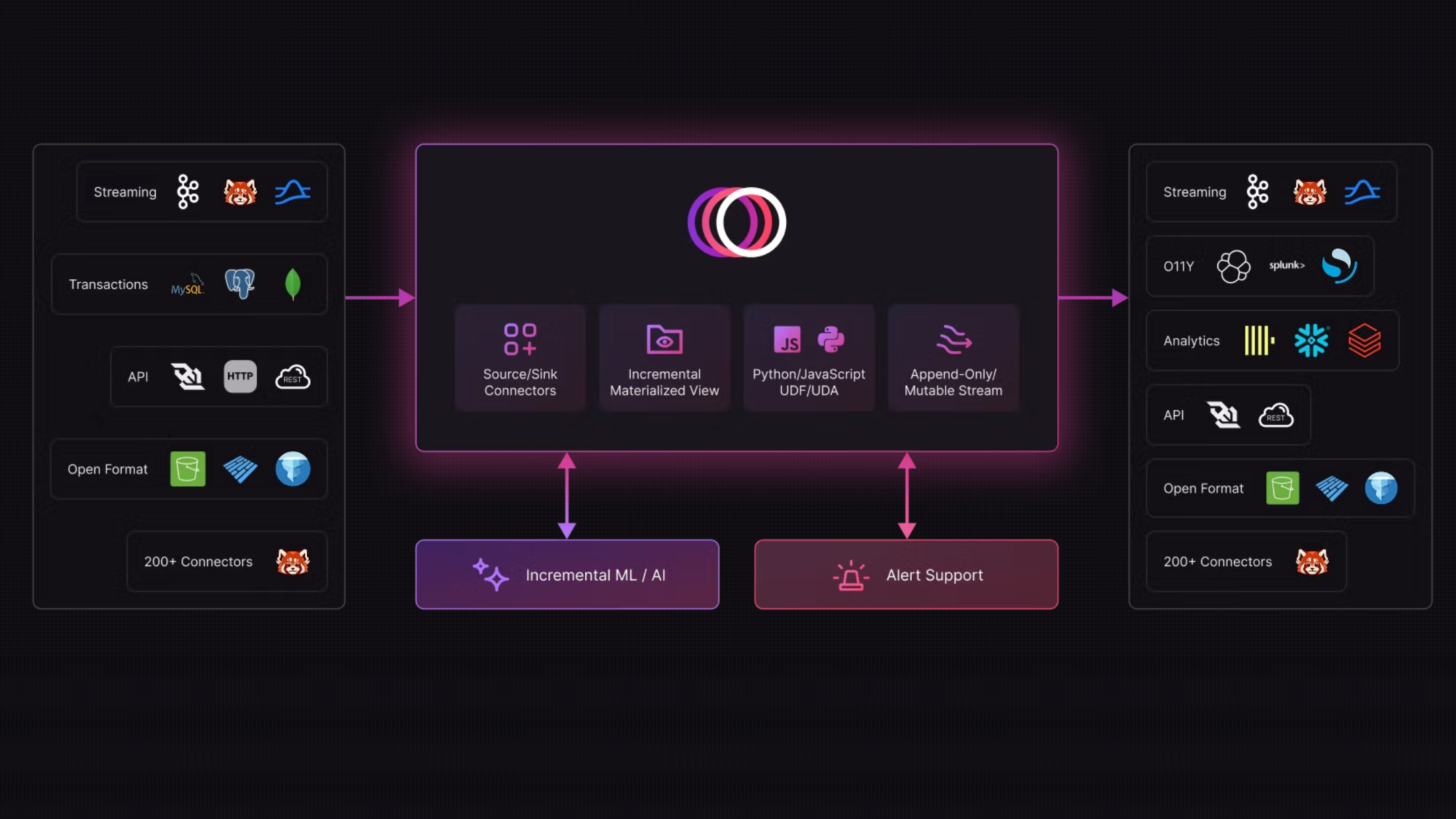
Timeplus Enterprise is a fast, unified, and efficient real-time data engine that simplifies stateful and stateless data processing, powering diverse workloads like real-time pipelines, incremental processing, mutability, alerting. Anytime, anywhere.
Overview
Image
Timeplus Architecture

Video
Product video
Timeplus Enterprise is a fast, unified, and efficient real-time data engine that simplifies stateful and stateless data processing, powering diverse workloads like real-time pipelines, incremental processing, mutability, alerting. Anytime, anywhere.
Highlights
- Unified Streaming and Historical Data Processing - Internal Write Ahead Log (WAL) and Historical Store
- Append-Only and Mutable Streams - Optimize performance with different stream types
- Multi-JOINs and ASOF JOINs - Enrich and correlate events in streaming queries Python and JavaScript UDF - Extend Timeplus with custom logic for both stateless and stateful queries - External Stream, External Tables - Execute federated queries across native data sources in real-time All in a Single Binary - Lightweight, fast, and efficient, runs in bare-metal or Kubernetes environments
Details
Sold by
Categories
Delivery method
Delivery option
64-bit (x86) Amazon Machine Image (AMI)
Latest version
Operating system
Ubuntu 24.04
Deployed on AWS
New
Introducing multi-product solutions
You can now purchase comprehensive solutions tailored to use cases and industries.

Features and programs
Financing for AWS Marketplace purchases
AWS Marketplace now accepts line of credit payments through the PNC Vendor Finance program. This program is available to select AWS customers in the US, excluding NV, NC, ND, TN, & VT.

Pricing
Pricing and entitlements for this product are managed through an external billing relationship between you and the vendor. You activate the product by supplying a license purchased outside of AWS Marketplace, while AWS provides the infrastructure required to launch the product. AWS Subscriptions have no end date and may be canceled any time. However, the cancellation won't affect the status of the external license.
Additional AWS infrastructure costs may apply. Use the AWS Pricing Calculator to estimate your infrastructure costs.
Vendor refund policy
Refund Policy
-
48-Hour Window: In accordance with AWS Marketplace policy, buyers may cancel their subscription within 48 hours of purchase for a full refund through the AWS console.
-
Discretionary Refunds: After the initial 48-hour window, all refund requests are handled at the discretion of Timeplus.

Legal
Vendor terms and conditions
Upon subscribing to this product, you must acknowledge and agree to the terms and conditions outlined in the vendor's End User License Agreement (EULA) .
Content disclaimer
Vendors are responsible for their product descriptions and other product content. AWS does not warrant that vendors' product descriptions or other product content are accurate, complete, reliable, current, or error-free.
Delivery details
64-bit (x86) Amazon Machine Image (AMI)
Amazon Machine Image (AMI)
An AMI is a virtual image that provides the information required to launch an instance. Amazon EC2 (Elastic Compute Cloud) instances are virtual servers on which you can run your applications and workloads, offering varying combinations of CPU, memory, storage, and networking resources. You can launch as many instances from as many different AMIs as you need.
Version release notes
Additional details
Usage instructions
-
Accessing the Instance Once the instance is in a "Running" state, connect via SSH using the username [ ubuntu] and your selected AWS Key Pair. ssh -i "your-key.pem" [username]@[instance-public-ip]
-
Initial Configuration / Login Access the web interface by navigating to http://<instance-public-ip>:8000 in your browser. An admin user is asked to be created on first login
-
Verifying Health You can verify the application is running correctly by checking the status of the service: sudo systemctl status timeplus
-
Support & Documentation For detailed configuration guides and advanced setup, please visit our documentation at: https://docs.timeplus.com/
Resources
Vendor resources
Support
Vendor support
AWS infrastructure support
AWS Support is a one-on-one, fast-response support channel that is staffed 24x7x365 with experienced and technical support engineers. The service helps customers of all sizes and technical abilities to successfully utilize the products and features provided by Amazon Web Services.
Similar products

Professional Services (PS) delivers packaged services (e.g., QuickStart), migration services, and customized engagements, training and PoCs.

Drive your products with the fastest, cheapest search APIs out there. Get started in minutes.

The most powerful answer engine for businesses. Powering curiosity with answers backed by up-to-date sources. This is where knowledge begins.

Historical sample from a panel of 40+ million active payments cards in the U.S., providing row-level transaction detail across 1,600+ merchants and 500+ stock tickers.
Customer reviews
No customer reviews yet
Be the first to review this product . We've partnered with PeerSpot to gather customer feedback. You can share your experience by writing or recording a review, or scheduling a call with a PeerSpot analyst.