Sold by: SMALLFRIES DIGITAL
Deployed on AWS
DR Commander is an agentless multi-region disaster recovery orchestration platform that automates cross-region replication and failover for EC2, RDS, S3, Route53, and load balancers from a single dashboard. Tag your resources with DR=true and DR Commander handles AMI snapshots, read replica management, S3 cross-region replication, DNS failover, and load balancer provisioning with automated health monitoring, configurable auto failover thresholds, and SNS alerting. Deploy as a single AMI with a CloudFormation template.
Overview
Image
Login
Image
Dashboard
Image
Resources
Image
Replication
Image
Failover
Image
Configuration

Video
Set Up Replication

Video
Test Failover

Video
Execute Failover
DR Commander is a multi-region disaster recovery orchestration platform that coordinates failover across your entire AWS stack: EC2 instances, RDS databases, S3 buckets, Route53 DNS records, and Application/Network Load Balancers, all from a single web dashboard. Unlike agent-based solutions that only replicate servers, DR Commander uses native AWS mechanisms (AMI snapshots, cross-region read replicas, S3 CRR, and ELB provisioning) to protect all your critical resources without installing software on your workloads. Simply tag resources with DR=true and DR Commander discovers, replicates, and orchestrates failover automatically.
The built-in health monitoring system continuously evaluates primary region health across multiple signal layers: EC2 instance status checks, RDS availability, load balancer target health, CloudWatch alarms, AWS Health Events, and Route53 health checks - with configurable failure thresholds that can trigger automatic failover when a regional outage is confirmed. During failover, DR Commander launches EC2 instances from AMI snapshots in the DR region with the correct networking (public or private subnets, security groups, key pairs), promotes RDS read replicas to standalone databases, provisions matching load balancers with target group and listener configuration, and optionally updates Route53 DNS records to point at the new DR endpoints - all in a single coordinated workflow with real-time progress in the dashboard and SNS email notifications.
DR Commander deploys as a single EC2 AMI via CloudFormation with three access options (public subnet with security group restriction, ALB with HTTPS, or private instance via SSM/VPN), Cognito-based admin authentication, and usage-based pricing at $0.045 per protected EC2 instance per hour. It supports configurable DR strategies (Pilot Light, Warm Standby, Hot Standby), scheduled EC2 AMI snapshots with multi-AZ subnet distribution, ACM certificate validation for HTTPS load balancers, S3 batch replication for pre-existing objects, and a configuration-driven failback workflow using region swap - providing enterprise-grade business continuity and disaster recovery capabilities without the complexity or per-server cost of traditional DR solutions.
Highlights
- Full-stack multi-region disaster recovery orchestration: Automates cross-region replication and failover for EC2, RDS, S3, Route53, and load balancers from a single agentless dashboard, with automated health monitoring and configurable auto-failover thresholds.
- Tag-and-protect simplicity: Tag any AWS resource with DR=true and DR Commander discovers, replicates, and orchestrates failover automatically using native AWS mechanisms (AMI snapshots, read replicas, S3 CRR, ELB provisioning) - no agents, no scripts, no manual runbooks.
- Usage-based pricing: Pay only $0.045 per protected EC2 instance per hour with RDS, S3, Route53, and load balancer protection included at no extra cost. Deploy in minutes via CloudFormation with Cognito authentication and three access options (public subnet, ALB with HTTPS, or private instance via SSM).
Details
Sold by
Delivery method
Delivery option
DR Commander - Unified CloudFormation Deployment
Latest version
Operating system
AmazonLinux 2023
Deployed on AWS
New
Introducing multi-product solutions
You can now purchase comprehensive solutions tailored to use cases and industries.

Features and programs
Financing for AWS Marketplace purchases
AWS Marketplace now accepts line of credit payments through the PNC Vendor Finance program. This program is available to select AWS customers in the US, excluding NV, NC, ND, TN, & VT.

Pricing
Pricing is based on actual usage, with charges varying according to how much you consume. Subscriptions have no end date and may be canceled any time.
Additional AWS infrastructure costs may apply. Use the AWS Pricing Calculator to estimate your infrastructure costs.
Dimension | Description | Cost/unit |
|---|---|---|
Protected EC2 Instances | Number of EC2 instances tagged for DR protection, counted hourly. | $0.045 |
Dimensions summary
You pay based on a single usage dimension: the number of EC2 instances tagged for disaster recovery protection. DR Commander counts these tagged instances hourly, so your cost scales directly with how many instances you protect. Add or remove tagged instances and your billing adjusts accordingly. Protection for RDS, S3, Route 53 and load balancers is included at no extra charge, so those resources do not add separate pricing dimensions. Charges appear on your monthly AWS invoice through consolidated billing.
Top-of-mind questions for buyers
Any EC2 instance you tag with DR=true counts as one protected instance. DR Commander discovers tagged instances through native AWS APIs and counts each one hourly. No agent runs on the instance. Each individual instance is counted separately, so ten tagged instances count as ten protected units.
No. Protection for RDS, S3, Route 53 and load balancers is included at no extra charge. Only tagged EC2 instances drive your cost. You can protect these other resources in the same coordinated workflow without adding any separate pricing dimension.
Billing counts tagged EC2 instances hourly, so cost adjusts as tags change. Remove the DR=true tag and that instance stops counting in later hours. Add the tag and it starts counting. Your charge reflects the number of tagged instances during each hour.
www.smallfries.digital
Helpful?
Vendor refund policy
No refunds are provided for usage charges incurred per protected EC2 instances. Buyers may cancel their subscription at any time to stop future charges. AWS infrastructure costs (EC2, data transfer, storage, etc.) are billed separately by AWS and are not eligible for refund by Smallfries Digital Inc. For billing questions, contact support@smallfries.digital .

Legal
Vendor terms and conditions
Upon subscribing to this product, you must acknowledge and agree to the terms and conditions outlined in the vendor's End User License Agreement (EULA) .
Content disclaimer
Vendors are responsible for their product descriptions and other product content. AWS does not warrant that vendors' product descriptions or other product content are accurate, complete, reliable, current, or error-free.
Delivery details
DR Commander - Unified CloudFormation Deployment
DR Commander deploys as a single EC2 instance running a Python orchestrator, Node.js API, and React dashboard behind nginx. This CloudFormation template provisions the instance, IAM role, Cognito authentication, security groups, and optionally an Application Load Balancer with HTTPS - all in one stack.
Three deployment options are available via the DeploymentOption parameter:
PublicSubnet (default): The instance is placed in a public subnet with HTTP port 80 restricted to your IP via security group. Simplest setup with no additional infrastructure cost. Recommended for evaluation and small teams.
PublicALB: An internet-facing Application Load Balancer terminates HTTPS using an ACM certificate you provide. The instance runs in a private subnet and only accepts traffic from the ALB. Public subnets for the ALB are auto-discovered from your VPC (minimum 2 AZs required). HTTP automatically redirects to HTTPS. Recommended for production deployments requiring TLS encryption.
PrivateInstance: The instance runs in a private subnet with no internet exposure. Dashboard access is restricted to the VPC CIDR and requires AWS Systems Manager Session Manager port forwarding, a bastion host SSH tunnel, or AWS Client VPN. Recommended for organizations with strict network isolation requirements.
All deployment options include:
- Cognito User Pool with admin account creation (temporary password sent via email)
- IAM role with cross-region permissions for EC2, RDS, S3, Route53, ELB, CloudWatch, and AWS Health
- 50 GB encrypted gp3 EBS volume
- IMDSv2 enforced with hop limit 2
- SSM Session Manager access (no SSH key required)
- SNS topic for failover alert notifications (optional)
- Automatic orchestrator configuration via UserData
The template uses a Custom Resource Lambda function to look up VPC CIDR blocks and discover public subnets, so you only need to provide a VPC ID and one subnet ID. Security groups are created automatically with least-privilege ingress rules based on your chosen deployment option and AllowedSourceCidr parameter.
After deployment, sign in to the dashboard with the admin username and temporary password sent to your email. You will be prompted to set a new password on first login. From the dashboard, run resource discovery to detect DR-tagged resources, configure replication settings, and set up cross-region disaster recovery for EC2, RDS, S3, and load balancers.
CloudFormation Template (CFT)
AWS CloudFormation templates are JSON or YAML-formatted text files that simplify provisioning and management on AWS. The templates describe the service or application architecture you want to deploy, and AWS CloudFormation uses those templates to provision and configure the required services (such as Amazon EC2 instances or Amazon RDS DB instances). The deployed application and associated resources are called a "stack."
Version release notes
DR Commander v1.0.1 - Initial Release (patched)
Release Date: May 2026 Platform: Amazon Linux 2023 | Python 3.12 | Node.js 22 | React 18
DR Commander is an agentless multi-region disaster recovery orchestration solution for AWS. This initial release provides full-stack DR protection for EC2, RDS, S3, Route53, and Elastic Load Balancers through a single web dashboard deployed via CloudFormation.
DEPLOYMENT
- Three deployment options via a single unified CloudFormation template: PublicSubnet (HTTP with security group restriction), PublicALB (HTTPS via ACM certificate with auto-discovered public subnets), and PrivateInstance (VPC-only access via SSM, bastion, or VPN)
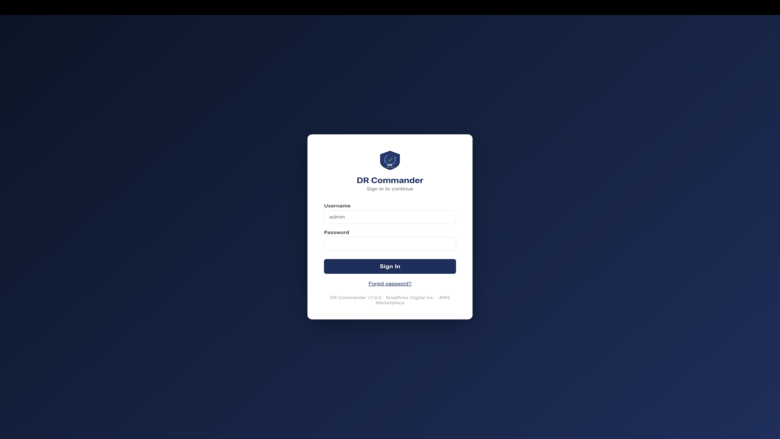
- Amazon Cognito authentication with admin account auto-provisioned during stack creation. Temporary password delivered via email. Supports password reset and forgot-password flows.
- IAM role with least-privilege cross-region permissions created automatically
- IMDSv2 enforced with hop limit 2 on all instances
- 50 GB encrypted gp3 EBS root volume
- SSM Session Manager access enabled by default (no SSH key required)
RESOURCE DISCOVERY
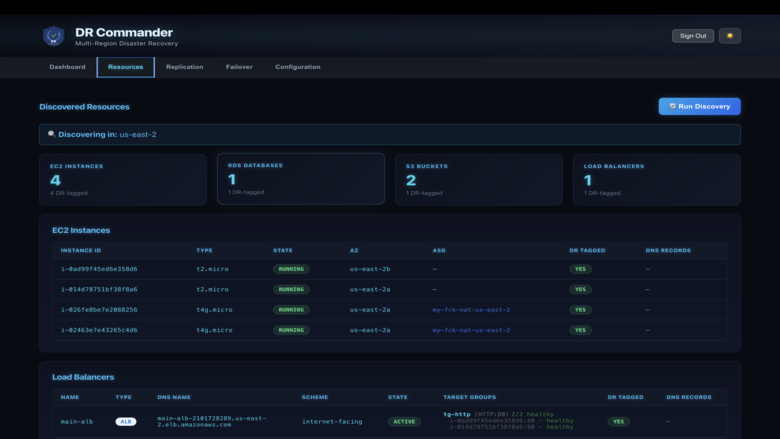
- Automatic discovery of DR-tagged resources across EC2, RDS, S3, and Elastic Load Balancers
- Tag-based inclusion: resources tagged DR=true, DR=critical, or DR=production are included in DR protection
- Auto Scaling Group instance deduplication to avoid counting ASG-managed instances twice
- Load balancer discovery includes target groups with health status of registered targets
- Route53 DNS record matching shows which DNS records point to each discovered resource
- Parallel discovery using ThreadPoolExecutor for faster resource enumeration
REPLICATION
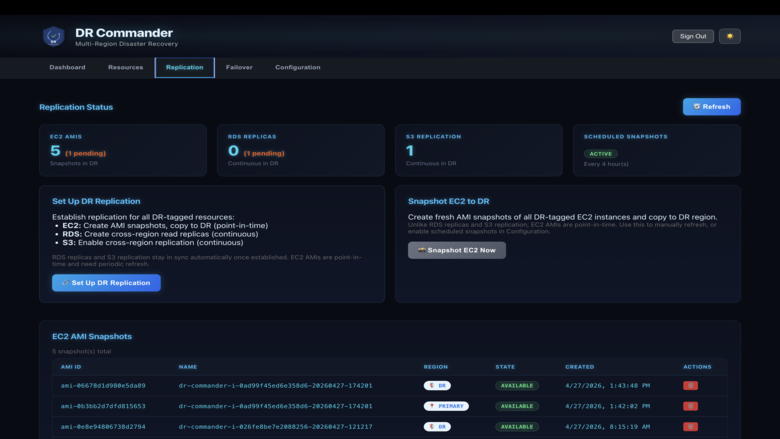
- EC2: Point-in-time AMI snapshots with cross-region copy to DR region. Intermediate primary-region AMI deleted after DR copy confirmed. Configurable scheduled snapshots (hourly, 4h, 12h, 24h) with automatic purge keeping a maximum of 8 AMIs per instance.
- RDS: Cross-region read replica creation for continuous replication. Supports all RDS engines that support read replicas.
- S3: Cross-region replication (CRR) rule configuration on customer-specified buckets, versioning enablement, and IAM replication role management. Batch replication available for pre-existing objects via S3 Batch Operations.
- Load Balancers: DR readiness evaluation with per-LB networking validation for mixed ALB/NLB environments. LBs are provisioned in the DR region during failover execution.
- Option to include stopped/offline EC2 instances in snapshots (disabled by default)
FAILOVER
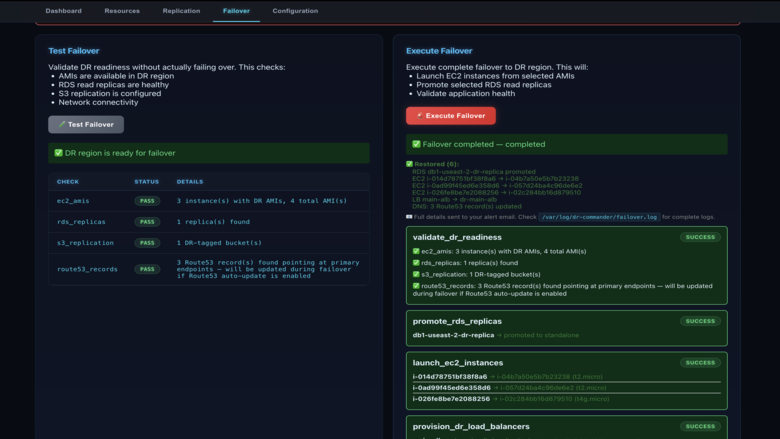
- One-click failover execution from the dashboard with resource picker and parallel resource fetch
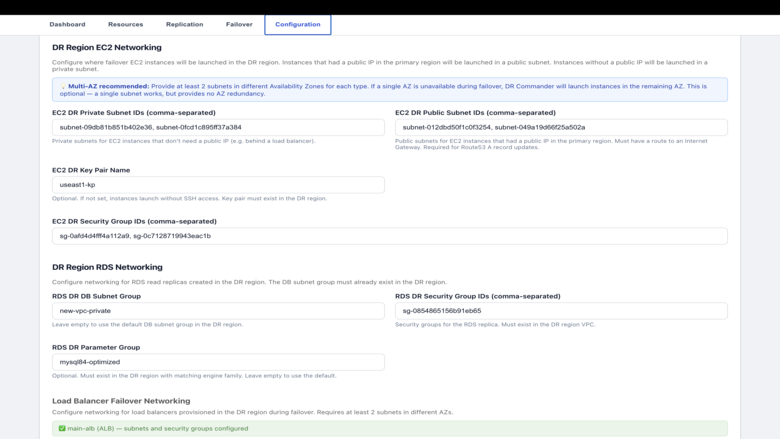
- EC2: Launches instances from DR AMIs with configurable DR networking (public/private subnet selection based on source instance, round-robin across subnets for multi-AZ distribution)
- RDS: Promotes read replicas to standalone databases
- Load Balancers: Provisions DR load balancers with correct type (ALB/NLB), target groups, listeners, and health checks
- Route53: Automatic DNS update across all hosted zones - supports alias A records (with correct ALB hosted zone ID), plain A records for EC2 public IPs, and CNAME records for RDS endpoints. TTL lowered to 60 seconds during failover.
- SNS notifications at failover start and completion with full resource details
- Post-failover runbook guidance including region swap, networking update, and DR replication re-establishment steps
- Test failover mode validates DR readiness without creating or modifying any resources
HEALTH MONITORING
- Multi-layer health checks: EC2 instance state and status checks, RDS availability (including backing-up and modifying as healthy states), load balancer target health, CloudWatch alarms with EC2 quorum logic (high-severity alarms downgraded to medium if less than 50% of instances affected), AWS Health Events, Route53 health checks, and AWS API reachability
- Configurable failure threshold (2-10, default 5) and health check interval (30-300 seconds, default 60)
- Auto-failover disabled by default. Enabled via dashboard after replication is confirmed working.
- Health status persisted to local file for API access between check cycles
DASHBOARD
- React 18 with TypeScript SPA served via nginx reverse proxy
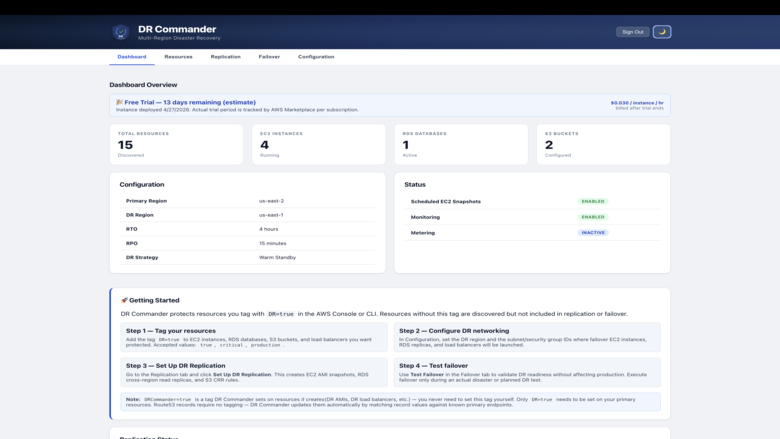
- Five tabs: Dashboard (overview, health signals, getting started), Resources (discovered resources with DNS records), Replication (status, setup, snapshots, LB readiness), Failover (execute, test, history), Configuration (regions, networking, scheduling, auto-failover)
- Light and dark mode with theme toggle persisted in localStorage
- Dark mode features neon cyan/blue styling with glowing status badges and monospace table fonts
- 15-second server-side response cache for status, resources, and replication endpoints with automatic invalidation after write operations
- Frontend parallel API calls with Promise.allSettled for faster page loads
- Pagination for EC2 AMI snapshots (25 per page)
- AMI deletion with optimistic UI removal, 1.5-second visual indicator, and 60-second grace period for AWS eventual consistency
- Orchestrator restart banner with progress bar after configuration save
- Certificate ARN live validation via ACM API
- Comma-separated input fields use decoupled raw string state to prevent blanking during typing
MARKETPLACE INTEGRATION
- Usage-based pricing at $0.045 per protected EC2 instance per hour
- RDS, S3, and load balancer protection included at no additional charge
- Hourly metering via AWS Marketplace Metering Service with retry logic
- IMDSv2 metadata for region-aware metering client initialization
- Entitlement validation script for diagnostic checks
SECURITY
- Cognito User Pool with admin-only user creation, 8-character minimum password policy, 7-day temporary password validity
- JWT verification via aws-jwt-verify with 8-hour token validity and 30-day refresh tokens
- Authentication required in production (503 returned if Cognito not configured). DISABLE_AUTH=true available for local development only.
- Security group least-privilege ingress based on deployment option and AllowedSourceCidr
- SSH hardened: root login disabled, key-based authentication only
- SELinux contexts applied, secure umask configured, unnecessary services disabled
- Log rotation configured for all application logs
INFRASTRUCTURE
- Python 3.12 orchestrator with boto3 1.42.x, PyYAML, schedule, psutil
- Express.js 4.22.0 API on Node.js 22 with winston logging and CORS support
- nginx reverse proxy with 300-second proxy_read_timeout for long-running operations
- Background job execution for replication setup, EC2 snapshots, and S3 batch operations with job polling API
- Packer-built AMI on Amazon Linux 2023 with automated validation suite
KNOWN LIMITATIONS
- EC2 AMI snapshots are point-in-time and go stale immediately. Scheduled snapshots mitigate this but RPO depends on snapshot frequency.
- RDS cross-region read replica creation typically takes 20-60 minutes depending on database size. Dashboard advises waiting for available status before testing failover.
- S3 bucket names must be specified in CloudFormation in order for CRR (Cross Region Replication) to work. CloudFormation template needs to be updated and re-deployed via a Stack update any time primary and DR bucket names are changed.
- Failback is manual: swap primary/DR regions in configuration, then re-run Set Up DR Replication.
- Auto-failover should only be enabled after Set Up DR Replication is confirmed working.
Additional details
Usage instructions
Prerequisites:
- A VPC in the DR region (the region where DR Commander will run)
- At least one subnet in that VPC (public for PublicSubnet option, private for PublicALB or PrivateInstance)
- For PublicALB: an ACM certificate in the same region and at least 2 public subnets in different AZs
- An email address to receive the initial admin login password
Step 1: Launch the CloudFormation stack
- Select your deployment option: PublicSubnet (default), PublicALB, or PrivateInstance
- Set AllowedSourceCidr to your IP address in CIDR notation (e.g. 203.0.113.10/32) to restrict dashboard access
- Provide your VPC ID and subnet ID
- Set PrimaryRegion to the AWS region where your production workloads run (e.g. us-east-1)
- Set DRRegion to the region where you are deploying this stack (e.g. us-west-2)
- Enter your email address in AdminEmail - Cognito sends the temporary password here
- Optionally provide a KeyPairName for SSH access and AlertEmail for SNS failover notifications
Step 2: Sign in to the dashboard
- Find the DashboardURL in the CloudFormation stack Outputs tab
- Sign in with username "admin" (or your custom AdminUsername) and the temporary password from your email
- Set a new password when prompted on first login
Step 3: Tag your primary region resources
- In the AWS Console for your primary region, add the tag DR=true to EC2 instances, RDS databases, S3 buckets, and load balancers you want to protect
- DR Commander discovers resources by tag - only tagged resources are included in replication and failover
Step 4: Run discovery and configure
- In the DR Commander dashboard, go to the Resources tab and verify your tagged resources appear
- Go to Configuration to set DR networking (subnets, security groups, key pair for the DR region)
- Configure snapshot interval, RTO/RPO targets, and DR strategy
Step 5: Set up replication
- Go to the Replication tab and click "Set Up DR Replication"
- EC2: Creates AMI snapshots and copies them to the DR region (point-in-time)
- RDS: Creates cross-region read replicas (continuous replication)
- S3: Enables cross-region replication rules (continuous replication)
- Wait for RDS replicas to reach "available" status (typically 20-60 minutes)
Step 6: Test failover
- Go to the Failover tab and run "Test Failover" to validate DR readiness without modifying resources
- Review the test results to confirm all resources can be failed over
Step 7: Enable auto-failover (optional)
- In Configuration, enable automatic failover after confirming replication is working
- DR Commander monitors primary region health and triggers failover automatically if the failure threshold is reached
Troubleshooting:
- SSH: ssh -i key.pem ec2-user@<instance-ip>
- SSM: aws ssm start-session --target <instance-id>
- Logs: /var/log/dr-commander/orchestrator/, /var/log/dr-commander/api/, /var/log/dr-commander/replication/, /var/log/dr-commander/failover/
- Services: sudo systemctl status dr-commander-orchestrator dr-commander-api nginx
- Support: support@smallfries.digital
Support
Vendor support
Smallfries Digital Inc. provides standard technical support for all DR Commander subscribers. Support covers deployment assistance, configuration guidance, replication and failover troubleshooting, CloudFormation template issues, IAM permission questions, and general product usage inquiries. Customers can expect an initial response within 24 to 48 business hours (Monday through Friday, excluding select holidays). Support requests can be submitted via email at support@smallfries.digital or through the contact form at https://smallfries.digital/contact . Product documentation, deployment guides, and troubleshooting resources are available within the DR Commander dashboard under the Getting Started section and in the included documentation files.
AWS infrastructure support
AWS Support is a one-on-one, fast-response support channel that is staffed 24x7x365 with experienced and technical support engineers. The service helps customers of all sizes and technical abilities to successfully utilize the products and features provided by Amazon Web Services.
Similar products

Multi-Region Disaster Recovery solution for your organisation's mission-critical system. The solution offer leverages Versent’s industry experience in implementing disaster recovery solutions for high-value systems on AWS using well-architected practices. The solution has a focus on sustainability and cost to ensure that your disaster recovery solution remains cost-effective and does not strain your carbon emission reduction targets whilst meeting your business goals & objectives.

HPE Zerto In-Cloud Software for AWS delivers disaster recovery, scaling to protect 1,000+ Amazon EC2 instances across regions, availability zones, and accounts. Zerto In-Cloud brings reliability and speed to the protection of enterprise AWS applications with simple automated workflows for failover, recovery, and testing.
Customers with existing licensing who want to deploy HPE Zerto In-Cloud Software for AWS should contact their HPE Zerto Sales team for a BYOL Private Offer.

SUDO Consultants delivers a Multi-Region Disaster Recovery Implementation that architects and deploys automated cross-region failover for customers running production workloads on AWS. The engagement is built on AWS Elastic Disaster Recovery, cross-region replication, and tested failover runbooks to establish resilient, repeatable recovery across regions. Delivered as a focused 4–8 week implementation, it is designed for organizations running production workloads in AWS’s UAE or Bahrain regions.
Audax Data Manager is a modern graphical database client and administration toolkit, with a primary focus on PostgreSQL while also supporting other databases.
Customer reviews
No customer reviews yet
Be the first to review this product . We've partnered with PeerSpot to gather customer feedback. You can share your experience by writing or recording a review, or scheduling a call with a PeerSpot analyst.