Sold by: cloudimg
Deployed on AWS
Free Trial
AWS Free Tier
This product has charges associated with it for seller support. Deploy a ready-to-run CIS and DISA STIG compliance scanner on your EC2 instance with no per-scan fees, producing HTML and ARF audit reports from verified upstream content.
Overview
Image
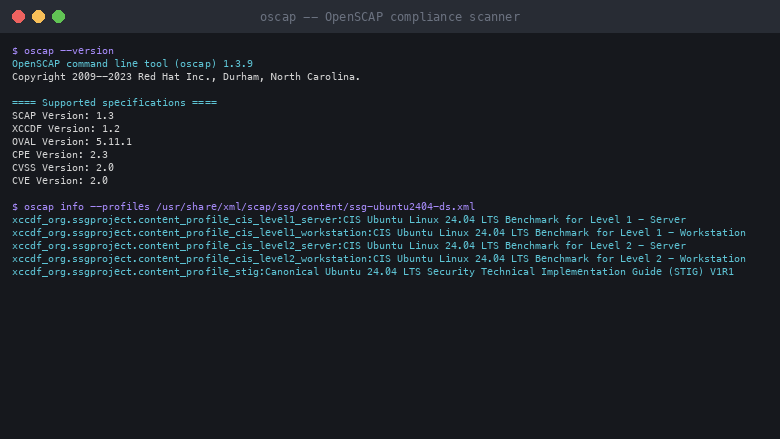
Scanner and shipped profiles
Image
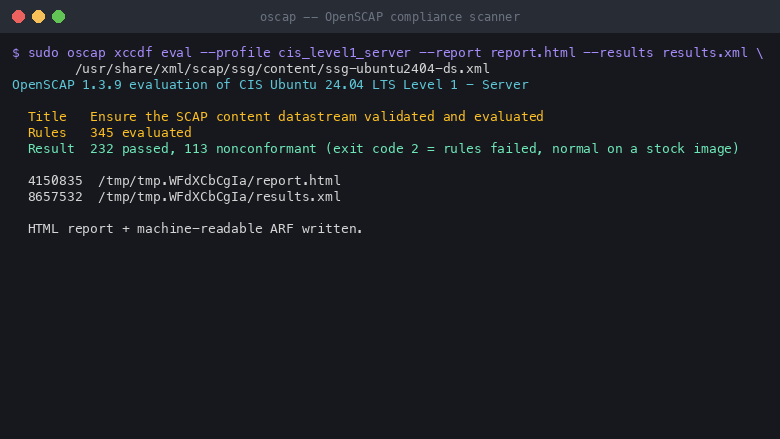
Running a compliance scan
Image
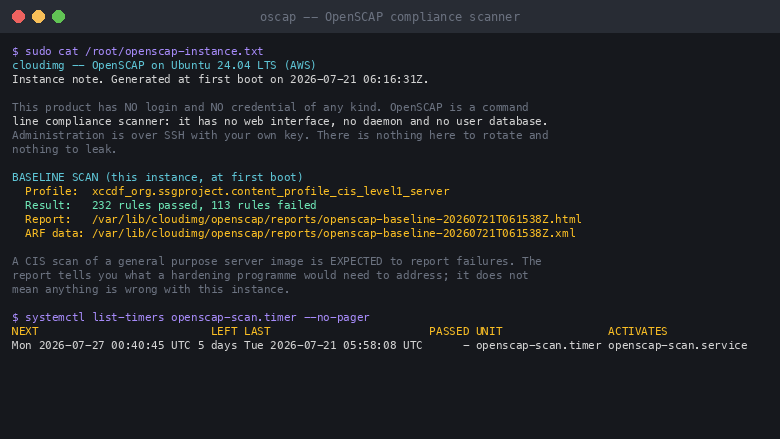
First-boot baseline and scheduled scan
This is a repackaged open source software product wherein additional charges apply for cloudimg support services.
OpenSCAP Compliance and Vulnerability Scanner
Deploy a ready-to-run SCAP compliance scanner on your own EC2 instance within minutes. Built on OpenSCAP - the reference open source implementation of the Security Content Automation Protocol - this AMI pairs the oscap engine with the SCAP Security Guide content so it can audit the operating system it runs on against real CIS and DISA STIG benchmarks, out of the box, with no manual content assembly.
Why This Scanner Instead of Alternatives
- No per-scan or per-asset fees - Unlike SaaS compliance platforms that charge per scan or per node, this AMI runs on hardware you control with predictable costs
- No agents to deploy - Unlike fleet-based scanners requiring installation on every target, one instance can scan remote hosts over SSH without touching them
- Upstream-verified content - Unlike distribution-packaged SCAP guides that often lag behind the OS release, this image ships the current ComplianceAsCode content verified against its published checksum
- No vendor lock-in - Standard SCAP outputs (HTML and ARF) integrate with any GRC tool or evidence repository
What This Image Is, Stated Plainly
This is a compliance SCANNER, not a compliance suite. It measures and reports: it evaluates your instance against a chosen policy profile and produces a human-readable HTML report plus a machine-readable ARF results file for your records. It does not have a web console, a fleet inventory, or historical trending, and it does not make any machine compliant on its own. What it does, it does honestly and out of the box - and for a single-node audit and drift-detection appliance that is exactly the useful shape.
Audits the OS It Runs On
This image installs the upstream ComplianceAsCode content release, verified against its published checksum, and ships the matching datastream with six profiles - CIS Level 1 and Level 2 for server and workstation, DISA STIG, and the standard profile. A baseline scan runs automatically on first boot.
Scheduled Drift Detection
A systemd timer re-runs your chosen profile on a schedule and keeps dated reports, so you can see your compliance posture drift over time. The profile and retention are set in a single config file. The scheduled scan is audit only - it never applies a fix.
Scan Remote Hosts
Using oscap-ssh and your own SSH key, one appliance can evaluate other Linux hosts over the network from this instance, so a small estate can be audited from a single scanner. All remote scanning is outbound - nothing listens on this instance beyond SSH.
Generate Remediation for Review
When a scan reports failures, oscap xccdf generate fix emits bash or Ansible scoped to your own results, for you to review and apply deliberately. The upstream remediation scripts and playbooks for every shipped profile are installed for reference. Remediation is never run automatically - CIS Level 2 and STIG hardening can disable services and lock an instance down, so it is always a reviewed, deliberate act.
Fail-Closed by Design
This image verifies the integrity of its policy content before every scheduled scan - the datastream must be present, unaltered against its recorded checksum, and accepted by the scanner - and a failed first boot stops the scheduled scan rather than reporting a clean result from missing content.
Minimal Attack Surface
OpenSCAP binds no port and runs no daemon. The only listening service is SSH for administration. There is no login and no baked-in credential of any kind: the scanner is operated entirely from the command line with your own SSH key.
Get Started with a Guided Setup
Want help choosing the right profile, scheduling scans, or wiring reports into your evidence workflow? Contact cloudimg for a free guided setup session. Our engineers will walk you through profile selection, remote scanning, and remediation review so you reach a repeatable audit process faster.
Use Cases
- Continuous configuration audit - Run a CIS or STIG scan automatically on first boot and on a schedule, keeping dated evidence of your instance's compliance posture over time
- Audit evidence generation - Produce HTML and machine-readable ARF reports to support security reviews and regulatory attestation in regulated environments
- Small-estate scanning - Evaluate a handful of Linux hosts over SSH from a single scanner using your own key, without installing an agent on each target
Highlights
- Scans against CIS and DISA STIG benchmarks immediately on first boot with no content assembly required - unlike SaaS compliance platforms, there are no per-scan or per-asset fees because the scanner runs entirely on your own EC2 instance. Upstream ComplianceAsCode content is checksum-verified so you audit against current policy, not stale distribution packages that lag behind the OS release.
New
Introducing multi-product solutions
You can now purchase comprehensive solutions tailored to use cases and industries.

Features and programs
Financing for AWS Marketplace purchases
AWS Marketplace now accepts line of credit payments through the PNC Vendor Finance program. This program is available to select AWS customers in the US, excluding NV, NC, ND, TN, & VT.

Pricing
Free trial
Try this product free for 7 days according to the free trial terms set by the vendor. Usage-based pricing is in effect for usage beyond the free trial terms. Your free trial gets automatically converted to a paid subscription when the trial ends, but may be canceled any time before that.
Pricing is based on actual usage, with charges varying according to how much you consume. Subscriptions have no end date and may be canceled any time. Alternatively, you can pay upfront for a contract, which typically covers your anticipated usage for the contract duration. Any usage beyond contract will incur additional usage-based costs.
Additional AWS infrastructure costs may apply. Use the AWS Pricing Calculator to estimate your infrastructure costs.
If you are an AWS Free Tier customer with a free plan, you are eligible to subscribe to this offer. You can use free credits to cover the cost of eligible AWS infrastructure. See AWS Free Tier for more details. If you created an AWS account before July 15th, 2025, and qualify for the Legacy AWS Free Tier, Amazon EC2 charges for Micro instances are free for up to 750 hours per month. See Legacy AWS Free Tier for more details.
Dimension | Description | Cost/hour |
|---|---|---|
m5.large Recommended | m5.large | $0.08 |
t3.micro | t3.micro instance type | $0.04 |
t2.micro | t2.micro instance type | $0.04 |
c8a.4xlarge | c8a.4xlarge instance type | $0.24 |
r8id.16xlarge | r8id.16xlarge instance type | $0.24 |
m8i-flex.large | m8i-flex.large instance type | $0.08 |
m8azn.6xlarge | m8azn.6xlarge instance type | $0.24 |
m7a.metal-48xl | m7a.metal-48xl instance type | $0.24 |
i4i.24xlarge | i4i.24xlarge instance type | $0.24 |
m8idn.8xlarge | m8idn.8xlarge instance type | $0.24 |
Vendor refund policy
Refunds available on request.

Legal
Vendor terms and conditions
Upon subscribing to this product, you must acknowledge and agree to the terms and conditions outlined in the vendor's End User License Agreement (EULA) .
Content disclaimer
Vendors are responsible for their product descriptions and other product content. AWS does not warrant that vendors' product descriptions or other product content are accurate, complete, reliable, current, or error-free.
Delivery details
64-bit (x86) Amazon Machine Image (AMI)
Amazon Machine Image (AMI)
An AMI is a virtual image that provides the information required to launch an instance. Amazon EC2 (Elastic Compute Cloud) instances are virtual servers on which you can run your applications and workloads, offering varying combinations of CPU, memory, storage, and networking resources. You can launch as many instances from as many different AMIs as you need.
Version release notes
Initial release of the OpenSCAP SCAP compliance scanner image with the matching SCAP Security Guide content (release 0.1.81).
Additional details
Usage instructions
Connect via SSH on port 22 as the default login user for your operating system variant (the user guide lists it per variant; on Ubuntu it is 'ubuntu'). The instance runs a baseline compliance scan automatically on first boot; read the summary with: sudo cat /root/openscap-instance.txt. List every available profile with: oscap info --profiles /usr/share/xml/scap/ssg/content/ssg-ubuntu2404-ds.xml. Run a scan on demand with: sudo oscap xccdf eval --profile <profile> --report /tmp/report.html /usr/share/xml/scap/ssg/content/ssg-ubuntu2404-ds.xml (exit code 2 means one or more rules failed, which is normal on a stock image; exit code 1 is a genuine error). Scheduled scans run via openscap-scan.timer and write dated HTML and ARF reports to /var/lib/cloudimg/openscap/reports; change the profile in /etc/cloudimg/openscap-scan.conf. To generate remediation for review, use oscap xccdf generate fix - never applied automatically. The user guide covers profile selection, scheduled scanning, remote host scanning over SSH, and reviewing generated remediation.
Resources
Vendor resources
Support
Vendor support
Channels:
- Email: support@cloudimg.co.uk
- Live chat: available around the clock
What we help with:
- Deployment and initial configuration on AWS (instance sizing, security group rules)
- Choosing the right SCAP profile (CIS Level 1 and Level 2, DISA STIG) for your workload
- Scheduling scans and interpreting HTML and ARF reports
- Scanning remote hosts over SSH with oscap-ssh
- Reviewing and safely applying generated remediation
- Upgrading the SCAP Security Guide content to a newer release
- Software updates and security patching guidance
Guided Setup: New customers can request a free guided setup session where our engineers walk through profile selection, scheduled scanning, remote scanning, and remediation review.
Instance Sizing Guidance:
- Single-instance audit: m5.large recommended
- Small-estate scanning (up to 10 remote hosts): m5.large or m5.xlarge
- Larger estates or frequent scheduled scans: m5.xlarge or above
Refunds: For refund requests or billing inquiries, contact support@cloudimg.co.uk with your AWS account ID and instance details.
Prerequisites for Launch:
- An AWS account with EC2 launch permissions
- A VPC with a subnet that allows inbound TCP on port 22
- An SSH key pair registered in your AWS region
After launch, connect using your EC2 key pair, read the first-boot baseline summary at /root/openscap-instance.txt, then run scans on demand or let the scheduled timer keep dated evidence.
AWS infrastructure support
AWS Support is a one-on-one, fast-response support channel that is staffed 24x7x365 with experienced and technical support engineers. The service helps customers of all sizes and technical abilities to successfully utilize the products and features provided by Amazon Web Services.
Similar products
This product has charges associated with it for seller support. Reduce downtime with pre-configured Nagios Core on AWS. Monitor networks, servers, and apps with 24/7 cloudimg expert support on Alma Linux 9 or Ubuntu.
This product has charges associated with it for seller support. Deploy Oracle Database 19c Standard Edition on Windows Server in minutes with production-ready ENA networking up to 25 Gbps and24x7 cloudimg engineer support.
This product has charges associated with it for seller support. Migrate from CentOS 8 EOL to Alma Linux 8 in under 60 seconds with zero licensing fees. 1:1 RHEL 8 compatible, AWS-optimized, backed by 24/7 support with guaranteed 24hr response SLA.
This product has charges associated with it for seller support. Oracle Database 19c Standard Edition AMI pre-configured on enterprise Linux with BYOL licensing. Deploy production-ready Oracle on AWS with 24/7 expert support from cloudimg.
This product has charges associated with it for seller support. Pre-configured Jenkins CI/CD server on Windows for .NET and DevOps teams. Launch in minutes with guaranteed 24-hour response support from cloudimg.
Customer reviews
No customer reviews yet
Be the first to review this product . We've partnered with PeerSpot to gather customer feedback. You can share your experience by writing or recording a review, or scheduling a call with a PeerSpot analyst.