Sold by: Sigmodata
Deployed on AWS
Free Trial
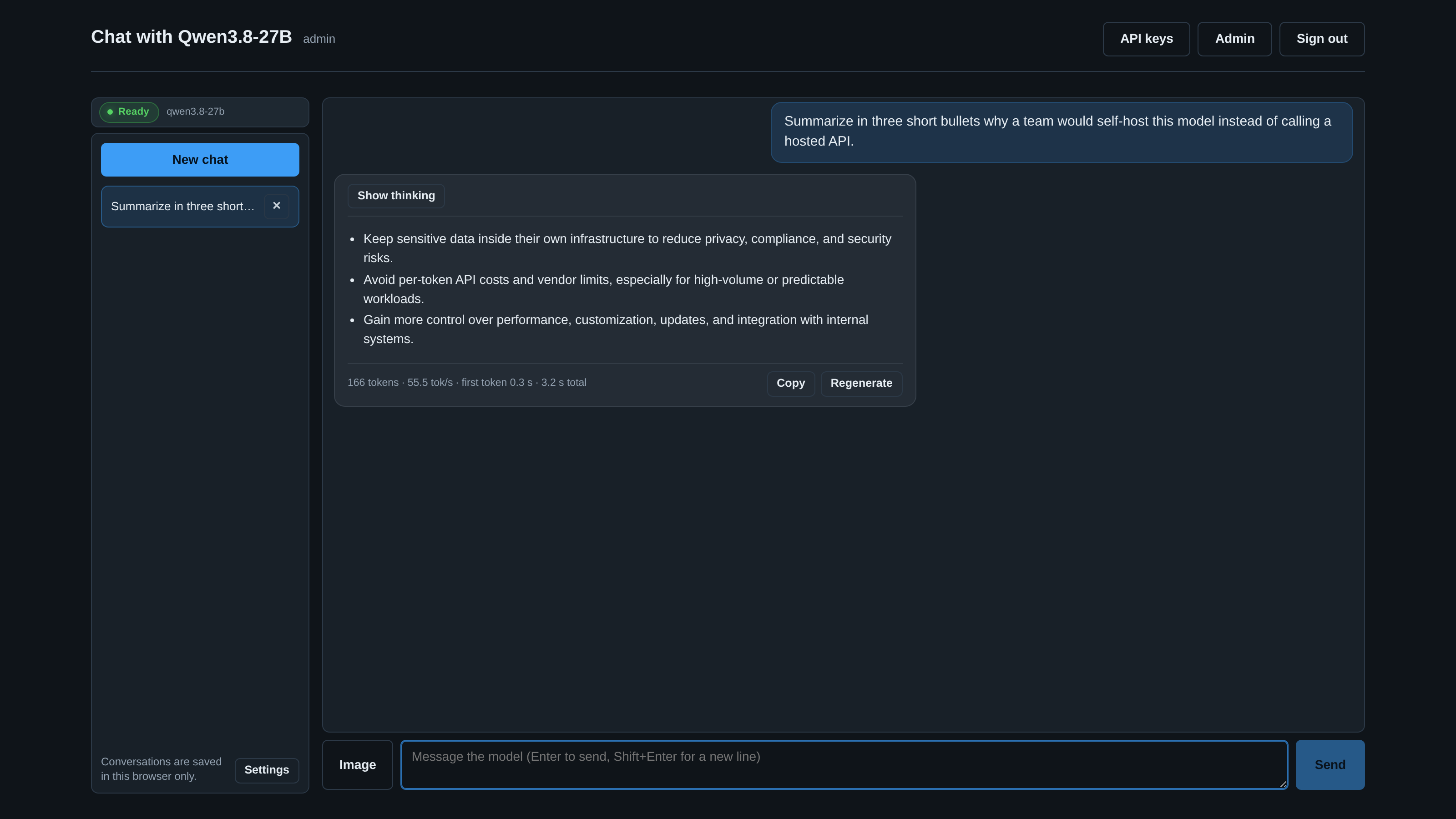
Run the open Qwen3.8-27B model on a single L40S GPU instance in your own AWS account. It comes with a browser chat page for your team, an OpenAI-compatible API with API keys you create and revoke, and a monitor of GPU use and tokens per key. Prompts and images stay in your account.
Overview
Image
Chat with Qwen3.8-27B
Image
Image input
Image
OpenAI-compatible API
Image
API keys
Image
Monitor
Image
Request limits
This product is an Amazon Machine Image (AMI) that serves Qwen3.8-27B, an open-weight (Apache-2.0) multimodal language model from Alibaba Cloud's Qwen team, on one NVIDIA L40S GPU (EC2 g6e.xlarge or g6e.2xlarge). The model weights are on the AMI, so nothing is downloaded when the instance starts, and prompts and images are never sent to a third-party API.
What you get
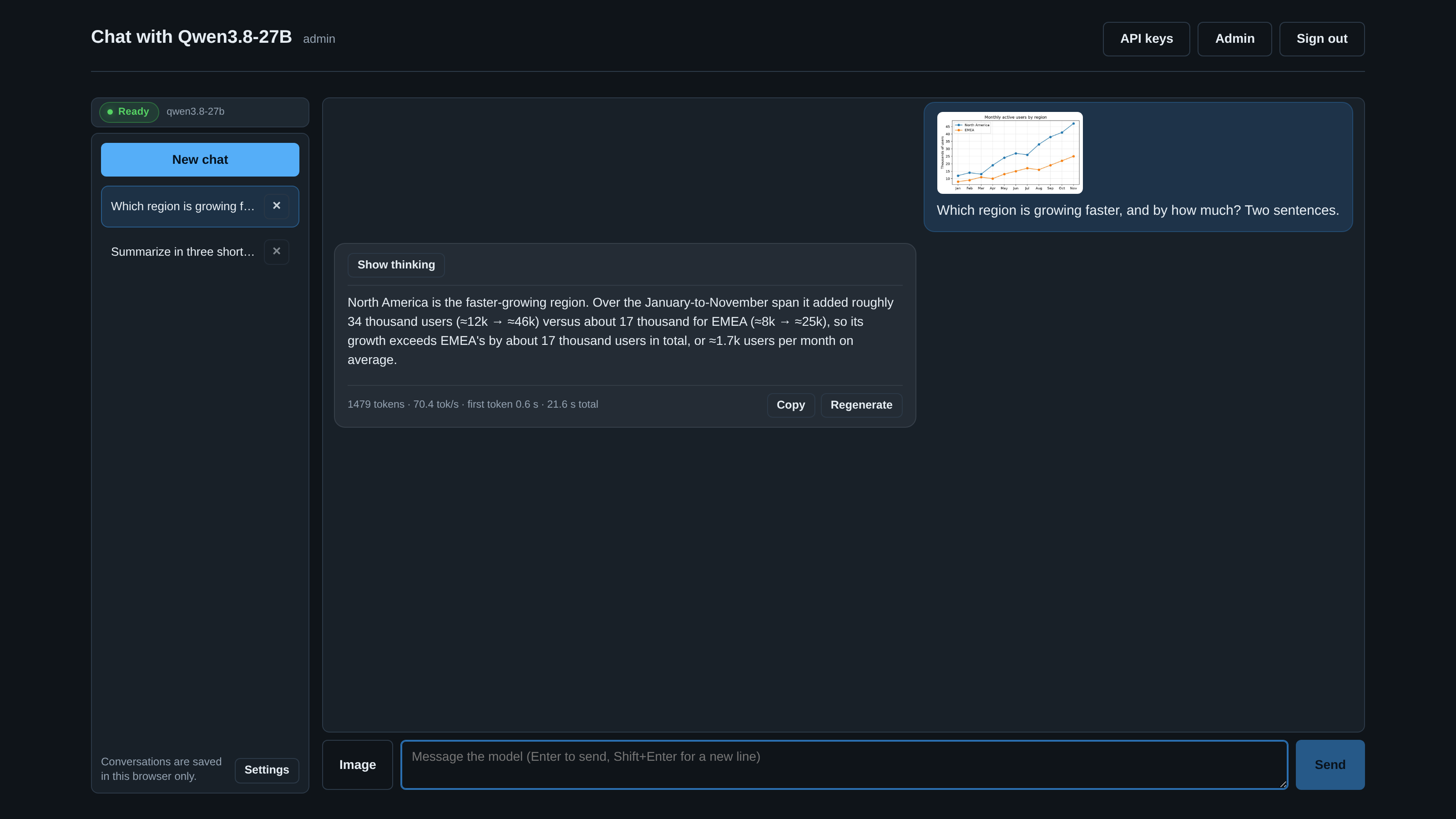
- A chat page for your team. People you add as users sign in at https://INSTANCE-ADDRESS/portal (use your instance's public IP address or DNS name) and chat in the browser, with streaming answers, an optional thinking panel and image attachments. The server stores no chat text.
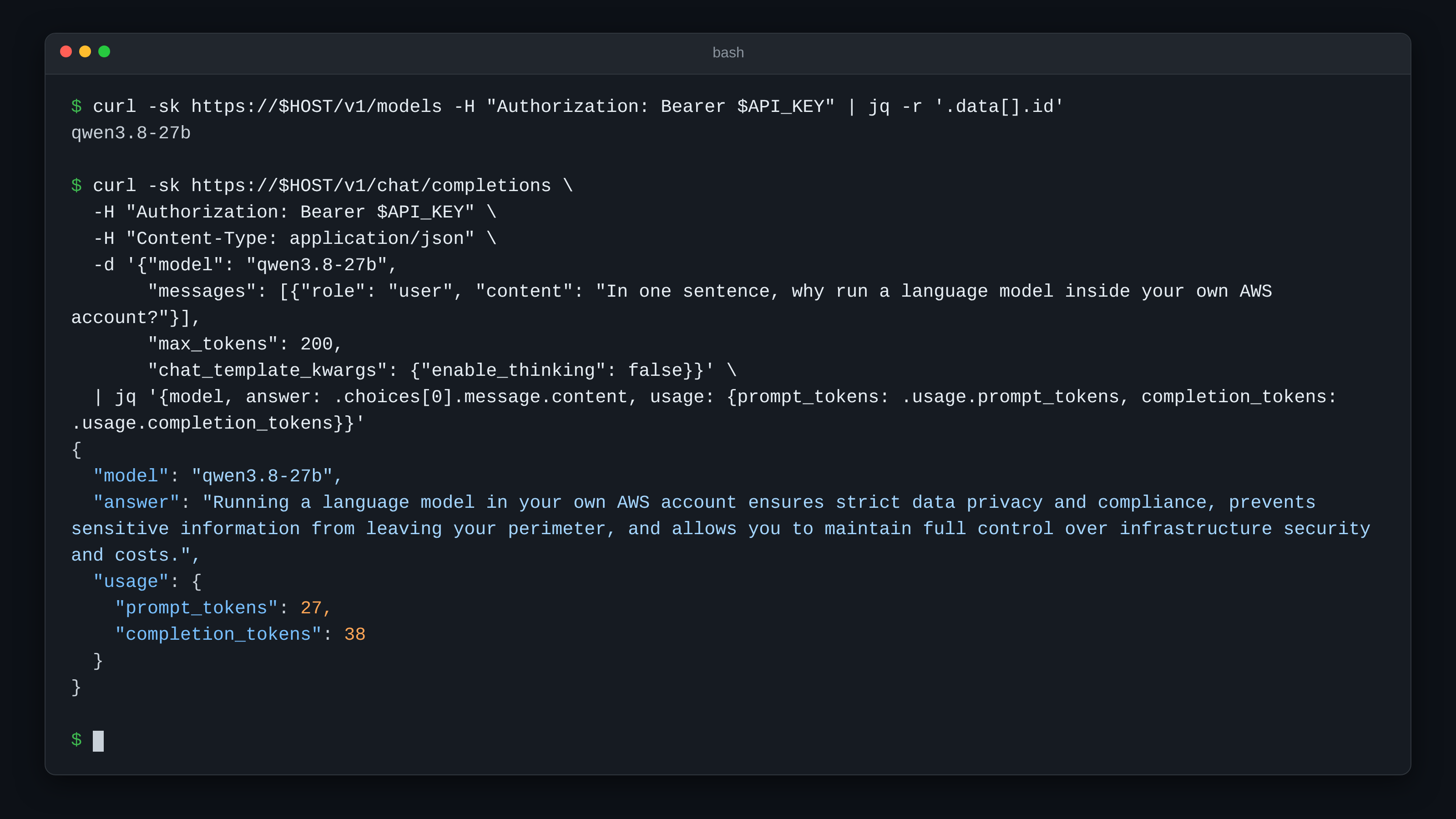
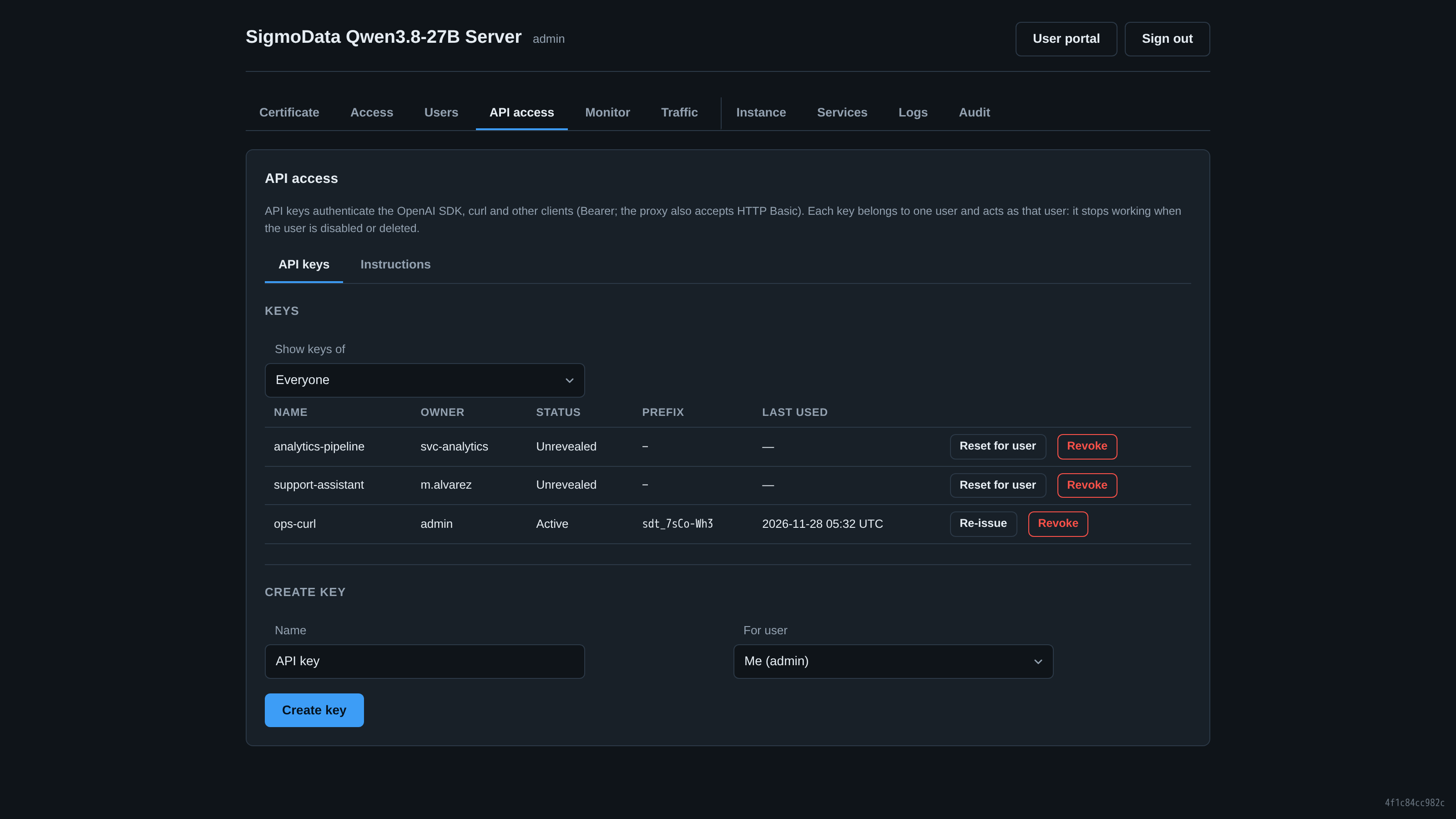
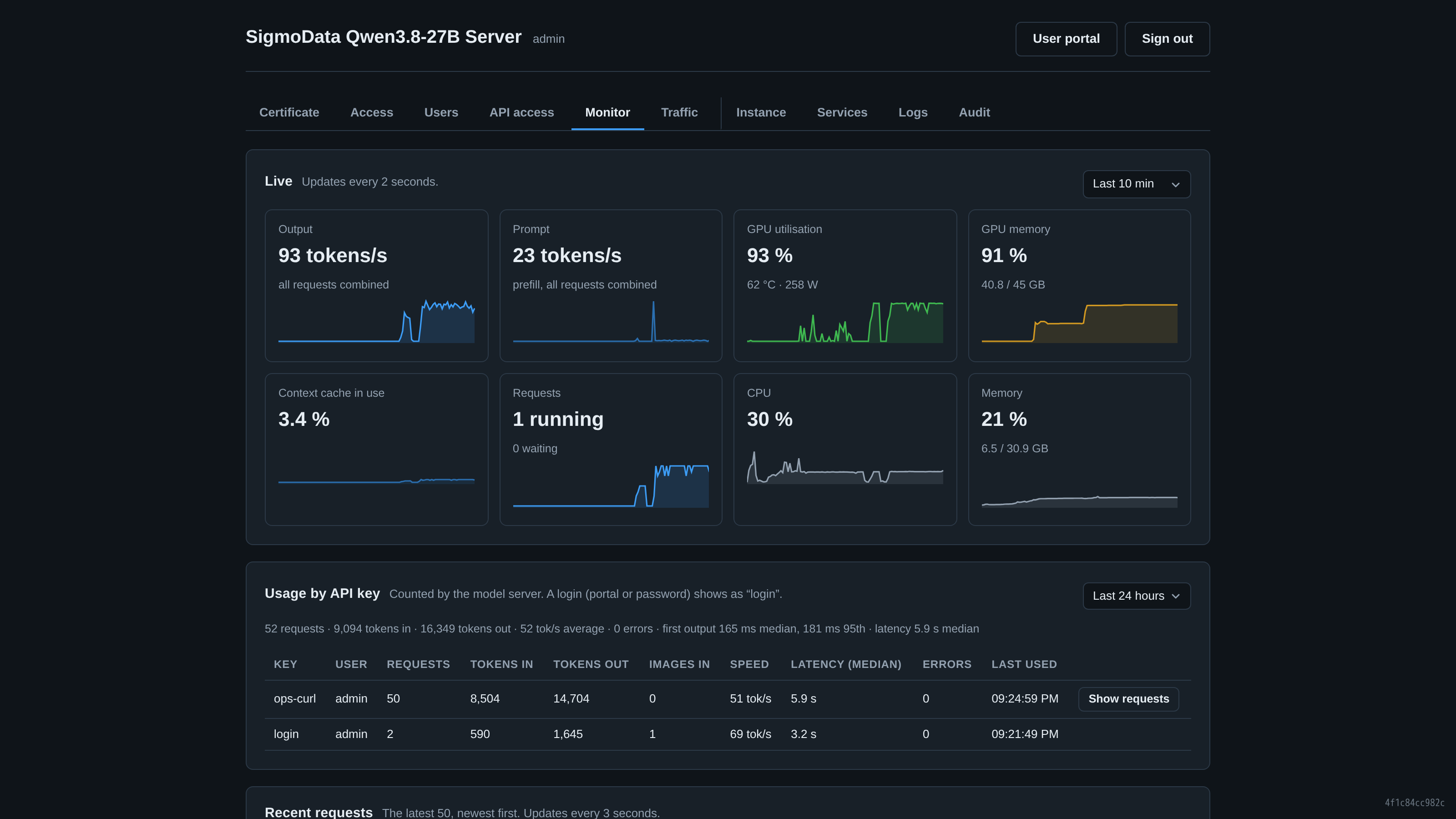
- An OpenAI-compatible API at /v1 (chat completions, streaming, images, tool calling). Administrators create and revoke API keys in the admin console, and the OpenAI SDK works unchanged with base_url set to your instance.
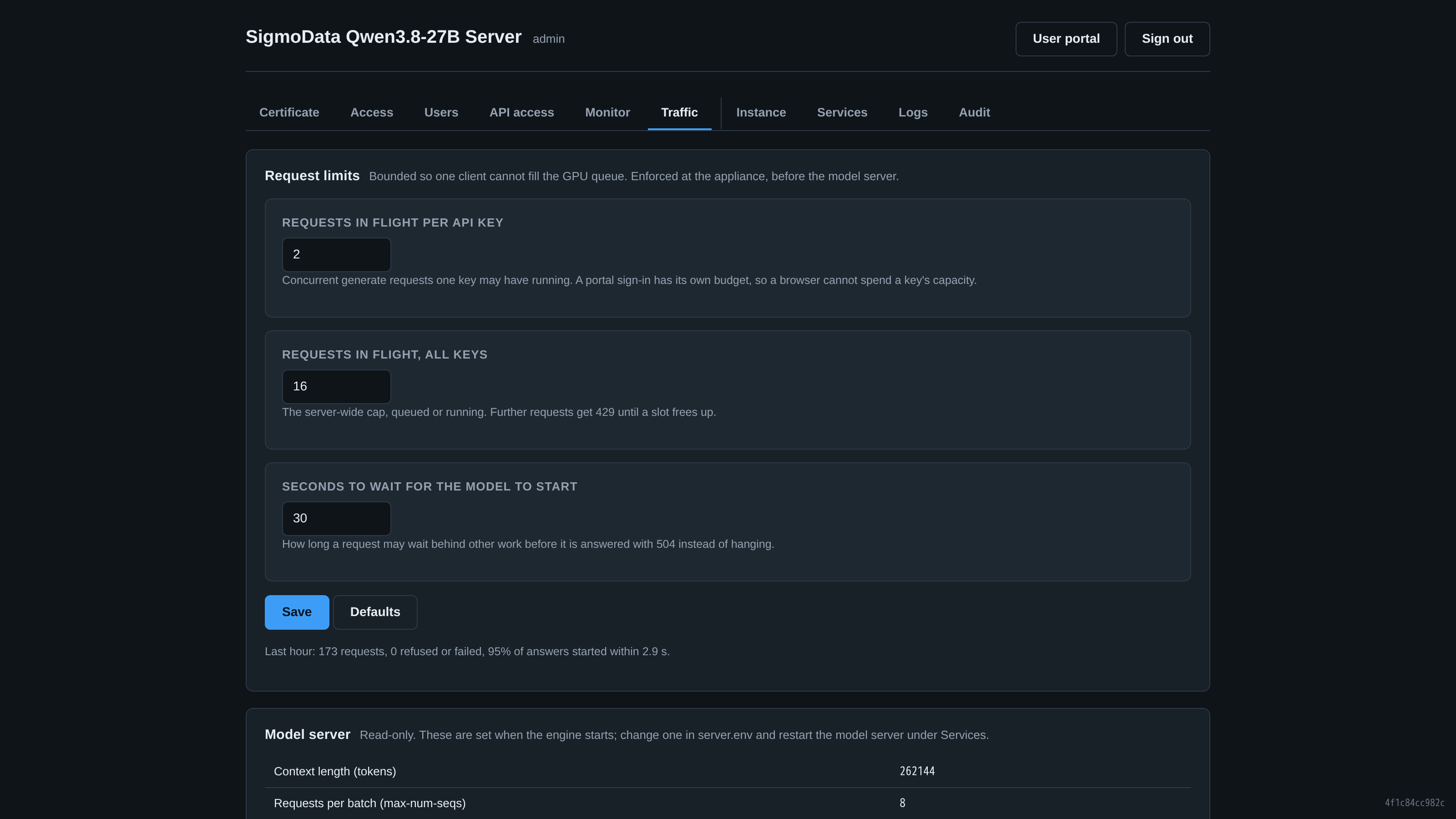
- An admin Monitor tab with live GPU use, generation speed and waiting requests, plus tokens and timings for each API key. It records counts and timings, never prompts or answers.
- HTTPS on port 443 with a guided first-run setup. No credentials go in EC2 user data.
- Two ways to launch: the AMI directly, or a one-click AWS CloudFormation stack that creates the security group, a launch template and the instance in your VPC, with a faster first start.
The model
Qwen3.8-27B reads text and images in the same request and answers in text. It thinks before it answers by default, and thinking can be switched off per request for fast replies. The context window is 262,144 tokens. The server is vLLM running the 4-bit (W4A16) checkpoint from Red Hat AI.
Typical uses are question answering over long documents, reasoning and code help, reading screenshots, charts and scanned pages, and agent workflows that call tools.
Pricing
You pay $0.10 per instance-hour for the software, billed by AWS Marketplace, plus the EC2 instance, the EBS volume and data transfer in your own account. There are no per-token fees. A 5-day free trial covers the software fee.
Example in US East, with g6e.xlarge at about $1.86 per hour on demand: running all day for a 730-hour month costs about $1,430 ($1,358 for EC2 and $73 for the software), and 10 hours a day on 22 days costs about $430. EC2 prices change, and storage and data transfer are extra.
Speed, measured by us
On one L40S (measured on both g6e.xlarge and g6e.2xlarge, with the same results), streaming, with thinking on: about 50 output tokens per second for one user and about 100 in total for two users at once, with the first token after about 0.2 seconds on short prompts. With 8,000-token prompts, one user gets about 30 tokens per second.
A prompt the server has not seen takes about 5 seconds to the first token at 16,000 tokens, 45 seconds at 100,000 and 2.5 minutes at 240,000. Asking again with the same start takes 1 to 3 seconds. Details: https://www.sigmodata.com/help/qwen-27b-performance
Security and data handling
- Prompts, images and answers stay on your instance. Nothing is sent to Sigmodata, and the model server has no internet access.
- HTTPS (TLS 1.2 and 1.3) on port 443, with a self-signed, Let's Encrypt or your own certificate. API keys are stored as SHA-256 hashes and shown once.
- The model server listens on the instance only. Every request passes the gateway, which checks the API key or the sign-in.
- Turn on EBS encryption when you launch for encryption at rest.
- Usage records keep counts and timings for 30 days, never the text.
Requirements and limitations
- The first start takes about 10 minutes on a new disk, or about 6.5 with an EBS volume initialization rate (https://www.sigmodata.com/help/fast-boot ). The setup page works while the model loads.
- One GPU per instance. Up to 8 requests are processed together, and by default each API key may have 2 in flight; an administrator can raise this under Traffic.
- Images go inline as base64 data URLs. Answers can be wrong or invented, so keep a person in the loop. Languages other than English and multi-GPU instances are not evaluated.
- Tested on g6e.xlarge and g6e.2xlarge.
About Sigmodata and next steps
Sigmodata LLC, based in San Jose, California and founded in 2023, builds AI servers that run inside your own AWS account. Start the 5-day free trial, or email support@sigmodata.com with questions or for help evaluating the model.
Base model Qwen3.8-27B by Alibaba Cloud (Qwen team), Apache-2.0. The 4-bit checkpoint is RedHatAI/Qwen3.8-27B-INT4 (Apache-2.0). Sigmodata did not train or fine-tune either. Qwen is a trademark of its owner; this product is not made or endorsed by Alibaba Cloud or Red Hat.
Highlights
- Prompts and images stay in your AWS account instead of going to a hosted LLM API, with browser chat and an OpenAI-compatible API on one L40S GPU
- A flat $0.10 per instance-hour software fee plus your own EC2 cost, with no per-token charges
- OpenAI SDK code works by changing base_url, instead of building and securing your own vLLM server, and the admin Monitor shows usage per API key without storing prompts
Details
Sold by
Delivery method
Delivery option
Qwen3.8-27B Multimodal Server (CloudFormation)
64-bit (x86) Amazon Machine Image (AMI)
Latest version
Operating system
AmazonLinux 2023
Deployed on AWS
Features and programs
Financing for AWS Marketplace purchases
AWS Marketplace now accepts line of credit payments through the PNC Vendor Finance program. This program is available to select AWS customers in the US, excluding NV, NC, ND, TN, & VT.

Pricing
Free trial
Try this product free for 5 days according to the free trial terms set by the vendor. Usage-based pricing is in effect for usage beyond the free trial terms. Your free trial gets automatically converted to a paid subscription when the trial ends, but may be canceled any time before that.
Pricing is based on actual usage, with charges varying according to how much you consume. Subscriptions have no end date and may be canceled any time.
Additional AWS infrastructure costs may apply. Use the AWS Pricing Calculator to estimate your infrastructure costs.
Dimension | Cost/hour |
|---|---|
g6e.xlarge Recommended | $0.10 |
g6e.2xlarge | $0.10 |
Vendor refund policy
No refunds offered but you may cancel at any time

Legal
Vendor terms and conditions
Upon subscribing to this product, you must acknowledge and agree to the terms and conditions outlined in the vendor's End User License Agreement (EULA) .
Content disclaimer
Vendors are responsible for their product descriptions and other product content. AWS does not warrant that vendors' product descriptions or other product content are accurate, complete, reliable, current, or error-free.
Delivery details
64-bit (x86) Amazon Machine Image (AMI)
Amazon Machine Image (AMI)
An AMI is a virtual image that provides the information required to launch an instance. Amazon EC2 (Elastic Compute Cloud) instances are virtual servers on which you can run your applications and workloads, offering varying combinations of CPU, memory, storage, and networking resources. You can launch as many instances from as many different AMIs as you need.
Version release notes
Optional upgrade from 1.3.0. The AMI is the same.
- Adds an AWS CloudFormation delivery option: one stack creates the security group, a launch template and one GPU instance in your VPC, with a volume initialization rate for a faster first start
- Runs on g6e.xlarge and g6e.2xlarge (one NVIDIA L40S)
- Browser chat for your team and an OpenAI-compatible API with API keys created and revoked in the admin console
- Admin console with Monitor and Traffic tabs, without storing prompts or answers
Additional details
Usage instructions
- Launch a g6e.xlarge or g6e.2xlarge (one NVIDIA L40S) with inbound TCP 443 and 22. Use a root volume of at least 48 GB (the default for this AMI).
- The model is read from a fresh disk, so the first start takes about 10 minutes from launch until the model answers. Launching with an EBS volume initialization rate of 300 MiB/s (EC2 API or launch template) takes about 6.5 minutes for a one-time AWS charge; see https://www.sigmodata.com/help/fast-boot . The setup page works while the model loads.
- Open https://<instance-address>/ in a browser. The certificate is self-signed at this point, so your browser will warn you once.
- Enter the instance ID shown in the EC2 console to confirm ownership.
- Complete the setup wizard: administrator password and certificate option.
- Sign in at https://<instance-address>/admin. Under API access create an API key (shown once). Under Users add the people who should chat.
- Use the model:
- People sign in at https://<instance-address>/portal and chat in the browser.
- Programs call https://<instance-address>/v1 with the OpenAI SDK, base_url set to that address plus /v1, and the API key as the api_key.
- https://<instance-address>/health returns 200 when the model is ready.
Port 80 is not required. Let's Encrypt validation uses port 443.
Where your data is stored
- Accounts and API keys: /etc/sigmodata-qwen27b/identity.sqlite3. Passwords and keys are stored hashed, never in clear text.
- Service configuration: /etc/sigmodata-qwen27b/ (optional model settings in server.env)
- TLS certificate and private key: /var/lib/sigmodata-qwen27b/certs/
- Usage history for the Monitor tab: /var/lib/sigmodata-qwen27b/usage.db. Time, key or user, endpoint, status, token counts and timings per request; never prompts, images or answers. Keeps 30 days.
- Chat conversations: in each user's own browser only; the server does not store them. All of it stays on the instance EBS volume in your own AWS account. Nothing is sent to Sigmodata, and the model server has no internet access.
Encryption
- In transit: HTTPS on port 443, self-signed by default. Browsers continue after a warning; API clients (OpenAI SDK, Java, Go) reject it. Use Let's Encrypt or your own certificate for real use: https://www.sigmodata.com/help/certificates
- At rest: enable EBS encryption when you launch (Advanced details -> EBS encryption) or launch from an encrypted copy of the AMI. Nothing else changes.
Rotation
- The TLS certificate renews automatically on a timer; renew or switch type at /admin.
- Revoke and re-issue API keys and passwords at /admin at any time. Rotate any credential that may have been exposed.
Checking that the product is healthy
- In the EC2 console, check that the instance's status checks pass.
- Request https://<instance-address>/_gw/healthz for the portal state and https://<instance-address>/health for the model (200 when ready).
- Open /admin and the Monitor tab for GPU use, requests and tokens.
- On the instance, run: sudo systemctl status sigmodata-qwen27b-engine sigmodata-qwen27b-recorder sigmodata-qwen27b and sudo tail -n 100 /var/log/sigmodata-qwen27b/engine.log for the model's log.
Backup and recovery
- Take EBS snapshots of the instance volume for full-instance recovery. The model is part of the AMI and needs no backup.
Upgrades
- There is no in-place upgrade: launch the new AMI and repeat setup; chat history stays in browsers and is not migrated.
Service quotas and cost
- g6e instances draw on the "Running On-Demand G and VT instances" vCPU quota, which is 0 on a new AWS account. A g6e.xlarge needs 4 vCPUs and a g6e.2xlarge needs 8. Request an increase in Service Quotas -> Amazon EC2 before you launch.
- You pay the AWS Marketplace hourly charge for this product plus the AWS resources it uses: EC2 instance hours, the EBS root volume, an optional one-time volume initialization charge, and data transfer out.
Resources
Vendor resources
Support
Vendor support
Support contact: Email: support@sigmodata.com Support URL: https://www.sigmodata.com/contact
Support description: Email support@sigmodata.com or https://www.sigmodata.com/contact . We reply within one business day, Monday through Friday, US Pacific time.
AWS infrastructure support
AWS Support is a one-on-one, fast-response support channel that is staffed 24x7x365 with experienced and technical support engineers. The service helps customers of all sizes and technical abilities to successfully utilize the products and features provided by Amazon Web Services.
Similar products
Chat, reasoning and image understanding from the open Qwen3.8-27B model, served on one GPU with vLLM. Runs on a SageMaker endpoint in your own AWS account with no network access, so prompts and images are not sent to a third-party API.
A self-hosted, production-ready Qwen 3.8 27B model deployed into your AWS environment with a single click. Because everything runs entirely within your private cloud, your data stays secure, isolated, and fully under your control. Best of all, unlimited tokens.
A self-hosted, production-ready Qwen 3.8 27B Uncensored model deployed into your AWS environment with a single click. Because everything runs entirely within your private cloud, your data stays secure, isolated, and fully under your control. Best of all, unlimited tokens.
A self-hosted, production-ready Qwen 3.6 35B model, with 3 billion active parameters deployed into your AWS environment with a single click. Because everything runs entirely within your private cloud, your data stays secure, isolated, and fully under your control. Best of all, unlimited tokens.
Customer reviews
No customer reviews yet
Be the first to review this product . We've partnered with PeerSpot to gather customer feedback. You can share your experience by writing or recording a review, or scheduling a call with a PeerSpot analyst.