
Sold by: cloudimg
Deployed on AWS
Free Trial
AWS Free Tier
This product has charges associated with it for seller support. Production-ready RabbitMQ 4 AMI with unique per-instance credentials and zero manual setup. Broker accepts connections in minutes - no default passwords, no config drift.
Overview
Image
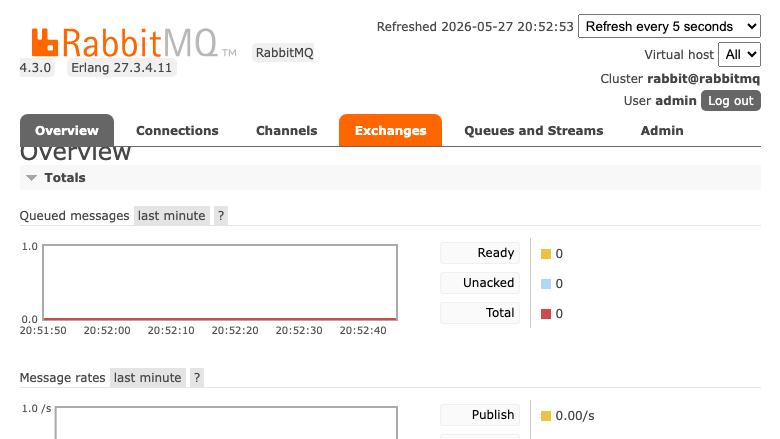
RabbitMQ management UI overview
Image
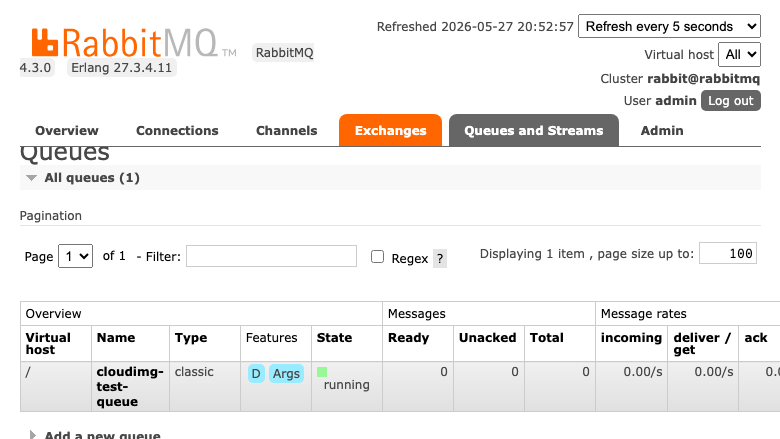
RabbitMQ queues tab
Image
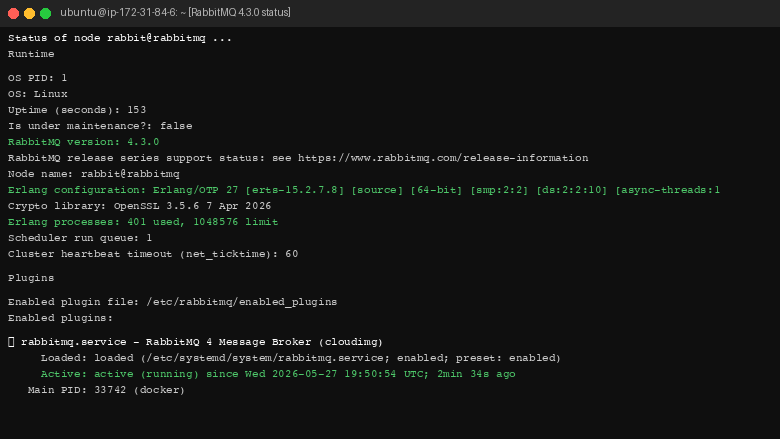
RabbitMQ service status
This is a repackaged open source software product wherein additional charges apply for cloudimg support services.
RabbitMQ 4 Message Broker - Production-Ready on AWS
RabbitMQ 4 is the most popular open source message broker, with more than 35,000 production deployments worldwide. This cloudimg AMI delivers RabbitMQ fully installed and hardened so platform engineers and DevOps teams running containerized workloads on EC2 can have a production-ready broker accepting connections within minutes of launch - no manual configuration required.
Why This AMI vs. Self-Managed or Default-Password Alternatives
Most marketplace RabbitMQ images ship with shared or well-known default credentials, creating immediate security risk in production. This image generates a unique admin password and Erlang cookie on every first boot, eliminating credential reuse across instances. The Docker-plus-systemd architecture ensures automatic restarts and clean lifecycle management without the operational burden of a bare-metal Erlang install.
Message Broker Stack
- RabbitMQ 4.3.0 with the management plugin enabled, running as a Docker container managed by a systemd service
- Management web interface available on port 15672 for monitoring queues, exchanges, and connections
- AMQP clients connect on port 5672 (also supports AMQP 1.0, MQTT, and STOMP protocols)
- Erlang/OTP 27 baked into the Docker image - no separate Erlang dependency to manage
Secure First Boot
On the first boot a one-shot systemd service generates a fresh admin password unique to that instance, computes the RabbitMQ SHA-256 password hash, and writes credentials to a root-only file. A fresh Erlang cookie is also generated per instance. No shared or default credentials ship in the image.
Persistent Storage
Queue data, Erlang mnesia, and node identity are stored on a dedicated 20 GiB EBS data volume mounted at /var/lib/rabbitmq. Message data survives instance stop/start cycles and the volume can be resized independently of the OS disk, simplifying backup and capacity planning.
AWS and Third-Party Integrations
- Amazon CloudWatch - monitor broker health, queue depth, and consumer lag using CloudWatch metrics and alarms
- Amazon EBS - persistent queue storage with snapshot-based backup and independent resizing
- Celery - use RabbitMQ as the transport backend for Python distributed task queues
- Spring Boot - connect Java microservices via Spring AMQP with auto-configuration support
- Compatible with any AMQP 0-9-1, AMQP 1.0, MQTT, or STOMP client library across all major languages (Java, Python, C#, Go, Node.js)
Use Cases
- Fintech order processing - decouple payment authorization from notification and fulfillment services, ensuring reliable delivery even during traffic spikes
- Microservice event-driven architectures - publish domain events between services without tight coupling
- IoT message ingestion - collect telemetry from thousands of devices using MQTT and route to processing pipelines
- Asynchronous task queues - offload background jobs such as image processing, report generation, or email delivery
- Real-time data pipelines - stream events between producers and consumers with configurable durability
Getting Started
Launch the AMI, open security group ports 5672 and 15672, then browse to port 15672 to access the management console. Retrieve your unique admin credentials from the root-only file on the instance. Publish and consume your first message using any AMQP client library.
cloudimg Support
24/7 technical support by email and chat. Expert assistance for RabbitMQ deployment, queue topology design, high availability clustering, performance tuning, and upgrades. Book a free 30-minute RabbitMQ architecture review by contacting the cloudimg team.
All product and company names are trademarks or registered trademarks of their respective holders. Use of them does not imply any affiliation with or endorsement by them.
Highlights
- RabbitMQ 4.3.0 preinstalled with the management web UI on port 15672 and AMQP on port 5672, running as a Docker container managed by systemd on a dedicated 20 GiB EBS data volume. Unlike self-managed installs or default-password AMIs, this image requires zero manual configuration - launch the instance, open two security group ports, and your broker is accepting connections.
- Hardened first boot generates a unique admin password and Erlang cookie for every instance, stored in a root-only credentials file. Many marketplace RabbitMQ images ship with shared or well-known default credentials that create immediate production security risk. This approach ensures your broker is never left with reusable passwords, and the SHA-256 hashed credentials are computed fresh on each deployment with no manual intervention required.
- 24/7 technical support from cloudimg engineers with a one-hour average response time for critical issues. Expert assistance covers RabbitMQ queue topology design, high availability clustering, performance tuning, upgrades, and integration with AWS services. Book a free 30-minute architecture review to plan your messaging infrastructure before committing to a production deployment.
Details
Sold by
Categories
Delivery method
Delivery option
64-bit (x86) Amazon Machine Image (AMI)
Latest version
Operating system
Ubuntu 24.04
Deployed on AWS
New
Introducing multi-product solutions
You can now purchase comprehensive solutions tailored to use cases and industries.

Features and programs
Financing for AWS Marketplace purchases
AWS Marketplace now accepts line of credit payments through the PNC Vendor Finance program. This program is available to select AWS customers in the US, excluding NV, NC, ND, TN, & VT.

Pricing
Free trial
Try this product free for 7 days according to the free trial terms set by the vendor. Usage-based pricing is in effect for usage beyond the free trial terms. Your free trial gets automatically converted to a paid subscription when the trial ends, but may be canceled any time before that.
Pricing is based on actual usage, with charges varying according to how much you consume. Subscriptions have no end date and may be canceled any time. Alternatively, you can pay upfront for a contract, which typically covers your anticipated usage for the contract duration. Any usage beyond contract will incur additional usage-based costs.
Additional AWS infrastructure costs may apply. Use the AWS Pricing Calculator to estimate your infrastructure costs.
If you are an AWS Free Tier customer with a free plan, you are eligible to subscribe to this offer. You can use free credits to cover the cost of eligible AWS infrastructure. See AWS Free Tier for more details. If you created an AWS account before July 15th, 2025, and qualify for the Legacy AWS Free Tier, Amazon EC2 charges for Micro instances are free for up to 750 hours per month. See Legacy AWS Free Tier for more details.
Dimension | Description | Cost/hour |
|---|---|---|
m5.large Recommended | m5.large | $0.04 |
t2.micro | t2.micro instance type | $0.04 |
t3.micro | t3.micro instance type | $0.04 |
c8a.16xlarge | c8a.16xlarge instance type | $0.24 |
x8i.24xlarge | x8i.24xlarge instance type | $0.24 |
c5n.9xlarge | c5n.9xlarge instance type | $0.24 |
r8i-flex.2xlarge | r8i-flex.2xlarge instance type | $0.24 |
r6a.8xlarge | r6a.8xlarge instance type | $0.24 |
r8i.2xlarge | r8i.2xlarge instance type | $0.24 |
r6in.24xlarge | r6in.24xlarge instance type | $0.24 |
Vendor refund policy
Refunds available on request.

Legal
Vendor terms and conditions
Upon subscribing to this product, you must acknowledge and agree to the terms and conditions outlined in the vendor's End User License Agreement (EULA) .
Content disclaimer
Vendors are responsible for their product descriptions and other product content. AWS does not warrant that vendors' product descriptions or other product content are accurate, complete, reliable, current, or error-free.
Delivery details
64-bit (x86) Amazon Machine Image (AMI)
Amazon Machine Image (AMI)
An AMI is a virtual image that provides the information required to launch an instance. Amazon EC2 (Elastic Compute Cloud) instances are virtual servers on which you can run your applications and workloads, offering varying combinations of CPU, memory, storage, and networking resources. You can launch as many instances from as many different AMIs as you need.
Version release notes
Initial release of RabbitMQ 4 message broker with management UI.
Additional details
Usage instructions
Connect via SSH on port 22 using the default login user 'ubuntu'. Retrieve the generated administrator credentials with: sudo cat /root/rabbitmq-credentials.txt. Browse to http://<instance-public-ip>:15672 to access the RabbitMQ management console and sign in as 'admin'. AMQP clients connect on port 5672 using amqp://admin:<password>@<instance-ip>:5672. Restrict ports 5672 and 15672 to trusted networks in production. Refer to the user guide for queue creation, exchange topology, and TLS configuration.
Resources
Vendor resources
Support
Vendor support
cloudimg Support for RabbitMQ
cloudimg provides 24/7 technical support for this RabbitMQ AMI by email and live chat. Our engineers specialize in RabbitMQ deployment, configuration, queue topology design, high availability clustering, performance tuning, upgrades, and troubleshooting.
Response Times
- Critical issues: one-hour average response time
- General inquiries: handled during the same business day
What We Help With
- Initial deployment and security group configuration
- Retrieving generated admin credentials from the instance
- Queue topology design and exchange routing
- Clustering and high availability setup
- Performance tuning for high-throughput workloads
- Upgrades and patch management
- Integration guidance for Amazon CloudWatch, Celery, Spring Boot, and other client libraries
- Troubleshooting connectivity, consumer lag, and memory alarms
Getting Help
Contact support@cloudimg.co.uk for any issues including product usage, troubleshooting, and requesting refunds. You can also book a free 30-minute RabbitMQ architecture review to discuss your messaging requirements before or after deployment.
Recommended Instance Sizing
For guidance on selecting the right EC2 instance type based on your message throughput and queue count, contact our team and we will provide tailored recommendations.
AWS infrastructure support
AWS Support is a one-on-one, fast-response support channel that is staffed 24x7x365 with experienced and technical support engineers. The service helps customers of all sizes and technical abilities to successfully utilize the products and features provided by Amazon Web Services.
Similar products

This product has charges associated with it for seller support. Deploy Oracle Database 19c Standard Edition on Windows Server in minutes with production-ready ENA networking up to 25 Gbps and24x7 cloudimg engineer support.

This product has charges associated with it for seller support. Oracle Database 19c Standard Edition AMI pre-configured on enterprise Linux with BYOL licensing. Deploy production-ready Oracle on AWS with 24/7 expert support from cloudimg.

This product has charges associated with it for seller support. Pre-configured RStudio IDE on Windows Server with 24/7 cloudimg support. Deploy a production-ready R data science environment on EC2 in minutes.

This product has charges associated with it for seller support. Migrate from CentOS 8 EOL to Alma Linux 8 in under 60 seconds with zero licensing fees. 1:1 RHEL 8 compatible, AWS-optimized, backed by 24/7 support with guaranteed 24hr response SLA.

This product has charges associated with it for seller support. Pre-configured Jenkins CI/CD server on Windows for .NET and DevOps teams. Launch in minutes with guaranteed 24-hour response support from cloudimg.
Customer reviews
No customer reviews yet
Be the first to review this product . We've partnered with PeerSpot to gather customer feedback. You can share your experience by writing or recording a review, or scheduling a call with a PeerSpot analyst.