
Sold by: cloudimg
Deployed on AWS
Free Trial
AWS Free Tier
This product has charges associated with it for seller support. Firebird SQL open source relational database, preinstalled and production-ready on AWS with a secure per-instance SYSDBA password and 24/7 cloudimg support.
Overview
Image
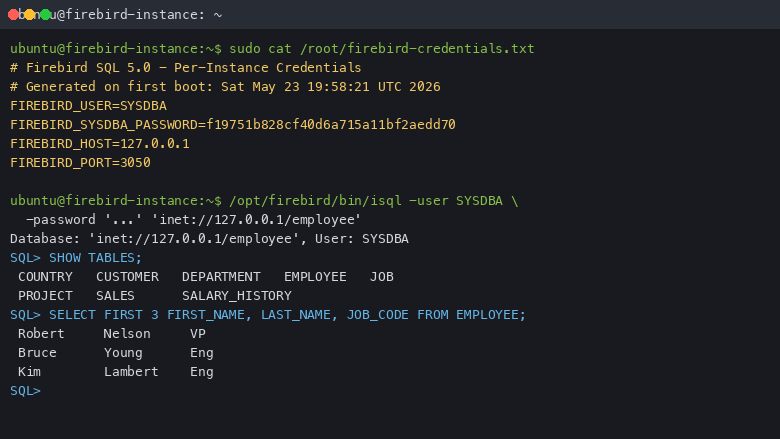
isql shell session
Image
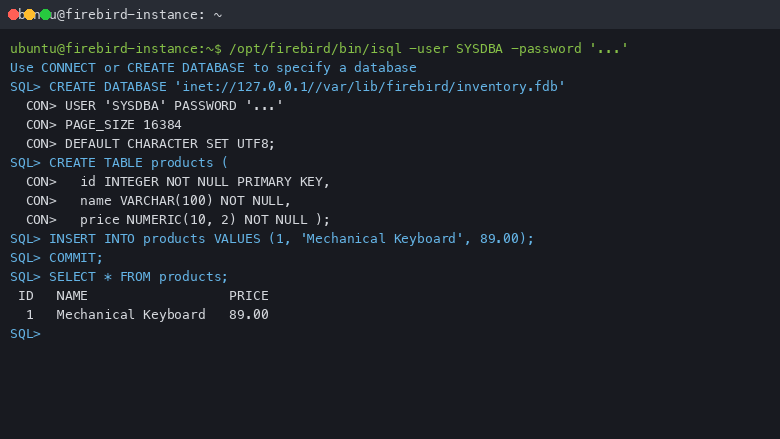
Creating a new database
Image
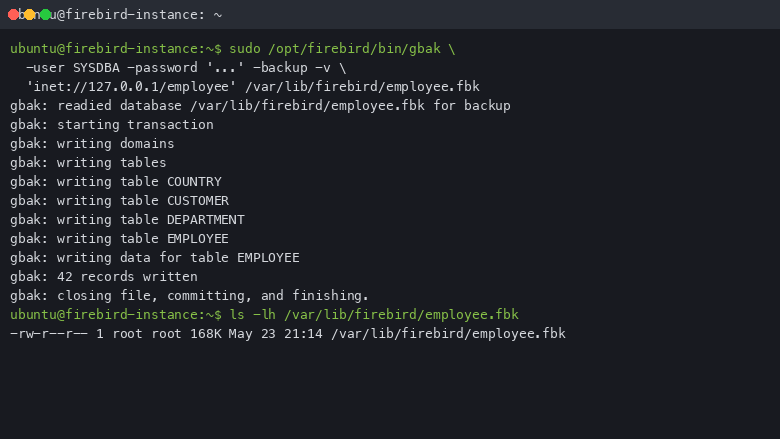
gbak backup
This is a repackaged open source software product wherein additional charges apply for cloudimg support services.
Overview
Firebird SQL is a mature, open source, ANSI SQL relational database descended from InterBase, first released in 2000and now at the stable 5.x line. It offers excellent concurrency, stored procedures, triggers, and a small footprint that scales from embedded devices through to enterprise servers handling databases exceeding 2TB with hundreds of concurrent clients. This AMI delivers Firebird SQL fully installed and configured on Linux, so a production-ready database server is running within minutes of launch.
Why This Image
Buyers evaluating database AMIs on AWS have alternatives - including Windows-based Firebird images bundled with DBeaver GUI, or installing Firebird manually on a generic Linux instance. This image is purpose-built to deliver advantages those options lack:
- Linux footprint advantage - Lower idle resource consumption compared to Windows Server images, reducing your EC2 spend for equivalent workloads.
- Firebird 5.x - The current stable release with over-the-wire encryption, asynchronous connection cancellation, and TraceAPI built in.
- Security-hardened first boot - A unique SYSDBA password is generated per instance automatically. No shared or default credentials ever ship in the image.
- Dedicated data volume - Database files live on a separate, independently resizable EBS volume from day one, enabling snapshots and backups without OS entanglement.
- 24/7 expert support included - Unlike self-managed installs, cloudimg engineers are available around the clock for deployment help, performance tuning, and replication configuration.
What Is Included
The Firebird SQL database engine installed from the official upstream distribution, running as the SuperServer engine variant. The following tools are on the path: isql interactive CLI shell, gbak backup tool, gfix maintenance tool, gsec security manager, and gstat statistics tool. The sample'employee' database ships preinstalled for hands-on exploration.
Security and Authentication
Firebird ships with native password authentication enabled out of the box. Database access requires a username and password. On first boot, a one-shot service generates a strong, unique SYSDBA superuser password, applies it to the database, and writes it to a root-only file. No shared or default SYSDBA password exists in the image. Over-the-wire encryption protects client connections on TCP 3050.
Data on Its Own Volume
Firebird database files live on a dedicated EBS volume mounted at the Firebird data directory. This separation means you can grow, snapshot, and back up your data independently of the OS disk - aligning with AWS best practices for stateful workloads.
Getting Started
- Launch the AMI on your chosen EC2 instance type.
- Ensure your security group allows SSH (TCP 22) and Firebird wire protocol (TCP 3050).
- SSH into the instance as the default user.
- Read the generated SYSDBA password from the root-only file.
- Open isql and connect to the sample employee database or create your own.
- Connect remote client tools such as FlameRobin or DBeaver using TCP 3050.
The database engine is listening and ready to accept connections immediately after boot.
Use Cases
- Application backends - SaaS platforms, internal tools, and web applications needing a fast, ANSI SQL compliant database with low operational overhead.
- Legacy InterBase migrations - Move Delphi or C++ applications from InterBase to a modern, actively maintained open source successor without rewriting SQL.
- Edge and embedded deployments - IoT gateways, retail point-of-sale systems, and field devices where RAM and disk footprint matter.
- Departmental databases - Small to medium business workloads such as inventory tracking, CRM backends, and reporting systems.
cloudimg Support
24/7 technical support by email and live chat. Our engineers assist with Firebird SQL deployment, upgrades, performance tuning, replication configuration, backup strategy, and database administration. Critical issues receive a one-hour average response time.
Evaluation Path
To evaluate this product at minimal cost, launch on a small instance type such as t3.micro or t3.small. The Firebird SuperServer engine runs efficiently on minimal resources, letting you test connectivity, run queries against the sample employee database, and validate your application compatibility before scaling up.
All product and company names are trademarks or registered trademarks of their respective holders. Use of them does not imply any affiliation with or endorsement by them.
Highlights
- Firebird SQL preinstalled and ready, with the isql CLI shell, gbak, gfix and the sample employee database, and no manual setup required
- Password authentication is enabled by default and a fresh SYSDBA superuser password is generated for every instance on first boot and stored in a file only the root user can read
- Firebird data lives on a dedicated, independently resizable storage volume, and 24/7 technical support from cloudimg covers deployment, performance tuning, replication and database administration
Details
Sold by
Categories
Delivery method
Delivery option
64-bit (x86) Amazon Machine Image (AMI)
Latest version
Operating system
Ubuntu 24.04
Deployed on AWS
New
Introducing multi-product solutions
You can now purchase comprehensive solutions tailored to use cases and industries.

Features and programs
Financing for AWS Marketplace purchases
AWS Marketplace now accepts line of credit payments through the PNC Vendor Finance program. This program is available to select AWS customers in the US, excluding NV, NC, ND, TN, & VT.

Pricing
Free trial
Try this product free for 7 days according to the free trial terms set by the vendor. Usage-based pricing is in effect for usage beyond the free trial terms. Your free trial gets automatically converted to a paid subscription when the trial ends, but may be canceled any time before that.
Pricing is based on actual usage, with charges varying according to how much you consume. Subscriptions have no end date and may be canceled any time. Alternatively, you can pay upfront for a contract, which typically covers your anticipated usage for the contract duration. Any usage beyond contract will incur additional usage-based costs.
Additional AWS infrastructure costs may apply. Use the AWS Pricing Calculator to estimate your infrastructure costs.
If you are an AWS Free Tier customer with a free plan, you are eligible to subscribe to this offer. You can use free credits to cover the cost of eligible AWS infrastructure. See AWS Free Tier for more details. If you created an AWS account before July 15th, 2025, and qualify for the Legacy AWS Free Tier, Amazon EC2 charges for Micro instances are free for up to 750 hours per month. See Legacy AWS Free Tier for more details.
Dimension | Description | Cost/hour |
|---|---|---|
m5.large Recommended | m5.large | $0.08 |
t3.micro | t3.micro instance type | $0.04 |
t2.micro | t2.micro instance type | $0.04 |
c6in.4xlarge | c6in.4xlarge instance type | $0.24 |
c8i.large | c8i.large instance type | $0.08 |
g4ad.xlarge | g4ad.xlarge instance type | $0.12 |
m6a.4xlarge | m6a.4xlarge instance type | $0.24 |
c8i.48xlarge | c8i.48xlarge instance type | $0.24 |
c7i.16xlarge | c7i.16xlarge instance type | $0.24 |
c5d.24xlarge | c5d.24xlarge instance type | $0.24 |
Vendor refund policy
Refunds available on request.

Legal
Vendor terms and conditions
Upon subscribing to this product, you must acknowledge and agree to the terms and conditions outlined in the vendor's End User License Agreement (EULA) .
Content disclaimer
Vendors are responsible for their product descriptions and other product content. AWS does not warrant that vendors' product descriptions or other product content are accurate, complete, reliable, current, or error-free.
Delivery details
64-bit (x86) Amazon Machine Image (AMI)
Amazon Machine Image (AMI)
An AMI is a virtual image that provides the information required to launch an instance. Amazon EC2 (Elastic Compute Cloud) instances are virtual servers on which you can run your applications and workloads, offering varying combinations of CPU, memory, storage, and networking resources. You can launch as many instances from as many different AMIs as you need.
Version release notes
Remediates flagged CVEs: full apt update (kernel + userspace); rng-tools added.
Additional details
Usage instructions
Connect via SSH on port 22 as the default login user for your operating system variant (the user guide lists it per variant). Firebird SQL listens for client connections on 127.0.0.1 port 3050 on the instance itself. Retrieve the generated SYSDBA password with: sudo cat /root/firebird-credentials.txt. Open the isql shell with: /opt/firebird/bin/isql -user SYSDBA -password '<password>' 'inet://127.0.0.1/employee'. Use SHOW TABLES; inside isql to list the sample tables. The user guide explains how to create new databases, users and how to back up with gbak.
Resources
Vendor resources
Support
Vendor support
cloudimg Support
cloudimg provides 24/7 technical support for this Firebird SQL product by email and live chat.
What is covered:
- Deployment assistance and initial configuration
- Firebird SQL upgrades and patch guidance
- Performance tuning and query optimization
- Replication configuration
- Backup strategy with gbak
- Database administration and troubleshooting
- Guidance on EC2 instance sizing for your workload
Response times:
Critical issues receive a one-hour average response time. Our engineers work to resolve problems quickly so your database stays available.
How to get help:
Email: support@cloudimg.co.uk Live chat: Available 24/7
For deployment questions, performance concerns, or any issues using the product, contact us through either channel. We also assist with refund requests and billing inquiries.
Recommended instance sizing:
- Light workloads and evaluation: t3.micro or t3.small
- Departmental databases with moderate concurrency: t3.medium or m5.large
- Production application backends with higher throughput: m5.xlarge or larger
Scale your EBS data volume independently as your database grows. cloudimg support can help you plan capacity for your specific workload.
AWS infrastructure support
AWS Support is a one-on-one, fast-response support channel that is staffed 24x7x365 with experienced and technical support engineers. The service helps customers of all sizes and technical abilities to successfully utilize the products and features provided by Amazon Web Services.
Similar products

This product has charges associated with it for seller support. Firebird SQL with 24/7 cloudimg support. Cross-platform open source RDBMS. True ACID compliance with multi-generational architecture. Lightweight footprint. Multiple Firebird versions available. Production-ready. Port 3050.

This product has charges associated with it for seller support. Eliminate database licensing costs and read-lock contention. Firebird SQL on Windows delivers zero-vacuum MVCC concurrency unlike PostgreSQL, with24/7 cloudimg support and sub-hour critical response.

Firebird is an open-source SQL relational database management system offering many ANSI SQL standard features that runs on Windows

Firebird is an open-source SQL relational database management system offering many ANSI SQL standard features that runs on Windows

This product has charges associated with it for seller support. Firebird is a powerful, open source relational database management system (RDBMS) that offers fast, scalable, and flexible database solutions for both small and large scale applications.
Customer reviews
No customer reviews yet
Be the first to review this product . We've partnered with PeerSpot to gather customer feedback. You can share your experience by writing or recording a review, or scheduling a call with a PeerSpot analyst.