Sold by: Dynamiq
Deployed on AWS
Deploy RegWatch entirely inside your own AWS account on Amazon EKS via Helm. The full data plane - PostgreSQL with pgvector, Redis, evidence storage, the API, and the web app - runs in your VPC under your own security controls, so regulatory data and evidence never leave your account. RegWatch's specialised AI agents monitor global regulations, flag what matters with business-impact analysis, and convert each update into a structured obligation with an owner, deadline, and linked evidence. External dependency: the monitoring worker makes outbound HTTPS calls to the Anthropic API (Claude) for agent reasoning and to an embeddings provider; all other components run in your cluster.
Overview
Image
RegWatch Private VPC - runs in your AWS account
Image
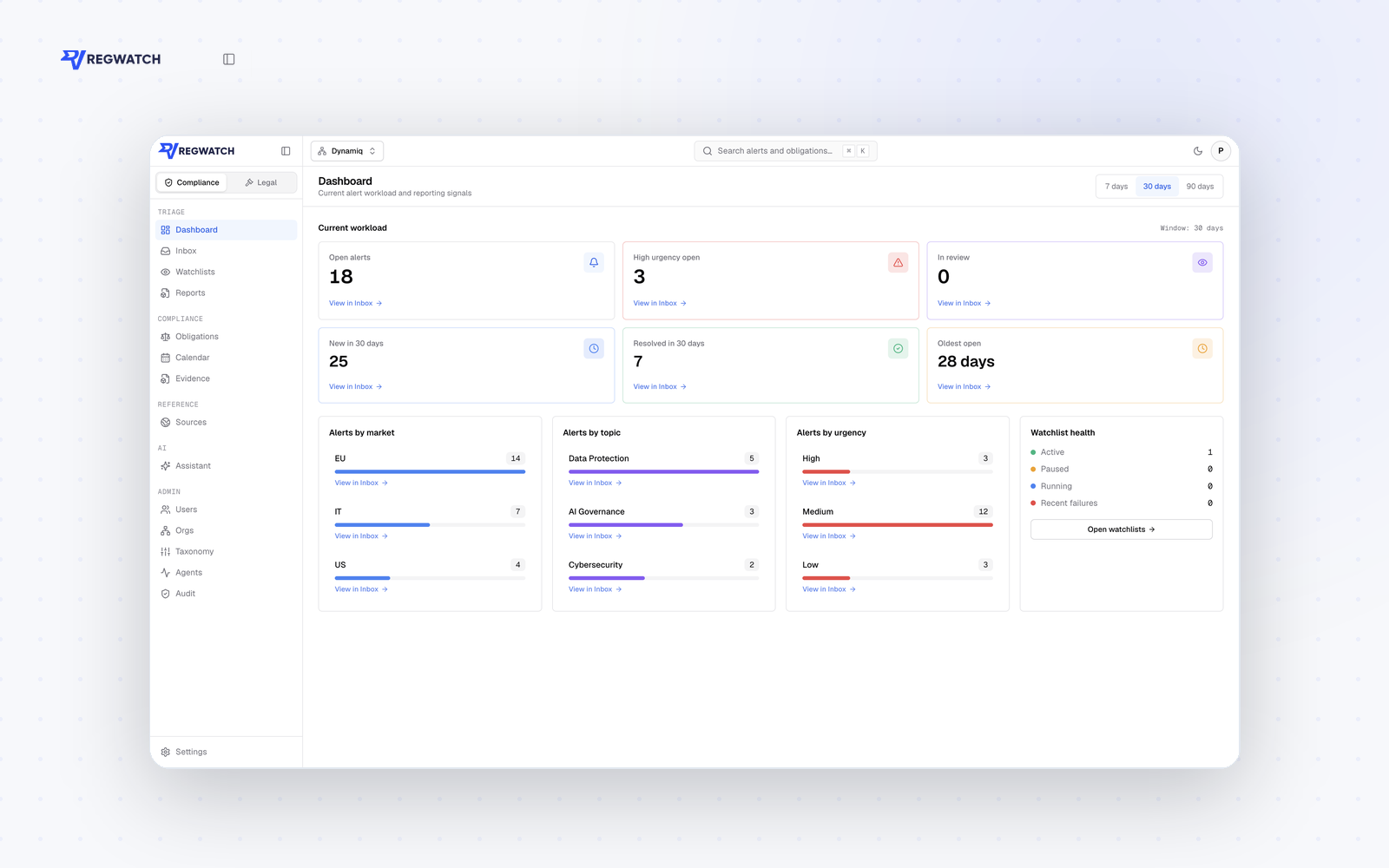
Compliance dashboard - workload and deadlines
Image
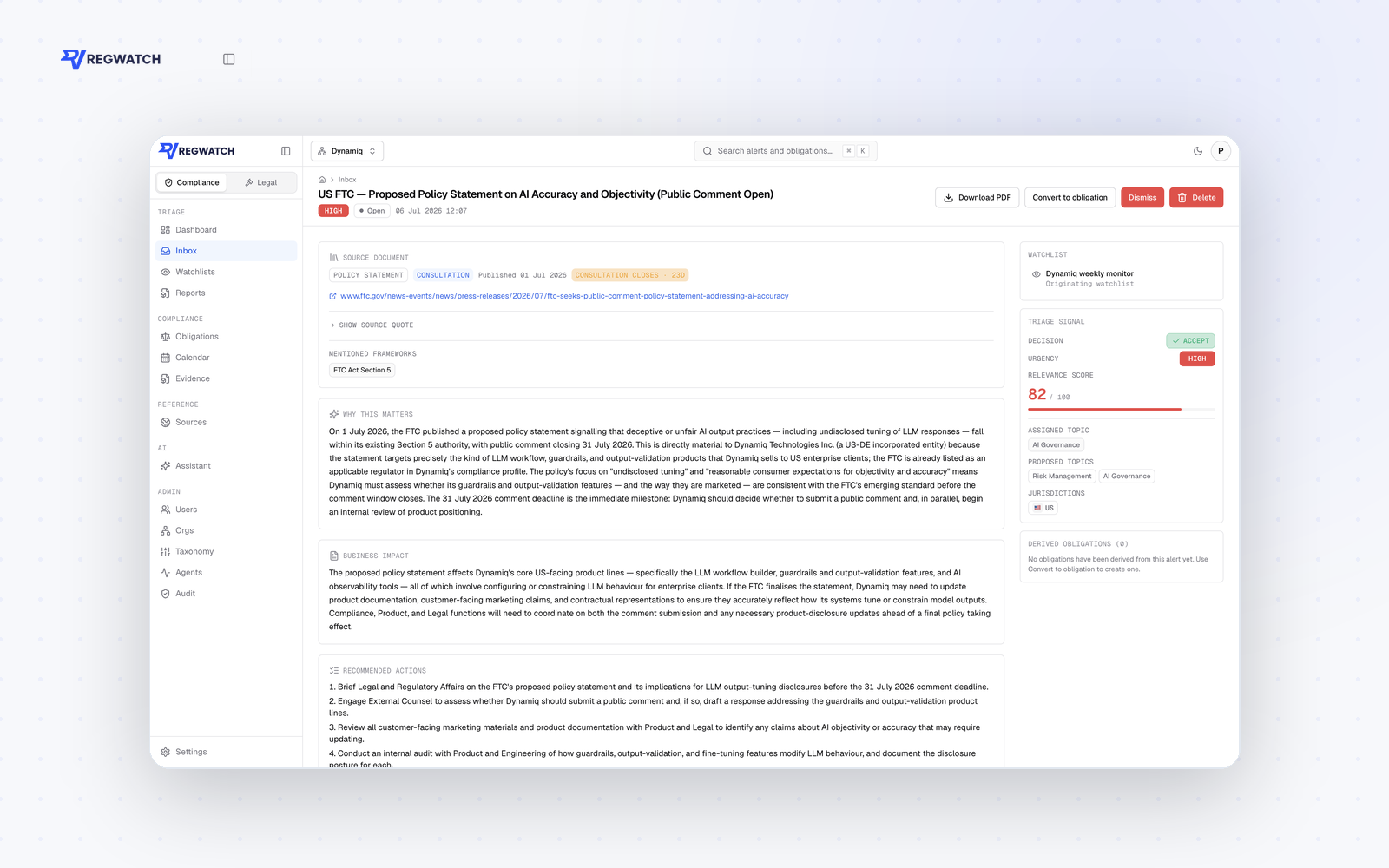
AI alert analysis with business impact
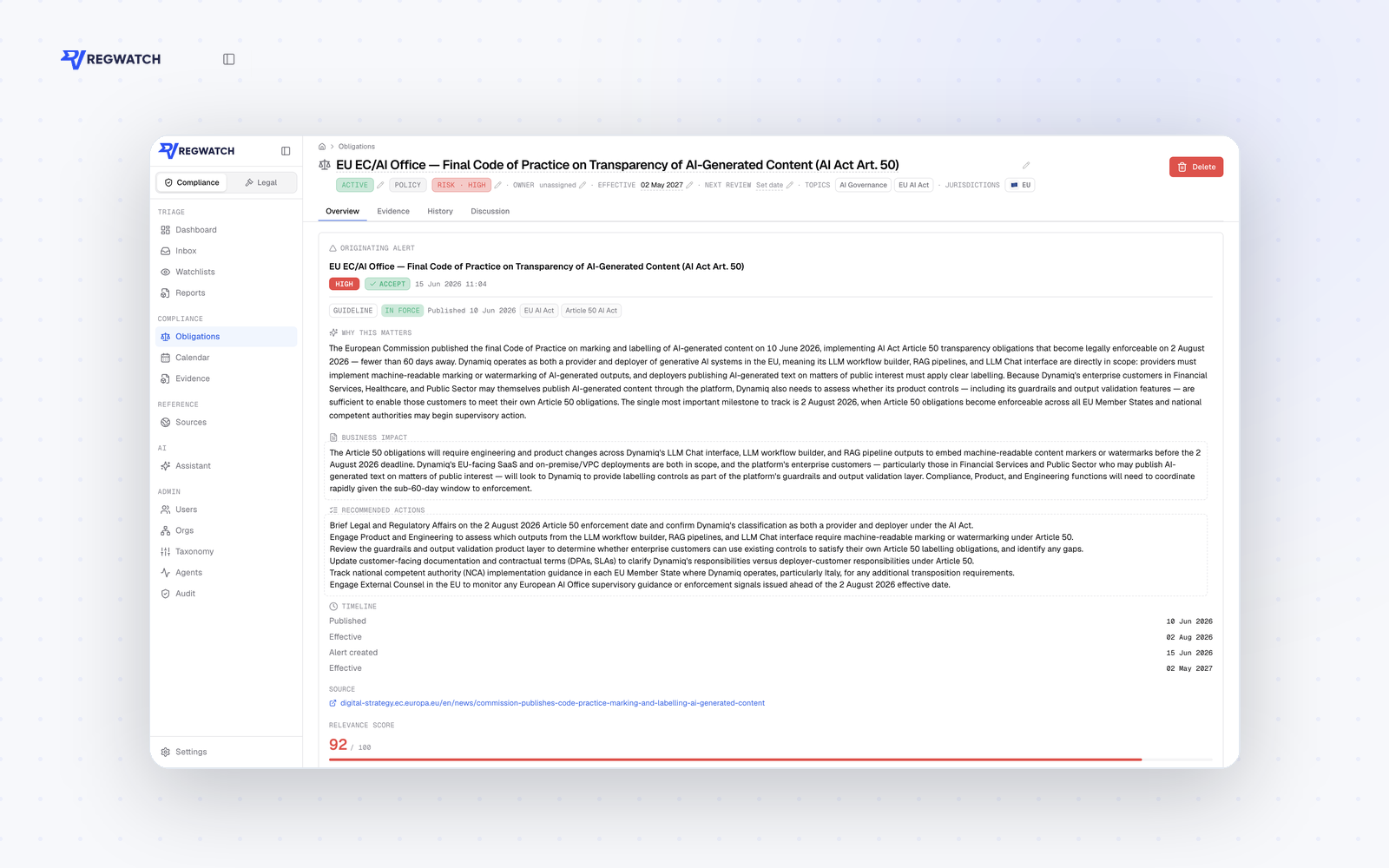
Image
Obligation tracking with owners and evidence
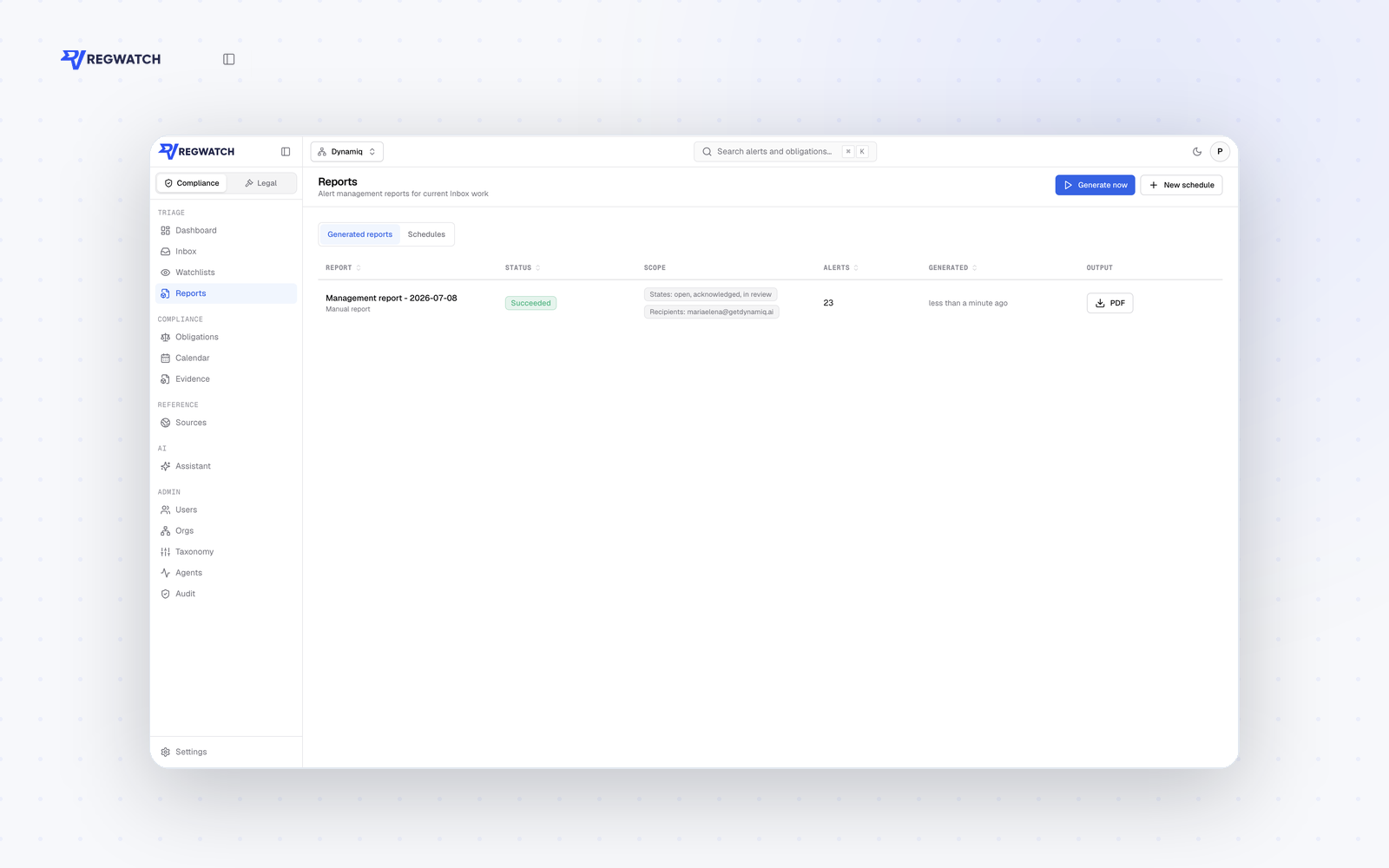
Image
Generate reports based on obligations
RegWatch Private VPC is the self-managed edition of RegWatch's AI-agent-driven regulatory-compliance monitoring platform. It deploys into your own AWS account on Amazon EKS using a Helm chart, so the platform runs inside your VPC under your security and compliance controls.
WHAT RUNS WHERE In your cluster / account (the data plane):
- api - the application API (FastAPI).
- worker - runs the AI monitoring, triage, and analysis jobs.
- scheduler - enqueues monitoring cycles on a schedule.
- web - the user interface.
- PostgreSQL 16 with the pgvector extension (your RDS/Aurora or in-cluster), Redis, and object storage (Amazon S3) for evidence and reports. Leaves your account (disclosed external dependency):
- The worker calls the Anthropic API (Claude) for agent reasoning and an embeddings provider for retrieval. These are required for the AI features; the deployment is not air-gapped. You control egress via your own network policy and allow-list.
CAPABILITIES (identical to the hosted edition)
- Monitor regulatory sources grouped into watchlists, with AI source recommendations.
- Triage findings by relevance and urgency with de-duplication and custom exclusion rules.
- Business-impact analysis and recommended actions on every alert.
- One-click conversion of alerts into structured obligations with owner, deadline, risk level, checklist, and linked evidence.
- Deadline dashboards, configurable PDF reports, and a compliance assistant over your own data.
SECURITY & ARCHITECTURE
- Strict per-organization isolation enforced at the database layer via PostgreSQL row-level security.
- SAML single sign-on and role-based access control with fine-grained permissions.
- Full audit logging of changes; encryption in transit and at rest; evidence retained under your controls.
- Stateless, horizontally scalable services; the worker scales with load (bounded by model API rate limits, not cluster CPU).
DEPLOYMENT Install with standard Helm commands against your EKS cluster. You provide connection details for PostgreSQL (with pgvector), Redis, an S3 bucket, and API keys for the model and embeddings providers via Helm values and Kubernetes secrets. Database schema is created and upgraded automatically via migrations. Full prerequisites and step-by-step instructions are provided in the usage instructions and accompanying documentation.
COMMERCIALS & SUPPORT Private VPC is offered as an annual contract. Multi-year terms, custom scope, and enterprise support are arranged through AWS Marketplace private offers. Support is provided by the RegWatch team with an assigned account manager.
This listing is for the self-managed edition. For the fully hosted multi-tenant service, see the "RegWatch - AI Regulatory Compliance Monitoring" SaaS listing.
Highlights
- Runs in your VPC: the entire data plane deploys to your Amazon EKS cluster via Helm - your network, your KMS keys, your retention. Regulatory data and evidence stay in your account.
- The same AI compliance product: agentic monitoring, business-impact analysis, and one-click structured obligations with owner, deadline, and evidence.
- Enterprise controls: SAML SSO, PostgreSQL row-level multi-tenant isolation, full audit logging, and encryption in transit and at rest.
Details
Sold by
Delivery method
Supported services
Delivery option
Helm chart on Amazon EKS
Latest version
Operating system
Linux
Deployed on AWS
New
Introducing multi-product solutions
You can now purchase comprehensive solutions tailored to use cases and industries.

Features and programs
Financing for AWS Marketplace purchases
AWS Marketplace now accepts line of credit payments through the PNC Vendor Finance program. This program is available to select AWS customers in the US, excluding NV, NC, ND, TN, & VT.

Pricing
Pricing is based on the duration and terms of your contract with the vendor. This entitles you to a specified quantity of use for the contract duration. If you choose not to renew or replace your contract before it ends, access to these entitlements will expire.
Additional AWS infrastructure costs may apply. Use the AWS Pricing Calculator to estimate your infrastructure costs.
Dimension | Description | Cost/12 months |
|---|---|---|
Private VPC | Self-managed RegWatch on Amazon EKS - data plane in your VPC | $24,500.00 |
Dimensions summary
This listing offers one pricing dimension: a Private VPC unit-based contract. You self-manage RegWatch on Amazon EKS, with the data plane running inside your own VPC. Pricing scales by the number of units you purchase under the contract. This is a single deployment option, so there are no tiers or instance sizes to compare. You add units as your monitoring needs grow. The unit-based structure lets you align your contract quantity with your workload. Because you host the data plane in your VPC, you keep control over data location and infrastructure.
Top-of-mind questions for buyers
A unit is the pricing measure for running self-managed RegWatch on Amazon EKS, with the data plane inside your VPC. You buy units to match your monitoring workload and add more as needs grow. The marketplace listing does not further break down what each unit maps to, so confirm exact unit sizing with the vendor.
You self-manage RegWatch on Amazon EKS, so the data plane runs on your own AWS resources. The contract covers the software units, but underlying compute, storage, and networking for your EKS cluster are billed separately by AWS. You keep control over data location and infrastructure sizing.
This listing covers a self-managed deployment on Amazon EKS with the data plane in your VPC. The vendor supports on-premises, cloud, and hybrid setups more broadly, with data visibility controls. For this Marketplace contract, plan around the Private VPC deployment model and confirm other environment options with the vendor.
getdynamiq.ai
Helpful?
Vendor refund policy
All charges are non-refundable except where required by law. If you believe there has been a billing error, or you have exceptional circumstances, contact support@regwatch.io within 30 days of the charge and we will review your request in good faith. Cancellations take effect at the end of the current contract term; no partial-term refunds are provided. For private offers, the refund terms stated in the offer apply.

Legal
Vendor terms and conditions
Upon subscribing to this product, you must acknowledge and agree to the terms and conditions outlined in the vendor's End User License Agreement (EULA) .
Content disclaimer
Vendors are responsible for their product descriptions and other product content. AWS does not warrant that vendors' product descriptions or other product content are accurate, complete, reliable, current, or error-free.
Delivery details
Helm chart on Amazon EKS
Supported services: Learn more
- Amazon EKS
- Amazon EKS Anywhere
Helm chart
Helm charts are Kubernetes YAML manifests combined into a single package that can be installed on Kubernetes clusters. The containerized application is deployed on a cluster by running a single Helm install command to install the seller-provided Helm chart.
Version release notes
RegWatch Private VPC 1.0.6 for Amazon EKS (Helm delivery). Deploys the api, web, worker, scheduler, and legal-api services with automatic database migrations.
Additional details
Usage instructions
PREREQUISITES
- An Amazon EKS cluster (Kubernetes 1.27+) with kubectl and Helm 3.19+ configured.
- PostgreSQL 16 with the pgvector extension (Amazon RDS/Aurora or in-cluster) and a Redis 7 endpoint.
- An Amazon S3 bucket for evidence/report storage.
- An IAM role for service accounts (IRSA) granting the pods S3 access to that bucket and AWS License Manager checkout permissions (license-manager:CheckoutLicense, CheckInLicense, ExtendLicenseConsumption, GetLicense). The containers use the AWS SDK default credential chain - do NOT configure static AWS access keys.
- API keys: an Anthropic API key (Claude) and an embeddings-provider API key (OpenAI).
- Outbound HTTPS egress allowed from the worker pods to api.anthropic.com and the embeddings provider endpoint.
-
SUBSCRIBE & PULL After subscribing, authenticate Helm to the AWS Marketplace registry: aws ecr get-login-password --region us-east-1 | helm registry login --username AWS --password-stdin 709825985650.dkr.ecr.us-east-1.amazonaws.com
-
CONFIGURE VALUES Create a values override file (my-values.yaml). Set: database URL (PostgreSQL+pgvector, postgresql+asyncpg scheme); Redis URL; S3 region/buckets; application secrets (AUTH_SECRET, ANTHROPIC_API_KEY, OPENAI_API_KEY, KMS key ref, download-signing and legal-connector secrets) preferably as a pre-created Kubernetes Secret referenced via secrets.existingSecret; the public authUrl/apiPublicUrl/corsAllowedOrigins; and ingress host/TLS. Grant AWS access exclusively via IAM roles for service accounts: annotate the chart's service account with your IAM role, e.g. serviceAccount.annotations."eks.amazonaws.com/role-arn"=arn:aws:iam::<account>:role/<role>. The chart has no fields for static AWS credentials and the containers never use them. Optional integrations (Sentry, email, SSO/SAML, OpenTelemetry) are enabled by setting their values; leave unset to disable. Image references default to this product's AWS Marketplace ECR repositories.
-
INSTALL helm install regwatch oci://709825985650.dkr.ecr.us-east-1.amazonaws.com/dynamiq/regwatch-helm --version 0.1.8 --namespace regwatch --create-namespace -f my-values.yaml This deploys the api, web, worker, scheduler, and legal-api services. Database schema is created and upgraded automatically via a pre-install migration job.
-
SEED REFERENCE DATA (optional) helm upgrade regwatch ... --set seed.enabled=true runs a post-install job that imports regulatory reference data.
-
ACCESS & FIRST LOGIN Point your DNS/ingress at the web service, open the configured URL, and create the first administrator account. Configure SAML SSO if required.
-
UPGRADE helm upgrade regwatch oci://709825985650.dkr.ecr.us-east-1.amazonaws.com/dynamiq/regwatch-helm --version <new> -f my-values.yaml - migrations run automatically as a pre-upgrade step.
SUPPORT Email support@regwatch.io . Architecture, sizing, and troubleshooting guidance are in the chart README inside the package and in docs/aws-marketplace/install-eks.md.
Support
Vendor support
Email support@regwatch.io for product and technical support (business hours, Monday-Friday). Documentation and guides: https://www.regwatch.io . Private VPC contracts include deployment assistance and an assigned account manager. Architecture, sizing, and troubleshooting guidance are provided in the accompanying documentation.
AWS infrastructure support
AWS Support is a one-on-one, fast-response support channel that is staffed 24x7x365 with experienced and technical support engineers. The service helps customers of all sizes and technical abilities to successfully utilize the products and features provided by Amazon Web Services.
Similar products
Deploy RegWatch Legal entirely inside your own AWS account on Amazon EKS via Helm. The full platform runs in your VPC under your own security controls, so contracts and matter data never leave your account. It includes RegWatch Legal - the AI legal assistant with cited answers over your documents, real Word redlining, tabular review across document sets, project workspaces, and 100+ workflow templates - plus RegWatch's regulatory-compliance monitoring. External dependency: the application makes outbound HTTPS calls to an LLM provider (Anthropic Claude by default) for AI reasoning and embeddings; all other components run in your cluster.
A platform you own, not one you rent. No operator, CRD, or control plane of ours runs in your clusters - only upstream ArgoCD, Traefik, ExternalDNS, ECK, and Headlamp, pre-integrated, version-compatible, and upgraded together three times a year. Cancel and nothing is torn down: every cluster keeps running in your own AWS account. A billion-dollar+ financial institution runs 6 clusters globally on EKS Manager.
RegWatch Legal is an AI workspace for legal documents. Chat with your contracts and get answers with page-level citations, draft and redline Word files with real tracked changes, and extract structured data across entire document sets. Includes 100+ built-in workflows across 11 practice areas and optional US case-law research that verifies citations against court opinions. Fully managed, credit-based pricing: pay for the work performed.

Get EKS monitoring and automated cost optimization in one easy-to-use platform. We show you how much you spend on EKS, and then we reduce your cost by 50 to 75% automatically. With active smart and automated rightsizing and pricing arbitrage, your cluster is continuously efficient.
Customer reviews
No customer reviews yet
Be the first to review this product . We've partnered with PeerSpot to gather customer feedback. You can share your experience by writing or recording a review, or scheduling a call with a PeerSpot analyst.