
Sold by: HabileLabs
Deployed on AWS
Refine is an AI-powered cloud governance platform that helps organizations secure AWS environments, optimize cloud costs, improve compliance, and receive actionable recommendations through intelligent cloud insights, posture management, and automated analysis.
Overview
Image
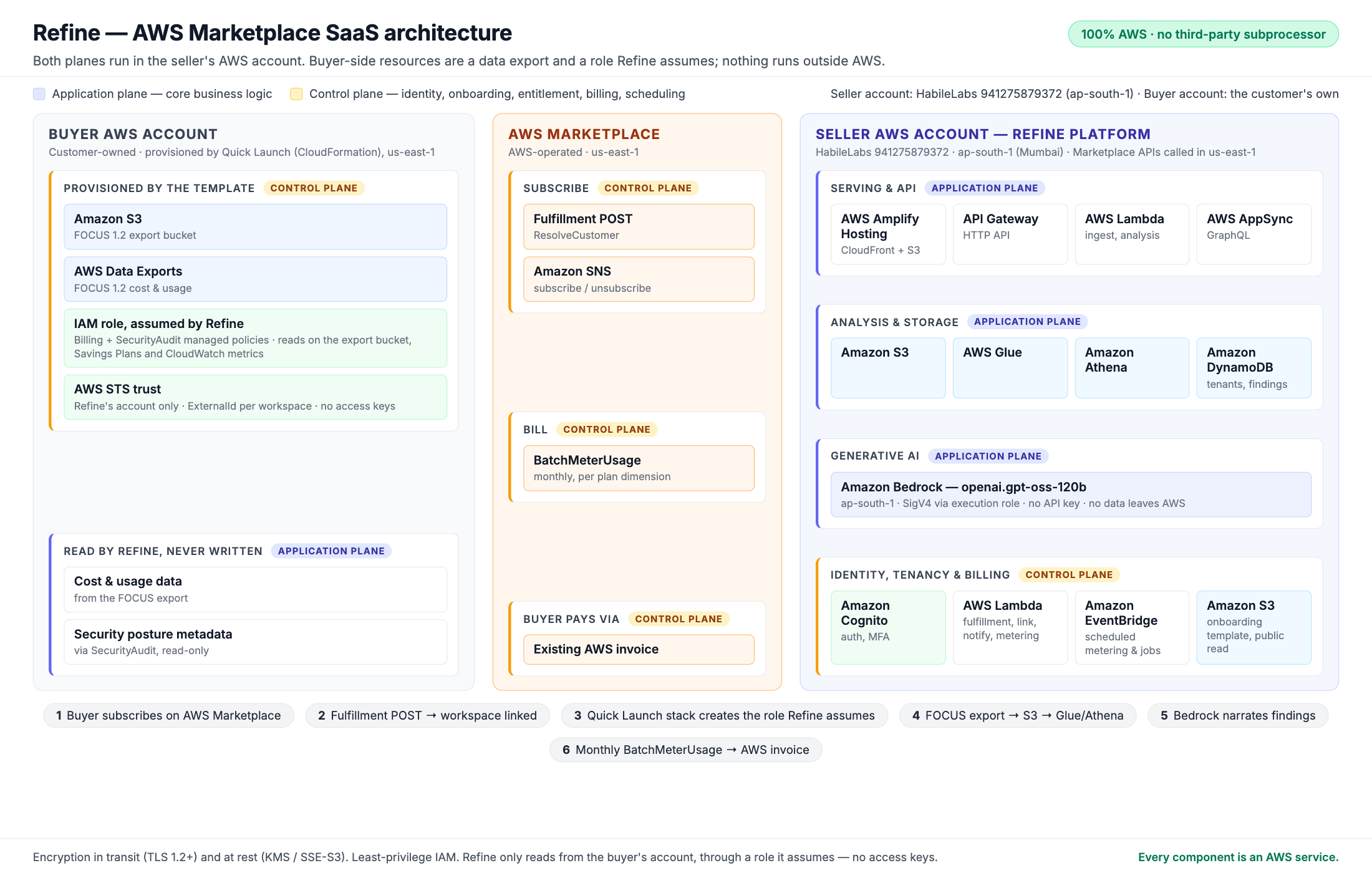
Architecture - every component is an AWS service
Image
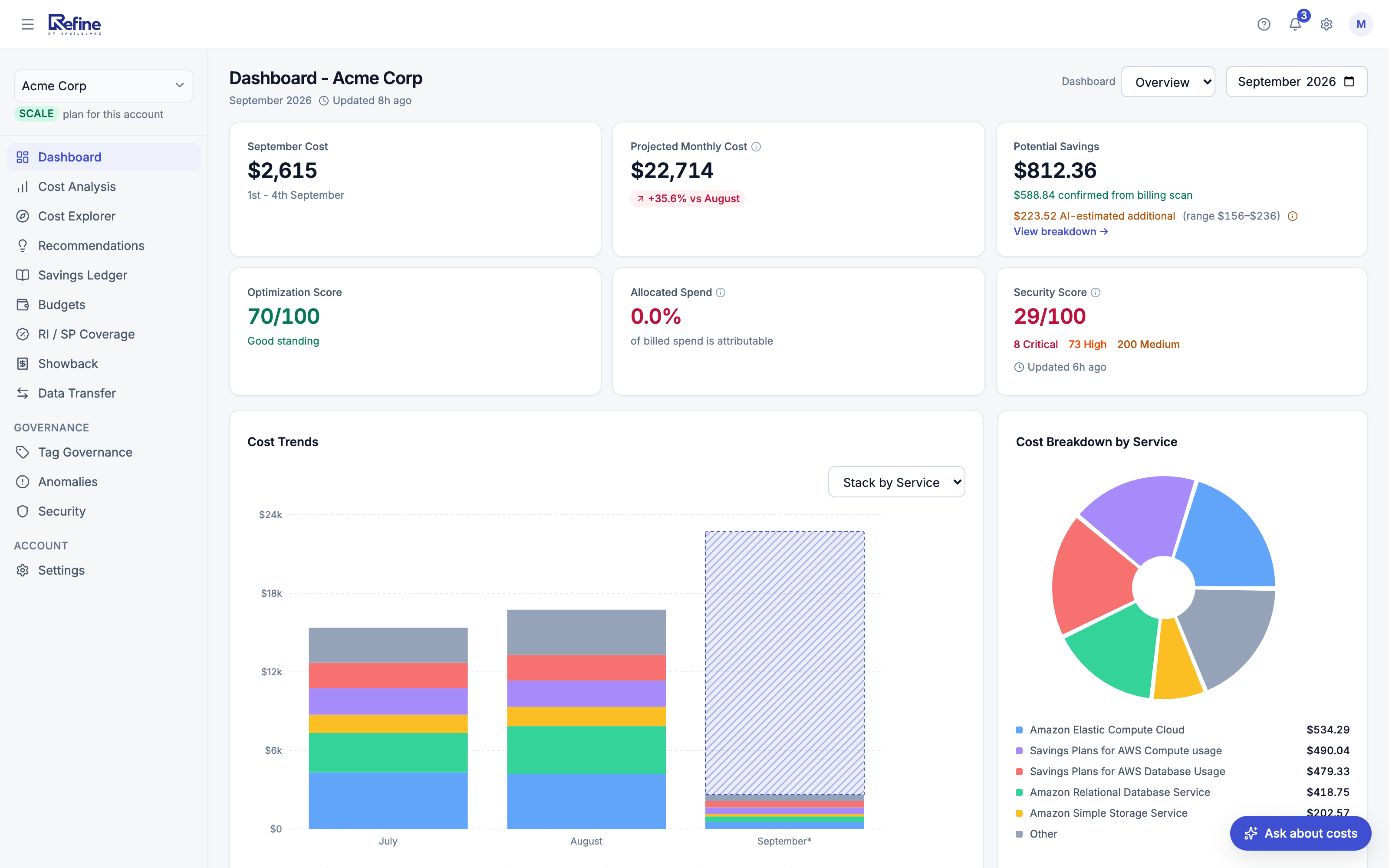
Dashboard - cost, savings, optimization and security scores
Image
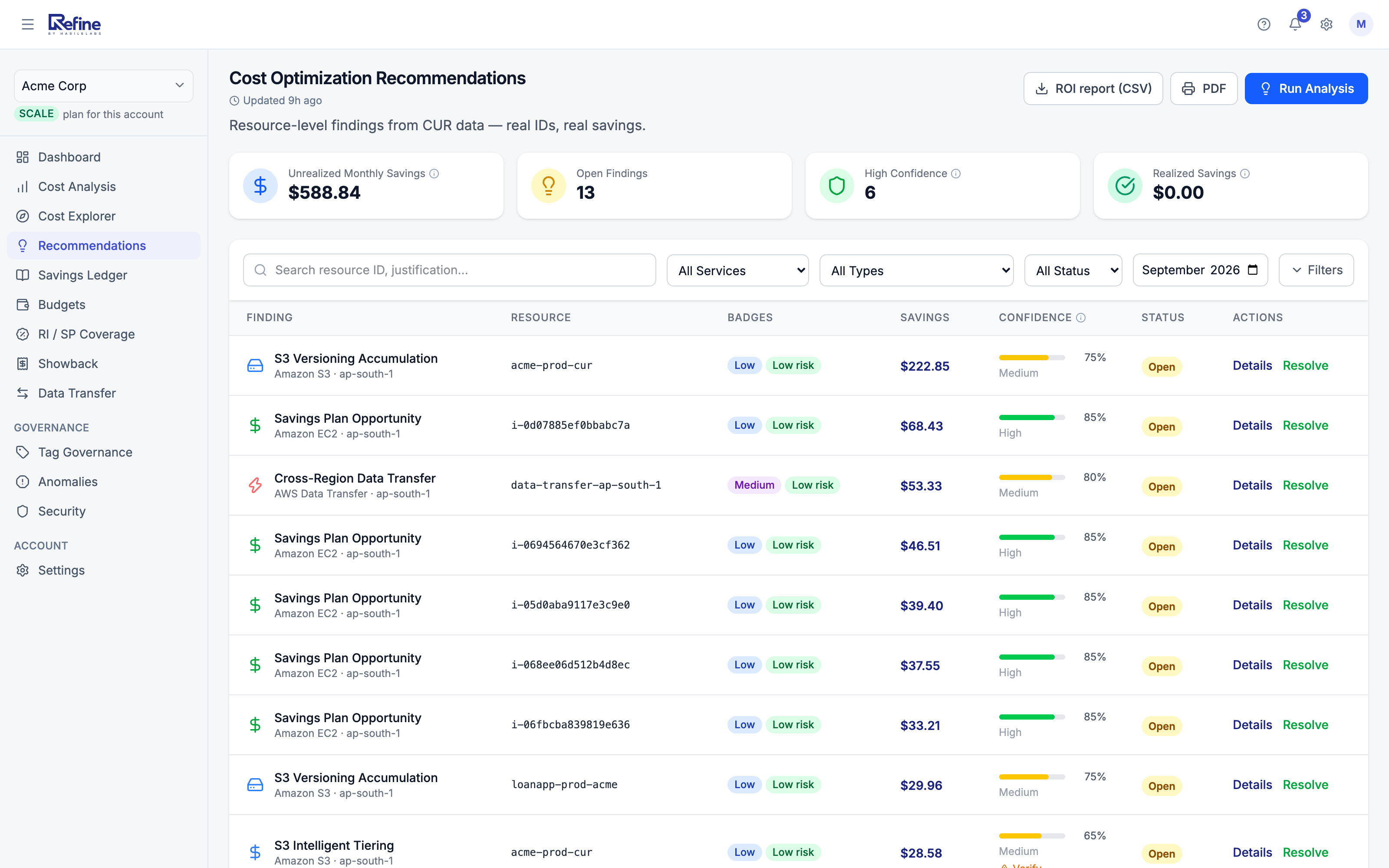
Resource-level savings recommendations
Image
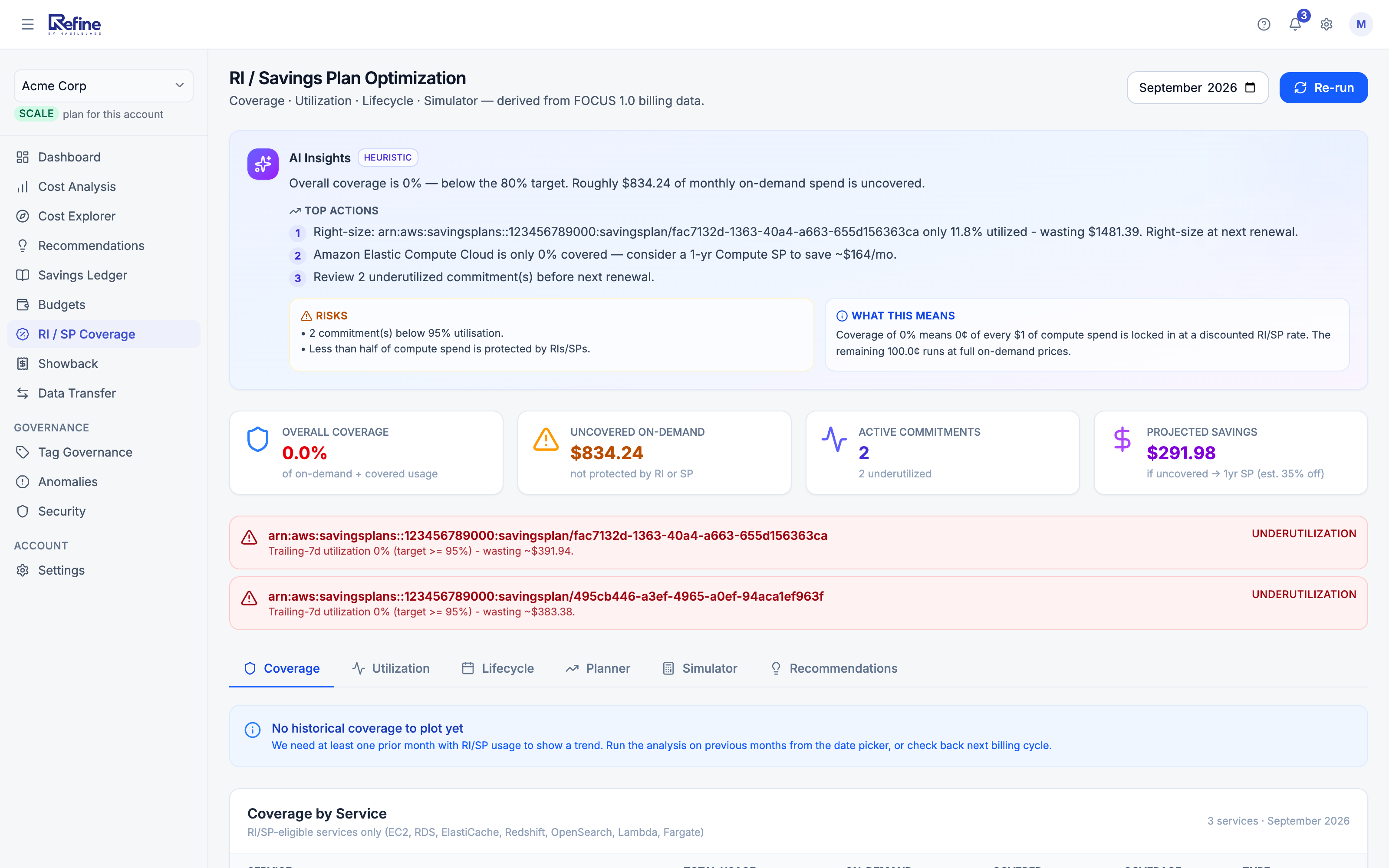
RI and Savings Plan optimization with AI insights
Image
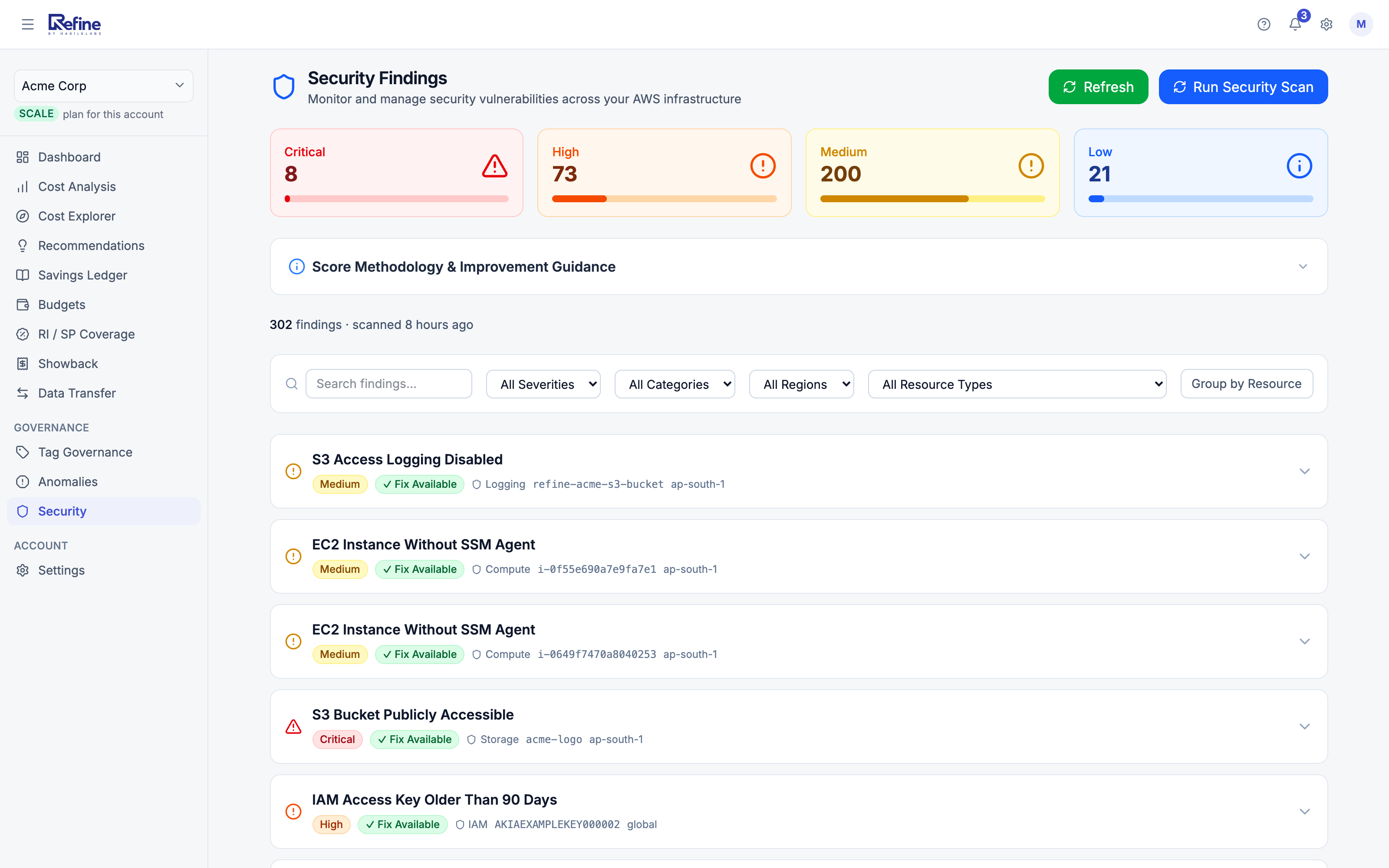
Security findings, prioritized by severity
Image
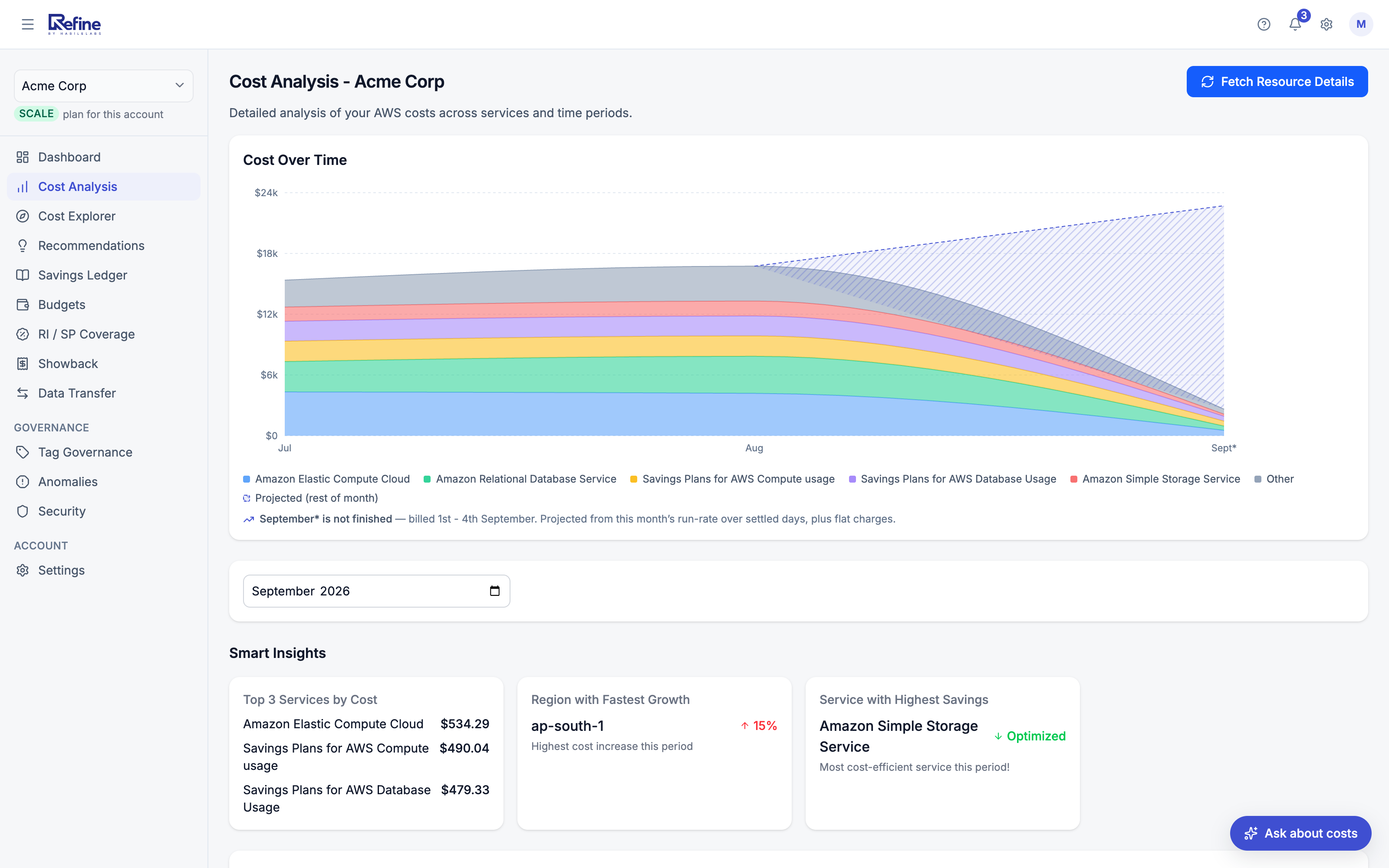
Cost analysis over time with Smart Insights
Image
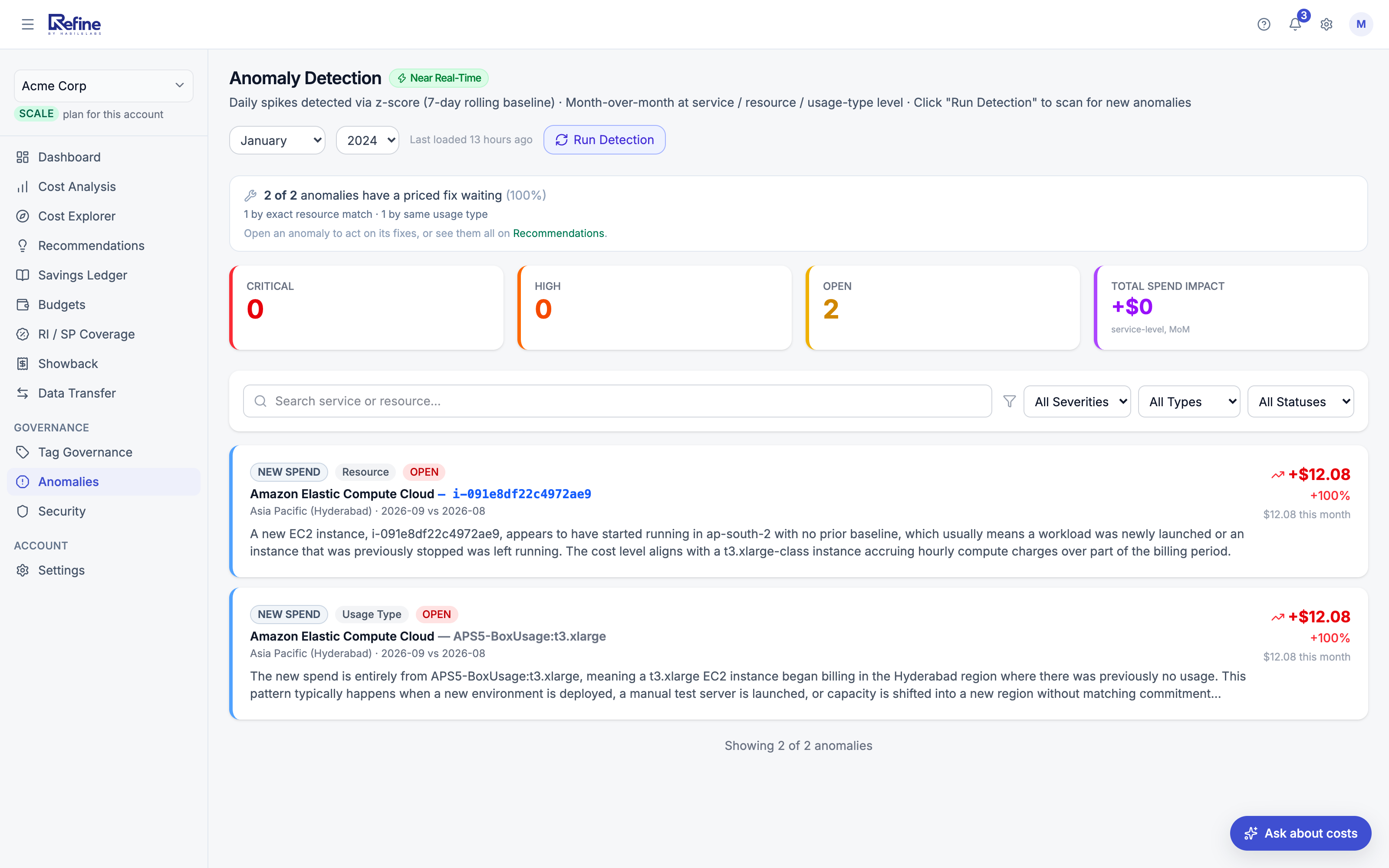
Anomaly detection in near real time
Image
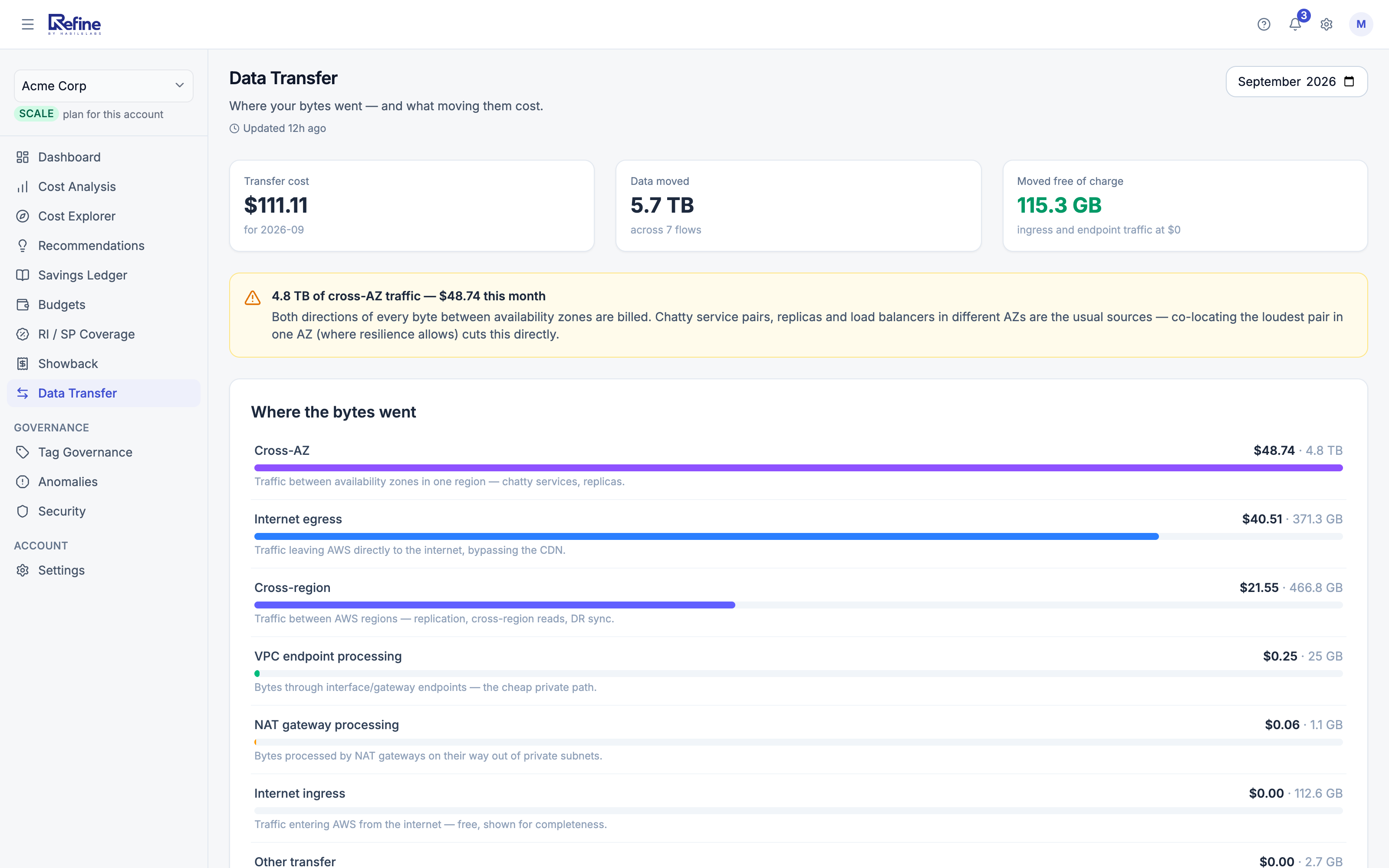
Data transfer - where the bytes went
Image
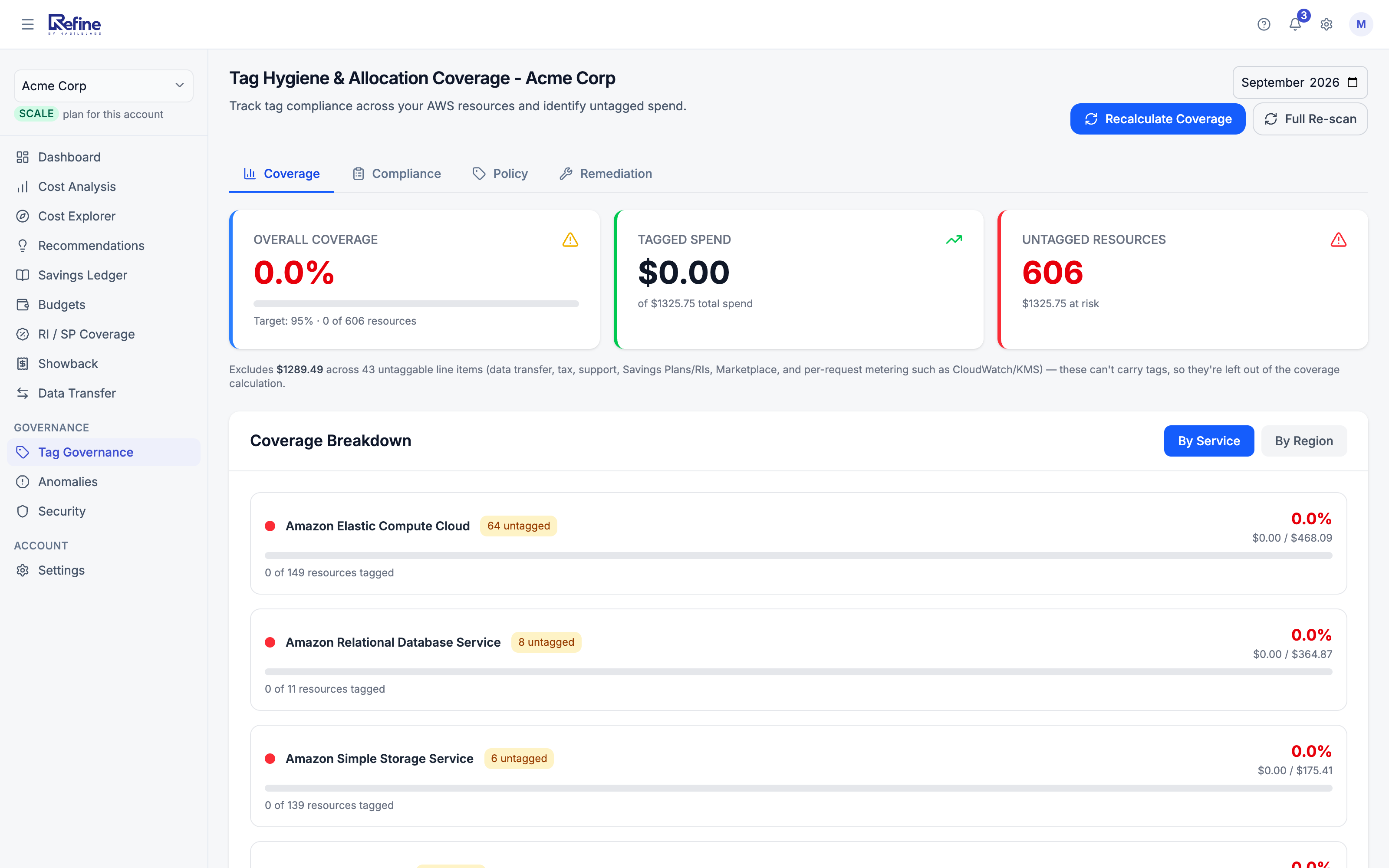
Tag hygiene and allocation coverage
Refine is a comprehensive AI-powered cloud governance platform designed to help organizations gain complete visibility, control, and optimization across their AWS environments. By combining Cloud Security Posture Management (CSPM), cloud cost intelligence, compliance monitoring, and AI-driven recommendations, Refine enables teams to proactively manage security risks, reduce cloud waste, and improve operational efficiency from a single dashboard. Refine continuously analyzes AWS resources and configurations to identify security misconfigurations, compliance gaps, excessive permissions, exposed assets, encryption issues, and other cloud risks. Security findings are prioritized based on severity and business impact, allowing teams to focus on the most critical issues first. AI-powered remediation guidance helps accelerate resolution by providing actionable recommendations tailored to the detected findings. In addition to security monitoring, Refine delivers deep cloud cost visibility and optimization insights. The platform analyzes AWS spending patterns across services, identifies cost anomalies, highlights underutilized resources, and generates intelligent recommendations to reduce unnecessary cloud expenditure. Teams can track spending trends, forecast usage, monitor budgets, and uncover opportunities for significant cost savings across their AWS infrastructure. Refine also strengthens governance and compliance initiatives by continuously evaluating cloud resources against security best practices and compliance standards. Centralized reporting, posture scoring, audit-ready insights, and historical trend analysis help organizations improve compliance readiness and maintain a strong security posture at scale. Built for security teams, FinOps teams, cloud architects, DevOps engineers, and enterprise organizations, Refine provides a unified platform for securing cloud environments, optimizing costs, and driving better cloud governance through AI-powered intelligence.
Key Features AI-Powered Cloud Intelligence Leverage generative AI to analyze cloud resources, security findings, spending patterns, and operational metrics. Receive contextual recommendations, risk explanations, optimization opportunities, and remediation guidance to improve decision-making. Cloud Security Posture Management (CSPM) Continuously monitor AWS resources for security misconfigurations, excessive permissions, public exposure risks, encryption gaps, identity risks, and configuration drift. Gain real-time visibility into your cloud security posture with prioritized findings and remediation guidance. Cloud Cost Optimization & FinOps Insights Analyze AWS spending across services, identify idle or underutilized resources, detect cost anomalies, and uncover optimization opportunities. Improve resource utilization and reduce cloud waste through AI-generated cost-saving recommendations. Compliance & Governance Monitoring Track security and governance posture through continuous assessments, compliance reporting, policy monitoring, and audit-ready dashboards. Improve visibility into organizational cloud governance and risk management. Unified Cloud Visibility View security, compliance, operational, and cost data in a centralized platform. Monitor posture scores, spending trends, findings, recommendations, and cloud health across AWS environments from a single interface. Actionable Recommendations Receive prioritized recommendations with business context, estimated impact, and implementation guidance to help teams quickly address security risks, compliance issues, and cost optimization opportunities.
Plans and Pricing Free - for a single standalone AWS account spending under $2,000/month on AWS: the cost dashboard, potential savings, forecasting, the AI narrative report, top recommendations and the security summary, at no cost. Ingest is never blocked and your data is never truncated. Growth ($100/month) - for organizations spending $2,000 to $10,000/month on AWS. Unlocks the full recommendation and security finding lists, scheduled reports and showback, bulk tag remediation, Slack and Teams routing, on-demand security scans, organization sync and additional AWS account connections. Scale ($200/month) - the same capabilities for organizations spending $10,000 to $50,000/month on AWS. Above $50,000/month AWS spend - contact us for a private offer. Enterprise pricing and terms are negotiated and delivered as a private offer against this listing, so billing still arrives on your existing AWS invoice.
Highlights
- Unified Security & Cost Intelligence: Monitor cloud security posture, compliance readiness, and AWS spending from a single AI-powered platform.
- AI-Driven Recommendations: Automatically identify security risks, compliance gaps, and cloud cost optimization opportunities with actionable remediation guidance.
- Improve Governance & Reduce Cloud Waste: Strengthen cloud governance, increase operational visibility, and uncover opportunities to reduce unnecessary AWS spend.
Details
Features and programs
Financing for AWS Marketplace purchases
AWS Marketplace now accepts line of credit payments through the PNC Vendor Finance program. This program is available to select AWS customers in the US, excluding NV, NC, ND, TN, & VT.

Pricing
Pricing is based on actual usage, with charges varying according to how much you consume. Subscriptions have no end date and may be canceled any time.
Additional AWS infrastructure costs may apply. Use the AWS Pricing Calculator to estimate your infrastructure costs.
Dimension | Description | Cost/unit |
|---|---|---|
Free | Free plan - under $2,000/month AWS spend. | $0.00 |
Growth | Growth plan - $2,000 to $10,000/month AWS spend. Billed monthly. | $100.00 |
Scale | Scale plan - $10,000 to $50,000/month AWS spend. Billed monthly. | $200.00 |
Dimensions summary
You pick a plan based on your prior-month AWS bill, not per-seat or percent-of-spend metering. The three plans form spend bands: Free applies while your AWS spend stays under $2,000 a month and covers one connected account. Growth covers $2,000 to $10,000 a month, and Scale covers $10,000 to $50,000. Growth and Scale share the same features; only the spend band differs. Paid plans bill monthly at a flat price. Your band is measured monthly from your completed AWS bill, so a one-time spike won't force an upgrade.
Top-of-mind questions for buyers
Your plan follows your AWS bill for the prior calendar month, using the BilledCost total after credits. This is the same figure your dashboard shows, so you can audit it anytime. There is no hidden metering layered on top of that number.
Free covers one connected AWS account with cost dashboards, savings totals, forecasting, anomaly alerts, and a Security Score. Growth and Scale unlock unlimited accounts, AWS Organizations sync, step-by-step fix guides, scheduled reports, chat alert routing, and on-demand security scans. Growth and Scale share these features; only the spend band differs.
A single unusual month will not move you up or lock you out. You see an in-product heads-up instead. Only sustained spend above your band shifts you to the next plan. Paid plans are flat monthly prices, so your bill does not rise with a spend spike.
refine.habilelabs.io
Helpful?
Vendor refund policy
To request a refund, contact our support team within 7 days of the billing date with relevant details. Approved refunds will be processed through AWS Marketplace as per their policies.

Legal
Vendor terms and conditions
Upon subscribing to this product, you must acknowledge and agree to the terms and conditions outlined in the vendor's End User License Agreement (EULA) .
Content disclaimer
Vendors are responsible for their product descriptions and other product content. AWS does not warrant that vendors' product descriptions or other product content are accurate, complete, reliable, current, or error-free.
Delivery details
Software as a Service (SaaS)
SaaS delivers cloud-based software applications directly to customers over the internet. You can access these applications through a subscription model. You will pay recurring monthly usage fees through your AWS bill, while AWS handles deployment and infrastructure management, ensuring scalability, reliability, and seamless integration with other AWS services.
Additional details
Usage instructions
Connect your AWS account to Refine
Refine reads your billing and security data from your own AWS account through a read-only IAM role that you create and can delete at any time. Nothing is copied until you connect an account, Refine only ever reads, and no access keys are created or shared.
Option 1 - Quick setup (recommended)
- After you subscribe, finish signing up in Refine, then open Add AWS Account and choose Quick setup.
- Choose Launch the connector stack. It opens a CloudFormation quick-create in US East (N. Virginia) us-east-1 with your workspace's External ID already filled in. AWS Cost and Usage Data Exports only exist in us-east-1, so the stack refuses to create anywhere else and says why.
- When the stack reaches CREATE_COMPLETE, open its Outputs and paste the RoleArn and BucketName values into Add AWS Account.
The stack creates, in your account:
- An S3 bucket to receive the export.
- A FOCUS 1.2 Cost and Usage Data Export delivered to that bucket.
- A read-only IAM role named RefineBillingReader (AWS managed policies job-function/Billing and SecurityAudit, plus read access to that one bucket). It trusts only Refine's AWS account, and only with your workspace's External ID, so no other Refine customer can ask Refine to read your account.
You can also launch the template below from this page. If you do, copy the External ID from the Add AWS Account screen into the ExternalId parameter exactly as shown.
Option 2 - You already have a FOCUS export
Choose I have a FOCUS export in Add AWS Account and launch the same stack with ExistingBucketName set to your export's bucket. It then creates only the role, scoped to that bucket. Nothing existing is touched or duplicated.
Notes
- The first export lands within 24 hours; Refine shows your data once it arrives.
- Deleting the stack removes the role, which ends Refine's access immediately.
- Support: support@habilelabs.io
Resources
Vendor resources
Support
Vendor support
Refine is supported by HabileLabs, an AWS Advanced Tier Services Partner.
Email support@habilelabs.io for onboarding help, billing questions, or a private offer. We reply within one business day, Monday to Friday, 09:00-18:00 IST.
Getting started: after you subscribe, you are taken to Refine to create or choose a workspace, then connect an AWS account from the Add AWS Account screen. Its Launch Stack button opens a CloudFormation quick-create that provisions the FOCUS 1.2 data export, the S3 bucket and a read-only IAM role that Refine assumes with an ExternalId unique to your workspace. No access keys are created or shared. Your first export lands within 24 hours and Refine populates as soon as it arrives.
Billing runs through AWS Marketplace and appears on your existing AWS invoice. Change or cancel a plan from AWS Marketplace > Manage subscriptions in your AWS console; access ends when the cancellation completes. For spend above $50,000 per month, contact us for a private offer.
Documentation: https://refine.habilelabs.io/documentation Security and trust:
AWS infrastructure support
AWS Support is a one-on-one, fast-response support channel that is staffed 24x7x365 with experienced and technical support engineers. The service helps customers of all sizes and technical abilities to successfully utilize the products and features provided by Amazon Web Services.
Similar products

Refine is an AI-powered cloud governance platform that helps organizations secure AWS environments, optimize cloud costs, improve compliance, and receive actionable recommendations through intelligent cloud insights, posture management, and automated analysis.

Nimbus AI Advisor is an autonomous agentic solution that accelerates and simplifies multi-cloud cost analysis, offering GCP-to-AWS comparisons and AI-powered optimization insights in minutes—not days.
CloudKeeper Lens & Tuner are our comprehensive AWS cost visibility and optimization platform that unifies analytics, automation, and AI-driven recommendations to help organizations maximize cloud efficiency. The suite combines CloudKeeper Lens, a powerful cost visibility and insights platform, with CloudKeeper Tuner, a real-time, AI-assisted cost optimization tool integrated directly into your AWS console.

Quantiphi's AI Powered Cloud Scanner Offering is a service that helps customers to optimise cost, performance, security, and compliance of their AWS environments by leveraging nOps
Customer reviews
No customer reviews yet
Be the first to review this product . We've partnered with PeerSpot to gather customer feedback. You can share your experience by writing or recording a review, or scheduling a call with a PeerSpot analyst.