
Sold by: CloudMantra
Deployed on AWS
Forensic accounting engine for SAP S/4HANA. Reconstructs T-accounts from ACDOCA, applies forensic rules and ML anomaly detection, and produces auditable, hash-verified findings offline.
Overview
Image
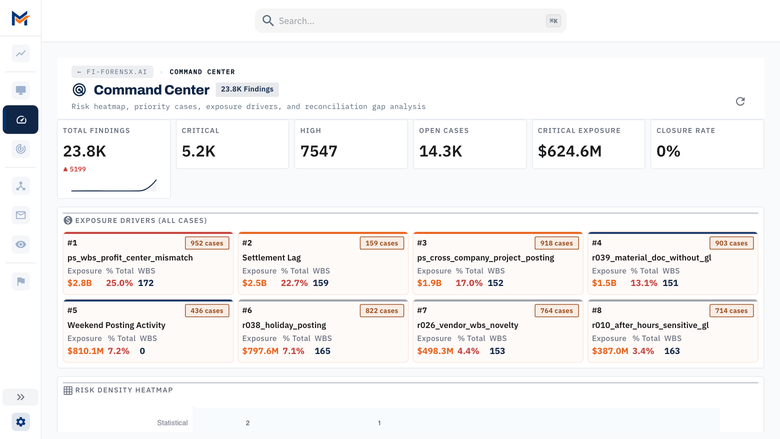
Command Center: findings and exposure
Image
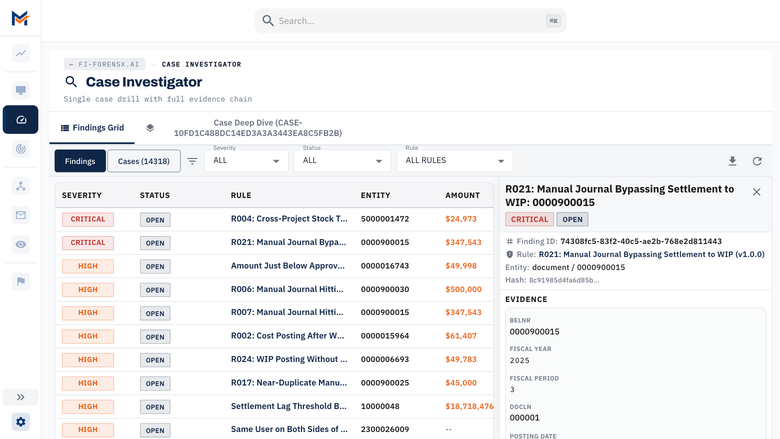
Case Investigator: evidence for every finding
Image
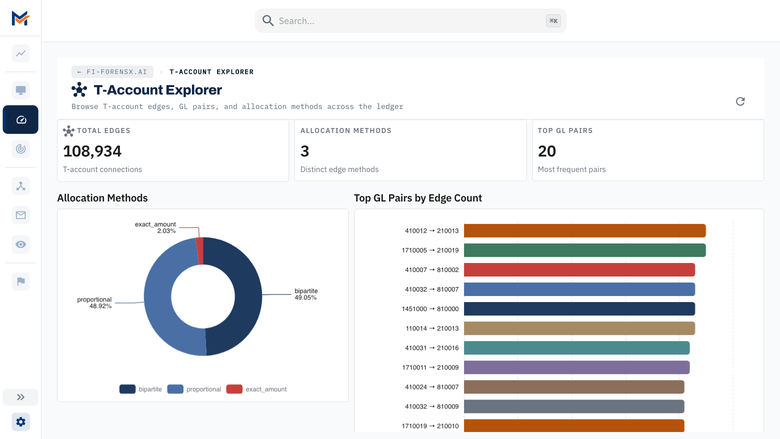
T-Account Explorer: reconstructed postings
Image
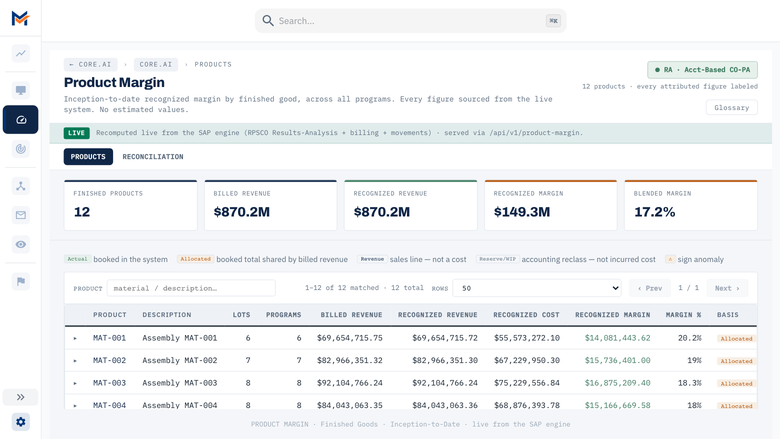
Product Margin across programs
Image
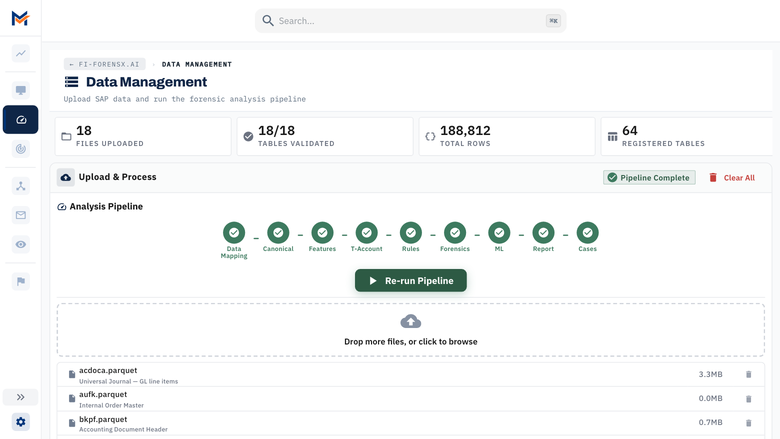
Data Management: one run, nine phases
Image
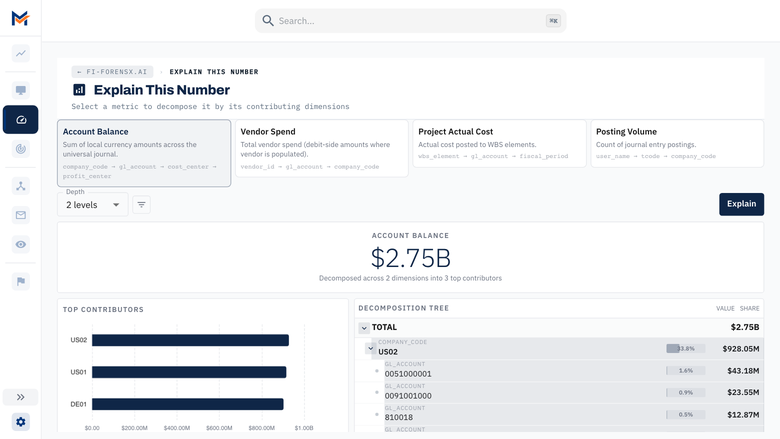
Explain This Number: balance breakdown
Forensic accounting for SAP S/4HANA, run entirely in your own AWS account
MANTRIX Projex AI, part of the MANTRIX platform from CloudMantra, reads your own SAP S/4HANA extract - ACDOCA and the project, controlling and material tables around it - and reconstructs what actually happened in the ledger. It builds T-accounts from the universal journal, follows the money across documents and periods, and applies a catalog of forensic rules, statistical tests and machine-learning anomaly detection to find the postings that do not belong.
What it finds
- Duplicate vendor invoices across documents and periods
- Split requisitions that stay just under approval thresholds
- Three-way-match failures between purchase orders, goods receipts and invoices
- Postings to closed WBS elements
- Vendor bank detail changes shortly before payment
- Margin distortion in project and program reporting
Evidence, not just alerts
Every finding carries a SHA-256 content hash and the T-account trail behind it, so a number can be traced back to the postings that produced it. The same input produces the same findings, and every release is checked against a golden manifest inside the image that ships, because forensic findings that change between runs are not evidence.
Your data stays in your account
The engine runs on an EC2 instance in your VPC. It needs no internet access at runtime, sends no telemetry, and your extract never leaves the instance; it runs in production on an isolated customer network with no route out. The host and containers run in FIPS mode, the TLS layer uses the FIPS 140-3 validated Go Cryptographic Module, IMDSv2 is required, dashboard sessions have idle and absolute time limits, and a JSON security audit log records sign-ins and actions.
Built for work that has to stand up to scrutiny
- Project and program audits
- Disputed claims that need a reproducible financial analysis
- Integrity reviews before a period close
- Investigations where someone has to explain a number to an auditor
It is not a continuous-monitoring SaaS. It analyses an extract you provide, on a machine you control.
How it works
- Launch the AMI in your VPC and attach a data volume
- Load your SAP S/4HANA extract (Parquet, CSV, TXT or DAT)
- Run the analysis from the dashboard
- Review each finding with its evidence and T-account trail
Get started
Subscribe and launch: an instance launched from this listing is licensed automatically, with nothing to request. For pre-sales questions or help, email support@thecloudmantra.com .
Highlights
- Reconstructs the ledger, not just reports on it. Rebuilds T-account debit and credit chains from the SAP S/4HANA universal journal, proven in production on extracts of 100-150 million ACDOCA rows, and traces every finding to the postings behind it, so a number can be explained to an auditor rather than asserted.
- Deterministic and auditable. The same input produces the same findings, each with a SHA-256 content hash, and every release is verified against a golden manifest inside the image that ships. Results you produced last quarter can be reproduced today.
- Built for restricted networks. Runs in production on isolated networks with no internet access, and sends no telemetry. FIPS mode on the host and in the containers, a FIPS 140-3 validated TLS layer, IMDSv2, dashboard session limits and a JSON security audit log.
Details
Sold by
Delivery method
Delivery option
64-bit (x86) Amazon Machine Image (AMI)
Latest version
Operating system
AmazonLinux Amazon Linux 2023 AMI 2023.12.20260930.0 x86_64 HVM kernel-6.1
Deployed on AWS
New
Introducing multi-product solutions
You can now purchase comprehensive solutions tailored to use cases and industries.

Features and programs
Financing for AWS Marketplace purchases
AWS Marketplace now accepts line of credit payments through the PNC Vendor Finance program. This program is available to select AWS customers in the US, excluding NV, NC, ND, TN, & VT.

Pricing
Pricing is based on actual usage, with charges varying according to how much you consume. Subscriptions have no end date and may be canceled any time. Alternatively, you can pay upfront for a contract, which typically covers your anticipated usage for the contract duration. Any usage beyond contract will incur additional usage-based costs.
Additional AWS infrastructure costs may apply. Use the AWS Pricing Calculator to estimate your infrastructure costs.
Dimension | Cost/hour |
|---|---|
r6i.12xlarge Recommended | $41.00 |
r5.8xlarge | $33.00 |
r6i.8xlarge | $33.00 |
r6a.8xlarge | $33.00 |
r5a.12xlarge | $41.00 |
r6a.12xlarge | $41.00 |
r5a.16xlarge | $49.00 |
r6a.16xlarge | $49.00 |
r6i.16xlarge | $49.00 |
r5.24xlarge | $58.00 |
Vendor refund policy
To request a refund, email support@thecloudmantra.com with your AWS account ID and the dates concerned. We reply within one business day. For annual subscriptions we refund the software fee in full within 30 days of purchase, and the unused portion of the term after that. For hourly usage we refund software charges for any period the product was unusable. AWS infrastructure charges are billed by AWS.

Legal
Vendor terms and conditions
Upon subscribing to this product, you must acknowledge and agree to the terms and conditions outlined in the vendor's End User License Agreement (EULA) .
Content disclaimer
Vendors are responsible for their product descriptions and other product content. AWS does not warrant that vendors' product descriptions or other product content are accurate, complete, reliable, current, or error-free.
Delivery details
64-bit (x86) Amazon Machine Image (AMI)
Amazon Machine Image (AMI)
An AMI is a virtual image that provides the information required to launch an instance. Amazon EC2 (Elastic Compute Cloud) instances are virtual servers on which you can run your applications and workloads, offering varying combinations of CPU, memory, storage, and networking resources. You can launch as many instances from as many different AMIs as you need.
Version release notes
Licensing: an instance launched from this AWS Marketplace listing is now licensed automatically by the listing's product code, which AWS signs into the instance's identity document. No licence file is needed. Direct contracts and air-gapped installations continue to use a signed licence file.
Accuracy fixes:
- Credit amounts keep their sign whatever form the extract uses (numbers, decimals, leading or trailing minus). Margins, the project ledger and the GL Explorer were wrong on extracts that did not use SAP's trailing-minus text.
- GL Explorer net is debits minus credits, so a balanced ledger reads balanced.
- Projects show "no budget data" when the extract has no budget, instead of an estimated one.
- Executive View uses the configured revenue base and reports materiality as unavailable when there is none.
Usage instructions now cover access through AWS Systems Manager Session Manager, including the VPC endpoints a subnet without internet access needs.
Base image: Amazon Linux 2023 (kernel 6.1), FIPS mode enabled, IMDSv2 required.
Additional details
Usage instructions
- Launch with storage and access.
Choose an instance type (r6i.12xlarge is recommended for a 100-150M row extract) and, before first boot, attach:
- A second EBS volume for your data, for example 2 TB gp3. The instance formats and mounts it at /var/lib/mantrix-projex-ai automatically. Without one it uses the 30 GB root volume, which suits small extracts only.
- An IAM instance profile with the AWS managed policy AmazonSSMManagedInstanceCore, so you can reach the instance with Session Manager. In a subnet with no internet access, also create VPC interface endpoints for ssm, ssmmessages and ec2messages.
If you prefer SSH, launch with your key pair, allow port 22 from your administration network only, and sign in as ec2-user.
- Find your access code.
Each instance generates its own at first boot and never prints it to the console log.
aws ssm start-session --target <instance-id> sudo cat /root/mantrix-projex-ai-initial-access-code
- Open the dashboard at https://<instance private IP or DNS>/
The certificate is issued by the instance's own certificate authority, so your browser warns once. To remove the warning, install your own certificate in /etc/mantrix/certs/cert.pem and key.pem, then run: sudo projex-ctl restart
- Load your SAP extract.
sudo projex-ctl load /path/to/extract
or copy it to S3 and sync:
aws s3 sync s3://your-bucket/extract/ /var/lib/mantrix-projex-ai/raw/
Accepted formats: Parquet (preferred), CSV, TXT, DAT. The tables the engine uses and the fields it needs are listed in the pre-install checklist at /opt/mantrix/app/docs.
- Licensing.
An instance launched from this listing is licensed automatically: AWS bills the software by the hour, and the product verifies the listing's product code on the instance. No licence file is needed.
- Run the analysis from the Data Management page in the dashboard.
A full run on 100-150M rows takes hours. The dashboard shows phase progress, and the run-health banner says if anything degraded.
Day to day:
sudo projex-ctl status what is running sudo projex-ctl logs tail the engine sudo projex-ctl health is it answering sudo projex-ctl fips cryptographic posture sudo projex-ctl support a bundle to send us, with amounts redacted
Your data lives under /var/lib/mantrix-projex-ai. If you attached a separate volume, detach and keep it when you terminate the instance, then attach it to the replacement: it is mounted untouched, which is the upgrade path. See /opt/mantrix/app/docs/customer/UPGRADING.md.
Support: support@thecloudmantra.com
Support
Vendor support
Support channels
Email support@thecloudmantra.com , Monday to Friday, 09:00-18:00 IST, excluding Indian public holidays.
Response times
- General questions: within one business day
- Software unusable: within four business hours
Diagnostic bundle
Start any request by running "sudo projex-ctl support" on the instance. It collects software versions, configuration with secrets masked, pipeline health and recent logs, with monetary amounts and document numbers removed so the file is safe to send. It is a plain .tar.gz archive - open it and review it before you send it.
Escalation
Contract customers get a named account contact for escalation, agreed at purchase.
Documentation on the instance
Installation and operating documentation ships at /opt/mantrix/app/docs, including the pre-install checklist, the upgrade procedure and the security controls mapping.
AWS infrastructure support
AWS Support is a one-on-one, fast-response support channel that is staffed 24x7x365 with experienced and technical support engineers. The service helps customers of all sizes and technical abilities to successfully utilize the products and features provided by Amazon Web Services.
Similar products

The Medex Video Authentication Platform offers justice and public safety experts a first-ever forensic toolset to automatically inspect a video file, identify the camera that created it, identify any software that was used to edit it, and report modifications that were made to the file.
Traditional maintenance strategies often lead to either unnecessary routine checks or costly downtime due to unexpected equipment failures.AI-assisted predictive maintenance predicts equipment failures before they happen, allowing businesses to perform maintenance only when needed. This optimization reduces the frequency of maintenance, leading to significant cost savings on labor, parts, and downtime.

NaDIng is a scalable, AI-driven solution that predicts natural disaster risk for critical infrastructure. Initially focused on flood risk, it integrates weather data, satellite alerts, and official maps to assess exposure at the asset level. When risks are detected, it activates generative AI to recommend action plans. Fully integrated with SAP, NaDIng turns environmental uncertainty into proactive decisions.

Sovos VAT Filing and Reporting automates global VAT compliance across 60+ jurisdictions with AI-powered automation, ERP integration, and real-time regulatory monitoring.
Customer reviews
No customer reviews yet
Be the first to review this product . We've partnered with PeerSpot to gather customer feedback. You can share your experience by writing or recording a review, or scheduling a call with a PeerSpot analyst.