
Sold by: cloudimg
Deployed on AWS
Free Trial
AWS Free Tier
This product has charges associated with it for seller support. Apache ActiveMQ Classic message broker AMI for DevOps teams - launches production-ready in minutes with auto-generated credentials and multi-protocol support. Backed by 24/7 cloudimg expert support.
Overview
Image
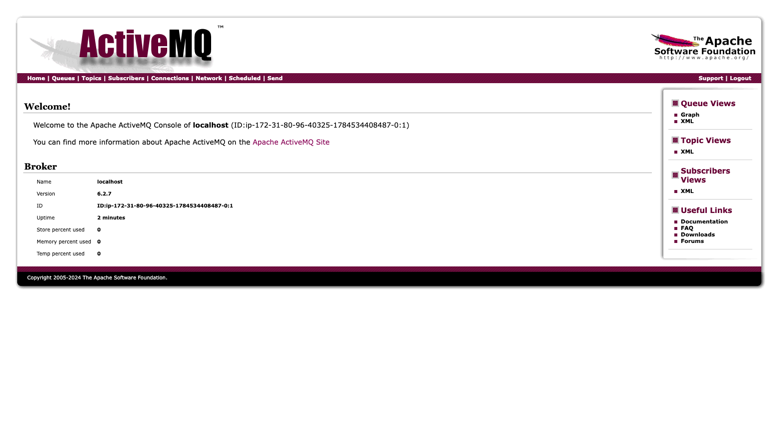
ActiveMQ Classic broker dashboard
Image
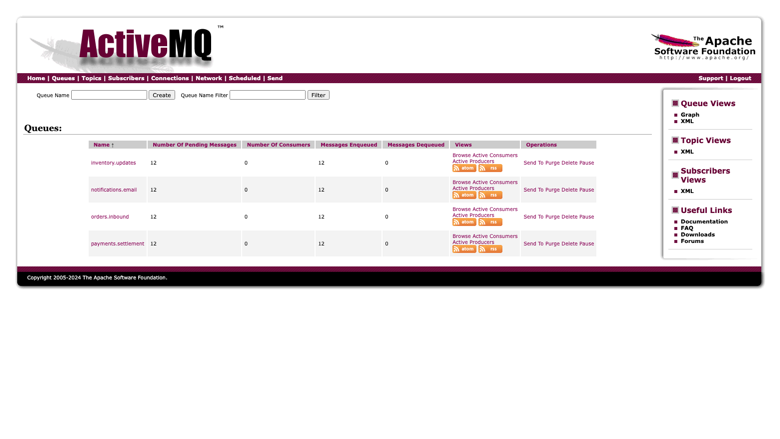
Queue management view
Image
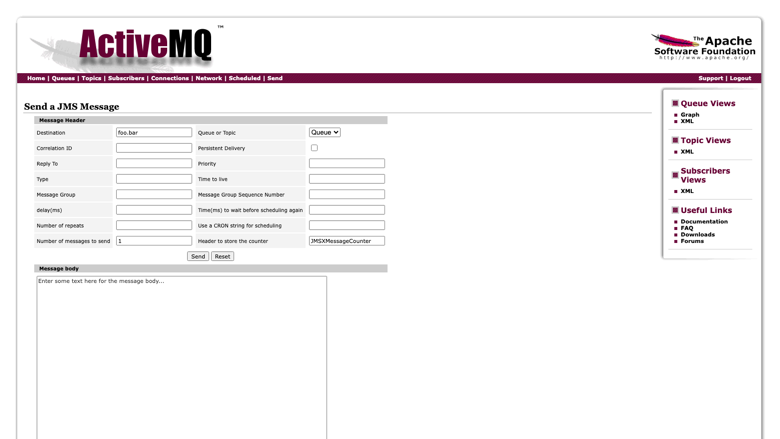
Send a JMS message
This is a repackaged open source software product wherein additional charges apply for cloudimg support services.
Apache ActiveMQ Classic - Production-Ready Message Broker AMI
Apache ActiveMQ Classic is a mature, widely deployed open-source message broker written in Java. It implements the Jakarta Messaging (JMS) API and speaks a broad set of wire protocols, so applications written in Java, Python, .NET, C++, Node.js and more can exchange messages reliably through a single broker. This image is built for DevOps engineers and platform teams running event-driven services on AWS who need a production-ready broker without hours of manual configuration.
This image delivers ActiveMQ Classic fully installed, configured and supervised by systemd, so a working broker and its web management console are available within minutes of launch.
Why This Image Over Alternatives
This build removes the manual work that normally stands between launch and a production-ready broker:
- No shipped default password - Stock ActiveMQ Classic ships a well-known administrator credential for both console and broker. This image contains none. A one-shot first-boot service generates a password unique to your instance, applies it to the console realm and the broker authentication plugin, and proves the rotation worked before recording anything.
- Multi-protocol out of the box - OpenWire plus AMQP, STOMP and MQTT are enabled and verified during the build, so heterogeneous clients connect without editing broker XML.
- Independently resizable storage - The persistence store lives on a dedicated volume mounted by filesystem identifier, so storage grows without rebuilding the instance.
- Console served safely - The management console is bound to the loopback interface and fronted by a reverse proxy, so it is reachable on the standard web port without exposing the raw management listener.
AWS and Ecosystem Integration
- Amazon EBS - The persistence store sits on a dedicated Amazon EBS volume, so message storage can be resized live, snapshotted for backup, and encrypted at rest.
- Apache Camel and Spring Boot - ActiveMQ Classic integrates natively with Camel routes and with Spring Boot through the JMS starter, so message-driven services need no extra adapter.
- Amazon EC2 - Launch on your preferred instance family; the image runs on general-purpose, compute-optimized, or memory-optimized instances depending on your throughput requirements.
Secure First Boot
On first boot a one-shot service generates a fresh administrator password unique to that instance, writes it into the console realm and the broker authentication configuration, then verifies the result: the console must reject an unauthenticated request and the stock default credential, must accept the new one, and a message must round-trip through the broker under it. Only then are the credentials written to a root-only file. If any check fails the service records nothing and retries on the next boot, so the broker never starts with an unproven password.
Application Stack
Apache ActiveMQ Classic is installed from the official Apache binary distribution, checksum-verified, and run by a dedicated unprivileged service account under systemd. The broker exposes the native OpenWire connector along with AMQP, STOMP and MQTT. A reverse proxy serves the loopback-bound console on the standard web port, alongside an unauthenticated health endpoint for load balancer checks.
Getting Started
- Launch the image on your chosen instance type.
- Connect over SSH as the default login user for your operating system variant.
- Retrieve the generated credentials from the root-only file.
- Browse to the instance public address and sign in to the management console.
- Point your messaging clients at the broker connector and start publishing.
For a detailed walkthrough covering security hardening, EBS volume expansion and network-of-brokers configuration, contact cloudimg support for the deployment guide.
Example Use Cases
- Order processing backbone - Publish order events to a durable queue while warehouse, billing and notification services consume them independently. Because the broker persists messages, a consumer that is briefly offline receives its backlog on reconnect.
- Microservices decoupling - Use durable queues and publish-subscribe topics to isolate service boundaries.
- Protocol bridging - Connect legacy JMS applications and modern MQTT or AMQP clients through a single broker.
- Telemetry buffering - Buffer data from field devices over lightweight protocols before downstream processing.
- Job distribution - Reliably distribute tasks across a pool of workers with message acknowledgment.
Next Steps
Launch the AMI and have a working broker in minutes. For architecture guidance, a deployment consultation, or help planning a network-of-brokers topology, reach out to cloudimg support via email or 24/7 live chat.
Highlights
- Apache ActiveMQ Classic preinstalled on Amazon EC2 with systemd supervision, the native OpenWire connector plus AMQP, STOMP and MQTT enabled out of the box, a management console served through a reverse proxy on the standard web port, and the persistence store on a dedicated Amazon EBS volume that can be resized, snapshotted and encrypted independently.
- Zero default passwords ship in the image. A hardened first boot service generates a random password unique to each instance, applies it to both the web console realm and the broker authentication plugin, then runs five automated checks (anonymous access rejected, stock default credential rejected on console and broker, new credential accepted, and a message round trip through the broker) before recording it to a root only file.
- 24/7 technical support from cloudimg engineers by email and live chat, covering broker deployment, protocol and connector configuration, persistence tuning, network of brokers topologies, upgrades and performance troubleshooting. Critical production issues receive a one hour average response time.
Details
Sold by
Delivery method
Delivery option
64-bit (x86) Amazon Machine Image (AMI)
Latest version
Operating system
Ubuntu 24.04
Deployed on AWS
New
Introducing multi-product solutions
You can now purchase comprehensive solutions tailored to use cases and industries.

Features and programs
Financing for AWS Marketplace purchases
AWS Marketplace now accepts line of credit payments through the PNC Vendor Finance program. This program is available to select AWS customers in the US, excluding NV, NC, ND, TN, & VT.

Pricing
Free trial
Try this product free for 7 days according to the free trial terms set by the vendor. Usage-based pricing is in effect for usage beyond the free trial terms. Your free trial gets automatically converted to a paid subscription when the trial ends, but may be canceled any time before that.
Pricing is based on actual usage, with charges varying according to how much you consume. Subscriptions have no end date and may be canceled any time. Alternatively, you can pay upfront for a contract, which typically covers your anticipated usage for the contract duration. Any usage beyond contract will incur additional usage-based costs.
Additional AWS infrastructure costs may apply. Use the AWS Pricing Calculator to estimate your infrastructure costs.
If you are an AWS Free Tier customer with a free plan, you are eligible to subscribe to this offer. You can use free credits to cover the cost of eligible AWS infrastructure. See AWS Free Tier for more details. If you created an AWS account before July 15th, 2025, and qualify for the Legacy AWS Free Tier, Amazon EC2 charges for Micro instances are free for up to 750 hours per month. See Legacy AWS Free Tier for more details.
Dimension | Description | Cost/hour |
|---|---|---|
m5.large Recommended | m5.large | $0.08 |
t3.micro | t3.micro instance type | $0.04 |
t2.micro | t2.micro instance type | $0.04 |
r7iz.2xlarge | r7iz.2xlarge instance type | $0.24 |
c8id.8xlarge | c8id.8xlarge instance type | $0.24 |
g6e.2xlarge | g6e.2xlarge instance type | $0.24 |
m6id.metal | m6id.metal instance type | $0.24 |
p6-b300.48xlarge | p6-b300.48xlarge instance type | $0.24 |
g7.8xlarge | g7.8xlarge instance type | $0.24 |
c6i.2xlarge | c6i.2xlarge instance type | $0.24 |
Vendor refund policy
Refunds available on request.

Legal
Vendor terms and conditions
Upon subscribing to this product, you must acknowledge and agree to the terms and conditions outlined in the vendor's End User License Agreement (EULA) .
Content disclaimer
Vendors are responsible for their product descriptions and other product content. AWS does not warrant that vendors' product descriptions or other product content are accurate, complete, reliable, current, or error-free.
Delivery details
64-bit (x86) Amazon Machine Image (AMI)
Amazon Machine Image (AMI)
An AMI is a virtual image that provides the information required to launch an instance. Amazon EC2 (Elastic Compute Cloud) instances are virtual servers on which you can run your applications and workloads, offering varying combinations of CPU, memory, storage, and networking resources. You can launch as many instances from as many different AMIs as you need.
Version release notes
Initial release of Apache ActiveMQ Classic on this platform, shipping the current stable 6.2.x broker with per instance credential generation and a dedicated persistence volume.
Additional details
Usage instructions
Connect via SSH on port 22 as the default login user for your operating system variant (the user guide lists it per variant). The ActiveMQ Classic management console is served by an nginx reverse proxy on port 80: browse to http://<instance-public-ip>/ and sign in as the 'admin' user. Retrieve the password generated for your instance with: sudo cat /root/activemq-credentials.txt. The native OpenWire broker connector listens on port 61616 and uses the same 'admin' credential; AMQP (5672), STOMP (61613) and MQTT (1883) connectors are also enabled on the broker but are not opened by the default security group, so add rules for them only if you need those protocols, and restrict all broker ports to trusted networks. An unauthenticated health endpoint is available at http://<instance-public-ip>/health for load balancer checks. The persistence store lives under /var/lib/activemq.
Resources
Vendor resources
Support
Vendor support
cloudimg provides 24/7 technical support for this product by email and live chat.
What We Help With
- Broker deployment and initial configuration on Amazon EC2
- Connector and wire-protocol configuration (OpenWire, AMQP, STOMP, MQTT)
- Queue, topic and durable subscription design
- Persistence store tuning and Amazon EBS capacity planning
- Network-of-brokers and high-availability topologies
- Integration guidance for Apache Camel and Spring Boot
- Version upgrades and migration planning
- Troubleshooting connectivity, message backlogs and consumer issues
- Instance sizing recommendations for your workload profile
Response Times
Critical production issues receive a one-hour average response. Our engineers are available around the clock to help resolve production-impacting problems promptly.
Architecture Consultations
Need help planning your broker topology or sizing your deployment? Contact us to schedule a consultation where our engineers can review your requirements and recommend an approach.
How to Reach Us
- Email: support@cloudimg.co.uk
- Live chat: available 24/7
Refunds and Billing
For billing questions or refund requests, contact us at the email above and we will respond promptly.
Whether you are evaluating ActiveMQ Classic for the first time or running production messaging at scale, our team is here to help you succeed.
AWS infrastructure support
AWS Support is a one-on-one, fast-response support channel that is staffed 24x7x365 with experienced and technical support engineers. The service helps customers of all sizes and technical abilities to successfully utilize the products and features provided by Amazon Web Services.
Similar products

Apache Hudi connector with shaded dependencies to work with AWS Glue.

Easily access Iceberg tables and operate DDLs, reads/writes, time-travels, streaming writes on the Iceberg tables.

Bansir offers this software product repackaged where additional charges apply for technical support provided by Bansir Cloud email support@bansircloud.com.

This product has a fee associated with the provision and deployment of the application and AMI support. Apache Superset is a modern, enterprise-ready business intelligence web application.

Enterprise-grade Kafka UI and API for deep visibility, precise control, and instant action across your ecosystem. Kpow is secure, vendor-agnostic, and trusted by Fortune 500s for managing Apache Kafka at scale.
Customer reviews
No customer reviews yet
Be the first to review this product . We've partnered with PeerSpot to gather customer feedback. You can share your experience by writing or recording a review, or scheduling a call with a PeerSpot analyst.