
Sold by: cloudimg
Deployed on AWS
Free Trial
AWS Free Tier
This product has charges associated with it for seller support. Self-hosted GraphQL IDE for developers and API teams: build, send and inspect GraphQL queries, mutations and subscriptions with zero third-party data egress, secured by a unique per-instance credential and backed by 24/7 cloudimg support.
Overview
Image
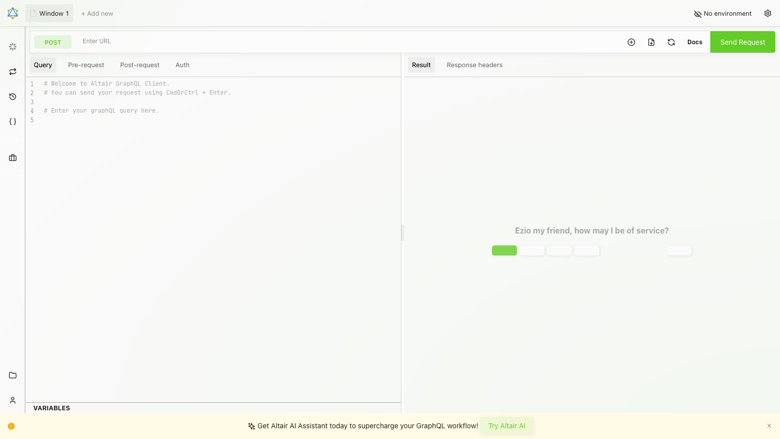
Altair GraphQL IDE
Image
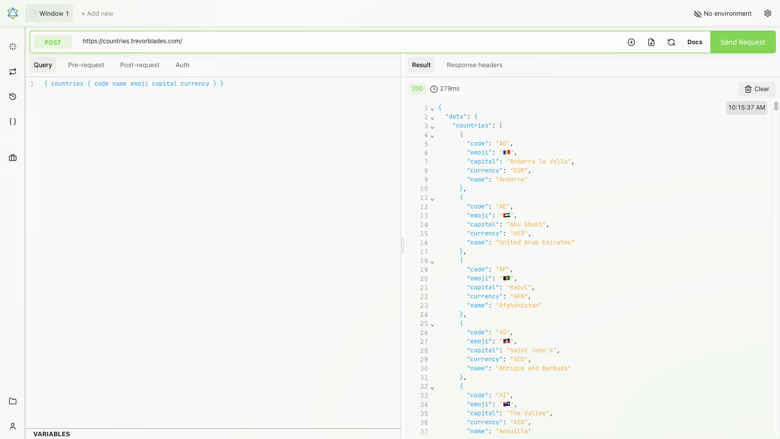
Running a GraphQL query
Image
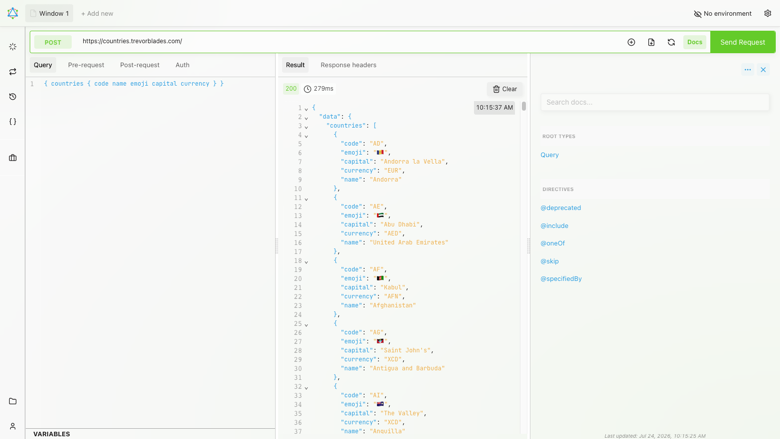
Schema introspection
This is a repackaged open source software product wherein additional charges apply for cloudimg support services.
Overview
Altair GraphQL Client is a self-hosted GraphQL IDE for building, sending and inspecting GraphQL requests entirely from your own browser. It gives you a full-featured query editor with syntax highlighting, autocompletion and inline documentation driven by live schema introspection, so you can explore an API's types, queries, mutations and subscriptions as you write. Set custom headers and variables, run real-time subscriptions, view formatted responses, keep a searchable history, and organise reusable requests into collections. Every request goes directly from your browser to the endpoint you choose - no data passes through a third party, no telemetry is collected, and nothing is stored on the server. This AMI delivers the official pre-built Altair bundle served by nginx and gated by a unique per-instance credential, so a working private GraphQL IDE is operational within minutes of launch.
How It Differs from SaaS and Desktop Alternatives
Unlike hosted GraphQL tools and cloud-based API clients, this product keeps all traffic on your network with zero SaaS data egress. Unlike desktop tools, it provides a shared team URL accessible from any browser without per-seat licensing:
- Zero data egress: requests never leave your network boundary, making it suitable for internal and sensitive APIs
- No per-seat fees: one instance serves your entire team from a single URL
- Real-time subscription support: test GraphQL subscriptions natively
- No telemetry or stored data: purely client-side with no server-side database
- Works offline once loaded: the IDE runs without external dependencies after the initial load
Why This Image vs a Manual Install
Altair's self-hosted build has no built-in authentication, so exposing it on a public IP would make it world-readable. Running it safely yourself means deploying the official static bundle, wiring the bootstrap call the self-hosting shell needs to render, serving it under nginx, and adding an authenticated front door. This image completes every step at build time. The pinned altair-static bundle is published under nginx on port 80, the render bootstrap is injected so the app loads on first request, and the whole application is gated behind HTTP Basic authentication using a credential generated fresh on each instance's first boot.
Authentication
Altair itself has no accounts or login. This image adds a single per-instance HTTP Basic credential (user admin) generated on first boot and written to a root-only file, so the IDE is not publicly readable. A single unauthenticated path is exposed: GET /healthz returns 200 for load-balancer and health probing. Read your per-instance credential with: sudo cat /var/lib/cloudimg/altair-credentials.txt.
Security Hardening
This image follows a defence in depth approach:
- No default or shared credentials: the per-instance HTTP Basic password is generated fresh on every instance's first boot with openssl and is never shipped in the image; the build-time credential is wiped before capture
- Gated front door: the whole application sits behind HTTP Basic authentication, so a scanner or passer-by cannot read the IDE; only GET /healthz is public
- Client-side by design: every request is sent straight from your browser to the endpoint you choose, so there is no server-side database, no stored user data and no telemetry to protect
- Add your own TLS: the front door is plain HTTP on port 80; for production, terminate TLS with your own certificate or an Application Load Balancer and restrict the security group to trusted source IP ranges as the guide describes
Concrete Use Cases
- A private, self-hosted GraphQL IDE: give developers and API teams one self-hosted URL for building, running and inspecting GraphQL queries, mutations and subscriptions instead of a desktop tool or a third-party hosted client
- Schema exploration: use live introspection, autocompletion and inline documentation to explore an unfamiliar GraphQL API's types and operations as you write
- Private, controlled API testing: because every request goes straight from your own browser to your endpoint and nothing is stored on the machine, test internal and sensitive APIs on a network you control
AWS Integration
Deploy on any EC2 instance type; the recommended size is m5.large. Put the instance behind an Application Load Balancer to terminate TLS with your own certificate, and restrict the security group to trusted source IP ranges. Because the application is entirely static and client-side there is no database to back up.
About cloudimg
cloudimg publishes pre-hardened AMIs on AWS Marketplace with 24/7 support by email and live chat, covering deployment, adding your own TLS certificate, restricting network access, and reverse-proxy configuration.
Highlights
- Private, self-hosted GraphQL IDE with zero third-party data egress. Unlike hosted SaaS tools and API clients, every request stays on your network - no telemetry, no stored data, no per-seat licensing. One instance serves your entire team from a single browser-accessible URL with live schema introspection, autocompletion, real-time subscription support, searchable history, and reusable request collections.
- Secure by default with a unique per-instance credential generated fresh on first boot - never shipped in the image. The entire application is gated behind HTTP Basic authentication so the IDE is never publicly readable. Only a health-check endpoint is exposed unauthenticated. The paired deployment guide covers adding your own TLS certificate via an Application Load Balancer and restricting network access to trusted IP ranges for production use.
- Operational in minutes with 24/7 cloudimg support. The pinned altair-static bundle is served by nginx with the render bootstrap pre-wired so the IDE loads on first request. No manual configuration required - launch an EC2 instance, retrieve your credential, and start querying. cloudimg provides 24/7 technical support via email and live chat for deployment, TLS setup, network hardening, and troubleshooting.
Details
Sold by
Categories
Delivery method
Delivery option
64-bit (x86) Amazon Machine Image (AMI)
Latest version
Operating system
Ubuntu 24.04
Deployed on AWS
New
Introducing multi-product solutions
You can now purchase comprehensive solutions tailored to use cases and industries.

Features and programs
Financing for AWS Marketplace purchases
AWS Marketplace now accepts line of credit payments through the PNC Vendor Finance program. This program is available to select AWS customers in the US, excluding NV, NC, ND, TN, & VT.

Pricing
Free trial
Try this product free for 7 days according to the free trial terms set by the vendor. Usage-based pricing is in effect for usage beyond the free trial terms. Your free trial gets automatically converted to a paid subscription when the trial ends, but may be canceled any time before that.
Pricing is based on actual usage, with charges varying according to how much you consume. Subscriptions have no end date and may be canceled any time. Alternatively, you can pay upfront for a contract, which typically covers your anticipated usage for the contract duration. Any usage beyond contract will incur additional usage-based costs.
Additional AWS infrastructure costs may apply. Use the AWS Pricing Calculator to estimate your infrastructure costs.
If you are an AWS Free Tier customer with a free plan, you are eligible to subscribe to this offer. You can use free credits to cover the cost of eligible AWS infrastructure. See AWS Free Tier for more details. If you created an AWS account before July 15th, 2025, and qualify for the Legacy AWS Free Tier, Amazon EC2 charges for Micro instances are free for up to 750 hours per month. See Legacy AWS Free Tier for more details.
Dimension | Description | Cost/hour |
|---|---|---|
m5.large Recommended | m5.large | $0.05 |
t2.micro | t2.micro instance type | $0.04 |
t3.micro | t3.micro instance type | $0.04 |
c5a.12xlarge | c5a.12xlarge instance type | $0.24 |
c5a.16xlarge | c5a.16xlarge instance type | $0.24 |
c5a.24xlarge | c5a.24xlarge instance type | $0.24 |
c5a.2xlarge | c5a.2xlarge instance type | $0.24 |
c5a.4xlarge | c5a.4xlarge instance type | $0.24 |
c5a.8xlarge | c5a.8xlarge instance type | $0.24 |
c5a.large | c5a.large instance type | $0.08 |
Vendor refund policy
Refunds available on request.

Legal
Vendor terms and conditions
Upon subscribing to this product, you must acknowledge and agree to the terms and conditions outlined in the vendor's End User License Agreement (EULA) .
Content disclaimer
Vendors are responsible for their product descriptions and other product content. AWS does not warrant that vendors' product descriptions or other product content are accurate, complete, reliable, current, or error-free.
Delivery details
64-bit (x86) Amazon Machine Image (AMI)
Amazon Machine Image (AMI)
An AMI is a virtual image that provides the information required to launch an instance. Amazon EC2 (Elastic Compute Cloud) instances are virtual servers on which you can run your applications and workloads, offering varying combinations of CPU, memory, storage, and networking resources. You can launch as many instances from as many different AMIs as you need.
Version release notes
Initial release of Altair GraphQL Client as a ready-to-use self-hosted GraphQL IDE, built from the official pinned altair-static distribution and served by nginx, with the whole app gated behind a unique per-instance HTTP Basic credential generated on each instance's first boot.
Additional details
Usage instructions
Connect via SSH on port 22 as the default login user for your operating system variant (for the Ubuntu 24.04 variant the user is ubuntu). Read the per-instance web credential with: sudo cat /var/lib/cloudimg/altair-credentials.txt. Open Altair in a browser at http://<instance-public-ip>/ and answer the HTTP Basic prompt with the ALTAIR_USERNAME (admin) and ALTAIR_PASSWORD from that file. Altair runs entirely in your browser and connects directly to whatever GraphQL endpoint you enter; there is no backend, database or account. A single unauthenticated path is exposed for probing: GET /healthz returns 200. The front door is plain HTTP on port 80 - for production, terminate TLS with your own certificate or an Application Load Balancer and restrict the security group to trusted source IP ranges. The service runs under systemd: systemctl status nginx. The instance security group opens ports 22 and 80.
Resources
Vendor resources
Support
Vendor support
cloudimg Support
cloudimg provides 24/7 technical support for this product by email and live chat.
Contact: support@cloudimg.co.uk
What we help with:
- Deployment and initial configuration
- Adding TLS with your own domain and certificate, and reverse-proxy configuration
- Restricting network access to trusted source IP ranges
- Performance tuning and troubleshooting
- Updates and security patching guidance
Refunds: For refund requests, contact support@cloudimg.co.uk with your AWS account ID and subscription details.
AWS infrastructure support
AWS Support is a one-on-one, fast-response support channel that is staffed 24x7x365 with experienced and technical support engineers. The service helps customers of all sizes and technical abilities to successfully utilize the products and features provided by Amazon Web Services.
Similar products

Altair Accelerator is a high-throughput, enterprise-grade job scheduler designed to meet the complex demands of semiconductor and electronic design automation (EDA) and high-performance computing (HPC).
Is your HPC parallel computing environment on AWS—whether Slurm-based or using other schedulers—taking too long to deliver results? Our expert-led assessment identifies performance bottlenecks and cloud cost inefficiencies across large-scale parallel workloads.
Customer reviews
No customer reviews yet
Be the first to review this product . We've partnered with PeerSpot to gather customer feedback. You can share your experience by writing or recording a review, or scheduling a call with a PeerSpot analyst.