Sold by: NeuraFlash
Deployed on AWS
NeuraFlash Desktop extends Amazon Connect Workspace with agent and supervisor wallboards, live call monitoring, transfer summaries and business operations tools - to help improve CSAT and first call resolution.
Overview
Image
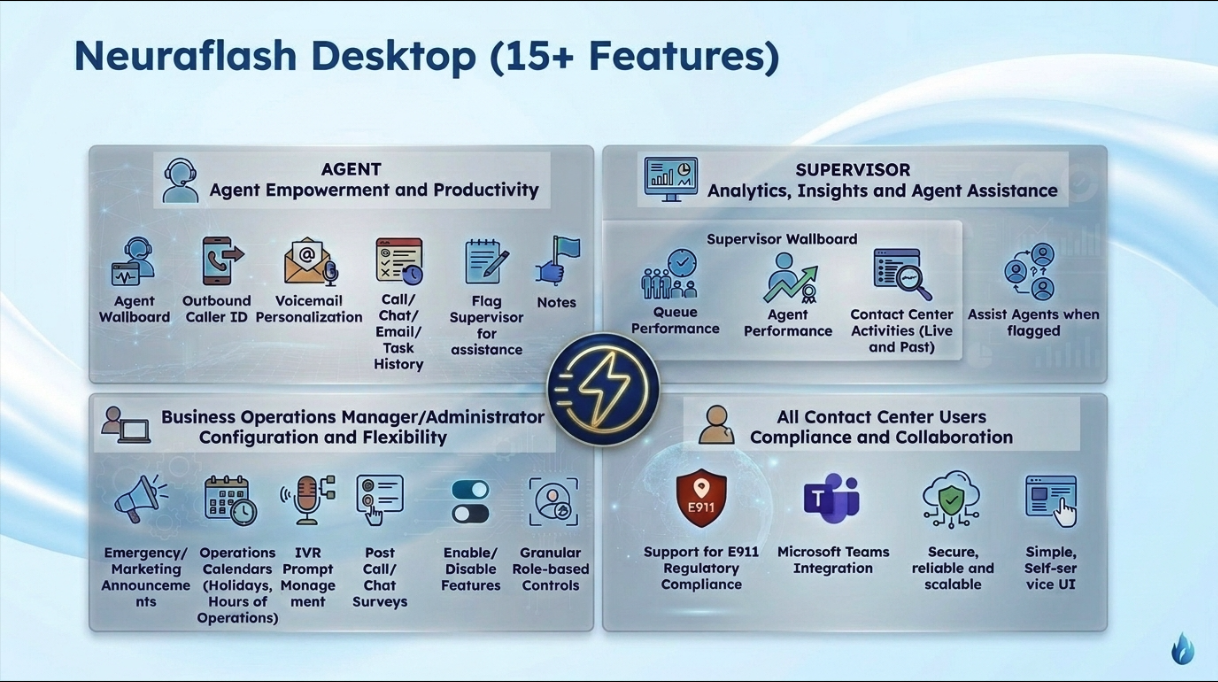
Features At a Glance

Video
Product video
NeuraFlash Desktop for Amazon Connect - Extend Your Contact Center with Native AWS-Powered Features
NeuraFlash Desktop for Amazon Connect (ACE) is a native solution that extends the Amazon Connect Workspace with purpose-built tools for human agents, supervisors, administrators and business operations managers. Rather than building a custom Contact Control Panel, NeuraFlash Desktop enhances the existing Amazon Connect experience, scaling with AWS growth and innovation to drive measurable business results.
Why NeuraFlash Desktop?
Contact centers running on Amazon Connect often face operational gaps that slow down human agents, limit supervisor visibility and create administrative overhead. NeuraFlash Desktop closes those gaps by delivering the capabilities teams need most, directly within the Amazon Connect Workspace.
Outcomes you can work toward:
- Higher customer satisfaction (CSAT) through faster, more personalized interactions
- Lower cost to serve through shorter handle times and fewer repeat questions
- Better first call resolution as human agents resolve issues without escalation
- Stronger collaboration across teams through Microsoft Teams
- More efficiency and visibility for supervisors and administrators
Agent Productivity Tools
- Agent Wallboard: See real-time queue volume, human agent availability and longest waits, compare your performance with benchmarks, and plan breaks around live demand
- Recent Activities: Search the past two weeks (configurable) of calls, chats, emails and tasks by date, number, sentiment or notes, and take notes during contacts and after-call work
- Contact Summary Notes: Review a summary of each contact - issue, actions taken, outcome and next steps - alongside human agent notes
- Transfer Summary: When a call is transferred from an AI agent to a human agent, the summary appears in NeuraFlash Desktop so the customer does not have to repeat themselves
- Disposition Codes: Tag each contact with up to five disposition codes, shown by queue and visible in notes and recent activities
- Outbound Caller ID Selection: Choose from caller ID lists managed by your business operations team, or your own direct number, before placing a call
- Personal Voicemail: Set a text-to-speech greeting for your direct number in any language Amazon Connect supports
- Microsoft Teams Integration: Update your Teams presence automatically when you accept a call, and see teammates' real-time status in the workspace
Supervisor Visibility and Coaching
- Supervisor Wallboard: Track queue performance in real time and over time, see human agent status and handling time, rank human agents, and review team activity and notes
- Live Call Monitoring: View all live activity from the supervisor wallboard, and monitor or barge in on active calls
- Flag a Supervisor: Human agents flag a supervisor during a call or chat; supervisors get a badge and audible alert, accept the flag, and monitor or join the contact
Business Operations Management
- Announcements: Schedule emergency and marketing announcements by phone number and queue, reuse multilingual messages and track playback counts
- Operations Calendars: Manage hours, breaks, holidays and temporary closures by time zone, with a linked IVR message, to respond quickly to planned and unplanned events
- Message Library: Create and manage IVR prompts by message type, such as greetings, menus and queue messages
- Post-Call and Chat Surveys: Link multilingual surveys to phone numbers or queues, edit questions in real time, view analytics on the supervisor wallboard and export results to CSV
Administration and Compliance
- Role-Based Access Control: Assign tags to human agents, supervisors, business operations users and administrators to control access to features and tools
- Feature Controls: Turn features on or off by user group to match how your organization works
- E911 Location Support: Human agents verify their address at login, store up to five validated addresses and switch between them during a session
Use Case: Reducing Handle Times and Transfers
Illustrative scenario: A customer is transferred from an AI agent to a human agent. The human agent sees the transfer summary in NeuraFlash Desktop, so the customer does not repeat themselves, and has activity history, live queue metrics and Teams presence in one workspace to resolve the call without another transfer. The supervisor sees the call on the wallboard and can monitor or barge in. The business operations team updates a holiday schedule and IVR message from one place.
Built for Amazon Connect
NeuraFlash Desktop is a native extension of the Amazon Connect Workspace, not a standalone application. It integrates directly with your existing Amazon Connect instance and scales alongside AWS services.
To learn how NeuraFlash Desktop can enhance your Amazon Connect contact center, reach out to the NeuraFlash team.
Highlights
- Native Workspace Extension - No Custom CCP Required: Unlike custom-built Contact Control Panels that require ongoing maintenance and fall behind AWS releases, NeuraFlash Desktop extends the native Amazon Connect Workspace with pre-built tools for every role. Human agents get recent activity history, contact and transfer summaries, outbound caller ID selection, personal voicemail, note-taking, disposition codes and Teams integration without leaving their existing workspace.
- Real-Time Supervisor Wallboards and Live Call Monitoring: Supervisors gain a dedicated wallboard with real-time queue metrics, historical trend analysis and individual human agent activity insights that go beyond the native Amazon Connect dashboards. Supervisors can monitor or barge in on active calls, and human agents can flag a supervisor during a call or chat, enabling faster coaching and support.
- Centralized Business Operations Management in One Interface: Business operations teams manage announcements, operations calendars, holidays, closures, IVR messages and post-call surveys from one tool instead of juggling multiple systems. Administrators control access by role and switch features on or off by user group.
Details
New
Introducing multi-product solutions
You can now purchase comprehensive solutions tailored to use cases and industries.

Features and programs
Financing for AWS Marketplace purchases
AWS Marketplace now accepts line of credit payments through the PNC Vendor Finance program. This program is available to select AWS customers in the US, excluding NV, NC, ND, TN, & VT.

Pricing
Pricing is based on the duration and terms of your contract with the vendor. This entitles you to a specified quantity of use for the contract duration. If you choose not to renew or replace your contract before it ends, access to these entitlements will expire.
Additional AWS infrastructure costs may apply. Use the AWS Pricing Calculator to estimate your infrastructure costs.
Dimension | Description | Cost/12 months |
|---|---|---|
Neuraflash Desktop for Amazon Connect - up to 500 agents | 50,000 USD for up to 500 Users Per Year | $30,000.00 |
Neuraflash Desktop for Amazon Connect > 500 agents | Contact Us | $30,000.00 |
Dimensions summary
This listing prices by number of agent users on an annual contract. You pay one yearly price for deployments of up to 500 agents. That fixed rate covers the whole user band, so cost does not change as you add agents within the 500-user limit. If you need more than 500 agents, pricing is not published. You contact the vendor to arrange a custom quote for that larger deployment. Both options bill as a yearly contract tied to agent headcount.
Top-of-mind questions for buyers
A user is a contact center agent, supervisor, or administrator who works inside the Amazon Connect agent workspace. You count every active person who uses the product features, such as the call log, wallboards, and admin settings. Each individual person counts as one user.
No. The up-to-500 band bills one flat yearly price for the whole band. Adding agents within that limit does not raise your cost. The price only changes if your deployment grows past 500 agents, which moves you to the custom-quote option.
The over-500 option has no published price. You contact the vendor to arrange a custom quote sized to your agent count. This is a separate annual contract tied to your headcount, not an automatic add-on to the up-to-500 band.
www.neuraflash.com
Helpful?
Vendor refund policy
At Neuraflash, we strive to provide high-quality products and services. If you are not satisfied with your purchase, you may be eligible for a refund under certain conditions. Refund requests are reviewed on a case-by-case basis and must be submitted within a reasonable time frame.
For refund inquiries, please reach out to us at support@neuraflash.com , and our team will assist you.
Custom pricing options
Request a private offer to receive a custom quote.

Legal
Vendor terms and conditions
Upon subscribing to this product, you must acknowledge and agree to the terms and conditions outlined in the vendor's End User License Agreement (EULA) .
Content disclaimer
Vendors are responsible for their product descriptions and other product content. AWS does not warrant that vendors' product descriptions or other product content are accurate, complete, reliable, current, or error-free.
Delivery details
Software as a Service (SaaS)
SaaS delivers cloud-based software applications directly to customers over the internet. You can access these applications through a subscription model. You will pay recurring monthly usage fees through your AWS bill, while AWS handles deployment and infrastructure management, ensuring scalability, reliability, and seamless integration with other AWS services.
Support
Vendor support
Contact NeuraFlash Support
For any feedback, issues or questions related to NeuraFlash Desktop for Amazon Connect, please reach out to the NeuraFlash support team.
Email: productsupport@neuraflash.com
The NeuraFlash team will assist with product setup, troubleshooting, feature questions and any issues you encounter while using the solution. If you need to request a refund, please contact the support team by email with your subscription details.
AWS infrastructure support
AWS Support is a one-on-one, fast-response support channel that is staffed 24x7x365 with experienced and technical support engineers. The service helps customers of all sizes and technical abilities to successfully utilize the products and features provided by Amazon Web Services.
Similar products

NeuraFlash Desktop extends Amazon Connect Workspace with agent and supervisor wallboards, live call monitoring, transfer summaries and business operations tools - to help improve CSAT and first call resolution.

NeuraFlash Teams Integration for Amazon Connect brings seamless integration between Amazon Connect and Microsoft Teams, significantly enhancing agent productivity. By automating status updates and enabling real-time visibility into co-workers' availability, this solution streamlines communication and collaboration, allowing agents to focus on delivering exceptional customer service without interruptions.

NeuraFlash’s Pulse continuously monitors self-service AI agents in Amazon Connect chat and voice, its Insights Center tracks which topics your AI resolves, loses, and why. This gives customers complete visibility into their AI agents' performance with proactive insights and 30+ built-in KPIs all in one place.

NeuraFlash Voice Essentials completes your voice instance while maximizing efficiency and outcomes. Increase agent efficiency and watch the real time success of your call center with a 360 View of your Call Center Performance, including IVR reporting.
Customer reviews
No customer reviews yet
Be the first to review this product . We've partnered with PeerSpot to gather customer feedback. You can share your experience by writing or recording a review, or scheduling a call with a PeerSpot analyst.