Sold by: Mobilist
Deployed on AWS
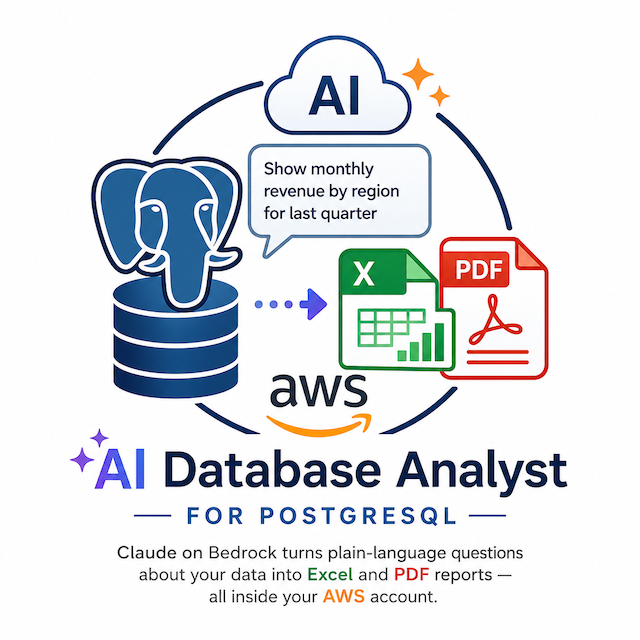
Self-service data reporting without SQL. Ask in plain English, get answers in seconds. All inside your AWS account.
Overview
Your data lives in your database and so do your answers. The problem is getting them out. Every report request becomes a ticket: someone has to write the query, format the result, build the chart, send the file. Multiply that across teams and the analyst queue is always full.
Logos-Postgre flips that. Your team asks questions the way they would ask a colleague "how did churn track against new signups last quarter, broken out by region?" and gets back a finished Excel sheet, a PDF report, or a Markdown summary. No technical knowledge required. No analyst middleman. The work is done in minutes, not days.
Logos-Postgre runs as a single instance inside your own AWS account. Your database connection details, your data, and your conversations stay there nothing is sent to a third-party service, nothing is logged outside your environment. For organizations bound by GDPR, KVKK, sector-specific regulations, or simple internal data policies, that boundary is the difference between "maybe we can use it" and "yes, immediately."
Reports are delivered in the language your team works in. Turkish is first-class supported every part of the assistant, from clarifying questions to final report copy, speaks Turkish naturally. English is equally fluent, and other languages can be configured per deployment.
Logos-Postgre fits any team that has a database and a steady stream of "can you pull me a quick report" requests:
Operations and finance teams running weekly KPI cycles Project and product managers needing fast snapshots before a meeting Compliance and audit teams compiling periodic data pulls BI groups offloading the long tail of ad-hoc work, freeing analysts for higher-value modeling Executive teams who want answers without waiting in a queue
Launch is a single deployment: pick an instance size, supply your database connection, and you are done. Your team logs in and starts asking questions immediately no provisioning, no schema setup, no dashboards to maintain.
Logos-Postgre is built and supported by Mobilist, a software company specializing in AI-driven internal tools.
Highlights
- Plain-language reporting: your team asks in their own words, the assistant handles the rest Finished reports in Excel, PDF, and Markdown ready to forward, no extra formatting
- Turkish-first language: support built for regional teams, multilingual by design Stays inside your AWS account: your data, your credentials, your perimeter
- One-deployment launch: no setup, no provisioning, no dashboards to maintain Scales with your workload: pick a small instance for light use or a larger one for heavy reporting cycles
Details
Sold by
Delivery method
Delivery option
Single-instance CloudFormation deployment
Latest version
Operating system
AmazonLinux 2023
Deployed on AWS
New
Introducing multi-product solutions
You can now purchase comprehensive solutions tailored to use cases and industries.

Features and programs
Financing for AWS Marketplace purchases
AWS Marketplace now accepts line of credit payments through the PNC Vendor Finance program. This program is available to select AWS customers in the US, excluding NV, NC, ND, TN, & VT.

Pricing
Pricing is based on the duration and terms of your contract with the vendor. This entitles you to a specified quantity of use for the contract duration. If you choose not to renew or replace your contract before it ends, access to these entitlements will expire.
Additional AWS infrastructure costs may apply. Use the AWS Pricing Calculator to estimate your infrastructure costs.
Dimension | Description | Cost/month |
|---|---|---|
Logos-Postgre Subscription (m5.large) | Logos-Postgre subscription that grants access to the m5.large instance tier. Suitable for typical use, single-user or small-team reporting workloads. Includes all product features, all Claude model tiers, and standard email support for the duration of the contract. The customer separately pays AWS for EC2 and Bedrock usage in their account. | $1,250.00 |
Logos-Postgre Subscription (m5.xlarge) | Logos-Postgre subscription that grants access to the m5.xlarge instance tier. Suitable for concurrent users and regular reporting cycles. Includes all product features, all Claude model tiers, and standard email support for the duration of the contract. The customer separately pays AWS for EC2 and Bedrock usage in their account. | $1,250.00 |
Logos-Postgre Subscription (m5.2xlarge) | Logos-Postgre subscription that grants access to the m5.2xlarge instance tier. Suitable for heavier workloads with larger result sets and more concurrent users. Includes all product features, all Claude model tiers, and standard email support for the duration of the contract. The customer separately pays AWS for EC2 and Bedrock usage in their account. | $1,250.00 |
Logos-Postgre Subscription (m5.4xlarge) | Logos-Postgre subscription that grants access to the m5.4xlarge instance tier. Suitable for heavy workloads, large datasets, and high-frequency reporting cycles. Includes all product features, all Claude model tiers, and standard email support for the duration of the contract. The customer separately pays AWS for EC2 and Bedrock usage in their account. | $1,250.00 |
Vendor refund policy
Subscriptions are non-refundable once activated, except: (1) deployment failure caused by a defect in the AMI or CloudFormation template that Mobilist cannot resolve within 15 business days; (2) accidental or duplicate purchase reported within 7 days. AWS infrastructure costs (EC2, Bedrock) are billed by AWS and not refundable through Mobilist. Refund requests: email support@mobilistbilisim.com with your AWS account ID and order ID. Response within 2 business days.

Legal
Vendor terms and conditions
Upon subscribing to this product, you must acknowledge and agree to the terms and conditions outlined in the vendor's End User License Agreement (EULA) .
Content disclaimer
Vendors are responsible for their product descriptions and other product content. AWS does not warrant that vendors' product descriptions or other product content are accurate, complete, reliable, current, or error-free.
Delivery details
Single-instance CloudFormation deployment
This delivery option launches Logos-Postgre as a single EC2 instance through AWS CloudFormation. The provided template handles the full setup automatically security group rules, instance configuration, and connection of Logos-Postgre to the database and AI model you specify at launch.
What gets deployed:
- One EC2 instance running Logos-Postgre, sized to your selected instance type
- A security group allowing SSH access on port 22 (the only inbound port required)
- Automatic configuration of the AI model based on the AWS region you deploy in
- Automatic connection to the PostgreSQL database you provide
What you provide at launch (CloudFormation parameters):
- An AWS access key and secret with permission to invoke Bedrock models
- The connection URL of your existing PostgreSQL database (RDS, Aurora, on-premise, or any reachable host)
- Your preferred Anthropic Claude model: Opus 4.7, Opus 4.6, Opus 4.5, Sonnet 4.6, Sonnet 4.5, or Haiku 4.5
- Instance type (m5.large, m5.xlarge, m5.2xlarge, or m5.4xlarge)
- An existing EC2 key pair for SSH access
Recommended sizing:
- m5.large: typical use, single user or small team, ad-hoc reporting
- m5.xlarge: concurrent users, regular reporting cycles
- m5.2xlarge or m5.4xlarge: heavy workloads, large datasets, high-frequency reporting
Prerequisites the customer must complete before launching:
- Enable Bedrock model access for the chosen Claude model in the deployment region (AWS Console -> Amazon Bedrock -> Model access -> Manage model access). This is a one-time, account-level approval that takes a few minutes.
- Create an IAM access key with permission to invoke Bedrock models.
Post-launch:
After CloudFormation reports CREATE_COMPLETE, the stack outputs include the public IP and the SSH command. Connect via SSH using the key pair you selected, and you are placed directly into the Logos-Postgre interface no further configuration required.
Updates and maintenance:
- New product versions are released as new AMI versions in AWS Marketplace
- Customers can upgrade by deploying the new version alongside the existing one and retiring the old stack
- Database, configuration, and credentials remain in your AWS account at all times
CloudFormation Template (CFT)
AWS CloudFormation templates are JSON or YAML-formatted text files that simplify provisioning and management on AWS. The templates describe the service or application architecture you want to deploy, and AWS CloudFormation uses those templates to provision and configure the required services (such as Amazon EC2 instances or Amazon RDS DB instances). The deployed application and associated resources are called a "stack."
Version release notes
Initial release of Logos-Postgre.
This version introduces a self-hosted AI assistant for natural-language data reporting against your PostgreSQL database. Key capabilities included from day one:
- Plain-language reporting with Excel, PDF, and Markdown output
- Selectable AI model at deployment time (Opus, Sonnet, Haiku families)
- Region-aware deployment deploy in any AWS region you have model access to
- First-class Turkish and English language support
- Single-instance launch via CloudFormation, no external dependencies
Recommended instance type: m5.large for typical use, m5.xlarge or larger for heavy reporting cycles.
Additional details
Usage instructions
After CloudFormation reports CREATE_COMPLETE, open the stack's Outputs tab. You will see the public IP of your new instance and a ready-to-copy SSH command.
Step 1: Connect from your terminal:
ssh -i your-keypair.pem ec2-user@<public-ip-from-outputs>
The first time you connect, accept the host key. You will be placed directly into the Logos-Postgre interface no separate setup or configuration step is required.
Step 2: Ask a question:
Type your reporting request in plain language. Examples:
"Show me the top 10 customers by revenue last quarter, broken down by region" "Compare new signups to churn, week by week, for the last six weeks" "Which products had the largest drop in sales last month?"
Logos-Postgre will plan the work, query your database, and return a structured answer. You can ask follow-up questions, request charts, or change the format.
Step 3: Choose an output format:
"Save the result as an Excel file" "Generate a PDF report" "Give me a Markdown summary"
Reports are saved into a dated folder on the instance, organized by topic.
Step 4: Download a report to your computer:
Open a second terminal and use SCP. Example:
scp -i your-keypair.pem ec2-user@<public-ip>:Outputs/<date>/<report-name>.xlsx ~/Downloads/
Step 5: Disconnect:
To exit, press Ctrl+D or type /exit. The SSH session will close. Your reports remain on the instance until you delete them or the stack is removed.
Multi-user usage:
Multiple analysts can connect at the same time from different terminals using the same key pair. Each session is independent.
Switching to a different AI tier:
If you want to change the Claude model after deployment (for example, from Sonnet to Opus for harder analytical work), update the CloudFormation stack and select a different value for the ClaudeModel parameter. The instance will reconfigure automatically.
Troubleshooting:
- "Model access denied" or rate-limit messages on the first prompt: enable Bedrock model access for the Claude model you chose, in the AWS Console of the region where you deployed (Amazon Bedrock -> Model access -> Manage model access). This is a one-time, account-level approval that takes a few minutes.
- "Cannot reach database" or connection errors: confirm the connection URL you provided to CloudFormation is reachable from the EC2 instance and that the database user has the appropriate read permissions.
- For all other issues, see Support information on the product listing page.
Support
Vendor support
Mobilist provides direct support for Logos-Postgre throughout your subscription.
Every customer receives:
- Email-based technical support during setup and ongoing use
- Troubleshooting for deployment and runtime issues
- Bug fixes and security updates delivered as new product versions
- Product documentation, release notes, and version migration guides
Response targets:
- Critical issues (production blocked): within 1 business day
- High-priority issues (significant impact, workaround exists): within 1 business day
- Standard requests (questions, minor issues, configuration help): within 2 business days
Supported languages: English and Turkish.
For paid-tier or enterprise support arrangements (24/7 coverage, dedicated channel, custom SLA), contact us directly using the email above.
AWS infrastructure support
AWS Support is a one-on-one, fast-response support channel that is staffed 24x7x365 with experienced and technical support engineers. The service helps customers of all sizes and technical abilities to successfully utilize the products and features provided by Amazon Web Services.
Similar products
DBLab Standard Edition (DBLab SE) delivers fast, cost-effective database cloning, enabling agile teams to create instant, full-size production clones for development, testing, and staging, all managed like code, integrated into CI/CD pipelines, and optimized with transparent pricing.
Supabase is the Postgres development platform. Start your project with a Postgres database, Authentication, instant APIs, Edge Functions, Realtime subscriptions, Storage, and Vector embeddings.

This is a repackaged software product wherein additional charges apply for a pre-hardened, SI Core STIG Hardened image and seller support. PostgreSQL on Ubuntu 24.04 LTS offers an optimized environment for your relational database needs, ensuring high performance and robust security. With its pre-hardened configuration, PostgreSQL on Ubuntu 24.04 LTS is ideal for enterprises seeking compliance and reliability in sensitive data environments. This AMI simplifies deployment in the AWS EC2 cloud, allowing you to quickly scale your applications. Experience seamless integration, advanced analytics capabilities, and unmatched flexibility with PostgreSQL on Ubuntu 24.04 LTS, designed to support modern workloads and development practices efficiently.
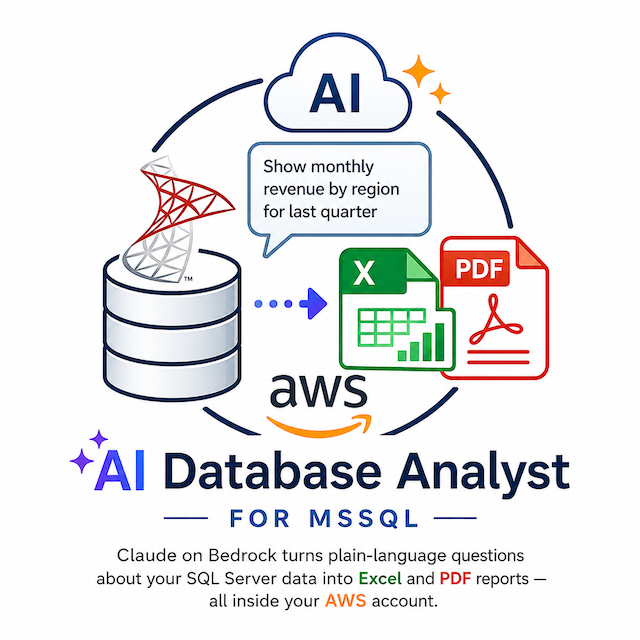
Self-service data reporting without SQL. Ask in plain English, get answers in seconds. All inside your AWS account.
Customer reviews
No customer reviews yet
Be the first to review this product . We've partnered with PeerSpot to gather customer feedback. You can share your experience by writing or recording a review, or scheduling a call with a PeerSpot analyst.