
Sold by: cloudimg
Deployed on AWS
Free Trial
AWS Free Tier
This product has charges associated with it for seller support. Oracle Database on Oracle Linux 8: 19c and 21c, Standard Edition 2 and Enterprise Edition, on filesystem or ASM storage. Per-instance credentials on first boot. 24/7 cloudimg support.
Overview
Image
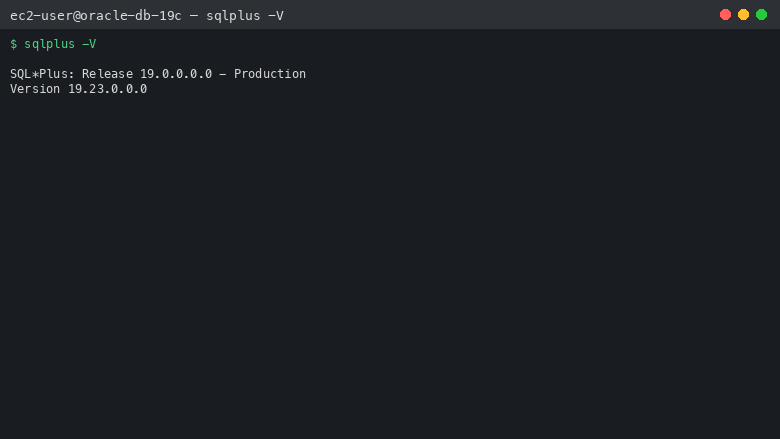
SQL*Plus Version (Patched DBRU)
Image
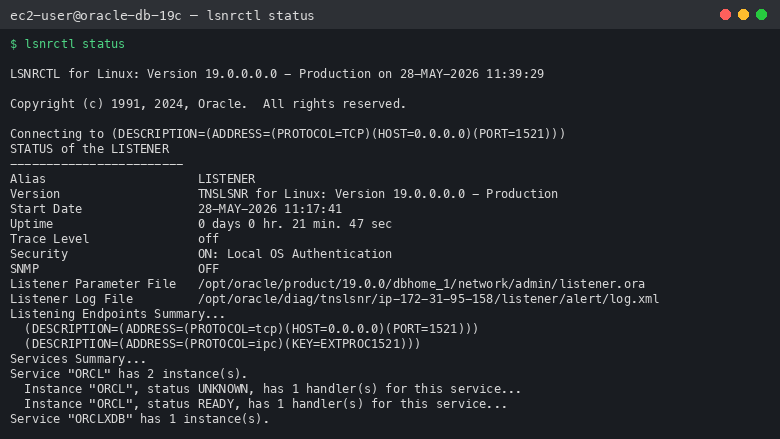
Oracle Listener Status Port 1521
Image
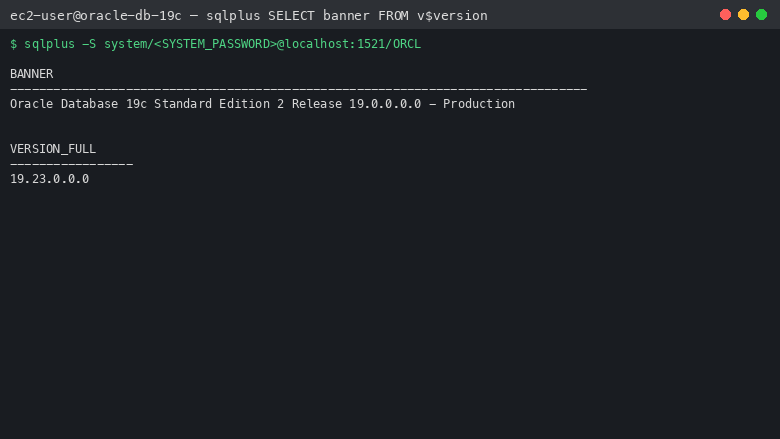
Sample SQL Query
This is a repackaged open source software product wherein additional charges apply for cloudimg support services.
Oracle Database is the world's most widely deployed relational database, powering mission-critical enterprise applications across industries. This listing delivers Oracle Database fully installed and configured, so a production-grade database is running within minutes of launch.
Choose Your Variant This listing is a family of Oracle Database AMIs on Oracle Linux 8; launch the AMI that matches your requirement. Oracle Database 19c is the Long Term Support release, recommended for long-term production; Oracle Database 21c is the Innovation Release, for applications certified against 21c. Standard Edition 2 suits departmental workloads and the SE2 licence model, while Enterprise Edition unlocks Partitioning, Advanced Compression, Advanced Replication and the full EE option set for demanding production workloads. Storage comes in two forms: a filesystem layout on a dedicated EBS data volume that is simple to operate and resize, or Automatic Storage Management (ASM) on Enterprise Edition, where single-instance Grid Infrastructure (Oracle Restart) manages +DATA and +RECO disk groups across raw EBS volumes for operational parity with on-premises ASM estates (asmcmd, srvctl, multi-volume IOPS striping, online storage management). The 21c ASM variant ships as a multitenant container database (ORCL) with a pluggable database (ORCLPDB).
What Is Included Oracle Database installed from upstream Oracle media, with a starter database and the SQL*Plus command-line client, and the Oracle listener on port 1521 preconfigured. The database storage tier lives on dedicated EBS volumes so it is independently resizable without touching the OS disk. Long Term Support variants are patched to the current Database Release Update for their release series.
Secure First Boot The image ships with no shared credentials. On the first boot of every instance, a one-shot service generates strong random passwords for SYSTEM and SYS (and ASMSNMP on ASM variants), sets them on the running database, and writes them to a file readable only by the root user. Authentication is enforced from the moment the listener is reachable.
Ready To Use Connect via SSH, retrieve the generated credentials from /root/oracle-db-credentials.txt, and open SQL*Plus or point your JDBC driver at port 1521. The database is open and the listener is serving immediately after first boot completes. SQL Developer and other JDBC clients can connect remotely on port 1521.
cloudimg Support 24/7 technical support by email. Help with Oracle Database deployment, tuning, backup and recovery, and migration.
Highlights
- Multiple AMI variants on one listing: Oracle Database 19c (Long Term Support) or 21c (Innovation Release), Standard Edition 2 or Enterprise Edition, on filesystem storage or Automatic Storage Management with Grid Infrastructure; launch the AMI that matches your requirement
- Per-instance first boot generates strong random passwords for SYSTEM, SYS (and ASMSNMP on ASM variants) and writes them to a root-only credentials file, so the database is never left with default or shared credentials
- 24/7 technical support from cloudimg, with expert assistance for Oracle Database deployment, performance tuning, backup and recovery, and cloud migration
Details
Sold by
Categories
Delivery method
Delivery option
64-bit (x86) Amazon Machine Image (AMI)
Latest version
Operating system
OtherLinux 9
Deployed on AWS
New
Introducing multi-product solutions
You can now purchase comprehensive solutions tailored to use cases and industries.

Features and programs
Financing for AWS Marketplace purchases
AWS Marketplace now accepts line of credit payments through the PNC Vendor Finance program. This program is available to select AWS customers in the US, excluding NV, NC, ND, TN, & VT.

Pricing
Free trial
Try this product free for 7 days according to the free trial terms set by the vendor. Usage-based pricing is in effect for usage beyond the free trial terms. Your free trial gets automatically converted to a paid subscription when the trial ends, but may be canceled any time before that.
Pricing is based on actual usage, with charges varying according to how much you consume. Subscriptions have no end date and may be canceled any time. Alternatively, you can pay upfront for a contract, which typically covers your anticipated usage for the contract duration. Any usage beyond contract will incur additional usage-based costs.
Additional AWS infrastructure costs may apply. Use the AWS Pricing Calculator to estimate your infrastructure costs.
If you are an AWS Free Tier customer with a free plan, you are eligible to subscribe to this offer. You can use free credits to cover the cost of eligible AWS infrastructure. See AWS Free Tier for more details. If you created an AWS account before July 15th, 2025, and qualify for the Legacy AWS Free Tier, Amazon EC2 charges for Micro instances are free for up to 750 hours per month. See Legacy AWS Free Tier for more details.
Dimension | Description | Cost/hour |
|---|---|---|
m5.xlarge Recommended | m5.xlarge | $0.08 |
t3.micro | t3.micro instance type | $0.04 |
t2.micro | t2.micro instance type | $0.04 |
c6in.metal | c6in.metal instance type | $0.24 |
i7i.metal-48xl | i7i.metal-48xl instance type | $0.24 |
m6idn.2xlarge | m6idn.2xlarge instance type | $0.24 |
m8i-flex.4xlarge | m8i-flex.4xlarge instance type | $0.24 |
x2iedn.xlarge | x2iedn.xlarge instance type | $0.12 |
r7i.8xlarge | r7i.8xlarge instance type | $0.24 |
i3.2xlarge | i3.2xlarge instance type | $0.24 |
Dimensions summary
You pay by the hour based on the EC2 instance type you launch. Each dimension is an instance size, not a separate software plan. Pricing scales with the instance you pick: smaller shared instances cost less per hour, while larger compute, memory, storage, and GPU instances cost more. The single listing ships seven Oracle Database delivery options covering different releases, editions, and storage layouts. You select the variant at launch. The vendor recommends m5.xlarge or larger as a starting point. Software support is bundled at no separate line item; you pay only the hourly instance rate shown.
Top-of-mind questions for buyers
You pay per running instance-hour of the EC2 type you launch. Each dimension maps to one instance size with a set number of vCPUs and memory. The rate covers the software and cloudimg support. You are billed for each instance you run, so two instances double the hourly charge.
The hourly software rate meters running time only. A fully stopped instance does not accrue the hourly software charge. Underlying AWS storage fees for attached EBS volumes may still apply while the instance is stopped. Restarting resumes the hourly software charge.
No. All seven delivery options ship in the single listing at the same instance-based rate. Your cost depends only on the EC2 instance type you launch, not on whether you pick 19c, 21c, 26ai, Standard Edition 2, Enterprise Edition, filesystem, or ASM.
www.cloudimg.co.uk
Helpful?
Vendor refund policy
Refunds available on request.

Legal
Vendor terms and conditions
Upon subscribing to this product, you must acknowledge and agree to the terms and conditions outlined in the vendor's End User License Agreement (EULA) .
Content disclaimer
Vendors are responsible for their product descriptions and other product content. AWS does not warrant that vendors' product descriptions or other product content are accurate, complete, reliable, current, or error-free.
Delivery details
64-bit (x86) Amazon Machine Image (AMI)
Amazon Machine Image (AMI)
An AMI is a virtual image that provides the information required to launch an instance. Amazon EC2 (Elastic Compute Cloud) instances are virtual servers on which you can run your applications and workloads, offering varying combinations of CPU, memory, storage, and networking resources. You can launch as many instances from as many different AMIs as you need.
Version release notes
Initial release of Oracle Database 26ai Enterprise Edition (Long Term Support release) with Automatic Storage Management (ASM) on Oracle Linux 9. Datafiles on +DATA, fast recovery area on +RECO, managed by single-instance Grid Infrastructure (Oracle Restart).
Additional details
Usage instructions
Connect via SSH on port 22 as ec2-user. Retrieve the database credentials with: sudo cat /root/oracle-db-credentials.txt. Switch to the oracle user: sudo su - oracle. Source the environment: . ~/setEnv.sh. Connect with SQL*Plus to the CDB root: sqlplus system/<password>@localhost:1521/ORCL, or to the pluggable database where application schemas live: sqlplus system/<password>@localhost:1521/ORCLPDB. Connect as SYSDBA: sqlplus / as sysdba. Inspect ASM as the grid user: sudo su - grid, then asmcmd lsdg to list the +DATA and +RECO disk groups. The Oracle listener runs on port 1521 and accepts remote SQL Developer / JDBC connections. The user guide explains how to connect remotely, manage the listener, inspect and manage ASM disk groups, configure backup to +RECO, use Enterprise Edition options (Partitioning, Data Guard), and tune memory.
Resources
Vendor resources
Support
Vendor support
cloudimg provides 24/7 technical support for this product by email and live chat. Our engineers help with deployment, configuration, updates, performance tuning and troubleshooting; critical issues receive a one hour average response. Contact support@cloudimg.co.uk .
AWS infrastructure support
AWS Support is a one-on-one, fast-response support channel that is staffed 24x7x365 with experienced and technical support engineers. The service helps customers of all sizes and technical abilities to successfully utilize the products and features provided by Amazon Web Services.
Similar products

This product has charges associated with it for seller support. Oracle Database Client 19c on Windows Server 2016, 2019 or 2022. Connect .NET, Java and Python apps, CI pipelines, and DBA workstations to Oracle Database 11g through 23ai. SQL*Plus, OCI, JDBC, ODP.NET pre-installed. ENA networking, 24/7 cloudimg support, 24h response SLA.

This product has charges associated with it for seller support. Oracle Database 19c Standard Edition AMI pre-configured on enterprise Linux with BYOL licensing. Deploy production-ready Oracle on AWS with 24/7 expert support from cloudimg.

This product has charges associated with it for seller support. Oracle Database 11g Client on Linux with 24/7 cloudimg support. Connect to Oracle databases from AWS. Available on popular Linux distributions.

This product has charges associated with it for seller support. Deploy Oracle Database 12.1 Standard Edition on AWS in minutes with BYOL support and average one-hour response from cloudimg engineers around the clock.
Customer reviews
No customer reviews yet
Be the first to review this product . We've partnered with PeerSpot to gather customer feedback. You can share your experience by writing or recording a review, or scheduling a call with a PeerSpot analyst.