Sold by: cloudimg
Deployed on AWS
Free Trial
AWS Free Tier
This product has charges associated with it for seller support. Pre-configured Harbor registry with Trivy scanning and RBAC. Launch a secure private container registry in minutes - no manual setup. Backed by 24/7 cloudimg support.
Overview
Image
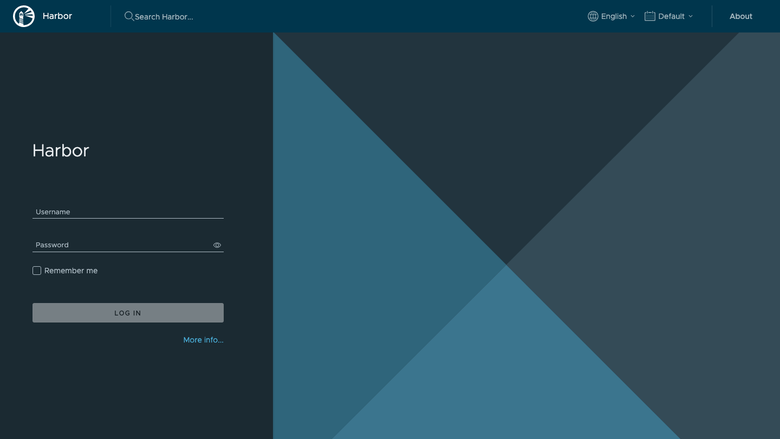
Harbor sign-in page
Image
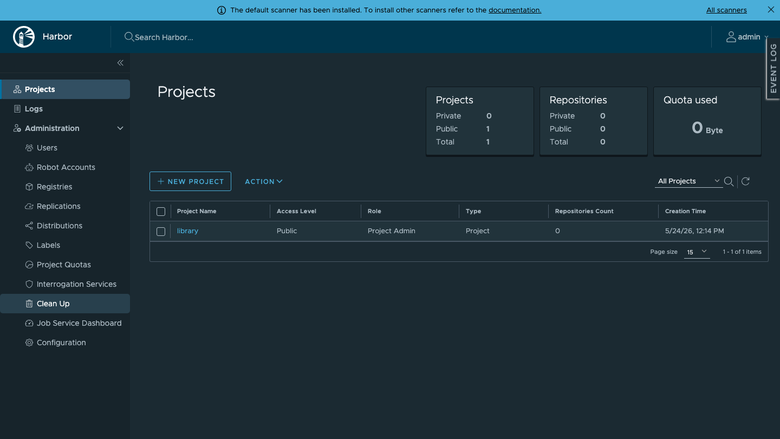
Projects list
Image
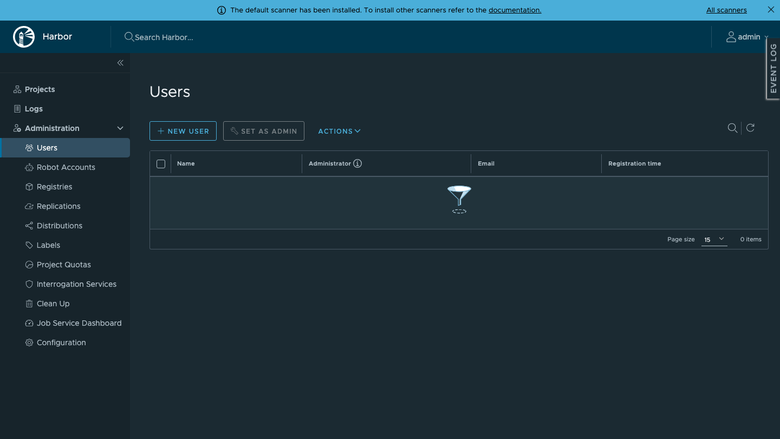
System administration
This is a repackaged open source software product wherein additional charges apply for cloudimg support services.
Private Container Registry - Secure and Running in Minutes
Stop spending hours installing, configuring, and hardening a container registry. This AMI delivers Harbor - the CNCF graduated open source registry with23,000+ GitHub stars - fully installed and production-ready on first boot. Platform engineers and DevOps teams get a complete private registry with vulnerability scanning, image signing, replication, and role-based access control without touching a single config file.
Why This AMI Over Alternatives
Unlike self-managed Harbor, there is no manual Docker Compose orchestration, no database setup, and no credential management. Unlike managed registries such as ECR, you retain full data sovereignty with images stored on your own EBS volume in your own VPC. Unlike other Marketplace registry AMIs, every instance generates a unique administrator password on first boot - no shared or default credentials ever ship in the image.
Application Stack
Harbor runs as a Docker Compose stack: nginx as the front proxy, Harbor core, portal web UI, registry, jobservice, a local PostgreSQL metadata database, Redis, and the Trivy vulnerability scanner. Docker Engine and the Docker Compose plugin are installed from the official Docker package repository. The current release is the latest stable Harbor2.x.
Dedicated Storage Tier
The Harbor data directory - holding registry blobs, the metadata database, Redis state, and the Trivy scan cache - lives on a separate, independently resizable EBS data volume. Grow your registry storage without downtime and without disturbing the OS or application layer. This separation means you can right-size compute and storage independently, keeping costs predictable as your image library scales.
Secure First Boot
On first launch, a one-shot systemd service generates a cryptographically random Harbor administrator password unique to that instance and writes it to a root-only file. No default credentials exist in the image. This eliminates the most common misconfiguration risk when deploying container registries.
Getting Started
- Launch the AMI from AWS Marketplace.
- SSH into the instance and retrieve the generated admin password from the root-only file.
- Browse to the instance address on port 80 and sign in as admin.
- Create projects, push images, configure replication policies, and review Trivy vulnerability scans through the Harbor web interface.
Real-World Scenario
A SaaS platform team replicating container images across multiple AWS regions for disaster recovery uses this AMI to run Harbor in each region. Developers push images to the primary registry, Harbor automatically replicates artefacts to secondary registries, and Trivy scans every image before it reaches production Kubernetes clusters - all without managing registry infrastructure manually.
Use Cases
- Private container registry for proprietary application images with full data sovereignty
- Automated vulnerability scanning of container artefacts before production deployment
- Image replication across AWS regions, data centres, or hybrid cloud environments
- Role-based access control for multi-team registries serving dozens of developers
24/7 cloudimg Support
Expert technical support by email and live chat around the clock. Our engineers provide hands-on assistance with Harbor deployment, upgrades, TLS configuration, vulnerability scanning tuning, replication policies, and registry administration. Critical issues receive a one-hour average response time.
Get Started With a Guided Setup
Not sure how to configure TLS, set up replication, or integrate with your CI/CD pipeline? Contact cloudimg for a free guided setup consultation to get your registry production-ready faster. Reach us at support@cloudimg.co.uk .
Harbor is a registered trademark of The Linux Foundation. CNCF and the CNCF logo are trademarks of The Linux Foundation. All other product and company names are trademarks or registered trademarks of their respective holders. Use of them does not imply any affiliation with or endorsement by them.
Highlights
- Harbor container registry preinstalled and ready, with the Compose stack, the Trivy vulnerability scanner and the local metadata database, and no manual setup required
- Hardened first boot generates a fresh administrator password for every instance and stores it in a file only the root user can read
- 24/7 technical support from cloudimg, with expert assistance for Harbor deployment, upgrades, TLS configuration, replication and vulnerability scanning
Details
Sold by
Delivery method
Delivery option
64-bit (x86) Amazon Machine Image (AMI)
Latest version
Operating system
Ubuntu 24.04
Deployed on AWS
New
Introducing multi-product solutions
You can now purchase comprehensive solutions tailored to use cases and industries.

Features and programs
Financing for AWS Marketplace purchases
AWS Marketplace now accepts line of credit payments through the PNC Vendor Finance program. This program is available to select AWS customers in the US, excluding NV, NC, ND, TN, & VT.

Pricing
Free trial
Try this product free for 7 days according to the free trial terms set by the vendor. Usage-based pricing is in effect for usage beyond the free trial terms. Your free trial gets automatically converted to a paid subscription when the trial ends, but may be canceled any time before that.
Pricing is based on actual usage, with charges varying according to how much you consume. Subscriptions have no end date and may be canceled any time. Alternatively, you can pay upfront for a contract, which typically covers your anticipated usage for the contract duration. Any usage beyond contract will incur additional usage-based costs.
Additional AWS infrastructure costs may apply. Use the AWS Pricing Calculator to estimate your infrastructure costs.
If you are an AWS Free Tier customer with a free plan, you are eligible to subscribe to this offer. You can use free credits to cover the cost of eligible AWS infrastructure. See AWS Free Tier for more details. If you created an AWS account before July 15th, 2025, and qualify for the Legacy AWS Free Tier, Amazon EC2 charges for Micro instances are free for up to 750 hours per month. See Legacy AWS Free Tier for more details.
Dimension | Description | Cost/hour |
|---|---|---|
m5.large Recommended | m5.large | $0.08 |
t3.micro | t3.micro instance type | $0.04 |
t2.micro | t2.micro instance type | $0.04 |
r8i.32xlarge | r8i.32xlarge instance type | $0.24 |
m6id.4xlarge | m6id.4xlarge instance type | $0.24 |
m5n.24xlarge | m5n.24xlarge instance type | $0.24 |
r7i.xlarge | r7i.xlarge instance type | $0.12 |
r5ad.2xlarge | r5ad.2xlarge instance type | $0.24 |
h1.16xlarge | h1.16xlarge instance type | $0.24 |
m8id.24xlarge | m8id.24xlarge instance type | $0.24 |
Vendor refund policy
Refunds available on request.

Legal
Vendor terms and conditions
Upon subscribing to this product, you must acknowledge and agree to the terms and conditions outlined in the vendor's End User License Agreement (EULA) .
Content disclaimer
Vendors are responsible for their product descriptions and other product content. AWS does not warrant that vendors' product descriptions or other product content are accurate, complete, reliable, current, or error-free.
Delivery details
64-bit (x86) Amazon Machine Image (AMI)
Amazon Machine Image (AMI)
An AMI is a virtual image that provides the information required to launch an instance. Amazon EC2 (Elastic Compute Cloud) instances are virtual servers on which you can run your applications and workloads, offering varying combinations of CPU, memory, storage, and networking resources. You can launch as many instances from as many different AMIs as you need.
Version release notes
Remediates flagged CVEs: full apt update (kernel + userspace); rng-tools added.
Additional details
Usage instructions
Connect via SSH on port 22 as the default login user for your operating system variant (the user guide lists it per variant). The Harbor web UI is served on port 80. Browse to http://<instance-public-ip>/ and sign in as the 'admin' user. Retrieve the generated administrator password with: sudo cat /root/harbor-credentials.txt. To push an image, run on a client machine: docker login <instance-public-ip>, then docker push <instance-public-ip>/library/<image>:<tag>. To enable HTTPS, follow the TLS section of the user guide.
Resources
Vendor resources
Support
Vendor support
cloudimg Support - 24/7 Technical Assistance
cloudimg provides around-the-clock technical support for this Harbor Container Registry AMI via email and live chat.
What We Help With:
- Harbor deployment and initial configuration
- TLS/SSL certificate setup and renewal
- Vulnerability scanning configuration and tuning with Trivy
- Image replication policy setup across regions or clouds
- Harbor upgrades to newer stable releases
- Performance tuning and troubleshooting
- Storage volume expansion and management
- Registry administration and RBAC configuration
Response Times:
- Critical issues (registry down, data loss risk): one-hour average response
- General inquiries and configuration help: responded to within business hours
Getting Started:
- Launch the AMI from AWS Marketplace in your preferred region.
- Ensure your security group allows inbound traffic on port 80 (HTTP) and port 443 (HTTPS if TLS is configured).
- SSH into the instance using your EC2 key pair.
- Retrieve the generated admin password from the root-only file at /root/.harbor_admin_password.
- Browse to your instance's public IP or DNS name on port 80.
- Sign in as admin and begin creating projects and pushing images.
Free Guided Setup Consultation: Not sure how to configure TLS, integrate with your CI/CD pipeline, or set up cross-region replication? Contact us for a free guided setup session.
Contact: support@cloudimg.co.uk
For refund requests or billing inquiries, contact cloudimg support via the same email address.
AWS infrastructure support
AWS Support is a one-on-one, fast-response support channel that is staffed 24x7x365 with experienced and technical support engineers. The service helps customers of all sizes and technical abilities to successfully utilize the products and features provided by Amazon Web Services.
Similar products
This product has charges associated with it for seller support. Pre-configured Docker CE on Windows Server with24/7 cloudimg support. Deploy Windows and Linux containers in minutes with guaranteed response SLA.

This product has charges associated with it for deployment, configuration, and ongoing support. Self-hosted container registry with vulnerability scanning, RBAC, image signing, and replication. Enterprise-grade Docker and OCI registry for secure artifact management.

This product has charges associated with it for hardening, security configuration, and support.
Harbor is a CNCF-graduated container registry that stores OCI images and Helm charts and adds vulnerability scanning (Trivy), image signing, and role-based access control. Unlike bare Harbor AMIs that ship with the well-known default admin password, expose the registry over plain HTTP that Docker clients reject, and leave the host firewall open, this Lynxroute build is ready out of the box: a unique admin password generated at first launch, HTTPS enabled automatically with a self-signed certificate, the registry and database bound behind the host TLS edge, UFW firewall pre-configured, and a CIS Level 1 hardened Ubuntu 24.04 LTS base.
Apache-2.0 license - fully auditable, no vendor lock-in.

Harbor is an open source trusted cloud native registry project that stores, signs, and scans content.

EXL Code Harbor is a Generative AI-powered service leveraging multi-agent conversion framework that accelerates the migration of legacy codebases to novel and open-source languages, as well as enhances data and code governance. It leverages the modular capability of code conversion and optimization, code governance and documentation; and automated testing to convert the client's codebase. It addresses the manual effort involved in writing and optimizing code to transform the process, resulting in accelerated delivery, reduced costs, and higher accuracy.
Customer reviews
No customer reviews yet
Be the first to review this product . We've partnered with PeerSpot to gather customer feedback. You can share your experience by writing or recording a review, or scheduling a call with a PeerSpot analyst.