
Sold by: cloudimg
Deployed on AWS
Free Trial
AWS Free Tier
This product has charges associated with it for seller support. Launch a hardened FTPS server in minutes - not hours. Per-instance credentials, mandatory TLS, and chroot isolation with no default logins to exploit. Backed by 24/7 cloudimg support.
Overview
Image
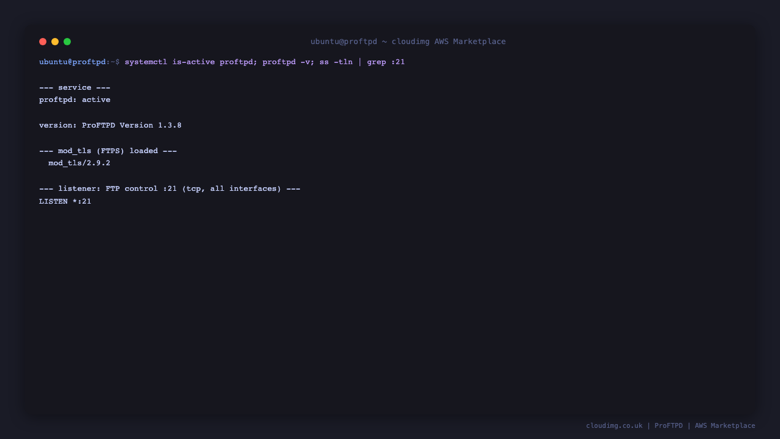
ProFTPD FTPS server running
Image
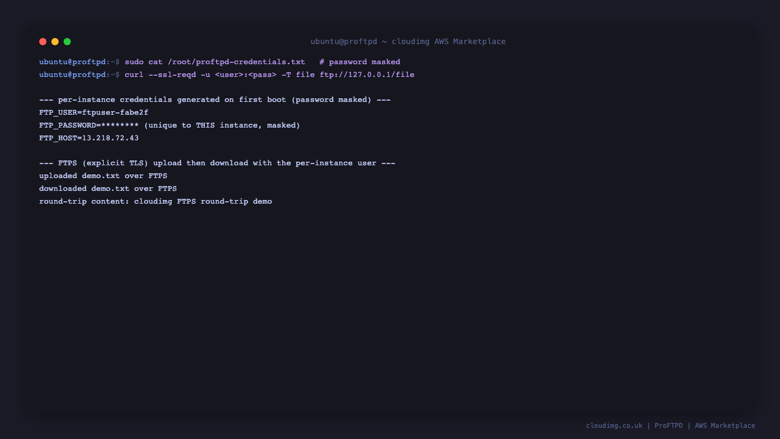
Per instance credentials and FTPS transfer
Image
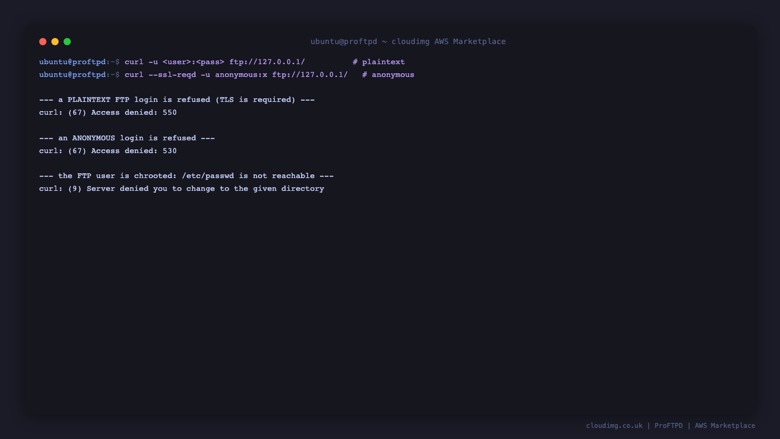
Plaintext and anonymous access refused
Image
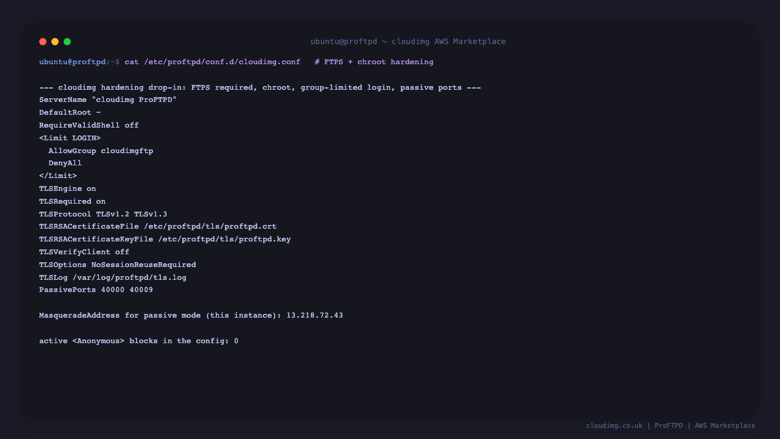
Hardening configuration
This is a repackaged open source software product wherein additional charges apply for cloudimg support services.
Why This Image Instead of a Manual Install or Managed Service
A bare ProFTPD package requires hours of manual TLS hardening, chroot configuration, passive-mode tuning, and credential management before it is production-ready. Many competing AMIs ship with documented default credentials that automated scanners target within minutes of launch. Managed file transfer services offer convenience but remove the control you need over storage, networking, and user backends.
This cloudimg image eliminates those trade-offs. You get a fully hardened, production-grade FTPS server accepting encrypted transfers within minutes of launch - with no known default credential, no plaintext access, and full control over your EC2 instance and attached storage.
Use-Case Scenario: Nightly Batch File Exchange
A logistics team needs to receive daily shipment manifests from external carriers over a secure channel. Each carrier connects with its own FTPS credentials, uploads files into a chrooted directory visible only to that carrier, and an automated process on the instance moves completed files to an S3 bucket for downstream processing. The defined passive port range and masquerade address let the server sit behind a NAT gateway while carriers connect from fixed IP ranges scoped in the Security Group. Setup takes minutes rather than a multi-day project.
How It Works
ProFTPD is fully installed and running as a systemd service (proftpd.service). On the first boot of every instance, a one-shot service:
- Creates a unique FTP user with a strong random password
- Generates a unique self-signed TLS certificate for that specific instance
- Sets the passive-mode masquerade address to the instance address
- Writes the user, password, and host to a root-owned credentials file
No two instances share a credential and no default login is ever baked into the image.
Security Posture
- Mandatory TLS: Explicit TLS is required on both the control channel and the data channel. Plaintext FTP login is refused outright, so usernames, passwords, and file contents are always encrypted in transit.
- No anonymous access: Only members of a dedicated login group may authenticate.
- Chroot isolation: Every user is jailed to its own home directory and cannot browse the rest of the server.
- No known bootstrap credential: The stock package ships no usable login. Credentials are generated uniquely per instance at first boot.
Network and Deployment on AWS
The server listens on the standard FTP control port 21 and uses a defined passive data port range (40000-40009). Open these ports in your EC2 Security Group and scope inbound rules to your client addresses. Place the instance in a private subnet for additional isolation and attach EBS volumes as storage needs grow.
Retrieve the generated FTP user, password, and host from the root-owned credentials file, then connect with any FTPS-capable client - curl, lftp, FileZilla, or WinSCP - using explicit TLS.
Extending the Server
The entire configuration lives in readable text under /etc/proftpd with a cloudimg hardening drop-in. There is no web console and no database. You can extend the server with:
- Virtual users backed by LDAP or SQL
- Per-user and per-group quotas
- Bandwidth controls
- Additional TLS certificates from your own CA
Guided Setup and Next Steps
After purchase, cloudimg engineers can walk you through virtual users, directory layout, quotas, LDAP or SQL backends, firewall design, and TLS certificate management. Contact our 24/7 support team to schedule a guided setup session.
All product and company names are trademarks or registered trademarks of their respective holders. Use of them does not imply any affiliation with or endorsement by them.
Highlights
- ProFTPD, a highly configurable and widely deployed FTP server, fully installed and hardened as a systemd service. Explicit TLS is required on both the control and data channels, so a secure FTPS endpoint is accepting encrypted uploads and downloads on port 21 within minutes of launch, driven entirely by the proven ProFTPD configuration tree.
- Secure by default with no known bootstrap credential: plaintext FTP and anonymous access are refused, every user is chrooted to its own home directory, and on first boot a unique FTP user, a strong random password and a unique self signed TLS certificate are generated for this specific instance and written to a root owned credentials file. No two instances share a credential.
- 24/7 expert technical support from cloudimg with a one hour average response time for critical issues. Our engineers help with virtual users, directory and quota design, LDAP and SQL user backends, bandwidth controls, passive mode and firewall configuration, TLS certificate management and ProFTPD version upgrades.
New
Introducing multi-product solutions
You can now purchase comprehensive solutions tailored to use cases and industries.

Features and programs
Financing for AWS Marketplace purchases
AWS Marketplace now accepts line of credit payments through the PNC Vendor Finance program. This program is available to select AWS customers in the US, excluding NV, NC, ND, TN, & VT.

Pricing
Free trial
Try this product free for 7 days according to the free trial terms set by the vendor. Usage-based pricing is in effect for usage beyond the free trial terms. Your free trial gets automatically converted to a paid subscription when the trial ends, but may be canceled any time before that.
Pricing is based on actual usage, with charges varying according to how much you consume. Subscriptions have no end date and may be canceled any time. Alternatively, you can pay upfront for a contract, which typically covers your anticipated usage for the contract duration. Any usage beyond contract will incur additional usage-based costs.
Additional AWS infrastructure costs may apply. Use the AWS Pricing Calculator to estimate your infrastructure costs.
If you are an AWS Free Tier customer with a free plan, you are eligible to subscribe to this offer. You can use free credits to cover the cost of eligible AWS infrastructure. See AWS Free Tier for more details. If you created an AWS account before July 15th, 2025, and qualify for the Legacy AWS Free Tier, Amazon EC2 charges for Micro instances are free for up to 750 hours per month. See Legacy AWS Free Tier for more details.
Dimension | Description | Cost/hour |
|---|---|---|
m5.large Recommended | m5.large | $0.08 |
t2.micro | t2.micro instance type | $0.04 |
t3.micro | t3.micro instance type | $0.04 |
r8a.xlarge | r8a.xlarge instance type | $0.12 |
c5a.2xlarge | c5a.2xlarge instance type | $0.24 |
h1.8xlarge | h1.8xlarge instance type | $0.24 |
r5dn.4xlarge | r5dn.4xlarge instance type | $0.24 |
r6idn.2xlarge | r6idn.2xlarge instance type | $0.24 |
m8idb.12xlarge | m8idb.12xlarge instance type | $0.24 |
r6in.large | r6in.large instance type | $0.08 |
Vendor refund policy
Refunds available on request.

Legal
Vendor terms and conditions
Upon subscribing to this product, you must acknowledge and agree to the terms and conditions outlined in the vendor's End User License Agreement (EULA) .
Content disclaimer
Vendors are responsible for their product descriptions and other product content. AWS does not warrant that vendors' product descriptions or other product content are accurate, complete, reliable, current, or error-free.
Delivery details
64-bit (x86) Amazon Machine Image (AMI)
Amazon Machine Image (AMI)
An AMI is a virtual image that provides the information required to launch an instance. Amazon EC2 (Elastic Compute Cloud) instances are virtual servers on which you can run your applications and workloads, offering varying combinations of CPU, memory, storage, and networking resources. You can launch as many instances from as many different AMIs as you need.
Version release notes
Initial release of the ProFTPD secure FTPS file transfer image.
Additional details
Usage instructions
Connect via SSH on port 22 as the default login user for your operating system variant (on Ubuntu it is 'ubuntu'). Retrieve this instance's generated FTP user, password and host with: sudo cat /root/proftpd-credentials.txt. FTPS (explicit TLS) is required on port 21 - a plaintext FTP login and anonymous access are both refused, and every user is chrooted to its own home directory. Open inbound tcp 21 (control) and tcp 40000-40009 (passive data) in your Security Group, scoped to your client addresses. Connect with any FTPS capable client using explicit TLS, for example: curl --ssl-reqd -u USER:PASSWORD -T local.txt ftp://HOST/local.txt to upload and curl --ssl-reqd -u USER:PASSWORD ftp://HOST/local.txt -o local.txt to download (add --insecure while the certificate is the per instance self signed cert, or install your own certificate at /etc/proftpd/tls). If the instance sits behind network address translation or its public IP changes, edit MasqueradeAddress in /etc/proftpd/conf.d/cloudimg-masq.conf and run sudo systemctl restart proftpd. The user guide covers creating additional FTP users, the chroot model, passive mode and firewall design, and TLS certificate management.
Resources
Vendor resources
Support
Vendor support
Support from cloudimg
cloudimg provides 24/7 technical support for this ProFTPD product by email (support@cloudimg.co.uk ) and live chat. Critical issues receive a one-hour average response time.
Channels:
- Email: support@cloudimg.co.uk
- Live chat: available around the clock
What we help with:
- Deployment and first boot configuration on AWS (instance sizing, security group rules for port 21 and the passive range, EBS volume setup)
- Connecting FTPS clients with explicit TLS and troubleshooting passive mode behind network address translation
- Managing FTP users and passwords, chroot and directory layout
- Setting the masquerade address and opening the control port and passive range
- Migrating to virtual users with LDAP or SQL backends, quotas and bandwidth controls
- TLS certificate management, ProFTPD version upgrades and patch guidance
- Performance tuning and troubleshooting
Guided Setup: New customers can request a guided setup session where our engineers walk through instance launch, security group configuration, user provisioning and FTPS client setup.
Refunds: For refund requests or billing inquiries, contact support@cloudimg.co.uk with your AWS account ID and instance details.
Prerequisites for Launch:
- An AWS account with EC2 launch permissions
- A VPC with a subnet that allows inbound TCP on ports 22, 21 and 40000-40009
- An SSH key pair registered in your AWS region
- Recommended: m5.large or larger instance type
AWS infrastructure support
AWS Support is a one-on-one, fast-response support channel that is staffed 24x7x365 with experienced and technical support engineers. The service helps customers of all sizes and technical abilities to successfully utilize the products and features provided by Amazon Web Services.
Similar products

This product has charges associated with it for seller support. Reduce downtime with pre-configured Nagios Core on AWS. Monitor networks, servers, and apps with 24/7 cloudimg expert support on Alma Linux 9 or Ubuntu.

This product has charges associated with it for seller support. Deploy Oracle Database 19c Standard Edition on Windows Server in minutes with production-ready ENA networking up to 25 Gbps and24x7 cloudimg engineer support.

This product has charges associated with it for seller support. Migrate from CentOS 8 EOL to Alma Linux 8 in under 60 seconds with zero licensing fees. 1:1 RHEL 8 compatible, AWS-optimized, backed by 24/7 support with guaranteed 24hr response SLA.

This product has charges associated with it for seller support. Oracle Database 19c Standard Edition AMI pre-configured on enterprise Linux with BYOL licensing. Deploy production-ready Oracle on AWS with 24/7 expert support from cloudimg.

This product has charges associated with it for seller support. Pre-configured Jenkins CI/CD server on Windows for .NET and DevOps teams. Launch in minutes with guaranteed 24-hour response support from cloudimg.
Customer reviews
No customer reviews yet
Be the first to review this product . We've partnered with PeerSpot to gather customer feedback. You can share your experience by writing or recording a review, or scheduling a call with a PeerSpot analyst.