
Sold by: cloudimg
Deployed on AWS
Free Trial
AWS Free Tier
This product has charges associated with it for seller support. Eliminate desktop database clients - query PostgreSQL, MySQL, MariaDB, SQLite and more from your browser with a preconfigured, security-hardened AMI generating unique credentials per instance.
Overview
Image
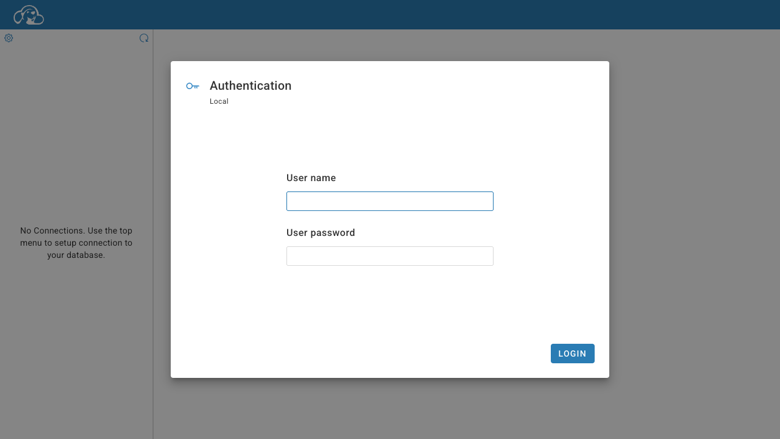
CloudBeaver sign-in
Image
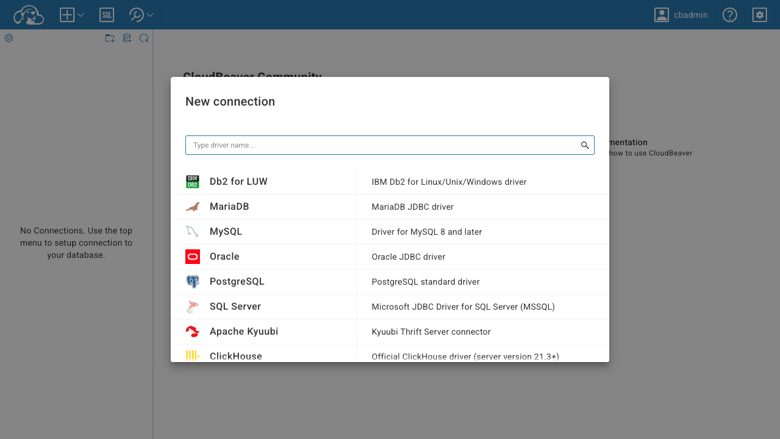
Add a connection
Image
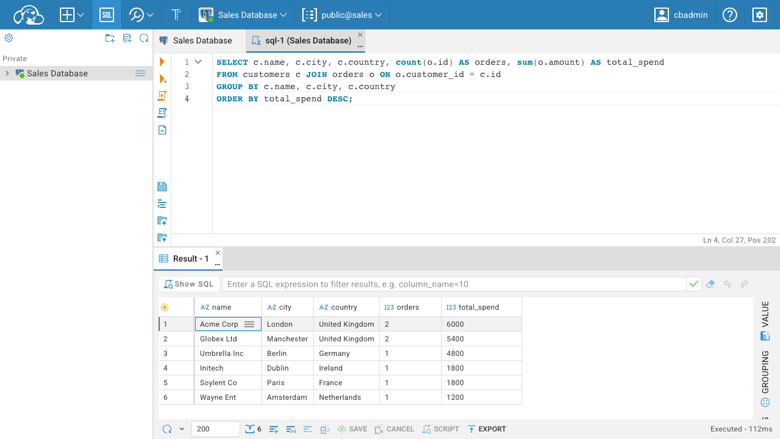
SQL editor with results
Image
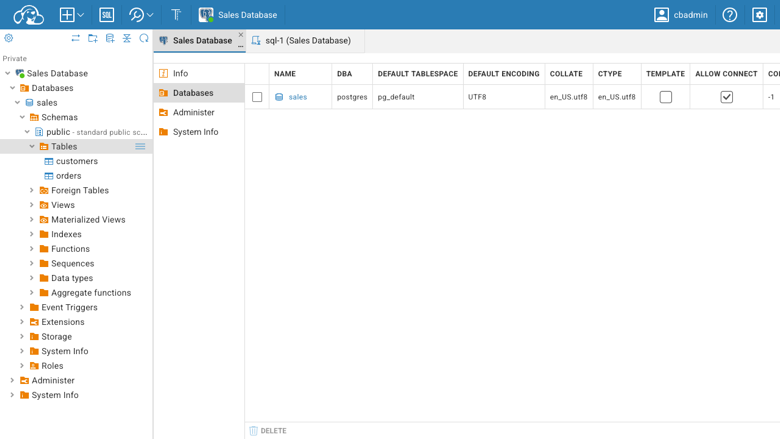
Database navigator
This is a repackaged open source software product wherein additional charges apply for cloudimg support services.
CloudBeaver CE - Web Database Manager
CloudBeaver CE is the browser edition of DBeaver, the desktop database tool with over 40,000 GitHub stars. This AMI delivers CloudBeaver CE fully installed, configured, and running behind an nginx reverse proxy - giving your team a shared database console without installing desktop clients on every machine.
Why This AMI Instead of Self-Deploying
Pulling the official CloudBeaver Docker image yourself means manually configuring a reverse proxy, setting up WebSocket upgrades for the SQL editor, managing credential generation, and provisioning storage. With this AMI, all of that is done for you:
- Nginx reverse proxy preconfigured with WebSocket upgrade for real-time SQL editing and result streaming
- Hardened first boot generates a unique admin password per instance - no shared or default credentials ever ship
- Dedicated data disk keeps your workspace (connections, users, query history) separate from the OS, enabling independent resizing without risking your system volume
- Auto-restart on failure ensures the container recovers without manual intervention
Compared to lightweight tools like Adminer or phpMyAdmin, CloudBeaver provides a full SQL editor with auto-completion, an execution plan viewer, role-based access control, and support for dozens of database drivers - not just MySQL or PostgreSQL.
Supported Databases
Connect to PostgreSQL, MySQL, MariaDB, SQLite, and many other databases over standard JDBC drivers. Browse databases, schemas, tables, views, and columns in the metadata navigator. Inspect and edit table data in a filterable, sortable grid.
SQL Editor and Query Tools
Write SQL with syntax highlighting and auto-completion. Run statements and scripts, view results, execution plans, and query history. Export result sets in multiple formats. Manage multiple connections from a single console.
Security Model
- On first boot, a one-shot service completes server configuration and creates the admin account with a fresh, instance-unique password stored in a root-only file
- CloudBeaver binds to the loopback interface - only nginx exposes the application
- No default or shared credentials ship in the image
- HTTPS can be configured post-launch by adding your TLS certificate to the nginx configuration
Architecture
CloudBeaver runs as a Java web application inside a Docker container, bound to localhost and fronted by nginx on port 80. Docker and the reverse proxy start on boot. The CloudBeaver workspace - server configuration, user accounts, saved connections, and query history - lives on a dedicated data disk that is independently resizable.
Use Cases
Startup engineering teams (5-20 developers) needing to query production RDS PostgreSQL or MySQL instances without distributing database credentials or requiring local client installs on every laptop.
Data analytics bootcamps and training programs running 20-30 concurrent student sessions against a shared MySQL or PostgreSQL training database, with role-based access ensuring students only see their own schemas.
Remote-first teams who need secure browser-based database access from any location without VPN tooling or desktop software distribution.
DevOps and platform teams providing a self-service SQL console to developers and analysts while maintaining centralized access control and audit through CloudBeaver's built-in user and role management.
Role-Based Access Control
Add teams and users with scoped permissions. Control which connections each role can access, whether users can create their own connections, and what level of data modification is allowed.
Operational Readiness
A built-in health endpoint answers on the reverse proxy for load-balancer and uptime checks. The container auto-restarts on failure. The dedicated data disk means you can resize storage without touching the OS volume.
Get Started
Launch the AMI, retrieve the generated admin password from the root-only file, sign in through your browser, and start adding database connections immediately. To discuss a deployment walkthrough or team onboarding, contact cloudimg support.
Highlights
- Skip hours of manual configuration - this AMI delivers CloudBeaver CE fully installed behind nginx with WebSocket upgrades preconfigured, so your team can run their first SQL query from a browser within minutes of launch. Unlike pulling the Docker image yourself, the reverse proxy, credential generation, and storage separation are already handled.
Details
Sold by
Categories
Delivery method
Delivery option
64-bit (x86) Amazon Machine Image (AMI)
Latest version
Operating system
Ubuntu 24.04
Deployed on AWS
New
Introducing multi-product solutions
You can now purchase comprehensive solutions tailored to use cases and industries.

Features and programs
Financing for AWS Marketplace purchases
AWS Marketplace now accepts line of credit payments through the PNC Vendor Finance program. This program is available to select AWS customers in the US, excluding NV, NC, ND, TN, & VT.

Pricing
Free trial
Try this product free for 7 days according to the free trial terms set by the vendor. Usage-based pricing is in effect for usage beyond the free trial terms. Your free trial gets automatically converted to a paid subscription when the trial ends, but may be canceled any time before that.
Pricing is based on actual usage, with charges varying according to how much you consume. Subscriptions have no end date and may be canceled any time. Alternatively, you can pay upfront for a contract, which typically covers your anticipated usage for the contract duration. Any usage beyond contract will incur additional usage-based costs.
Additional AWS infrastructure costs may apply. Use the AWS Pricing Calculator to estimate your infrastructure costs.
If you are an AWS Free Tier customer with a free plan, you are eligible to subscribe to this offer. You can use free credits to cover the cost of eligible AWS infrastructure. See AWS Free Tier for more details. If you created an AWS account before July 15th, 2025, and qualify for the Legacy AWS Free Tier, Amazon EC2 charges for Micro instances are free for up to 750 hours per month. See Legacy AWS Free Tier for more details.
Dimension | Description | Cost/hour |
|---|---|---|
t3.medium Recommended | t3.medium | $0.04 |
t2.micro | t2.micro instance type | $0.04 |
t3.micro | t3.micro instance type | $0.04 |
c5a.12xlarge | c5a.12xlarge instance type | $0.24 |
c5a.16xlarge | c5a.16xlarge instance type | $0.24 |
c5a.24xlarge | c5a.24xlarge instance type | $0.24 |
c5a.2xlarge | c5a.2xlarge instance type | $0.24 |
c5a.4xlarge | c5a.4xlarge instance type | $0.24 |
c5a.8xlarge | c5a.8xlarge instance type | $0.24 |
c5a.large | c5a.large instance type | $0.08 |
Vendor refund policy
Refunds available on request.

Legal
Vendor terms and conditions
Upon subscribing to this product, you must acknowledge and agree to the terms and conditions outlined in the vendor's End User License Agreement (EULA) .
Content disclaimer
Vendors are responsible for their product descriptions and other product content. AWS does not warrant that vendors' product descriptions or other product content are accurate, complete, reliable, current, or error-free.
Delivery details
64-bit (x86) Amazon Machine Image (AMI)
Amazon Machine Image (AMI)
An AMI is a virtual image that provides the information required to launch an instance. Amazon EC2 (Elastic Compute Cloud) instances are virtual servers on which you can run your applications and workloads, offering varying combinations of CPU, memory, storage, and networking resources. You can launch as many instances from as many different AMIs as you need.
Version release notes
Initial release of CloudBeaver CE 26.1.2 as a ready-to-use web-based database manager with the server configuration completed and the admin password generated on first boot.
Additional details
Usage instructions
Connect via SSH on port 22 as the default login user for your operating system variant (for the Ubuntu 24.04 variant the user is ubuntu). Retrieve the generated admin password with: sudo cat /root/cloudbeaver-credentials.txt. Open CloudBeaver in a browser at http://<instance-public-ip>/ and sign in as the admin user (cbadmin) with the generated password. Add a database connection and start browsing schemas and running SQL from the editor. The application is served by nginx on port 80 (CloudBeaver runs on loopback 8978); an unauthenticated health endpoint is available at http://<instance-public-ip>/healthz. CloudBeaver's workspace lives on a dedicated data disk mounted at /var/lib/cloudbeaver. The instance security group opens ports 22, 80 and 443. CloudBeaver runs as a Docker container: sudo docker ps; the reverse proxy runs under systemd: systemctl status nginx.
Resources
Vendor resources
Support
Vendor support
cloudimg Support
Contact: support@cloudimg.co.uk
What We Help With:
- Deployment and initial configuration
- HTTPS and reverse-proxy setup
- Connecting to your databases and configuring drivers
- Role-based access control and user management
- Storage expansion and data disk management
- Upgrade planning and execution
- Performance tuning and troubleshooting
- Refund requests and billing questions
Getting Started After Launch:
- Launch the AMI with a security group allowing inbound TCP port 80 (and 443 if configuring HTTPS)
- SSH into the instance and retrieve the generated admin password from /root/.cloudbeaver_password
- Open your browser and navigate to the instance public IP or DNS name
- Sign in as the admin user with the retrieved password
- Add your first database connection using the connection wizard
Recommended Instance Types:
For individual use or small teams (1-5 users), a t3.small or t3.medium instance is suitable. For larger teams with concurrent sessions, consider m5.large or higher. The dedicated data disk can be resized independently through the AWS console without affecting the OS volume.
For deployment walkthroughs, team onboarding assistance, or any technical questions, contact us at support@cloudimg.co.uk .
AWS infrastructure support
AWS Support is a one-on-one, fast-response support channel that is staffed 24x7x365 with experienced and technical support engineers. The service helps customers of all sizes and technical abilities to successfully utilize the products and features provided by Amazon Web Services.
Similar products


Database management tool for relational databases

This product has charges associated with it for Websoft9 support. Pre-configured, web-based, cloud-native, secure, one-click to deploy CloudBeaver Community with Websoft9 Applications Hosting Platform on AWS. CloudBeaver is a web-based database GUI tool which provides rich web interface.

This product has charges associated with it for deployment, configuration, and ongoing support. Self-hosted web-based database IDE. Connect to any database with SQL editor, ER diagrams, data export, and team collaboration features.
Customer reviews
No customer reviews yet
Be the first to review this product . We've partnered with PeerSpot to gather customer feedback. You can share your experience by writing or recording a review, or scheduling a call with a PeerSpot analyst.