
Sold by: cloudimg
Deployed on AWS
Free Trial
AWS Free Tier
This product has charges associated with it for seller support. Microsoft SQL Server preinstalled in Enterprise, Standard, Express and Developer editions. Per-instance SA and cloudimg credentials generated on first boot. Backed by 24/7 cloudimg support.
Overview
Image
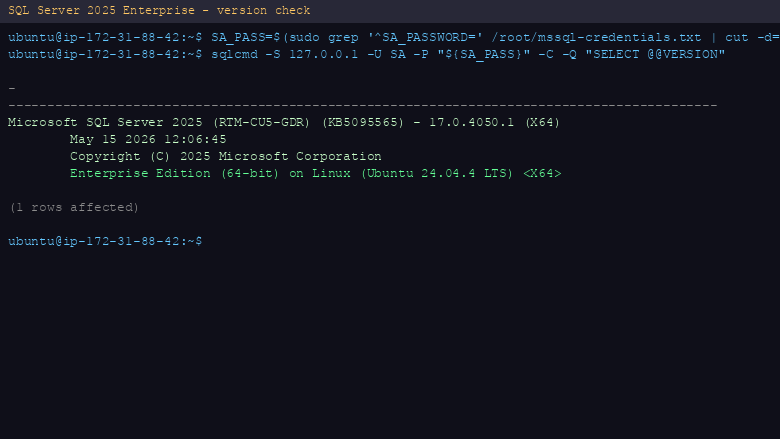
SQL Server 2025 Enterprise version
Image
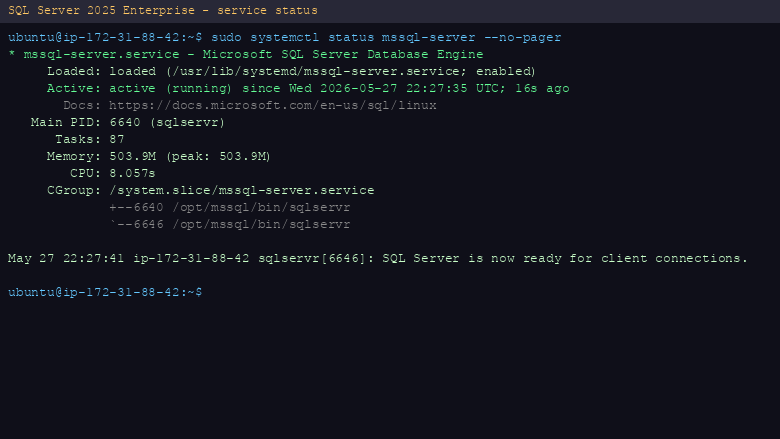
mssql-server systemd service status
Image
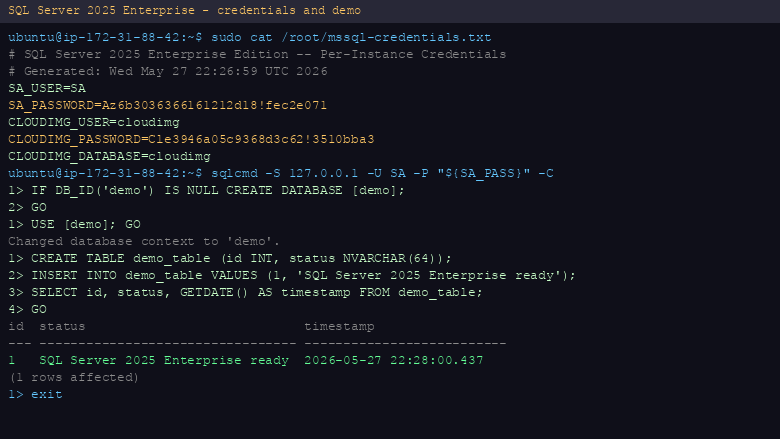
Credentials file and database demo
This is a repackaged open source software product wherein additional charges apply for cloudimg support services.
Microsoft SQL Server 2025 is the full-featured relational database platform for mission-critical workloads, advanced analytics, AI and high availability at scale. This listing delivers SQL Server fully installed and configured, so a production-grade database server is running within minutes of launch.
Available editions on this listing: Enterprise, Standard, Express and Developer. Choose the delivery option that matches your workload when you subscribe. Enterprise delivers the full feature set for mission-critical scale. Standard suits mid-tier production workloads. Express is the free entry-level edition for small databases and learning. Developer provides the complete Enterprise feature set licensed for development and test use only.
Application Stack mssql-server from the official Microsoft APT repository. mssql-tools18 and sqlcmd for command-line administration. The service runs on port 1433 and starts on boot via systemd.
New Engine Features Vector data type and HNSW indexes for AI and RAG workloads. Native JSON_OBJECT and JSON_ARRAY functions. REGEXP_LIKE, REGEXP_INSTR and REGEXP_REPLACE in T-SQL. Optimized locking for improved concurrency. Native Azure Active Directory authentication for Linux.
Secure First Boot On the first boot of every instance a one-shot service generates a unique SA password, sets it via mssql-conf, re-applies the selected edition, creates a cloudimg SQL login, removes the build-time memory cap and writes all credentials to a root-only file. No shared or default credentials ship in the image.
Ready To Use The SQL Server service starts on boot. Retrieve the generated credentials from /root/mssql-credentials.txt (root access required) and connect with sqlcmd or any SQL Server client on port 1433.
cloudimg Support 24/7 technical support by email and chat. Help with SQL Server deployment, performance tuning, high availability, query optimisation and database administration.
All product and company names are trademarks or registered trademarks of their respective holders. Use of them does not imply any affiliation with or endorsement by them.
Highlights
- SQL Server preinstalled with mssql-tools18 and sqlcmd, offered in Enterprise, Standard, Express and Developer editions so you can match the edition to your workload
- Hardened first boot generates a unique SA password and cloudimg SQL login for every instance and stores them in a root-only credentials file
- 24/7 technical support from cloudimg with expert assistance for SQL Server deployment, performance tuning, high availability and database administration
New
Introducing multi-product solutions
You can now purchase comprehensive solutions tailored to use cases and industries.

Features and programs
Financing for AWS Marketplace purchases
AWS Marketplace now accepts line of credit payments through the PNC Vendor Finance program. This program is available to select AWS customers in the US, excluding NV, NC, ND, TN, & VT.

Pricing
Free trial
Try this product free for 7 days according to the free trial terms set by the vendor. Usage-based pricing is in effect for usage beyond the free trial terms. Your free trial gets automatically converted to a paid subscription when the trial ends, but may be canceled any time before that.
Pricing is based on actual usage, with charges varying according to how much you consume. Subscriptions have no end date and may be canceled any time. Alternatively, you can pay upfront for a contract, which typically covers your anticipated usage for the contract duration. Any usage beyond contract will incur additional usage-based costs.
Additional AWS infrastructure costs may apply. Use the AWS Pricing Calculator to estimate your infrastructure costs.
If you are an AWS Free Tier customer with a free plan, you are eligible to subscribe to this offer. You can use free credits to cover the cost of eligible AWS infrastructure. See AWS Free Tier for more details. If you created an AWS account before July 15th, 2025, and qualify for the Legacy AWS Free Tier, Amazon EC2 charges for Micro instances are free for up to 750 hours per month. See Legacy AWS Free Tier for more details.
Dimension | Description | Cost/hour |
|---|---|---|
m5.xlarge Recommended | m5.xlarge | $0.09 |
t2.micro | t2.micro instance type | $0.01 |
t3.micro | t3.micro instance type | $0.01 |
g4dn.2xlarge | g4dn.2xlarge instance type | $0.24 |
inf2.8xlarge | inf2.8xlarge instance type | $0.24 |
m8in.96xlarge | m8in.96xlarge instance type | $0.24 |
c8id.96xlarge | c8id.96xlarge instance type | $0.24 |
g6f.2xlarge | g6f.2xlarge instance type | $0.24 |
c7i-flex.large | c7i-flex.large instance type | $0.06 |
c7i-flex.8xlarge | c7i-flex.8xlarge instance type | $0.24 |
Vendor refund policy
Refunds available on request.

Legal
Vendor terms and conditions
Upon subscribing to this product, you must acknowledge and agree to the terms and conditions outlined in the vendor's End User License Agreement (EULA) .
Content disclaimer
Vendors are responsible for their product descriptions and other product content. AWS does not warrant that vendors' product descriptions or other product content are accurate, complete, reliable, current, or error-free.
Delivery details
64-bit (x86) Amazon Machine Image (AMI)
Amazon Machine Image (AMI)
An AMI is a virtual image that provides the information required to launch an instance. Amazon EC2 (Elastic Compute Cloud) instances are virtual servers on which you can run your applications and workloads, offering varying combinations of CPU, memory, storage, and networking resources. You can launch as many instances from as many different AMIs as you need.
Version release notes
Remediates flagged CVEs: full apt update (kernel + userspace); rng-tools added.
Additional details
Usage instructions
Connect via SSH on port 22 using the default login user for your operating system variant (see the user guide for the login user per variant). After first boot completes, retrieve your generated SA password with: sudo cat /root/mssql-credentials.txt. Connect to SQL Server with: sqlcmd -S 127.0.0.1 -U SA -P '<SA_PASSWORD>' -C. SQL Server listens on port 1433. To allow external connections, add port 1433 to the instance security group.
Resources
Vendor resources
Support
Vendor support
cloudimg provides 24/7 technical support for this product by email and live chat. Our engineers help with deployment, configuration, updates, performance tuning and troubleshooting; critical issues receive a one hour average response. Contact support@cloudimg.co.uk .
AWS infrastructure support
AWS Support is a one-on-one, fast-response support channel that is staffed 24x7x365 with experienced and technical support engineers. The service helps customers of all sizes and technical abilities to successfully utilize the products and features provided by Amazon Web Services.
Similar products
RDS SQL Server Read Replicas and Disaster Recovery (DR)
AzureSQL to AWS RDS SQL Server replication and disaster recovery (DR)
AzureSQL to AWS S3 Datalake data streaming
AzureSQL to AWS Redshift data streaming
SQL Server cross-region disaster recovery, in-region and cross-AWS-accounts read replicas, AzureSQL to AWS RDS SQL Server Migration
Support of all SQL Server versions and editions, including AzureSQL managed instance.

This product has charges associated with it for seller support. SQL Server 2022 Standard on Windows 2025 is a powerful, high-performance database solution designed for businesses of all sizes. Streamline your data management with advanced features such as improved performance, enhanced security, and increased scalability. With capabilities like intelligent query processing and built-in machine learning tools, you can optimize your data analytics and decision-making processes effortlessly. This AMI is ideal for deploying mission-critical applications and workloads in the EC2 cloud, allowing for flexibility and easy integration with existing infrastructure. Benefit from robust processing, dependable backup options, and comprehensive support for compliance requirements, ensuring your data remains secure and accessible. Maximize your operational efficiency and improve your team's productivity with SQL Server 2022 Standard on Windows 2025.

This product has charges associated with it for Websoft9 support. Pre-configured, web-based, cloud-native, secure, one-click to deploy SQL Server Express with Websoft9 Applications Hosting Platform on AWS. SQL Server Express is an official free distribution of Microsoft's SQL Server, used in scenarios such as SQL databases/relational databases.

SQL test automation tool to help version upgrades test and migration assessment

This product has charges associated with it for seller support. SQL Server 2022 Enterprise running on Windows 2025 offers a robust, high-performance platform for mission-critical database applications. Leveraging advanced analytics, in-memory technologies, and enhanced security features, this AMI is designed to meet the demands of large-scale enterprises. Key benefits include automated backups, intelligent query processing, and built-in machine learning capabilities to enhance operational efficiency. Developers and data analysts can seamlessly integrate this solution into their existing architecture, allowing for efficient data management and analysis. With support for hybrid and multi-cloud environments, SQL Server 2022 Enterprise on Windows 2025 is ideal for businesses looking to harness the power of their data while ensuring compliance and security across their infrastructures.
Customer reviews
No customer reviews yet
Be the first to review this product . We've partnered with PeerSpot to gather customer feedback. You can share your experience by writing or recording a review, or scheduling a call with a PeerSpot analyst.