Sold by: cloudimg
Deployed on AWS
Free Trial
AWS Free Tier
This product has charges associated with it for seller support. Eliminate complex stream-processing stacks - run real-time analytics as standard SQL. RisingWave uses the PostgreSQL wire protocol so existing tools connect unchanged, with state on a dedicated data volume and a unique password generated on first boot. Includes 24/7 cloudimg support.
Overview
Image
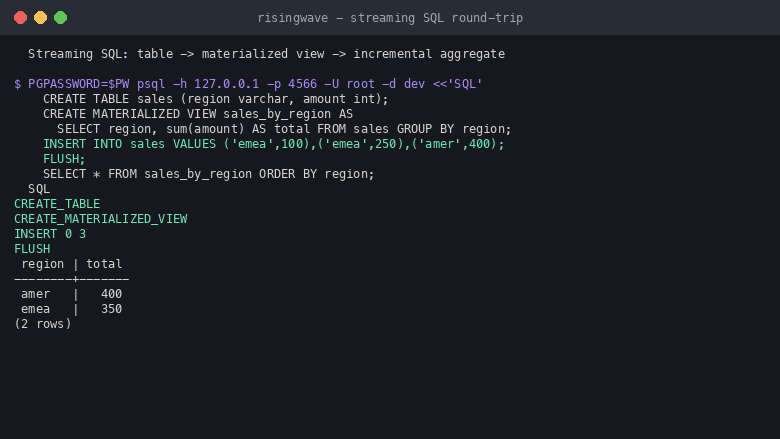
Streaming SQL round-trip
Image
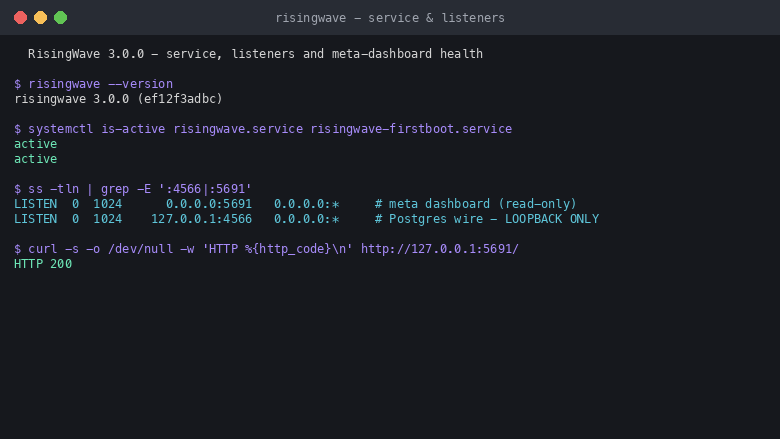
Service, listeners and health
Image
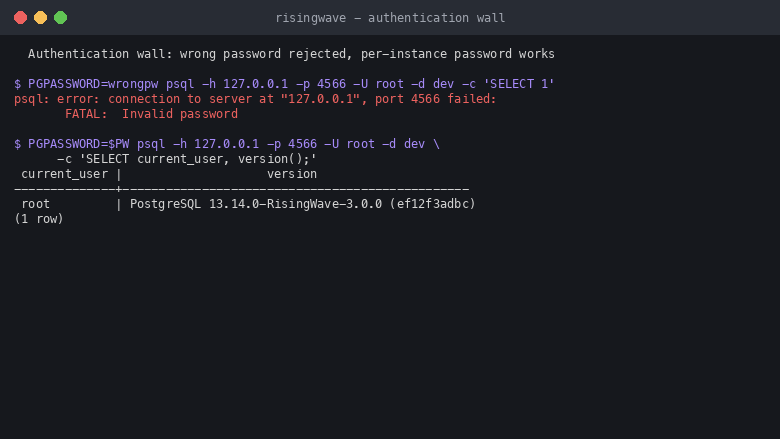
Authentication wall
This is a repackaged open source software product wherein additional charges apply for cloudimg support services.
Real-Time Analytics Without the Complexity
RisingWave is a Postgres-compatible streaming database that replaces the need to deploy a separate stream-processing framework alongside a traditional database. Instead of learning a new query language, managing JVM-based infrastructure, or configuring a separate state backend, your team expresses real-time analytics as ordinary SQL and queries continuously-maintained results whenever needed.
Unlike architectures that require stitching together a message broker, a stream processor, and a serving database, RisingWave collapses these layers into a single process that speaks the PostgreSQL wire protocol. Any psql client or PostgreSQL driver connects unchanged - no new tooling, no retraining.
Use Case: Real-Time Inventory Tracking
Consider a warehouse or e-commerce operation that needs accurate stock visibility across locations. With RisingWave you define a change-data-capture source capturing every inventory change, create materialized views that aggregate stock levels per SKU and location, and query the results with standard SQL. Stock counts stay incrementally up to date as changes stream in, preventing stockouts and overstock without batch ETL delays or custom application code.
Why This Image Instead of Self-Installing
Standing up RisingWave yourself means fetching and pinning the release binary, writing a standalone single-node configuration, deciding where the state store and metadata should live, binding the data plane so it is not exposed, adding password authentication that the default install does not enforce, and provisioning a dedicated disk for durable state. This image resolves every one of those decisions: launch an instance, read your unique password over SSH, and connect with any PostgreSQL client. A working streaming database is running within minutes of launch.
Standalone Single-Node Architecture
This image runs RisingWave in standalone single-node mode where one process hosts the meta, compute, frontend, and compactor components. There is no external cluster to provision and no separate object store to configure. The standalone state store and metadata are kept on the machine's own dedicated data volume. Point RisingWave at your streaming sources - Kafka, Kinesis, Redpanda, Pulsar, MQTT, and more.
Persistent State on a Dedicated Volume
RisingWave's state store and metadata live on a dedicated, independently resizable EBS data volume mounted at /var/lib/risingwave. Streams, tables, and materialized views persist across restarts, and the state volume can be grown independently of the operating-system disk.
Security Hardening From First Boot
Security is not an afterthought - this image ships with deliberate hardening:
- Loopback-only binding - the PostgreSQL wire protocol is never exposed to the network by default; access requires an SSH tunnel or an explicit security group change.
- Unique generated password - a per-instance password is created on first boot and enforced on the root user; anonymous and wrong-password connections are rejected.
- No default credentials - nothing is baked into the image.
- Dedicated system user - a non-root user owns the data directory and runs the daemon.
- systemd management - automatic restarts and clean logging.
Getting Started
- Launch the instance from the AWS Marketplace listing.
- SSH in and read the generated password from the root-only credentials file.
- Connect with psql to the loopback Postgres wire on port 4566, database dev, user root.
- Create a table, define a materialized view that aggregates over it, insert rows, and read the incrementally-maintained result.
- Connect an external streaming source such as Kafka to ingest your own data.
cloudimg Support
cloudimg provides 24/7 technical support by email and chat covering deployment, connecting external streaming sources, sizing, tunnelling and remote access, TLS, and upgrades. For sizing guidance, email support@cloudimg.co.uk with your expected event rate and source types.
RisingWave is distributed under the Apache License 2.0. All product and company names are trademarks or registered trademarks of their respective holders. Use of them does not imply any affiliation with or endorsement by them.
Highlights
- Replace complex stream-processing stacks with standard SQL - unlike architectures requiring a separate JVM-based framework, a custom query language, and an external state backend, RisingWave lets your team use familiar PostgreSQL syntax and tools. Any psql client or PostgreSQL driver connects unchanged on port 4566, so there is no new tooling to learn and no overhead of managing multiple systems for real-time analytics.
- Production-grade security without manual hardening - the Postgres wire protocol is bound to loopback only and never network-exposed by default. A unique password is generated per instance on first boot with no default credentials baked in. This eliminates the class of misconfiguration vulnerabilities common in self-managed streaming deployments.
- Durable, independently scalable state with 24/7 expert support - the state store and metadata live on a dedicated EBS volume at /var/lib/risingwave that persists across restarts and can be resized without touching the OS disk. Backed by cloudimg's 24/7 technical support via email and chat covering deployment, source integration, sizing, TLS, and upgrades.
Details
Sold by
Categories
Delivery method
Delivery option
64-bit (x86) Amazon Machine Image (AMI)
Latest version
Operating system
Ubuntu 24.04
Deployed on AWS
New
Introducing multi-product solutions
You can now purchase comprehensive solutions tailored to use cases and industries.

Features and programs
Financing for AWS Marketplace purchases
AWS Marketplace now accepts line of credit payments through the PNC Vendor Finance program. This program is available to select AWS customers in the US, excluding NV, NC, ND, TN, & VT.

Pricing
Free trial
Try this product free for 7 days according to the free trial terms set by the vendor. Usage-based pricing is in effect for usage beyond the free trial terms. Your free trial gets automatically converted to a paid subscription when the trial ends, but may be canceled any time before that.
Pricing is based on actual usage, with charges varying according to how much you consume. Subscriptions have no end date and may be canceled any time. Alternatively, you can pay upfront for a contract, which typically covers your anticipated usage for the contract duration. Any usage beyond contract will incur additional usage-based costs.
Additional AWS infrastructure costs may apply. Use the AWS Pricing Calculator to estimate your infrastructure costs.
If you are an AWS Free Tier customer with a free plan, you are eligible to subscribe to this offer. You can use free credits to cover the cost of eligible AWS infrastructure. See AWS Free Tier for more details. If you created an AWS account before July 15th, 2025, and qualify for the Legacy AWS Free Tier, Amazon EC2 charges for Micro instances are free for up to 750 hours per month. See Legacy AWS Free Tier for more details.
Dimension | Description | Cost/hour |
|---|---|---|
m5.large Recommended | m5.large | $0.08 |
t3.micro | t3.micro instance type | $0.04 |
t2.micro | t2.micro instance type | $0.04 |
r5b.16xlarge | r5b.16xlarge instance type | $0.24 |
i7i.12xlarge | i7i.12xlarge instance type | $0.24 |
m8azn.large | m8azn.large instance type | $0.08 |
c8in.xlarge | c8in.xlarge instance type | $0.12 |
g4ad.2xlarge | g4ad.2xlarge instance type | $0.24 |
f2.6xlarge | f2.6xlarge instance type | $0.24 |
i3.8xlarge | i3.8xlarge instance type | $0.24 |
Vendor refund policy
Refunds available on request.

Legal
Vendor terms and conditions
Upon subscribing to this product, you must acknowledge and agree to the terms and conditions outlined in the vendor's End User License Agreement (EULA) .
Content disclaimer
Vendors are responsible for their product descriptions and other product content. AWS does not warrant that vendors' product descriptions or other product content are accurate, complete, reliable, current, or error-free.
Delivery details
64-bit (x86) Amazon Machine Image (AMI)
Amazon Machine Image (AMI)
An AMI is a virtual image that provides the information required to launch an instance. Amazon EC2 (Elastic Compute Cloud) instances are virtual servers on which you can run your applications and workloads, offering varying combinations of CPU, memory, storage, and networking resources. You can launch as many instances from as many different AMIs as you need.
Version release notes
Initial release of RisingWave 3.0.0.
Additional details
Usage instructions
Connect via SSH on port 22 as the default login user for your operating system variant (the user guide lists it per variant; on Ubuntu it is 'ubuntu'). Retrieve the generated password with: sudo cat /root/risingwave-credentials.txt. RisingWave speaks the PostgreSQL wire protocol on 127.0.0.1:4566 (database 'dev', user 'root'); connect locally with: PGPASSWORD=<password> psql -h 127.0.0.1 -p 4566 -U root -d dev. Run streaming SQL - create a table, define a materialized view that aggregates over it, insert rows, and SELECT from the view to read the incrementally-maintained result. RisingWave runs as a single-node service managed by systemd: use systemctl status risingwave. The standalone state store and metadata live on a dedicated data volume at /var/lib/risingwave. The Postgres wire on 4566 is bound to loopback and not exposed; reach it remotely over an SSH tunnel (ssh -L 4566:127.0.0.1:4566 ubuntu@<instance-public-ip>) or by opening 4566 in your own security group restricted to known source ranges. To stream your own data, connect an external source such as Kafka, Kinesis or Redpanda as described in the user guide. Do not expose 4566 to the internet without TLS and source restrictions.
Resources
Vendor resources
Support
Vendor support
cloudimg provides 24/7 technical support for this product by email and live chat.
What We Help With
- Deployment and initial configuration
- Connecting external streaming sources (Kafka, Kinesis, Redpanda, Pulsar, MQTT, and more)
- Writing streaming SQL and materialized views
- Database sizing and performance tuning
- Persistent state and the dedicated data volume
- Tunnelling and remote access configuration
- TLS termination and certificate management
- Upgrades to newer RisingWave releases
Response Times
Critical issues receive a one-hour average first response. Our engineers are available around the clock, including weekends and holidays.
Sizing Guidance
Not sure which instance type fits your workload? Email us with your expected event rate, number of sources, and materialized view complexity, and our engineers will recommend an appropriate configuration.
Contact
Email: support@cloudimg.co.uk
For refund requests or billing questions, contact us at the same email address and we will respond within one business day.
AWS infrastructure support
AWS Support is a one-on-one, fast-response support channel that is staffed 24x7x365 with experienced and technical support engineers. The service helps customers of all sizes and technical abilities to successfully utilize the products and features provided by Amazon Web Services.
Similar products

RisingWave Streaming Database - Build Real-time streaming applications using SQL on Cloud infrastructure in an elastic and Cost-effective way

RisingWave Cloud - Build Real-time streaming applications using SQL on Cloud

This product has charges associated with it for deployment, configuration, and ongoing support. Self-hosted streaming database with PostgreSQL compatibility. Write SQL to process streaming data in real-time. Materialized views that stay fresh automatically.
Customer reviews
No customer reviews yet
Be the first to review this product . We've partnered with PeerSpot to gather customer feedback. You can share your experience by writing or recording a review, or scheduling a call with a PeerSpot analyst.