Sold by: Software Sushi
Deployed on AWS
Free Trial
Sushi ML Studio is no-code machine learning that runs in your browser, on your own EC2 instance. Upload a CSV or Excel file, pick the column you want to predict, and it trains and compares against many scikit-learn models, tells you in plain language how good the best one is, and adds predictions to new spreadsheets. Your data never leaves the instance, and you keep the model file and the Python code that reproduces it.
Overview
Image
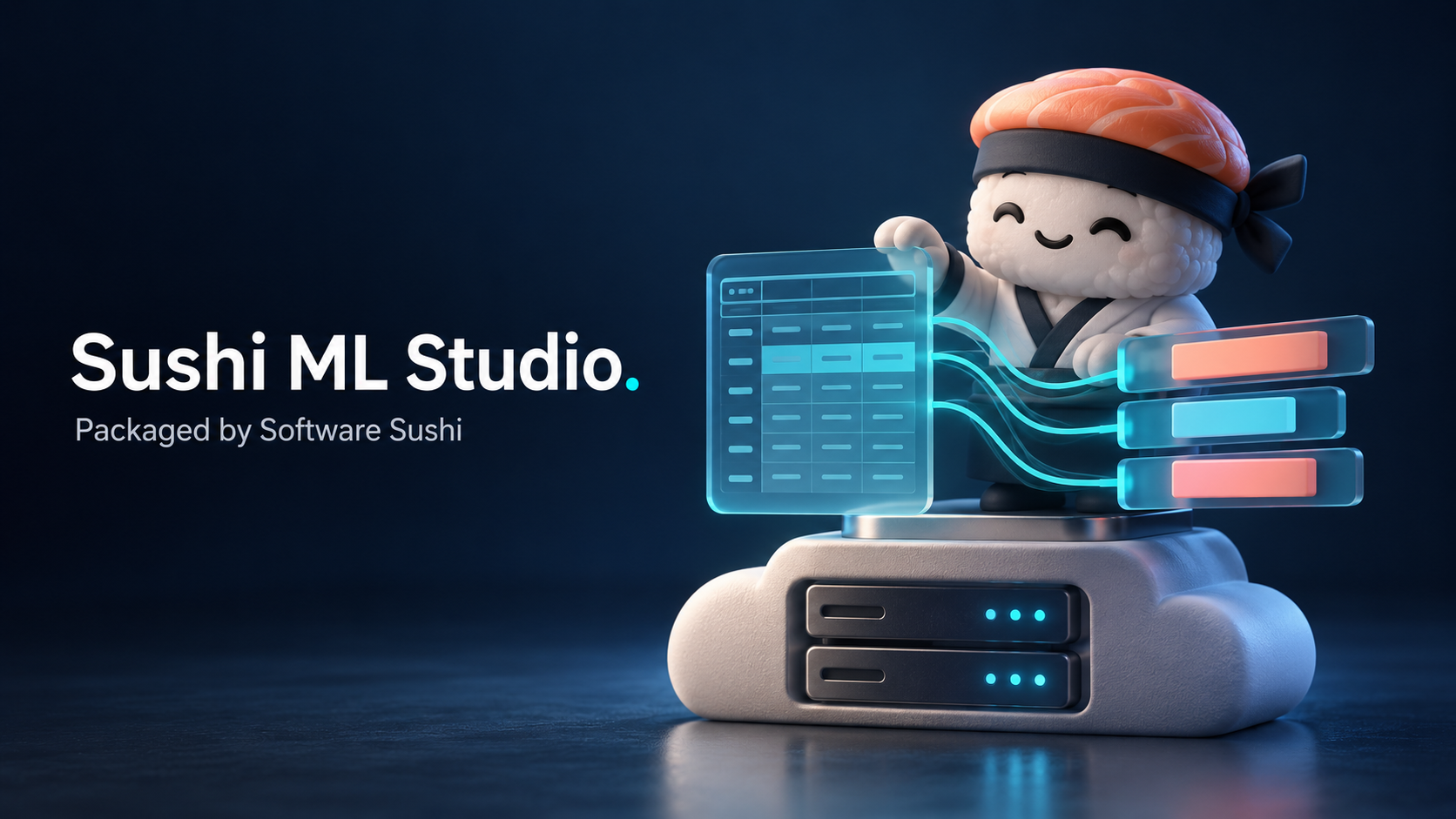
Sushi ML Studio - Software Sushi product illustration

Video
Sushi ML Studio Demo
Image
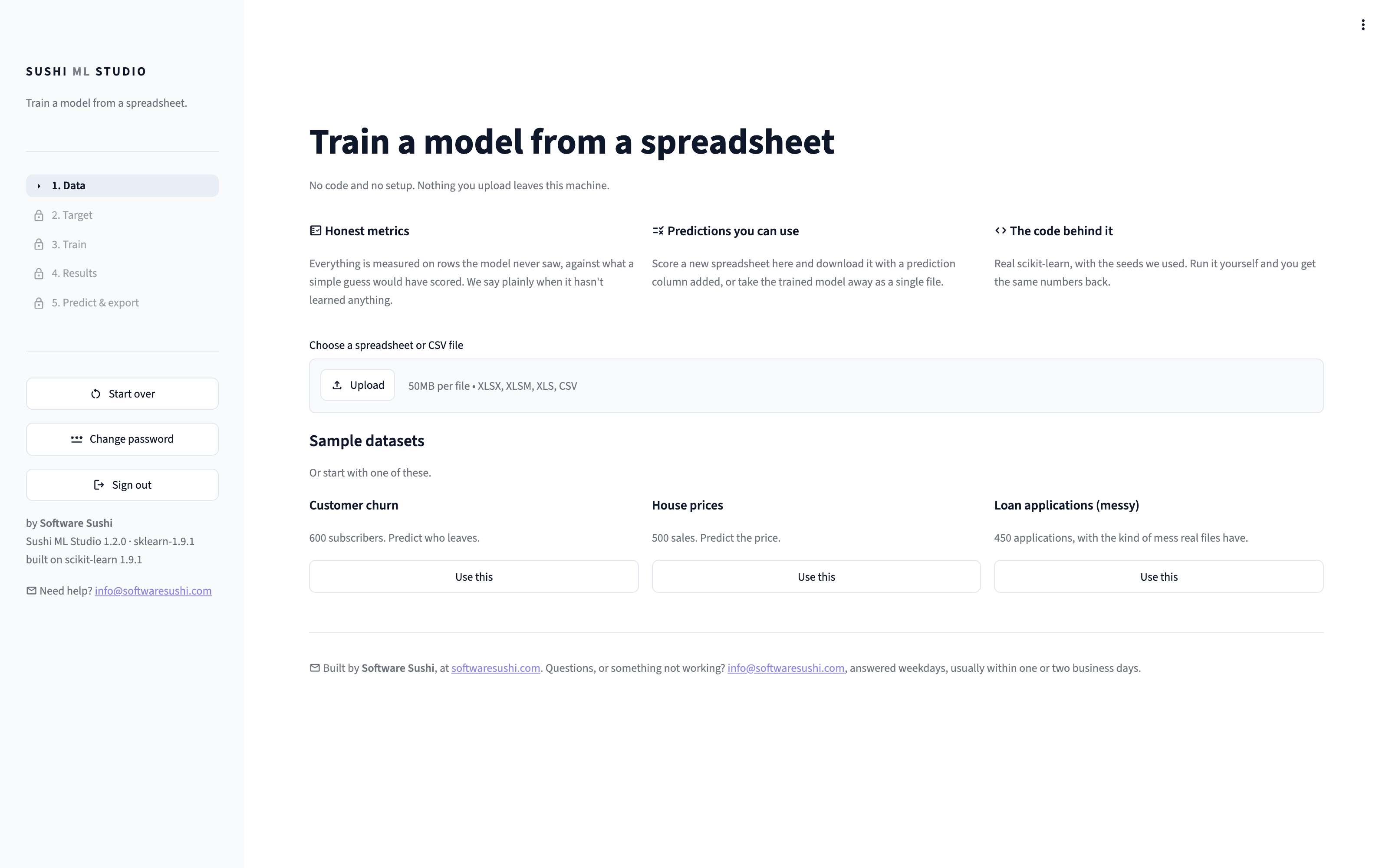
Start from a spreadsheet or an example
Image
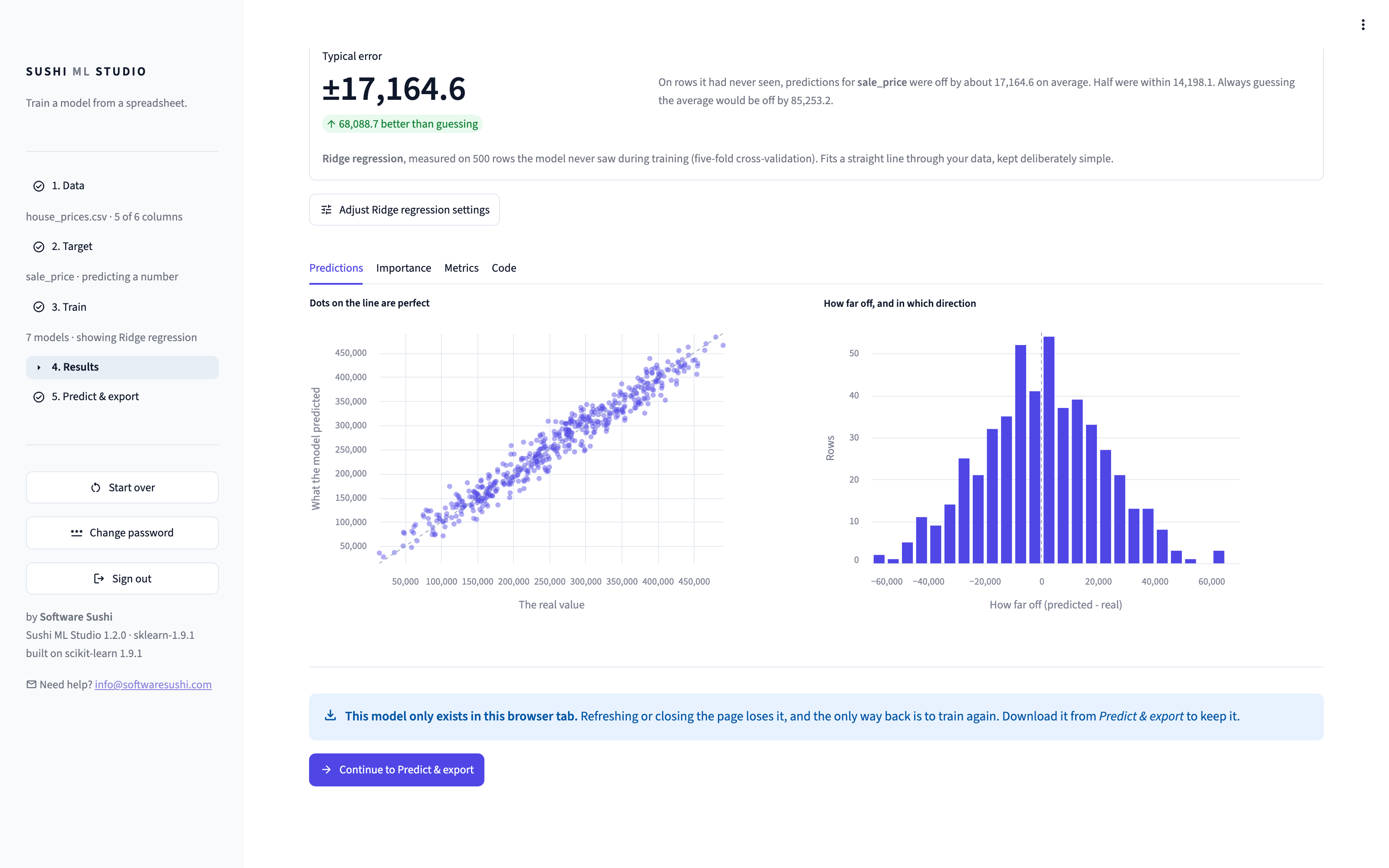
A plain verdict on how good the model is
Image
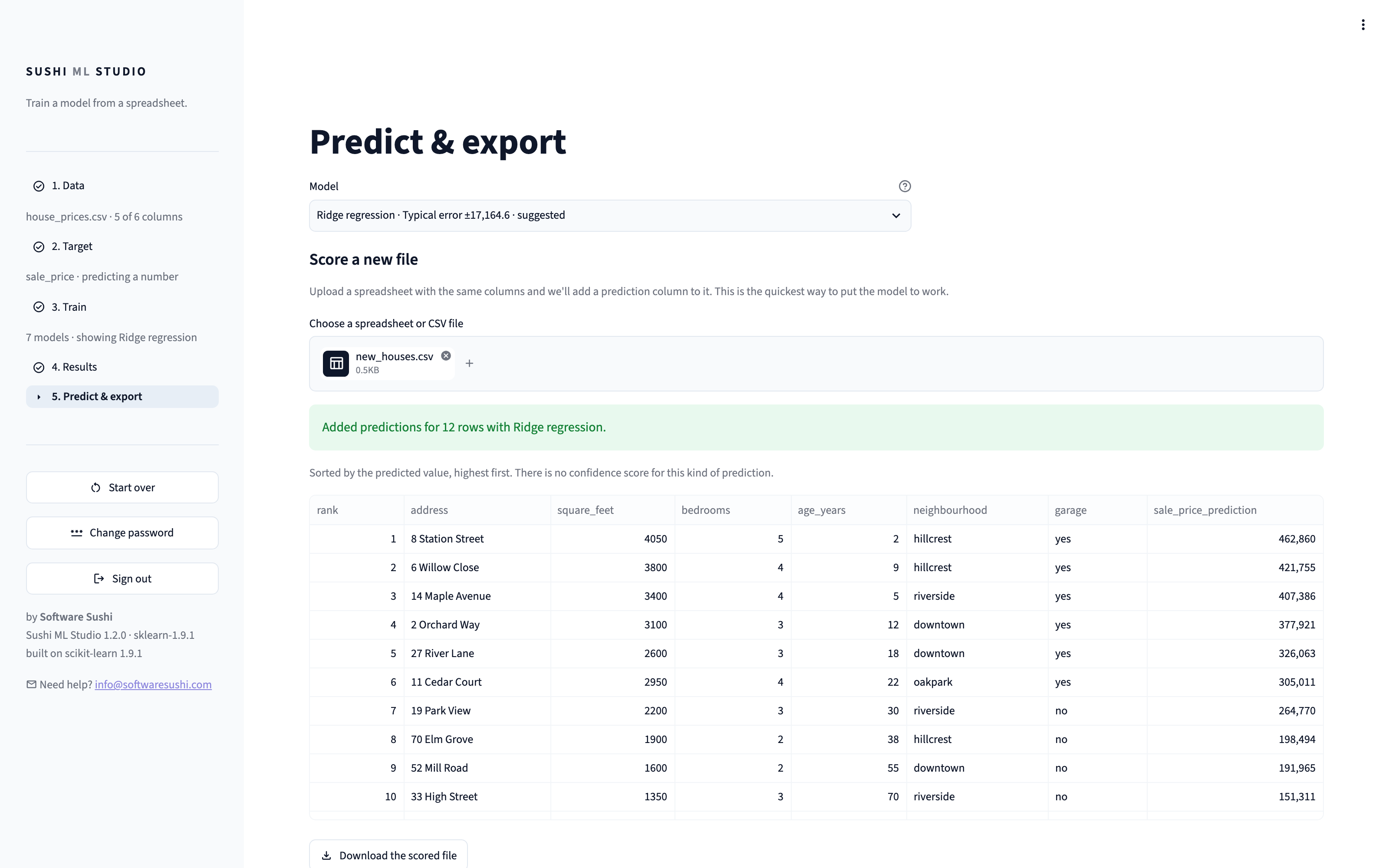
Predictions for new data
Image
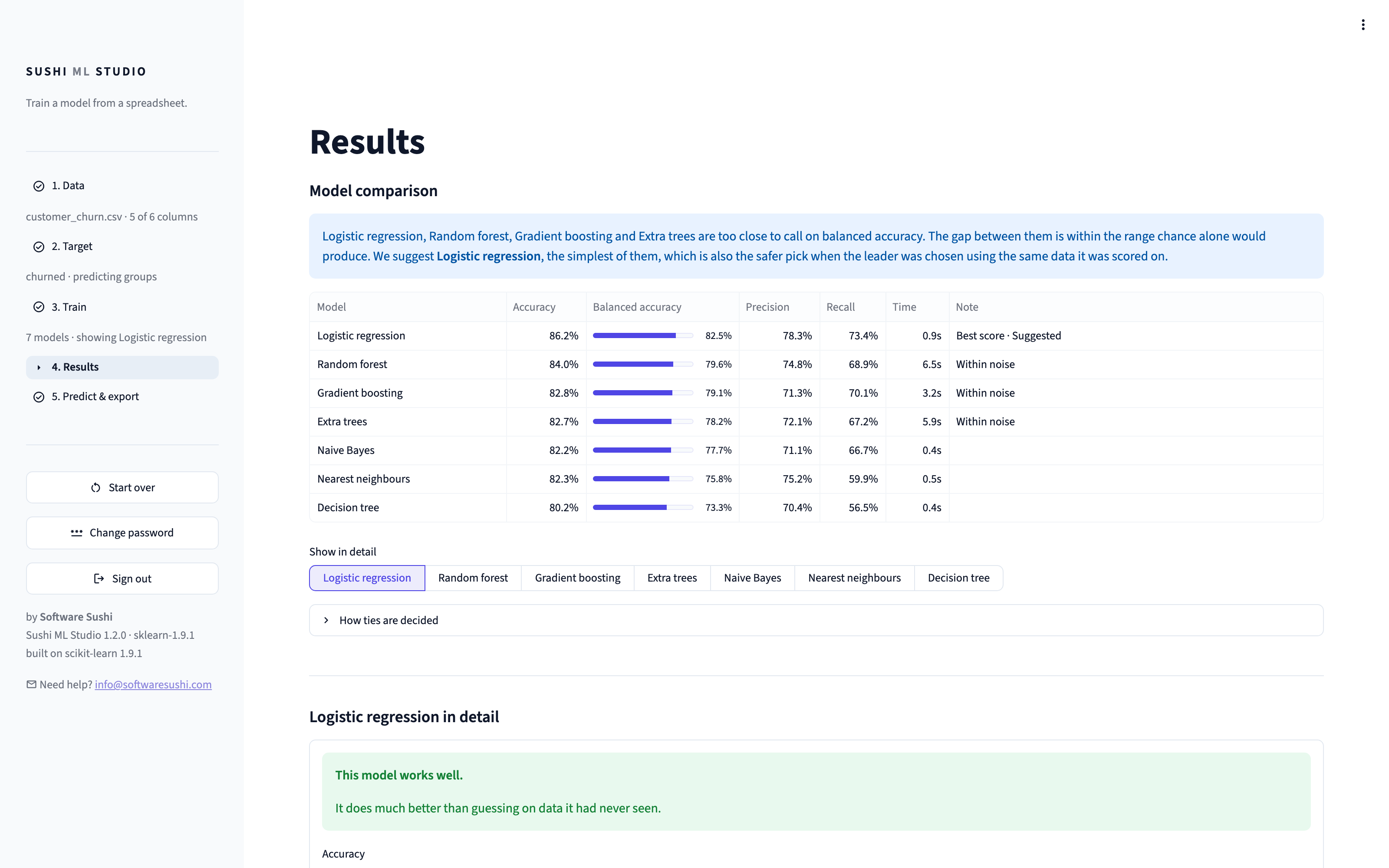
Seven models compared for you
Turn a spreadsheet into predictions you can trust, without writing code, hiring a data scientist, or sending your data to anyone.
Sushi ML Studio is a web application that runs on an EC2 instance in your own AWS account. Open it in your browser, upload a file, and within minutes you have a trained model, an honest account of how good it is, and predictions for new rows.
HOW IT WORKS
- Load your data. Upload a CSV or Excel (.xlsx) file up to 50 MB, or start from one of three example datasets. The Studio reads the file, detects separators and encodings, and profiles every column: its type, blank cells, typical values, and warnings about columns that would mislead a model, such as IDs, dates, free text and duplicates of each other.
- Choose what to predict. Tick the column you want answers about. The Studio works out whether that means sorting rows into groups (classification, for example churned or stayed) or predicting a number (regression, for example a sale price), and you can override it.
- Train. Seven scikit-learn models are trained and compared for you, including gradient boosting, random forest, and linear models. An optional search tries better settings, and then tells you whether it actually helped. You can also adjust a model's settings yourself and retrain just that model. On a large file, a model that may run out of memory or take more than five minutes says so before training, and you can train it on a sample of the rows; a model that runs out of memory stops on its own, and your other models and work are kept.
- Read the results. A plain-language verdict says how good the model is, the predictions and metrics are charted, and a ranking shows which columns drive the prediction.
- Use it. Upload new rows, as CSV or Excel, and download them as a CSV file with a prediction column added. You can switch to any of the trained models right there, and the same file is scored again.
RESULTS YOU CAN TRUST
- Every score is measured on rows the model never saw during training, using cross-validation on smaller files and a held-back test set on larger ones.
- Every score sits next to what a simple guess would have achieved, so a 95% accuracy on data that is 95% one answer is called out, not celebrated.
- When the models have not learned anything useful, the Studio says so.
- When several models perform the same within noise, it says they are tied and recommends the simplest one, instead of crowning a winner by a hair.
- Column importance is measured on held-out rows, and columns that duplicate each other are named, so the ranking does not mislead.
YOU KEEP WHAT YOU MAKE
- Download the trained model as a standard scikit-learn file that loads with joblib, with no dependency on this product. Or download every model you trained in one zip, ranked, with a list of their scores.
- Download the complete Python training code, with the random seeds used, so running it reproduces the same numbers.
- The instance also includes JupyterLab and a Python environment with scikit-learn, pandas, NumPy, SciPy, matplotlib and seaborn, for when you want to continue in code. The Studio runs from its own separate environment, so changing packages cannot break it.
PRIVATE BY DESIGN
- Runs entirely on your instance, in your account and your chosen region. Uploaded data is held in memory and never written to disk or sent anywhere.
- No accounts, no telemetry, no licence server, no calls home.
- The Studio is password protected from the first boot. The initial password is your instance ID, which only people with access to your EC2 console can see, and you can change it from the Studio at any time.
- HTTPS from the first boot: the Studio is served at https:// with a trusted certificate for your instance's address, renewed automatically. No domain and nothing to set up.
- Prefer no open ports? Turn HTTPS off and reach the Studio from your own IP only, over an SSH tunnel, or through AWS Systems Manager Session Manager with no inbound ports at all.
GOOD TO KNOW
- Works with tabular data: one row per example, one column per attribute. It does not do time-series forecasting, images, or text analysis.
- Download your model before you close the browser tab. The Studio does not keep projects between sessions, and warns you before anything unsaved would be lost.
- Recommended instance type: t3.medium or larger.
Built by Software Sushi, a team that designs custom machine learning and AI systems. Support is by email on business days.
Highlights
- No-code machine learning in minutes: upload a CSV or Excel file, pick the column to predict, and seven scikit-learn models are trained and compared for you, with predictions for new rows ready to download.
- Honest results: every score is measured on rows the model never saw, compared against a simple guess, and explained in plain language, including when a model has not learned anything useful.
- Private and portable: it runs on your own EC2 instance, your data never leaves it, and you download the model file and the Python code that reproduces it. No accounts, no lock-in.
Details
Sold by
Categories
Delivery method
Delivery option
64-bit (x86) Amazon Machine Image (AMI)
Latest version
Operating system
Ubuntu 24.04 LTS
Deployed on AWS
New
Introducing multi-product solutions
You can now purchase comprehensive solutions tailored to use cases and industries.

Features and programs
Financing for AWS Marketplace purchases
AWS Marketplace now accepts line of credit payments through the PNC Vendor Finance program. This program is available to select AWS customers in the US, excluding NV, NC, ND, TN, & VT.

Pricing
Free trial
Try this product free for 7 days according to the free trial terms set by the vendor. Usage-based pricing is in effect for usage beyond the free trial terms. Your free trial gets automatically converted to a paid subscription when the trial ends, but may be canceled any time before that.
Pricing is based on actual usage, with charges varying according to how much you consume. Subscriptions have no end date and may be canceled any time.
Additional AWS infrastructure costs may apply. Use the AWS Pricing Calculator to estimate your infrastructure costs.
Dimension | Cost/hour |
|---|---|
t3.medium Recommended | $0.05 |
c7i.2xlarge | $0.05 |
c7i.xlarge | $0.05 |
m7i.2xlarge | $0.05 |
m7i.xlarge | $0.05 |
m7i.large | $0.05 |
t3.xlarge | $0.05 |
t3.2xlarge | $0.05 |
t3.large | $0.05 |
Dimensions summary
You pay by the hour for the EC2 instance size you choose, with no upfront commitment. The nine options map to three instance families. The t3 sizes (medium, large, xlarge, 2xlarge) are burstable general-purpose instances. The m7i sizes (large, xlarge, 2xlarge) are general-purpose instances. The c7i sizes (xlarge, 2xlarge) are compute-optimized. Within each family, cost rises as you move to larger sizes with more vCPUs and memory. The software runs on EC2 in your own AWS account, so AWS infrastructure charges are billed separately.
Top-of-mind questions for buyers
Each option maps to an Amazon EC2 instance type. The t3 sizes are burstable general-purpose. The m7i sizes are general-purpose. The c7i sizes are compute-optimized. Larger sizes within a family add vCPUs and memory, which helps train larger spreadsheets that may run out of memory on smaller sizes.
The software is metered by running instance-hours, so a fully stopped instance stops accruing software charges. AWS storage and other infrastructure fees are billed separately by AWS and may still apply while the instance is stopped. Review your AWS account for those charges.
The hourly price covers the software only. AWS infrastructure such as EC2 compute, EBS storage, networking, and data transfer is billed separately by AWS. The Studio runs in your own AWS account, so you control and pay for that underlying infrastructure directly.
docs.softwaresushi.com+1
Helpful?
Vendor refund policy
Sushi ML Studio has a 7-day free trial, so you can try it on your own data before you pay anything. During the trial there is no software charge; AWS still bills the EC2 instance as usual.
After the trial, the software is billed by AWS per instance hour, only while the instance is running. Stopping or terminating the instance stops the charge. The trial moves to paid use automatically, so stop or terminate your instance before the trial ends if you do not want to continue.

Legal
Vendor terms and conditions
Upon subscribing to this product, you must acknowledge and agree to the terms and conditions outlined in the vendor's End User License Agreement (EULA) .
Content disclaimer
Vendors are responsible for their product descriptions and other product content. AWS does not warrant that vendors' product descriptions or other product content are accurate, complete, reliable, current, or error-free.
Delivery details
64-bit (x86) Amazon Machine Image (AMI)
Amazon Machine Image (AMI)
An AMI is a virtual image that provides the information required to launch an instance. Amazon EC2 (Elastic Compute Cloud) instances are virtual servers on which you can run your applications and workloads, offering varying combinations of CPU, memory, storage, and networking resources. You can launch as many instances from as many different AMIs as you need.
Version release notes
Sushi ML Studio 1.2.0.
- New: HTTPS by default. Open https:// and the Studio is served with a trusted certificate for your instance's address, renewed automatically, with nothing to set up. Ports 80 and 443 must be open in the security group. http://:8501 still works.
- New: sudo sushi-ml-studio https status, on and off, to check or change it.
- New: on large files, a model that would probably run out of memory or take more than five minutes says so before training, and can be trained on a sample of the rows you choose. A model that ran out of memory can be retrained on a sample in one click.
- New: choose which model to use right on Predict & export, without going back to Results. Switching scores your uploaded file again with that model.
- Changed: the column contribution check on the Data page explains what its numbers mean, and no longer offers to drop columns, which could cost accuracy.
- Faster: on large files, nearest neighbours finishes up to about 6 times sooner and random forest about a third sooner, with the same models and scores.
- Fixed: random forest and extra trees failed when the column to predict held numbers stored as text, as Excel often does, and some groups were much smaller than others.
- Fixed: on a large file, a model that needed more memory than the instance had could restart the Studio and lose your work. Now only that model stops, with a message saying so, and your session and other models are kept.
- Operating system and Python packages updated to the latest security patches at build time.
Additional details
Usage instructions
- Launch with the security group created from seller settings. It opens 443 and 80 for HTTPS, and 22 for SSH. Keep 80 and 443 open to every address: Let's Encrypt checks the certificate from the internet.
- Wait 1 to 5 minutes, then open https://<public-ip> in your browser.
- Sign in with your instance ID (it starts with i-, shown in the EC2 console), then choose your own password: Change password in the sidebar, or run: sudo sushi-ml-studio set-password
Optional, if you would rather not expose the Studio to the internet: run sudo sushi-ml-studio https off, remove the rules you do not need, and use one of these. Each opens the Studio at http://localhost:8501 unless noted.
- Your IP only: allow 8501 from your own IP, then open http://<public-ip>:8501 (not encrypted, password protected).
- SSH tunnel, only 22 open: ssh -i <key>.pem -L 8501:localhost:8501 ubuntu@<public-ip>
- Session Manager, no inbound ports (needs an instance role with AmazonSSMManagedInstanceCore): aws ssm start-session --target <instance-id> --document-name AWS-StartPortForwardingSession --parameters '{"portNumber":["8501"],"localPortNumber":["8501"]}'
- Inside your VPC: allow 8501 from your VPC range only.
Check HTTPS any time: sushi-ml-studio https status Setup guide: https://docs.softwaresushi.com/ml-studio/ Launch kit (Session Manager role, CloudFormation): https://docs.softwaresushi.com/launch-kit/ Help: info@softwaresushi.com
Support
Vendor support
Email support from Software Sushi, the publisher.
- Support email: info@softwaresushi.com
- Hours: weekdays. We reply within one or two business days.
AWS infrastructure support
AWS Support is a one-on-one, fast-response support channel that is staffed 24x7x365 with experienced and technical support engineers. The service helps customers of all sizes and technical abilities to successfully utilize the products and features provided by Amazon Web Services.
Similar products

Datrics is a no-code studio for analytics, it helps to do more experiments with your data, faster, without coding. It helps data analytics to go quickly from raw data to predictive models. It connects to different data sources, like relational databases, key-value stores, DWH, block storage, etc.

This is a repackaged open source software product wherein additional charges apply for Code Creator EC2 deployment configuration, preconfigured Python data application environment, Streamlit runtime setup, and Ubuntu integration. Streamlit enables developers and data teams to turn Python data scripts into interactive web applications for machine learning, analytics, and data science.
Streamlit is an open-source python framework for building web apps for Machine Learning and Data Science.

IBM watsonx.ai software is an enterprise-grade AI development studio that brings together generative AI and machine learning development, deployment and scalability on AWS.

Run an Agno AgentOS API with a CSV calculation tool and persistent SQLite sessions on your own EC2 instance. This is paid repackaged open-source software.
Customer reviews
No customer reviews yet
Be the first to review this product . We've partnered with PeerSpot to gather customer feedback. You can share your experience by writing or recording a review, or scheduling a call with a PeerSpot analyst.