
Sold by: ProUCX
Amazon Connect inside Dynamics 365 - screen-pop, click-to-dial, call logging, live stats, transfer, Amazon Q and Contact Lens transcript. 14-day free trial.
Overview
Image
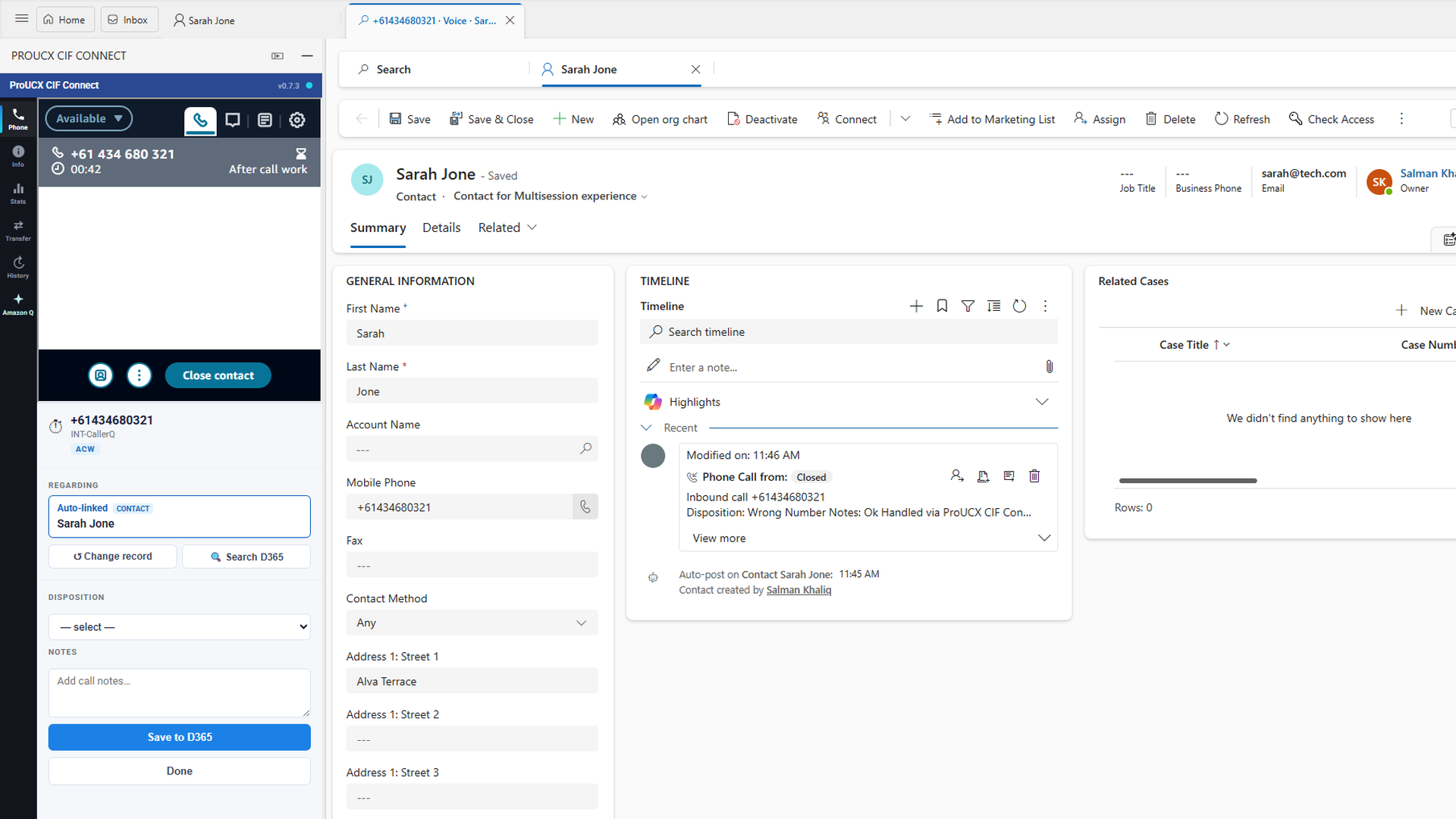
Screen-pop and wrap-up in Dynamics 365
Image
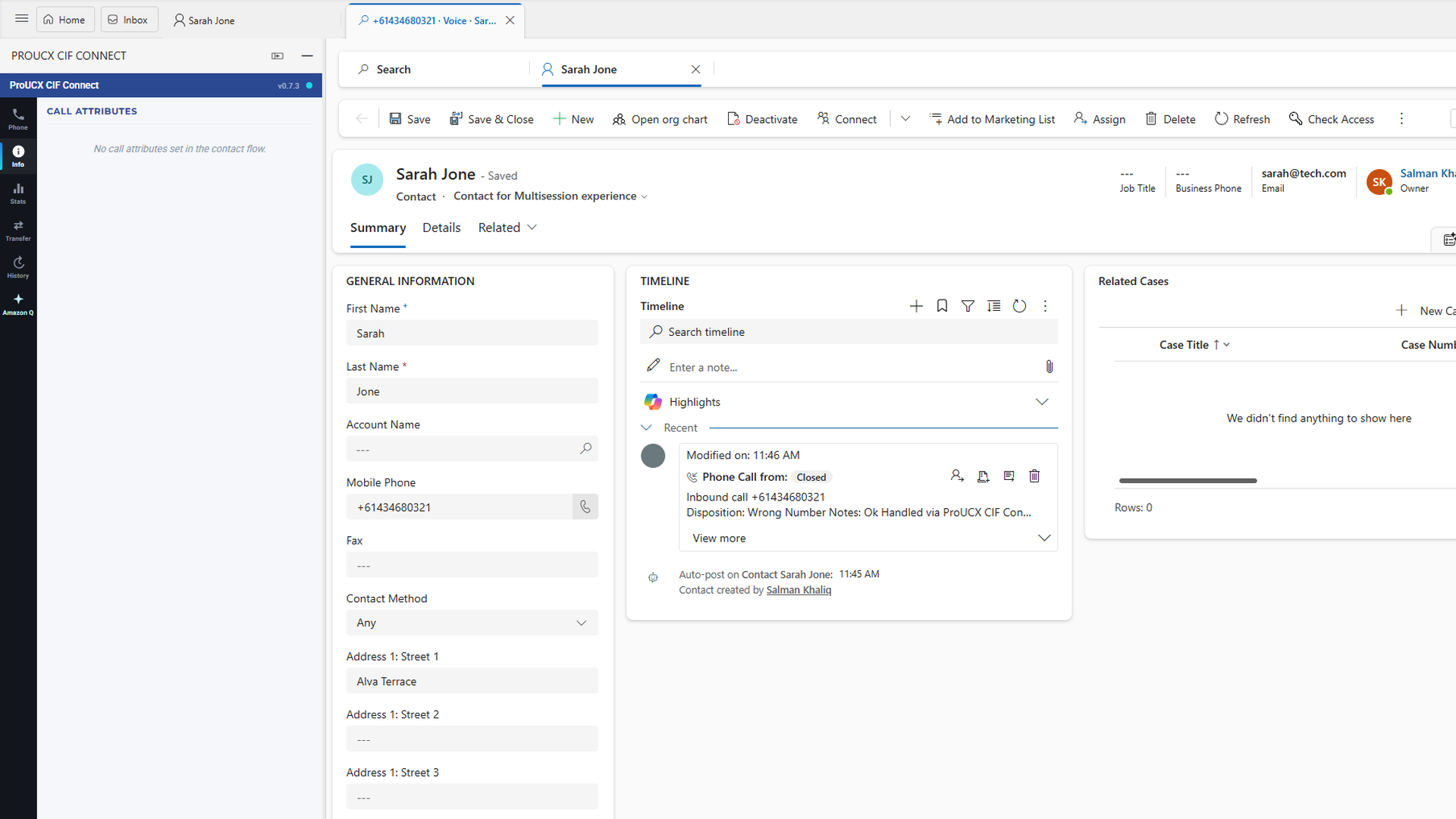
Live contact attributes
Image
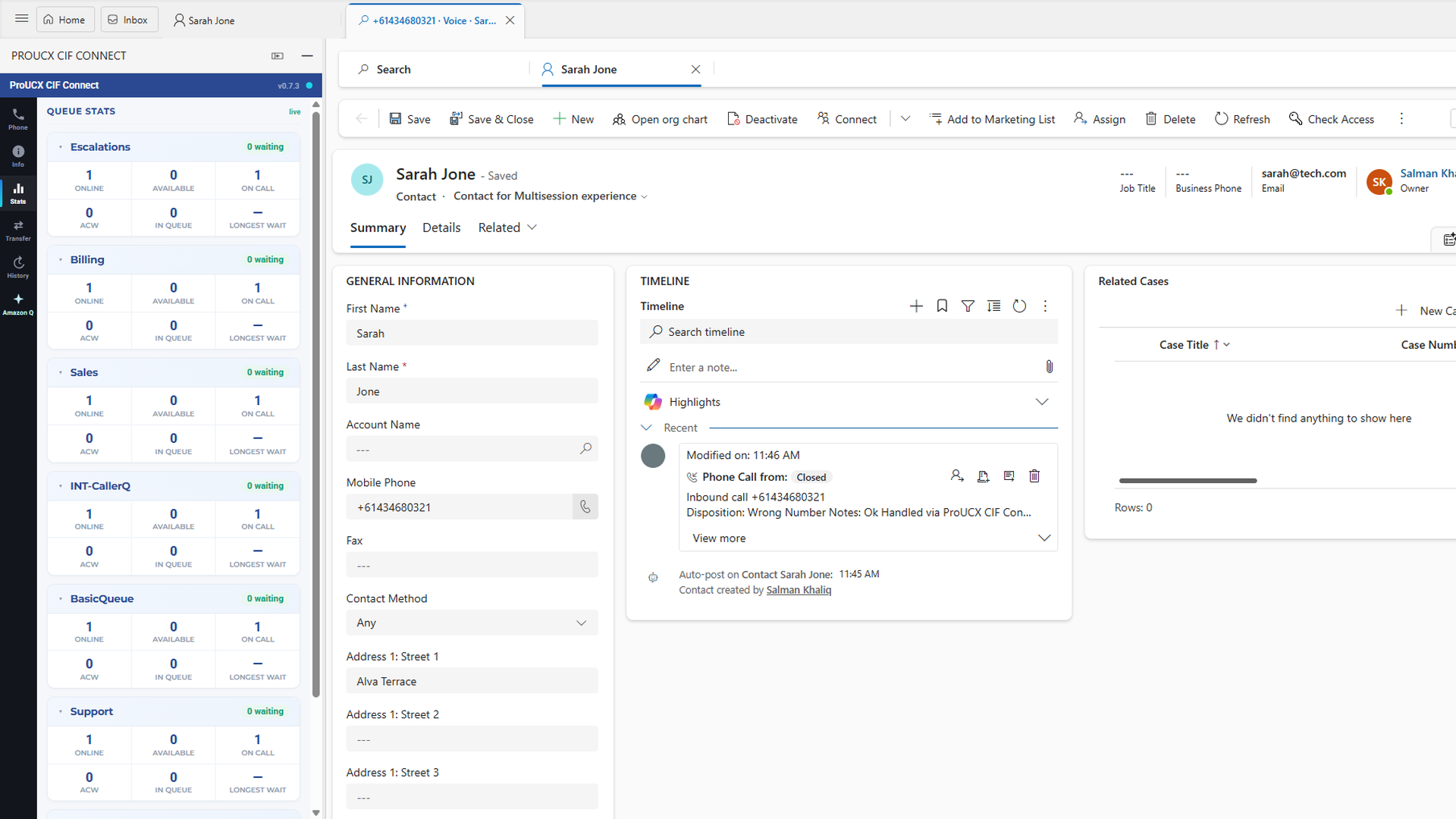
Live queue stats
Image
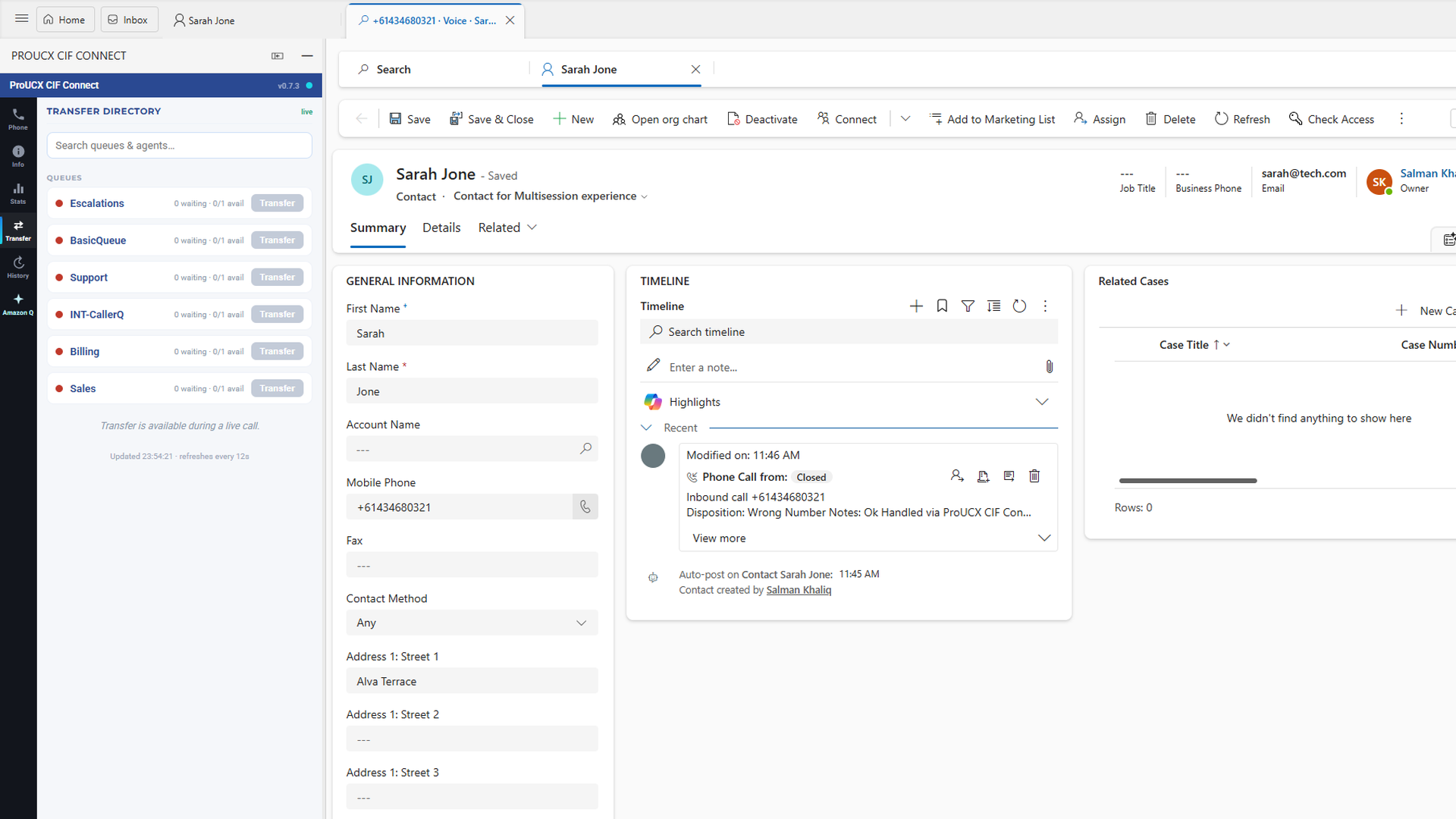
Transfer directory
Image
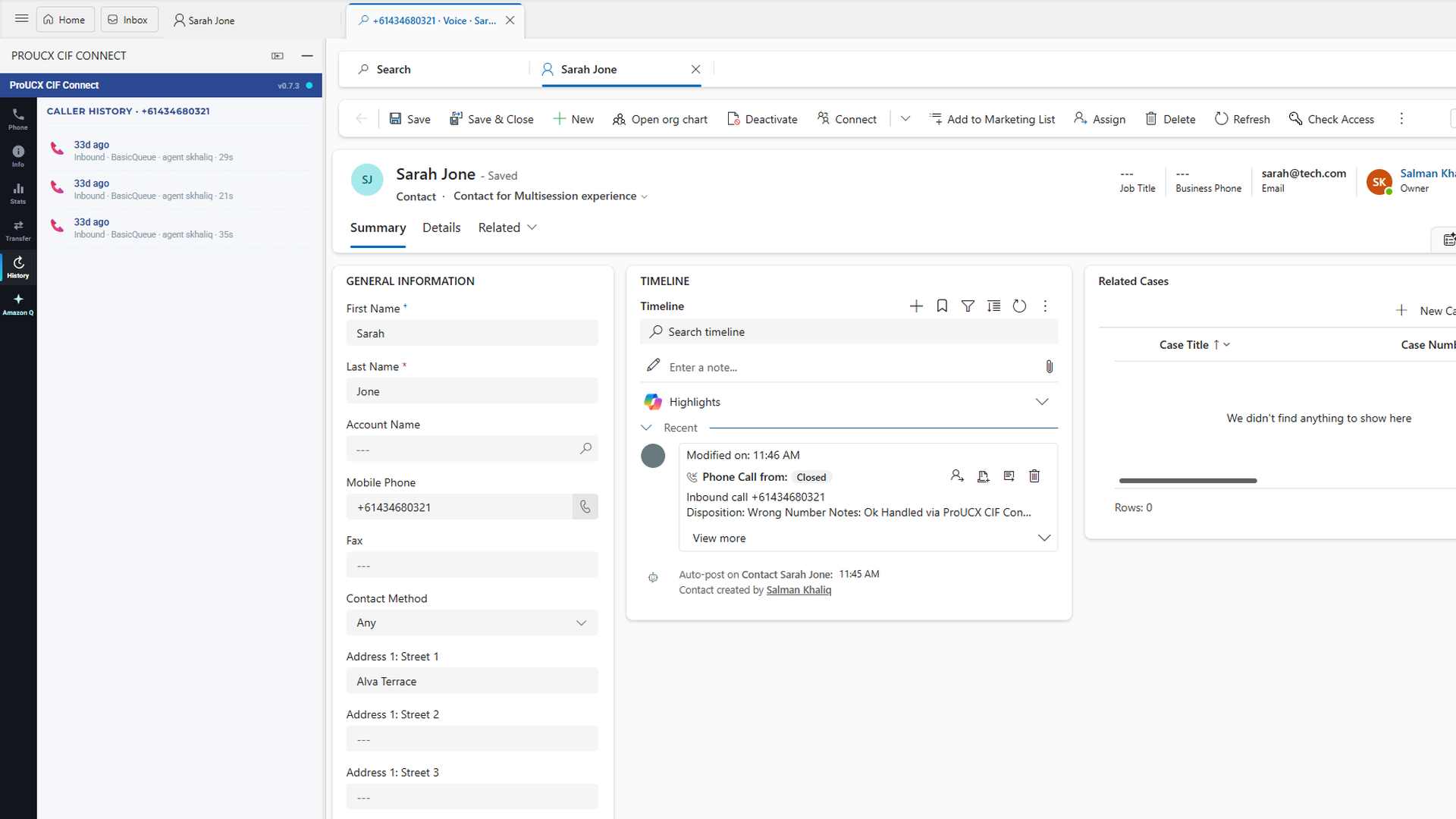
Caller interaction history
Image
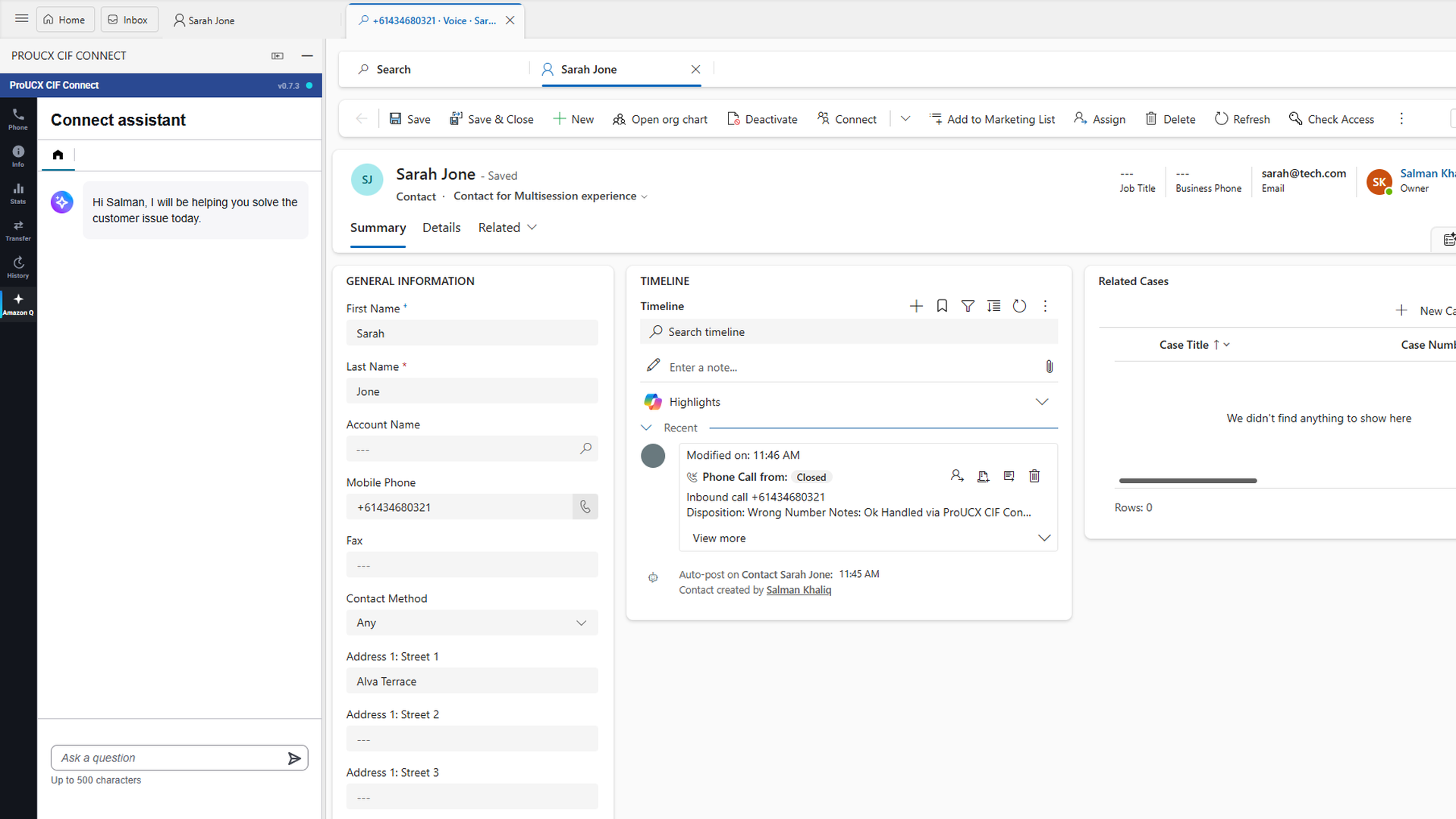
Amazon Q agent assist
Amazon Connect CTI for Dynamics 365 puts your Amazon Connect contact centre inside the Microsoft Dynamics 365 agent workspace. When a call arrives, the matching Contact, Account or Case opens automatically; agents dial any phone number in Dynamics with a single click; and every call is written back to a completed Phone Call activity with disposition and notes - no manual data entry and no swivel-chair between two screens.
Built on the Amazon Connect Channel Integration Framework (CIF v2), it runs as an embedded panel inside your existing Dynamics 365 Customer Service apps. There is nothing to install on agent desktops and no firewall changes: agents sign in through the identity provider they already use and start taking calls.
WHAT AGENTS GET Screen pop: an inbound contact voice-chat-email) opens the matching Contact, Account or Case. Multiple matches show a picker; an unmatched caller opens a pre-filled create form so a new record is one click away. Click-to-dial: any phone number in Dynamics is clickable and dials out through Amazon Connect. Session per call: each call opens its own titled Dynamics session, and concurrent voice, chat and email interactions are isolated in their own sessions, so context never bleeds between conversations. Automatic activity logging: disposition and agent notes are written to a completed Phone Call activity, keyed to the Amazon Connect contact ID, so every call is captured without manual entry. Agent workspace in the panel: live queue stats, a searchable transfer directory (queues and agents with live availability), the caller's interaction history, Amazon Connect contact attributes, and Amazon Q in Connect agent assist. Call transcript and sentiment: after each call, the Amazon Connect Contact Lens transcript and per-turn sentiment appear in the panel, beside the Dynamics record.
WHAT ADMINISTRATORS GET A multi-tenant, self-serve portal: configure screen-pop rules, disposition mappings and field names per organisation without code changes. Start with a 14-day free trial at https://proucx.com/aws-connect-dynamics-365.html - no charges during the trial.
DEPLOYMENT Your Amazon Connect instance and your Dynamics 365 environment stay yours: add the ProUCX origin to your Connect instance's approved origins, register the channel provider in Dynamics, and agents are live. Australian-built and deployable in any AWS region to meet your data-residency requirements - hosted onshore in the region you choose (ap-southeast-2 by default). Typical setup is under 30 minutes.
Highlights
- Screen-pop, click-to-dial and automatic call logging inside Dynamics 365 - inbound calls open the matching Contact, Account or Case; agents dial from any phone field; every call is written to a completed Phone Call activity keyed to the Amazon Connect contact ID.
- A full agent workspace in the panel - live queue stats, a searchable transfer directory, the caller's interaction history, contact attributes, Amazon Q agent assist, and Contact Lens call transcript with sentiment, all beside the Dynamics record.
- Nothing to install, deployable in any AWS region - embedded via CIF v2 with no desktop software, plug-in or firewall change; concurrent voice, chat and email each get their own Dynamics session; agents sign in with their existing identity provider.
Details
New
Introducing multi-product solutions
You can now purchase comprehensive solutions tailored to use cases and industries.

Features and programs
Financing for AWS Marketplace purchases
AWS Marketplace now accepts line of credit payments through the PNC Vendor Finance program. This program is available to select AWS customers in the US, excluding NV, NC, ND, TN, & VT.

Pricing
Pricing is based on actual usage, with charges varying according to how much you consume. Subscriptions have no end date and may be canceled any time.
Additional AWS infrastructure costs may apply. Use the AWS Pricing Calculator to estimate your infrastructure costs.
Dimension | Description | Cost/unit |
|---|---|---|
Standard: Active agent per month | Screen-pop, click-to-dial, session-per-call and call logging. Per agent/month. | $9.00 |
Premium: Active agent per month | Standard plus live stats, transfer, history and Amazon Q. Per agent/month. | $15.00 |
Dimensions summary
You pick one of two tiers, both billed per active agent each month. Billing scales with how many agents use the connector. Standard covers screen-pop, click-to-dial, session-per-call, and call logging. Premium includes everything in Standard, then adds live stats, transfer, history, and Amazon Q. The tiers are not add-ons; you choose the level that matches the features your team needs. As your agent count changes, your monthly charge changes with it.
Top-of-mind questions for buyers
An active agent is a contact-centre user who works calls inside Dynamics 365 through the connector during the month. You are billed per agent using the connector, not per call. The charge scales up or down as your working agent count changes month to month.
Both tiers bill per active agent per month. Standard covers screen-pop, click-to-dial, session-per-call, and automatic call logging. Premium meters the same per-agent basis but unlocks live queue stats, transfer with availability, caller history, and Amazon Q. You pick one tier for all agents; the tiers are not stacked.
No. The connector links your existing Amazon Connect instance to Dynamics 365. You do not license a separate telephony platform or dialer for the connector to work. There are no per-transaction or per-call fees; the monthly per-agent rate is the connector charge itself.
www.proucx.com+1
Helpful?
Vendor refund policy
Amazon Connect CTI for Dynamics 365 is billed monthly in arrears for actual usage (active agents metered through AWS Marketplace), so there are no upfront or prepaid fees to refund. If you believe you were billed in error, email service@proucx.com.au within 30 days of the invoice with your AWS account ID and the billing month. We will investigate and, where an error is confirmed, issue a correction or refund through AWS Marketplace.

Legal
Vendor terms and conditions
Upon subscribing to this product, you must acknowledge and agree to the terms and conditions outlined in the vendor's End User License Agreement (EULA) .
Content disclaimer
Vendors are responsible for their product descriptions and other product content. AWS does not warrant that vendors' product descriptions or other product content are accurate, complete, reliable, current, or error-free.
Delivery details
Software as a Service (SaaS)
SaaS delivers cloud-based software applications directly to customers over the internet. You can access these applications through a subscription model. You will pay recurring monthly usage fees through your AWS bill, while AWS handles deployment and infrastructure management, ensuring scalability, reliability, and seamless integration with other AWS services.
Resources
Vendor resources
Support
Vendor support
Email: service@proucx.com.au Phone: +61 1300 508 947 (Australian business hours, AEST, Mon to Fri) Support portal: https://proucx.com/support
Onboarding help, Amazon Connect integration (approved origins), Dynamics 365 channel-provider setup, agent sign-in and billing questions, responded to within one business day.
AWS infrastructure support
AWS Support is a one-on-one, fast-response support channel that is staffed 24x7x365 with experienced and technical support engineers. The service helps customers of all sizes and technical abilities to successfully utilize the products and features provided by Amazon Web Services.
Similar products

The Odea Amazon Connect CTI Connector for Microsoft Dynamics 365 seamlessly integrates Amazon Connect with Dynamics 365 CRM, creating a streamlined and efficient workflow that enhances agent productivity and improves customer service.

Improve the agent and customer experience with the integration of Amazon Connect and Microsoft Dynamics

Seamlessly integrate Amazon Connect with Microsoft Dynamics 365 for enhanced omnichannel customer engagement. Enable dynamic screen pops, click-to-dial, synchronized agent presence, and efficient task-based routing to optimize your customer interactions.
This is part of One New Zealand's Cornerstone CX suite of products.

Seamlessly integrate Microsoft Dynamics 365 with Amazon Connect to empower agents to manage inbound and outbound calls, SMS, and social media interactions within Dynamics 365. Agents can update their status, perform call actions, view customer profiles, and use wrap-up codes for better tracking and reporting.
Customer reviews
No customer reviews yet
Be the first to review this product . We've partnered with PeerSpot to gather customer feedback. You can share your experience by writing or recording a review, or scheduling a call with a PeerSpot analyst.