Sold by: cloudimg
Deployed on AWS
Free Trial
AWS Free Tier
This product has charges associated with it for seller support. Launch a production-ready Keycloak identity provider in minutes - no default credentials, dedicated PostgreSQL backend, and24/7 cloudimg support included.
Overview
Image
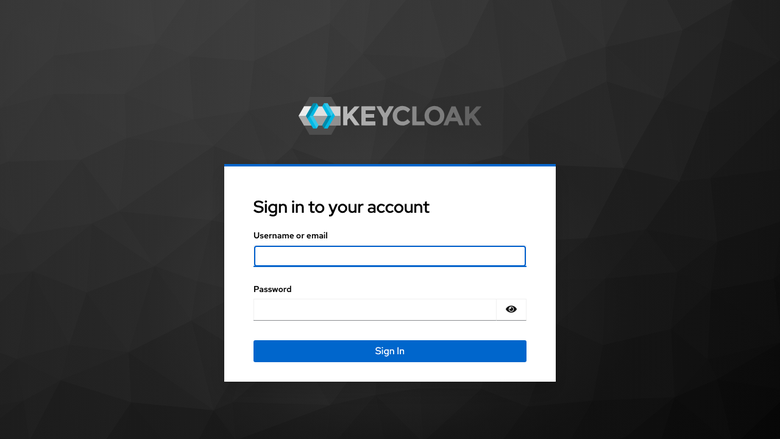
Keycloak sign in page
Image
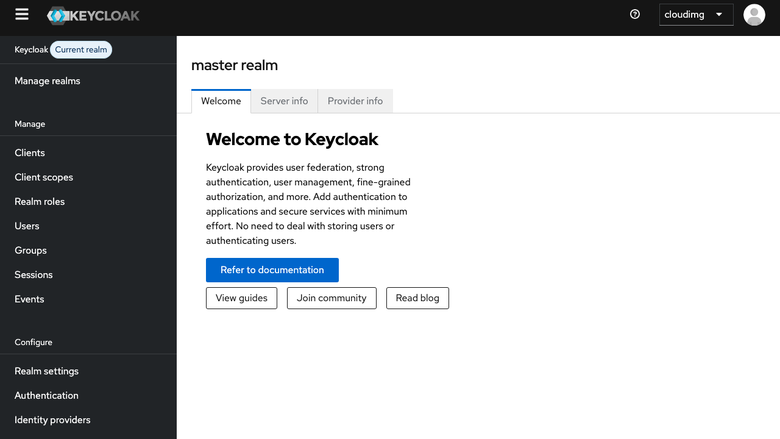
Master realm overview
Image
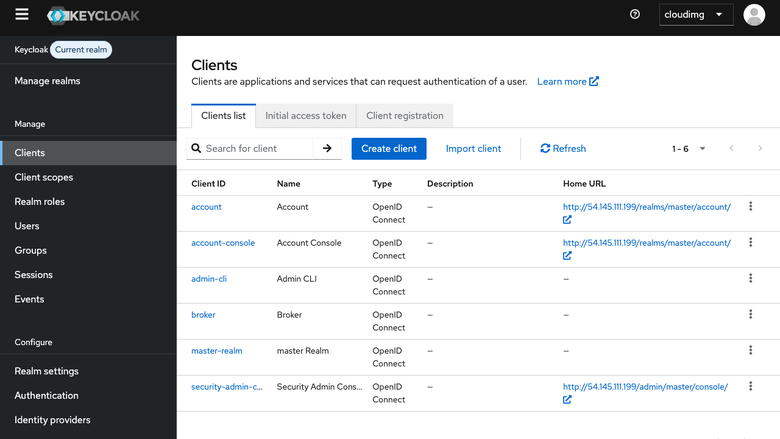
Clients list
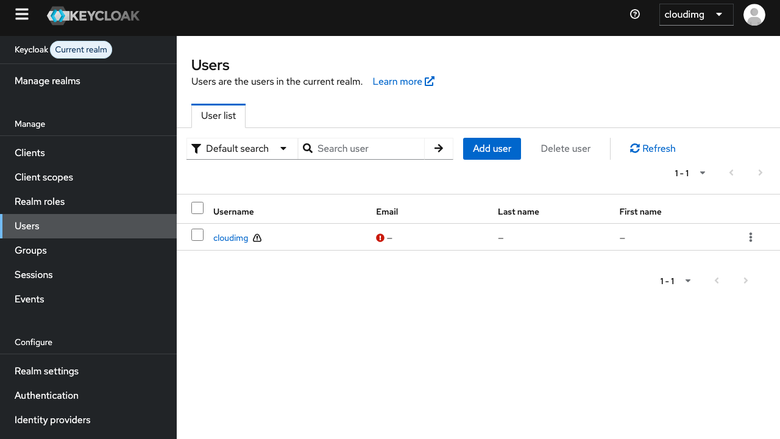
Image
Users page
This is a repackaged open source software product wherein additional charges apply for cloudimg support services.
Why This Keycloak AMI
Unlike community images that ship with shared default credentials or require manual database setup, this product delivers a fully configured identity provider from first boot. Every instance generates its own unique administrator password - eliminating the credential-sharing risk common to other pre-built images. The PostgreSQL backend lives on a separate, independently resizable EBS volume so you can scale storage without rebuilding the application tier - a limitation of single-disk AMIs that forces costly redeployments.
Keycloak is a CNCF incubating project with broad community adoption across thousands of organizations worldwide. This AMI packages that trusted platform into a deployment-ready format backed by professional cloudimg support.
Who This Is For
Platform engineers and DevOps teams running workloads on EC2 who need a self-hosted identity provider without the overhead of manual installation. SaaS companies federating tenant users via OpenID Connect. Internal teams replacing legacy LDAP directories. Organizations that need SSO, social login, or SAML 2.0 but want to avoid managed IdP vendor lock-in.
Identity Stack
Keycloak 26.x running as a systemd service on OpenJDK 21headless. The Keycloak server listens on 127.0.0.1:8080 behind an nginx reverse proxy on TCP port 80, with X-Forwarded headers, websocket upgrade for the admin console event stream, and large request body support. The management interface for health and metrics listens on loopback port 9000with the /health/ready endpoint enabled.
PostgreSQL Backend
Keycloak persists realms, clients, users, role mappings, group hierarchies, federation links, event logs, and online sessions to a dedicated PostgreSQL 16 database. The database resides on its own independently resizable data volume, separate from the operating system disk, so you can grow storage without touching the application tier.
Secure First Boot
On first boot a one-shot service generates a fresh Keycloak bootstrap administrator password unique to that instance, provisions the cloudimg administrator via the Keycloak bootstrap admin command, and stores the plain-text value in a root-only file. The legacy temporary administrator user is not created, so the image never carries shared or default credentials.
Ready To Use
The Keycloak service, nginx reverse proxy, Java21 runtime, PostgreSQL backend, and administrator account are all prepared. Browse to your instance public address on port 80, follow the Administration Console link, and sign in as the cloudimg administrator. The Keycloak hostname is set from the resolved customer public address on first boot so issuer URIs and admin console URLs are correct from the start.
Evaluate at Low Risk
Launch on a t3.micro or t3.small for a few hours to validate your realm configuration, test OIDC client integration, and explore the admin console before scaling to a production instance type.
Use Cases
- SaaS multi-tenant SSO: A SaaS platform federating thousands of tenant users via OpenID Connect, giving each customer their own realm with branded login flows.
- Workforce identity modernization: An internal engineering team replacing a legacy LDAP directory for hundreds of employees, consolidating authentication behind a standards-based IdP.
- Customer identity and access management: Consumer-facing applications requiring social login, self-registration, and fine-grained consent management.
- API gateway authorization: Microservices architectures using Keycloak token-based authorization to enforce fine-grained access policies at the gateway layer.
- Identity brokering: Connecting to upstream enterprise identity providers (Azure AD, Okta, Google Workspace) while maintaining a unified session and token format internally.
cloudimg Support
24/7 technical support by email and chat. Expert assistance with realm modelling, identity provider federation, OpenID Connect and SAML client configuration, theming, custom authenticators, and upgrades.
All product and company names are trademarks or registered trademarks of their respective holders. Use of them does not imply any affiliation with or endorsement by them.
Highlights
- Unlike single-disk AMIs that force full rebuilds to resize storage, this product runs Keycloak 26.x with a dedicated PostgreSQL 16 database on its own independently resizable EBS volume. An nginx reverse proxy on port 80 handles X-Forwarded headers and websocket upgrade out of the box. OpenID Connect and SAML 2.0 ready from first boot - browse to your instance address and sign in within minutes of launch.
- Many community Keycloak images ship with well-known default admin passwords, creating an immediate security risk. This AMI eliminates that threat entirely - every instance generates a unique bootstrap administrator password on first boot and stores it in a root-only file. No shared credentials ever exist on the image, and the legacy temporary admin user is never created.
- Round-the-clock technical support from cloudimg engineers with one-hour average response for critical issues. Expert assistance for realm modelling, identity provider federation, OIDC and SAML client configuration, theming, custom authenticators, and upgrades. Support covers deployment through production operations so you are never left troubleshooting alone.
Details
Sold by
Categories
Delivery method
Delivery option
64-bit (x86) Amazon Machine Image (AMI)
Latest version
Operating system
Ubuntu 24.04
Deployed on AWS
New
Introducing multi-product solutions
You can now purchase comprehensive solutions tailored to use cases and industries.

Features and programs
Financing for AWS Marketplace purchases
AWS Marketplace now accepts line of credit payments through the PNC Vendor Finance program. This program is available to select AWS customers in the US, excluding NV, NC, ND, TN, & VT.

Pricing
Free trial
Try this product free for 7 days according to the free trial terms set by the vendor. Usage-based pricing is in effect for usage beyond the free trial terms. Your free trial gets automatically converted to a paid subscription when the trial ends, but may be canceled any time before that.
Pricing is based on actual usage, with charges varying according to how much you consume. Subscriptions have no end date and may be canceled any time. Alternatively, you can pay upfront for a contract, which typically covers your anticipated usage for the contract duration. Any usage beyond contract will incur additional usage-based costs.
Additional AWS infrastructure costs may apply. Use the AWS Pricing Calculator to estimate your infrastructure costs.
If you are an AWS Free Tier customer with a free plan, you are eligible to subscribe to this offer. You can use free credits to cover the cost of eligible AWS infrastructure. See AWS Free Tier for more details. If you created an AWS account before July 15th, 2025, and qualify for the Legacy AWS Free Tier, Amazon EC2 charges for Micro instances are free for up to 750 hours per month. See Legacy AWS Free Tier for more details.
Dimension | Description | Cost/hour |
|---|---|---|
m5.large Recommended | m5.large | $0.08 |
t2.micro | t2.micro instance type | $0.04 |
t3.micro | t3.micro instance type | $0.04 |
c8i.metal-48xl | c8i.metal-48xl instance type | $0.24 |
r6idn.4xlarge | r6idn.4xlarge instance type | $0.24 |
c5a.4xlarge | c5a.4xlarge instance type | $0.24 |
c8in.12xlarge | c8in.12xlarge instance type | $0.24 |
r6id.metal | r6id.metal instance type | $0.24 |
r5n.large | r5n.large instance type | $0.08 |
m8i.16xlarge | m8i.16xlarge instance type | $0.24 |
Vendor refund policy
Refunds available on request.

Legal
Vendor terms and conditions
Upon subscribing to this product, you must acknowledge and agree to the terms and conditions outlined in the vendor's End User License Agreement (EULA) .
Content disclaimer
Vendors are responsible for their product descriptions and other product content. AWS does not warrant that vendors' product descriptions or other product content are accurate, complete, reliable, current, or error-free.
Delivery details
64-bit (x86) Amazon Machine Image (AMI)
Amazon Machine Image (AMI)
An AMI is a virtual image that provides the information required to launch an instance. Amazon EC2 (Elastic Compute Cloud) instances are virtual servers on which you can run your applications and workloads, offering varying combinations of CPU, memory, storage, and networking resources. You can launch as many instances from as many different AMIs as you need.
Version release notes
Initial release of Keycloak 26.x identity and access management platform.
Additional details
Usage instructions
Connect via SSH on port 22 as the default login user for your operating system variant (the user guide lists it per variant). Keycloak is fronted by nginx on TCP port 80. Browse to http://<instance-public-ip>/ and follow the Administration Console link, then sign in as the 'cloudimg' user. Retrieve the generated administrator password with: sudo cat /root/keycloak-credentials.txt. Restrict port 80 to trusted networks until you have configured TLS (the user guide includes an nginx HTTPS section).
Resources
Vendor resources
Support
Vendor support
cloudimg provides 24/7 technical support for this Keycloak product by email and live chat.
Response Times
- Critical issues: one-hour average response
- General inquiries: handled during the same business day
What We Help With
- Deployment and initial configuration
- Realm modelling and identity provider federation
- OpenID Connect and SAML client setup
- Theming and custom authenticator development
- Performance tuning and upgrades
- Troubleshooting and issue resolution
- Refund requests
Instance Sizing Guidance For small workloads (up to a few hundred users with moderate login frequency), a t3.small or t3.medium instance is typically sufficient. For larger deployments with thousands of concurrent sessions, consider m5.large or above. The PostgreSQL data volume can be resized independently as your user base grows.
Contact Email: support@cloudimg.co.uk
Our engineers are available around the clock to help you get the most from your Keycloak deployment, from initial launch through production operations.
AWS infrastructure support
AWS Support is a one-on-one, fast-response support channel that is staffed 24x7x365 with experienced and technical support engineers. The service helps customers of all sizes and technical abilities to successfully utilize the products and features provided by Amazon Web Services.
Similar products
This product has charges associated with it for seller support. Launch a production-ready, self-hosted Git server in minutes. Gitea preconfigured with nginx, SQLite, and automated credential hardening - backed by 24/7 cloudimg support.

This product has charges associated with it for seller support. Keycloak is an open-source identity and access management (IAM) solution designed to secure applications and services. Developed by Red Hat, Keycloak simplifies user authentication, authorization, and user management, offering a centralized platform for handling identity-related tasks. It supports various authentication methods, including social logins, single sign-on (SSO), and multi-factor authentication, making it a versatile solution for securing web applications, mobile apps, and APIs.

This is a repackaged open source software product wherein additional charges apply for patching the operating system and the maintenance provided by Kurian. This AMI has Keycloak installed as a service with PostgreSQL as the backend database.
Choose AMI for the target OS and version.
This product has a fee associated with the provision and deployment of the application and AMI support. KeyCloak is an open source identity and access management solution which mainly aims at applications and services.

KeyCloak is an Identity and Access Management Solution. Add authentication to applications and secure services with minimum effort. No need to deal with storing users or authenticating users.
This product includes charges for the installation of Keycloak
Customer reviews
No customer reviews yet
Be the first to review this product . We've partnered with PeerSpot to gather customer feedback. You can share your experience by writing or recording a review, or scheduling a call with a PeerSpot analyst.