
Sold by: cloudimg
Deployed on AWS
Free Trial
AWS Free Tier
This product has charges associated with it for seller support. Production ready VictoriaLogs log database preinstalled as a systemd service with multi protocol log ingestion, a LogsQL query UI and an authenticating nginx proxy. Backed by 24/7 cloudimg support.
Overview
Image
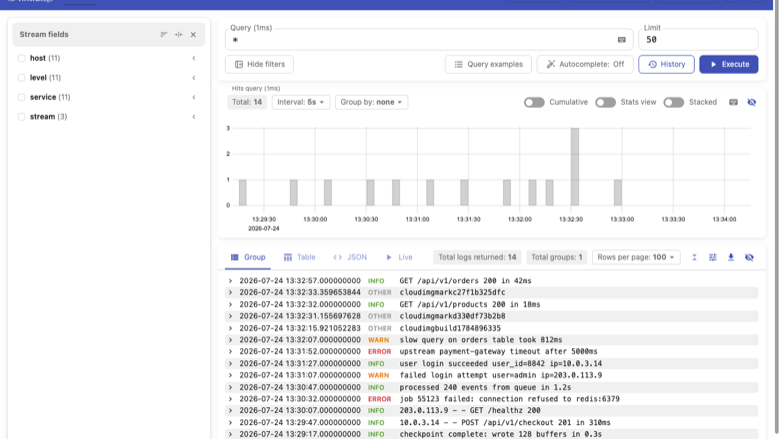
Log explorer
Image
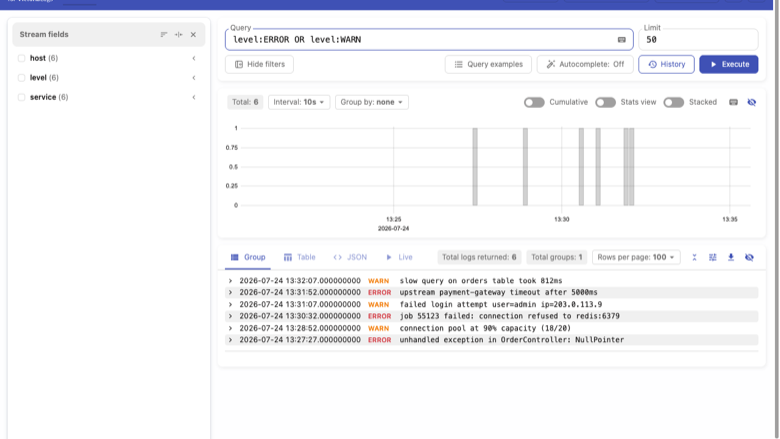
Filtering logs with LogsQL
Image
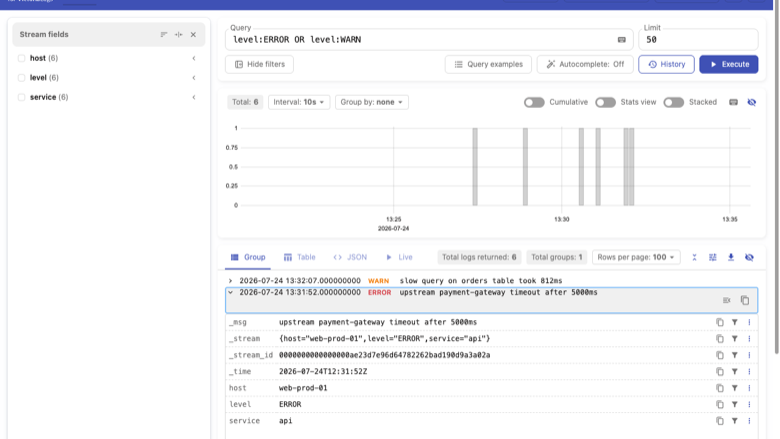
Full log record
This is a repackaged open source software product wherein additional charges apply for cloudimg support services.
Store and Search Your Logs in Your Own VPC
VictoriaLogs is a fast, cost efficient database for logs from the VictoriaMetrics team. It ingests structured and plaintext logs over many protocols, stores them compactly on disk, and queries them back with the LogsQL query language through a built in browser UI and HTTP APIs, from a single static Go binary with no external storage dependency. There is no Elasticsearch cluster, no Kibana and no object store to operate: ingestion, indexing and query all live in one process on one instance.
This image delivers VictoriaLogs fully installed as a systemd service, fronted by an authenticating nginx reverse proxy, with log storage on a dedicated EBS volume.
Who This Is For
Platform and SRE teams who want log storage inside their own VPC rather than a third party SaaS, without running an Elasticsearch plus Kibana cluster to do it. Application teams shipping logs from Loki, Fluent Bit, Vector, an OpenTelemetry Collector or syslog who need an endpoint to point at on day one. Observability owners replacing a multi node log backend with a single instance appliance.
Application Stack
- VictoriaLogs 1.52.0 single static Go binary, run by a dedicated non login system account
- nginx reverse proxy on port 80, the only public listener, enforcing HTTP Basic Auth
- Multi protocol log ingestion under /insert/ (its own JSON stream, Loki push, Elasticsearch bulk, OpenTelemetry, syslog)
- The LogsQL query API at /select/logsql/query and the built in log explorer UI at /select/vmui/
- Log storage on a dedicated 32 GiB EBS volume, independently resizable and separate from the OS disk
Secure By Default
VictoriaLogs, like every component in the VictoriaMetrics family, ships with no authentication of its own. For a log store that matters twice over: an open ingest endpoint lets anyone poison the store, and an open query endpoint leaks every log line in it, including hostnames, URLs, user identifiers, tokens and internal topology. This image therefore never gives the database a public listener.
- VictoriaLogs binds to loopback 127.0.0.1 only and is reachable solely through nginx
- Both the ingest path and the query paths sit behind the same HTTP Basic Auth gate
- A unique 24 character password is generated on first boot, bcrypt hashed into the nginx credential file and written to a root only file
- The image ships with an empty credential file, so no usable password exists in it and every login against the unbooted image is rejected
- The only unauthenticated route is a static health endpoint that never touches the database
Getting Started
- Launch the AMI, opening port 80 in your security group alongside SSH
- SSH in and read the generated password: sudo cat /root/victorialogs-credentials.txt
- Open http:///select/vmui/ and sign in as admin to search stored logs with LogsQL
- Ship logs to http:///insert/ from Loki, Fluent Bit, Vector, an OpenTelemetry Collector or syslog using the same credentials
- Query logs programmatically at /select/logsql/query
- Verify the appliance end to end at any time: sudo /usr/local/sbin/victorialogs-selftest.sh
Retention and Sizing
Log retention defaults to 30 days, and storage is capped at 80 percent of the data volume so a log burst cannot fill the disk and wedge the service. Both are single flag settings the user guide explains how to change. Size the volume against your ingest rate.
24/7 cloudimg Support
Every deployment is backed by cloudimg engineers available around the clock via email. Support covers:
- Initial deployment and instance sizing guidance
- Log shipper configuration (Loki, Fluent Bit, Vector, OpenTelemetry Collector, syslog) against the ingest endpoint
- Retention, disk sizing and storage tuning
- TLS termination with Let's Encrypt or custom certificates
- nginx reverse proxy and authentication configuration
- VictoriaLogs version upgrades
- Troubleshooting ingestion, query and connectivity issues
VictoriaLogs and VictoriaMetrics are trademarks of their respective owners. cloudimg is not affiliated with or endorsed by VictoriaMetrics. All product and company names are trademarks or registered trademarks of their respective holders.
Highlights
- Fast, cost efficient log database that runs as a single static Go binary with no external storage dependency - no Elasticsearch, no Kibana, no object store. Ingests logs over many protocols (its own JSON stream, Loki push, Elasticsearch bulk, OpenTelemetry, syslog) and queries them back with LogsQL through a built in web UI. Log storage sits on a dedicated EBS volume, with a 30 day default retention and a hard cap at 80 percent of the volume so a log burst cannot wedge the service.
- Secure by default with no credential baked into the image. VictoriaLogs has no authentication of its own, so this image binds it to loopback and puts nginx HTTP Basic Auth in front of both the ingest path and the query paths - an open log store would let anyone poison it or read every line in it. A unique password is generated on first boot and written to a root only file; the shipped image contains an empty credential file, so no usable password exists in it.
- 24/7 technical support from cloudimg engineers via email. Support scope covers deployment and instance sizing, log shipper configuration (Loki, Fluent Bit, Vector, OpenTelemetry Collector, syslog) against the ingest endpoint, retention and disk sizing, TLS termination, nginx and authentication configuration, version upgrades, and troubleshooting ingestion and query issues - so your team ships log analysis instead of operating a search cluster.
Details
Sold by
Categories
Delivery method
Delivery option
64-bit (x86) Amazon Machine Image (AMI)
Latest version
Operating system
Ubuntu 24.04
Deployed on AWS
New
Introducing multi-product solutions
You can now purchase comprehensive solutions tailored to use cases and industries.

Features and programs
Financing for AWS Marketplace purchases
AWS Marketplace now accepts line of credit payments through the PNC Vendor Finance program. This program is available to select AWS customers in the US, excluding NV, NC, ND, TN, & VT.

Pricing
Free trial
Try this product free for 7 days according to the free trial terms set by the vendor. Usage-based pricing is in effect for usage beyond the free trial terms. Your free trial gets automatically converted to a paid subscription when the trial ends, but may be canceled any time before that.
Pricing is based on actual usage, with charges varying according to how much you consume. Subscriptions have no end date and may be canceled any time. Alternatively, you can pay upfront for a contract, which typically covers your anticipated usage for the contract duration. Any usage beyond contract will incur additional usage-based costs.
Additional AWS infrastructure costs may apply. Use the AWS Pricing Calculator to estimate your infrastructure costs.
If you are an AWS Free Tier customer with a free plan, you are eligible to subscribe to this offer. You can use free credits to cover the cost of eligible AWS infrastructure. See AWS Free Tier for more details. If you created an AWS account before July 15th, 2025, and qualify for the Legacy AWS Free Tier, Amazon EC2 charges for Micro instances are free for up to 750 hours per month. See Legacy AWS Free Tier for more details.
Dimension | Description | Cost/hour |
|---|---|---|
m5.large Recommended | m5.large | $0.08 |
t2.micro | t2.micro instance type | $0.04 |
t3.micro | t3.micro instance type | $0.04 |
c5a.12xlarge | c5a.12xlarge instance type | $0.24 |
c5a.16xlarge | c5a.16xlarge instance type | $0.24 |
c5a.24xlarge | c5a.24xlarge instance type | $0.24 |
c5a.2xlarge | c5a.2xlarge instance type | $0.24 |
c5a.4xlarge | c5a.4xlarge instance type | $0.24 |
c5a.8xlarge | c5a.8xlarge instance type | $0.24 |
c5a.large | c5a.large instance type | $0.08 |
Vendor refund policy
Refunds available on request.

Legal
Vendor terms and conditions
Upon subscribing to this product, you must acknowledge and agree to the terms and conditions outlined in the vendor's End User License Agreement (EULA) .
Content disclaimer
Vendors are responsible for their product descriptions and other product content. AWS does not warrant that vendors' product descriptions or other product content are accurate, complete, reliable, current, or error-free.
Delivery details
64-bit (x86) Amazon Machine Image (AMI)
Amazon Machine Image (AMI)
An AMI is a virtual image that provides the information required to launch an instance. Amazon EC2 (Elastic Compute Cloud) instances are virtual servers on which you can run your applications and workloads, offering varying combinations of CPU, memory, storage, and networking resources. You can launch as many instances from as many different AMIs as you need.
Version release notes
Initial release of VictoriaLogs 1.52.0, a fast, cost efficient log database with a LogsQL query UI.
Additional details
Usage instructions
Connect via SSH on port 22 as the default login user for your operating system variant (the user guide lists it per variant; on Ubuntu it is 'ubuntu'). VictoriaLogs is served on port 80 through nginx (the database itself listens only on 127.0.0.1:9428 and has no authentication of its own). Retrieve the generated login with: sudo cat /root/victorialogs-credentials.txt. Browse to http://<instance-public-ip>/select/vmui/ and sign in as admin with the password shown to search stored logs with LogsQL. Ship logs to http://<instance-public-ip>/insert/ (its own JSON stream, Loki push, Elasticsearch bulk, OpenTelemetry or syslog) using the same HTTP Basic Auth credentials, and query them at /select/logsql/query. The unauthenticated health endpoint http://<instance-public-ip>/healthz is open for load balancer probes. Services are managed with systemctl (victorialogs, nginx). Verify the appliance end to end at any time with: sudo /usr/local/sbin/victorialogs-selftest.sh. To enable HTTPS, follow the TLS section of the user guide.
Resources
Vendor resources
Support
Vendor support
cloudimg Support
cloudimg provides 24/7 technical support for this VictoriaLogs AMI via email.
Contact: support@cloudimg.co.uk
Response Times:
- Critical issues (service down, ingestion stopped): one-hour average response
- General inquiries: responded to within business hours
Support Scope:
Our engineers assist with the full lifecycle of your VictoriaLogs deployment:
- Initial deployment guidance and instance sizing recommendations
- Log shipper configuration (Loki, Fluent Bit, Vector, OpenTelemetry Collector, syslog) against the ingest endpoint
- Log retention, disk sizing and storage tuning
- TLS termination setup with Let's Encrypt or custom certificates
- nginx reverse proxy and HTTP Basic Auth configuration
- LogsQL query usage and Grafana datasource wiring
- VictoriaLogs version upgrades
- Troubleshooting ingestion, query and connectivity issues
Getting Help:
Email support@cloudimg.co.uk with a description of your issue. Include your instance ID and AWS region to expedite troubleshooting.
Refunds:
If you experience issues with the product, contact support@cloudimg.co.uk . Our team will work to resolve your concern or assist with the refund process through AWS Marketplace.
AWS infrastructure support
AWS Support is a one-on-one, fast-response support channel that is staffed 24x7x365 with experienced and technical support engineers. The service helps customers of all sizes and technical abilities to successfully utilize the products and features provided by Amazon Web Services.
Similar products

Simple, reliable, and efficient observability for everyone. VictoriaMetrics Cloud is a fully managed solution for metrics and logs. Run VictoriaMetrics and VictoriaLogs on AWS without the DevOps overhead. Cost-efficient time series and logging databases built on our scalable open-source products, with added enterprise features (downsampling, retention filters) and support from the engineers who build VictoriaMetrics. Guided integrations with Kubernetes, Grafana, Perses, Prometheus, OpenTelemetry, AWS CloudWatch, Fluentbit, and more.

Enterprise support for VictoriaMetrics observability on AWS: direct, 24/7/365 access to the engineers who build the product, across metrics, logs, traces, anomaly detection, and Cloud, for both open-source and enterprise deployments.
Customer reviews
No customer reviews yet
Be the first to review this product . We've partnered with PeerSpot to gather customer feedback. You can share your experience by writing or recording a review, or scheduling a call with a PeerSpot analyst.