
Sold by: cloudimg
Deployed on AWS
Free Trial
AWS Free Tier
This product has charges associated with it for seller support. Fossil SCM by cloudimg: a pre-hardened, all-in-one distributed version control server with a built-in wiki, bug tracker, forum and web UI, behind a rate limited nginx reverse proxy with a per instance admin password. Ready to run on EC2 in minutes with 24/7 cloudimg support.
Overview
Image
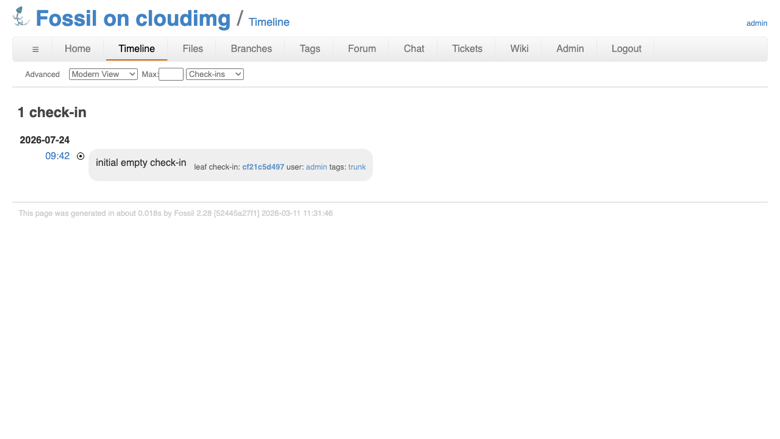
Repository timeline
Image
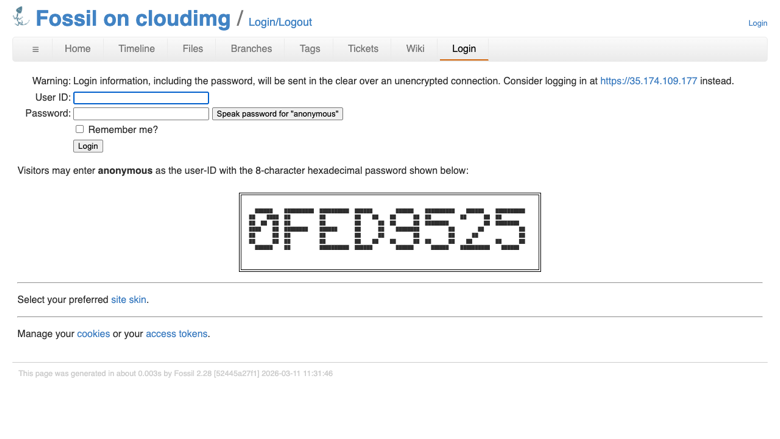
Secure by default login
Image
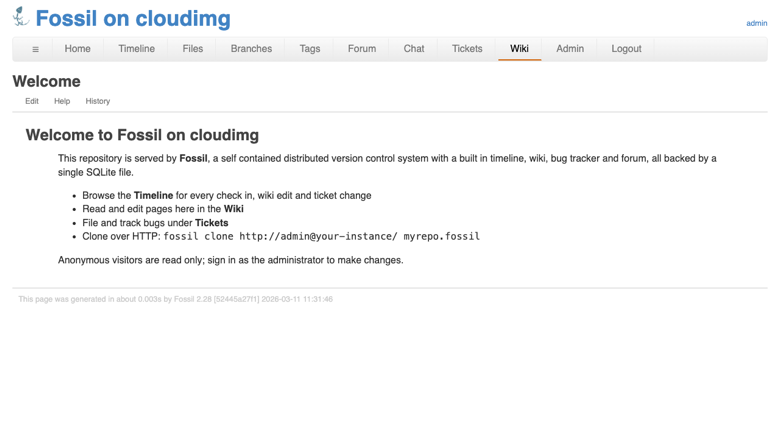
Built in wiki
Image
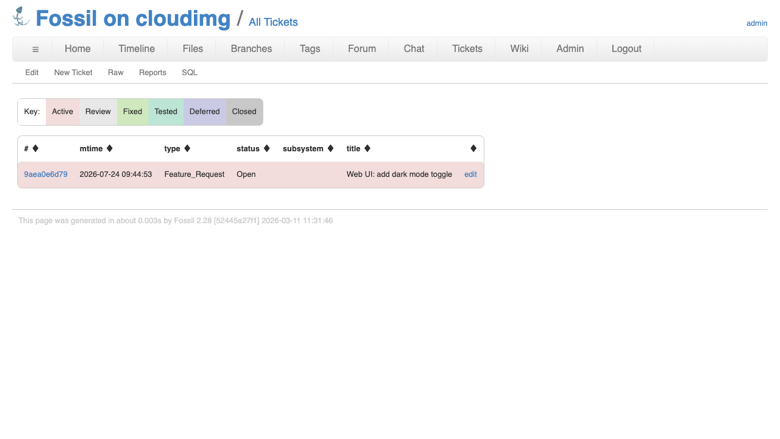
Built in bug tracker
This is a repackaged open source software product wherein additional charges apply for cloudimg support services.
Overview
Fossil is a simple, high reliability, distributed version control system. It was created by the author of SQLite and hosts the SQLite project's own source code, and it has a track record of over a decade in production. Unlike most version control tools, Fossil bundles everything a small project needs into one self contained executable: distributed source control, a bug tracker, a wiki, a forum, a chatroom, technotes and an integrated web interface, all backed by a single SQLite database file that is the entire repository. There is nothing else to install and nothing external to run.
This AMI delivers Fossil fully installed and reverse proxied behind nginx, so a working version control server with its web UI is running within minutes of launch, with no manual package installation, no dependency troubleshooting and no proxy configuration required.
Why This Image vs a Manual Install
Running Fossil safely yourself means fetching and verifying the official binary, standing up a service that binds only to loopback, putting a rate limiting reverse proxy in front of it to close the denial of service gap that a directly exposed server would leave open, locking anonymous access down to read only, and generating a unique administrator password per machine so no two servers share a credential. This image completes every one of those steps at build time:
- Fossil binds only to loopback and is served through an nginx reverse proxy that is ready for your TLS certificate and rate limits inbound requests
- Anonymous write is disabled so unauthenticated visitors and the built in anonymous account are restricted to read only access
- A fresh empty repository and a unique random administrator password are generated on each instance's first boot and written to a root only file
Security Hardening
This image follows a defence in depth approach:
- No default or shared credential: no repository and no administrator password ship in the image; the build repository is deleted before capture, and a fresh empty repository plus a unique random administrator password are generated on each instance's first boot
- Loopback only backend: Fossil binds exclusively to 127.0.0.1:8081; only the nginx reverse proxy is exposed on port 80
- Rate limited front door: nginx rate limits inbound requests and caps request body size, adding the denial of service mitigation that a directly exposed Fossil server lacks
- Read only anonymous access: unauthenticated visitors and the built in anonymous account can browse and clone but cannot commit, edit the wiki or file tickets; the administrator is the only writer
- Hardened service unit: the Fossil systemd unit runs as a dedicated unprivileged system user with NoNewPrivileges, ProtectSystem=strict and a writable path restricted to its own data directory
Concrete Use Cases
- All in one project hosting: give a small team distributed source control together with a bug tracker, wiki and forum in a single self hosted server, with nothing external to install or run
- Portable, trivially backed up repositories: the whole repository is one SQLite file, so a project's entire history, tickets and wiki back up with a single file copy or EBS snapshot
- Self hosted alternative to a hosted forge: run your own version control server with a web timeline, code browsing with syntax highlighting, tarball and ZIP downloads and cloning over HTTP, inside your own AWS account
AWS Integration
Deploy on any EC2 instance type; the recommended size is m5.large. Front the instance with an Application Load Balancer terminating TLS with your own certificate, or add your certificate to the bundled nginx reverse proxy. Back up the single file repository with EBS snapshots or AWS Backup, and grow the root volume as your history grows.
Getting Started
Launch the AMI, read your unique administrator password from the root only file on the instance, and log in to the Fossil web UI to create users, set capabilities, attach your TLS certificate and start pushing code. The paired cloudimg deployment guide walks through connecting over SSH, verifying the service, the secure by default settings and backup planning.
cloudimg Support
24/7 technical support by email and chat. Help with deployment, adding your own domain and TLS certificate to the reverse proxy, managing Fossil users and capabilities, and backup planning for your repository.
Highlights
- Ready to serve code in minutes: launch the AMI and reach a fully working version control server with a web timeline, wiki, bug tracker and forum without editing a single config file. Every build and hardening step is completed at image creation time, eliminating manual binary verification, service configuration and proxy setup.
- Secure by default with a unique per instance credential: no repository or password ships in the image. On first boot a fresh repository and a random administrator password are generated and stored in a root only file, so no two instances share a credential and unauthenticated visitors are restricted to read only access behind a rate limited nginx reverse proxy.
- All in one version control backed by 24/7 support: distributed source control, bug tracking, a wiki, a forum and a syntax highlighted code browser run from a single binary backed by one SQLite file, trivially backed up with an EBS snapshot or AWS Backup. cloudimg provides 24/7 technical support via email and live chat for deployment, TLS setup, user management and backup planning.
Details
Sold by
Delivery method
Delivery option
64-bit (x86) Amazon Machine Image (AMI)
Latest version
Operating system
Ubuntu 24.04
Deployed on AWS
New
Introducing multi-product solutions
You can now purchase comprehensive solutions tailored to use cases and industries.

Features and programs
Financing for AWS Marketplace purchases
AWS Marketplace now accepts line of credit payments through the PNC Vendor Finance program. This program is available to select AWS customers in the US, excluding NV, NC, ND, TN, & VT.

Pricing
Free trial
Try this product free for 7 days according to the free trial terms set by the vendor. Usage-based pricing is in effect for usage beyond the free trial terms. Your free trial gets automatically converted to a paid subscription when the trial ends, but may be canceled any time before that.
Pricing is based on actual usage, with charges varying according to how much you consume. Subscriptions have no end date and may be canceled any time. Alternatively, you can pay upfront for a contract, which typically covers your anticipated usage for the contract duration. Any usage beyond contract will incur additional usage-based costs.
Additional AWS infrastructure costs may apply. Use the AWS Pricing Calculator to estimate your infrastructure costs.
If you are an AWS Free Tier customer with a free plan, you are eligible to subscribe to this offer. You can use free credits to cover the cost of eligible AWS infrastructure. See AWS Free Tier for more details. If you created an AWS account before July 15th, 2025, and qualify for the Legacy AWS Free Tier, Amazon EC2 charges for Micro instances are free for up to 750 hours per month. See Legacy AWS Free Tier for more details.
Dimension | Description | Cost/hour |
|---|---|---|
m5.large Recommended | m5.large | $0.08 |
t2.micro | t2.micro instance type | $0.04 |
t3.micro | t3.micro instance type | $0.04 |
c5a.12xlarge | c5a.12xlarge instance type | $0.24 |
c5a.16xlarge | c5a.16xlarge instance type | $0.24 |
c5a.24xlarge | c5a.24xlarge instance type | $0.24 |
c5a.2xlarge | c5a.2xlarge instance type | $0.24 |
c5a.4xlarge | c5a.4xlarge instance type | $0.24 |
c5a.8xlarge | c5a.8xlarge instance type | $0.24 |
c5a.large | c5a.large instance type | $0.08 |
Vendor refund policy
Refunds available on request.

Legal
Vendor terms and conditions
Upon subscribing to this product, you must acknowledge and agree to the terms and conditions outlined in the vendor's End User License Agreement (EULA) .
Content disclaimer
Vendors are responsible for their product descriptions and other product content. AWS does not warrant that vendors' product descriptions or other product content are accurate, complete, reliable, current, or error-free.
Delivery details
64-bit (x86) Amazon Machine Image (AMI)
Amazon Machine Image (AMI)
An AMI is a virtual image that provides the information required to launch an instance. Amazon EC2 (Elastic Compute Cloud) instances are virtual servers on which you can run your applications and workloads, offering varying combinations of CPU, memory, storage, and networking resources. You can launch as many instances from as many different AMIs as you need.
Version release notes
Initial release of Fossil as a ready to use self hosted distributed version control system with a built in web timeline, wiki, bug tracker and forum, installed as the official precompiled binary behind an nginx reverse proxy, secured so Fossil binds only to loopback, anonymous write is disabled, and a fresh empty repository plus a unique random administrator password are generated on each instance's first boot.
Additional details
Usage instructions
Connect via SSH on port 22 as the default login user for your operating system variant (for the Ubuntu 24.04 variant the user is ubuntu). Read the per instance administrator password with: sudo cat /root/fossil-info.txt. Open the web UI in a browser at http://<instance-public-ip>/ to reach the repository timeline, wiki, bug tracker and forum. To make changes, open http://<instance-public-ip>/login and sign in as admin with the password from that file; unauthenticated visitors are read only and can browse and clone but cannot commit, edit the wiki or file tickets. Clone the repository with: fossil clone http://admin@ <instance-public-ip>/ myrepo.fossil. Fossil binds only to the loopback interface on port 8081 and is reached only through the nginx reverse proxy on port 80. The instance security group opens ports 22 and 80. The services run under systemd: systemctl status fossil nginx.
Resources
Vendor resources
Support
Vendor support
cloudimg Support
cloudimg provides 24/7 technical support for this product by email and live chat.
Contact: support@cloudimg.co.uk
What we help with:
- Deployment and initial configuration
- Adding your own domain and TLS certificate to the nginx reverse proxy
- Managing Fossil users, capabilities and access control
- Backup planning for your single file repository using EBS snapshots or AWS Backup
- Performance tuning and troubleshooting
- Updates and security patching guidance
Response times: Support requests are monitored around the clock; email and chat are available 24/7.
Refunds: For refund requests, contact support@cloudimg.co.uk with your AWS account ID and subscription details.
AWS infrastructure support
AWS Support is a one-on-one, fast-response support channel that is staffed 24x7x365 with experienced and technical support engineers. The service helps customers of all sizes and technical abilities to successfully utilize the products and features provided by Amazon Web Services.
Similar products

27Global's Distributed Energy Resource (DER) management services enable energy and utilities providers to seamlessly manage solar, wind, and battery storage systems at scale.

The global Photovoltaic Market is anticipated to reach USD 251.41 billion by 2030, with a Compound Annual Growth Rate (CAGR) of 10.1%. This growth is propelled by increased demand for sustainable energy sources and supportive government regulations. These regulations prioritize reducing reliance on fossil fuels, consequently mitigating environmental pollution.

Partnering with AWS, IBM Consulting brings together industry-leading expertise in renewables, SAP, and sustainability to introduce the IBM Consulting Product Carbon Ledger. This cutting-edge cloud-based solution streamlines your renewable supply chain, turning sustainability into profitability.
This index monitors mechanical-digital combination timepieces including Frederique Constant Horological Smartwatch, Alpina Horological Smartwatch, Mondaine Helvetica Smart, Withings Steel HR, Garmin Vivomove, Fossil Hybrid HR, and Skagen Hybrid. It tracks appreciation for analog-digital fusion, traditional aesthetic preservation with modern functionality, and transitional technology acceptance.
Customer reviews
No customer reviews yet
Be the first to review this product . We've partnered with PeerSpot to gather customer feedback. You can share your experience by writing or recording a review, or scheduling a call with a PeerSpot analyst.