
Sold by: PuzariCloud
Free Trial
AWS Free Tier
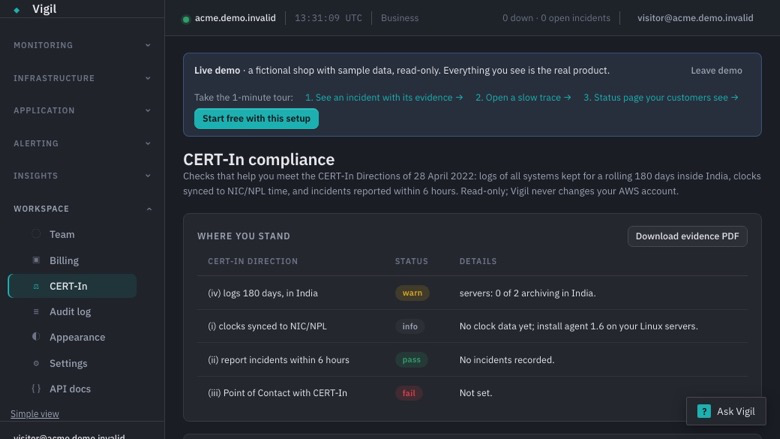
Meet the CERT-In Directions on AWS and see it on one page: 180-day logs kept in India, clock checks, a 6-hour incident clock with a ready report, the Point of Contact register and an evidence PDF for auditors, plus uptime, API, cron and server monitoring.
Overview
Image
CERT-In page: logs in India, clocks, incidents
Image
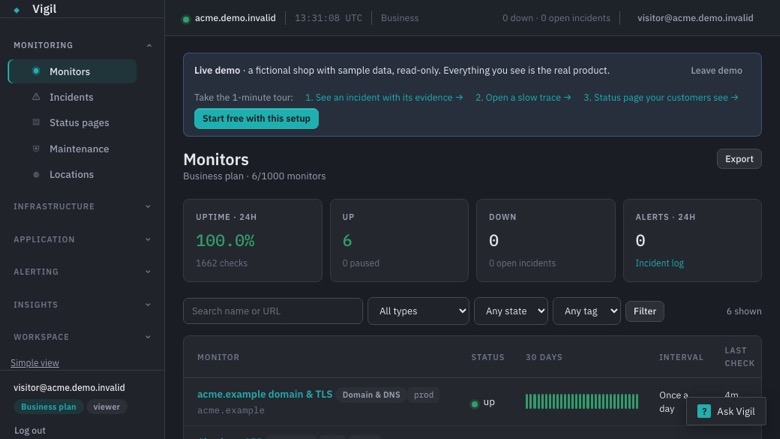
Monitors: uptime, API, heartbeat and DNS
Meet the CERT-In Directions without a spreadsheet
The CERT-In Directions of 28 April 2022 require Indian organisations to keep logs of all ICT systems for a rolling 180 days within India, sync clocks to NIC or NPL time servers, report listed cyber incidents to CERT-In within 6 hours of noticing them, and designate a Point of Contact. Vigil turns these rules into checks you can see and evidence you can hand to an auditor.
What is included
- AWS account checks (read-only IAM policy, 9 List and Describe actions): CloudTrail on and stored in ap-south-1 or ap-south-2, 180-day retention on trail buckets and CloudWatch log groups, VPC flow logs and load-balancer access logs. Every gap comes with the fix.
- India-mode log shipping: the Vigil agent writes server logs straight to your own S3 bucket in Mumbai or Hyderabad. The log text never reaches Vigil; we only see counts and upload status.
- Clock check: the agent reports each server's time source and offset; NIC and NPL sources pass.
- 6-hour incident clock: record an incident, get email reminders at 2, 4 and 5 hours, and a ready-to-send report to incident@cert-in.org.in with the CERT-In form fields filled in.
- Point of Contact register in the Annexure II format, with a draft email to info@cert-in.org.in .
- Evidence PDF: a dated report of where you stand on each direction.
- Monitoring: uptime, API, cron heartbeat, SSL and server monitoring, status pages, and alerts to Slack, Microsoft Teams, Telegram, Discord, email and webhooks.
Security and access
- AWS checks use a read-only IAM policy with 9 List and Describe actions and an External ID; nothing in your account is changed. You can review the policy before you create it.
- The Vigil agent runs on your servers and sends metrics to Vigil. In India mode it writes log lines straight to your own S3 bucket in Mumbai or Hyderabad; the log text never reaches Vigil.
- Hosting: the Vigil service runs in the EU (Germany), with encrypted backups. Removing the role or the agent ends our access.
Typical uses
- Showing an auditor that logs are kept 180 days in India and clocks are synced
- Meeting the 6-hour CERT-In reporting window when an incident happens
- Keeping the CERT-In Point of Contact register up to date
- Watching websites, APIs, cron jobs and servers from the same place
Who it is for
Indian companies running on AWS that must follow the CERT-In Directions: SaaS, fintech, e-commerce, hosting and service providers, and their compliance and DevOps teams.
Getting started
- Subscribe, or start the 14-day free trial.
- Connect your AWS account with the read-only role and install the agent on your servers.
- Turn on India mode to keep server logs in your own S3 bucket in India.
Plans
Plans differ only in limits: Starter covers 1 AWS account, Pro 3 and Business 10, with unlimited team members.
Vigil helps you meet the CERT-In Directions; it is not legal advice and does not certify compliance. The Vigil service is hosted in the EU (Hetzner, Germany). In India mode your log content stays in your own AWS account in India.
Start the 14-day free trial to see where you stand on each CERT-In direction the same day.
Highlights
- Checks the CERT-In log rules in your AWS account. A read-only role with nine List and Describe actions confirms CloudTrail is on and stored in Mumbai or Hyderabad, that trail buckets and CloudWatch log groups keep 180 days, and that VPC flow logs and load-balancer access logs are on. Every gap comes with the exact fix.
- Server logs stay in your own AWS account in India. In India mode the Vigil agent writes server logs straight to your S3 bucket in ap-south-1 or ap-south-2; the log text never reaches Vigil, which sees only counts and upload status. The agent also reports each server's time source and offset, so you can show clocks are synced to NIC or NPL.
- Ready for the 6-hour rule and the auditor. Record an incident and get email reminders at 2, 4 and 5 hours, with a report to incident@cert-in.org.in already filled in. Keep the Point of Contact register in the Annexure II format and download a dated evidence PDF. Uptime, API, cron, SSL and server monitoring with status pages and alerts are included.
Details
New
Introducing multi-product solutions
You can now purchase comprehensive solutions tailored to use cases and industries.

Features and programs
Financing for AWS Marketplace purchases
AWS Marketplace now accepts line of credit payments through the PNC Vendor Finance program. This program is available to select AWS customers in the US, excluding NV, NC, ND, TN, & VT.

Pricing
Free trial
Try this product free according to the free trial terms set by the vendor.
Pricing is based on the duration and terms of your contract with the vendor. This entitles you to a specified quantity of use for the contract duration. If you choose not to renew or replace your contract before it ends, access to these entitlements will expire.
Additional AWS infrastructure costs may apply. Use the AWS Pricing Calculator to estimate your infrastructure costs.
Dimension | Description | Cost/month |
|---|---|---|
Starter | CERT-In pack for 1 AWS account, plus Vigil Starter: 50 monitors, 3 servers, 30-day history, unlimited team members. | $29.00 |
Pro | CERT-In pack for 3 AWS accounts, plus Vigil Pro: 200 monitors, 15 servers, 90-day history, unlimited team members. | $79.00 |
Business | CERT-In pack for 10 AWS accounts, plus Vigil Business: 1,000 monitors, 100 servers, 365-day history, SSO and SCIM, unlimited team members. | $179.00 |
Dimensions summary
You pick one of three contract tiers, each sold per workspace with unlimited team members. The tiers scale by capacity: the CERT-In compliance pack covers 1, 3, or 10 AWS accounts across Starter, Pro, and Business. Monitoring limits rise alongside it — monitors, servers with the agent, and how long history is kept all grow by tier. Business adds SSO and SCIM for identity management. Pricing is flat per tier, so the number of accounts and the capacity limits you need determine which tier fits.
Top-of-mind questions for buyers
A monitor is one thing you watch: a URL, API flow, cron job, domain, TCP port, or browser script. Servers with the agent are counted separately. The agent's own metrics, logs, traces, and errors are not metered per host.
Nothing is charged for going over. The product keeps monitoring what already exists and tells you in the app. New items above the limit wait until you upgrade or remove something. There is no overage billing.
No. Pricing is flat per workspace. Each tier sets fixed limits on monitors, servers with the agent, and history length. Team members are unlimited on every tier and never billed per seat. The tier capacity you choose drives your cost.
puzaricloud.in
Helpful?
Vendor refund policy
Contracts can be cancelled any time in AWS Marketplace by turning off auto-renewal; access continues until the end of the paid term. Refund requests for the current term: email hello@puzaricloud.in within 14 days of purchase with your AWS account ID. Approved refunds are issued through AWS Marketplace.

Legal
Vendor terms and conditions
Upon subscribing to this product, you must acknowledge and agree to the terms and conditions outlined in the vendor's End User License Agreement (EULA) .
Content disclaimer
Vendors are responsible for their product descriptions and other product content. AWS does not warrant that vendors' product descriptions or other product content are accurate, complete, reliable, current, or error-free.
Delivery details
Software as a Service (SaaS)
SaaS delivers cloud-based software applications directly to customers over the internet. You can access these applications through a subscription model. You will pay recurring monthly usage fees through your AWS bill, while AWS handles deployment and infrastructure management, ensuring scalability, reliability, and seamless integration with other AWS services.
Resources
Support
Vendor support
Getting help
Email hello@puzaricloud.in . We reply within one business day, Monday to Friday, India time, and usually much sooner.
Self-service
- Help centre: puzaricloud.in/help
- Documentation: puzaricloud.in/docs
- Security and data handling: puzaricloud.in/security
What support covers
- Connecting your AWS account and installing the agent
- Setting up India mode and your S3 log bucket
- Using the incident clock, the Point of Contact register and the evidence PDF
- Billing and plan changes through AWS Marketplace
When you write to us
Include your workspace email and, for AWS checks, your AWS account ID. Support is included on every plan, including the free trial.
Plans
Starter covers 1 AWS account with 50 monitors and 3 servers, Pro 3 accounts with 200 monitors and 15 servers, and Business 10 accounts with 1,000 monitors, 100 servers, SSO and SCIM. Every plan has unlimited team members.
Refunds
If you are not satisfied with your first paid month, email hello@puzaricloud.in within 14 days of the first charge with your AWS account ID and we will refund it in full through AWS Marketplace.
AWS infrastructure support
AWS Support is a one-on-one, fast-response support channel that is staffed 24x7x365 with experienced and technical support engineers. The service helps customers of all sizes and technical abilities to successfully utilize the products and features provided by Amazon Web Services.
Similar products

AI-powered, integrated Environment, Health, Safety, and Sustainability (EHS&S) solution suite designed to enhance workplace safety, drive sustainability, and minimize risk.

Enterprise Applications – SaaS service that monitors SaaS platforms for security, compliance, and data protection.

Scan public website URLs in your browser and review evidence-backed privacy risk signals. Includes 50 single-page scans per month, report history, and email support. Requires a CertScore account; no MCP client or API-key configuration.

Free website privacy scanning through MCP, with evidence and public report links. Requires a CertScore account and Marketplace API key. Shared usage limits apply.
Customer reviews
No customer reviews yet
Be the first to review this product . We've partnered with PeerSpot to gather customer feedback. You can share your experience by writing or recording a review, or scheduling a call with a PeerSpot analyst.