
Sold by: Madarson IT
Deployed on AWS
AWS Free Tier
This product has charges associated with it for the Kali-AI v2 automated penetration testing platform. Kali-AI v2 with Authenticated Scanning lets you scan behind a login using a session cookie or header, across a 7-tool pipeline and Claude AI, delivering white-label PDF reports for MSSPs and red teams.
Overview
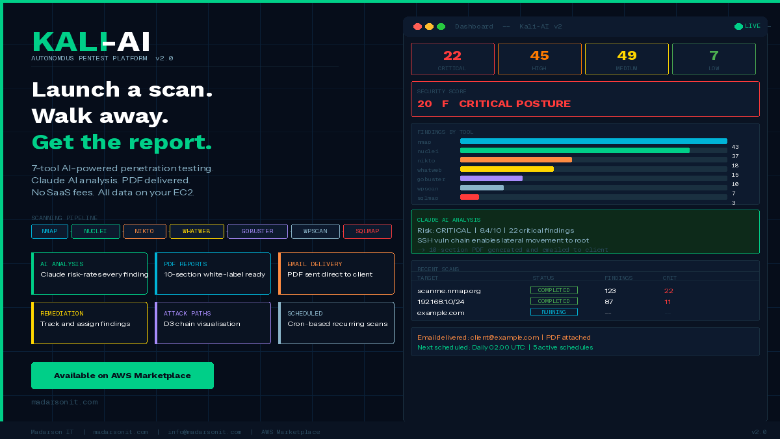
Image
Kali-AI v2 Authenticated Scanning
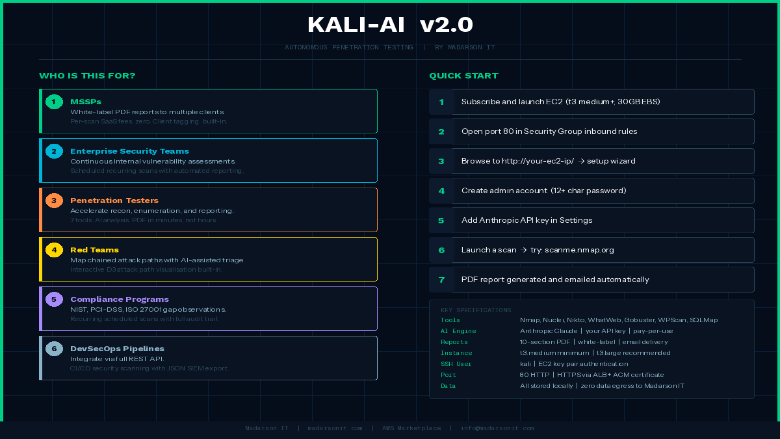
Image
Kali-AI v2 Authenticated Pentest Use Cases
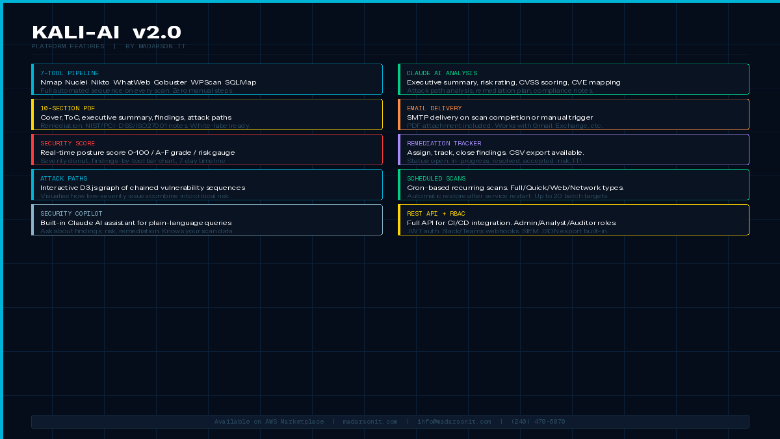
Image
Kali-AI v2 Auth Pentest Feature Set

Video
Product video
This is a repackaged software product wherein additional charges apply for the Kali-AI v2 automated penetration testing platform. Kali-AI v2 is a self-hosted autonomous penetration testing platform built on hardened Ubuntu 24.04 LTS. It runs a 7-tool scanning pipeline, analyzes every finding with Anthropic Claude AI, and generates professional white-label PDF reports automatically - no manual steps between scan launch and final deliverable.
This edition adds Authenticated Scanning: supply a session cookie or custom header per scan, and Kali-AI automatically includes it on every request from Nuclei, Nikto, WhatWeb, Gobuster, WPScan, and SQLMap - surfacing findings on member areas and admin dashboards an unauthenticated scan alone would miss. Credentials are encrypted at rest, redacted from all logs and console output, and never returned by the API or shown in reports.
Designed for MSSPs, security teams, red teams, and penetration testers who need repeatable automated assessments without SaaS pricing or data residency risk. All data stays on your EC2 instance.
How It Works
Kali-AI v2 executes Nmap, Nuclei, Nikto, WhatWeb, Gobuster, WPScan, and SQLMap in sequence. When an auth cookie or header is supplied, each applicable tool includes it on every request. Findings are correlated, enriched with CVE data, and analyzed by Claude AI to produce an executive summary, risk rating, attack path analysis, remediation plan, and NIST/PCI-DSS/ISO 27001 compliance observations - delivered as a white-label PDF.
Key Features
- Authenticated Scanning: Supply a session cookie or custom header once; applied automatically across Nuclei, Nikto, WhatWeb, Gobuster, WPScan, and SQLMap. Encrypted at rest, never shown in logs or reports.
- 7-Tool Automated Pipeline: Runs with no manual orchestration required.
- Claude AI Analysis: Every finding is risk-rated with actionable narratives, not raw scanner output.
- White-Label PDF Reports: Your company name and logo, with email delivery on completion.
- Security Score Dashboard: Posture score (0-100, A-F), risk gauge, severity chart, activity timeline.
- Remediation Tracker: Assign findings, due dates, status, CSV export.
- Attack Path Visualization and Scan Delta comparison across assessments.
- Scheduled Scans: Cron-based, Full/Quick/Web/Network types.
- Batch Scanning: Up to 20 targets with parallel execution.
- Client and Project Tagging for MSSP workflows.
- Security Copilot: AI assistant for remediation queries.
- RBAC: Admin, analyst, auditor roles with JWT authentication.
- Integrations: Slack/Teams webhooks, SIEM JSON export, REST API.
Security and Data Handling
Runs on hardened Ubuntu 24.04 LTS. The first-boot wizard ensures no default credentials exist. RBAC with JWT authentication controls access across roles. Authentication values are encrypted at rest and redacted from logs, console output, and reports. All scan data remains on your EC2 instance with no vendor data retention.
Getting Started
- Launch an EC2 instance (t3.medium or larger, 30 GB EBS). Open port 80 in your Security Group.
- Open a browser to and complete the setup wizard.
- Create your admin account (12+ character password required).
- Add your Anthropic API key in Settings (console.anthropic.com - pay-per-use).
- Launch a scan. Try: scanme.nmap.org. Optionally expand "Authentication" for a session cookie.
- View the AI-analyzed PDF report in Reports.
Evaluate Before You Commit
Request a sample anonymized PDF report from Madarson IT before deploying. Launch a t3.medium instance and scan scanme.nmap.org to try the full scan-to-report workflow with minimal commitment.
Requirements and Limitations
- An Anthropic API key is required for Claude AI analysis, billed separately by Anthropic on a pay-per-use basis.
- Authenticated Scanning supports session cookie / header-based authentication. Automated login is not currently supported.
- Buyers should verify compatibility with their target EC2 instance types before deploying at scale.
- For HTTPS, deploy behind an AWS ALB or CloudFront distribution with an ACM certificate.
Responsible Use
AUTHORIZED USE ONLY. For security testing of systems you have explicit written permission to test, including with Authenticated Scanning. Unauthorized use violates the AWS Acceptable Use Policy, the Computer Fraud and Abuse Act (CFAA), and equivalent laws.
About Madarson IT
Madarson IT certified images are continuously updated, security-optimized, and built to meet enterprise requirements with minimal configuration. Madarson IT also offers hardened and custom images across AWS, GCP, and Azure Marketplace.
Highlights
- Authenticated Scanning Across a 7-Tool Pipeline: Supply a session cookie or custom header once, and Nmap, Nuclei, Nikto, WhatWeb, Gobuster, WPScan, and SQLMap automatically use it to scan behind a login - surfacing findings on member portals, admin dashboards, and other authenticated areas an unauthenticated scan alone would miss. Credentials are encrypted at rest, redacted from logs and reports, and never returned by the API.
- White-Label PDF Reports with Claude AI Analysis: Every scan produces a professional PDF report with executive summary, risk rating, attack path analysis, remediation plan, and NIST/PCI-DSS/ISO 27001 compliance observations generated by Claude AI. White-label with your company name and logo for direct client delivery. Email delivery on scan completion included.
- Built for MSSP and Enterprise Workflows: Client and project tagging supports multi-tenant operations. Remediation tracker with assignee, due date, and CSV export. Slack, Teams, and SIEM webhooks plus a full REST API enable CI/CD integration. RBAC with admin, analyst, and auditor roles controls access across your team.
Details
Sold by
Categories
Delivery method
Delivery option
64-bit (x86) Amazon Machine Image (AMI)
Latest version
Operating system
Ubuntu 24.04
Deployed on AWS
New
Introducing multi-product solutions
You can now purchase comprehensive solutions tailored to use cases and industries.

Features and programs
Financing for AWS Marketplace purchases
AWS Marketplace now accepts line of credit payments through the PNC Vendor Finance program. This program is available to select AWS customers in the US, excluding NV, NC, ND, TN, & VT.

Pricing
Pricing is based on actual usage, with charges varying according to how much you consume. Subscriptions have no end date and may be canceled any time.
Additional AWS infrastructure costs may apply. Use the AWS Pricing Calculator to estimate your infrastructure costs.
If you are an AWS Free Tier customer with a free plan, you are eligible to subscribe to this offer. You can use free credits to cover the cost of eligible AWS infrastructure. See AWS Free Tier for more details. If you created an AWS account before July 15th, 2025, and qualify for the Legacy AWS Free Tier, Amazon EC2 charges for Micro instances are free for up to 750 hours per month. See Legacy AWS Free Tier for more details.
Dimension | Cost/hour |
|---|---|
t3a.medium Recommended | $0.50 |
t3.micro | $0.50 |
c3.large | $0.50 |
c8a.large | $0.50 |
c7a.large | $0.50 |
c6a.large | $0.50 |
c5a.large | $0.50 |
i3.large | $0.50 |
m3.large | $0.50 |
m5a.large | $0.50 |
Dimensions summary
You pay by the hour for the EC2 instance type that runs this platform. All dimensions bill the same way; they differ only by the compute instance you select. Options span several families: general purpose (t2, t3, t3a, m-series), compute optimized (c-series), memory optimized (r-series), storage optimized (d3, i2, i3), and GPU-backed instances (g-series, p-series). Sizes range from nano up to 8xlarge. Larger or specialized instances carry higher hourly rates. Your cost scales with the size and class of instance you choose and the hours you run it.
Top-of-mind questions for buyers
Each hourly unit is one running EC2 instance of the type you select. The platform runs on your own virtual machine. The AI analysis step needs your own separate third-party AI service key, obtained directly from that provider. Open-source scanning tools are included; no commercial tool licences are supplied.
Software charges meter running instance-hours only. A fully stopped instance stops accruing the hourly software fee. Stopped instances may still incur separate AWS storage charges for attached volumes. You pay only for the hours the instance actually runs, regardless of how many scans you launch.
All dimensions deliver the same platform and the same scanning pipeline; they differ only by compute capacity and hourly rate. Smaller instances suit single-target or scheduled scans. Larger compute, memory, or GPU instances suit heavier parallel scanning. You pick the instance that matches your scan volume and workload.
madarsonit.com
Helpful?
Vendor refund policy
There is no refund policy for this image

Legal
Vendor terms and conditions
Upon subscribing to this product, you must acknowledge and agree to the terms and conditions outlined in the vendor's End User License Agreement (EULA) .
Content disclaimer
Vendors are responsible for their product descriptions and other product content. AWS does not warrant that vendors' product descriptions or other product content are accurate, complete, reliable, current, or error-free.
Delivery details
64-bit (x86) Amazon Machine Image (AMI)
Amazon Machine Image (AMI)
An AMI is a virtual image that provides the information required to launch an instance. Amazon EC2 (Elastic Compute Cloud) instances are virtual servers on which you can run your applications and workloads, offering varying combinations of CPU, memory, storage, and networking resources. You can launch as many instances from as many different AMIs as you need.
Version release notes
Kali-AI Auth v2 - Automated Pentest Platform with Authenticated Scanning on Hardened Ubuntu 24.04 LTS
Additional details
Usage instructions
Allow inbound SSH access in your security group (TCP port 22) Allow inbound web access in your security group on TCP port 80
To connect to your instance using the Amazon EC2 console: Open the Amazon EC2 console at https://console.aws.amazon.com/ec2/ In the navigation pane, choose Instances. Select the instance and choose Connect. Choose the EC2 Instance Connect tab. For Connection type, choose Connect using EC2 Instance Connect. Access the ec2 with the default username: "kali"
To access the dashboard and set up your admin account: http://your-vm-ip To scan behind a login, expand "Authentication" in the New Scan form and supply a session cookie or custom header.
Resources
Vendor resources
Support
Vendor support
Support for Kali-AI v2 with Authenticated Scanning
Madarson IT provides support for Kali-AI v2 via email at info@madarsonit.com . Contact us for assistance with deployment, configuration, authenticated scanning setup, scanning issues, report generation, or troubleshooting.
How to Submit a Request
When contacting support, please include:
- Your EC2 instance ID
- A description of the issue or question
- Any relevant error messages or log output
This information helps us diagnose and resolve your issue efficiently.
Private Offers and Custom Licensing
For private offers, volume licensing, or custom deployment arrangements, contact info@madarsonit.com with details about your requirements and expected usage.
About Madarson IT
Madarson IT certified images are always up to date, secure, follow industry standards, and are built to work right out of the box. Every image is designed to help organizations establish a strong security baseline and reduce risk exposure to common cyber threats. Madarson IT also offers hardened and custom images across AWS, GCP, and Azure Marketplace, covering multiple operating systems and compliance frameworks.
AWS infrastructure support
AWS Support is a one-on-one, fast-response support channel that is staffed 24x7x365 with experienced and technical support engineers. The service helps customers of all sizes and technical abilities to successfully utilize the products and features provided by Amazon Web Services.
Similar products

This product has charges associated with it for the Kali-AI v2 automated penetration testing platform. Kali-AI v2 automates penetration testing across 20 targets in parallel using a 7-tool pipeline and Claude AI, delivering white-label PDF reports for MSSPs and red teams.

By Kali
Kali Linux is an open-source, multi-platform distribution, aimed at advanced Penetration Testing and Security Auditing.
Kali Linux provides several hundred common tools and industry specific modifications, targeted towards various information security tasks, such as Penetration Testing, Security Research, Computer Forensics, Reverse Engineering, Vulnerability Management and Red Team Testing.

XBOW is an autonomous offensive security platform that attacks your web applications like a real adversary, under controls you define, and proves what it can exploit.

Kali Linux is an open-source, multi-platform distribution, aimed at advanced Penetration Testing and Security Auditing.
Kali Linux provides several hundred common tools and industry specific modifications, targeted towards various information security tasks, such as Penetration Testing, Security Research, Computer Forensics, Reverse Engineering, Vulnerability Management and Red Team Testing.
Customer reviews
No customer reviews yet
Be the first to review this product . We've partnered with PeerSpot to gather customer feedback. You can share your experience by writing or recording a review, or scheduling a call with a PeerSpot analyst.