
Sold by: cloudimg
Deployed on AWS
Free Trial
AWS Free Tier
This product has charges associated with it for seller support. Keep sensitive data off third-party sites. Self-hosted CyberChef AMI for security teams and SOC analysts - 400+ operations run client-side in your browser, served by nginx, ready in minutes.
Overview
Image
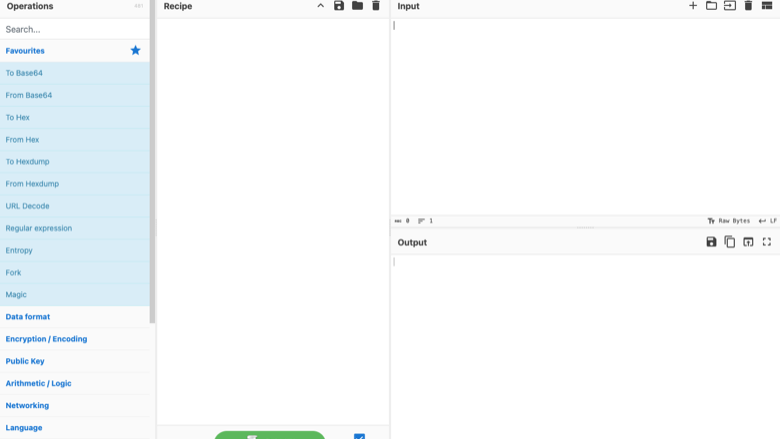
The CyberChef interface
Image
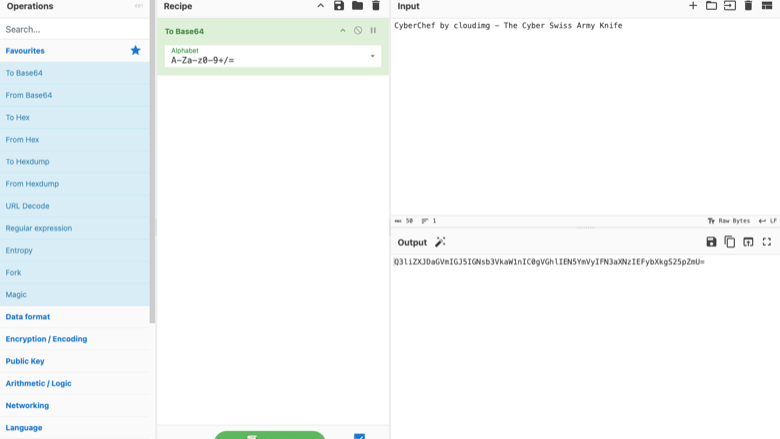
A recipe in action
Image
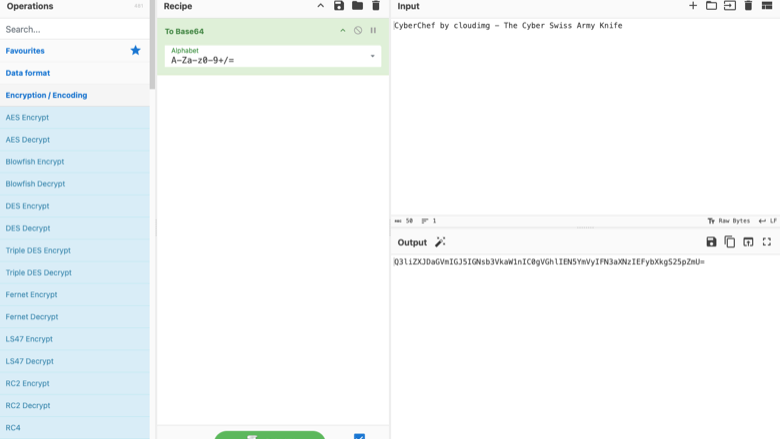
Encryption and encoding operations
This is a repackaged open source software product wherein additional charges apply for cloudimg support services.
CyberChef - The Cyber Swiss Army Knife, Pre-Configured and Ready to Deploy
CyberChef is a simple, intuitive web app for carrying out all manner of cyber operations in a browser. Encode and decode Base64, URL and many other formats; encrypt and decrypt with AES, DES and RSA; compress and decompress data; parse and translate hexdumps; work with hashes and checksums; and chain any of more than 400 operations together into a repeatable recipe. This AMI delivers CyberChef fully installed and served by nginx, so the tool is available in a browser within minutes of launch. The current release is CyberChef 11.2.0.
Why This AMI Instead of Self-Hosting?
Downloading CyberChef from GitHub is free - so why use this AMI? This image eliminates the setup work so your team can focus on analysis, not infrastructure:
- Launch-ready deployment - CyberChef is pre-installed and served by nginx with systemd managing process restarts on failure. No manual package installation, web server configuration, or service file authoring required.
- Integrity-verified build - The official upstream release bundle is verified against a pinned checksum at build time, ensuring you run an unmodified, authentic copy.
- Deployment guide included - A paired guide walks through restricting access with security groups, placing the instance behind a VPN, fronting it with an authenticating reverse proxy, and adding HTTPS.
- 24/7 cloudimg support - Help with deployment, access restriction, HTTPS configuration, and upgrade planning via email and chat.
Client-Side by Design
CyberChef is a purely client-side application. Every operation runs in the visitor's own browser: the data you paste, drop or type is processed locally by the page and is never uploaded to the server, never stored, and never sent anywhere. There is no database, no server-side backend and no account. This makes it ideal for working with sensitive investigation data, and means the appliance has no server-side data store to secure.
AMI Security Posture
The image serves CyberChef over nginx on port 80 as the upstream project intends for self-hosted instances. HTTPS is not preconfigured out of the box; cloudimg support can assist with TLS setup using your own certificate or a reverse proxy. SSH access is key-based - password authentication is disabled on the base image. The appliance adds only nginx and a small set of supporting tools on top of a fully patched Linux base. Operators who want to restrict access can narrow the instance security group to trusted source addresses, place the instance behind a VPN, or front it with an authenticating reverse proxy. The paired deployment guide walks through each of these options.
Application Stack
The official pre-built CyberChef release bundle is served as static files by nginx. systemd starts nginx on boot and restarts it on failure. An unauthenticated health endpoint answers for load-balancer and uptime checks. On first boot a one-shot service records the instance address in a root-only note and an SSH message-of-the-day banner so operators know exactly where to reach the tool.
Ready to Use
Open the instance address in your browser and CyberChef loads immediately with no sign-in step. Drag an input in, pick operations from the catalogue, and build a recipe - everything computes in the browser.
Use Cases
- Security teams and SOCs - A self-hosted, private instance so analysts can decode, decrypt and transform data without sending it to a third-party site.
- CTF players and malware analysts - A shared browser toolkit for incident responders and competition teams.
- Developers and engineers - A convenient always-on data-conversion and cryptography workbench.
cloudimg Support
24/7 technical support by email and chat covering deployment assistance, security group and reverse proxy configuration, HTTPS setup, and upgrade planning.
All product and company names are trademarks or registered trademarks of their respective holders. CyberChef is Crown Copyright, published by GCHQ under the Apache License 2.0. Use of the name does not imply any affiliation with or endorsement by GCHQ.
Highlights
- Launch-ready in minutes, not hours: CyberChef is pre-installed and served by nginx with systemd managing restarts, eliminating manual web server setup, package installation, and service configuration. The official release bundle is integrity-verified against a pinned checksum at build time. Open the instance address and start building recipes immediately with no sign-in step required.
- Sensitive data stays in your browser: CyberChef is purely client-side - every one of the 400+ operations (encoding, encryption, compression, hashing, data analysis) runs locally in the visitor's browser. Nothing is uploaded, stored, or sent to the server. There is no database and no account, making it ideal for SOC analysts and incident responders handling confidential data.
- 24/7 cloudimg support and deployment guidance: Technical support by email and chat covers deployment, security group lockdown, VPN placement, authenticating reverse proxy setup, HTTPS configuration, and upgrade planning. A paired deployment guide walks through each access-restriction option so your team can harden the instance to match your requirements.
New
Introducing multi-product solutions
You can now purchase comprehensive solutions tailored to use cases and industries.

Features and programs
Financing for AWS Marketplace purchases
AWS Marketplace now accepts line of credit payments through the PNC Vendor Finance program. This program is available to select AWS customers in the US, excluding NV, NC, ND, TN, & VT.

Pricing
Free trial
Try this product free for 7 days according to the free trial terms set by the vendor. Usage-based pricing is in effect for usage beyond the free trial terms. Your free trial gets automatically converted to a paid subscription when the trial ends, but may be canceled any time before that.
Pricing is based on actual usage, with charges varying according to how much you consume. Subscriptions have no end date and may be canceled any time. Alternatively, you can pay upfront for a contract, which typically covers your anticipated usage for the contract duration. Any usage beyond contract will incur additional usage-based costs.
Additional AWS infrastructure costs may apply. Use the AWS Pricing Calculator to estimate your infrastructure costs.
If you are an AWS Free Tier customer with a free plan, you are eligible to subscribe to this offer. You can use free credits to cover the cost of eligible AWS infrastructure. See AWS Free Tier for more details. If you created an AWS account before July 15th, 2025, and qualify for the Legacy AWS Free Tier, Amazon EC2 charges for Micro instances are free for up to 750 hours per month. See Legacy AWS Free Tier for more details.
Dimension | Description | Cost/hour |
|---|---|---|
m5.large Recommended | m5.large | $0.04 |
t2.micro | t2.micro instance type | $0.04 |
t3.micro | t3.micro instance type | $0.04 |
g4dn.2xlarge | g4dn.2xlarge instance type | $0.24 |
inf2.8xlarge | inf2.8xlarge instance type | $0.24 |
m8in.96xlarge | m8in.96xlarge instance type | $0.24 |
g6f.2xlarge | g6f.2xlarge instance type | $0.24 |
c7i-flex.large | c7i-flex.large instance type | $0.08 |
c7i-flex.8xlarge | c7i-flex.8xlarge instance type | $0.24 |
c8id.96xlarge | c8id.96xlarge instance type | $0.24 |
Vendor refund policy
Refunds available on request.

Legal
Vendor terms and conditions
Upon subscribing to this product, you must acknowledge and agree to the terms and conditions outlined in the vendor's End User License Agreement (EULA) .
Content disclaimer
Vendors are responsible for their product descriptions and other product content. AWS does not warrant that vendors' product descriptions or other product content are accurate, complete, reliable, current, or error-free.
Delivery details
64-bit (x86) Amazon Machine Image (AMI)
Amazon Machine Image (AMI)
An AMI is a virtual image that provides the information required to launch an instance. Amazon EC2 (Elastic Compute Cloud) instances are virtual servers on which you can run your applications and workloads, offering varying combinations of CPU, memory, storage, and networking resources. You can launch as many instances from as many different AMIs as you need.
Version release notes
Initial release of CyberChef 11.2.0 as a ready-to-use, browser-based data-operations toolkit served by nginx. The official upstream release bundle is served unmodified, with its integrity verified against a pinned checksum at build time.
Additional details
Usage instructions
Connect via SSH on port 22 as the default login user for your operating system variant (for the Ubuntu 24.04 variant the user is ubuntu). Open CyberChef in a browser at http://<instance-public-ip>/ -- there is no sign-in step; the tool loads immediately and every operation runs client-side in your browser. The instance address is also recorded at /root/cyberchef-info.txt (view with: sudo cat /root/cyberchef-info.txt). CyberChef is served by nginx on port 80; an unauthenticated health endpoint is available at http://<instance-public-ip>/healthz. The instance security group opens ports 22 (SSH) and 80 (HTTP). Because CyberChef has no login, restrict who can reach it at the network edge: narrow the security group to trusted source addresses, use a VPN, or front the instance with an authenticating reverse proxy (see the deployment guide). The web server runs under systemd: systemctl status nginx.
Resources
Vendor resources
Support
Vendor support
cloudimg provides 24/7 technical support for this product by email and live chat. Our engineers help with deployment, configuration, updates, performance tuning and troubleshooting; critical issues receive a one hour average response. Contact support@cloudimg.co.uk .
AWS infrastructure support
AWS Support is a one-on-one, fast-response support channel that is staffed 24x7x365 with experienced and technical support engineers. The service helps customers of all sizes and technical abilities to successfully utilize the products and features provided by Amazon Web Services.
Similar products

This product has charges associated with it for deployment, configuration, and ongoing support. Self-hosted data transformation tool by GCHQ. Encode, decode, encrypt, compress, and analyze data with 300+ operations in a visual recipe builder.

Security Onion is a free and open platform built by defenders for defenders. It includes network visibility, host visibility, intrusion detection honeypots, log management, case management, and much more.

Connect the Hunter Strategy vSOC Appliance to your AWS Cloud to monitor logs, traffic and security events to increase your security posture.
Customer reviews
No customer reviews yet
Be the first to review this product . We've partnered with PeerSpot to gather customer feedback. You can share your experience by writing or recording a review, or scheduling a call with a PeerSpot analyst.