
Sold by: cloudimg
Deployed on AWS
Free Trial
AWS Free Tier
This product has charges associated with it for seller support. Production-ready JBoss EAP 8.1 on RHEL 8 with secure auto-configured credentials and 24/7 cloudimg support - deploy Jakarta EE apps without manual server setup.
Overview
Image
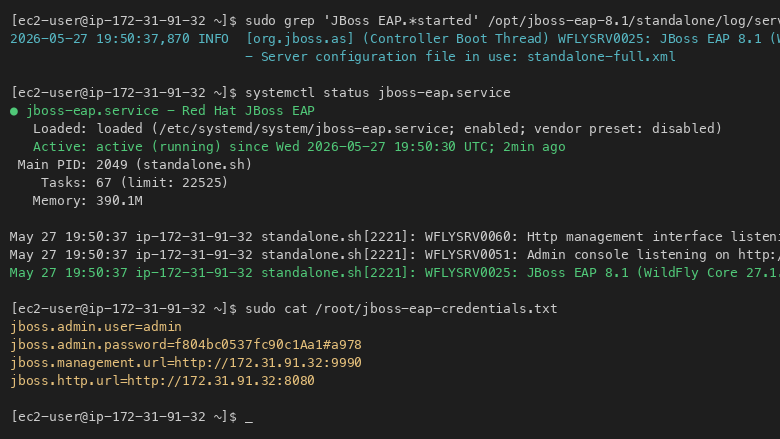
JBoss EAP service status
Image
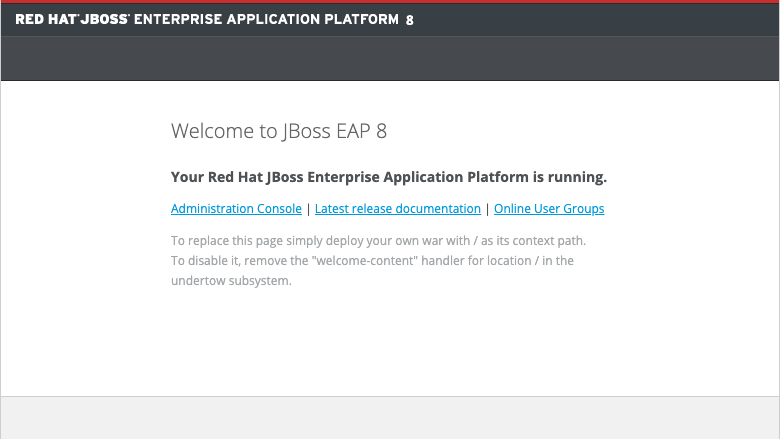
Management Console login
Image
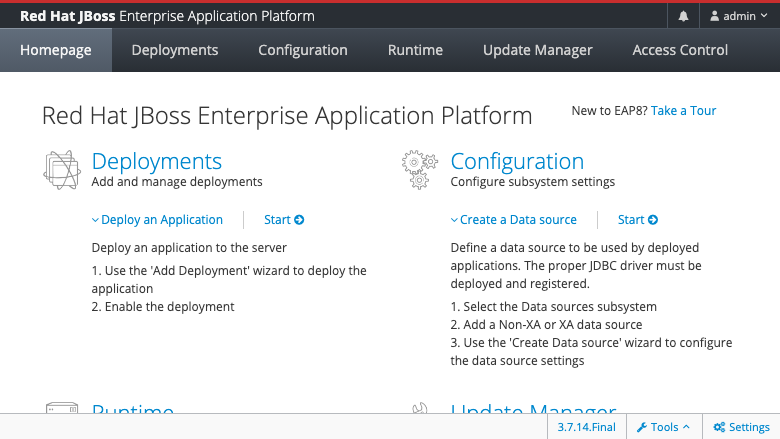
Management Console dashboard
This is a repackaged open source software product wherein additional charges apply for cloudimg support services.
Overview
Red Hat JBoss EAP 8.1 is a production-ready Jakarta EE 10application server that delivers the full Java EE programming model - including EJB, JPA, JMS, JAX-RS, CDI, and JSF - on a lightweight, high-performance runtime. This image delivers JBoss EAP fully installed and configured on Red Hat Enterprise Linux 8, so a complete Jakarta EE application server is running within minutes of launch. Skip the hours of manual installation, dependency resolution, and security hardening that a bare RHEL AMI requires.
Why This Image Over Alternatives
Unlike self-installing EAP on a bare RHEL AMI or running unsupported WildFly, this image eliminates manual JDK installation, EAP configuration, systemd service creation, and credential setup. The standalone-full profile is pre-tuned with all Jakarta EE 10 subsystems enabled. Every instance launches with a unique, automatically generated management password - removing the security risk of shared or default credentials that plague manual deployments. You also receive ongoing expert support from cloudimg, which is unavailable with community-only options.
Application Server Stack
- JBoss EAP 8.1 running as a systemd service under the standalone-full profile, enabling the full Jakarta EE 10 feature set including the JMS messaging subsystem (ActiveMQ Artemis)
- Java 21 LTS from the RHEL AppStream repository provides the JDK
- Management console available on port 9990
- HTTP listener on port 8080 serves deployed applications
Security and Network Guidance
Secure First Boot: On first launch, a one-shot systemd service generates a fresh management admin password unique to that instance, registers it via the EAP add-user utility in the ManagementRealm, and stores the plain text value in a root-only file. No shared or default credentials ship in the image.
Recommended Security Group Rules:
- Port 9990(management console) - restrict to your admin IP range or VPN CIDR only
- Port 8080 (HTTP application traffic) - open to application consumers or place behind an ALB
- Port 22 (SSH) - restrict to your bastion or admin IP
Encryption Guidance: Enable EBS encryption on attached volumes for data-at-rest protection. Configure TLS on the EAP HTTPS listener (port 8443) for data in transit. Place the management console (port 9990) in a private subnet or behind a VPN to prevent public exposure.
Ready To Deploy
The EAP service, standalone-full profile, and per-instance admin account are all prepared at launch. Connect to the management console on port 9990 to deploy WAR and EAR applications, configure datasources, messaging destinations, and security domains. The HTTP listener on port 8080 serves deployed applications immediately.
Use Cases
- Enterprise Messaging: Financial services teams processing trade orders and settlement messages through JMS via ActiveMQ Artemis at high throughput
- Microservices and REST APIs: SaaS vendors deploying multiple JAX-RS-based services behind an Application Load Balancer for scalable API back ends
- Stateful Enterprise Applications: EJB-based workloads for insurance claims processing, ERP modules, or supply chain orchestration
- JPA Database Applications: Data-intensive applications backed by Amazon RDS or Aurora with JPA connection pooling and transaction management
cloudimg Support
24/7 technical support by email and live chat. Our engineers provide expert assistance for JBoss EAP deployment, application configuration, datasource setup, JMS messaging, clustering, and performance tuning. Critical issues receive a one-hour average response time.
Getting Started
- Launch the AMI and ensure your security group allows inbound on ports 9990, 8080, and 22
- SSH into the instance and retrieve your unique admin password from the root-only file
- Access the EAP management console at http://your-instance-ip:9990
- Deploy your WAR or EAR application via the console or CLI
For a guided deployment walkthrough or to discuss clustering and high-availability configurations, contact cloudimg support.
All product and company names are trademarks or registered trademarks of their respective holders. Use of them does not imply any affiliation with or endorsement by them.
Highlights
- JBoss EAP 8.1 preinstalled with the standalone-full Jakarta EE 10 profile, Java 21 LTS, and systemd service on RHEL 8. Eliminates manual JDK installation, EAP configuration, profile tuning, and service setup - your management console is accessible on port 9990 within minutes of launch, ready to deploy WAR and EAR applications immediately without any manual server configuration steps.
- Security-hardened first boot generates a unique management admin password for every instance and stores it in a root-only file - no shared or default credentials ever ship. This eliminates the credential exposure risk present in manual installations and provides a stronger security baseline than self-configured deployments where default passwords are often left unchanged.
- 24/7 expert technical support from cloudimg with a one-hour average response time for critical issues. Engineers assist with JBoss EAP application deployment, datasource configuration, JMS messaging with ActiveMQ Artemis, clustering setup, and performance tuning - ongoing expertise unavailable with unsupported community alternatives like WildFly.
Details
Sold by
Categories
Delivery method
Delivery option
64-bit (x86) Amazon Machine Image (AMI)
Latest version
Operating system
Rhel 9
Deployed on AWS
New
Introducing multi-product solutions
You can now purchase comprehensive solutions tailored to use cases and industries.

Features and programs
Financing for AWS Marketplace purchases
AWS Marketplace now accepts line of credit payments through the PNC Vendor Finance program. This program is available to select AWS customers in the US, excluding NV, NC, ND, TN, & VT.

Pricing
Free trial
Try this product free for 7 days according to the free trial terms set by the vendor. Usage-based pricing is in effect for usage beyond the free trial terms. Your free trial gets automatically converted to a paid subscription when the trial ends, but may be canceled any time before that.
Pricing is based on actual usage, with charges varying according to how much you consume. Subscriptions have no end date and may be canceled any time. Alternatively, you can pay upfront for a contract, which typically covers your anticipated usage for the contract duration. Any usage beyond contract will incur additional usage-based costs.
Additional AWS infrastructure costs may apply. Use the AWS Pricing Calculator to estimate your infrastructure costs.
If you are an AWS Free Tier customer with a free plan, you are eligible to subscribe to this offer. You can use free credits to cover the cost of eligible AWS infrastructure. See AWS Free Tier for more details. If you created an AWS account before July 15th, 2025, and qualify for the Legacy AWS Free Tier, Amazon EC2 charges for Micro instances are free for up to 750 hours per month. See Legacy AWS Free Tier for more details.
Dimension | Description | Cost/hour |
|---|---|---|
m5.large Recommended | m5.large | $0.04 |
t3.micro | t3.micro instance type | $0.04 |
t2.micro | t2.micro instance type | $0.04 |
inf1.24xlarge | inf1.24xlarge instance type | $0.24 |
m8a.8xlarge | m8a.8xlarge instance type | $0.24 |
c8id.24xlarge | c8id.24xlarge instance type | $0.24 |
d3en.6xlarge | d3en.6xlarge instance type | $0.24 |
r8idn.32xlarge | r8idn.32xlarge instance type | $0.24 |
m8in.24xlarge | m8in.24xlarge instance type | $0.24 |
c5n.2xlarge | c5n.2xlarge instance type | $0.24 |
Vendor refund policy
Refunds available on request.

Legal
Vendor terms and conditions
Upon subscribing to this product, you must acknowledge and agree to the terms and conditions outlined in the vendor's End User License Agreement (EULA) .
Content disclaimer
Vendors are responsible for their product descriptions and other product content. AWS does not warrant that vendors' product descriptions or other product content are accurate, complete, reliable, current, or error-free.
Delivery details
64-bit (x86) Amazon Machine Image (AMI)
Amazon Machine Image (AMI)
An AMI is a virtual image that provides the information required to launch an instance. Amazon EC2 (Elastic Compute Cloud) instances are virtual servers on which you can run your applications and workloads, offering varying combinations of CPU, memory, storage, and networking resources. You can launch as many instances from as many different AMIs as you need.
Version release notes
Remediates flagged CVEs: full dnf update (kernel + userspace); rng-tools added for entropy.
Additional details
Usage instructions
Connect via SSH on port 22 as ec2-user. JBoss EAP serves HTTP on port 8080 and the management console on port 9990. Retrieve the generated admin password with: sudo cat /root/jboss-eap-credentials.txt. Access the management console at http://<instance-public-ip>:9990/console and sign in as admin. Deploy applications from the management console or via the jboss-cli.sh command-line tool at /opt/jboss-eap-8.0/bin/jboss-cli.sh.
Resources
Vendor resources
Support
Vendor support
cloudimg Support
cloudimg provides 24/7 technical support for this JBoss EAP product by email and live chat.
Support Scope:
- JBoss EAP deployment and application configuration
- Datasource setup and connection pooling
- JMS messaging with ActiveMQ Artemis
- Clustering and high-availability configuration
- Performance tuning and troubleshooting
- Security configuration and TLS setup
- Updates and patching guidance
Response Times:
- Critical issues: one-hour average response
- General inquiries: handled during standard support workflow
Deployment Prerequisites:
- Recommended instance types: m5.large or larger (minimum 2 vCPU, 8 GB RAM)
- Required security group inbound rules: port 9990 (management), port 8080 (HTTP), port 22 (SSH)
- SSH access required to retrieve the auto-generated admin password from the root-only file after first boot
- EBS storage: 20 GB minimum recommended; enable EBS encryption for data-at-rest protection
Getting Started After Launch:
- SSH into your instance as ec2-user
- Retrieve the management admin password from the root-only credential file
- Access the management console at http://your-instance-ip:9990
- Deploy your first WAR or EAR application via the console
Contact: support@cloudimg.co.uk
For guided deployment walkthroughs, clustering architecture discussions, or performance assessments, reach out to our engineering team via the same support channels.
AWS infrastructure support
AWS Support is a one-on-one, fast-response support channel that is staffed 24x7x365 with experienced and technical support engineers. The service helps customers of all sizes and technical abilities to successfully utilize the products and features provided by Amazon Web Services.
Similar products

This product has charges associated with it for seller support. Deploy Oracle Database 19c Standard Edition on Windows Server in minutes with production-ready ENA networking up to 25 Gbps and24x7 cloudimg engineer support.

This product has charges associated with it for seller support. Oracle Database 19c Standard Edition AMI pre-configured on enterprise Linux with BYOL licensing. Deploy production-ready Oracle on AWS with 24/7 expert support from cloudimg.

This product has charges associated with it for seller support. Deploy Oracle Database 12.1 Standard Edition on AWS in minutes with BYOL support and average one-hour response from cloudimg engineers around the clock.

This product has charges associated with it for seller support. Skip Java and JDBC setup headaches - launch a pre-configured Oracle SQL Developer IDE on Windows Server 2019 with 24/7 cloudimg support and guaranteed 24-hour response SLA.

This product has charges associated with it for seller support. Pre-configured Docker CE on Windows Server with24/7 cloudimg support. Deploy Windows and Linux containers in minutes with guaranteed response SLA.
Customer reviews
No customer reviews yet
Be the first to review this product . We've partnered with PeerSpot to gather customer feedback. You can share your experience by writing or recording a review, or scheduling a call with a PeerSpot analyst.