
Sold by: Mirantis
Lens turns Kubernetes into a UI instead of a puzzle. Every cluster in one interface with automatic Amazon EKS discovery, real-time logs, metrics and events, a cluster-aware terminal, and AI troubleshooting in plain English. Enterprise adds single sign-on, SCIM provisioning and central seat control.
Overview
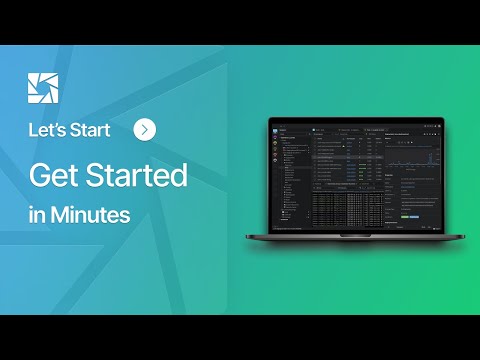
Lens is the Kubernetes IDE engineers keep open all day. It turns clusters into something you can see and work with directly, rather than something you interrogate one kubectl command at a time - and it does that across every cluster you run, whether that is Amazon EKS, another cloud, on-premises, or a cluster on your own machine.
Amazon EKS clusters are discovered automatically and connect with a single sign-in. There are no kubeconfigs to assemble by hand and no context switching to answer a simple question: one Lens, all your clusters, in the same window.
See what is actually happening. Real-time logs from a single pod or a whole deployment. Live metrics from metrics-server or Prometheus. A contextual event feed that updates without a refresh. Drill from a workload into the resources it depends on, including the custom resources your own applications define, and read the whole picture in one place.
The built-in terminal is cluster-aware and opens with kubectl already pointed at the right context, so the drop into a shell costs nothing. If you deploy with Flux or Argo CD, reconciliation is visible as it happens rather than after the fact.
Lens Ask AI brings Claude, GitHub Copilot, Gemini or Codex into the same window with live cluster context. Ask why a pod is restarting, have logs, events and metrics analysed together, or summarise a resource - in plain English, without switching tools or pasting cluster state somewhere else.
Lens runs on the engineer's own machine against standard kubeconfigs and enforces the RBAC you already have. There are no privileged agents to install in your clusters and no elevated access to grant. Each person sees exactly what their own credentials allow, which is what makes it straightforward to put in front of a whole engineering organization.
Around all of that, Enterprise gives you the administration an organization needs. Connect your identity provider over SAML or OIDC and give your organization its own login URL. Provision and deprovision through SCIM 2.0 with Okta, Microsoft Entra ID or any SCIM-capable directory, so joiners and leavers are handled by the directory rather than by hand. Verify the domains you own and have new engineers land in the right organization automatically. Assign seats, see which are in use, reclaim them when people move on, and choose which capabilities are turned on across the organization.
Purchases are billed through AWS Marketplace and appear on your AWS bill, with no separate vendor onboarding or payment terms to negotiate. Subscriptions are annual, and seat counts are managed on your AWS Marketplace subscription. Lens Desktop brings your Kubernetes resources to your fingertips, allowing you to drill down into every detail. Whether it's inspecting the status of your Pods and Deployments, or understanding custom resources added by your applications, Lens Desktop Pro provides an exhaustive and detailed perspective.
Got a plethora of Kubernetes clusters? No worries. Lens Desktop allows you to switch between different clusters with ease, effectively simplifying cluster context management. And, you can easily share your Kubernetes clusters with your team without compromising on security, thanks to built-in safe sharing features.
Through its intuitive graphical interface, Lens Desktop aids in effectively managing your applications, monitoring their status, and troubleshooting issues as they occur. The inherent complexity of Kubernetes fades away, replaced by a clear, organized, and interactive view of your Kubernetes environment.
Set sail on your Kubernetes journey with Lens Desktop today!
Highlights
- One Lens for all your clusters. Amazon EKS clusters are discovered automatically and connect with a single sign-in, alongside every other cluster you run - no kubeconfig juggling, no context switching, on macOS, Windows and Linux.
- Real-time logs, metrics and events, a cluster-aware terminal with kubectl already in context, and Lens Ask AI - Claude, Copilot, Gemini or Codex - troubleshooting against live cluster state in plain English.
- Safe to hand the whole organization. Standard kubeconfigs with your existing RBAC and no privileged cluster agents, plus SAML and OIDC single sign-on, SCIM provisioning and central seat control.
Details
Sold by
Categories
Delivery method
Deployed on AWS
New
Introducing multi-product solutions
You can now purchase comprehensive solutions tailored to use cases and industries.

Features and programs
Financing for AWS Marketplace purchases
AWS Marketplace now accepts line of credit payments through the PNC Vendor Finance program. This program is available to select AWS customers in the US, excluding NV, NC, ND, TN, & VT.

Pricing
Pricing is based on the duration and terms of your contract with the vendor. This entitles you to a specified quantity of use for the contract duration. If you choose not to renew or replace your contract before it ends, access to these entitlements will expire.
Additional AWS infrastructure costs may apply. Use the AWS Pricing Calculator to estimate your infrastructure costs.
Dimension | Description | Cost/12 months |
|---|---|---|
Lens Desktop Enterprise Licenses | Qty of Lens Desktop Enterprise Licenses | $600.00 |
Dimensions summary
This listing has one pricing dimension: Lens Desktop Enterprise Licenses, billed per user. You buy a quantity of user licenses, so your cost scales with the number of people who need access. Pick the user count that matches your team size. There are no separate tiers or instance sizes to choose from. Pricing is based on a contract commitment for the licenses you select. Each license gives a user access to the desktop application for working with Kubernetes clusters.
Top-of-mind questions for buyers
One license covers one named user who needs access to the desktop application. You buy a quantity of licenses matching the number of people on your team. Each person using the tool to work with Kubernetes clusters requires their own license.
Each license gives a user the desktop application to connect to and manage Kubernetes clusters. Users can automatically discover and connect clusters across accounts, view logs, port forward, create teams with role-based access controls, scan for vulnerabilities, and install extensions.
Cost scales with the number of user licenses you buy. Adding more people means adding more licenses. The quantity you commit to under your contract sets your cost, so plan the user count to match your expected team size.
docs.lenshq.io
Helpful?
Vendor refund policy
Refunds are available for subscriptions canceled within 48 hours. Refunds for metering errors or downgrades are reviewed case-by-case. Submit refund requests with AWS account ID, invoice, and product details to support@k8slens.dev . Approved refunds appear in 24-48 hours but may take up to 5 business days to reflect. Refunds comply with AWS Marketplace and KYC requirements.

Legal
Vendor terms and conditions
Upon subscribing to this product, you must acknowledge and agree to the terms and conditions outlined in the vendor's End User License Agreement (EULA) .
Content disclaimer
Vendors are responsible for their product descriptions and other product content. AWS does not warrant that vendors' product descriptions or other product content are accurate, complete, reliable, current, or error-free.
Delivery details
Software as a Service (SaaS)
SaaS delivers cloud-based software applications directly to customers over the internet. You can access these applications through a subscription model. You will pay recurring monthly usage fees through your AWS bill, while AWS handles deployment and infrastructure management, ensuring scalability, reliability, and seamless integration with other AWS services.
Resources
Vendor resources
Support
Vendor support
24 x 5 Priority Enterprise Support
How to reach us
- Email: support@k8slens.dev
- Support portal (submit and track tickets): https://support.k8slens.dev/
- Sales and account questions: https://k8slens.dev/contact
What's included
- Help with installing, configuring and using Lens
- Help with Lens ID and organization management, including seats, members and single sign-on
- Bug reports and troubleshooting, escalated to the Lens engineering team when needed
- Priority handling of tickets over non-Enterprise customers
When you contact support, include the AWS account ID you bought Lens with and your Lens organization name so we can find your subscription quickly.
AWS infrastructure support
AWS Support is a one-on-one, fast-response support channel that is staffed 24x7x365 with experienced and technical support engineers. The service helps customers of all sizes and technical abilities to successfully utilize the products and features provided by Amazon Web Services.
Similar products
Aware Lens is an ADA Title II and WCAG 2.1 AA compliant public meeting video platform for local governments, school boards, and public agencies. It adds civic-tuned captions, real-time live captioning, audio description, searchable transcripts, AI meeting summaries, and 8-language translation to every meeting, with most agencies live on an accessible resident portal within 1-3 business days.

Ubuntu 22 Remote Desktop with high-end NICE DCV streaming experience - includes 3D MESA support

High-End Remote Desktop for Windows with NICE DCV QUIC/UDP Support and NVIDIA GRID Performance Drivers on G4 and G3 graphics-intensive instances (3D Post-Processing, Media & Entertainment, Gaming). Optimized NICE DCV configurations are covered by the charges.

Ubuntu 24 Remote Desktop with high-end NICE DCV streaming experience - includes 3D MESA support

Ubuntu 20 Remote Desktop with high-end NICE DCV streaming experience - includes 3D MESA support
Customer reviews
No customer reviews yet
Be the first to review this product . We've partnered with PeerSpot to gather customer feedback. You can share your experience by writing or recording a review, or scheduling a call with a PeerSpot analyst.