
Sold by: HabileLabs
Deployed on AWS
Free Trial
Quick Launch
AWS Free Tier
CoSell by HabileLabs is co-sell automation software for AWS Partners. It connects your CRM to AWS Partner Central (ACE, APN Customer Engagements): deals that reach your gate stage become ACE opportunities, checked against AWS's rules before they are submitted, and AWS's review, sellers, stages, referrals and leads come back to the CRM, with no re-keying. It works with Salesforce, HubSpot, Microsoft Dynamics 365, Zoho CRM and LeadSquared, or CoSell's built-in CRM. Run it hosted by HabileLabs or in your own AWS account, from USD 10 a month.
Overview
Image
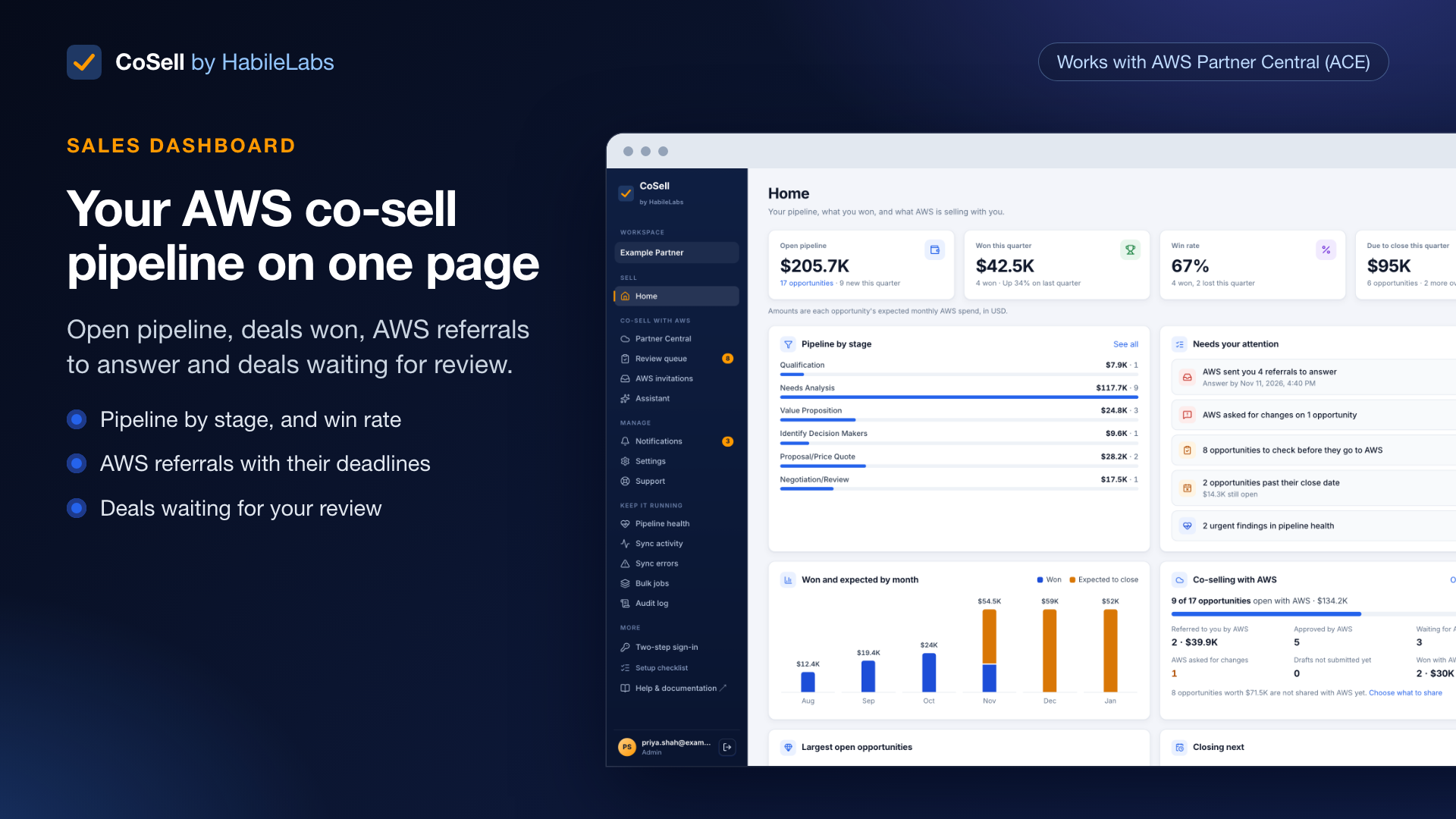
Sales dashboard for your AWS co-sell pipeline
Image
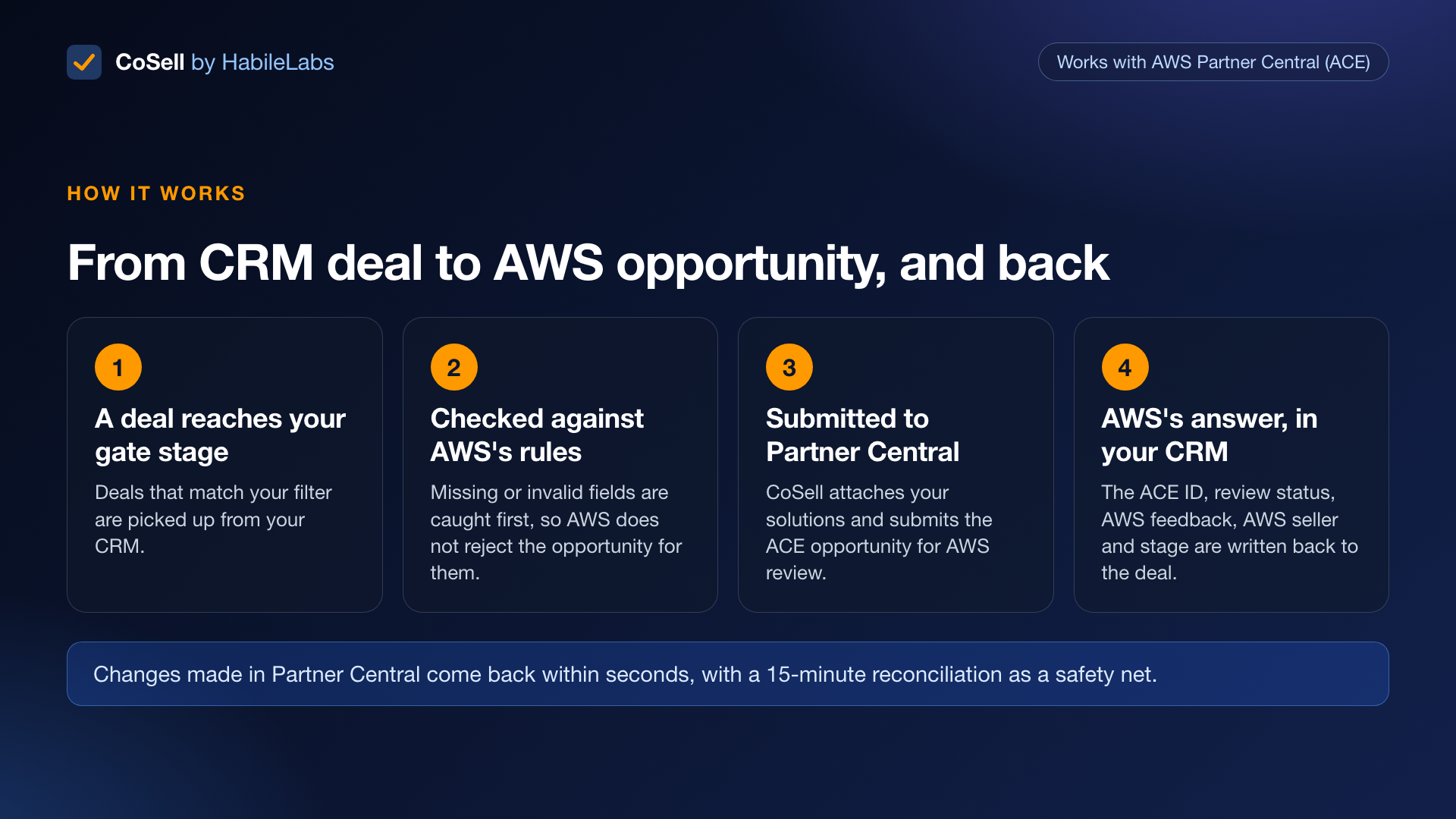
How CoSell works: CRM deal to ACE opportunity
Image
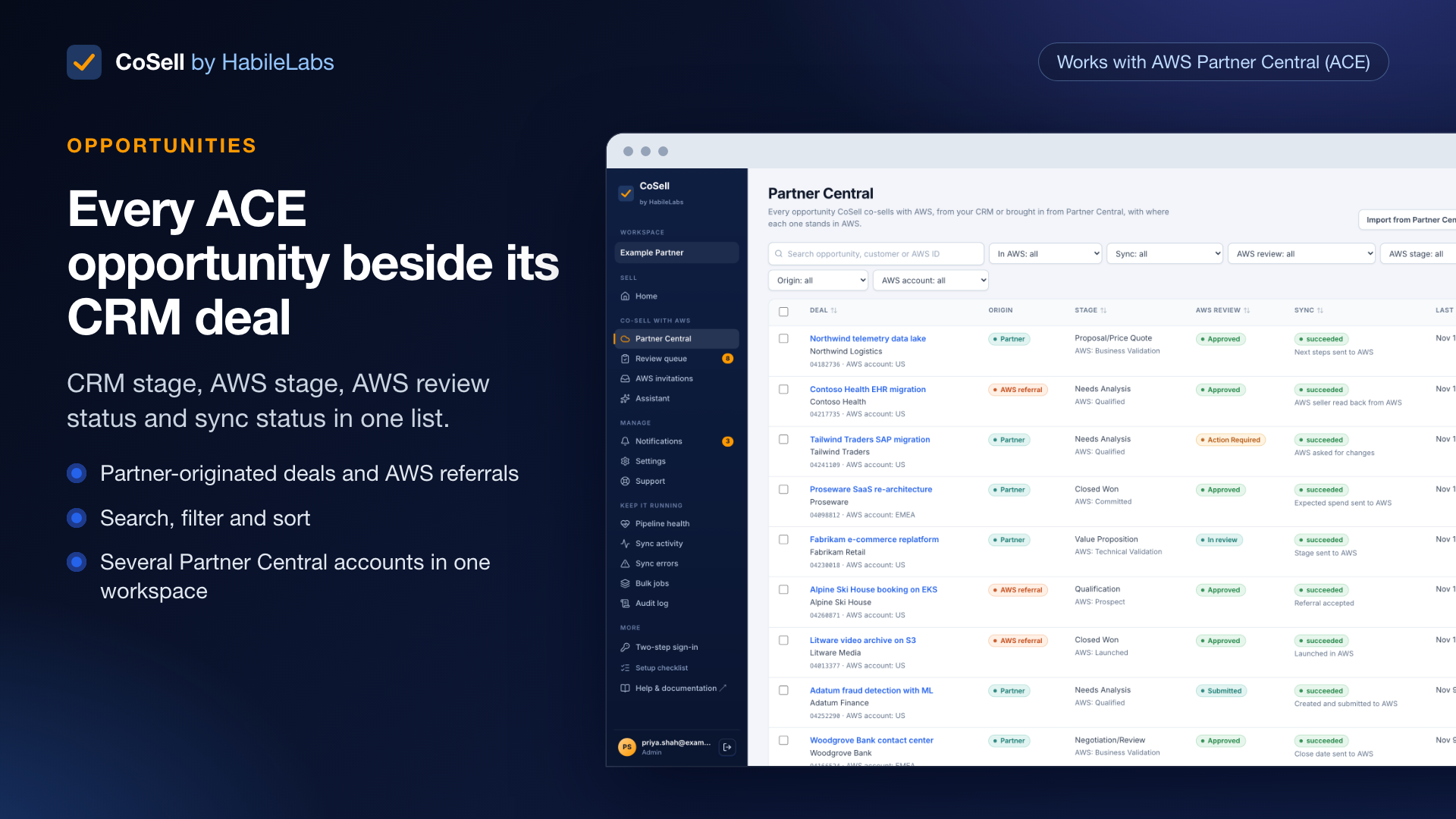
AWS Partner Central opportunities in your CRM
Image
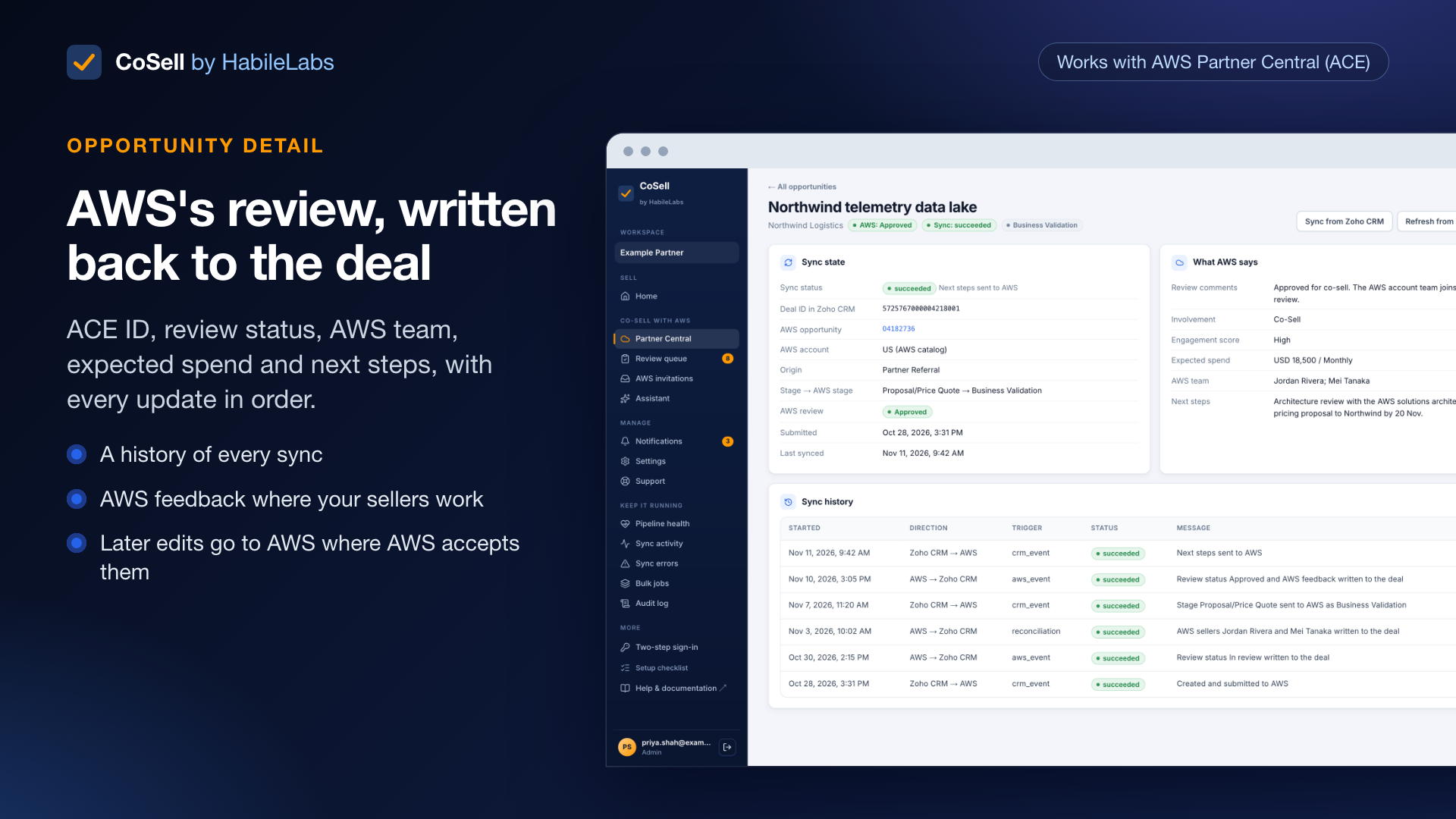
Opportunity detail: ACE ID, AWS review, history
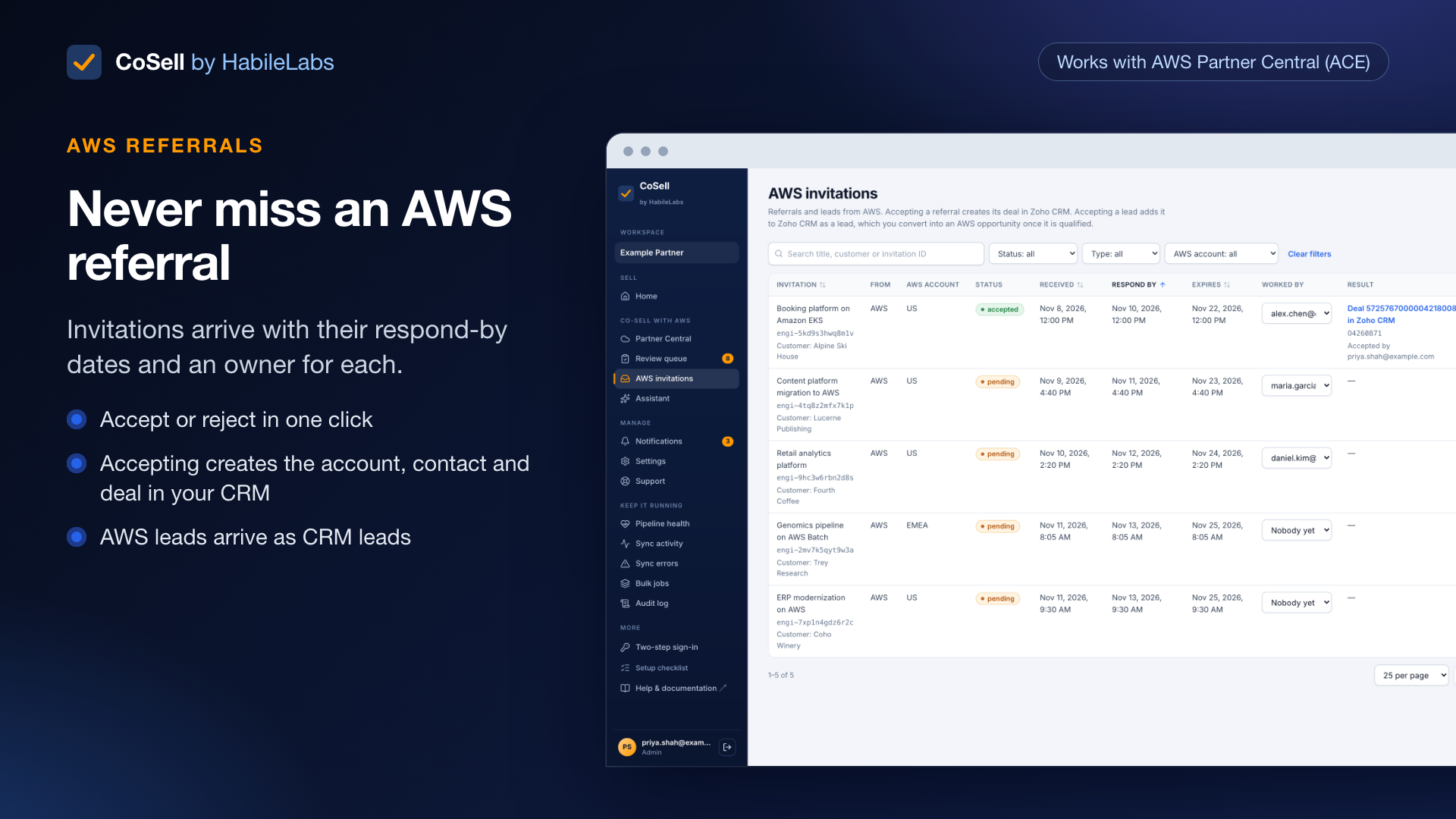
Image
AWS referrals with response deadlines
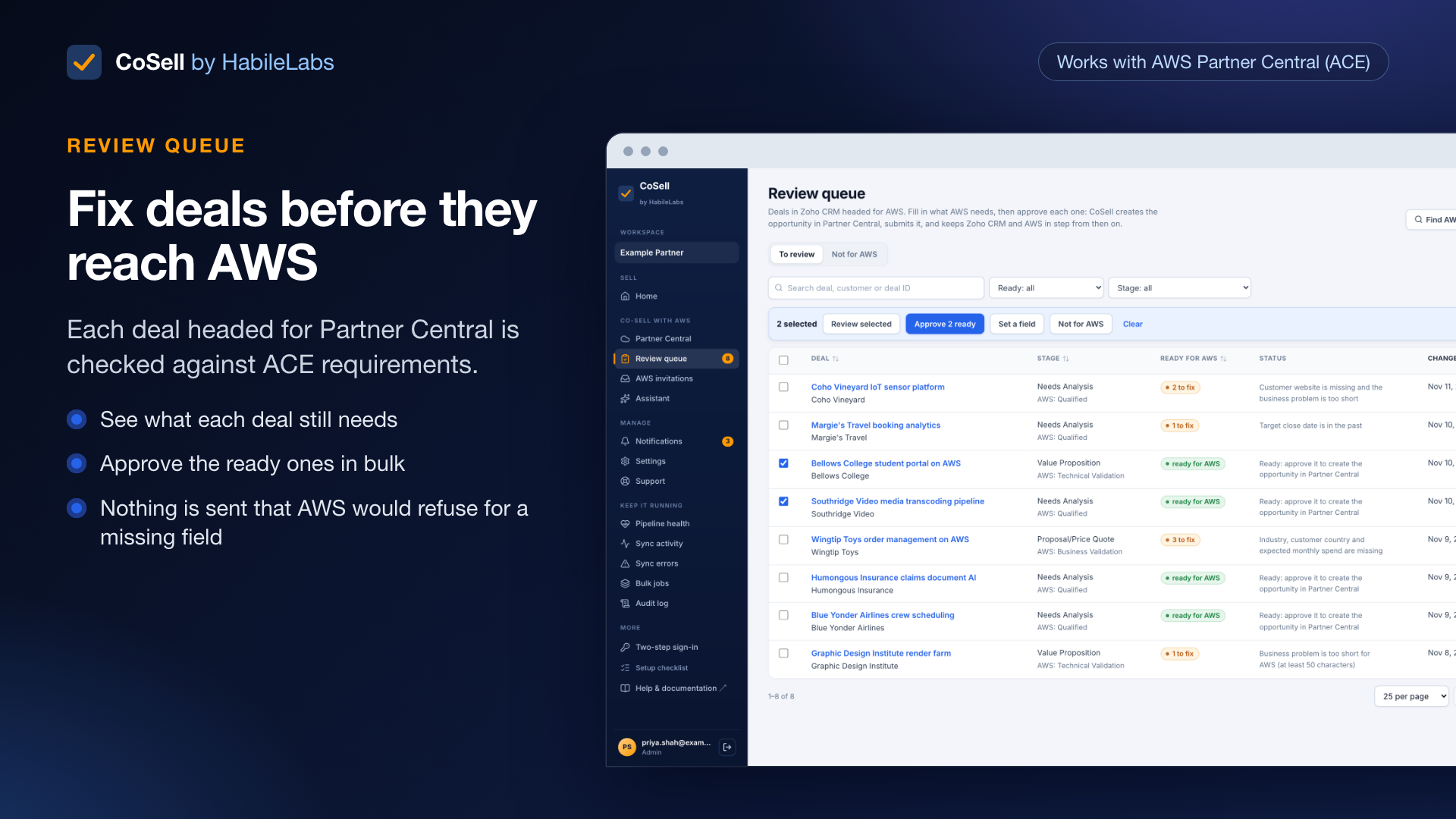
Image
Review queue: fix deals before they reach AWS
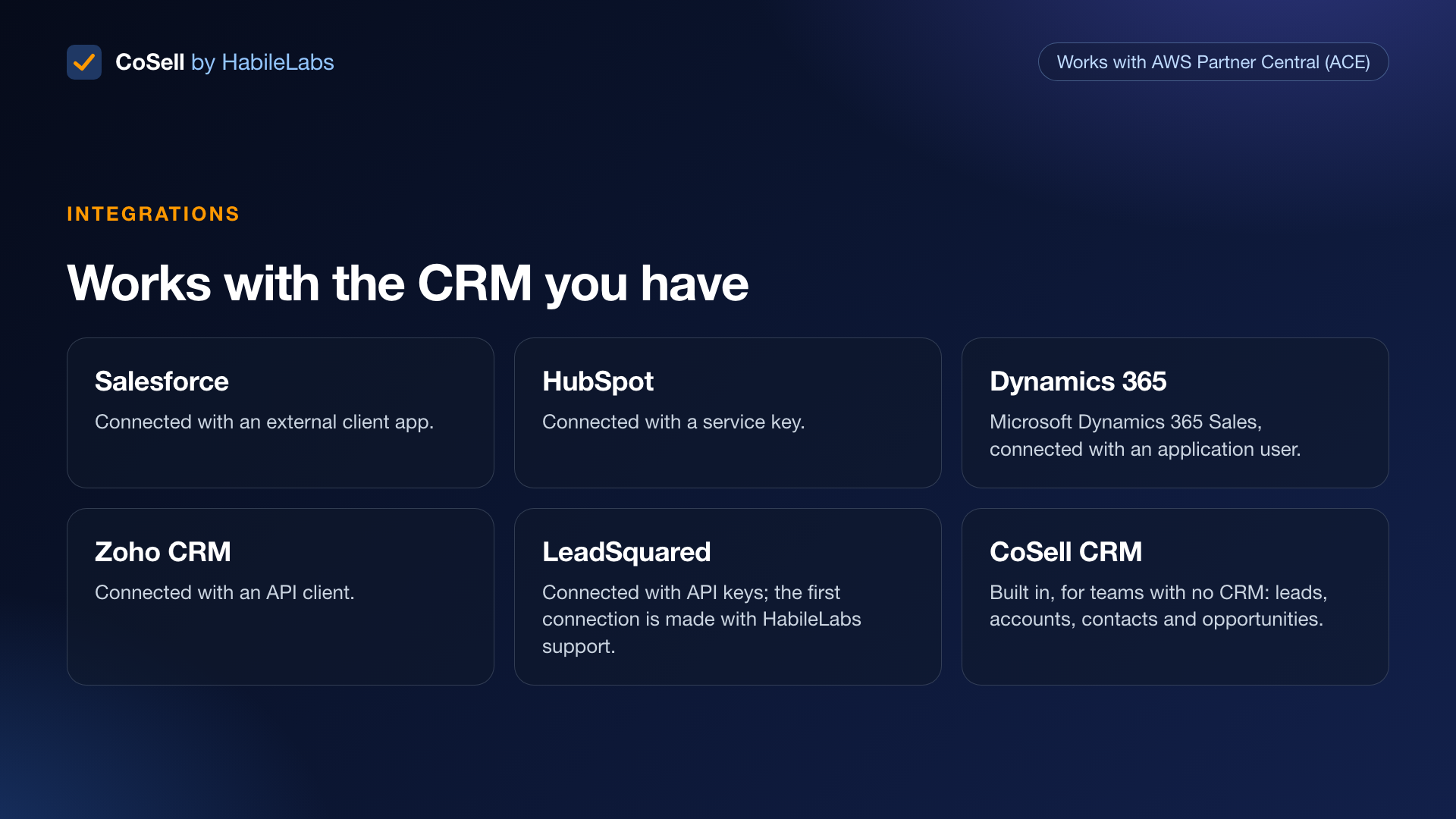
Image
Works with Salesforce, HubSpot, Dynamics and more
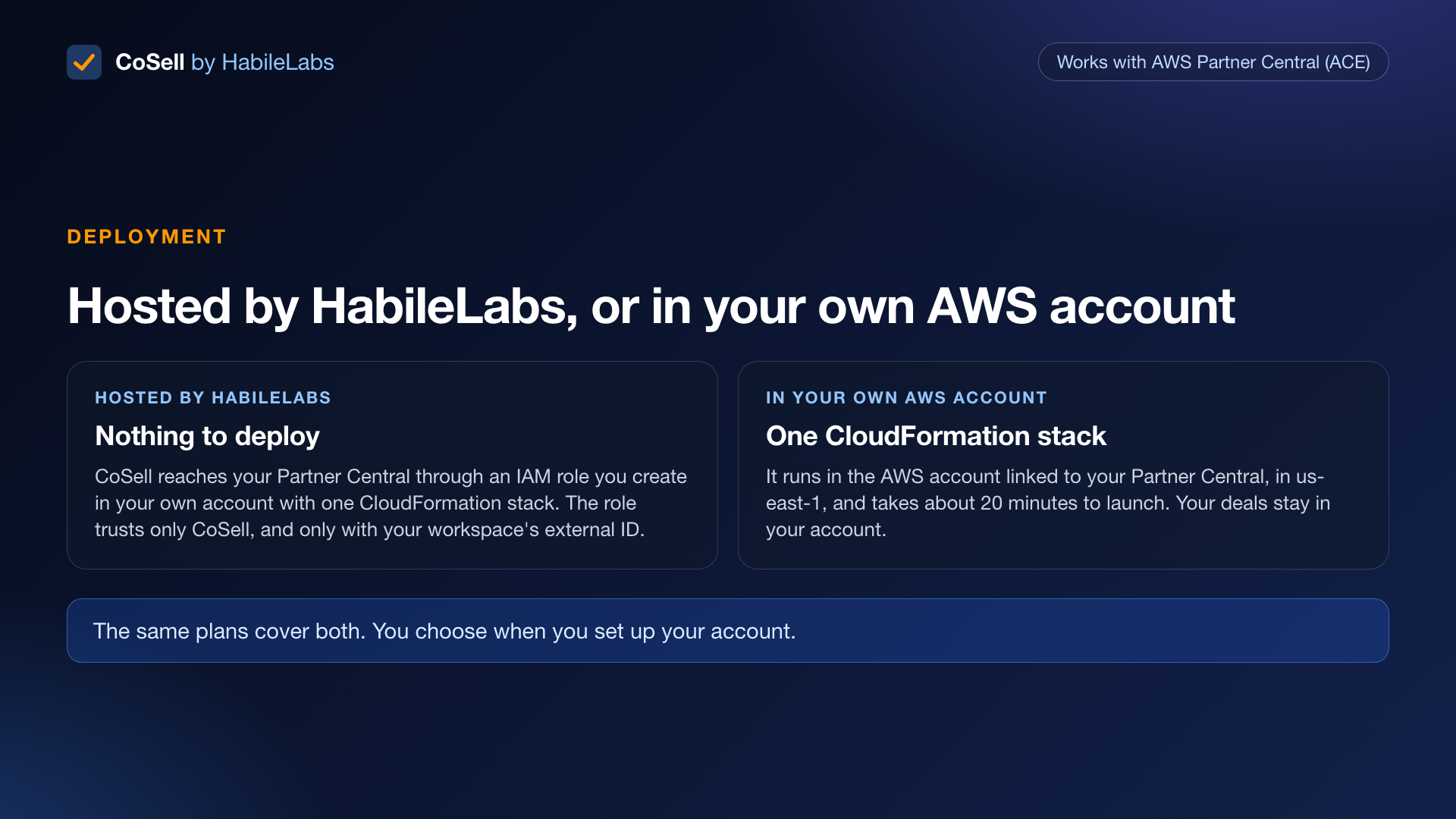
Image
Run CoSell hosted or in your own AWS account
Image
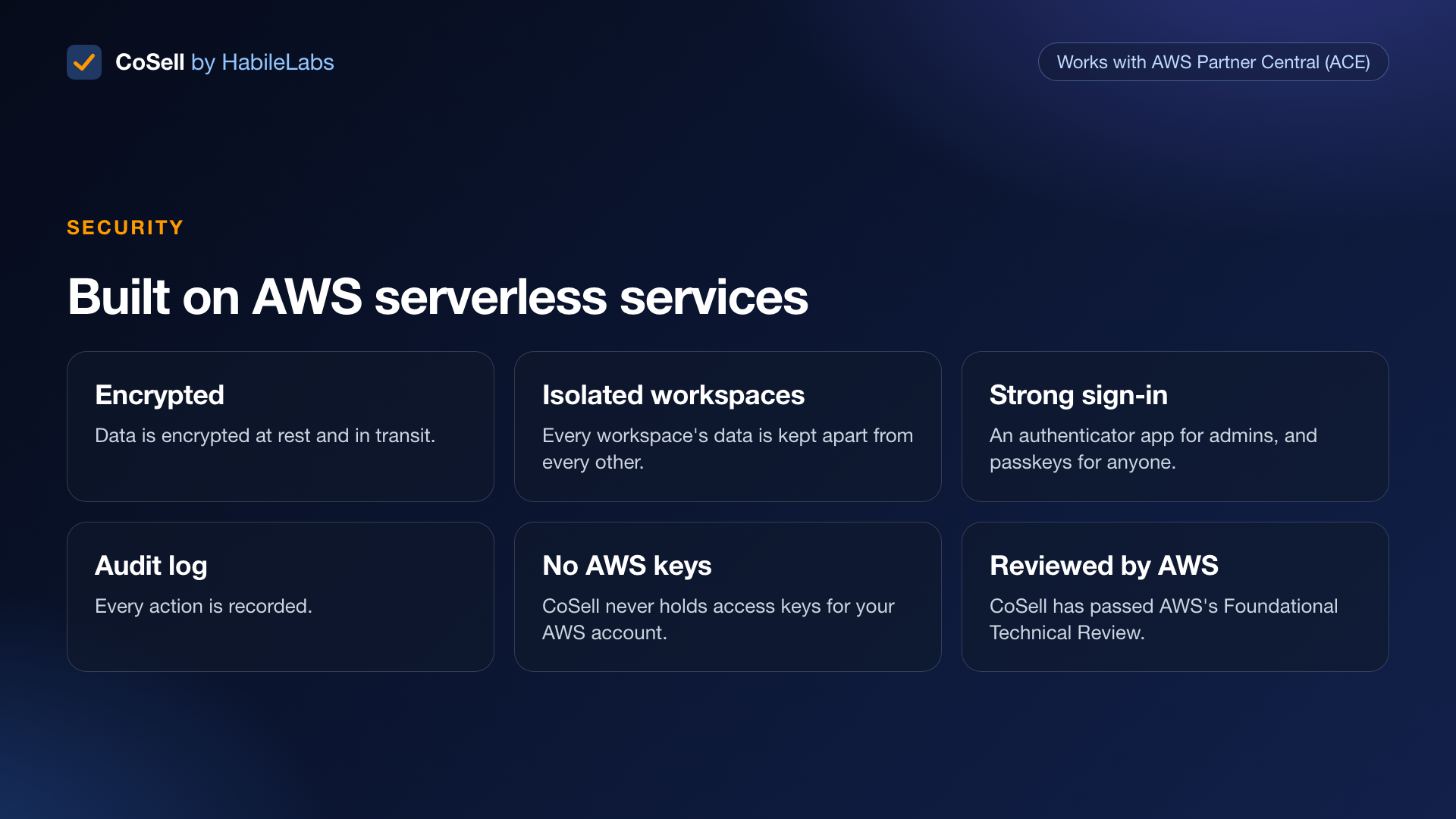
Security: encrypted, isolated and audited
Image
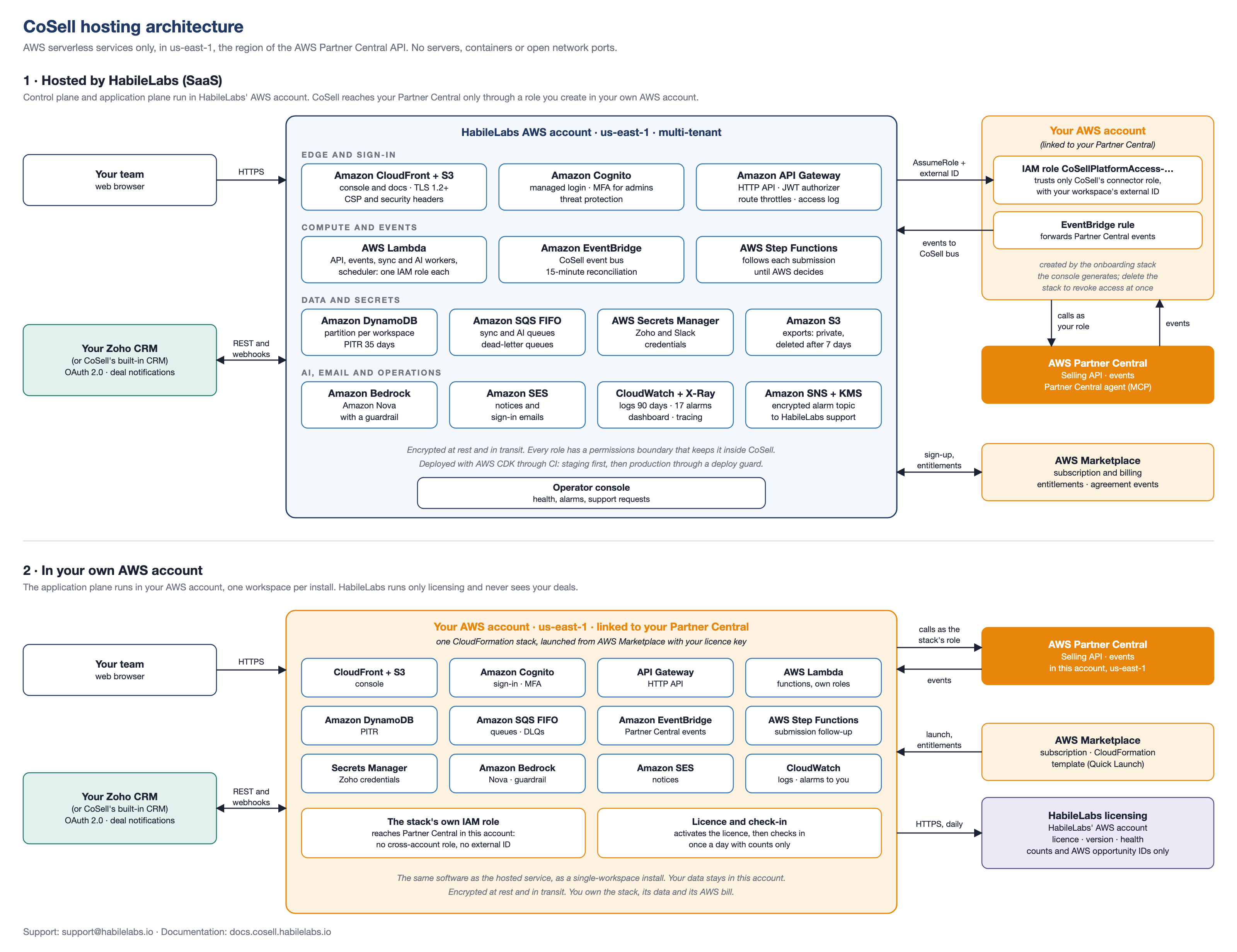
Hosted by HabileLabs or in your own AWS account

Video
CoSell overview: co-sell with AWS from your CRM
CoSell by HabileLabs is co-sell automation software for AWS Partners. It connects your CRM (Salesforce, HubSpot, Microsoft Dynamics 365 Sales, Zoho CRM or LeadSquared), or CoSell's built-in CRM, to AWS Partner Central (APN Customer Engagements, ACE), so your sellers co-sell with AWS from the CRM they already use.
Who it is for AWS Partners (ISVs, consulting partners, resellers and MSPs) whose alliance and sales teams enter each deal twice, in the CRM and in Partner Central, or miss AWS referral deadlines.
How it works
- Deals that match your filter and reach your gate stage are picked up from your CRM.
- CoSell checks each one against AWS's rules, so it is not rejected for a missing field.
- CoSell attaches your solutions, submits the ACE opportunity for AWS review, and writes the ACE ID, review status, AWS feedback, AWS seller and stage back to the deal.
- Later edits go to AWS wherever AWS accepts them. Changes made in Partner Central come back within seconds, with a 15-minute reconciliation as a safety net.
AWS referrals and leads Referrals arrive with their response deadline. Accepting one in CoSell accepts it in Partner Central and creates the account, contact and deal in your CRM. AWS leads arrive as CRM leads you can convert.
Your CRM Each workspace connects one CRM, set up by its admin: an external client app in Salesforce, a service key in HubSpot, an application user in Dynamics 365, an API client in Zoho CRM, or API keys in LeadSquared, whose first connection is made with HabileLabs support. No CRM yet? CoSell includes one, with leads, accounts, contacts and opportunities.
Also included A sales dashboard, a review queue, roles for sales reps and managers, several Partner Central accounts per workspace with routing rules, import of your open opportunities or the last 12 months from Partner Central, Ask Partner Central (AWS's Partner Central agent, with every change approved by a person), an opportunity quality coach, bulk operations, private offer drafts, sync history and an error inbox with retry.
Two ways to run it
- Hosted by HabileLabs. Nothing to deploy: CoSell reaches your Partner Central through an IAM role you create in your own account with one CloudFormation stack. The role trusts only CoSell, and only with your workspace's external ID.
- In your own AWS account. One CloudFormation stack in the AWS account linked to your Partner Central, in us-east-1. Your deals stay in your account. It checks in with HabileLabs once a day for licensing, sending counts only. The same plans cover both.
Getting started
- Subscribe, choose a plan and a 1- or 12-month contract, then choose Set up your account.
- Enter your company name and a work email, and choose Hosted by HabileLabs or In my AWS account. That person becomes the workspace admin.
- Hosted: sign in with the temporary password, set up an authenticator app, and follow the checklist: deploy the access role, choose your CRM and map your stages.
- In your own AWS account: launch the CoSell stack from the link the portal shows (about 20 minutes), then sign in, choose your CRM and map your stages.
Security CoSell runs on AWS serverless services only and has completed an AWS Foundational Technical Review. Data is encrypted at rest and in transit, every workspace is isolated, admins sign in with an authenticator app, anyone can add a passkey, and every action is recorded in an audit log. CoSell never holds AWS keys for your account.
Plans and pricing Starter: 1 Partner Central account and 5 users. Growth: 3 accounts and 25 users. Enterprise: 10 accounts and unlimited users. Each plan is a subscription for one workspace, at the prices on the Pricing tab, whichever way you run it. In your own AWS account, AWS also bills you directly for the resources the stack uses: about USD 12.50 to 14 a month at list prices, depending on volume. AWS Partners that run their co-selling through CoSell can have the first year in their own AWS account free, as a private offer: email support@habilelabs.io .
Common questions Do I need Salesforce? No. CoSell works with five CRMs and includes its own. Does CoSell replace Partner Central? No. It works through the Partner Central API, so Partner Central stays your system of record with AWS. Is anything sent to AWS without a check? No. Each opportunity is checked first, and you can require a person's approval in the review queue. Where does my data live? In us-east-1: in HabileLabs' AWS account when hosted, or in your own.
Website: https://cosell.habilelabs.io Documentation: https://docs.cosell.habilelabs.io Support: support@habilelabs.io
Highlights
- Co-sell from Salesforce, HubSpot, Dynamics 365, Zoho CRM or LeadSquared: deals past your gate stage become ACE opportunities checked against AWS's rules, with the ACE ID, AWS's review, feedback and seller written back to the deal.
- Never miss an AWS referral: invitations and leads arrive with their response deadline, and accepting a referral creates the account, contact and deal in your CRM. No CRM yet? CoSell includes one.
- Hosted by HabileLabs or in your own AWS account with one CloudFormation stack. AWS serverless only, encrypted, isolated workspaces, MFA, passkeys, an audit log, and an AWS Foundational Technical Review completed.
Details
Features and programs
Financing for AWS Marketplace purchases
AWS Marketplace now accepts line of credit payments through the PNC Vendor Finance program. This program is available to select AWS customers in the US, excluding NV, NC, ND, TN, & VT.

Quick Launch
Leverage AWS CloudFormation templates to reduce the time and resources required to configure, deploy, and launch your software.
Pricing
Free trial
Try this product free according to the free trial terms set by the vendor.
Pricing is based on the duration and terms of your contract with the vendor. This entitles you to a specified quantity of use for the contract duration. If you choose not to renew or replace your contract before it ends, access to these entitlements will expire.
Additional AWS infrastructure costs may apply. Use the AWS Pricing Calculator to estimate your infrastructure costs.
Dimension | Description | Cost/month |
|---|---|---|
Starter | 1 AWS Partner Central account and up to 5 users | $10.00 |
Growth | Up to 3 AWS Partner Central accounts and 25 users | $25.00 |
Enterprise | Up to 10 AWS Partner Central accounts and unlimited users | $60.00 |
Dimensions summary
You subscribe to one plan per workspace, with three tiers that scale by how many AWS Partner Central accounts and users you connect. Starter covers 1 Partner Central account and up to 5 users. Growth covers up to 3 accounts and 25 users. Enterprise covers up to 10 accounts and unlimited users. Each tier is a contract you buy on AWS Marketplace, billed monthly or for 12 months. Every tier includes the same features and CRM connections, so you pick based on account and user count, not capability.
Top-of-mind questions for buyers
A Partner Central account is one AWS Partner Central (ACE) account you link to your workspace. A user is a person with sign-in access to the CoSell console. Starter allows 1 account and 5 users, Growth up to 3 accounts and 25 users, Enterprise up to 10 accounts and unlimited users.
Each plan caps the number of Partner Central accounts and users per workspace. To go beyond those limits, you move to a plan that covers more. Growth and Enterprise raise both the account and user counts. The change is a new plan selection, not automatic overage charges.
No. The plan price is the same whether CoSell is hosted by HabileLabs or runs in your own AWS account. If you self-host, you also pay AWS directly for the serverless resources the CloudFormation stack uses in us-east-1. That AWS cost is separate from the plan.
cosell.habilelabs.io
Helpful?
Vendor refund policy
To request a refund, contact our support team within 7 days of the billing date with relevant details. Approved refunds will be processed through AWS Marketplace as per their policies.
Custom pricing options
Request a private offer to receive a custom quote.

Legal
Vendor terms and conditions
Upon subscribing to this product, you must acknowledge and agree to the terms and conditions outlined in the vendor's End User License Agreement (EULA) .
Content disclaimer
Vendors are responsible for their product descriptions and other product content. AWS does not warrant that vendors' product descriptions or other product content are accurate, complete, reliable, current, or error-free.
Delivery details
Software as a Service (SaaS)
SaaS delivers cloud-based software applications directly to customers over the internet. You can access these applications through a subscription model. You will pay recurring monthly usage fees through your AWS bill, while AWS handles deployment and infrastructure management, ensuring scalability, reliability, and seamless integration with other AWS services.
Additional details
Usage instructions
Set up CoSell: hosted, or in your own AWS account
Choose Set up your account first. On the HabileLabs Marketplace sign-up, enter your company and a work email, and choose how to run CoSell:
- Hosted by HabileLabs: there is nothing to launch here. CoSell creates your workspace and emails the admin a temporary password. The console's onboarding checklist then gives you the one small CloudFormation stack it needs in your account: an IAM role that lets CoSell reach your Partner Central.
- In my AWS account: follow the steps below.
Run CoSell in your own AWS account
CoSell runs entirely in your AWS account, in US East (N. Virginia), us-east-1. That is where AWS Partner Central's API and its events live. The stack is serverless and takes 15 to 20 minutes to create. Launching it needs the permissions in the IAM policy shown beside the template. The CoSell documentation covers what it creates and how to use it.
1. Before you start
- Use the AWS account linked to your Partner Central, in us-east-1, for the production install. CoSell links to Partner Central with the stack's own role, so it needs no access template and no external ID. Further AWS accounts can be linked later from the console.
- Amazon Bedrock: Amazon Nova 2 Lite must be available in us-east-1 (Bedrock console, Model access). The AI features use it.
- Notification email is optional. To send it, verify a sender address in Amazon SES and request SES production access. Until then CoSell offers Slack. Sign-in invitations always work, through Amazon Cognito's own email.
2. Get your licence key
After you choose In my AWS account, the HabileLabs Marketplace portal shows your licence key, which starts with COS-, and launch links for your production and non-production installs. If HabileLabs sent you a private offer for your own AWS account, accept it first: its sign-up offers only this choice.
3. Launch the stack in us-east-1
Use Quick Launch with the template below, or the portal's launch link. Fill in:
- LicenseKey: your COS- key.
- InstallSlot: production works with your live Partner Central pipeline. For a test install, choose nonprod (Partner Central Sandbox only) and use another stack name, for example cosell-nonprod. Both can run in the same account.
- CompanyName: your company. The CoSell workspace is named after it.
- AdminEmail: the first administrator, who is emailed an invitation when the stack is created.
- Optional DomainName, CertificateArn and HostedZoneId: your own hostname for the console (the API goes on api. + that name), an ACM certificate in us-east-1 that covers both names, and the Route 53 zone to create their records in. Leave them empty to use the CloudFront and API Gateway names.
- Optional SenderEmail: the verified SES address notification email comes from.
Acknowledge that the template creates IAM resources with custom names, then create the stack.
4. Sign in
Open ConsoleUrl from the stack's outputs and sign in with the temporary password in the invitation. Admins set up an authenticator app on first sign-in. Under Settings, the AWS accounts card shows that the stack's own Partner Central link is verified. Then connect your CRM (Salesforce, HubSpot, Dynamics 365, Zoho CRM or LeadSquared), or use CoSell's built-in CRM. The Install page shows the version, the licence and the last check-in with HabileLabs.
Upgrades and support
The install checks in with HabileLabs once a day. New versions appear in the portal and on the Install page. To upgrade, update the stack with the new template URL: your data, settings and links are kept. Support: support@habilelabs.io , or Support in the console. The full guide, with sizing, backups, upgrades, cost and removal: Running CoSell in your AWS account .
Resources
Support
Vendor support
CoSell is supported by HabileLabs, an AWS Partner.
Email support@habilelabs.io , or raise a request from Support in the CoSell console. Include your workspace name and, for a deal, the CRM deal ID or the ACE opportunity ID. Each request gets a reference and a first-response time set by your plan and its severity: https://docs.cosell.habilelabs.io/sla/
Website: https://cosell.habilelabs.io Documentation: https://docs.cosell.habilelabs.io Getting started: https://docs.cosell.habilelabs.io/getting-started/ In your own AWS account: https://docs.cosell.habilelabs.io/your-aws-account/ Support: https://docs.cosell.habilelabs.io/support/
Billing runs through AWS Marketplace and appears on your AWS invoice. Upgrade, renew or cancel from AWS Marketplace > Manage subscriptions; CoSell picks up the change within minutes. In your own AWS account, the Install page in the console shows your version and licence, and new versions are announced there and in the HabileLabs Marketplace portal.
For a private offer or a question before you buy, email support@habilelabs.io .
AWS infrastructure support
AWS Support is a one-on-one, fast-response support channel that is staffed 24x7x365 with experienced and technical support engineers. The service helps customers of all sizes and technical abilities to successfully utilize the products and features provided by Amazon Web Services.
Similar products

Vela is a co-sell and partner funding platform for alliance teams at B2B SaaS ISVs. It syncs co-sell opportunities bi-directionally between Salesforce or HubSpot and AWS Partner Central (ACE), tracks AWS partner funding such as MDF, POC, PIF and Sandbox credits with deadline alerts, and helps prepare funding claims. AI insights built on Amazon Bedrock flag at-risk co-sell deals and suggest next actions.

Co-pilot to accelerate your Cloud Marketplace and Co-sell revenue. Automate your Cloud Sales with no engineering effort and our deep Salesforce and Hubspot CRM integrations.

HabileLabs helps businesses reduce AWS costs, improve billing visibility, right-size cloud resources, and implement FinOps practices for stronger cloud spend governance and long-term savings on AWS.

HabileLabs helps businesses modernize legacy applications, databases, and infrastructure on AWS using cloud-native architecture, containers, serverless, DevOps automation, security, and performance optimization.
Customer reviews
No customer reviews yet
Be the first to review this product . We've partnered with PeerSpot to gather customer feedback. You can share your experience by writing or recording a review, or scheduling a call with a PeerSpot analyst.