
Sold by: Str8in LLC
Deployed on AWS
FlowForge is a self-hosted workflow automation platform that runs entirely in your own AWS account. Build automations visually by connecting triggers (webhooks, schedules, API calls and AI agents via MCP) to actions such as REST API calls, database queries, email, Slack, Microsoft Teams, SMS and Claude AI. Multi-tenant workspaces, role-based access and encrypted credentials make it suitable for teams, departments and service providers.
Overview
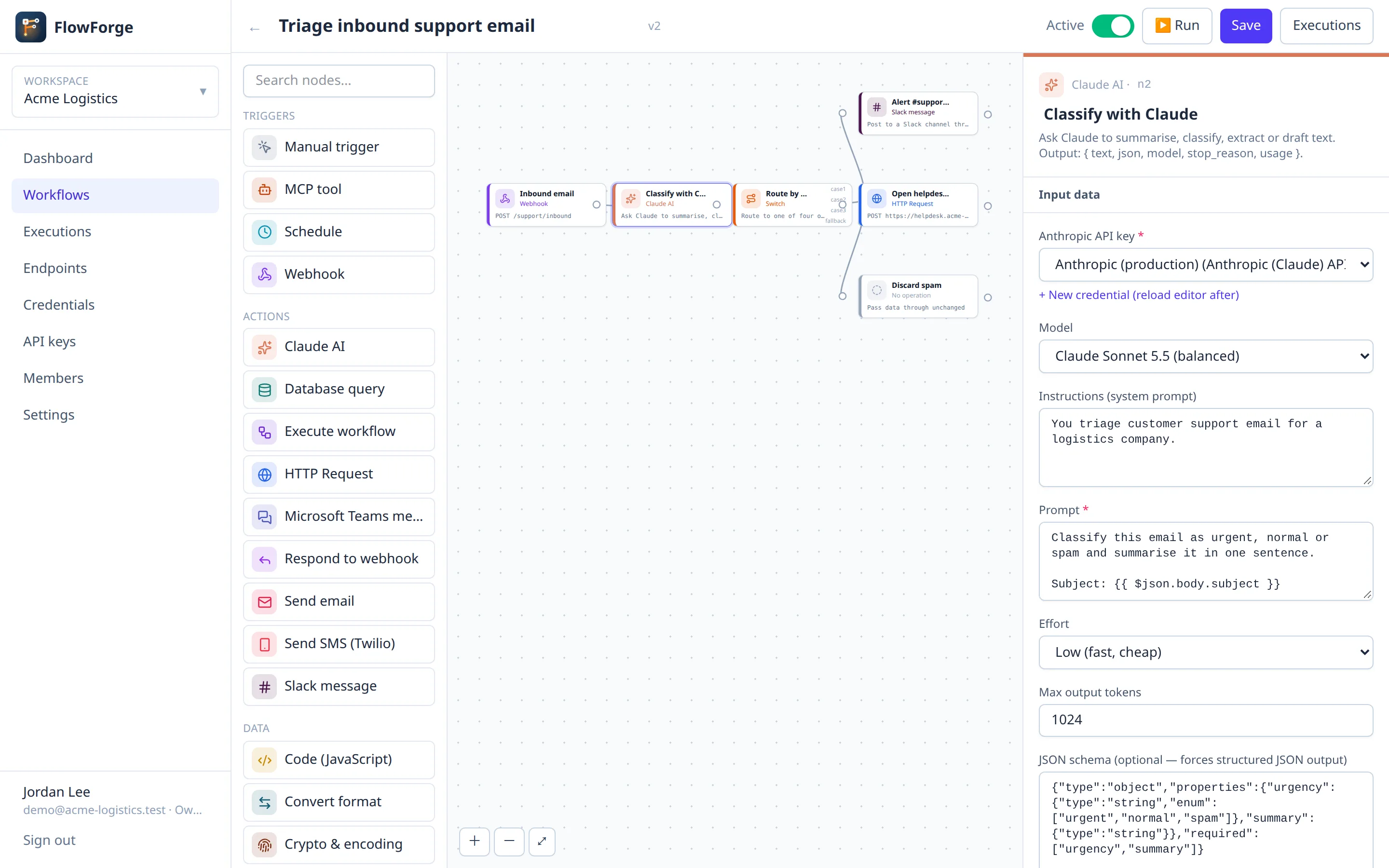
FlowForge lets you automate business processes and integrate systems without writing glue code, while keeping your data and credentials inside your own AWS account.
VISUAL WORKFLOW EDITOR Drag nodes onto a canvas, connect them, and configure each step in a form. See the real input and output of every step from the last run, and pick fields from previous steps instead of typing expressions.
TRIGGERS
- Webhooks: every workspace gets its own HTTPS endpoints, with optional header, basic-auth or API-key protection. Endpoints can reply immediately or with the workflow's result.
- Schedules: cron expressions with time-zone support.
- REST API: run workflows from your own applications.
- MCP server: publish workflows as tools that AI assistants such as Claude can discover and call.
ACTIONS AND DATA TOOLS HTTP requests to any REST API (bearer, header, basic, API-key and OAuth2 client-credentials authentication), MySQL and PostgreSQL queries, email (SMTP), Slack, Microsoft Teams, Twilio SMS, Claude AI (summarise, classify, extract, draft), sub-workflows, filter, IF and switch routing, loops over lists, date and time, text, CSV, XML and JSON conversion, hashing and HMAC signatures, a persistent key-value data store, and sandboxed JavaScript.
BUILT FOR TEAMS AND SERVICE PROVIDERS
- Multi-tenant: isolated workspaces, each with its own workflows, credentials, API keys, webhook URLs and usage limits.
- Roles: owner, admin, editor and viewer in each workspace, plus a platform administration view of all workspaces.
- Execution history with step-by-step input and output, retry and cancel.
SECURITY Credentials are encrypted at rest. API keys are stored only as hashes. Tenant JavaScript runs in an isolated V8 sandbox with no network or file access. Outbound calls to private networks are blocked by default. Setup is locked to the instance owner.
DEPLOYMENT Launch a single instance with a local MySQL 8.4 database, or use the CloudFormation template for Amazon RDS for MySQL and an Application Load Balancer with your ACM certificate. A browser-based setup wizard configures everything on first launch.
DATA COLLECTION During setup, FlowForge sends the company name, the administrator's name and email address, the installation URL and the instance's AWS identity document to Str8In LLC to register the installation. No workflow data, credentials or passwords are sent.
Highlights
- Visual workflow builder with webhooks, schedules, REST API and MCP triggers. Connect APIs, databases, email, Slack, Teams, SMS and Claude AI without writing integration code.
- Multi-tenant by design: isolated workspaces with their own users, roles, credentials, API keys, webhook endpoints and usage limits, plus a platform view for administrators.
- Runs in your AWS account: encrypted credentials, sandboxed custom code, private-network protection, and one-click deployment with local MySQL or Amazon RDS behind an Application Load Balancer.
Details
Sold by
Delivery method
Delivery option
64-bit (x86) Amazon Machine Image (AMI)
Latest version
Operating system
AmazonLinux version 2023
Deployed on AWS
Features and programs
Financing for AWS Marketplace purchases
AWS Marketplace now accepts line of credit payments through the PNC Vendor Finance program. This program is available to select AWS customers in the US, excluding NV, NC, ND, TN, & VT.

Pricing
Pricing is based on actual usage, with charges varying according to how much you consume. Subscriptions have no end date and may be canceled any time.
Additional AWS infrastructure costs may apply. Use the AWS Pricing Calculator to estimate your infrastructure costs.
Dimension | Cost/hour |
|---|---|
t3.medium Recommended | $0.25 |
m7i.2xlarge | $1.00 |
m7i.xlarge | $1.00 |
m7i.large | $1.00 |
m6i.2xlarge | $0.65 |
m6i.xlarge | $0.65 |
t3a.xlarge | $0.40 |
t3a.medium | $0.40 |
t3.xlarge | $0.25 |
t3.large | $0.25 |
Dimensions summary
You pay by the hour for the EC2 instance that runs this self-hosted workflow automation platform in your own AWS account. The ten options are instance sizes, not feature tiers, so every option delivers the same platform. Pricing scales with compute capacity. The t3 and t3a options offer burstable general-purpose instances in medium, large, and xlarge sizes. The m6i and m7i options offer steady general-purpose instances in large, xlarge, and 2xlarge sizes. Choose a smaller instance for lighter workloads or a larger one for heavier processing. Your hourly cost rises as instance size increases.
Top-of-mind questions for buyers
Each label is an AWS EC2 instance type with a set amount of CPU and memory. You pay per hour the chosen instance runs. Larger sizes (xlarge, 2xlarge) carry more compute than medium or large sizes, so your hourly rate rises with the size you pick.
The hourly software charge applies while the instance runs. If you stop the instance, software metering stops. Underlying AWS storage for your platform data may still accrue separately through AWS, but the platform's hourly charge meters running time only.
The t3 and t3a options are burstable. They run steadily at a baseline and draw credits for short bursts above it. The m6i and m7i options run at a steady level without burst credits, which suits continuous processing. Both bill per hour at rates set by size.
str8in.com
Helpful?
Vendor refund policy
Hourly usage charges are non-refundable. Annual subscriptions may be cancelled for a full refund within 30 days of purchase if FlowForge does not work as described. To request a refund, contact [support@str8in.com ] with your AWS account ID and the reason.

Legal
Vendor terms and conditions
Upon subscribing to this product, you must acknowledge and agree to the terms and conditions outlined in the vendor's End User License Agreement (EULA) .
Content disclaimer
Vendors are responsible for their product descriptions and other product content. AWS does not warrant that vendors' product descriptions or other product content are accurate, complete, reliable, current, or error-free.
Delivery details
64-bit (x86) Amazon Machine Image (AMI)
Amazon Machine Image (AMI)
An AMI is a virtual image that provides the information required to launch an instance. Amazon EC2 (Elastic Compute Cloud) instances are virtual servers on which you can run your applications and workloads, offering varying combinations of CPU, memory, storage, and networking resources. You can launch as many instances from as many different AMIs as you need.
Version release notes
FlowForge 1.1.2
New: Local agents
- Run a small agent on Windows, macOS or Linux computers to connect local folders to FlowForge. New files in a watched folder start a workflow, and workflows can save files back to the computer.
- Manage agents under Agents (tenant admins). Each agent has its own token and only makes outgoing HTTPS connections, so no firewall changes are needed.
- New nodes: "Local agent folder" trigger and "Send file to local agent".
- Agent downloads, release notes and checksums: https://releases.str8in.com/flowforge
New: Error workflows
- Start a workflow automatically when another one fails, with the error, the failed step and a link to the failed run.
- Choose it per workflow under "On failure, run", or set a tenant-wide default in Settings.
New: AI chat node
- Summarise, classify, extract or draft text with any OpenAI-compatible model (OpenAI, Azure OpenAI, Mistral, Groq, OpenRouter, Ollama and more).
- Platform admins can let workflows use the platform AI server ("Let workflows use this server" under Platform admin > AI assistant).
- The AI workflow assistant now knows your tenant's agents.
Changes
- Releases and updates now come from https://releases.str8in.com/flowforge . Servers that set FLOWFORGE_UPDATE_URL themselves must update it.
- This update includes a database migration. It is applied automatically and backed up first.
Additional details
Usage instructions
- Launch the instance (t3.medium or larger). Allow inbound TCP 443 and 80 from the users who will reach FlowForge, and optionally TCP 22 from your IP for SSH. AWS Systems Manager Session Manager also works without SSH.
- Wait about 2 minutes for first-boot configuration to finish. It creates a local MySQL database, a self-signed HTTPS certificate and a one-time setup token.
- Open https://YOUR-INSTANCE-PUBLIC-DNS/ in a browser and accept the self-signed certificate warning.
- The setup wizard opens. To prove you own the instance, enter its instance ID (it starts with i- and is shown in the EC2 console), or the token from: sudo cat /var/www/automation/web/storage/app/setup-token
- Follow the wizard. The database step is pre-filled; leave the password empty to use the generated one. Enter your public URL and email settings, then create your company workspace and administrator account. When it finishes, sign in.
- For production, use a domain name with a trusted certificate. Either deploy with the CloudFormation template (Application Load Balancer with an ACM certificate), or replace /etc/pki/flowforge/server.crt and server.key with your own and restart Apache. First-boot log: /var/log/flowforge-firstboot.log
Support
Vendor support
Support is provided by Str8In LLC by email at [support@str8in.com ] and at [https://flowforge.str8in.com/ ]. We respond within one business day. Setup and usage documentation: [https://flowforge.str8in.com/#support ].
AWS infrastructure support
AWS Support is a one-on-one, fast-response support channel that is staffed 24x7x365 with experienced and technical support engineers. The service helps customers of all sizes and technical abilities to successfully utilize the products and features provided by Amazon Web Services.
Similar products

Code Creator FlowForge delivers a preconfigured n8n automation server on AWS with PostgreSQL and Docker, ready to launch workflows in minutes via a visual editor.

n8n is a flexible low-code automation & AI platform for technical users. It simplifies connecting systems and implementing AI in workflows. Available for cloud or self-hosting.

Self-hosted n8n workflow automation server, pre-configured with PostgreSQL and a reverse proxy. Launch and start building automations in minutes no manual setup required.

This is a repackaged open source software product wherein additional charges apply for a pre-hardened AMI with automated startup and pre-configured deployment. Self-hosted workflow automation with 400+ integrations,
Customer reviews
No customer reviews yet
Be the first to review this product . We've partnered with PeerSpot to gather customer feedback. You can share your experience by writing or recording a review, or scheduling a call with a PeerSpot analyst.