Sold by: Syed Solutions
Deployed on AWS
AWS Free Tier
Pre-hardened Amazon Linux 2023 bastion AMI that eliminates public SSH exposure and deploys in minutes with no manual hardening required.
Overview
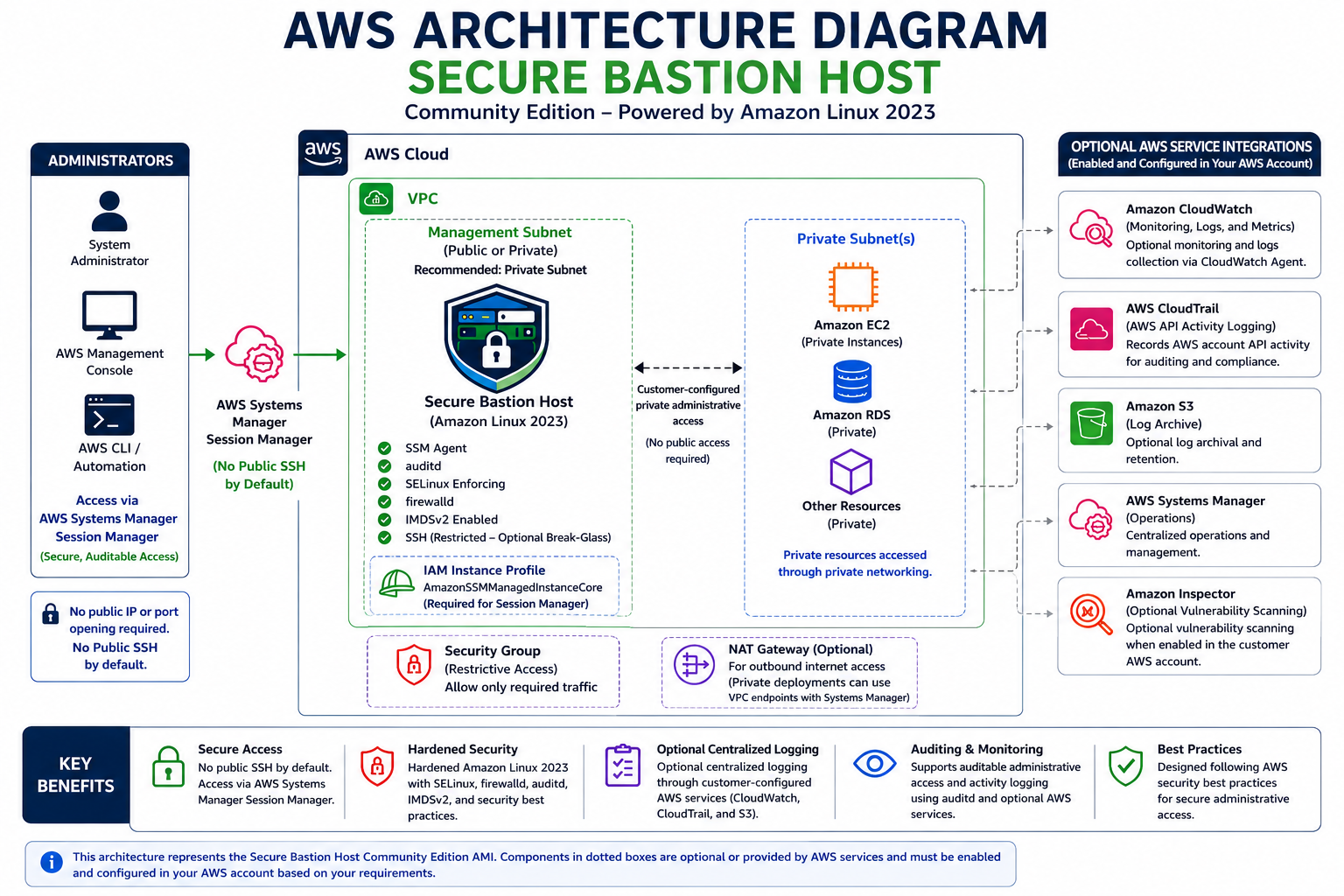
Image
Secure Bastion Host AWS Reference Architecture
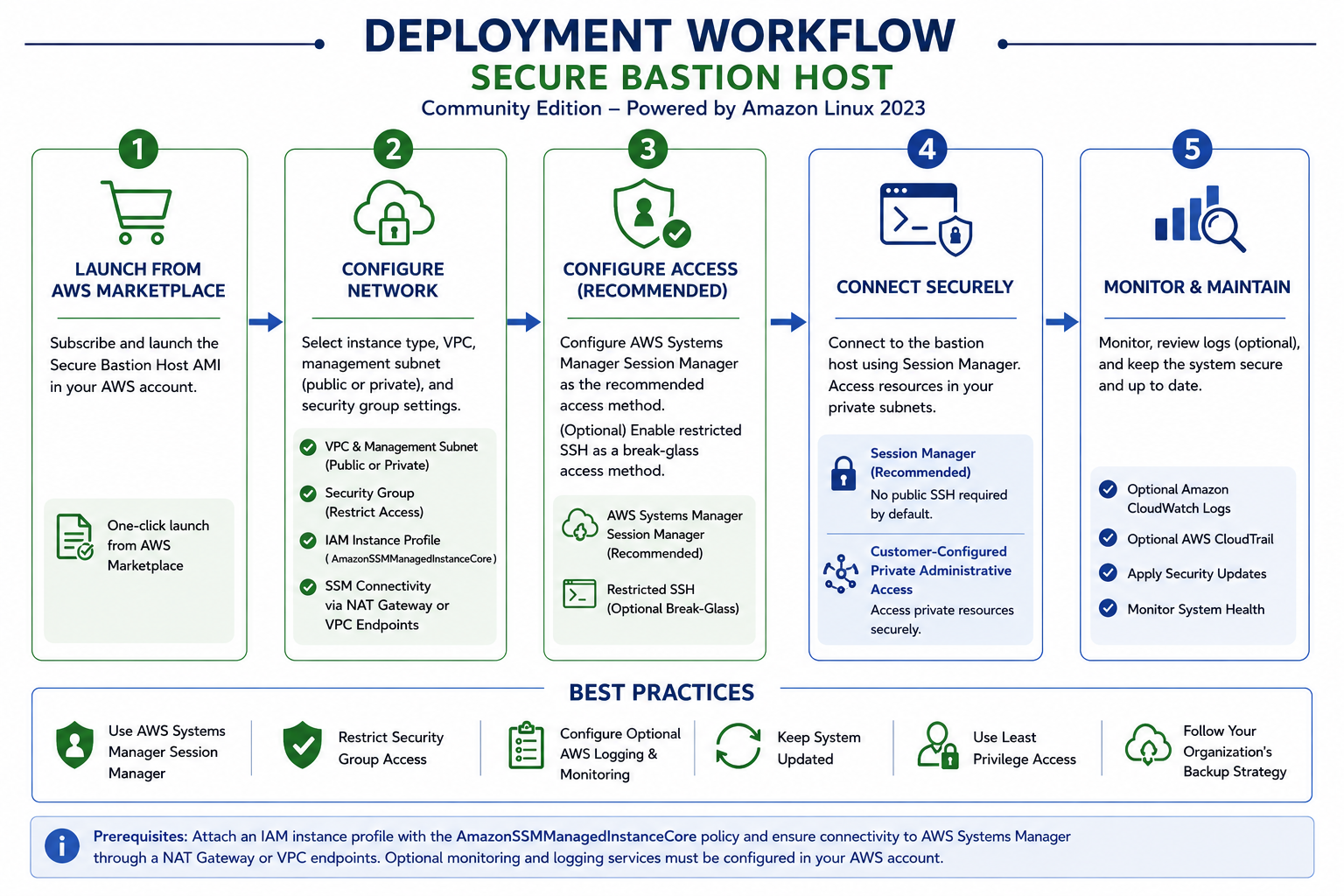
Image
Secure Bastion Host Deployment Workflow
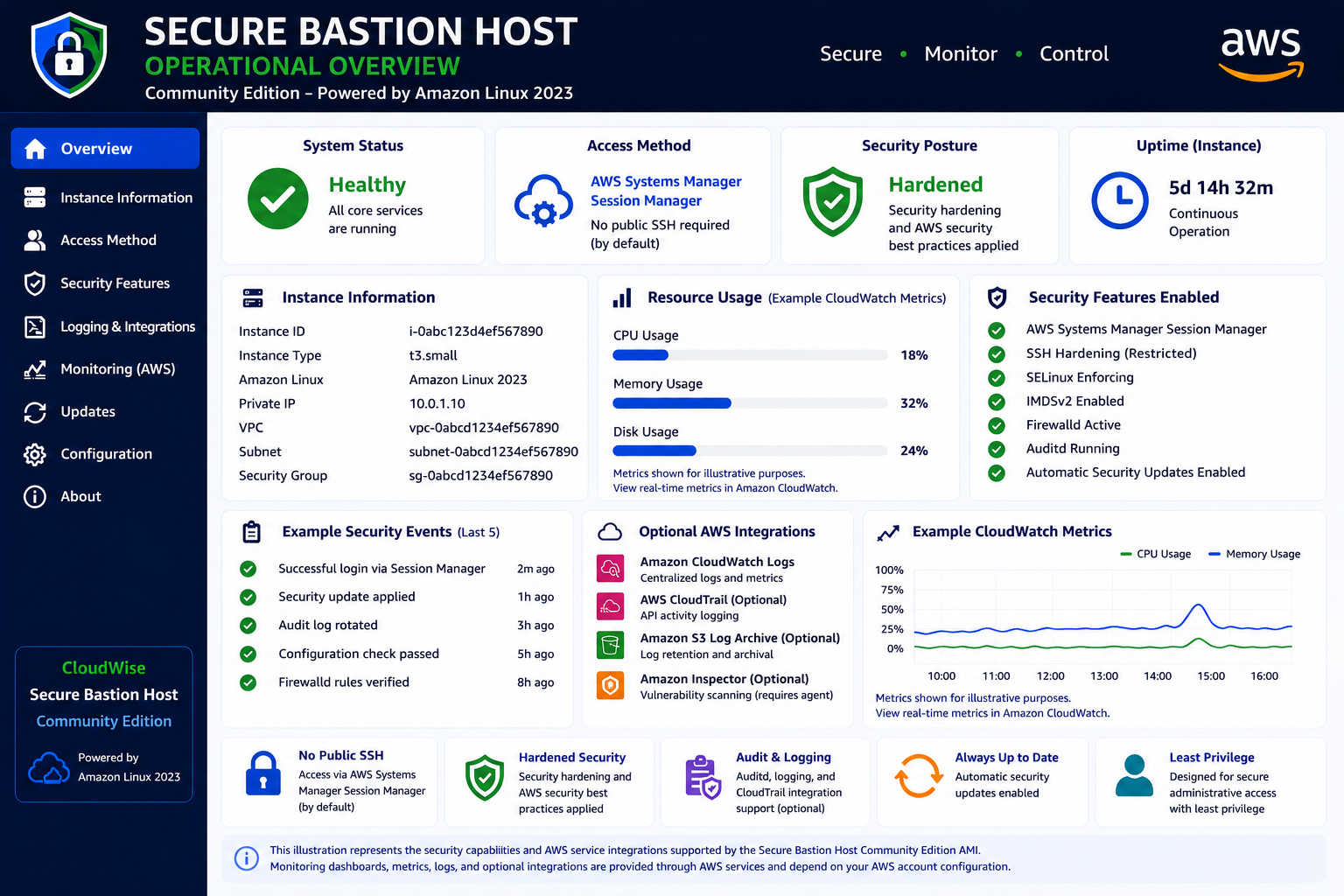
Image
Secure Bastion Host Operational Overview
Image
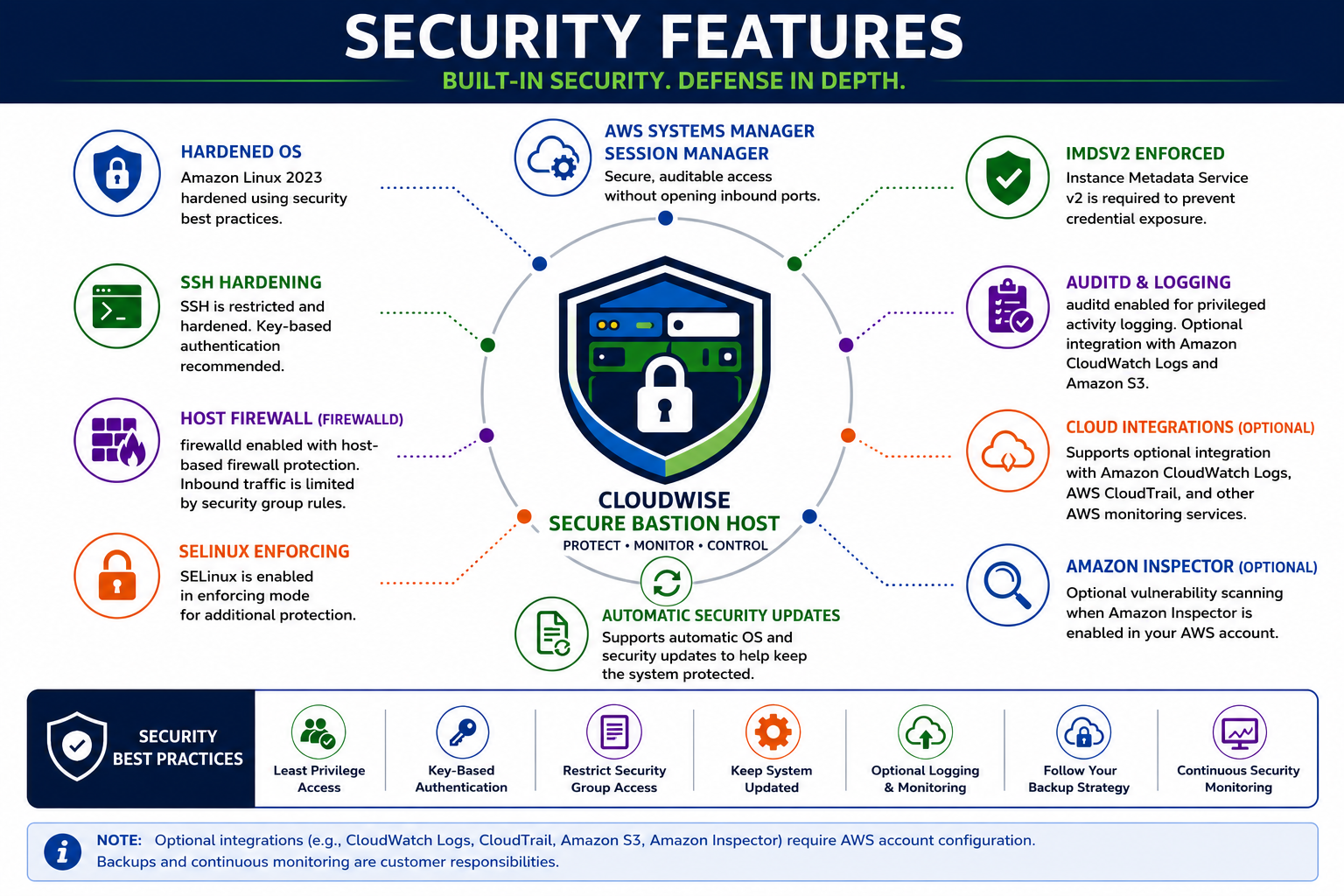
Secure Bastion Host Security Features
Secure Bastion Host Community Edition
The Secure Bastion Host Community Edition by Syed Solutions is a pre-hardened Amazon Linux 2023 AMI that provides a secure administrative entry point for AWS environments. Instead of spending hours manually hardening a stock Amazon Linux instance - configuring SELinux, locking down SSH, enabling audit logging, and enforcing IMDSv2 - you launch a single AMI that delivers all of these controls out of the box.
This is a no-cost community AMI. There is no software charge; you pay only for the underlying AWS infrastructure (EC2 instance, EBS storage, data transfer) at standard AWS rates.
Why Not Just Use a Default Amazon Linux 2023 Instance?
A stock AL2023 instance ships with permissive defaults: SELinux in permissive mode, no firewall rules, no audit logging, and IMDSv1 still accessible. Hardening it yourself requires researching and applying dozens of configuration changes, testing for regressions, and maintaining those settings over time. Secure Bastion Host Community Edition closes that gap by delivering a production-ready hardened baseline from the first boot.
Key Security Controls Included
AWS Systems Manager Session Manager - Encrypted, auditable shell access without opening inbound SSH ports or exposing a public IP address Hardened SSH as break-glass access - Available when the SSM agent is unreachable, with strict cipher suites and key-only authentication SELinux in Enforcing mode - Mandatory access controls that contain processes and limit lateral movement if a service is compromised firewalld - Host-based firewall with a deny-all default policy auditd with pre-configured rules - Kernel-level logging of privileged commands, file access, and authentication events for compliance and forensics IMDSv2 enforcement - Blocks SSRF-based credential theft by requiring session tokens for metadata access Persistent system logging - Survives reboots so you never lose evidence during incident response Automated security-only package updates - Reduces your CVE exposure window without introducing feature regressions
Example Use Case
A DevOps engineer at a regulated organization needs to troubleshoot a database running in a private subnet during an incident. Using Session Manager through the Secure Bastion Host, they connect without exposing any public IP, and every keystroke is logged to CloudWatch Logs for the compliance team to audit later. If Session Manager is unavailable due to an SSM agent issue, hardened SSH provides a documented break-glass path.
Quick-Start Deployment Steps
- Launch the AMI in your VPC private subnet with an IAM instance profile that includes the AmazonSSMManagedInstanceCore policy.
- Ensure the subnet has a NAT Gateway or VPC endpoints for SSM, SSM Messages, and EC2 Messages.
- Open the AWS Systems Manager console, select Session Manager, and start a session to your new instance.
- Optionally configure CloudWatch Logs for session logging and Amazon Inspector for vulnerability scanning.
- Validate SELinux status and auditd rules are active by running "sestatus" and "auditctl -l" from your session.
AWS Integrations
The AMI is designed to work with the broader AWS security ecosystem. Optional integrations include:
Amazon CloudWatch Logs - Centralize session transcripts and system logs AWS CloudTrail - Track API calls related to your bastion instance Amazon Inspector - Continuous vulnerability assessment AWS CloudFormation - Automate repeatable deployments
Who Is This For?
Secure Bastion Host Community Edition is built for cloud engineers, security teams, and DevOps practitioners who need a hardened administrative access point but do not want to invest the time to build and maintain one from scratch. It is suitable for development, staging, and production environments across any industry that values auditable, least-privilege access.
Get Started
Subscribe and launch the AMI directly from AWS Marketplace. If you need a guided walkthrough of deployment or want to discuss how the AMI fits your security architecture, contact Syed Solutions at Contact@SyedSolutions.com to schedule a brief consultation.
Highlights
- Unlike a stock AL2023 instance that requires hours of manual hardening, CloudWise Secure Bastion Host delivers production-ready security from first boot. AWS Systems Manager Session Manager provides encrypted, auditable shell access with zero inbound ports - plus hardened SSH break-glass access that alternatives like native Session Manager alone do not include. No software charge; you pay only for AWS infrastructure.
- Pre-configured with SELinux Enforcing, firewalld deny-all policy, auditd kernel-level logging, IMDSv2 enforcement, persistent system logging, and automated security-only updates. These controls address the permissive defaults that ship with stock Amazon Linux 2023 - eliminating the need to research, apply, test, and maintain dozens of individual hardening changes yourself.
- Launch-ready AMI that reduces bastion deployment from a multi-hour hardening project to a straightforward launch-and-connect workflow. Customers retain full control over IAM policies, networking, CloudWatch Logs integration, and monitoring configuration. Free Community Edition available now, with a Professional Edition planned for teams needing additional features and enterprise support.
Details
Sold by
Categories
Delivery method
Delivery option
64-bit (x86) Amazon Machine Image (AMI)
Latest version
Operating system
AmazonLinux 2023
Deployed on AWS
New
Introducing multi-product solutions
You can now purchase comprehensive solutions tailored to use cases and industries.

Features and programs
Financing for AWS Marketplace purchases
AWS Marketplace now accepts line of credit payments through the PNC Vendor Finance program. This program is available to select AWS customers in the US, excluding NV, NC, ND, TN, & VT.

Pricing
This product is available free of charge. Free subscriptions have no end date and may be canceled any time.
Additional AWS infrastructure costs may apply. Use the AWS Pricing Calculator to estimate your infrastructure costs.
If you are an AWS Free Tier customer with a free plan, you are eligible to subscribe to this offer. You can use free credits to cover the cost of eligible AWS infrastructure. See AWS Free Tier for more details. If you created an AWS account before July 15th, 2025, and qualify for the Legacy AWS Free Tier, Amazon EC2 charges for Micro instances are free for up to 750 hours per month. See Legacy AWS Free Tier for more details.
Dimensions summary
This listing charges no software fee. You pick from eight EC2 instance sizes, all billed hourly. Two families are offered: t3 and t3a. Within each family, you choose micro, small, medium, or large. The size you select sets the compute capacity of the bastion host. Larger sizes carry higher hourly rates than smaller ones. Since the software itself is free, your hourly charge reflects only the underlying AWS infrastructure. You also pay separately for storage, data transfer, and any optional AWS services you enable.
Top-of-mind questions for buyers
Each size sets the CPU and memory of the running host. The micro, small, medium, and large labels move from fewer to more virtual CPUs and RAM. The t3 and t3a families use different processor types. You pick the size that matches your administrative access load.
The software carries no fee, so no software charge applies at any time. When the instance is stopped, you stop paying for compute hours. You may still pay AWS for attached storage that persists while stopped. Running hours are what drive the hourly compute charge.
You pay AWS separately for storage, data transfer, and any optional services you enable. These include log forwarding, API activity logging, vulnerability scanning, session recording, and encryption key management. Third-party licenses, support plans, and backup tools may also add charges. You configure and pay for these directly.
www.syedsolutions.com
Helpful?
Vendor refund policy
Not applicable.

Legal
Vendor terms and conditions
Upon subscribing to this product, you must acknowledge and agree to the terms and conditions outlined in the vendor's End User License Agreement (EULA) .
Content disclaimer
Vendors are responsible for their product descriptions and other product content. AWS does not warrant that vendors' product descriptions or other product content are accurate, complete, reliable, current, or error-free.
Delivery details
64-bit (x86) Amazon Machine Image (AMI)
Amazon Machine Image (AMI)
An AMI is a virtual image that provides the information required to launch an instance. Amazon EC2 (Elastic Compute Cloud) instances are virtual servers on which you can run your applications and workloads, offering varying combinations of CPU, memory, storage, and networking resources. You can launch as many instances from as many different AMIs as you need.
Version release notes
Initial AWS Marketplace release.
Built on Amazon Linux 2023.
Security hardening includes SELinux, firewalld, auditd, IMDSv2 enforcement, hardened SSH configuration, automatic security updates, and AWS Systems Manager support.
Default SSH authorized keys have been removed for Marketplace compliance.
General maintenance and security improvements.
Additional details
Usage instructions
Launch the AMI into your VPC using a supported x86_64 instance type.
The default login user is ec2-user.
AWS Systems Manager Session Manager is the recommended method for administrative access.
If SSH is enabled, restrict access to trusted IP addresses only.
After deployment, add your own SSH public key, configure IAM roles as required, enable monitoring services if desired, and apply your organization's security policies before production use.
Documentation is available from the product listing.
Support
Vendor support
Community Support by Syed Solutions
Community support is provided by Syed Solutions for product installation questions, AMI launch issues, and general configuration guidance.
Support Channel: Email at Contact@SyedSolutions.com
Response Time: We aim to respond within two business days.
Support Hours: Monday through Friday, 11:00 AM to 6:00 PM Central Time, excluding U.S. federal holidays.
Deployment Prerequisites
To deploy the Secure Bastion Host Community Edition successfully, ensure the following are in place before launch:
- An IAM instance profile with the AmazonSSMManagedInstanceCore managed policy attached.
- A VPC private subnet with either a NAT Gateway or VPC endpoints configured for ssm, ssmmessages, and ec2messages services.
- A security group with no inbound rules required for Session Manager access (add inbound SSH only if break-glass access is needed).
- Recommended instance types: t3.micro or t3.small for most administrative workloads.
What Is Covered
Guidance on launching the AMI and verifying Session Manager connectivity Questions about pre-configured security controls (SELinux, firewalld, auditd, IMDSv2) General advice on integrating with CloudWatch Logs, CloudTrail, or Inspector
What Is Not Covered
Managed administration or custom development AWS account management or billing questions Third-party software support Troubleshooting of customer networking, IAM policies, applications, or workloads
Customer Responsibilities
Customers remain responsible for AWS infrastructure charges, ongoing security configuration, monitoring, backups, patch governance beyond automated security updates, and compliance requirements specific to their organization.
Refund Requests
Since there is no software charge for this Community Edition AMI, refund requests related to AWS infrastructure costs should be directed to AWS Support.
AWS infrastructure support
AWS Support is a one-on-one, fast-response support channel that is staffed 24x7x365 with experienced and technical support engineers. The service helps customers of all sizes and technical abilities to successfully utilize the products and features provided by Amazon Web Services.
Similar products

This product has charges associated with it for security hardening, ongoing image maintenance, release evidence, and seller support. Deploy Hardened Amazon Linux 2023 (ARM) as a secure, repeatable operating-system baseline.

This is a repackaged open-source software product, with additional charges for a pre-hardened SSH jump host with fail2ban intrusion blocking, AIDE integrity checking, Active Directory/SSSD join tooling, Amazon CloudWatch log and metric shipping, the AWS Systems Manager agent, and vendor support.
A hardened, self-updating Amazon Linux 2023 AMI with Fail2ban brute-force protection and automatic security patching, ready in minutes.

This product has charges associated with the pre-built security hardening and recurring maintenance. Deploy a Amazon Linux 2023 virtual machine with 300+ security controls already applied. Start secure. Stay secure. Save weeks of work.
Customer reviews
No customer reviews yet
Be the first to review this product . We've partnered with PeerSpot to gather customer feedback. You can share your experience by writing or recording a review, or scheduling a call with a PeerSpot analyst.