
Sold by: Sigmodata
Deployed on AWS
Free Trial
Self-hosted PII redaction server for security and data teams: portal, CSV upload, S3 batch queue and REST API. Runs inside your AWS account on a small CPU instance, so no text is sent to a third-party API. $0.05 per hour.
Overview
Image
Detector UI
Image
POST /redact
Image
Admin
Runs inside your own AWS account: text and files are redacted on an instance you control, inside your VPC, and are never sent to a third-party API.
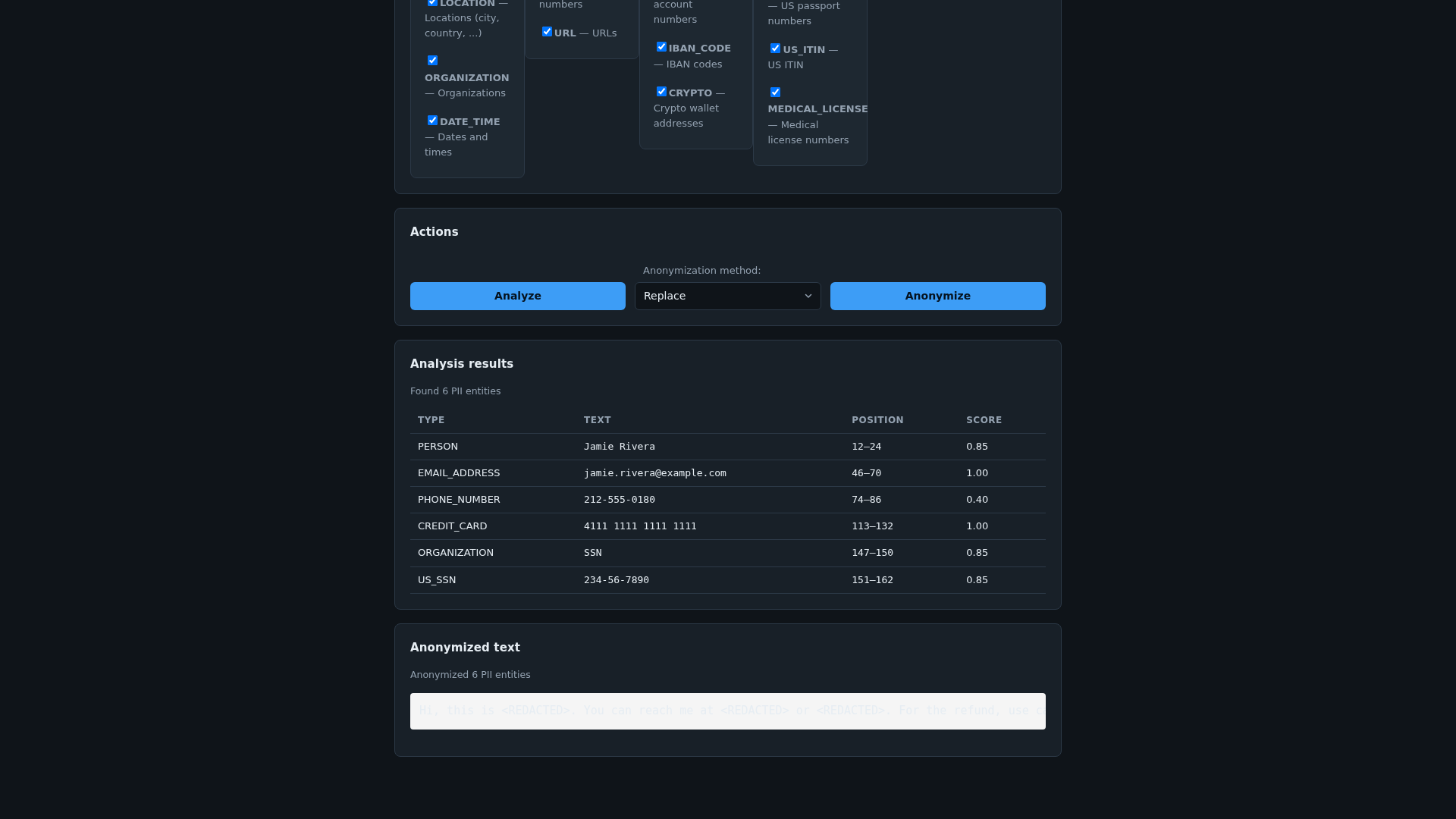
This product provides a self-hosted PII detection and anonymization server packaged as an Amazon Machine Image (AMI) for AWS EC2, built on Microsoft Presidio. It detects around 18 personally identifiable information (PII) entity types by default - names, emails, phone numbers, SSNs, credit cards, IBANs, IP addresses, and more - and applies a configurable action per entity type: replace, mask, redact, hash, or encrypt. English only.
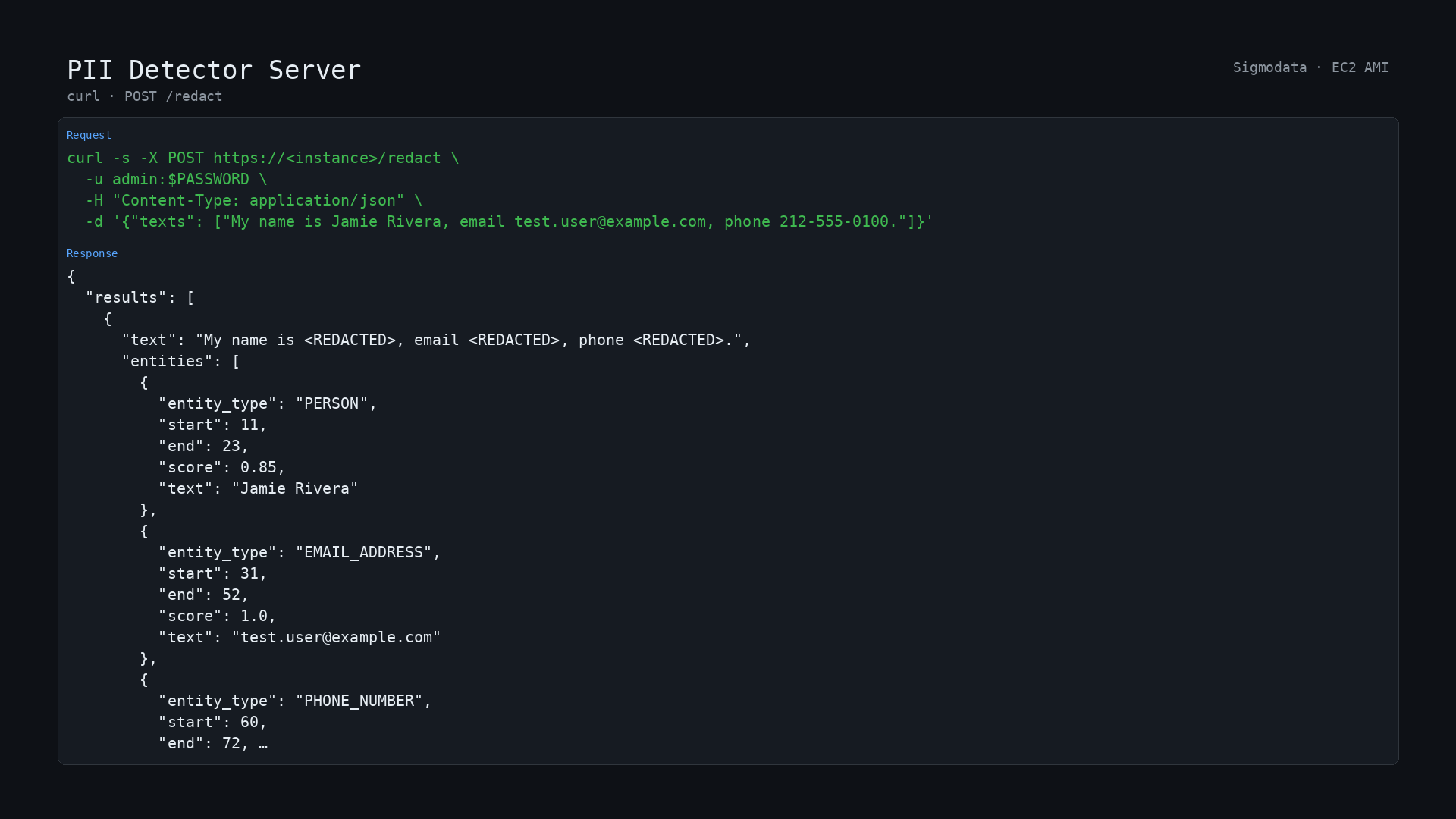
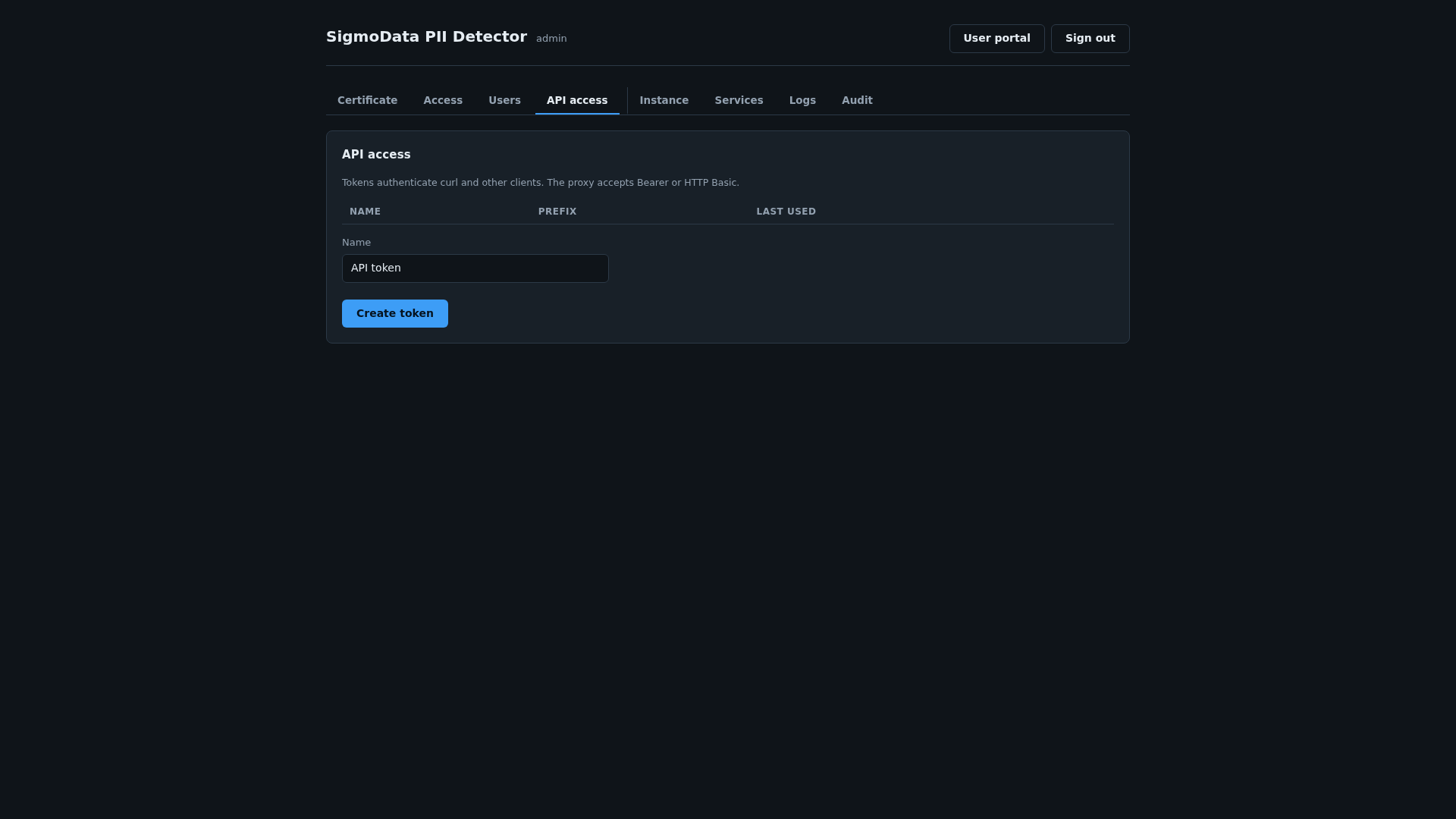
The AMI launches with a guided browser setup wizard over HTTPS (port 443). You confirm ownership with the EC2 instance ID, create an administrator account, and pick a certificate option. No SSH or user-data editing is required for credentials. After setup, sign in to a point-and-click portal - paste text, choose which entity types to look for and what to do with each, and see the anonymized result alongside every detected span and its confidence score. The same functionality is available as a REST API (POST /redact), authenticated with API tokens issued from /admin - no need to share one password with every script or CI job. HTTP Basic auth with any account also works. If you encrypt, POST /decrypt with the caller-supplied key and the rewrites array from the anonymize response.
For bulk work there are two more tools alongside the single-text portal. CSV conversion: upload a spreadsheet, and the server reads the header and tells you which columns actually contain PII so you can tick the ones to process; every other column is copied through unchanged. You get a download of the converted file, statistics on what was found by entity type and by column, and the exact configuration used so the same run can be reproduced against the API. Batch processing: attach one of your own S3 buckets during setup, and the instance mounts it as a folder you can browse in the browser. Queue up CSV and text files and each one gets a redacted copy written back beside it. Files never leave your bucket, and the bucket is optional - leave it empty and the rest of the product works unchanged.
CPU only - Presidio's default detection pipeline has no GPU benefit, so there is no GPU instance tier to pay for. Nothing is downloaded at boot; the detector is already on the AMI.
This listing is the AMI path. For a SageMaker real-time or batch endpoint with the same detector, use the PII Detector Model.
Common uses include redacting PII from support tickets, logs, and data exports before they reach a data warehouse or an LLM, and compliance workflows where sending customer text to a third-party PII API is not an option.
Names, emails, credit cards, SSNs, IBANs, IP addresses, and URLs are the strongest categories out of the box; organization, location, and date/time detection use general-purpose NLP and are noisier. Full postal-address detection is not a built-in capability. Phone recall on mixed international formats is weaker than on US-format numbers.
Highlights
- Redact PII from text, CSV files and S3 folders through a portal, a batch queue or the POST /redact API
- Runs inside your own AWS account and VPC - HTTPS setup wizard, API tokens, nothing sent to a third-party API
- CPU only: $0.05 per hour software fee (20 percent off annual) plus a small EC2 instance, with a 5-day free trial
Details
Sold by
Categories
Delivery method
Delivery option
64-bit (x86) Amazon Machine Image (AMI)
Latest version
Operating system
AmazonLinux 2023
Deployed on AWS
New
Introducing multi-product solutions
You can now purchase comprehensive solutions tailored to use cases and industries.

Features and programs
Financing for AWS Marketplace purchases
AWS Marketplace now accepts line of credit payments through the PNC Vendor Finance program. This program is available to select AWS customers in the US, excluding NV, NC, ND, TN, & VT.

Pricing
Free trial
Try this product free for 5 days according to the free trial terms set by the vendor. Usage-based pricing is in effect for usage beyond the free trial terms. Your free trial gets automatically converted to a paid subscription when the trial ends, but may be canceled any time before that.
Pricing is based on actual usage, with charges varying according to how much you consume. Subscriptions have no end date and may be canceled any time. Alternatively, you can pay upfront for a contract, which typically covers your anticipated usage for the contract duration. Any usage beyond contract will incur additional usage-based costs.
Additional AWS infrastructure costs may apply. Use the AWS Pricing Calculator to estimate your infrastructure costs.
Dimension | Cost/hour |
|---|---|
t3.small Recommended | $0.05 |
c5.large | $0.05 |
c5.xlarge | $0.05 |
c6i.large | $0.05 |
c6i.xlarge | $0.05 |
c7i.large | $0.05 |
c7i.xlarge | $0.05 |
m5.2xlarge | $0.05 |
m5.large | $0.05 |
m5.xlarge | $0.05 |
Dimensions summary
You pay by the hour for the EC2 instance type you run this AMI on. The 26 options are all instance sizes, not feature tiers. They span general-purpose (t3, t3a, m5, m6i, m7i), compute-optimized (c5, c6i, c7i), and memory-optimized (r5, r6i) families. Within each family, larger sizes (medium, large, xlarge, 2xlarge) carry more CPU and memory and bill at higher hourly rates. Pick the size that fits your workload; the software runs the same across all of them. You are billed only for the hours each instance runs.
Top-of-mind questions for buyers
You pay a software fee per hour for each running instance of the AMI. The rate depends on the EC2 instance type you launch, since larger sizes carry more CPU and memory. This software charge is separate from the underlying AWS compute charge for the instance itself.
Software charges accrue only while the instance runs. A stopped or terminated instance stops accruing the hourly software fee. Note that stopped instances may still incur AWS storage fees for attached volumes, but the AMI software meters running hours only.
Pick a size based on your workload's CPU and memory needs; the PII detection software runs the same across all 26 options. To switch sizes, stop the instance and relaunch on a different type. Your hourly rate then matches the new instance size.
www.sigmodata.com
Helpful?
Vendor refund policy
No refunds offered but you may cancel at any time

Legal
Vendor terms and conditions
Upon subscribing to this product, you must acknowledge and agree to the terms and conditions outlined in the vendor's End User License Agreement (EULA) .
Content disclaimer
Vendors are responsible for their product descriptions and other product content. AWS does not warrant that vendors' product descriptions or other product content are accurate, complete, reliable, current, or error-free.
Delivery details
64-bit (x86) Amazon Machine Image (AMI)
Amazon Machine Image (AMI)
An AMI is a virtual image that provides the information required to launch an instance. Amazon EC2 (Elastic Compute Cloud) instances are virtual servers on which you can run your applications and workloads, offering varying combinations of CPU, memory, storage, and networking resources. You can launch as many instances from as many different AMIs as you need.
Version release notes
Initial release.
- Guided HTTPS setup wizard - no user-data credentials
- Point-and-click portal and REST API (POST /redact, POST /decrypt)
- ~18 default PII entity types (Microsoft Presidio); per-entity operator: replace, mask, redact, hash, or encrypt
- CSV upload and optional S3-backed batch queue
- Teammate accounts and API tokens from /admin, plus HTTP Basic
- CPU only - no GPU instance tier needed
Additional details
Usage instructions
- Launch on any small instance type (no GPU required); allow inbound TCP 443 and 22.
- Open https://<instance-address>/ in a browser. The certificate is self-signed at this point, so your browser will warn you once.
- Enter the instance ID shown in the EC2 console to confirm ownership.
- Complete the setup wizard: administrator account, certificate option, and optionally an S3 bucket to use as a data folder for batch processing.
- Detect and anonymize PII at https://<instance-address>/ - paste text in the Redact tab, or POST /redact with an API token (create one at /admin -> API tokens) or HTTP Basic auth with any account. English only.
- If you encrypt, POST /decrypt with the caller-supplied key and the rewrites array from the anonymize response. The key is never stored on the instance.
- For bulk work, use the CSV tab to convert a spreadsheet, or the Batch tab to queue files from the S3 folder you attached in step 4. The Batch tab appears only when a bucket is configured.
Manage the instance, teammates, tokens, and the S3 data folder later at https://<instance-address>/admin.
Where your data is stored
- Accounts and API tokens: /etc/sigmodata-pii/identity.sqlite3. Passwords and tokens are stored hashed, never in clear text.
- Service configuration: /etc/sigmodata-pii/
- TLS certificate and private key: /var/lib/sigmodata-pii/certs/
- Text you submit for detection is processed in memory and is not retained on the instance after the request completes.
- CSV conversion: the uploaded file and its converted copy are held in a temporary directory on the instance and expire automatically. Nothing is retained once you have downloaded the result.
- Batch processing (optional): if you attach an S3 bucket, the instance mounts it and reads and writes files there, including the redacted output copies and a queue file. That bucket is yours, in your own account. Access uses the instance IAM role - the product never asks for or stores an access key. It needs s3:ListBucket on the bucket and s3:GetObject and s3:PutObject on its contents. Leave the bucket blank and nothing is mounted. Everything else stays on the instance EBS volume in your own AWS account. Nothing is sent to Sigmodata.
Encryption
- In transit: HTTPS on port 443, self-signed by default or Let's Encrypt from the setup wizard.
- At rest: AWS Marketplace requires the published AMI snapshot to be unencrypted. If you need encryption at rest, enable EBS encryption when you launch (Advanced details -> EBS encryption) or launch from an encrypted copy. The product needs no change either way.
Rotation
- The TLS certificate renews automatically on a systemd timer. Renew it or switch certificate type on demand at /admin.
- Revoke and re-issue account passwords and API tokens at /admin at any time. Rotate any credential that may have been exposed.
Checking that the product is healthy
- In the EC2 console, choose Instances, select this instance, and check the Status checks tab for passed system and instance checks.
- Request https://<instance-address>/_gw/healthz for the service state.
- On the instance, run: sudo systemctl status sigmodata-pii and sudo journalctl -u sigmodata-pii for logs.
Backup and recovery
- Take EBS snapshots of the instance volume for full-instance recovery.
Service quotas and cost
- This product runs on standard instance types covered by the "Running On-Demand Standard instances" vCPU quota. Request an increase in Service Quotas -> Amazon EC2 if you are near your limit.
- You pay the AWS Marketplace hourly charge for this product plus the AWS resources it uses: EC2 instance hours, the EBS root volume, any S3 storage you configure, and data transfer out.
Resources
Vendor resources
Support
Vendor support
Support contact: Email: support@sigmodata.com Support URL: https://www.sigmodata.com/contact
Support description: Email support@sigmodata.com or https://www.sigmodata.com/contact . We reply within one business day, Monday through Friday, US Pacific time.
AWS infrastructure support
AWS Support is a one-on-one, fast-response support channel that is staffed 24x7x365 with experienced and technical support engineers. The service helps customers of all sizes and technical abilities to successfully utilize the products and features provided by Amazon Web Services.
Similar products

Strip PII from text before it reaches your LLM, data warehouse or logs. Detects about 18 entity types and applies replace, mask, redact, hash or encrypt per type. Runs inside your AWS account, so no text is sent to a third-party API.

This product has charges associated with it for configuration of ClamAV antivirus. SmartAMI openSUSE Leap 16 with ClamAV Antivirus. SmartAMI upgrades it periodically so it includes newest available packages.

Security that's built for DevOps to automatically defend your AWS workloads and simplify compliance. Pay per instance starting at $0.01/hour. Proactive protection of elastic workloads against threats, malware and vulnerabilities.

Preconfigured PyTorch 2.12 with TorchVision, TorchServe and JupyterLab. CUDA 13.1 optimized for NVIDIA T4G. Ready-to-use on AWS g5g.xlarge, g5g.2xlarge, g5g.4xlarge, g5g.8xlarge.
Customer reviews
No customer reviews yet
Be the first to review this product . We've partnered with PeerSpot to gather customer feedback. You can share your experience by writing or recording a review, or scheduling a call with a PeerSpot analyst.