
Sold by: cloudimg
Deployed on AWS
Free Trial
AWS Free Tier
This product has charges associated with it for seller support. Docker Engine preinstalled with Buildx and Compose on a dedicated storage tier - run your first container in minutes, not hours. Backed by 24/7 cloudimg support.
Overview
Image
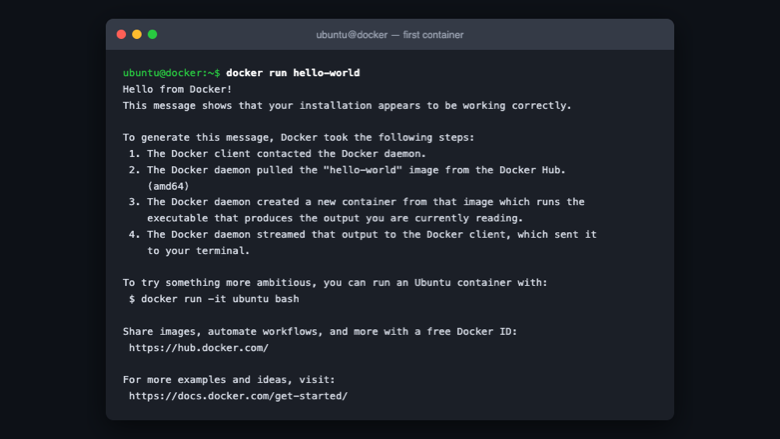
Running your first container
Image
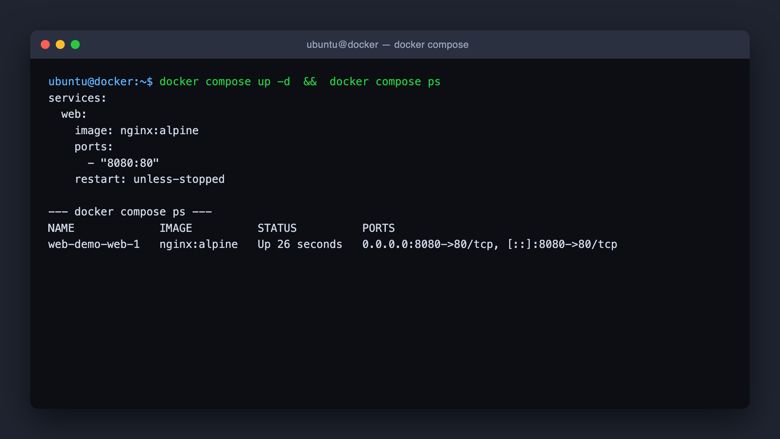
Multi container apps with Compose
Image
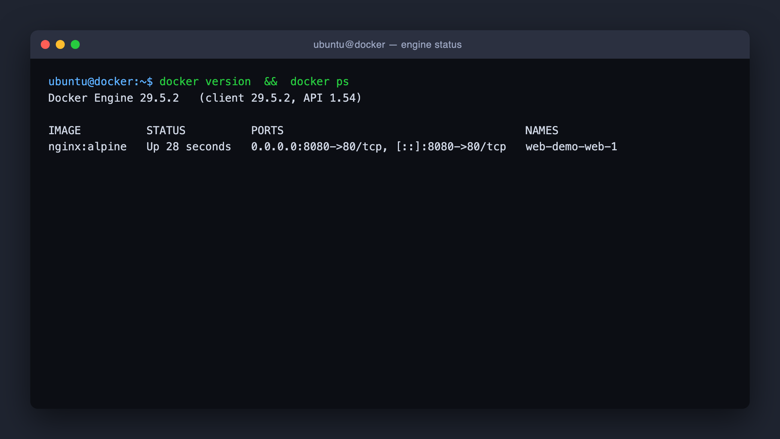
Engine status and running containers
This is a repackaged open source software product wherein additional charges apply for cloudimg support services.
Overview
Docker Engine is the industry-standard open source runtime for building, shipping, and running applications in containers. This AMI delivers Docker Engine fully installed and configured so you have a complete container platform running within minutes of launch - no package management, repository setup, or manual configuration required.
What Is Included
- Docker Engine, the Docker CLI, and the containerd runtime
- Buildx plugin for advanced and multi-platform image builds
- Compose plugin for defining and running multi-container applications from a single file
- Docker daemon and containerd enabled and started automatically at boot
Dedicated Storage Tier
Docker image layers, container writable layers, and named volumes live on a separate, independently resizable Amazon EBS volume mounted at the Docker data directory. By keeping container storage off the operating system disk, you eliminate the risk of root volume exhaustion causing instance failure - a common problem when container images accumulate on a shared disk. Resize the data volume independently as your workloads grow without disturbing the OS or requiring instance downtime.
Security and Hardening
The Docker daemon listens only on a local Unix socket - no remote TCP API is exposed by default. Container access is granted through group membership rather than root privileges, reducing the attack surface. The dedicated Amazon EBS storage volume supports encryption at rest using AWS Key Management Service (KMS), allowing you to meet data-at-rest encryption requirements. We recommend enabling Docker Content Trust for image signature verification in production environments.
Container Access on First Boot
On first boot, a one-shot systemd service adds the default login user to the docker group so containers can be managed without sudo after a single re-login. This eliminates the manual post-install step that often leads to insecure workarounds such as running containers as root.
AWS Integration
This AMI works seamlessly with core AWS services:
- Amazon ECR - Pull and push container images to your private registry without additional credential configuration beyond IAM roles
- Amazon CloudWatch - Ship container and daemon logs using the awslogs logging driver for centralized monitoring and alerting
- Amazon EBS - The dedicated storage tier leverages EBS volumes that support gp3, io2, and other volume types for tunable IOPS and throughput
- AWS CodeBuild and CodePipeline - Use this AMI as a self-hosted build agent for CI/CD pipelines that require Docker-in-Docker or custom build environments
Use Case: CI/CD Build Agents at Scale
Platform engineering teams deploy this AMI as ephemeral build agents in Auto Scaling groups. Each agent launches, pulls the build image from Amazon ECR, executes the test suite in isolated containers, pushes artifacts, and terminates - all without manual Docker installation. The dedicated storage volume prevents build cache from filling the root disk during parallel jobs, enabling dozens of concurrent builds per instance without storage-related failures.
Additional Use Cases
- Container-based application hosting for microservices and monoliths
- Multi-container application stacks orchestrated with Compose
- Development and testing environments that mirror production
- Self-hosted CI runners for teams without dedicated DevOps staff
Technical Requirements
- Compatible with t3, m5, c5, r5, and other current-generation instance families
- Minimum recommended: 2 vCPU, 4 GB RAM (t3.medium or larger)
- Root volume: 8 GB minimum
- Data volume: 20 GB minimum (resizable via EBS without reboot)
- Security group: allow inbound SSH (port 22) for management access
Getting Started
- Launch the AMI from AWS Marketplace and select your instance type
- Connect via SSH using your key pair
- Re-login once to activate docker group membership
- Run your first container or bring up a Compose stack immediately
cloudimg Support
24/7 technical support by email and live chat. Our engineers assist with container deployment, image building, Compose orchestration, storage configuration, engine upgrades, and AWS integration questions.
All product and company names are trademarks or registered trademarks of their respective holders. Use of them does not imply any affiliation with or endorsement by them.
Highlights
- Docker Engine preinstalled and ready, with the containerd runtime and the Buildx and Compose plugins, and no manual package or repository setup required
- Container image and volume storage lives on a separate, independently resizable data volume kept off the operating system disk
- 24/7 technical support from cloudimg, with expert assistance for container deployment, image building, Compose orchestration and engine upgrades
Details
Sold by
Delivery method
Delivery option
64-bit (x86) Amazon Machine Image (AMI)
Latest version
Operating system
Ubuntu 24.04
Deployed on AWS
New
Introducing multi-product solutions
You can now purchase comprehensive solutions tailored to use cases and industries.

Features and programs
Financing for AWS Marketplace purchases
AWS Marketplace now accepts line of credit payments through the PNC Vendor Finance program. This program is available to select AWS customers in the US, excluding NV, NC, ND, TN, & VT.

Pricing
Free trial
Try this product free for 7 days according to the free trial terms set by the vendor. Usage-based pricing is in effect for usage beyond the free trial terms. Your free trial gets automatically converted to a paid subscription when the trial ends, but may be canceled any time before that.
Pricing is based on actual usage, with charges varying according to how much you consume. Subscriptions have no end date and may be canceled any time. Alternatively, you can pay upfront for a contract, which typically covers your anticipated usage for the contract duration. Any usage beyond contract will incur additional usage-based costs.
Additional AWS infrastructure costs may apply. Use the AWS Pricing Calculator to estimate your infrastructure costs.
If you are an AWS Free Tier customer with a free plan, you are eligible to subscribe to this offer. You can use free credits to cover the cost of eligible AWS infrastructure. See AWS Free Tier for more details. If you created an AWS account before July 15th, 2025, and qualify for the Legacy AWS Free Tier, Amazon EC2 charges for Micro instances are free for up to 750 hours per month. See Legacy AWS Free Tier for more details.
Dimension | Description | Cost/hour |
|---|---|---|
m5.large Recommended | m5.large | $0.08 |
t3.micro | t3.micro instance type | $0.04 |
t2.micro | t2.micro instance type | $0.04 |
i4i.xlarge | i4i.xlarge instance type | $0.12 |
r6a.32xlarge | r6a.32xlarge instance type | $0.24 |
r5ad.large | r5ad.large instance type | $0.08 |
x2iedn.24xlarge | x2iedn.24xlarge instance type | $0.24 |
x2iezn.4xlarge | x2iezn.4xlarge instance type | $0.24 |
i3.4xlarge | i3.4xlarge instance type | $0.24 |
m8id.8xlarge | m8id.8xlarge instance type | $0.24 |
Vendor refund policy
Refunds available on request.

Legal
Vendor terms and conditions
Upon subscribing to this product, you must acknowledge and agree to the terms and conditions outlined in the vendor's End User License Agreement (EULA) .
Content disclaimer
Vendors are responsible for their product descriptions and other product content. AWS does not warrant that vendors' product descriptions or other product content are accurate, complete, reliable, current, or error-free.
Delivery details
64-bit (x86) Amazon Machine Image (AMI)
Amazon Machine Image (AMI)
An AMI is a virtual image that provides the information required to launch an instance. Amazon EC2 (Elastic Compute Cloud) instances are virtual servers on which you can run your applications and workloads, offering varying combinations of CPU, memory, storage, and networking resources. You can launch as many instances from as many different AMIs as you need.
Version release notes
Initial release of Docker Engine on AWS.
Additional details
Usage instructions
Connect via SSH on port 22 as the default login user for your operating system variant (the user guide lists it per variant). Docker Engine, the docker CLI and the containerd runtime are already running. The login user is added to the docker group on first boot, so after one re-login you can run 'docker run', 'docker compose up' and 'docker buildx build' without sudo. Confirm the installation with: docker version. The installed engine version is recorded in /stage/scripts/docker-info.log.
Resources
Vendor resources
Support
Vendor support
Support Channels
cloudimg provides 24/7 technical support for this product via email and live chat. Contact our team at support@cloudimg.co.uk .
Response Times
Critical issues receive a one-hour average response. Our engineers are available around the clock to ensure your container workloads remain operational.
What We Help With
- Initial deployment and instance configuration
- Docker Engine upgrades and patch guidance
- Container image building and multi-stage Dockerfile optimization
- Compose orchestration and multi-container stack troubleshooting
- Dedicated storage volume expansion and performance tuning
- Integration with AWS services including Amazon ECR and CloudWatch
- Security configuration including daemon socket access and EBS encryption
- Troubleshooting container networking, resource limits, and runtime errors
Getting Started After Purchase
- Launch the AMI and connect via SSH using your key pair
- Re-login once to activate docker group membership
- Run containers, build images, or bring up Compose stacks immediately
- Contact support@cloudimg.co.uk if you need assistance at any step
Refunds
If you experience issues with the product, contact our support team. We will work to resolve problems promptly or assist with the refund process through AWS Marketplace.
AWS infrastructure support
AWS Support is a one-on-one, fast-response support channel that is staffed 24x7x365 with experienced and technical support engineers. The service helps customers of all sizes and technical abilities to successfully utilize the products and features provided by Amazon Web Services.
Similar products

This product has charges associated with it for seller support. Pre-configured Docker CE on Windows Server with24/7 cloudimg support. Deploy Windows and Linux containers in minutes with guaranteed response SLA.

This product has charges associated with it for seller support. Pre-configured Docker CE AMI for teams needing production-ready containers without manual setup. Includes Docker Engine, Compose, and24/7 support with guaranteed 24hr response SLA.

This product has charges associated with it for seller support. Coolify, the open source self-hosted platform as a service for deploying applications, databases and services from Git, preinstalled as a Docker compose stack with the dashboard published on port 8000 behind its own authentication and a built in Traefik proxy on ports 80 and 443 for the apps you deploy. A unique admin login is generated on first boot. Backed by 24/7 cloudimg support.

This product has charges associated with it for seller support. Jenkins LTS preinstalled on AWS with nginx reverse proxy - no setup wizard needed. Unique admin credentials generated per instance. 24/7 expert CI/CD support from cloudimg.
Customer reviews
No customer reviews yet
Be the first to review this product . We've partnered with PeerSpot to gather customer feedback. You can share your experience by writing or recording a review, or scheduling a call with a PeerSpot analyst.