Sold by: Dedicatted
Deployed on AWS
UniGuide is an AI product expert that embeds in any software you build, lifting activation 5-15%, cutting early churn 10-25% and support tickets 30-50%. It answers users from your own documentation, shows them exactly where to click, and with permission completes multi-step tasks for them. This listing deploys a working demo into your AWS account in minutes, so you can try the full experience before you talk to anyone.
Overview
Image
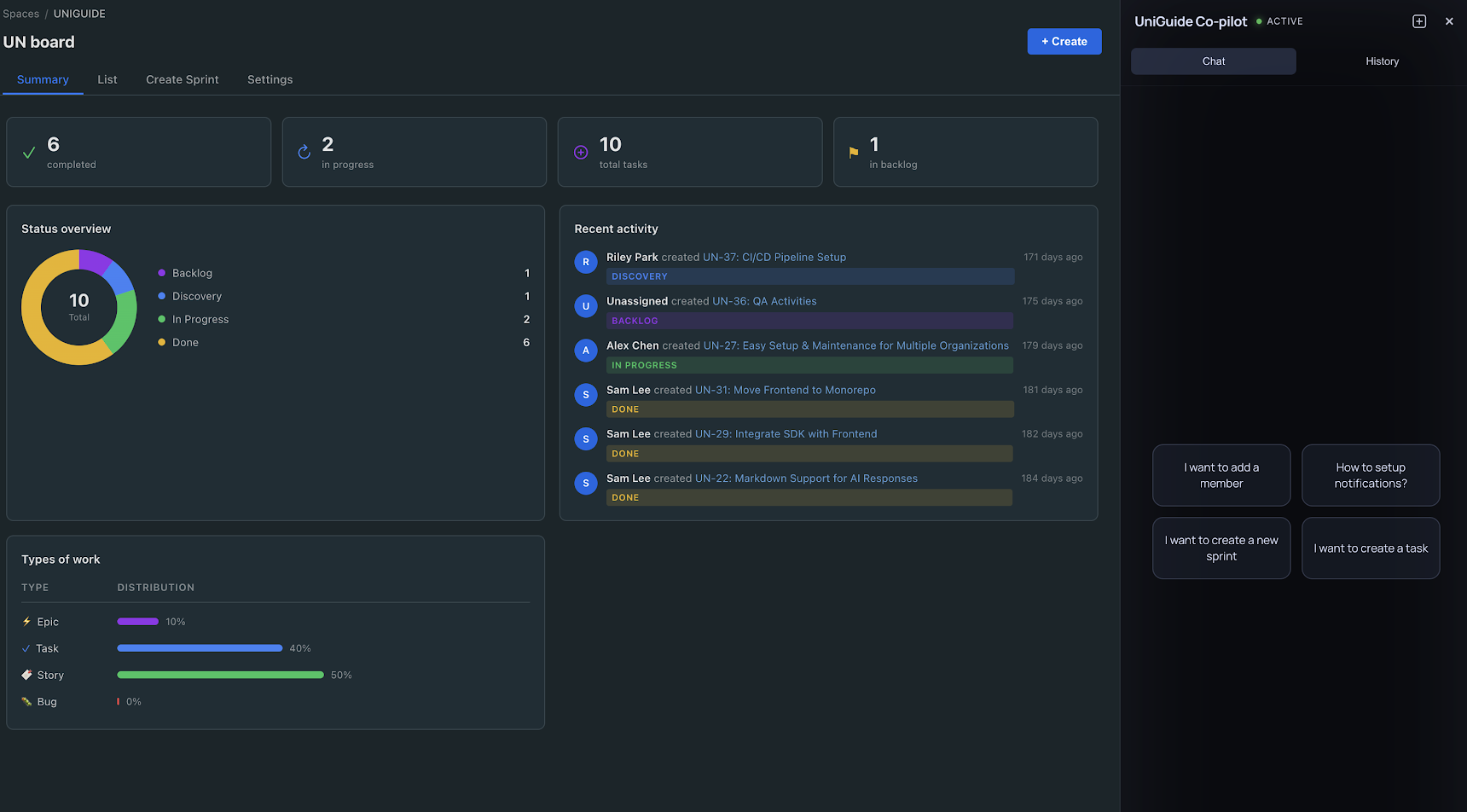
Start page
Image
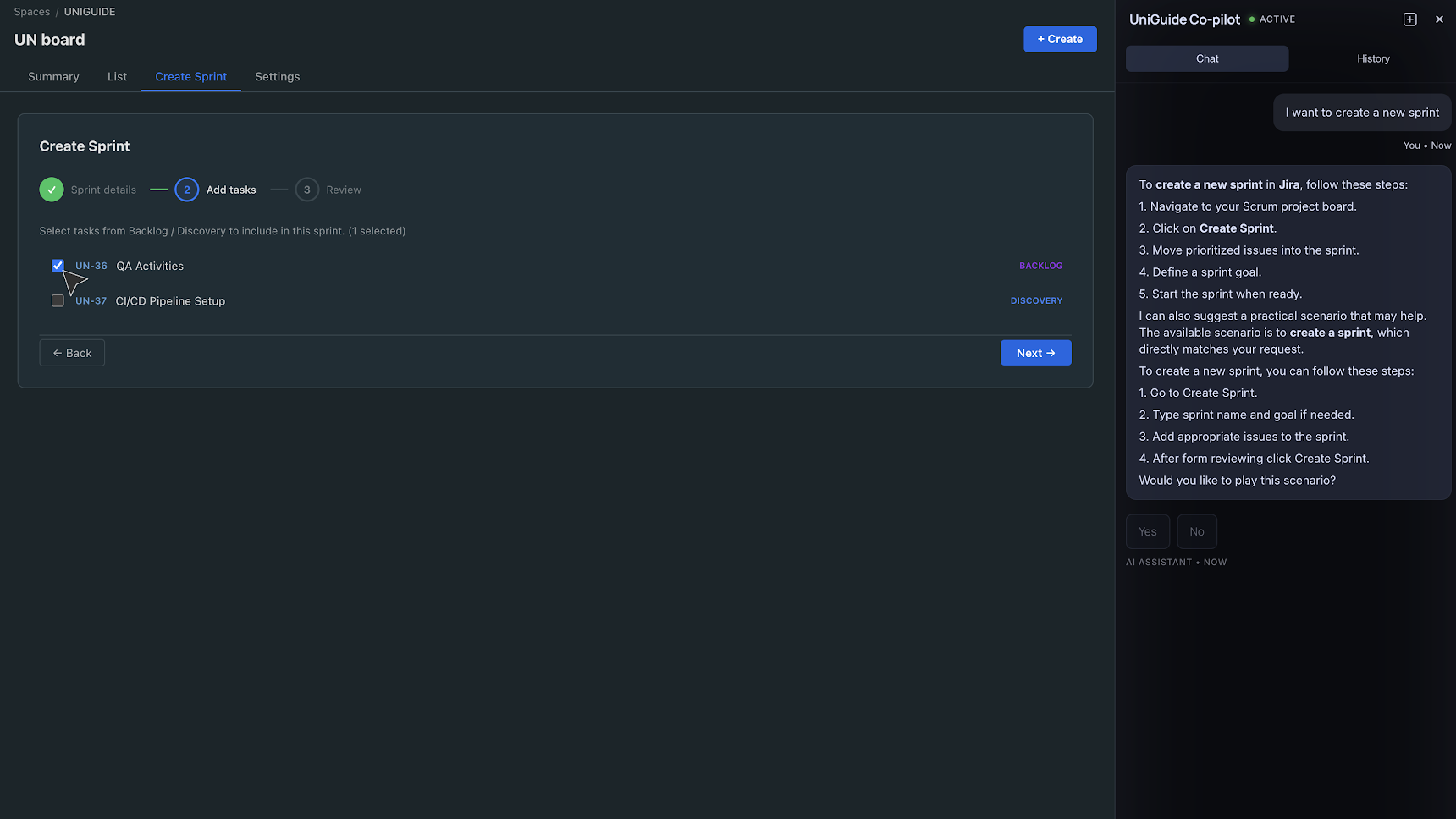
Create Sprint page
Image
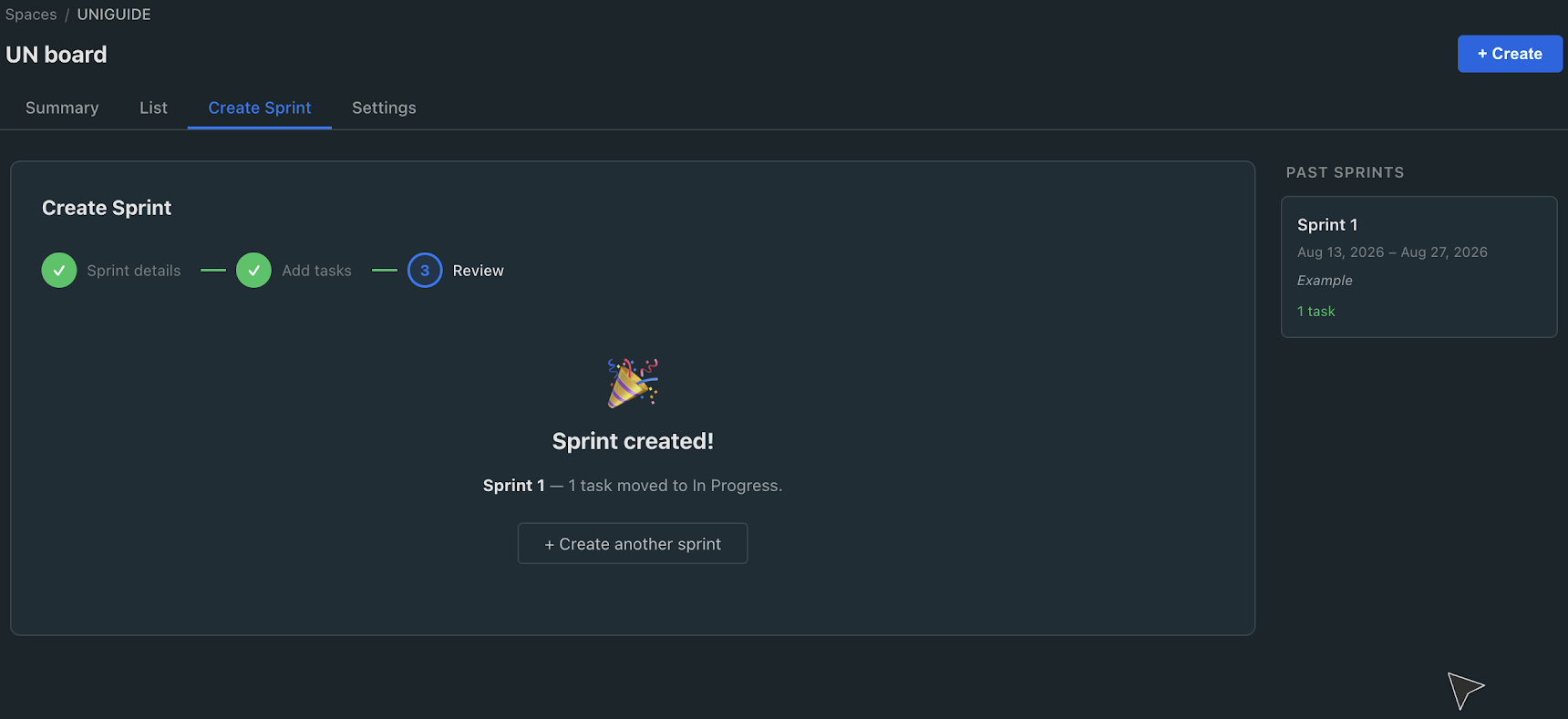
Successfully created sprint page

Video
Product video
Most software loses users in the same three places. People never reach first value and quietly churn. Support answers the same "how do I" question hundreds of times. And the product team never finds out what users were actually trying to do.
UniGuide closes all three gaps from a single install. It is an AI product expert that embeds inside your own interface, whatever you have built, from a customer facing SaaS platform to an internal line of business tool. A user asks a question in plain language. UniGuide reads the context they are in, their role, the screen they are on and what they were just doing, then answers strictly from your own verified knowledge base. If the answer is not there it says so rather than inventing one. Then it does the part a chatbot cannot: it shows the user exactly where to click, step by step, and asks whether it should complete the task for them. The user stays in control.
*** MEASURED IMPACT ***
- Activation up 5 to 15 percent.
- Early churn down 10 to 25 percent.
- Support tickets down 30 to 50 percent.
*** WHAT EACH TEAM GETS ***
- End users get help in the moment, inside the product, with no docs and no tickets.
- Support teams see repetitive first line questions disappear before a ticket is ever opened.
- Product teams get a ranked view of where users get stuck and what they keep asking for.
- Growth and customer success teams get churn risk and upsell signals pulled straight out of conversations that were already happening.
*** ACROSS THE USER LIFECYCLE ***
- Onboarding and activation. UniGuide identifies the user's role, builds an onboarding path around their use case, walks them through their first real task, and steps in on its own when someone stops making progress.
- Retention. It supports daily work, introduces relevant features in context while the user is working rather than by email, and flags churn risk early.
- Expansion. It spots upgrade intent, triggers the offer at the right moment, and turns everyday conversations into ranked feature requests.
*** HOW IT FITS YOUR STACK ***
UniGuide integrates through an SDK, about one line of code and an hour of engineering time on your side, similar to adding an analytics tag. It is model agnostic, so the underlying LLM can be chosen or swapped to match your cloud and compliance requirements. It runs inside your own perimeter, so chat history and customer data stay in your account. It can also run live SQL against your database during a conversation, so users get answers about their own data, not just about the product. The widget is white label and matches your brand. A typical pilot runs four weeks, covering a joint workshop, integration and 20 to 30 guided scenarios, and you own the resulting code.
*** ABOUT THIS LISTING ***
This listing deploys a working demo, not a slide deck. A CloudFormation template provisions a sample project management application with a live UniGuide instance into your own AWS account, so you can ask real questions and watch it guide and act. Five preloaded scenarios cover what a brand new user tries on day one.
The demo runs on Amazon ECS with AWS Fargate from a verified image in our ECR repository, deploys into an existing VPC or a new isolated one, terminates HTTPS at an Application Load Balancer using your own ACM certificate, and ships with Amazon CloudWatch enabled. It is stateless and uses least privilege IAM roles.
Dedicatted is an AWS Premier Tier Services Partner and the first Canadian partner to earn both AWS AI Competencies, Generative AI and Agentic AI.
Highlights
- Answers in context, not from a script. UniGuide reads the user's role, current screen and session history, replies only from your verified documentation, and says it does not know rather than guessing.
- Guides, then acts. It highlights exactly where to click and, with the user's permission, completes multi-step tasks inside your UI. Deployments see 30 to 50 percent fewer support tickets.
- Turns conversations into signal. Every chat becomes structured insight: ranked feature requests, churn risk accounts and upsell moments, on a dashboard your product and customer success teams can act on.
Details
Sold by
Delivery method
Supported services
Delivery option
Delivery Option - Recommended
Latest version
Operating system
Linux
Deployed on AWS
New
Introducing multi-product solutions
You can now purchase comprehensive solutions tailored to use cases and industries.

Features and programs
Trust Center

Access real-time vendor security and compliance information through their Trust Center powered by Drata or Vanta. Review certifications and security standards before purchase.
Financing for AWS Marketplace purchases
AWS Marketplace now accepts line of credit payments through the PNC Vendor Finance program. This program is available to select AWS customers in the US, excluding NV, NC, ND, TN, & VT.

Pricing
This product is available free of charge. Free subscriptions have no end date and may be canceled any time.
Additional AWS infrastructure costs may apply. Use the AWS Pricing Calculator to estimate your infrastructure costs.
Vendor refund policy
The product is free, so there is no refund policy.
Custom pricing options
Request a private offer to receive a custom quote.

Legal
Vendor terms and conditions
Upon subscribing to this product, you must acknowledge and agree to the terms and conditions outlined in the vendor's End User License Agreement (EULA) .
Content disclaimer
Vendors are responsible for their product descriptions and other product content. AWS does not warrant that vendors' product descriptions or other product content are accurate, complete, reliable, current, or error-free.
Delivery details
Delivery Option - Recommended
Supported services: Learn more
- Amazon ECS
- Amazon ECS Anywhere
Container image
Containers are lightweight, portable execution environments that wrap server application software in a filesystem that includes everything it needs to run. Container applications run on supported container runtimes and orchestration services, such as Amazon Elastic Container Service (Amazon ECS) or Amazon Elastic Kubernetes Service (Amazon EKS). Both eliminate the need for you to install and operate your own container orchestration software by managing and scheduling containers on a scalable cluster of virtual machines.
Version release notes
Latest version of the released product.
Additional details
Usage instructions
IAM Roles and Policies The stack creates two IAM roles, both trusted by ecs-tasks.amazonaws.com. The task execution role (TaskExecutionRole) attaches the AWS-managed AmazonECSTaskExecutionRolePolicy, granting the ECS agent the minimum needed to pull the container image from Amazon ECR and write container logs to Amazon CloudWatch Logs. The task role (TaskRole) is created with no policies attached and is available for the application to assume if it later needs to call AWS APIs; as delivered it grants no permissions, ensuring a least-privilege posture. No write or modify access to other AWS services is included by default.
Keys No KMS or Secrets Manager keys are created. CloudWatch log data is encrypted at rest with the AWS-managed key by default. No EC2 key pair is created the workload is serverless (AWS Fargate), so there are no hosts to SSH into; operational access is via the AWS console, CloudWatch Logs, and ECS Exec if enabled.
Network Configuration The template supports deployment into either a new VPC (with two public subnets across two Availability Zones, an Internet Gateway, route table, and security groups) or an existing VPC (using your supplied VPC ID and subnet IDs). Both the Application Load Balancer and the Fargate tasks are placed in the public subnets, and tasks are assigned public IP addresses to reach ECR and CloudWatch. Inbound access to the load balancer is restricted to TCP port 80 from the CIDR block you specify (AllowedClientCidr); the tasks accept traffic only from the load balancer's security group. Outbound access is unrestricted.
Application Launch and Communication The stack launches a single Amazon ECS service (DesiredCount: 1) on AWS Fargate, running an ARM64/Graviton container (256 CPU units / 512 MiB) from a region-specific Amazon ECR image. The service registers with an internet-facing Application Load Balancer through a target group (target type ip, health check GET /, healthy matcher 200 to 399). A deployment circuit breaker with automatic rollback is enabled so failed deployments fail fast instead of stalling. The CloudFormation outputs include the service access URL (http://<alb-dns>:80), the ALB DNS name, the ECS cluster name, and the VPC in use.
Pricing and Service Limits Primary cost drivers are the Fargate task (vCPU/memory per second), the Application Load Balancer (hourly + LCU), CloudWatch Logs ingestion/storage, and any outbound data transfer. VPC networking components (VPC, IGW, route table, security groups) incur no additional charges. Container Insights adds CloudWatch metrics charges. Limits to be aware of include Fargate task and vCPU quotas, ELB and target-group quotas, and VPC/IGW limits. For accurate estimates, use the AWS Pricing Calculator with your task size, image pull frequency, and expected data egress.
Data Encryption CloudWatch Logs are encrypted at rest with the AWS-managed key. No databases or persistent storage volumes are created by the template. Data in transit is served over HTTP on port 80; HTTPS/TLS is not configured. For production use, AWS recommends adding an HTTPS listener with an ACM-managed TLS certificate, moving the tasks to private subnets behind a NAT Gateway or VPC endpoints, and using CloudWatch and Container Insights for logging and monitoring.
This deployment provides a secure, cost-effective, serverless foundation for running a single containerized web service behind a load balancer with minimal setup effort.
Resources
Support
Vendor support
Support Details:
At Dedicatted, we are committed to providing our customers with exceptional support to ensure they receive the most value from our product. Customers who purchase our product can expect to receive the following level of support:
Contact information: Customers can reach out to us via email at contact@dedicatted.com or through our website.
Support channels: We offer a variety of support channels to ensure our customers receive timely and efficient support. Our support channels include:
- Email: Customers can email our support team at any time with questions or issues. We strive to respond within 24 hours.
- Google Chat: Customers can chat with our support team in real-time to get quick answers to their questions or assistance with any issues they may be experiencing.
- Phone support: Customers can call our support team during business hours, Monday through Friday, from 9 am to 5 pm EST.
Support level: We provide technical support for our product, including assistance with installation, configuration, and troubleshooting. Additionally, we offer guidance and best practices to help customers optimize their DevOps processes.
Overall, our goal is to ensure our customers receive exceptional support and have a positive experience with our product. We are committed to helping our customers achieve success with their DevOps processes and AWS cloud adoption.
AWS infrastructure support
AWS Support is a one-on-one, fast-response support channel that is staffed 24x7x365 with experienced and technical support engineers. The service helps customers of all sizes and technical abilities to successfully utilize the products and features provided by Amazon Web Services.
Similar products

Dedicatted's mobile GenAI assistant on AWS equips field technicians with AR-guided repairs, diagnostics, and real-time documentation via voice/image input. Maintenance crews resolve issues 40% faster, reduce downtime, and generate compliant work orders automatically

Streamline legal document workflows by leveraging Generative AI on AWS to automate drafting, review, and analysis—enhancing accuracy, efficiency, and compliance

Dedicatted’s GenAI-powered solution automates report generation by processing raw data, extracting insights, and producing structured reports with AWS services—cutting reporting time and improving decision quality.

Dedicatted automates technical documentation generation on AWS using Generative AI to analyze code, APIs, and specs, producing up‑to‑date API references, guides, and changelogs. Engineering teams save dozens of hours quarterly on manual doc maintenance while improving developer experience for internal teams, customers, and partners.
Customer reviews
No customer reviews yet
Be the first to review this product . We've partnered with PeerSpot to gather customer feedback. You can share your experience by writing or recording a review, or scheduling a call with a PeerSpot analyst.