
Sold by: cloudimg
Deployed on AWS
Free Trial
AWS Free Tier
This product has charges associated with it for seller support. Production-ready Apache Solr 9 AMI with secure authentication from first boot. Eliminates manual setup so DevOps teams can run queries in minutes, backed by 24/7 expert support.
Overview
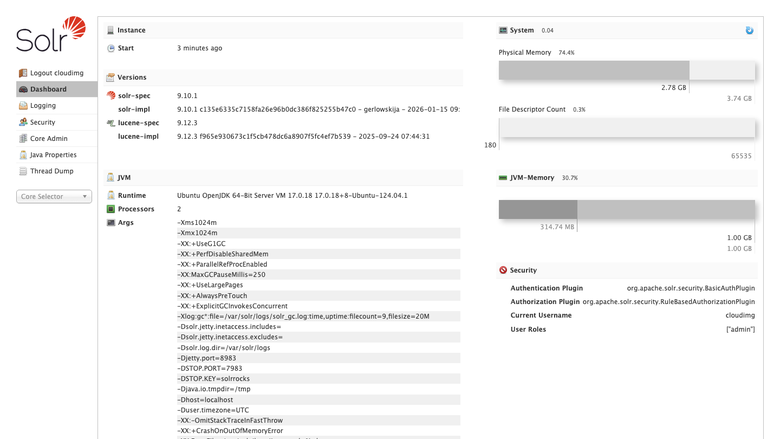
Image
Solr Admin UI dashboard
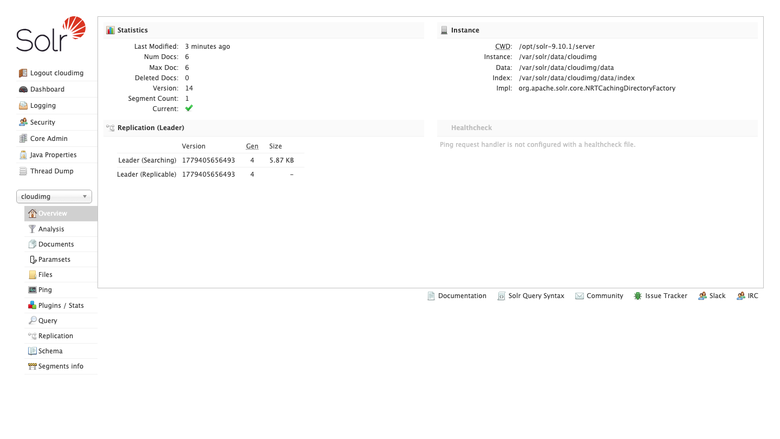
Image
Search core overview
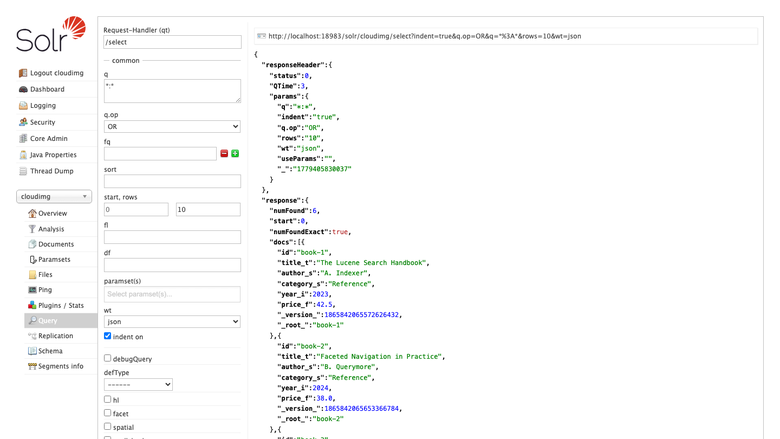
Image
Query interface
This is a repackaged open source software product wherein additional charges apply for cloudimg support services.
The Problem: Deploying Search Should Not Take Days
Setting up Apache Solr from scratch means installing Java, configuring service files, hardening authentication, provisioning storage, and creating initial cores - a process that can consume hours or days of engineering time. Most community images ship with default credentials or no authentication at all, exposing your admin UI to the internet. This AMI eliminates that burden entirely.
What You Get
Apache Solr 9 fully installed and running as a system service on OpenJDK 17. A demonstration search core is pre-created from the bundled default configset, so the server is queryable the moment you sign in. Full-text search, faceted navigation, hit highlighting, rich document indexing, vector kNN retrieval, and streaming analytics are all available immediately.
Secure by Default - No Shared Credentials
Unlike images that ship with published default passwords, this AMI generates a unique administrator password on first boot. A one-shot service creates the credential, writes it into the Solr security configuration as a salted hash, and records the plain value in a file only the root user can read. Every endpoint under the Solr context requires a valid login from the first moment the instance is reachable. You avoid the most common misconfiguration that leads to exposed search clusters.
Production-Grade Storage Layout
The Solr data directory lives on a dedicated, independently resizable EBS volume, separate from the operating system disk. Indexes, cores, and transaction logs all land on that volume. When your index grows, resize the data volume without touching the OS or redeploying - no downtime, no data migration.
Getting Started
- Launch the AMI on your chosen EC2 instance type (recommended: m5.large or larger for production workloads).
- Open TCP port 8983 in your security group for your trusted IP range.
- SSH into the instance and retrieve the admin password from the root-only file.
- Browse to http://your-instance-ip:8983 and sign in to the Solr Admin UI.
- Create cores, define schemas, index documents, and run queries.
The demonstration core is queryable as soon as you authenticate, so you can validate the deployment in minutes.
Evaluate Before You Scale
Launch on a t3.medium instance to explore the Admin UI, test schema designs, and run sample queries against the demo core. When you are satisfied, scale up to a production instance type and attach a larger data volume - no reinstallation required.
Detailed Use Case: Ecommerce Product Search
A mid-market retailer indexing hundreds of thousands of SKUs can deploy this AMI to power faceted product navigation with filters for brand, price range, size, and availability. Solr's near-real-time indexing keeps search results current as inventory changes, while vector kNN retrieval enables "find similar products" recommendations. The dedicated data volume means the index can grow with the catalogue without OS-level changes.
Additional Use Cases
- Website and application search with sub-second response times
- Document and knowledge base search with hit highlighting
- Log and event search for operational analytics
- Faceted analytics and vector similarity retrieval
Why This AMI Over a Manual Install
- Minutes vs. hours: Skip Java installation, service configuration, and security hardening.
- Secure from boot: No exposed admin UI, no default credentials to forget to change.
- Separated storage: Resize indexes independently without OS changes.
- Expert support: 24/7 assistance from cloudimg engineers for schema design, query tuning, and scaling to SolrCloud.
Next Steps
Subscribe and launch to begin evaluating. For guidance on schema design, SolrCloud clustering, or production sizing, contact cloudimg support via email or live chat - our engineers are available around the clock.
All product and company names are trademarks or registered trademarks of their respective holders. Use of them does not imply any affiliation with or endorsement by them.
Highlights
- Apache Solr preinstalled and running as a service, with OpenJDK 17, a demonstration search core and no manual setup required
- Hardened first boot enables Solr authentication and generates a fresh administrator password for every instance, stored as a salted hash and recorded in a file only the root user can read
- 24/7 technical support from cloudimg, with expert assistance for Solr deployment, schema design, query tuning and scaling
Details
Sold by
Delivery method
Delivery option
64-bit (x86) Amazon Machine Image (AMI)
Latest version
Operating system
Ubuntu 24.04
Deployed on AWS
New
Introducing multi-product solutions
You can now purchase comprehensive solutions tailored to use cases and industries.

Features and programs
Financing for AWS Marketplace purchases
AWS Marketplace now accepts line of credit payments through the PNC Vendor Finance program. This program is available to select AWS customers in the US, excluding NV, NC, ND, TN, & VT.

Pricing
Free trial
Try this product free for 7 days according to the free trial terms set by the vendor. Usage-based pricing is in effect for usage beyond the free trial terms. Your free trial gets automatically converted to a paid subscription when the trial ends, but may be canceled any time before that.
Pricing is based on actual usage, with charges varying according to how much you consume. Subscriptions have no end date and may be canceled any time. Alternatively, you can pay upfront for a contract, which typically covers your anticipated usage for the contract duration. Any usage beyond contract will incur additional usage-based costs.
Additional AWS infrastructure costs may apply. Use the AWS Pricing Calculator to estimate your infrastructure costs.
If you are an AWS Free Tier customer with a free plan, you are eligible to subscribe to this offer. You can use free credits to cover the cost of eligible AWS infrastructure. See AWS Free Tier for more details. If you created an AWS account before July 15th, 2025, and qualify for the Legacy AWS Free Tier, Amazon EC2 charges for Micro instances are free for up to 750 hours per month. See Legacy AWS Free Tier for more details.
Dimension | Description | Cost/hour |
|---|---|---|
m5.large Recommended | m5.large | $0.08 |
t2.micro | t2.micro instance type | $0.04 |
t3.micro | t3.micro instance type | $0.04 |
c7i.2xlarge | c7i.2xlarge instance type | $0.24 |
m7a.24xlarge | m7a.24xlarge instance type | $0.24 |
r6idn.large | r6idn.large instance type | $0.08 |
c8i.32xlarge | c8i.32xlarge instance type | $0.24 |
c5a.large | c5a.large instance type | $0.08 |
c7i.xlarge | c7i.xlarge instance type | $0.12 |
x8i.metal-96xl | x8i.metal-96xl instance type | $0.24 |
Vendor refund policy
Refunds available on request.

Legal
Vendor terms and conditions
Upon subscribing to this product, you must acknowledge and agree to the terms and conditions outlined in the vendor's End User License Agreement (EULA) .
Content disclaimer
Vendors are responsible for their product descriptions and other product content. AWS does not warrant that vendors' product descriptions or other product content are accurate, complete, reliable, current, or error-free.
Delivery details
64-bit (x86) Amazon Machine Image (AMI)
Amazon Machine Image (AMI)
An AMI is a virtual image that provides the information required to launch an instance. Amazon EC2 (Elastic Compute Cloud) instances are virtual servers on which you can run your applications and workloads, offering varying combinations of CPU, memory, storage, and networking resources. You can launch as many instances from as many different AMIs as you need.
Version release notes
Initial release of Apache Solr on AWS.
Additional details
Usage instructions
Connect via SSH on port 22 as the default login user for your operating system variant (the user guide lists it per variant). Apache Solr and the Solr Admin UI are served on port 8983. Browse to http://<instance-public-ip>:8983/solr/ and sign in as the 'cloudimg' user. Retrieve the generated administrator password with: sudo cat /root/solr-credentials.txt. To enable HTTPS, follow the TLS section of the user guide or terminate TLS at an upstream load balancer.
Resources
Vendor resources
Support
Vendor support
cloudimg provides 24/7 technical support for this Apache Solr AMI by email and live chat.
How to Get Help
Email: support@cloudimg.co.uk Live chat: Available around the clock
What We Cover
- Deployment and launch troubleshooting
- Solr configuration, schema, and configset design
- Query tuning and search relevance optimization
- Performance analysis and scaling guidance
- Upgrades and patching
- Scaling from standalone to SolrCloud
- Assistance with refund requests
Response Times
Critical issues receive a one-hour average response. Our engineers work to resolve non-critical requests promptly during all hours.
Getting Started Support
If you need help retrieving your administrator password, configuring security groups, creating your first core, or planning a production deployment, contact us immediately after launch. We are happy to walk you through the initial setup.
Architecture Consultation
For teams planning production deployments, our engineers can advise on instance sizing, EBS volume configuration, SolrCloud topology, and schema design. Reach out via email or chat to discuss your requirements.
AWS infrastructure support
AWS Support is a one-on-one, fast-response support channel that is staffed 24x7x365 with experienced and technical support engineers. The service helps customers of all sizes and technical abilities to successfully utilize the products and features provided by Amazon Web Services.
Similar products

Apache Hudi connector with shaded dependencies to work with AWS Glue.

Easily access Iceberg tables and operate DDLs, reads/writes, time-travels, streaming writes on the Iceberg tables.

Bansir offers this software product repackaged where additional charges apply for technical support provided by Bansir Cloud email support@bansircloud.com.
This product has a fee associated with the provision and deployment of the application and AMI support. Apache Superset is a modern, enterprise-ready business intelligence web application.

Enterprise-grade Kafka UI and API for deep visibility, precise control, and instant action across your ecosystem. Kpow is secure, vendor-agnostic, and trusted by Fortune 500s for managing Apache Kafka at scale.
Customer reviews
No customer reviews yet
Be the first to review this product . We've partnered with PeerSpot to gather customer feedback. You can share your experience by writing or recording a review, or scheduling a call with a PeerSpot analyst.