
Sold by: Solve DevOps
Deployed on AWS
AWS Free Tier
This is a repackaged open-source software product wherein additional charges apply for a source-built FreeSWITCH softswitch with production file descriptor and kernel tuning, per-instance SIP password generation, Amazon CloudWatch log and metric shipping, AWS Systems Manager agent integration, SSH hardening, and vendor support.
Overview
FreeSWITCH on AWS - Production-Ready Cloud PBX and VoIP Platform
FreeSWITCH is a scalable open-source telephony platform for voice, video, and messaging that powers softswitches, PBXs, conference bridges, and SIP trunking gateways. This AMI delivers FreeSWITCH compiled from the official release source with its supporting libraries, tuned for production workloads, hardened at first boot, and configured with AWS-native observability and management agents.
FreeSWITCH is widely adopted across the telecommunications industry, powering platforms such as BigBlueButton and used by organizations including the U.S. Department of Veterans Affairs. Common deployment scenarios include PBX systems, IVR platforms, videoconferencing servers, session border controllers, and embedded communication solutions.
Who This Is For
- VoIP service providers deploying scalable call routing and SIP trunking solutions on AWS
- Developers building real-time communications applications with SIP, WebRTC, or custom integrations
- Enterprises seeking an open-source PBX alternative to replace legacy on-premises telephony systems
- System integrators delivering hosted communication services for their customers
What Is Included
- FreeSWITCH built from official release source with spandsp, sofia-sip, libks, and signalwire-c libraries; installed to /usr/local/freeswitch with core sounds and music-on-hold
- Production-tuned systemd service running FreeSWITCH as a dedicated unprivileged user with LimitNOFILE 200000 and LimitNPROC 60000, matching PAM limits, and kernel sysctl tuning (file-max, somaxconn, local port range, tcp_fin_timeout) for high call volumes
- Per-instance credential generation - A first-boot script replaces the SIP default_password in vars.xml with a random value unique to your instance and then deletes itself, so no two launches share a password
- Amazon CloudWatch integration - The CloudWatch agent ships FreeSWITCH logs, syslog, and auth logs to CloudWatch Logs (log groups /solvedevops/freeswitch/*, 30-day retention) and publishes CPU, memory, disk, TCP connection, and process metrics under the SolveDevOps/FreeSWITCH namespace with InstanceId, InstanceType, and AutoScalingGroupName dimensions
- AWS Systems Manager integration - The SSM agent enables Session Manager access, Patch Manager patching, and Run Command management without opening inbound SSH
- Security hardening - Event Socket listener bound to localhost only; SSH key-only authentication with root login disabled; no pre-set passwords baked into the image; build-time SSH keys and cloud-init state scrubbed so every launch starts clean
- Pre-installed modules including mod_sofia, mod_conference, mod_event_socket, mod_xml_curl, conferencing, and voicemail
- Protocol support for SIP (UDP/TCP/TLS), RTP, and WebRTC
Getting Started
Prerequisites: Attach an IAM instance role that includes the CloudWatchAgentServerPolicy and AmazonSSMManagedInstanceCore managed policies. The agents start automatically and detect the Region at boot. No AWS credentials are stored on the image.
Required ports: Open UDP/TCP 5060 and 5080 for SIP, TCP 5061 for SIP-TLS, and UDP 16384-32768 for RTP as required by your dialplan. Open TCP 22 for SSH if you are not using Session Manager.
- Launch the instance from AWS Marketplace
- Connect via SSH using your key pair: ssh -i your-key.pem admin@instance-ip
- Access the FreeSWITCH CLI: fs_cli
- Your generated SIP password is in /usr/local/freeswitch/conf/vars.xml
- Configuration lives in /usr/local/freeswitch/conf and logs in /usr/local/freeswitch/log
- Start configuring dial plans, SIP trunks, or applications
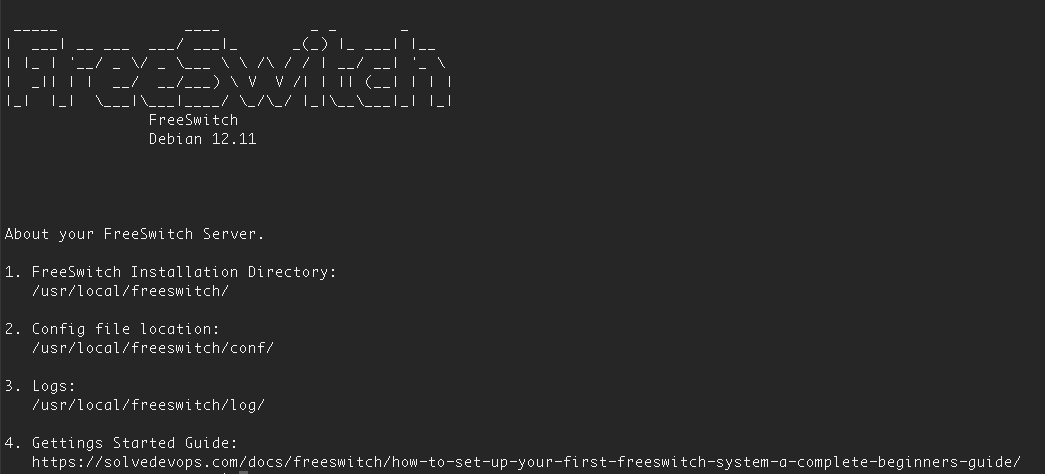
The login message of the day shows the install and configuration directories, log location, getting-started guide, CloudWatch namespace, and the IAM policies required to activate the agents. Full root access is provided.
Security
- SIP default_password regenerated randomly on first boot - unique per instance
- Event Socket (ESL) bound to 127.0.0.1 only
- Key-based SSH authentication with root login disabled and no baked-in credentials
- Build-time SSH keys and cloud-init state scrubbed for clean launches
- Runs on a minimal Debian image to reduce the attack surface
Launch your FreeSWITCH on Debian server today and start building your cloud communications platform with production-grade observability and security from the first boot.
Highlights
- FreeSWITCH compiled from official release source with spandsp, sofia-sip, libks, and signalwire-c. Includes core sounds and music-on-hold. Runs as a dedicated unprivileged user under systemd with LimitNOFILE 200000 and LimitNPROC 60000, matching PAM limits, and kernel sysctl tuning (file-max, somaxconn, local port range, tcp_fin_timeout) for high call volumes. Full root access provided.
- Security hardened at first boot: SIP default_password is regenerated randomly per instance so no two launches share credentials. Event Socket (ESL) bound to localhost only. SSH is key-only with root login disabled. No baked-in passwords or SSH keys - build-time keys and cloud-init state are scrubbed so every launch starts clean.
- AWS-native observability and management built in: Amazon CloudWatch agent ships FreeSWITCH, syslog, and auth logs to CloudWatch Logs with 30-day retention and publishes CPU, memory, disk, TCP, and process metrics under the SolveDevOps/FreeSWITCH namespace. AWS Systems Manager agent enables Session Manager, Patch Manager, and Run Command without opening inbound SSH.
Details
Sold by
Delivery method
Delivery option
64-bit (x86) Amazon Machine Image (AMI)
Latest version
Operating system
Debian 12
Deployed on AWS
Features and programs
Financing for AWS Marketplace purchases
AWS Marketplace now accepts line of credit payments through the PNC Vendor Finance program. This program is available to select AWS customers in the US, excluding NV, NC, ND, TN, & VT.

Pricing
Pricing is based on actual usage, with charges varying according to how much you consume. Subscriptions have no end date and may be canceled any time.
Additional AWS infrastructure costs may apply. Use the AWS Pricing Calculator to estimate your infrastructure costs.
If you are an AWS Free Tier customer with a free plan, you are eligible to subscribe to this offer. You can use free credits to cover the cost of eligible AWS infrastructure. See AWS Free Tier for more details. If you created an AWS account before July 15th, 2025, and qualify for the Legacy AWS Free Tier, Amazon EC2 charges for Micro instances are free for up to 750 hours per month. See Legacy AWS Free Tier for more details.
- ...
Dimension | Cost/hour |
|---|---|
t3.large Recommended | $0.0076 |
t3.micro | $0.0076 |
c6id.32xlarge | $0.0076 |
c6a.32xlarge | $0.0076 |
c6a.xlarge | $0.0076 |
c6id.xlarge | $0.0076 |
c6i.8xlarge | $0.0076 |
c6i.large | $0.0076 |
t3.nano | $0.0076 |
c5.12xlarge | $0.0076 |
Dimensions summary
You pay by the hour for the EC2 instance you run this software on. Pricing is not organized into feature tiers. Instead, each dimension maps to a specific AWS instance type, so your rate depends on the compute size you choose. Small burstable options like t3.nano, t3.micro, and t2.medium suit light testing. General-purpose m4 and m5 families, compute-optimized c4, c5, c6a, c6i, c6id, and c6in families, memory-optimized r5, and bare-metal or high-performance hpc options serve larger workloads. Rates scale with instance capacity. You stop paying when you stop the instance.
Top-of-mind questions for buyers
The hourly rate covers the FreeSWITCH software image running on your chosen EC2 instance type. The underlying compute is bundled into the rate you pick. AWS bills separately for resources like storage volumes, data transfer, and any elastic IPs, which are not part of this software charge.
Software charges meter running instance-hours only. When you stop the instance, the hourly software charge stops. AWS may still bill for attached storage that persists while the instance is stopped, but the FreeSWITCH software fee applies to running time. You stop paying the software rate when you stop the instance.
Each dimension maps to one EC2 instance type, so you pick based on the compute size your call volume needs. Light testing suits burstable t2 and t3 sizes; larger PBX or carrier-grade workloads suit bigger families. You can stop the instance and relaunch on a different type, which changes your hourly rate accordingly.
solvedevops.com
Helpful?
Vendor refund policy
Cancel Anytime

Legal
Vendor terms and conditions
Upon subscribing to this product, you must acknowledge and agree to the terms and conditions outlined in the vendor's End User License Agreement (EULA) .
Content disclaimer
Vendors are responsible for their product descriptions and other product content. AWS does not warrant that vendors' product descriptions or other product content are accurate, complete, reliable, current, or error-free.
Delivery details
64-bit (x86) Amazon Machine Image (AMI)
Amazon Machine Image (AMI)
An AMI is a virtual image that provides the information required to launch an instance. Amazon EC2 (Elastic Compute Cloud) instances are virtual servers on which you can run your applications and workloads, offering varying combinations of CPU, memory, storage, and networking resources. You can launch as many instances from as many different AMIs as you need.
Version release notes
Updates to the latest Security Patches for FreeSwitch and Debain 12
Additional details
Usage instructions
Getting Started:
- Provision an EC2 instance with the right capacity for your needs. For smaller installations we suggest; - 4 GB RAM - 30 GB hard disk.
- Access your Server using the IP Address issued by AWS for the initial setup.
- Enjoy the Power of FreeSwitch.
Resources
Vendor resources
Support
Vendor support
Solve DevOps supports installation and configuration questions about this FreeSWITCH AMI. Contact the support team at support@solvedevops.com .
AWS infrastructure support
AWS Support is a one-on-one, fast-response support channel that is staffed 24x7x365 with experienced and technical support engineers. The service helps customers of all sizes and technical abilities to successfully utilize the products and features provided by Amazon Web Services.
Similar products

This is a repackaged open-source software product with additional charges for a ready-to-run FreePBX® and Asterisk PBX, pre-tuned PHP and web server settings, Amazon CloudWatch log and metric shipping, AWS Systems Manager agent integration, SSH hardening, and vendor support.

This is a repackaged open-source software product wherein additional charges apply for a ready-to-run FusionPBX multi-tenant PBX with per-instance admin and database password generation, Amazon CloudWatch log and metric shipping, AWS Systems Manager agent integration, SSH hardening, and vendor support.

This is a repackaged open-source software product with additional charges for a ready-to-run FreePBX and Asterisk PBX, pre-tuned PHP and web server settings, Amazon CloudWatch log and metric shipping, AWS Systems Manager agent integration, SSH hardening, and vendor support.

This is a repackaged open source software product wherein additional charges apply for a fully built VICIdial contact-center stack with Asterisk, DAHDI and a tuned MariaDB, Amazon CloudWatch log and metric shipping, AWS Systems Manager integration, security hardening, and vendor support.
Customer reviews
No customer reviews yet
Be the first to review this product . We've partnered with PeerSpot to gather customer feedback. You can share your experience by writing or recording a review, or scheduling a call with a PeerSpot analyst.