
Sold by: Backup Assure
Deployed on AWS
Backup Assure Pro is a purpose-built appliance that automates and validates configuration backups for Cisco, Aruba, Juniper, and Fortinet. Deploy in 20 minutes, no Linux skills required.
Overview
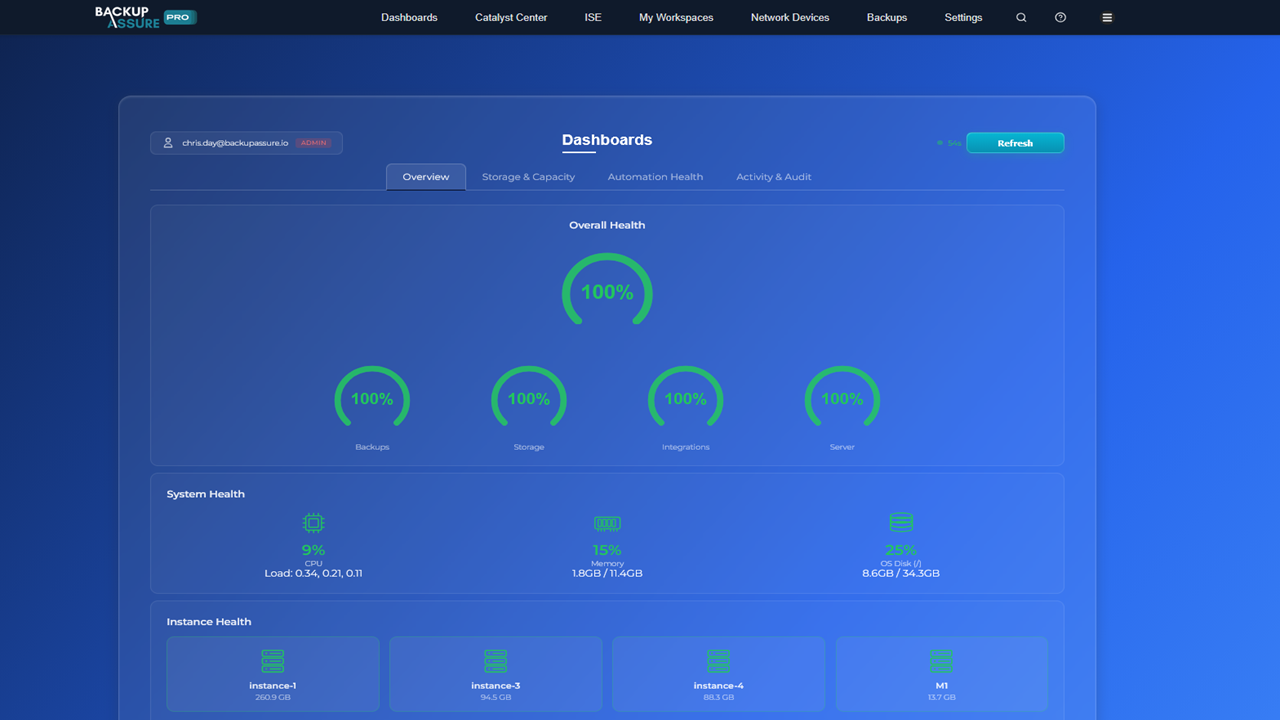
Image
dashboard
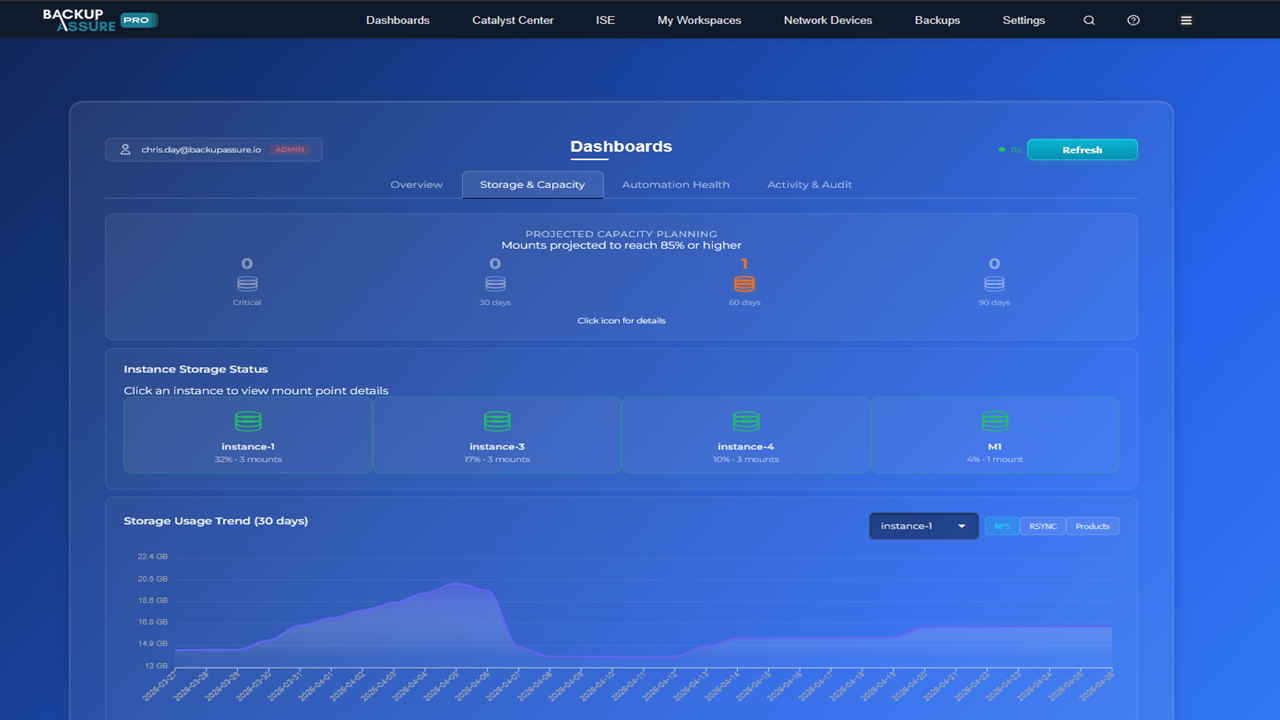
Image
capacity planning

Video
Product video
Backup Assure Pro is a purpose-built virtual appliance that automates, validates, and centrally manages configuration backups for your entire network infrastructure, across vendors, across protocols, in a single pane of glass.
Most organisations protect their network gear with a patchwork of vendor specific scripts, ad hoc Linux servers running NFS,SFTP,RSYNC, and a hope that the backups will actually restore when disaster strikes. Backup Assure Pro replaces all of it.
What it does:
Backs up configurations for Cisco (Catalyst Center, ISE, ACI, CUCM, FMC, Nexus), Aruba (ClearPass, Central, AOS-CX, AOS-S), Juniper (Junos, Mist, Paragon), Fortinet (FortiGate, FortiManager), and more Hosts the SFTP, NFS, RSYNC, and SCP targets each vendor expects pre-hardened, preconfigured Schedules backups, manages retention, and validates that each backup is restorable Generates audit ready reports for compliance teams Alerts on missed or failed backups before they become a recovery problem Why customers choose it:
Deploy in 20 minutes. Boot the appliance, answer a few questions in the web UI, take your first backup within the hour. No Linux skills required. Everything is web configurable. Your network team owns it without needing a Linux admin or a TAC case. Vendor aware. Built specifically for network infrastructure backup, not a generic file backup tool retrofitted for the job. Single appliance. One VM replaces the multiple Linux servers and scripts most teams maintain today. Proven in production. Customers ranging from enterprise networks to MSPs managing hundreds of devices. Use cases:
Network operations teams responsible for backup of Cisco, Aruba, Juniper, and Fortinet infrastructure MSPs delivering managed network services who need consistent, auditable backup across customer sites Compliance-driven organisations that need to prove backup integrity for audit Disaster recovery planning where rebuilding network configuration from scratch is not an option Deployment: Launch the AMI, complete the web-based setup wizard, point your network devices at the appliance, and you're collecting validated backups the same day. Licensing is by the number of devices protected.
For product information and support, visit https://backupassure.io or contact support@backupassure.io .
Highlights
- 1. Deploy in 20 Minutes, no Linux Skills Required .Launch the appliance, complete a webbased setup wizard, take your first backup within the hour .Fully web configurable your network team owns it without a Linux admin or vendor TAC case .Single sign-on via Entra ID with role based access control
- 2. One Appliance for Cisco, Aruba, Juniper, and Fortinet .Backs up Catalyst Center, ISE, ACI, CUCM, FMC, Nexus, ClearPass, Aruba Central, Junos, FortiGate, FortiManager, and more .Pre hardened SFTP, NFS, RSYNC, and SCP targets ready out of the box .Single pane of glass for scheduling, retention, and monitoring across your entire fleet
- 3. Enterprise Ready: API, Long Term Retention, and Audit Reporting .REST API and Microsoft Graph API integration for automation, alerts, and ITSM workflows .Long term backup safeguards prevent accidental deletion of historical configurations -Audit-ready validation and reporting for compliance and disaster recovery
Details
Sold by
Categories
Delivery method
Delivery option
64-bit (x86) Amazon Machine Image (AMI)
Latest version
Operating system
CentOs Stream 10
Deployed on AWS
New
Introducing multi-product solutions
You can now purchase comprehensive solutions tailored to use cases and industries.

Features and programs
Financing for AWS Marketplace purchases
AWS Marketplace now accepts line of credit payments through the PNC Vendor Finance program. This program is available to select AWS customers in the US, excluding NV, NC, ND, TN, & VT.

Pricing
Pricing and entitlements for this product are managed through an external billing relationship between you and the vendor. You activate the product by supplying a license purchased outside of AWS Marketplace, while AWS provides the infrastructure required to launch the product. AWS Subscriptions have no end date and may be canceled any time. However, the cancellation won't affect the status of the external license.
Additional AWS infrastructure costs may apply. Use the AWS Pricing Calculator to estimate your infrastructure costs.
Vendor refund policy
A 30 day free trial is available so customers can fully evaluate BackupAssure Pro prior to purchase. After purchase, refunds are issued only where the appliance is demonstrably not working as described, and only after we have been given a reasonable opportunity to diagnose and resolve the issue, which may include redeploying a fresh appliance instance. Where the issue cannot be resolved, a full refund will be provided.

Legal
Vendor terms and conditions
Upon subscribing to this product, you must acknowledge and agree to the terms and conditions outlined in the vendor's End User License Agreement (EULA) .
Content disclaimer
Vendors are responsible for their product descriptions and other product content. AWS does not warrant that vendors' product descriptions or other product content are accurate, complete, reliable, current, or error-free.
Delivery details
64-bit (x86) Amazon Machine Image (AMI)
Amazon Machine Image (AMI)
An AMI is a virtual image that provides the information required to launch an instance. Amazon EC2 (Elastic Compute Cloud) instances are virtual servers on which you can run your applications and workloads, offering varying combinations of CPU, memory, storage, and networking resources. You can launch as many instances from as many different AMIs as you need.
Version release notes
Backup Assure Pro 2.1.5 is a maintenance release continuing the 2.1.x series, delivering base-image stability and reliability improvements over 2.1.3.
Highlights of the 2.1.x series:
-
Initial setup wizard. A guided seven-step configuration flow with contextual tips, persistent navbar progress, and skippable steps.
-
Safeguard Retention. Tiered backup protection that automatically preserves yearly, monthly, and weekly snapshots, immune to global purge schedules.
-
ACME Certificate Automation. Automated TLS certificate issuance and renewal with percentage-based expiry alerts.
-
Cloud Diagnostics. Built-in remote troubleshooting for system resources, backup arrival timestamps, licence state, and infrastructure health.
-
Force admin password change on first login.
-
Cisco Discovery enhancements: source interface support, VRF awareness, archive verification, and improved failure visibility.
Patch notes for 2.1.5:
- Base appliance image stability and reliability fixes.
- Rolls up fixes previously delivered through the appliance update channel since 2.1.3.
Upgrade path:
This version is a fresh-install AMI for AWS deployments. Existing on-premises customers continue to receive automatic updates through the appliance's update channel.
Additional details
Usage instructions
Initial Access:
- Launch the instance from AWS Marketplace using the recommended instance type (m6i.xlarge or larger).
- Allow inbound TCP 443 from your administrator network in the security group.
- In a web browser, browse to your BackupAssure Pro instance's IP address. The appliance uses a self-signed certificate on first boot; accept the browser warning.
- Log in with the default credentials: Username: admin Password: Password!
- You will be required to change the admin password immediately on first login.
- Complete the first-time setup wizard to activate your licence, mount backup storage, configure email/alerts, and add your first backup sources.
SSH access (optional, for support): ssh -i <your-key.pem> ec2-user@<instance-ip> The ec2-user account has shell access only (no sudo).
Full installation guide, configuration documentation, and license activation instructions are available in the Backup Assure customer portal at https://backupassure.io .
Support: info@backupassure.io
Resources
Vendor resources
Support
Vendor support
Support email: support@backupassure.io Website:
AWS infrastructure support
AWS Support is a one-on-one, fast-response support channel that is staffed 24x7x365 with experienced and technical support engineers. The service helps customers of all sizes and technical abilities to successfully utilize the products and features provided by Amazon Web Services.
Similar products

Remote Expert SentinelOne Resource Up to 8 hours of professional services included

Protect your AWS Workloads with Rubrik Cloud Cluster node and Elastic S3 Storage as a fully managed service

SentinelOne Getting Started Assistance
Remote Expert SentinelOne Resource

The ProCap360™ platform is a scalable knowledge graph that organizes business products, services, or process collections of software supply chain components or SBOMs, release or build components or RBOMs and AI Model components or AIBOMs into actionable and auditable visualizations of real time production operations. We integrate with SDLC pipelines to score at each environment (dev, QA, SIT, Prod) the actual vulnerabilities found, upgrade options to remediate and priority based on KEV, EPSS and other exploitable signal sources. Our Continuous Monitoring option discovers and rescores new vulnerabilities or unscheduled changes measured against planned operations. Our Proactive left of boom visualization platform supports faster discovery and mitigation action that improves your Business Assurance Score and customer satisfaction.
Customer reviews
No customer reviews yet
Be the first to review this product . We've partnered with PeerSpot to gather customer feedback. You can share your experience by writing or recording a review, or scheduling a call with a PeerSpot analyst.