Sold by: Hourglass Software LLC
Deployed on AWS
Hourglass Quality Manager helps software teams release with confidence by finding quality risks before they reach customers. It learns from your development history to show which changes are most likely to cause problems, so testing effort goes where it matters most. The result is fewer defects in production, faster releases, and a clear view of product quality over time.
Overview
Image
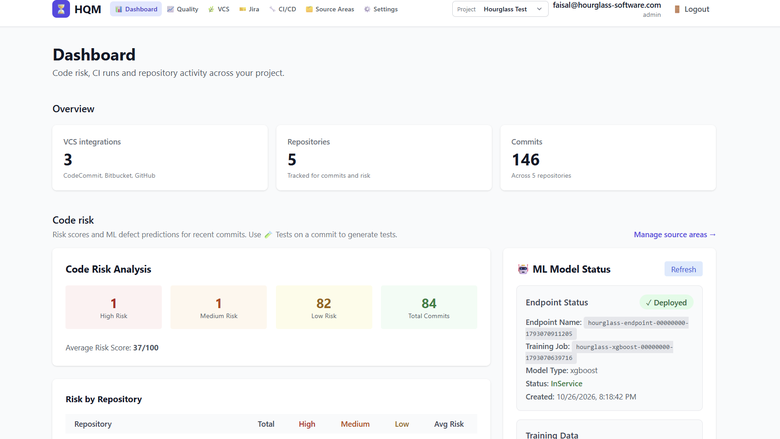
Dashboard
Image
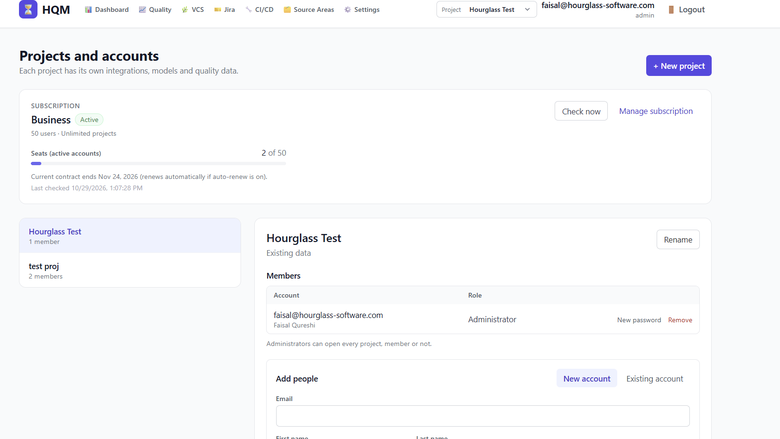
Projects
Image
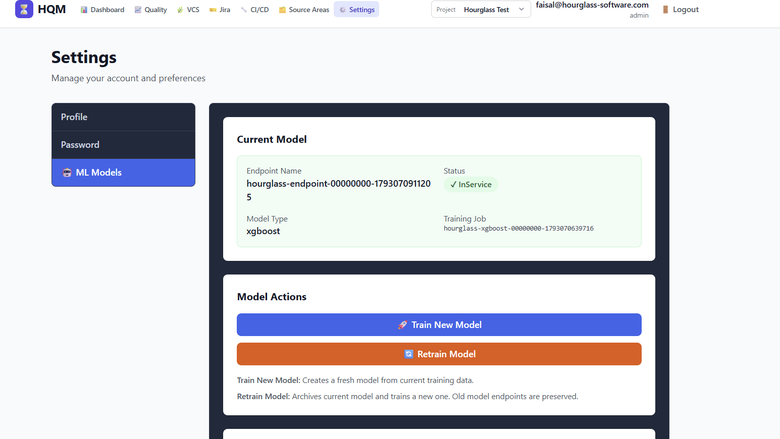
ML
Image
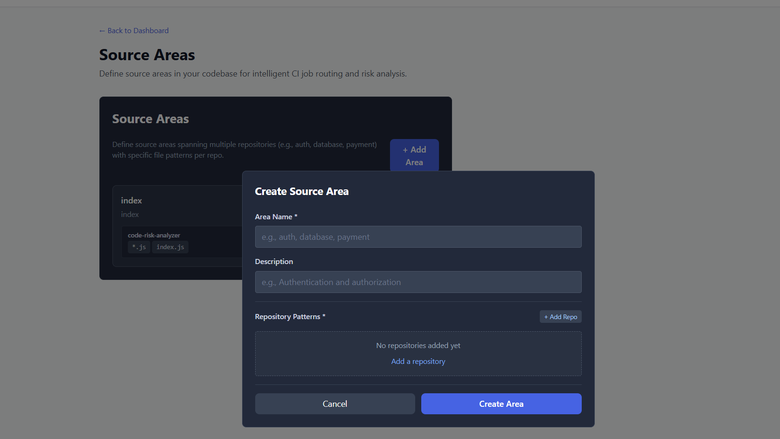
Source areas
Image
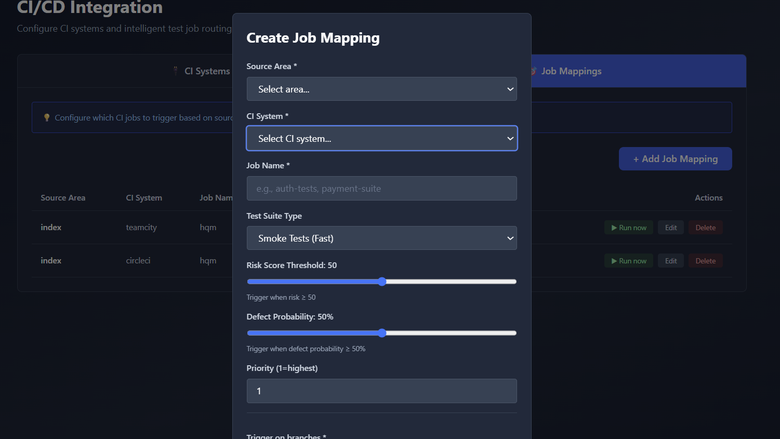
CICD
Image
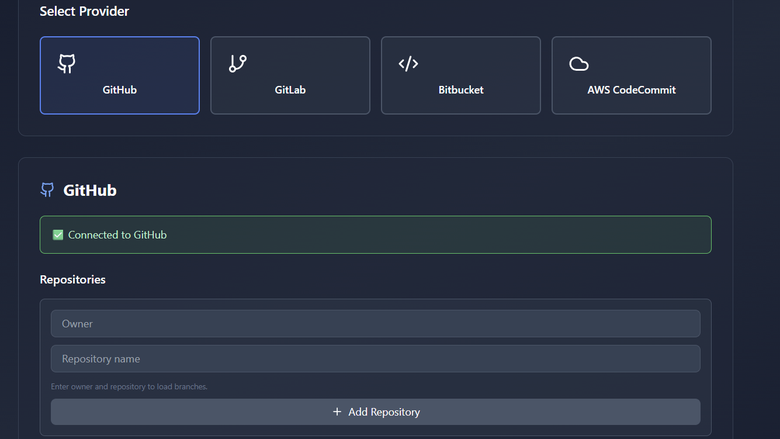
VCS
Image
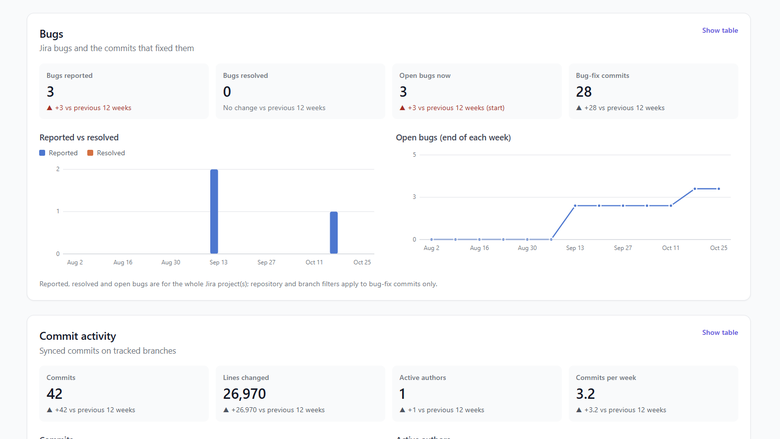
Activity
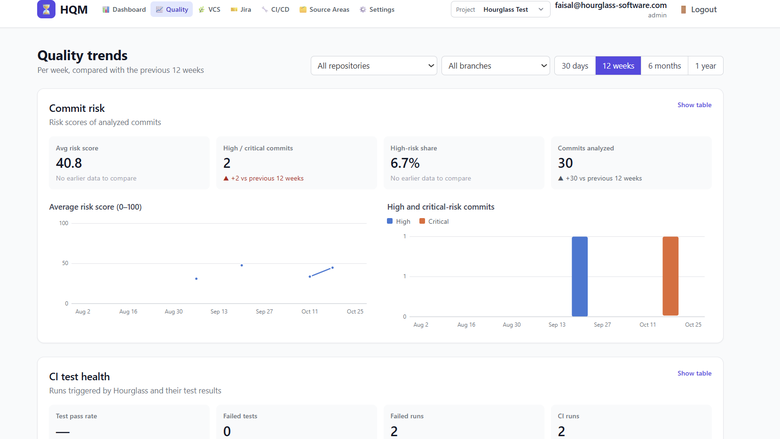
Image
Trends
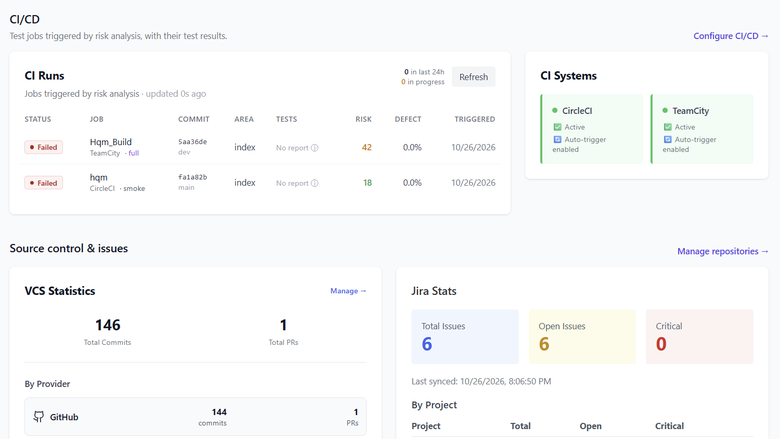
Image
Runs

Video
About

Video
Product video
Hourglass Quality Manager connects to your source code in GitHub, GitLab, Bitbucket or AWS CodeCommit, and to your issue tracking in Jira. As commits arrive, it links them to Jira issues and traces each bug fix back to the change that introduced the bug, building an accurate history of where defects come from in your codebase. Every new commit then gets a risk score based on factors such as the size and spread of the change, how often the files it touches have needed bug fixes, and the author's familiarity with that code. A machine learning model, trained with Amazon SageMaker on your own history, adds a defect probability that sharpens as your team keeps working, and the risk dashboard shows which changes deserve attention before they reach a release.
Those scores drive where testing effort goes. You map areas of your code to test jobs in Jenkins, GitHub Actions, GitLab CI, CircleCI, TeamCity, Azure Pipelines or AWS CodePipeline, and risky changes automatically trigger the right test runs, with the results pulled back into Hourglass. Where coverage is thin, Amazon Bedrock generates new tests in your repository's own language and test framework, following the style of your existing tests and skipping ones you already have. Over time, the Quality page shows how defect rates, test results and release risk are trending, so teams can see whether quality is improving from one release to the next.
Hourglass deploys into your own AWS account through a CloudFormation template, running on Amazon EC2 with your choice of Amazon RDS or a local database, and storing its data in Amazon S3 and AWS Secrets Manager. It uses least-privilege IAM roles instead of access keys, and your source code, issue data and models never leave your account. Plans are offered for teams of 10 or 50 users, or unlimited users, with unlimited projects on every plan.
Highlights
- Find quality risks before release: every commit gets a risk score learned from your own Git and Jira history, so teams see which changes are most likely to introduce defects before they reach customers.
- Focus testing where defects are likely: high-risk changes automatically trigger the right test jobs in your CI pipeline, and Amazon Bedrock writes new tests where coverage is thin.
- Your code and data stay in your AWS account: Hourglass runs entirely in your AWS account with least-privilege IAM roles, so you reduce quality risks without sending source code or issue data anywhere else.
Details
Sold by
Delivery method
Delivery option
Hourglass Quality Manager - CloudFormation
Latest version
Operating system
AmazonLinux 2023
Deployed on AWS
New
Introducing multi-product solutions
You can now purchase comprehensive solutions tailored to use cases and industries.

Features and programs
Financing for AWS Marketplace purchases
AWS Marketplace now accepts line of credit payments through the PNC Vendor Finance program. This program is available to select AWS customers in the US, excluding NV, NC, ND, TN, & VT.

Pricing
Pricing is based on the duration and terms of your contract with the vendor. This entitles you to a specified quantity of use for the contract duration. If you choose not to renew or replace your contract before it ends, access to these entitlements will expire.
Additional AWS infrastructure costs may apply. Use the AWS Pricing Calculator to estimate your infrastructure costs.
Dimension | Description | Cost/month |
|---|---|---|
Team | Up to 10 users, unlimited projects | $249.00 |
Business | Up to 50 users, unlimited projects | $999.00 |
Enterprise | Unlimited users and projects | $3,500.00 |
Vendor refund policy
New subscriptions can be cancelled for a full refund within 14 days of purchase. After 14 days, fees are non-refundable. Upgrades between plans take effect immediately and are prorated by AWS Marketplace. Charges for AWS resources used by the software (such as Amazon EC2, Amazon RDS, Amazon SageMaker and Amazon Bedrock) are billed by AWS and are not covered by this policy. To request a refund, email support@hourglass-software.com with your AWS account ID and the date of purchase.

Legal
Vendor terms and conditions
Upon subscribing to this product, you must acknowledge and agree to the terms and conditions outlined in the vendor's End User License Agreement (EULA) .
Content disclaimer
Vendors are responsible for their product descriptions and other product content. AWS does not warrant that vendors' product descriptions or other product content are accurate, complete, reliable, current, or error-free.
Delivery details
Hourglass Quality Manager - CloudFormation
This CloudFormation template deploys Hourglass Quality Manager into your own AWS account and VPC. It launches one Amazon EC2 instance from the Hourglass AMI, with an encrypted disk and IMDSv2 required, behind a security group that allows HTTPS only from the IP range you choose. HTTPS is served with a free Let's Encrypt certificate when you provide a domain name, or a self-signed certificate otherwise. An optional Elastic IP keeps the address fixed. There is no SSH access: administrators connect through AWS Systems Manager Session Manager.
For the database, choose Amazon RDS for PostgreSQL (recommended, with an optional Multi-AZ standby), or a local PostgreSQL database that is cheaper to run. The local database lives on its own encrypted EBS volume, kept when the server is replaced, with daily snapshots through Amazon Data Lifecycle Manager. The template also creates an encrypted Amazon S3 bucket for training data and models, generates the database password and encryption keys in AWS Secrets Manager, sends application logs to Amazon CloudWatch Logs, and creates least-privilege IAM roles for the server and for Amazon SageMaker. No access keys are created or requested.
Before you launch, you need a VPC with a subnet the server can reach the internet from, permission to create IAM roles, access to the Amazon Bedrock model used for test generation, and Amazon SageMaker quotas for model training (see the usage instructions). The stack is usually ready in about 5 minutes with the local database, or 15 minutes with RDS. To upgrade, update the stack with the new version; your data is kept. If you delete the stack, the S3 bucket, secrets, database snapshot and local database volume are retained so no data is lost.
CloudFormation Template (CFT)
AWS CloudFormation templates are JSON or YAML-formatted text files that simplify provisioning and management on AWS. The templates describe the service or application architecture you want to deploy, and AWS CloudFormation uses those templates to provision and configure the required services (such as Amazon EC2 instances or Amazon RDS DB instances). The deployed application and associated resources are called a "stack."
Version release notes
v1.1.3 - Product name and icon in the browser tab; Subscribe and Upgrade buttons link to the listing; ML models are kept separate per installation; v1.1.4 -CI runs and the Quality page use the current model defect predictions
Additional details
Usage instructions
BEFORE YOU LAUNCH
- Amazon SageMaker quotas (for defect prediction): in Service Quotas > Amazon SageMaker, request at least 1 for "ml.m5.xlarge for training job usage" and "ml.m5.large for endpoint usage" (or for the instance types you choose in the stack). New AWS accounts often start at 0.
- Amazon Bedrock (for AI test generation): make sure the model mistral.mistral-large-3-675b-instruct is available to your account in the stack's region.
- Permissions: the person launching the stack needs permission to use CloudFormation, EC2, IAM, S3, Secrets Manager, CloudWatch Logs and Systems Manager, plus RDS (database mode rds) or Data Lifecycle Manager (local database with snapshots). Acknowledge that the stack creates IAM resources.
IAM ROLES CREATED BY THE STACK No access keys are created or requested. The stack creates two least-privilege roles:
- Server role (EC2 instance profile): reads only this stack's secrets; reads and writes only this stack's S3 bucket; starts and manages SageMaker jobs and endpoints named hourglass-*; invokes the configured Bedrock model; checks your AWS Marketplace subscription with AWS License Manager; reads CodeCommit and CodePipeline/CodeBuild if you connect them; writes its CloudWatch log group; Session Manager access for administrators. With the local database it can also create, attach and snapshot only EBS volumes tagged with this stack's ID.
- SageMaker role: used only by training jobs and endpoints, with access to this stack's S3 bucket and its own logs.
LAUNCH
- Choose a VPC and a subnet that can reach the internet (public subnet, or private subnet with a NAT gateway).
- AllowedCidr: your office or VPN IP range, for example 203.0.113.0/24. Only this range can open the app.
- Optional: DomainName and TlsEmail for a trusted HTTPS certificate. Without a domain, the app uses a self-signed certificate and your browser shows a warning.
- DatabaseMode: rds (recommended for production) or local (lower cost).
- Wait for CREATE_COMPLETE (about 5 minutes with local, 15 with RDS), then open AppUrl from the stack's Outputs.
FIRST SIGN-IN
- Create the first account: it becomes the administrator. Do this right away, since the first person to open the app gets that role.
- If the app shows Subscription required right after subscribing, click Check now.
- Add people under Projects and accounts. Your plan sets the number of active users (Team 10, Business 50, Enterprise unlimited).
CONNECT YOUR TOOLS
- VCS: connect GitHub, GitLab, Bitbucket or AWS CodeCommit with a read-only token, then add repositories and choose the branches to track.
- Jira: connect with your site URL, your Atlassian email and an API token. Bug fixes are traced back to the commits that introduced them.
- CI/CD: add Jenkins, GitHub Actions, GitLab CI, CircleCI, TeamCity, Azure Pipelines or AWS CodePipeline. Define Source Areas (file patterns per repository), then Job Mappings that say which test job runs when a change in an area crosses your risk threshold.
- Settings > ML Models: click Train New Model once history has built up (at least 10 bug-introducing and 10 clean commits). Retrain monthly as more history accumulates.
UPGRADES AND OPERATIONS
- Upgrade by updating the stack with the new version from AWS Marketplace. Your data is kept.
- Logs: CloudWatch Logs group /hourglass/<stack name>. Shell access: EC2 > the instance > Connect > Session Manager.
- Deleting the stack keeps the S3 bucket, secrets, the RDS final snapshot and the local database volume so no data is lost; delete them by hand when no longer needed.
Support: support@hourglass-software.com
Resources
Vendor resources
Support
Vendor support
I you need assistance with the tool usage, or have encountered any issues, you can email support at support@hourglass-software.com
AWS infrastructure support
AWS Support is a one-on-one, fast-response support channel that is staffed 24x7x365 with experienced and technical support engineers. The service helps customers of all sizes and technical abilities to successfully utilize the products and features provided by Amazon Web Services.
Similar products

Witty is a powerful SaaS platform for comprehensive task and resource management, tailored for service-based businesses, manufacturing, IT system integrators, consulting companies, and outsourcing providers. By connecting task tracking, labor costs, equipment usage, client billing, and asset management, Witty provides real-time insights into project profitability. Key features include attendance tracking, client and inventory management, and built-in collaboration tools to streamline communication. Trusted across multiple industries, Witty enhances productivity, profitability, and strategic alignment for companies seeking efficient resource management.For custom pricing or private offers, please reach out to us marketplace@witty.team

Aspen Quality Management is designed to be a cornerstone of best-in-class contact centers. As the leading expert in contact center solutions, we understand your challenges. Our simple-to-use platform turns your customer
interaction data into insights that fuel your continuous improvement.
Amazon Connect Integration Connector for Aspect Cloud Quality brings Amazon Connect recordings and interaction metadata into Aspect Quality. It maps available interaction metadata to Aspect Quality metadata fields so teams can search, play back, and score customer interactions directly within the Aspect Quality user interface.
Manage your product quality with a preventative approach. Optimize manufacturing performance, comply with industry standards and manage risks. Improve operating margins, Enhance customer satisfaction, Standardize quality processes, Improve visibility across the enterprise.
Customer reviews
No customer reviews yet
Be the first to review this product . We've partnered with PeerSpot to gather customer feedback. You can share your experience by writing or recording a review, or scheduling a call with a PeerSpot analyst.