
Sold by: airSlate
Deployed on AWS
Free Trial
AWS Free Tier
eSignature that scales with your workflows: signNow keeps your business moving forward by automating even the most complex document processes.
4.6
Overview
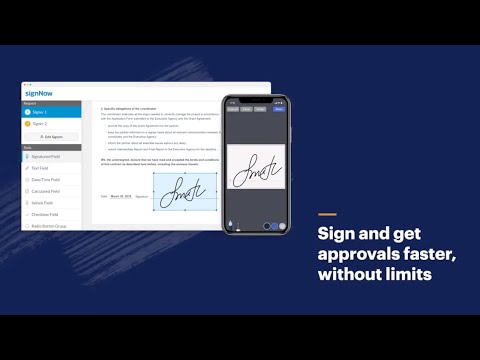
signNow is an eSignature solution designed to scale with your workflows - simplify the signing and management of documents online, make your teams more productive with automated document processes, delight customers with an intuitive and easy-to-use interface, and easily integrate into the business apps that you already use and love. More than 12 million people are already using signNow to automate document workflows and reduce paperwork.
The average satisfaction score among enterprise users is 9.56 out of 10, which makes signNow the #1 eSignature solution for both large and small businesses. Furthermore, a mobile signNow app is available for both iOS and Android to conduct business anytime and anywhere, even while offline with automatic mobile to web sync once reconnected.
signNow Enterprise is our enhanced offering; users can send & eSign documents, brand signature invitations with company logos, set signing reminders, track documents with a detailed Audit Trail, create unlimited templates, send in bulk, and more. They can also request/collect payments, add conditional and calculated fields in documents, and access signNow inside the numerous productivity business applications they already use.
Interested in a 30-day trial? Please reach out to your AWS Account Manager, your trusted AWS partner, or email us at AWSmarketplace@airslate.com to get started!
Highlights
- Simplify complex document workflows from an easy to use interface - Arrange document signing orders for multiple signers, enable/disable document forwarding, preset reminders, and set expiration dates and passwords for confidential documents.
- Approve documents anytime, anywhere - Users can start editing documents in their office and finish from their mobile device, even while offline. All data is securely and instantly synced with the signNow network as soon as connection is restored.
- Safeguard data with the highest security and compliance standards - Password protect documents, access court-admissible audit trails, and track documents in real-time. Compliance includes SOC 2 Type II, 21 CFR Part 11, PCI DSS, CCPA, GDPR, and more!
Details
Sold by
Delivery method
Deployed on AWS
New
Introducing multi-product solutions
You can now purchase comprehensive solutions tailored to use cases and industries.

Features and programs
Buyer guide
Gain valuable insights from real users who purchased this product, powered by PeerSpot.

Financing for AWS Marketplace purchases
AWS Marketplace now accepts line of credit payments through the PNC Vendor Finance program. This program is available to select AWS customers in the US, excluding NV, NC, ND, TN, & VT.

Pricing
Free trial
Try this product free according to the free trial terms set by the vendor.
Pricing is based on the duration and terms of your contract with the vendor. This entitles you to a specified quantity of use for the contract duration. If you choose not to renew or replace your contract before it ends, access to these entitlements will expire.
Additional AWS infrastructure costs may apply. Use the AWS Pricing Calculator to estimate your infrastructure costs.
Dimension | Description | Cost/month |
|---|---|---|
Enterprise | 1 Seat of Enterprise signNow Includes Payment Feature and Integrations | $50.00 |
Vendor refund policy
All fees are non-refundable except as required by law.

Legal
Vendor terms and conditions
Upon subscribing to this product, you must acknowledge and agree to the terms and conditions outlined in the vendor's End User License Agreement (EULA) .
Content disclaimer
Vendors are responsible for their product descriptions and other product content. AWS does not warrant that vendors' product descriptions or other product content are accurate, complete, reliable, current, or error-free.
Delivery details
Software as a Service (SaaS)
SaaS delivers cloud-based software applications directly to customers over the internet. You can access these applications through a subscription model. You will pay recurring monthly usage fees through your AWS bill, while AWS handles deployment and infrastructure management, ensuring scalability, reliability, and seamless integration with other AWS services.
Resources
Vendor resources
Support
Vendor support
signNow offers live online chat, email, and phone support. Live Chat: support.signnow.com, Email Support: support@signnow.com , Phone Support: 888-785-1150
AWS infrastructure support
AWS Support is a one-on-one, fast-response support channel that is staffed 24x7x365 with experienced and technical support engineers. The service helps customers of all sizes and technical abilities to successfully utilize the products and features provided by Amazon Web Services.
Updated weekly


Top
10
In Content Management, Media & Entertainment
Top
10
In Human Resources
Top
50
In Project Management
Sentiment is AI generated from actual customer reviews on AWS and G2
Functionality
Ease of use
Customer service
Cost effectiveness
Positive reviews
Mixed reviews
Negative reviews
AI generated from product descriptions
Document Workflow Automation
Arrangement of document signing orders for multiple signers with capabilities to enable/disable document forwarding, preset reminders, set expiration dates, and password protection for confidential documents.
Mobile and Offline Functionality
Mobile application available for iOS and Android platforms with offline editing capability and automatic synchronization between mobile and web interfaces upon reconnection.
Audit Trail and Document Tracking
Real-time document tracking with court-admissible audit trails providing detailed logging of document activities and access history.
Security and Compliance Standards
Compliance with SOC 2 Type II, 21 CFR Part 11, PCI DSS, CCPA, and GDPR standards with password protection and data encryption capabilities.
Template and Bulk Operations
Creation of unlimited document templates with bulk sending capabilities and support for conditional and calculated fields within documents.
Electronic Signature Capability
Enables users to digitally sign documents online with support for multiple signer options and customizable signature requests.
Document Workflow Automation
Provides built-in reminders and advanced signer options to streamline document completion and signing processes.
Template Management System
Allows users to save and reuse documents as templates for commonly used forms such as NDAs, Offer Letters, and Sales Agreements.
Audit Trail and Compliance
Maintains an auditable record of document signing activities with secure and safe transaction logging for legal compliance.
Brand Customization
Supports addition of company logo, tagline, and custom messaging to personalize signature requests and maintain brand consistency.
Low-Code Workflow Builder
Visual workflow builder enabling creation of custom solutions and automation of manual processes without requiring complex coding
Digital Forms and Data Collection
Online forms capability for data collection, payment processing, lead capture, and survey administration without coding requirements
Document Generation and Population
Document generator that automatically populates collected data into pre-designed documents for distribution across business systems
Electronic Signature Capability
Drag-and-drop eSignature solution for collecting digital signatures on forms and documents across multiple devices
Third-Party System Integration
Support for over 100 integrations enabling seamless connectivity with central business systems including CRMs and other enterprise applications
Standard contract
No
No
No
Customer reviews
Construction
Straightforward Document Signing and Reliable SSO Integration
Reviewed on Oct 05, 2026
Review provided by G2
What do you like best about the product?
SignNow does a good job with document signing and the SSO integration works well once configured. The user experience is straightforward, and it helps reduce reliance on paper-based processes. My biggest frustration has been account migration and document ownership management when users change email addresses, as some administrative features require higher-tier licensing. Overall, it's a solid platform with a few limitations that make administration more challenging than it needs to be.
What do you dislike about the product?
My biggest frustration with SignNow has been account management during user email changes. When users move to a new email address, the system can create duplicate accounts and make document migration more complicated than expected. Some administrative features that would simplify this process, such as document ownership transfers, are restricted by licensing tiers. Overall, the end-user experience is good, but administration and account migration could be more streamlined.
What problems is the product solving and how is that benefiting you?
SignNow helps us eliminate paper-based approvals and lets employees sign documents electronically from anywhere. The SSO integration also simplifies access by allowing users to sign in with their company accounts, reducing password-related support issues.
Ryan P.
Efficient and Secure Form Management with Flexibility
Reviewed on Oct 01, 2026
Review provided by G2
What do you like best about the product?
I like that SignNow takes away the unreliability of mailing forms and simplifies the process, making it fast and secure. I really appreciate the flexibility of being able to upload any form and mark it up according to its requirements. The way it simplifies forms that require multiple signatures or have signature lines that are hard to find is really beneficial, as it directs customers to the correct space. Additionally, the initial setup was very easy, and on top of that, I'm very likely to recommend it to others.
What do you dislike about the product?
I wish I could choose what signature font is available. A lot of customers choose the print type font, which isn't allowed for many forms because it needs to be a cursive font. So, I wish I could remove that option from the font types for signatures. An auto send function would also be nice for when customers haven't signed a form to automatically resend it periodically. I also wish the forms wouldn't expire.
What problems is the product solving and how is that benefiting you?
SignNow removes the unreliability of mailing forms, making it fast and secure. Its flexibility in uploading and marking forms simplifies customer forms with multiple signatures, providing the correct signature space.
Anonymous
Efficient Digital Signatures, But Alignments Need Improvement
Reviewed on Oct 01, 2026
Review provided by G2
What do you like best about the product?
I really like the quick save functions in SignNow because they allow me to avoid typing information repetitively. The radio buttons, names, and other details being easily available is a huge plus. Adding a password to documents and accessing document history are also features that I find very useful. These capabilities save me a significant amount of time, improve efficiency, and are especially beneficial when dealing with confidential documents and getting signatures without meeting in person.
What do you dislike about the product?
One area that needs to be improved is the document layout and field positioning. While the features like pre-filled fields are useful, they don't always align properly within the document. For example, when adding a radio button, the resize function does not always fit well within the desired section. Additionally, the alignment guides can be restrictive since if one field is placed vertically, subsequent fields tend to automatically align beneath it, making it difficult to position fields independently or create a custom layout. Greater flexibility in field placement could improve the overall user experience.
What problems is the product solving and how is that benefiting you?
I use SignNow to obtain signatures remotely without visiting in person, saving time. It also saves time with pre-filled fields and document history features, improving efficiency.
Primary/Secondary Education
Easy-to-Use Layout, but Invite Limits and Scheduling Glitches Need Fixes
Reviewed on Oct 01, 2026
Review provided by G2
What do you like best about the product?
The accessibility and app layout is easy to follow and use. It was easy to figure out without even needing a trial. Great customer support team.
What do you dislike about the product?
The limits on invites even after having a subscription. The fact that other invitees cannot edit templates even though the main member has given them access to do so. The fact that you can't change email to SMS later or have a feature that says send both email and SMS. The fact that attachments and picture fields are not included in a paid subscription. The fact that when I want to schedule send some bundles, it glitches and says Fail to Send. So I wasted my invites.
What problems is the product solving and how is that benefiting you?
Help neurodivergent kids out there get the support they need since we are a non profit. This platform helped us connect to various people - parent, contractors, teachers, etc.
Lisa V.
Simple, Cost-Effective, and Packed with Room to Grow
Reviewed on Oct 01, 2026
Review provided by G2
What do you like best about the product?
We switched to SignNow a few months ago, and I really appreciate how simple it is to use and how cost-effective it’s been for us. It also seems to offer more features than we’re currently taking advantage of, so there’s room for us to grow into it over time.
What do you dislike about the product?
When creating an invite, I really need a name field. I don’t like having to add someone to my contacts just to be able to see their name.
What problems is the product solving and how is that benefiting you?
It’s a firm-wide electronic signature platform that we can use through email or SMS. With other platforms, SMS often comes with an additional fee, so I appreciate that we can utilize it here without that extra charge.