
Sold by: IBM Software
Deployed on AWS
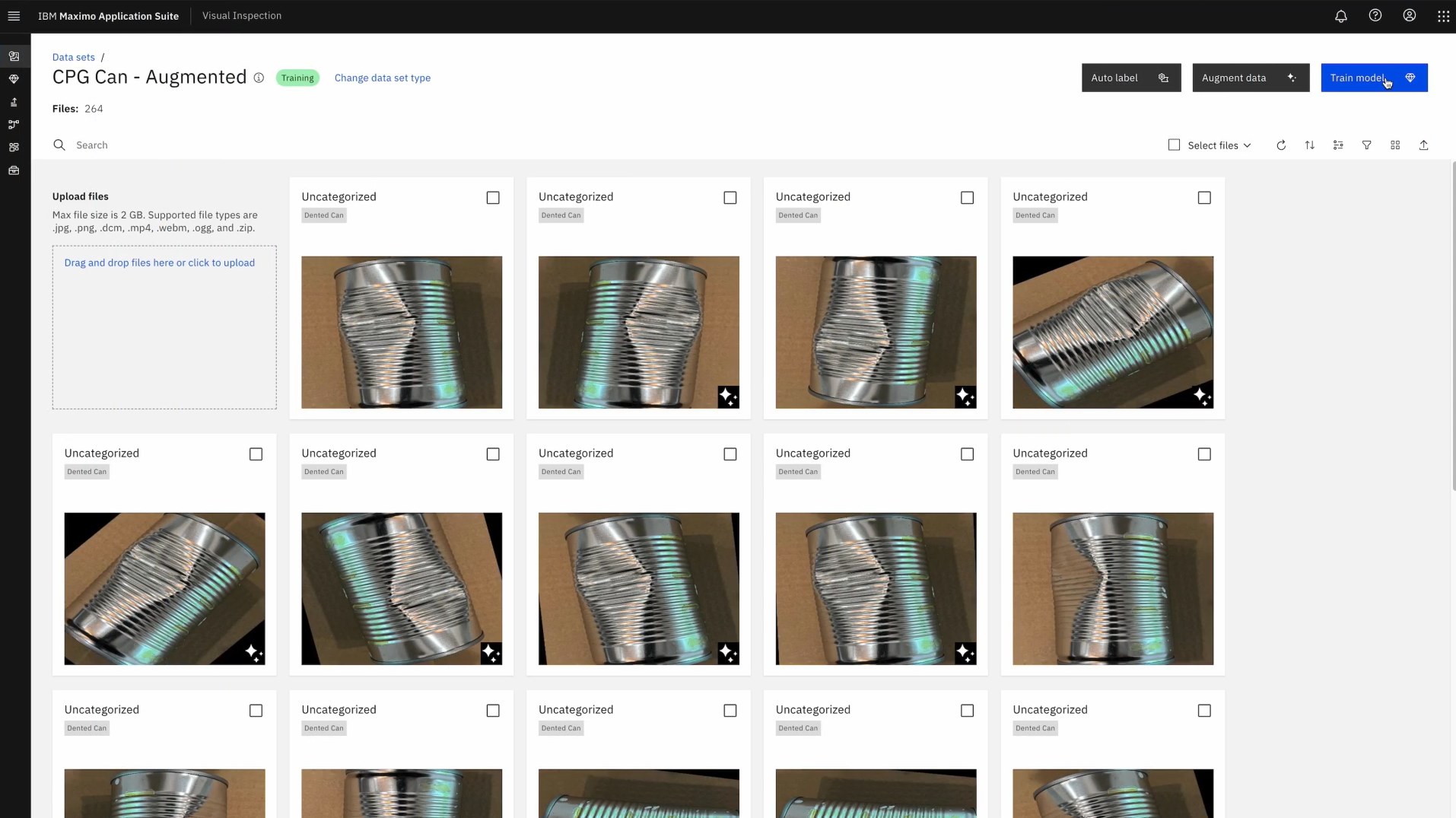
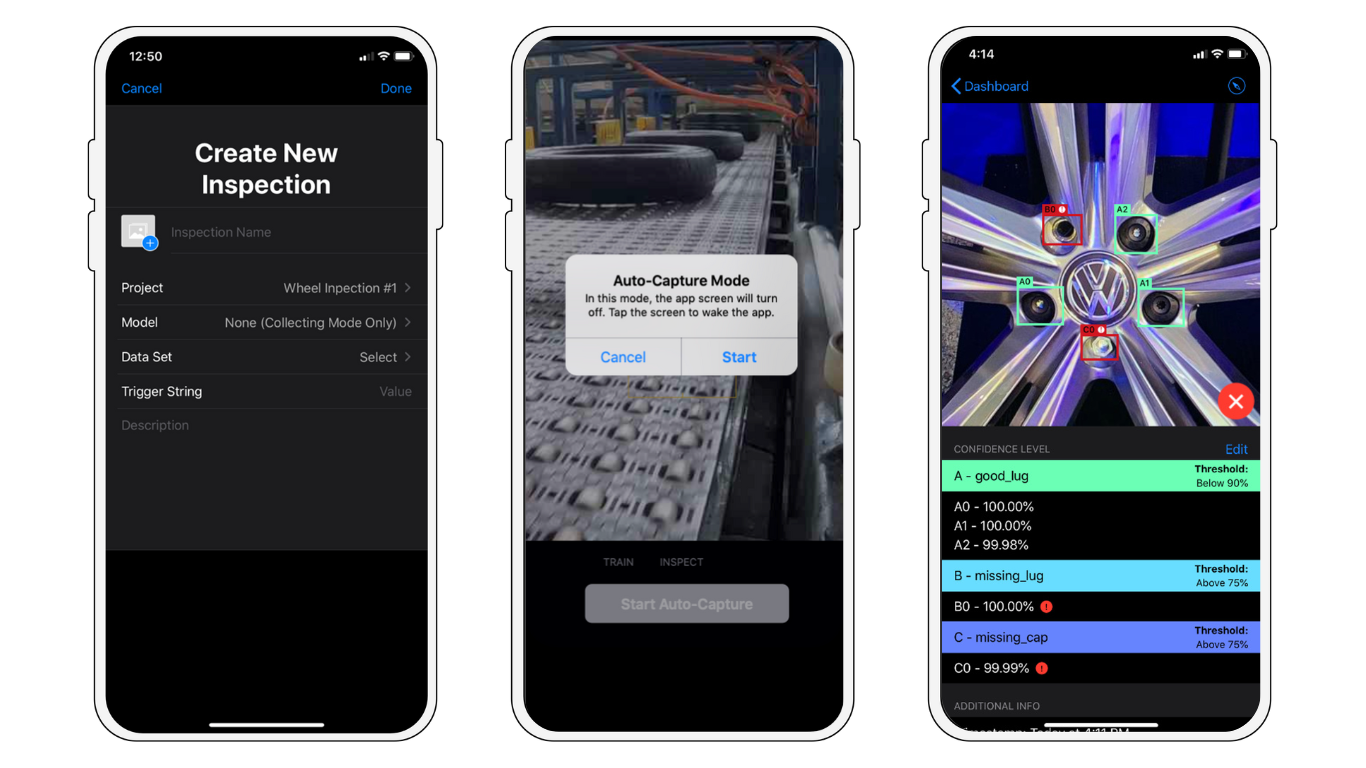
IBM Maximo Visual Inspection (MVI) puts computer vision AI capabilities into the hands of your quality control and inspection teams. Conduct efficient remote and on-site inspections using not only mobile devices, but also drones, thermal and specialized imaging cameras, as well as fixed cameras installed on critical assets. With MVI your team can train and deploy AI models to monitor equipment conditions and detect anomalies in real time, regardless of location or the type of visual data source.
4.4
Overview
Video
IBM Maximo Accelerate Defect Detection
Image
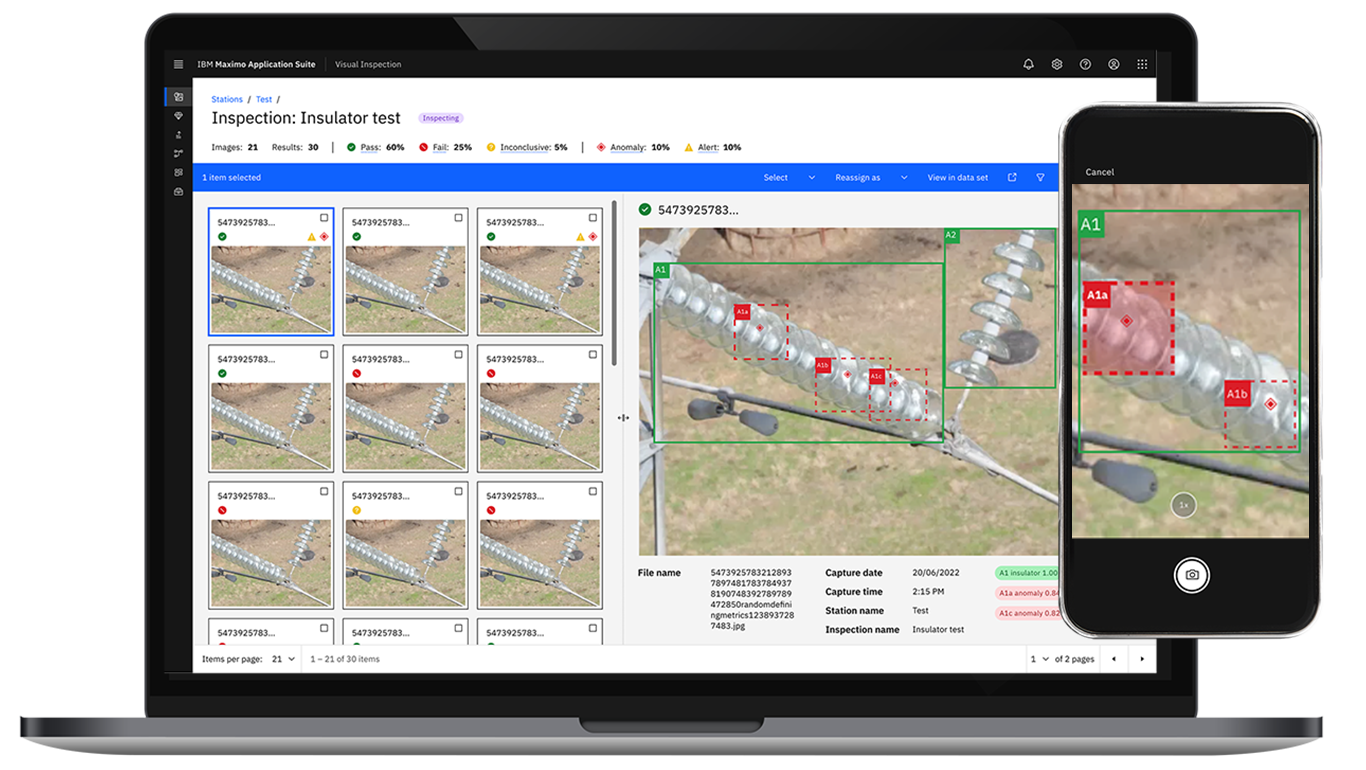
Visual Inspection on Edge Devices
Image
Visual Inspection on Mobile
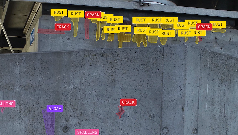
Video
IBM Maximo and Sund & Baelt
IBM Maximo Visual Inspection (MVI) puts the power of computer vision AI capabilities into the hands of your quality control and inspection teams. It simplifies the use of computer vision and deep learning by providing an intuitive toolset for labeling. Technicians can easily train and deploy AI models using a user-friendly drag-and-drop interface.
Designed for fast and easy deployment, IBM Maximo Visual Inspection (MVI) uses AI-powered vision capabilities to enable organizations to quickly identify assets, product defects, anomalies, or deviations anytime, anywhere. With MVI Edge, AI models can be deployed at scale for real-time inspections using edge servers connected to high-resolution cameras, drones, specialized imaging systems, or vehicle-mounted devices. This solution enhances productivity, reduces downtime, and supports faster, more precise decision-making.
With IBM Maximo Inspection Essentials, you get IBM Maximo as an easy to acquire and simple to adopt solution with key computer vision features in an entry level configuration and with consistently reliable enterprise security and quality.
Looking to experience Maximo Visual Inspection before you buy? Sign up for the Maximo Application Suite trial at https://www.ibm.com/account/reg/us-en/signup?formid=urx-52271 .
To explore the full scope of MAS SaaS Essentials, Standard, and Premium Edition configurations, offering additional capacity, applications, and operational options, use the "Request private offer" button, or alternatively, contact your IBM Sales Representative, email AssetManagement@ibm.com , or visit https://www.ibm.com/products/maximo/pricing .
Highlights
- Maximo Inspection Essentials includes Maximo Visual Inspection (MVI), designed for fast and easy deployment, that uses AI-powered vision capabilities to enable organizations to quickly identify assets, product defects, anomalies, or deviations anytime, anywhere.
- With MVI, AI models can be deployed at scale for real-time inspections using edge servers connected to high-resolution cameras, drones, specialized imaging systems, or vehicle-mounted devices. This solution enhances productivity, reduces downtime, and supports faster, more precise decision-making.
- Easily scales up to IBM Maximo Application Suite SaaS Standard Edition, unlocking its comprehensive Enterprise Asset Management (EAM) and Asset Performance Management (APM) capabilities.
Details
Sold by
Categories
Delivery method
Deployed on AWS
New
Introducing multi-product solutions
You can now purchase comprehensive solutions tailored to use cases and industries.

Features and programs
Financing for AWS Marketplace purchases
AWS Marketplace now accepts line of credit payments through the PNC Vendor Finance program. This program is available to select AWS customers in the US, excluding NV, NC, ND, TN, & VT.

Pricing
Pricing is based on the duration and terms of your contract with the vendor, and additional usage. You pay upfront or in installments according to your contract terms with the vendor. This entitles you to a specified quantity of use for the contract duration. Usage-based pricing is in effect for overages or additional usage not covered in the contract. These charges are applied on top of the contract price. If you choose not to renew or replace your contract before the contract end date, access to your entitlements will expire.
Additional AWS infrastructure costs may apply. Use the AWS Pricing Calculator to estimate your infrastructure costs.
Dimension | Description | Cost/12 months | Overage cost |
|---|---|---|---|
Inspection Essentials | Visual Inspection: 5 Devices, 10K Inferences/Hr, 500 GB Storage | $46,412.00 |
Dimensions summary
This listing offers a single contract option delivered as software as a service. You buy one bundled unit that covers the Visual Inspection capability. Each unit includes a fixed allocation: 5 devices, 10,000 inferences per hour, and 500 GB of storage. Pricing does not break into separate tiers or add-ons here. Instead, you scale by purchasing more units, with each unit adding the same set of device, inference, and storage limits. This keeps the structure simple: one price point per unit, applied across the full contract term.
Top-of-mind questions for buyers
An inference is one image or video frame analyzed by the AI vision model to detect defects, anomalies, or equipment issues. Each unit lets the system process up to 10,000 such analyses per hour. Higher throughput needs mean buying more units, each adding another 10,000 per hour.
A device is a source that captures images or video for inspection. This includes mobile devices, cameras, drones, and edge-connected imaging systems. Each unit supports 5 such connected devices. To connect more than 5, you purchase additional units.
You scale by buying more units. Each unit adds the same fixed bundle: 5 devices, 10,000 inferences per hour, and 500 GB storage. The three limits do not scale separately, so you buy full units even if only one limit is the constraint.
www.ibm.com
Helpful?
Vendor refund policy
All orders are non-cancellable and all fees and other amounts paid are non-refundable.
Custom pricing options
Request a private offer to receive a custom quote.

Legal
Vendor terms and conditions
Upon subscribing to this product, you must acknowledge and agree to the terms and conditions outlined in the vendor's End User License Agreement (EULA) .
Content disclaimer
Vendors are responsible for their product descriptions and other product content. AWS does not warrant that vendors' product descriptions or other product content are accurate, complete, reliable, current, or error-free.
Delivery details
Software as a Service (SaaS)
SaaS delivers cloud-based software applications directly to customers over the internet. You can access these applications through a subscription model. You will pay recurring monthly usage fees through your AWS bill, while AWS handles deployment and infrastructure management, ensuring scalability, reliability, and seamless integration with other AWS services.
Resources
Support
Vendor support
IBM Maximo Application Suite clients receive Base Support, which provides strong business protection for production workloads. Alternately, clients who require higher tier, priority care to respond to critical support requests and drive faster case resolution subscribe to Advanced Support, which enables clients to tailor support to their business and environment.
Compare support options at https://www.ibm.com/support/pages/ibm-advanced-support-offering .
View the Maximo Application Suite as a Service Getting Started Guide at https://www.ibm.com/docs/mas-saas and view product documentation at https://www.ibm.com/docs/en/mas .
Click Get support to access product resources, open a case or chat with a support representative. https://www.ibm.com/mysupport/s/topic/0TO0z000000Zas8GAC/ maximo-application-suite
AWS infrastructure support
AWS Support is a one-on-one, fast-response support channel that is staffed 24x7x365 with experienced and technical support engineers. The service helps customers of all sizes and technical abilities to successfully utilize the products and features provided by Amazon Web Services.
Similar products

IBM Maximo Application Suite is an integrated asset lifecycle management solution that enables you to remotely maintain and manage all your assets throughout their entire lifecycle, from acquisition to disposal, all within a single unified platform. It uses AI, IoT and analytics to optimize equipment performance, extend asset lifecycles and reduce operational downtime and costs.
With IBM Maximo Space Management Essentials, you get a powerful, integrated solution that helps facility strategists, real estate professionals, and workplace managers align physical spaces with the evolving needs of a dynamic workforce.
With IBM Maximo Capital Planning Essentials, you get robust functionalities for planning, executing, and tracking various aspects of capital projects - including budgeting, scheduling, resource allocation, and risk management.
With IBM Maximo Lease Management Essentials, you get a clear and comprehensive management for lease portfolios of facilities and assets through a centralized lease
administration and accounting operation. It can streamline lease contract administration and accounting, lease payment processing, and detailed and required reporting.
Customer reviews
Banking
Flexible, Integrated Platform That Delivers
Reviewed on Sep 07, 2026
Review provided by G2
What do you like best about the product?
A single integrated platform that provides flexibility
What do you dislike about the product?
Maximo is a robust platform, but improvements in usability, configuration simplicity, and self-service reporting would make it easier to adopt and use efficiently.
What problems is the product solving and how is that benefiting you?
Before using IBM Maximo Application Suite, we struggled with fragmented maintenance information, manual tracking, and limited visibility into equipment history and outstanding work. This made it harder to prioritize maintenance activities and increased the risk of reactive repairs.
With Maximo, we can manage work orders, preventive maintenance schedules, asset history, and maintenance planning in one centralized system. This has made it much easier to track equipment performance, assign and prioritize work, and ensure preventive maintenance activities are completed on time.
The biggest benefit has been improved visibility and control over our maintenance operations. We have reduced reliance on spreadsheets and manual processes, improved communication between maintenance teams, and can make better decisions using consistent asset and maintenance data. It has also helped us shift from a more reactive approach toward proactive maintenance, which supports better equipment reliability and reduces avoidable downtime.
With Maximo, we can manage work orders, preventive maintenance schedules, asset history, and maintenance planning in one centralized system. This has made it much easier to track equipment performance, assign and prioritize work, and ensure preventive maintenance activities are completed on time.
The biggest benefit has been improved visibility and control over our maintenance operations. We have reduced reliance on spreadsheets and manual processes, improved communication between maintenance teams, and can make better decisions using consistent asset and maintenance data. It has also helped us shift from a more reactive approach toward proactive maintenance, which supports better equipment reliability and reduces avoidable downtime.
ghribi h.
A Unified Platform for Smarter Asset Lifecycle Management
Reviewed on Jul 13, 2026
Review provided by G2
What do you like best about the product?
modular structure: you can activate only the applications you need, which helps both with flexibility and cost Powerful asset and work management: it's very detailed and customizable, which is great for managing complex maintenance processes. Integration with AI and IoT: the predict and monitor modules bring a lot of added value by helping anticipate issues before they happens
What do you dislike about the product?
Initial setup and configuration can be complex, especially for new users or organizations without strong Maximo expertise. Licensing and entitlements aren't always intuitive. It takes time to fully understand how to manage access across the different applications Performance can vary depending on the deployment model. Cloud versions occasionally experience lags, especially when dealing with large data volumes.
What problems is the product solving and how is that benefiting you?
IBM Maximo Application Suite is helping us address fragmented asset information, reactive maintenance, unplanned downtime, and inefficient planning and field-service processes. It gives us a more integrated view of assets, work orders, maintenance history, condition, risk, and resources. This helps us move toward preventive and condition-based maintenance, prioritise the right work, assign resources more effectively, and make better-informed asset investment decisions
Manufacturing
AI-Powered Asset Management That Boosts Efficiency and Reduces Downtime
Reviewed on Jun 30, 2026
Review provided by G2
What do you like best about the product?
IBM Maximo Application Suite is a powerful and reliable enterprise asset management platform. Its AI-driven maintenance features, comprehensive asset tracking, and intuitive user interface help streamline operations, improve operational efficiency, and reduce equipment downtime.
What do you dislike about the product?
The initial setup and configuration can be complex, and new users may encounter a steep learning curve. Licensing costs can also be high for smaller organizations, making implementation a significant financial commitment.
What problems is the product solving and how is that benefiting you?
The IBM Maximo Application Suite centralizes asset and maintenance management, cutting manual tasks and improving operational visibility. It supports more effective preventive maintenance planning, reduces equipment downtime, and delivers data-driven insights that boost productivity and lower maintenance costs.
Phil i.
All-in-One Platform for Smarter Asset Management and Reliability
Reviewed on Jun 24, 2026
Review provided by G2
What do you like best about the product?
is its ability to integrate asset management, predictive maintenance, and reliability tools into a single platform, enabling better equipment performance and data-driven decision-making.
What do you dislike about the product?
requiring significant training and technical expertise to fully utilize its capabilities.
What problems is the product solving and how is that benefiting you?
helps solve challenges related to asset reliability, maintenance planning, work management, and equipment downtime by providing real-time visibility and predictive insights.
Computer Software
Asset Management Made Easy, Plus a Handy Mobile App
Reviewed on Jun 23, 2026
Review provided by G2
What do you like best about the product?
Makes asset management easier and it also provides mobile application
What do you dislike about the product?
It's UI. The demo application too. The demo application doesn't have all feature even tho it's for 14 days.
What problems is the product solving and how is that benefiting you?
It's making asset management,tracking,assigning work order easier