
Sold by: cloudimg
Deployed on AWS
Free Trial
AWS Free Tier
This product has charges associated with it for seller support. Launch a production-ready Apache Flink cluster in minutes - no manual setup. Pre-configured with OpenJDK 17, Web Dashboard, and backed by 24/7 cloudimg expert support.
Overview
Image
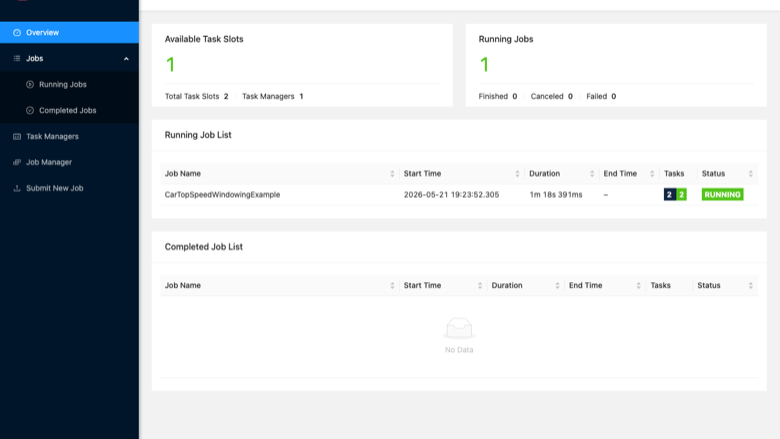
Flink Dashboard cluster overview
Image
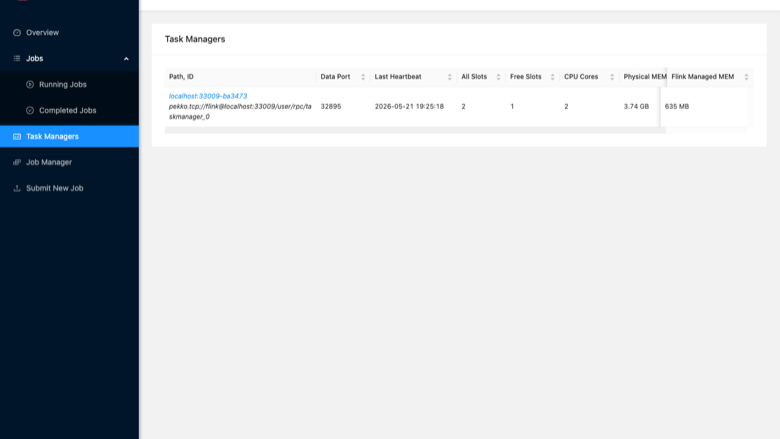
Task Managers page
Image
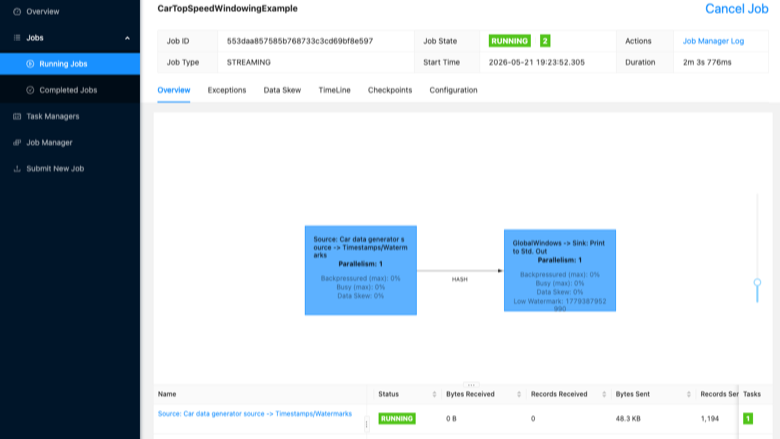
A running Flink job
This is a repackaged open source software product wherein additional charges apply for cloudimg support services.
Why This AMI Instead of Manual Setup
Installing Apache Flink from scratch means configuring JDK compatibility, creating service accounts, writing systemd units, setting up working directories, and validating cluster health - typically hours of work. This AMI eliminates that burden entirely. Apache Flink 2launches as a fully configured single-node standalone cluster on first boot, with the Web Dashboard reachable on port 8081 within minutes. You skip the manual steps and go straight to submitting your first job.
Application Stack
Apache Flink with the JobManager and the TaskManager each running as its own systemd service. OpenJDK 17 provides the Java runtime, pre-validated for compatibility with Flink 2. The Flink command-line client, the bundled SQL client, and the streaming and batch example jobs are all included. The Flink Web Dashboard is served for cluster and job monitoring and for submitting jobs.
Single Node Cluster
The JobManager and the TaskManager run together on one instance with two task slots, ready for development, testing, single-tenant production streaming, and proof-of-concept workloads. The cluster scales out by adding further TaskManager instances on additional hosts, and the included configuration is straightforward to tune for larger instance types.
First Boot Experience
On the first boot a one-shot service records the dashboard address and the cluster paths to an information file and starts the cluster. No shared or default passwords ship in the image - Apache Flink itself has no built-in user accounts.
Ready To Use
The Flink distribution, the dedicated service account, the systemd units, and the working directories are all configured. Browse to the instance address on port 8081 to reach the Web Dashboard, monitor the cluster, and submit a job.
Security Considerations
Apache Flink has no built-in authentication layer. Restrict access to port 8081 using Security Groups limited to trusted CIDR ranges, or place the dashboard behind an Application Load Balancer with authentication. The AMI ships without default passwords or shared credentials. For data at rest, enable EBS encryption when launching the instance through the AWS Console or CLI. For data in transit, configure Flink's SSL settings to enable TLS between the JobManager and TaskManagers.
Use Case: Streaming Fraud Detection Pipeline
A fintech team ingests payment transaction events into Flink, applies windowed pattern-matching rules to flag anomalous sequences, and writes alerts to Amazon Kinesis Data Streams - all within a single streaming job on this AMI. The same architecture applies to IoT sensor anomaly detection, clickstream enrichment for adtech, and continuous log processing for observability platforms.
Additional Use Cases
- Real-time stream processing and analytics
- Event-driven applications
- Streaming data pipelines and ETL
- Continuous metric and log processing
cloudimg Support
24/7 technical support by email and chat with a one-hour average response time for critical issues. Our engineers assist with Apache Flink deployment, cluster sizing, job submission, state and checkpoint configuration, and performance tuning. To discuss your workload requirements or request a guided walkthrough of the cluster, contact our team through the support channels listed below.
All product and company names are trademarks or registered trademarks of their respective holders. Use of them does not imply any affiliation with or endorsement by them.
Highlights
- Apache Flink preinstalled and ready, with OpenJDK 17, a JobManager service, a TaskManager service and the Flink Web Dashboard, with no manual setup required
- Single node standalone cluster with two task slots, suited to development, testing, single tenant production streaming and proof of concept workloads, and straightforward to scale out
- 24/7 technical support from cloudimg, with expert assistance for stream processing deployment, cluster sizing, job submission and performance tuning
Details
Sold by
Delivery method
Delivery option
64-bit (x86) Amazon Machine Image (AMI)
Latest version
Operating system
Ubuntu 24.04
Deployed on AWS
New
Introducing multi-product solutions
You can now purchase comprehensive solutions tailored to use cases and industries.

Features and programs
Financing for AWS Marketplace purchases
AWS Marketplace now accepts line of credit payments through the PNC Vendor Finance program. This program is available to select AWS customers in the US, excluding NV, NC, ND, TN, & VT.

Pricing
Free trial
Try this product free for 7 days according to the free trial terms set by the vendor. Usage-based pricing is in effect for usage beyond the free trial terms. Your free trial gets automatically converted to a paid subscription when the trial ends, but may be canceled any time before that.
Pricing is based on actual usage, with charges varying according to how much you consume. Subscriptions have no end date and may be canceled any time. Alternatively, you can pay upfront for a contract, which typically covers your anticipated usage for the contract duration. Any usage beyond contract will incur additional usage-based costs.
Additional AWS infrastructure costs may apply. Use the AWS Pricing Calculator to estimate your infrastructure costs.
If you are an AWS Free Tier customer with a free plan, you are eligible to subscribe to this offer. You can use free credits to cover the cost of eligible AWS infrastructure. See AWS Free Tier for more details. If you created an AWS account before July 15th, 2025, and qualify for the Legacy AWS Free Tier, Amazon EC2 charges for Micro instances are free for up to 750 hours per month. See Legacy AWS Free Tier for more details.
Dimension | Description | Cost/hour |
|---|---|---|
m5.large Recommended | m5.large | $0.08 |
t3.micro | t3.micro instance type | $0.04 |
t2.micro | t2.micro instance type | $0.04 |
m6idn.metal | m6idn.metal instance type | $0.24 |
x8i.metal-48xl | x8i.metal-48xl instance type | $0.24 |
m5d.2xlarge | m5d.2xlarge instance type | $0.24 |
c6i.8xlarge | c6i.8xlarge instance type | $0.24 |
r7iz.8xlarge | r7iz.8xlarge instance type | $0.24 |
r6idn.12xlarge | r6idn.12xlarge instance type | $0.24 |
c6i.large | c6i.large instance type | $0.08 |
Vendor refund policy
Refunds available on request.

Legal
Vendor terms and conditions
Upon subscribing to this product, you must acknowledge and agree to the terms and conditions outlined in the vendor's End User License Agreement (EULA) .
Content disclaimer
Vendors are responsible for their product descriptions and other product content. AWS does not warrant that vendors' product descriptions or other product content are accurate, complete, reliable, current, or error-free.
Delivery details
64-bit (x86) Amazon Machine Image (AMI)
Amazon Machine Image (AMI)
An AMI is a virtual image that provides the information required to launch an instance. Amazon EC2 (Elastic Compute Cloud) instances are virtual servers on which you can run your applications and workloads, offering varying combinations of CPU, memory, storage, and networking resources. You can launch as many instances from as many different AMIs as you need.
Version release notes
Initial release of Apache Flink as a single node stream processing cluster.
Additional details
Usage instructions
Connect via SSH on port 22 as the default login user for your operating system variant (the user guide lists it per variant). The Apache Flink Web Dashboard and REST API are served on port 8081. Browse to http://<instance-public-ip>:8081/ to reach the dashboard, monitor the JobManager and TaskManager and submit jobs. Apache Flink has no built in authentication, so restrict the port 8081 security group rule to trusted networks or front the dashboard with a TLS terminating load balancer. Cluster information is recorded at /stage/scripts/flink-info.log. The JobManager and TaskManager run as the systemd services flink-jobmanager.service and flink-taskmanager.service.
Resources
Vendor resources
Support
Vendor support
cloudimg 24/7 Technical Support
cloudimg provides round-the-clock technical support for this Apache Flink AMI by email and live chat. Critical issues receive a one-hour average response time.
Support Channels:
- Email: support@cloudimg.co.uk
- Live chat: available 24/7
What We Help With:
- Deployment and first-boot configuration
- Cluster sizing and instance type selection
- Job submission and Flink SQL client usage
- State backend and checkpoint configuration
- Performance tuning and scaling out TaskManagers
- Troubleshooting cluster health and job failures
- Applying updates and security patches
Instance Sizing Guidance:
- Development and testing: A general-purpose instance (e.g., m5.large or equivalent) with at least 2 vCPUs and 8 GB RAM is suitable for the default two-task-slot configuration with lightweight workloads.
- Production streaming: For higher-throughput jobs, use a compute-optimized or memory-optimized instance with 4+ vCPUs and 16+ GB RAM. Contact our team for workload-specific sizing recommendations.
Deployment Prerequisites:
- Launch the AMI with a Security Group allowing inbound TCP on port 8081 from your trusted network.
- Ensure outbound internet access if your jobs require external data sources.
- Optionally enable EBS encryption at launch for data-at-rest protection.
Getting Started:
- Launch the instance from AWS Marketplace.
- Wait for the first-boot service to complete (the cluster starts automatically).
- Browse to http://[instance-public-ip]:8081 to access the Flink Web Dashboard.
- Submit an example job from the included samples to verify cluster health.
For refund requests, billing questions, or any issue with the product, contact support@cloudimg.co.uk and our team will respond promptly.
AWS infrastructure support
AWS Support is a one-on-one, fast-response support channel that is staffed 24x7x365 with experienced and technical support engineers. The service helps customers of all sizes and technical abilities to successfully utilize the products and features provided by Amazon Web Services.
Similar products

Apache Hudi connector with shaded dependencies to work with AWS Glue.

Easily access Iceberg tables and operate DDLs, reads/writes, time-travels, streaming writes on the Iceberg tables.

Bansir offers this software product repackaged where additional charges apply for technical support provided by Bansir Cloud email support@bansircloud.com.

This product has a fee associated with the provision and deployment of the application and AMI support. Apache Superset is a modern, enterprise-ready business intelligence web application.

Enterprise-grade Kafka UI and API for deep visibility, precise control, and instant action across your ecosystem. Kpow is secure, vendor-agnostic, and trusted by Fortune 500s for managing Apache Kafka at scale.
Customer reviews
No customer reviews yet
Be the first to review this product . We've partnered with PeerSpot to gather customer feedback. You can share your experience by writing or recording a review, or scheduling a call with a PeerSpot analyst.