Agent orchestration on AWS
Build control planes for multi-agent networks: deterministic workflows, durable execution, state management, and human-in-the-loop approval gates on AWS.
Overview
Technical workshop: Agent orchestration
You’ve built multi-agent systems and specialized them for specific domains. This workshop tackles what happens when those agent networks need coordinated execution: state that persists across failures, human approval gates that pause workflows until sign-off, and graceful failure handling that prevents cascading outages. Learn how to build multi-agent orchestration using AWS services and tools from across the AI landscape.
📅 June 2, 2026
🕐 10:00 AM PT
🎓 Practical demos
📊 Intermediate
✓ No cost to register
Control planes for multi-agent orchestration
Coordinate agent networks with deterministic workflows, durable execution, and human approval gates using AWS services and orchestration tools.
Topics covered:
- Deterministic workflow orchestration with state management and retry logic
- Reasoning-driven agent coordination with dynamic tool use and memory
- Human-in-the-loop approval workflows and execution gates
- Graceful failure handling and cascade prevention patterns
Featured AI tools in AWS Marketplace
Build with foundation models, deployment platforms, and AI infrastructure—all available through your AWS account.
Featured tools in this module:

Page topics
- Introduction
- What orchestration really means at enterprise scale
- Durable execution — making workflows that survive the real world
- Agent, tool, and MCP server lifecycles
- Aligning agents with enterprise workflows
- Dependency management — agents that depend on each other
- Scheduling and event-driven orchestration
- Concurrency, rate limiting, and backpressure
- Long-running workflows and human-in-the-loop patterns
- Observability and operational excellence
- Worked example: the DevOps companion as a fully orchestrated system
- Conclusion and looking ahead
Introduction
Module 4 and Module 5 established the patterns that make multi-agent systems architecturally coherent: how agents are organized into planes, how they hand work off to one another, how they use protocols like MCP and A2A to access tools and communicate with each other, and how they can be specialized for particular domains. What those modules intentionally set aside is the question that becomes urgent the moment you try to run a multi-agent system in production: how do you keep it working?
Production is unforgiving. Networks partition. API rate limits are hit. Model endpoints return transient errors. Deployment steps take longer than expected. A human reviewer is needed before infrastructure can be provisioned. A cron-triggered analysis job must run every night whether or not the previous run finished cleanly. An event from an upstream system must trigger a downstream workflow even if the triggering service can’t wait for a synchronous response. These aren’t edge cases they’re the daily reality of operating any sufficiently complex distributed system, and agentic systems inherit all of them.
Orchestration, in the sense this module uses the term, is the operational discipline that makes agent workflows durable, observable, lifecycle-managed, and aligned with the enterprise. It’s the layer that sits above the individual agent and below the business process, translating between the reliability guarantees the business requires and the probabilistic, tool-calling reality of the agents that execute the work.
This module covers that layer end-to-end. We’ll examine the durable execution engines that keep workflows alive through failures, the lifecycle management practices that let agents and their tools evolve without breaking running workflows, the dependency and scheduling models that make orchestrated workflows predictable, the concurrency and backpressure mechanisms that protect shared resources, and the observability architecture that gives operators the visibility they need to run these systems with confidence.
By the end of this module you’ll have a complete mental model for orchestrating agent systems in AWS, and a concrete example, the DevOps Companion use case that we’ve iterated on over the series, reimplemented as a production-grade orchestrated system using AWS Step Functions, Temporal Technologies, Amazon EventBridge, and the full Amazon Bedrock AgentCore lifecycle management stack.
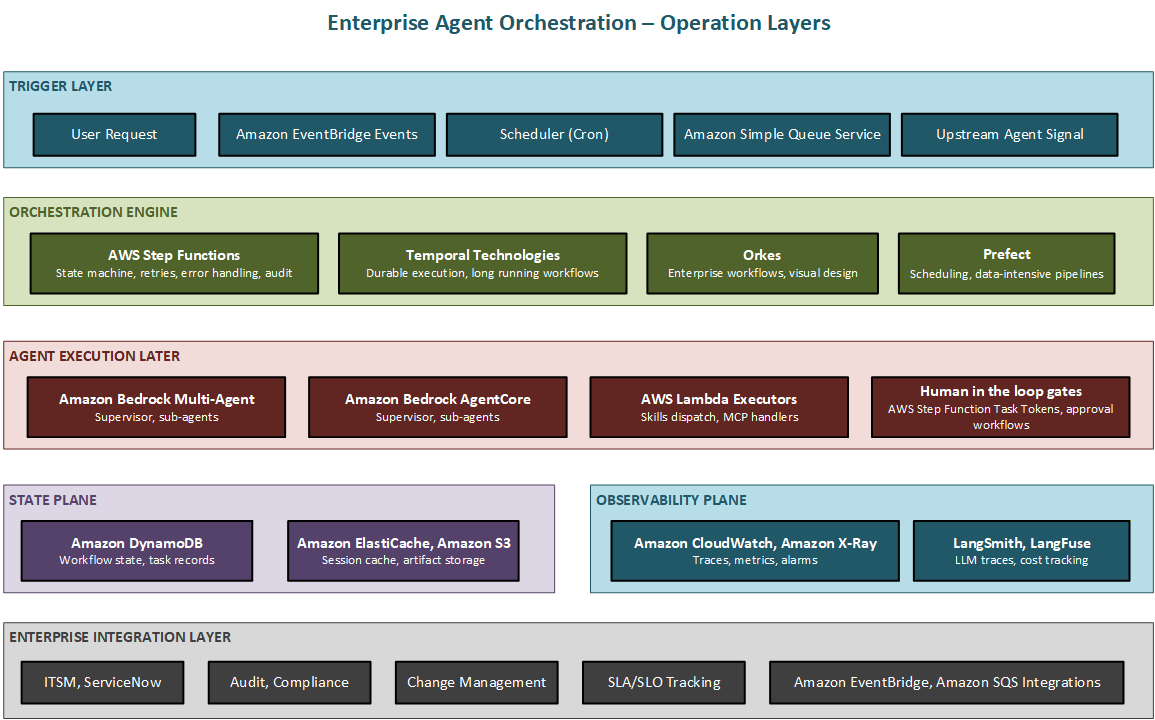
Figure 6.1 Enterprise agent orchestration — the six operational layers from trigger to enterprise integration
What orchestration really means at enterprise scale
It’s easy to conflate orchestration with coordination. Coordination, the topic of Module 4, concerns the runtime logic of which agent runs next, how agents communicate, and how shared context is managed. Orchestration concerns everything that must be true for coordination to happen reliably over time: the infrastructure that executes the workflow, the lifecycle management of the components the workflow depends on, the operational practices that keep the system healthy, and the integration points that connect agent workflows to the broader enterprise.
A useful way to separate the two is by the questions they answer. Coordination answers: given the current state of a workflow, what happens next? Orchestration answers: how do I guarantee that the workflow reaches a final state, that I can explain what happened, that I can update the agents involved without breaking running instances, and that I can integrate this workflow into my existing operational processes?
The gap between prototype and production
Almost every team that builds a working multi-agent prototype discovers the same pattern: getting the agents to collaborate correctly is hard, but getting that collaboration to run reliably at scale is harder. The prototype runs in a single process, communicates over in-memory queues, and is restarted manually when something goes wrong. Production requires distributed deployment, network communication, persisted state, retry logic, monitoring, alerting, and graceful degradation.
The specific failure modes that production introduces include the following:
First, transient errors: model API calls fail, external tools time out, and downstream services return 5xx responses. An orchestrated workflow needs configurable retry policies with exponential backoff and jitter so that transient errors don’t permanently fail long-running workflows.
Second, infrastructure failures: the compute instance running an agent can be terminated, the container can be OOM-killed, and the serverless function can time out. Without a durable execution layer, any of these events results in a lost workflow with no record of the work completed and no ability to resume from the last successful step.
Third, partial completion: in a twelve-step workflow, if step eight fails permanently, the work completed in steps one through seven has already had side effects; it’s called APIs, written records, and consumed tokens. A production orchestration layer must handle compensation for partially completed workflows.
Fourth, long-running duration: some agent workflows genuinely take a long time. Analyzing a large repository, generating and reviewing infrastructure code, deploying to EKS and waiting for health checks, and generating a full suite of CloudWatch alarms might take twenty minutes to an hour. Synchronous request-response architectures can’t support workflows of this duration.
Fifth, human gates: production workflows often require a human decision at one or more points, a reviewer must approve generated infrastructure before it’s deployed. The orchestration layer must be able to pause a workflow, notify a human, and resume only when approval is received, potentially hours or days later.
The enterprise compliance dimension
Beyond reliability, enterprise orchestration carries a compliance dimension that prototype environments never need to worry about. Regulated industries require audit trails: a complete, tamper-evident record of every step in every workflow, including which agent ran it, what inputs it received, what outputs it produced, and when. Financial services, healthcare, and government all have specific requirements about data handling during workflows that must be satisfied at the orchestration layer, not left as an afterthought for individual agents to implement inconsistently.
Change management is equally important. In most large enterprises, deploying a new version of a production system requires a change record, an approval, and a rollback plan. Agent systems are software; they must be subject to the same change management discipline as any other production workload. The orchestration layer, specifically, the lifecycle management practices it enforces, is where this discipline is operationalized.
Durable execution — making workflows that survive the real world
Durable execution is the property of a workflow system that guarantees a workflow will eventually reach a final state, success or a handled failure regardless of transient infrastructure disruptions. It achieves this by persisting workflow state at every step so that execution can be resumed from the last completed checkpoint if the executing process is interrupted. This isn’t a new concept; it’s the defining property of systems like Step Functions and Temporal Technologies, and it’s the most important property an orchestration layer can provide for agentic systems.
To understand why durable execution matters so much for agents, consider the alternative. Without it, a multi-step agent workflow runs in a single process. If that process is interrupted at step seven of twelve, the entire workflow must be restarted from the beginning, repeating every API call, every model invocation, and every side effect that was already successfully completed. For a workflow that takes twenty minutes and costs several dollars in model tokens, this isn’t merely inconvenient; it’s a correctness problem, because many agent tool calls aren’t idempotent. Calling an infrastructure provisioning API twice creates two resources. Sending a notification twice notifies the recipient twice. Durable execution eliminates this problem by checkpointing state so that restarts begin from the last successful step.
AWS Step Functions as the primary durable execution layer
AWS Step Functions is the AWS-native durable execution service for orchestrating workflows. It expresses workflows as state machines: a graph of named states connected by transitions, where each state can invoke a Lambda function, call an Amazon Bedrock agent, invoke an SQS queue, send an HTTP request to an external service, wait for a callback, run states in parallel, or make branching decisions based on runtime data. The state machine definition is JSON or YAML, managed as infrastructure through AWS CDK, and versioned alongside the agents it orchestrates.
Step Functions persists the state of every workflow execution in its own managed durable store. If the Lambda function running an agent is interrupted mid-execution, Step Functions retries it according to the configured retry policy. If the retry limit is exceeded, it transitions to an error state and can trigger a compensating workflow. The execution history, every state transition, every input, every output, every error is stored and accessible through the CloudWatch Logs integration, providing the audit trail that compliance teams require.
For agent orchestration, Step Functions provides several features that are particularly valuable. Retry configuration can be set per-state with independent backoff multipliers, maximum attempts, and jitter settings, so a model API call that’s rate-limited retries with exponential backoff while a Lambda invocation failure retries immediately. The Map state enables parallel fan-out, launching multiple agent invocations simultaneously and waiting for all of them to complete before proceeding. The Wait state enables long pauses without holding compute resources. And the task token pattern, covered in detail in Section 8, enables human-in-the-loop approval gates without polling.
Step Functions Express Workflows are optimized for high-throughput, short-duration workflows with sub-second step execution and millions of workflow starts per second. Standard Workflows support exactly-once execution semantics and workflows up to one year in duration, making them appropriate for the long-running deployment orchestration scenarios the DevOps Companion requires.
Temporal Technologies for code-native durable execution
While Step Functions excels at infrastructure-native workflow orchestration, some teams prefer to express their workflows as code rather than as state machine definitions. Temporal Technologies provides a durable execution platform where workflows are written in standard Python, TypeScript, Java, or Go, and the Temporal runtime handles all checkpointing, retry, and resumption transparently.
In Temporal, a workflow function is an ordinary Python function, but every call to an activity (the Temporal equivalent of a Step Functions state) is automatically checkpointed. If the process running the workflow is killed at any point, Temporal replays the workflow function from the beginning, skipping activities that have already completed by returning their saved results from the event log. The workflow code executes deterministically to the same point it was at before the failure, then continues executing new activities from where it left off. This is called workflow replay, and it requires that workflow code be deterministic, it can’t make random choices or read the current time directly, as those would produce different values on replay.
Temporal Cloud, available in AWS Marketplace, provides a managed Temporal deployment that integrates with AWS VPC through private connectivity, eliminating the need to operate Temporal’s own infrastructure. It’s well-suited to workflows that are easier to express in code than in a state machine diagram with complex branching logic, dynamic parallelism where the number of parallel branches depends on runtime data, and recursive workflows that call themselves with different parameters.
Idempotency and compensation patterns
Durable execution with retry creates a new requirement for the operations that agents perform: they must be idempotent, or the orchestration layer must account for the fact that they’re not. An idempotent operation produces the same result whether it’s performed once or many times. Creating an S3 bucket with a fixed name is idempotent, doing it twice by definition will be unable to create two buckets with the same name. Sending an email is not, doing it twice sends two emails.
For agent tool calls that aren’t idempotent, the orchestration layer must implement one of two strategies. The first is idempotency keys: each tool invocation is assigned a unique key derived from the workflow execution ID and the step number. The tool implementation stores the key and its result, and subsequent invocations with the same key return the stored result without re-executing the action. AWS Lambda’s built-in idempotency feature using Amazon DynamoDB supports this pattern. The second strategy is compensation: rather than preventing duplicate execution, the orchestration layer detects that a step was executed multiple times and compensates — undoing the duplicate effects by calling a compensating action. Step Functions supports this through its error handling and catch configurations.
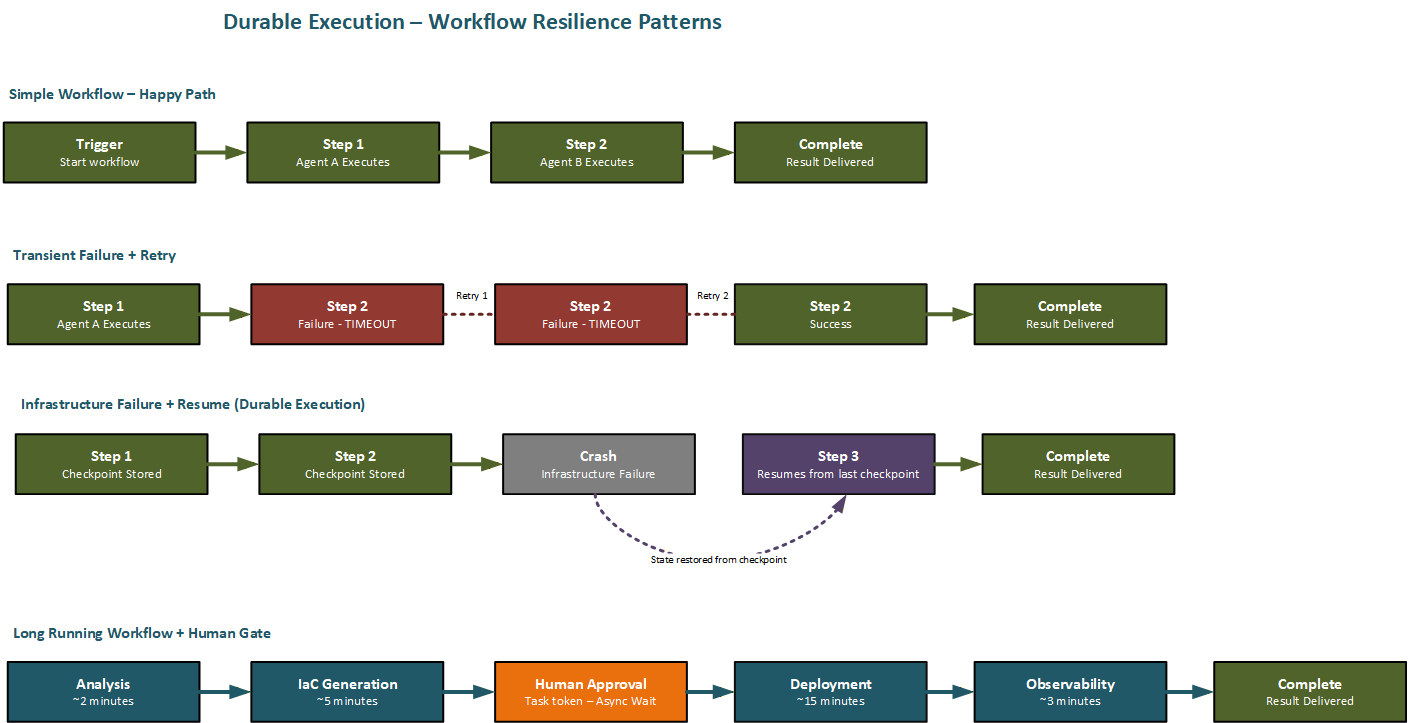
Figure 6.2 Durable execution patterns — retry, resume-from-checkpoint, and long-running human-gated workflows
Agent, tool, and MCP server lifecycles
Agents, MCP servers, and the tools they expose are software. Like all software, they have a lifecycle: they’re authored, tested, versioned, deployed, operated, updated, and eventually deprecated. Managing this lifecycle rigorously is what separates an orchestrated agent system that can evolve safely over time from one that becomes increasingly fragile as each update introduces the risk of breaking the workflows that depend on it.
The lifecycle management challenge for agent systems is more complex than for traditional microservices for two reasons. First, agents interact through natural language interfaces as well as structured APIs, and natural language interfaces are harder to version formally than typed API contracts. A change to an agent’s system prompt can change its behavior in ways that are difficult to detect without running the full evaluation suite. Second, the dependencies between agents and their tools are often implicit: an orchestrator agent assumes a certain capability is available, but that assumption is encoded in its system prompt rather than in a formal dependency declaration.
Semantic versioning for agents and tool schemas
The standard for versioning agent components in this series follows semantic versioning: MAJOR.MINOR.PATCH, where a MAJOR version increment indicates a breaking change, MINOR indicates a backwards-compatible capability addition, and PATCH indicates a bug fix. The challenge is defining what constitutes a breaking change for an agent.
For MCP tool schemas, the definition is precise: a breaking change is any modification to a tool’s input schema that would cause a previously valid call to be rejected, or any modification to a tool’s output schema that would cause a consumer of the output to fail. Adding a new required field to a tool’s input schema is breaking. Adding a new optional field isn’t. Renaming a field is breaking. Changing the type of a field is breaking. These rules mirror standard API versioning practice and can be enforced automatically by schema validation tooling integrated into the CI/CD pipeline.
For agent behavior, the definition is less mechanical but still actionable: a breaking change is any modification that causes the agent to fail existing golden dataset test cases that it previously passed, or any modification that changes the structure of the agent’s output in a way that downstream consumers depend on. This definition makes the evaluation suite, introduced in Module 3, the gatekeeper for what constitutes a breaking change. An agent update that passes all existing evaluation cases is classified as non-breaking regardless of what changed in the implementation.
Amazon Bedrock AgentCore lifecycle management
Amazon Bedrock AgentCore provides a managed lifecycle management layer for agents built on Amazon Bedrock. It introduces the concept of agent aliases, named references that point to a specific agent version. Orchestrators and other agents always refer to an agent by alias, not by version number. When a new version is ready, the alias can be updated to point to it, and the change takes effect immediately for all callers without requiring any changes to the orchestrator’s configuration.
Amazon Bedrock AgentCore supports two types of alias routing. A fixed alias points to a single version and provides stable, deterministic behavior. A canary alias splits traffic between two versions according to a configured percentage, enabling gradual rollout. Starting a new version at 10% of traffic lets you compare quality metrics against the stable version before full promotion. If the new version’s metrics are worse, lower task completion rate, higher error rate, degraded evaluation scores, the alias can be rolled back to 100% of the old version with a single configuration change and no redeployment.
The combination of alias-based routing and continuous online evaluation creates a deployment loop where new versions earn their way to full traffic by demonstrating equivalent or better quality than their predecessors. This is analogous to the progressive delivery practices used for standard microservices, extended to cover the probabilistic quality dimensions that matter for agents.
MCP server versioning and compatibility contracts
MCP servers present a specific compatibility challenge because they’re shared resources: multiple agents may depend on the same MCP server, each potentially requiring a different version of its tool schemas. Managing this requires explicit compatibility matrices, a record of which versions of an MCP server are compatible with which versions of each agent that uses it.
The recommended pattern for handling breaking MCP server changes is to deploy new and old versions simultaneously and route agents to the appropriate version based on their compatibility declaration. An agent declares its MCP server dependency with a minimum and maximum compatible version range in its configuration. The orchestration layer consults this declaration when routing tool calls, ensuring that each agent is connected to a compatible MCP server version. When all agents have been updated to support the new version, the old version can be decommissioned. AWS Lambda versions and aliases support this side-by-side deployment pattern natively.
Don’t skip the compatibility matrix. I’ve seen teams manage MCP server versions informally and regret it when a shared server change breaks two agents simultaneously in production.
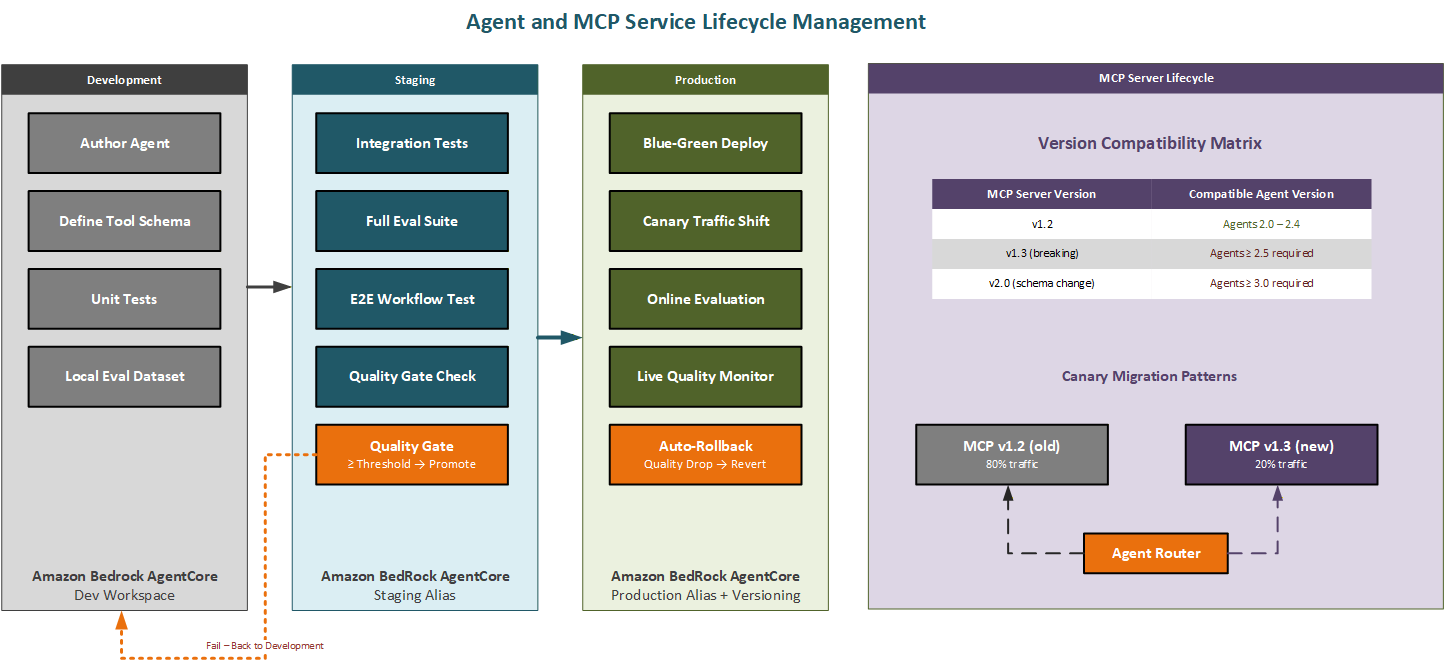
Figure 6.3 Agent and MCP server lifecycle — dev-staging-prod promotion and canary version migration
Aligning agents with enterprise workflows
Enterprise organizations don’t deploy agent systems into a vacuum. They deploy them into environments that already have processes, approval chains, audit requirements, compliance obligations, and integration points with other systems. Agents that can’t operate within these constraints, that produce no audit trail, that bypass approval processes, that can’t integrate with existing ticketing systems, won’t be adopted regardless of how capable they are.
This section covers the specific integration points between orchestrated agent workflows and the enterprise infrastructure they must connect to. The goal isn’t to constrain what agents can do, but to make agent workflows first-class citizens of your operational environment, subject to the same governance as any other production system and visible to the same operational teams through the same tools.
Human-in-the-loop approval checkpoints
Many enterprise processes require a human decision at one or more points: an engineer must review generated infrastructure before it’s applied, a manager must approve an automated action that crosses a cost threshold, a compliance officer must sign off before data is processed. These aren’t failures of automation, they’re deliberate governance controls, and a production orchestration layer must implement them without compromising the durability of the surrounding workflow.
Step Functions implements human approval through the task token pattern. When a workflow reaches an approval state, Step Functions pauses execution and emits a unique task token. The orchestration layer sends this token along with the context that the approver needs to a notification system: an email through Amazon SNS, a Slack message through an EventBridge integration, or a ticket in an ITSM system through a Lambda connector. The workflow remains paused indefinitely, consuming no compute resources, until a human responds by calling the Step Functions SendTaskSuccess or SendTaskFailure API with the original task token. At that point the workflow resumes exactly where it paused, with the human’s decision available as input to the next state.
Because the workflow state is durably persisted, the pause can last minutes, hours, or days without any risk of losing the workflow. The paused workflow appears in the CloudWatch metrics for workflow execution duration and in the Step Functions console as a running execution awaiting a callback, so operations teams have full visibility into pending approvals.
Audit trail design
A compliant audit trail for an orchestrated agent workflow must record: the identity of the user or system that initiated the workflow, the specific version of each agent that participated, the inputs and outputs of every step, the decisions made at approval gates, the timestamps of every state transition, and any errors that occurred and how they were handled. This is a data architecture decision that must be made consciously at design time not instrumented after the first audit request arrives.
AWS Step Functions Standard Workflows record the full execution history in CloudWatch Logs automatically. Each state transition is logged with its input, output, error (if any), and timestamped. This provides a durable, structured record that satisfies most audit requirements without additional instrumentation. For workflows that require longer retention or more sophisticated querying, the execution history can be streamed to Amazon S3 through Kinesis Data Firehose and indexed with Amazon Athena for SQL-based audit queries.
Agent-level tracing, the detailed record of every LLM call, tool invocation, and intermediate reasoning step is captured by LangSmith or LangFuse as introduced in Module 3. For compliance use cases, this trace data can be correlated with the workflow execution history using the execution ID as a shared key, providing a complete audit chain from the top-level workflow invocation down to the individual model API call.
Integration with enterprise systems
Orchestrated agent workflows often need to interact with enterprise systems that sit outside the AWS environment: ITSM platforms, ERP systems, CRM applications, and internal approval portals. The recommended integration pattern uses Amazon EventBridge as the enterprise event bus: agent workflows emit structured events at key milestones, and downstream enterprise systems subscribe to those events through EventBridge integrations.
This decouples agent workflows from the specific enterprise systems they need to notify. When an enterprise integration changes, an ITSM platform is replaced, a new notification system is adopted, the event structure remains stable and only the EventBridge target configuration changes. Agent workflow code never needs to be updated. The inverse direction enterprise events triggering agent workflows follows the same pattern: enterprise systems publish events to EventBridge, and agent workflow triggers subscribe to the relevant event patterns.
Dependency management — agents that depend on each other
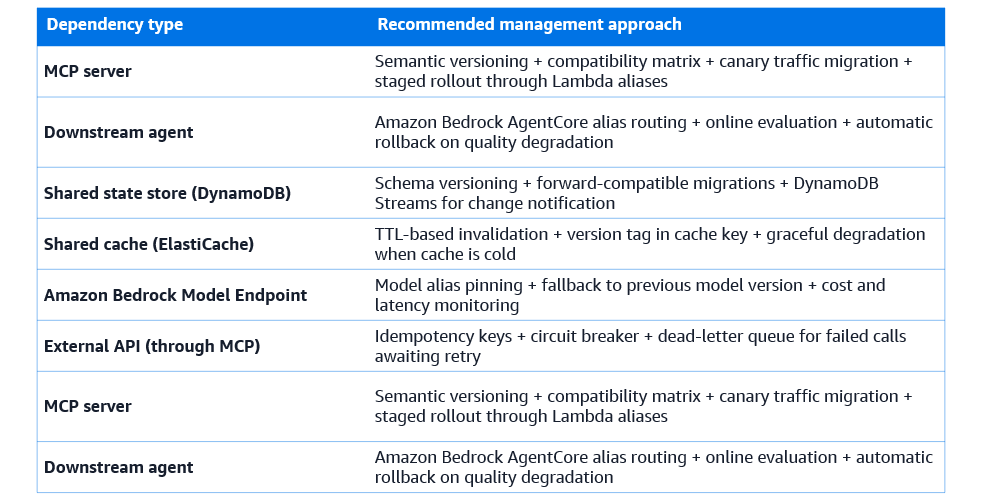
A mature multi-agent system is a network of dependencies. Agents depend on MCP servers to provide their tools. Orchestrators depend on specialized agents to execute sub-tasks. Agents depend on shared state stores to coordinate. The agent network depends on the embedding models used to populate its knowledge bases, and on the Amazon Bedrock model endpoints that power its reasoning. Each of these dependencies has a version, a health status, and a compatibility contract.
Managing this dependency network isn’t fundamentally different from managing dependencies in any other distributed system, but it requires deliberate tooling and discipline. Teams that don’t manage agent dependencies explicitly will eventually hit the classic failure mode: a change to a shared component breaks multiple agents in ways that are difficult to diagnose because the dependency was implicit.
Explicit dependency declaration
Every agent in a production system should carry an explicit declaration of its dependencies: the MCP servers it requires, the version ranges it’s compatible with, the shared state stores it reads and writes, and the downstream agents it may invoke. This declaration serves multiple purposes. It lets the orchestration layer verify that all dependencies are available before starting a workflow. It lets the CI/CD pipeline automatically test an agent against a new version of its dependencies in a staging environment. And it lets operations teams understand the blast radius of a change to a shared component before making it.
In practice, this declaration is a structured configuration file, a YAML or JSON document stored alongside the agent’s code that specifies each dependency by name, type, and version constraint. AWS CDK reads these declarations when deploying the agent infrastructure, ensuring that the appropriate versions of each dependency are deployed alongside the agent. The CDK deployment fails if a required dependency isn’t available at a compatible version, catching dependency mismatches at deploy time rather than at runtime.
Testing against dependency updates
When a shared MCP server is updated, all agents that depend on it need to be tested against the new version before it’s promoted to production. The recommended process uses a staging environment where the new MCP server version is deployed alongside the existing agents. A test harness runs each agent’s evaluation suite against the new version. If all agents pass, the new version is promoted. If any agent fails, the update is blocked until the failing agent is either fixed or explicitly excluded from the compatibility requirement.
This process can be automated using AWS CodePipeline. When a new MCP server version is pushed to the repository, the pipeline deploys it to the staging environment, triggers the evaluation suites for all dependent agents in parallel using a fan-out Step Functions state, collects the results, and gates promotion on all suites passing. The entire process runs without human intervention for minor and patch version updates; breaking version updates require an explicit human approval step before promotion.
Circuit breakers for dependency failures
When a dependency fails, an MCP server becomes unavailable, a downstream agent consistently returns errors, a shared state store is degraded, the orchestration layer needs a mechanism to stop routing work to the failing dependency without waiting for the full retry limit to be exhausted for every in-flight workflow. This is the circuit breaker pattern, adapted for agent orchestration.
A circuit breaker wraps calls to a dependency and tracks the error rate over a rolling time window. When the error rate exceeds a configured threshold, say 50% of calls failing over the last sixty seconds, the circuit trips to the open state and subsequent calls are rejected immediately without attempting the dependency. After a configured recovery time, the circuit moves to the half-open state and allows a small number of probe requests through. If the probe requests succeed, the circuit closes and normal traffic resumes. If they fail, the circuit opens again.
AWS Lambda destinations and Step Functions catch blocks can implement circuit breaker logic by writing error counts to a DynamoDB table and checking the table before each dependency invocation. For higher-volume systems, Amazon ElastiCache provides sub-millisecond read latency for circuit state checks, enabling circuit breakers that don’t add meaningful latency to the hot path. Be aware that the DynamoDB read on every invocation does add cost and a few milliseconds at scale, use ElastiCache if your workflows are high-frequency.
Scheduling and event-driven orchestration
Not all agent workflows start with a user request. Production agent systems include workflows that run on a schedule, a nightly analysis that prepares context for the next day, a weekly reporting agent that summarizes the past week’s activity, a periodic data refresh that keeps a knowledge base current. They also include workflows triggered by events; a code commit that triggers a repository analysis, a CloudWatch alarm that triggers a diagnostic agent, a new document upload that triggers an indexing workflow. Orchestrating these scheduled and event-driven workflows requires the same durable execution discipline as user-initiated workflows, combined with scheduling and event routing infrastructure.
Scheduled workflows with Amazon EventBridge scheduler
Amazon EventBridge Scheduler is the recommended service for triggering agent workflows on a schedule. It supports cron expressions for flexible scheduling running every weekday at 2 AM, run on the first of every month at 9 AM and rate expressions for interval-based scheduling, run every 15 minutes, run every hour. It delivers invocations with at-least-once semantics and supports a flexible time window that allows invocations to be spread over a configurable window to prevent thundering herd problems when many scheduled workflows start simultaneously.
The recommended pattern connects EventBridge Scheduler to a Step Functions workflow: the scheduler triggers a Step Functions Standard Workflow execution at the configured time, passing the current timestamp and any contextual parameters as the initial input. The workflow takes over from there, with all of the durable execution guarantees that Step Functions provides. If the scheduled execution fails, CloudWatch alarms on the Step Functions ExecutionsFailed metric trigger notifications to the on-call team.
For agent workflows where the scheduled run should be skipped if the previous run hasn’t yet completed, to avoid overlapping executions, the pattern adds a DynamoDB check at the start of the workflow: if a record exists indicating an execution is in progress, the new execution exits immediately. The record is written at the start of each execution and deleted at the end, providing a distributed mutex for scheduled workflows.
Event-driven orchestration with EventBridge and Amazon SQS
Event-driven agent workflows decouple the systems that produce events from the agents that react to them. A code review tool emits an event when a pull request is opened; an analysis agent reacts to that event without the code review tool knowing anything about agents. This decoupling is valuable because it lets you add, modify, and remove agent workflows without changing the upstream systems that generate the triggering events.
Amazon EventBridge provides the event routing layer. Upstream systems publish structured events to an EventBridge event bus. Event rules match incoming events based on their structure, event source, event type, field values — and route matching events to configured targets, which may be Step Functions workflow executions, SQS queues, Lambda functions, or other services. The event schema is registered in the EventBridge Schema Registry, providing discoverability and generating code bindings for event producers and consumers.
For agent workflows that must handle high event volumes without losing events during traffic spikes, Amazon SQS provides the buffer between EventBridge and the workflow execution. Events are delivered to an SQS queue, and a Lambda function polls the queue and starts Step Functions executions at a controlled rate. The SQS visibility timeout and dead-letter queue ensure that events that can’t be processed because the workflow execution limit is reached, or because the workflow fails repeatedly are retained and can be reprocessed rather than lost.
Prefect for data-intensive scheduled pipelines
While EventBridge Scheduler and Step Functions handle the majority of scheduling needs, some agent workflows are deeply integrated with data pipelines and they consume the output of data processing jobs, operate on datasets that must be refreshed before the agent runs, and produce outputs that feed back into data stores. For these workflows, Prefect Cloud, available in AWS Marketplace, provides scheduling and orchestration with first-class support for data dependencies.
Prefect’s core concept is the flow, a Python function that contains the orchestration logic, and the task, a Python function that performs a unit of work within a flow. Prefect tracks the data produced by each task as an artifact and lets downstream tasks declare dependencies on upstream task outputs. This creates a data dependency graph alongside the execution graph, enabling Prefect to skip tasks whose inputs haven’t changed since the last run and to automatically retry tasks when their input data is updated.
For agent workflows that must run after a data refresh — updating a knowledge base with new data before running analysis, for example, Prefect’s data dependency tracking means the agent task runs only when the data refresh task has completed successfully in the same flow run, without requiring explicit polling or waiting logic.
Concurrency, rate limiting, and backpressure
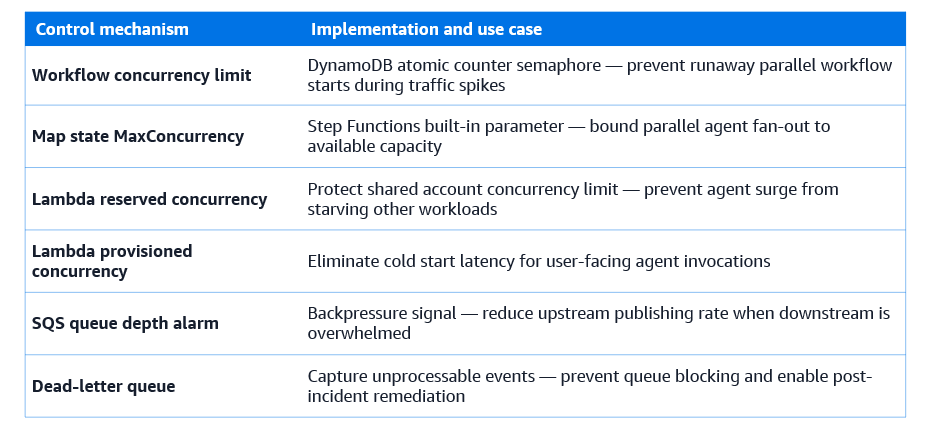
Orchestrated agent systems under load face a challenge that single-agent systems don’t: the same shared resources, model endpoints, MCP server instances, shared state stores are accessed by many concurrently executing workflows. Without concurrency controls, a surge in workflow starts causes a corresponding surge in model API calls, potentially exceeding rate limits, degrading latency for all concurrent workflows, and in the worst case causing cascading failures as timeouts propagate through the dependency chain.
Managing concurrency requires controls at multiple layers: at the workflow level, limiting how many workflow instances can execute simultaneously; at the agent level, limiting how many concurrent invocations of a specific agent are permitted; at the tool level, rate-limiting calls to external APIs accessed through MCP servers; and at the model level, managing the token throughput consumed by concurrent model calls.
AWS Step Functions concurrency controls
Step Functions doesn’t have a built-in per-workflow-type concurrency limit, but you can implement one using a DynamoDB counter as a semaphore. At the start of each workflow execution, an atomic increment operation on a DynamoDB counter checks whether the concurrency limit has been reached. If so, the execution pauses and retries after a backoff period. When an execution completes, it decrements the counter, allowing a waiting execution to proceed.
For the Map state, used for parallel fan-out across multiple agents, Step Functions provides a MaxConcurrency parameter that directly limits how many parallel branches execute simultaneously. Setting this parameter prevents a large input set from spawning thousands of parallel agent invocations simultaneously. Instead, branches execute in batches of MaxConcurrency, with new branches starting only as previous ones complete.
AWS Lambda concurrency for agent execution
Lambda’s reserved concurrency feature allocates a fixed pool of concurrent executions to a specific Lambda function, preventing it from consuming more than its share of the regional concurrency limit. For agent Lambda functions that call expensive model APIs, setting a reserved concurrency limit prevents a sudden surge in workflow starts from exhausting the Lambda concurrency limit for the entire AWS account.
Provisioned concurrency eliminates cold start latency for agent Lambda functions that must respond quickly. For agent functions that handle user-initiated requests where latency is directly visible to users and provisioned concurrency ensures that a pool of pre-warmed execution environments is always available. For agent functions that handle background processing, scheduled workflows, event-driven analysis, provisioned concurrency generally isn’t needed, as the latency of a cold start isn’t user-visible.
Backpressure and dead-letter queues
Backpressure is the mechanism by which a downstream component signals to upstream components that it’s overwhelmed and they should slow down. In orchestrated agent systems, backpressure is implemented through SQS queue depth monitoring: when the queue depth exceeds a threshold, a CloudWatch alarm triggers and the upstream event source reduces its publishing rate or pauses temporarily.
Dead-letter queues capture events and messages that couldn’t be processed after the maximum number of retry attempts. For agent workflows, a dead-letter queue is essential for event-driven triggers: if a workflow execution fails repeatedly for the same event, the event is moved to the dead-letter queue rather than blocking the processing of subsequent events. Operations teams monitor the dead-letter queue depth as an operational metric and process dead-lettered events through a separate remediation workflow when the underlying cause is resolved.
Long-running workflows and human-in-the-loop patterns
We introduced task token pattern for human approval gates earlier. This section covers long-running workflows and human-in-the-loop patterns in full, addressing the design considerations that arise when agent workflows must span extended time periods and incorporate human judgment at multiple points.
Anatomy of a long-running agent workflow
A long-running agent workflow has several characteristics that distinguish it from a short-duration request-response interaction. Its total execution time exceeds what’s practical for a synchronous API call, typically more than thirty seconds, often many minutes or hours. It produces intermediate results that are meaningful and should be persisted even if the workflow doesn’t complete. It may require human decisions at one or more points that introduce unpredictable waiting periods. And it must provide the user with visibility into its progress without requiring the user to remain connected.
The DevOps Companion workflow introduced in Module 4 has all of these characteristics. Repository analysis may take several minutes for large codebases. Infrastructure code generation involves multiple LLM calls and validation cycles. The human review of generated infrastructure before deployment may take hours. The EKS deployment itself, including health check stabilization, takes fifteen minutes or more. Designing this workflow correctly requires explicit choices about how to communicate progress, how to handle intermediate failures, and how to ensure that the human reviewer has the context they need to make an informed decision.
Asynchronous status and progress reporting
Long-running workflows should provide progress updates through a push mechanism — publishing status events to EventBridge as each major milestone is reached rather than requiring callers to poll for completion. The calling system subscribes to status events for the specific execution ID and receives updates as they’re published, without maintaining a persistent connection.
Each status event carries the execution ID, the current workflow stage, a percentage completion estimate, and a human-readable description of what’s currently happening. A separate Lambda function subscribes to these status events and writes them to a DynamoDB table keyed by execution ID, providing a persistent status record that can be queried by any system that needs it, including a front-end dashboard that displays workflow progress to the user.
For Temporal workflows, the SDK provides a query mechanism: client code can query a running workflow for its current state at any time, without the workflow needing to publish events proactively. This pull-based model is simpler to implement for workflows that have internal state that maps naturally to a progress concept, and it complements the push-based event model for workflows where external systems need proactive notification of specific milestones.
The task token pattern in detail
The task token pattern in Step Functions works as follows. The workflow definition includes a state of type Task with an integration pattern of WaitForTaskToken. When execution reaches this state, Step Functions generates a unique task token and passes it — along with the state’s input data — to the configured integration target, which is typically a Lambda function that initiates the human review process.
The Lambda function receives the task token and the review payload, formats the review request, and sends it to the reviewer through the appropriate channel: an email containing a link to a review interface, a message to a Slack channel, or a ticket created in an ITSM system. The workflow execution is then completely paused. No Lambda function is running, no polling is occurring, and no compute resources are consumed. The task token is stored in the external system alongside the review request.
When the reviewer completes their review, approving or rejecting the proposed infrastructure. The review interface calls the Step Functions SendTaskSuccess or SendTaskFailure API using the stored task token. Step Functions immediately resumes the paused execution, transitioning to the next state with the reviewer’s decision as the output of the approval state. The entire mechanism is asynchronous, durable, and stateless from the perspective of the calling system the task token is the only artifact that connects the paused workflow to its pending callback.
Temporal for multi-day human workflows
Some enterprise workflows require human action on a timescale of days rather than hours. A security review, a compliance certification, or a multi-party approval process may take a week or more. Step Functions Standard Workflows support execution durations up to one year, but the task token pattern requires that the external system reliably delivers the callback when the human action is complete. For very long-duration workflows, Temporal is often preferable because its workflow replay mechanism provides stronger guarantees about the durability of paused workflow state across infrastructure changes, deployments, and cluster restarts.
In Temporal, a long-running workflow waits for a signal — an external message sent to a running workflow to provide it with data or instruct it to proceed. The workflow function calls an await-signal primitive that suspends execution until a signal with a specified name is received. The signal can be sent at any time — minutes or days later — and the workflow resumes immediately. Because Temporal persists the full event history, the workflow can survive cluster restarts, upgrades, and even migrations to new Temporal namespaces between the time it’s paused and the time the signal arrives.
Observability and operational excellence
An orchestrated agent system that can’t be observed can’t be operated. Observability for orchestrated agent systems requires instrumentation at three levels: the workflow level, tracking the health and throughput of the orchestration layer itself; the agent level, tracking the quality and latency of individual agent invocations; and the dependency level, tracking the availability and performance of MCP servers, model endpoints, and shared data stores. These three levels must be correlated through a shared trace identifier so that a problem observed at the workflow level can be traced to its root cause at the agent or dependency level.
Workflow-level observability with CloudWatch and Step Functions
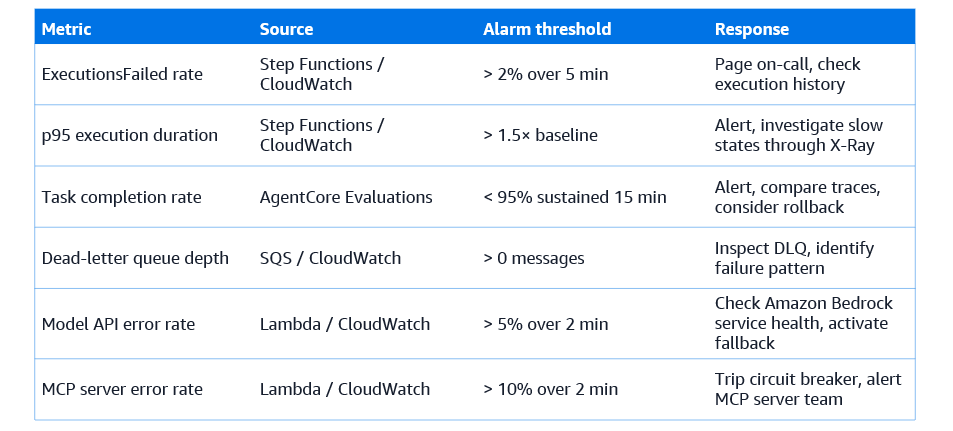
Step Functions emits CloudWatch metrics for every workflow type: ExecutionsStarted, ExecutionsSucceeded, ExecutionsFailed, ExecutionsTimedOut, and ExecutionThrottled. These metrics, broken down by state machine name, provide the baseline operational picture: how many workflows are running, how many are succeeding, and how many are failing. CloudWatch alarms on ExecutionsFailed with appropriate thresholds provide the primary on-call alert for workflow-level failures.
Step Functions also emits execution duration metrics, enabling percentile analysis of workflow completion time. A p95 execution duration alarm catches workflows that are running slower than baseline without requiring any individual execution to fail. For the DevOps Companion, where users expect workflows to complete in under an hour, an alarm on executions that exceed 90 minutes provides early warning of performance degradation before users begin complaining.
AWS X-Ray integration with Step Functions provides distributed tracing across workflow steps. Each state transition is traced as a segment, and Lambda invocations within states are traced as subsegments. The X-Ray service map shows the complete workflow execution path with latency and error rate annotations on each segment, making it straightforward to identify which step is responsible for a latency increase or an elevated error rate.
Agent-level observability
Agent-level observability extends below the workflow layer to the individual agent invocations that compose each workflow step. LangSmith and LangFuse, introduced in Module 3, capture the detailed trace of every agent execution: each LLM call with its full prompt and response, each tool call with its arguments and result, the latency of each step, and the total token consumption. These traces are correlated with the Step Functions execution history using the execution ID, which is passed as a trace tag to the LangSmith or LangFuse client at the start of each agent invocation.
The key operational metric at the agent level is the task completion rate: the fraction of agent invocations that produce a valid, complete output rather than an error or an incomplete response. This metric is computed from the evaluation results collected during production traffic by the online evaluation mode of Amazon Bedrock AgentCore Evaluations, which applies a subset of the built-in evaluators to sampled production invocations. A sustained drop in task completion rate triggers a CloudWatch alarm and may trigger an automatic rollback to the previous agent version.
Operational runbooks and on-call practices
Every production agent system should have a set of operational runbooks: step-by-step procedures for diagnosing and resolving the most common failure scenarios. Good runbooks are specific enough to be actionable, they identify the exact metric to check, the exact query to run, and the exact action to take without being so prescriptive that they fail to apply to real-world scenarios that differ slightly from the template.
The most important runbooks for orchestrated agent systems address: elevated workflow failure rate (check Step Functions execution history for failed executions, identify the failing state, check the Lambda logs for the failing state, check the MCP server health if a tool call is failing); workflow latency degradation (check CloudWatch p95 execution duration, use X-Ray service map to identify the slow step, check Amazon Bedrock model latency metrics for model API slowdowns); agent quality degradation detected by online evaluation (check the evaluation trace in LangSmith or LangFuse to understand which evaluator is failing, compare with the previous version’s traces to identify the source of the regression, trigger rollback if regression is confirmed); and dead-letter queue depth increase (inspect the dead-lettered messages, identify the common failure pattern, determine whether the failure is transient and retry or permanent and require code changes).
Worked example: the DevOps companion as a fully orchestrated system
Module 4 and Module 5 introduced the DevOps Companion as a multi-agent system with four specialized agents coordinated by a central orchestrator. This section reimplements the same system as a production-grade orchestrated deployment using the patterns and services covered throughout this module. The goal is to show how each concept — durable execution, lifecycle management, dependency management, scheduling, human approval, observability — materializes in a concrete system design.
Workflow state machine design
The DevOps Companion workflow is implemented as an AWS Step Functions Standard Workflow. The state machine definition, managed through AWS CDK, comprises nine primary states: InitializeWorkflow, RepositoryAnalysis, InfrastructureGeneration, InfrastructureReview, CICDConfiguration, DeploymentExecution, DeploymentHealthCheck, ObservabilitySetup, and FinalizeWorkflow. Three error handler states handle the main failure scenarios: AnalysisFailureHandler, DeploymentRollbackHandler, and WorkflowCompensation.
The RepositoryAnalysis state invokes the Repo Analysis agent Lambda function with a retry configuration of three attempts, exponential backoff starting at five seconds, and a jitter factor of 0.5. If all retries are exhausted, the catch block transitions to AnalysisFailureHandler, which notifies the requesting team through SNS and records the failure in DynamoDB before marking the execution as failed.
The InfrastructureReview state uses the task token pattern to pause the workflow and request human approval. The Lambda target formats the generated infrastructure specification into a structured review document, creates a review ticket in the configured ITSM system through an EventBridge API destination, and returns the task token to the ITSM system for embedding in the approval/rejection response. The workflow remains paused until the reviewer responds through the ITSM interface.
The DeploymentExecution state invokes a Temporal workflow for the EKS deployment phase. The Step Functions state calls the Temporal workflow start API and then waits for a completion callback. The Temporal workflow handles the internal complexity of the deployment — creating namespace, applying manifests, waiting for pod readiness, running smoke tests — with its own retry and checkpoint logic, and sends a Step Functions task token callback when the deployment completes or fails.
Lifecycle management configuration
Each agent in the DevOps Companion is deployed as an Amazon Bedrock AgentCore agent with three versions: v1 (the current stable version), v2 (the canary version receiving 10% of traffic during rollout), and a dev alias pointing to a draft version used for staging. The orchestrator’s Step Functions state machine references each agent by its production alias, never by version number. Updating an agent involves deploying a new AgentCore version, updating the canary alias to split traffic 90/10, running the online evaluation for 24 hours, and promoting the new version to 100% if evaluation metrics are within acceptable bounds.
The GitHub MCP server, the CDK execution MCP server, the EKS operations MCP server, and the CloudWatch MCP server each have their own Lambda alias configuration, with a compatibility matrix recorded in a DynamoDB table. The orchestrator reads the compatibility matrix at the start of each workflow execution and selects the appropriate MCP server version for each agent based on the agent’s declared compatibility range.
Scheduling and event triggers
The DevOps Companion is triggered in three ways. User-initiated analyses are triggered by an API Gateway endpoint connected to an EventBridge event bus. The event carries the repository URL and the requesting user’s identity. An EventBridge rule routes events to the Step Functions state machine through a direct integration.
A scheduled nightly workflow, triggered by EventBridge Scheduler at 2 AM in each configured region, runs a lightweight version of the workflow that refreshes the knowledge base — re-indexing repository documentation, updating infrastructure pattern templates in Amazon Bedrock Knowledge Bases — without performing analysis or deployment. This ensures that the knowledge base is always current with the latest repository state.
A code-push event trigger connects an EventBridge integration to the code hosting platform. When a pull request is merged to the main branch, the code hosting platform publishes an event to EventBridge, which routes it to a Lambda function that starts a full DevOps Companion workflow execution for the affected repository. This creates a continuous deployment trigger that initiates the full agent workflow — analysis, IaC generation, CI/CD configuration, deployment — on every merge to main, subject to the human approval gate at the InfrastructureReview state.
Observability configuration
CloudWatch alarms are configured for the five key metrics: ExecutionsFailed rate, p95 execution duration, agent task completion rate from AgentCore Evaluations, dead-letter queue depth, and Bedrock model API error rate. All five alarms route to an SNS topic that notifies the on-call engineer by email and PagerDuty integration.
A CloudWatch dashboard named DevOps-Companion-Operations provides the operational overview: workflow starts and completions over the last 24 hours, current execution duration p50/p95/p99, per-agent task completion rates, model API latency and error rates, and dead-letter queue depth. The dashboard is the first screen the on-call engineer opens when an alarm fires.
LangSmith traces for all agent invocations are tagged with the Step Functions execution ID, enabling drill-down from a failed workflow execution in the CloudWatch console to the specific LLM call that produced an incorrect output. This correlation is implemented by passing the execution ID as an environment variable to each agent Lambda function at invocation time, where the LangSmith client picks it up as a trace tag.
Conclusion and looking ahead
Agent orchestration is infrastructure work, not agent work. You can have the most capable agents in the world and still have an unreliable system if the layer running them can’t handle failures, can’t version components independently, and can’t integrate with your enterprise’s governance processes. I’d prioritize getting durable execution and lifecycle management right before optimizing anything else, those two properties eliminate the largest class of production incidents.
One honest caveat: Step Functions Standard Workflows record every state transition, which is exactly what you want for audit trails but comes with a cost. At high workflow volumes, the execution history storage can become a meaningful line item. Review your CloudWatch Logs retention policies and consider streaming historical data to S3 and Athena rather than retaining everything in CloudWatch indefinitely.
The operational patterns in this module, task tokens, circuit breakers, canary deployments, DLQ monitoring aren’t specific to agents. They’re the same patterns used for reliable distributed systems generally. What’s different for agents is the additional quality dimension: you’re not just monitoring whether the workflow succeeded, you’re monitoring whether the agent’s output was actually correct. That requires the online evaluation pipeline, and it requires building your runbooks around quality metrics as well as availability metrics.
Module 7 takes a complementary perspective. Where this module concerned itself with the operational infrastructure that runs agent workflows, Module 7 concerns itself with the data infrastructure that lets agents remember. Memory, in-context, session, long-term semantic, and cross-agent shared, is what lets agents accumulate understanding over time, maintain context across interactions, and coordinate effectively with other agents through shared state. Module 7 covers the full memory architecture for agentic systems, from the context window through vector stores, graph databases, and memory governance as a first-class data discipline.
Featured AI tools in AWS Marketplace
Build multi-agent orchestration with durable execution, workflow coordination, and DAG-based scheduling tools — all available through your AWS account.
Why AWS Marketplace for on-demand cloud tools
Free to try. Deploy in minutes. Pay only for what you use.
Featured tools are designed to plug in to your AWS workflows and integrate with your favorite AWS services.
Subscribe through your AWS account with no upfront commitments, contracts, or approvals.
Try before you commit. Most tools include free trials or developer-tier pricing to support fast prototyping.
Only pay for what you use. Costs are consolidated with AWS billing for simplified payments, cost monitoring, and governance.
A broad selection of tools across observability, security, AI, data, and more can enhance how you build with AWS.
Continue your journey
This series builds progressively: from agent fundamentals and tool use, through evaluation and multi-agent coordination, to domain specialization and orchestration. Module 6 is where individual agents become coordinated systems with control planes. Look back at domain specialization, or continue to agent memory systems.