Optimizing ML models
Machine learning (ML) has significantly improved user experience. Whether it’s to help us find the perfect product amongst a seemingly infinite array of options or getting your next binge-worthy show suggested, ML has changed our lives in ways that border on fiction.
What is the common denominator that underlies all these varied and life changing capabilities? Massive amounts of data.
However, as organizations embark on their machine learning exploration and development journey, it has become evident that data volume alone is not a guarantee that the models being built will perform in the way they anticipate. Considering the cost of training and running a model, suboptimal performance may result in bloated budgets and underwhelming return on that investment. Having a clear understanding of the data and extracting the right features from it can help you optimize training processes as well as ensure that the performance of your ML model is optimal and the value it delivers to users matches their expectations and rises to the real potential of AI.
In this article, I will walk you through a sample use case to show how you can locate and then aggregate the data you need on a regular basis. Once you have aggregated the data, you can run algorithms to identify important features relevant to the problem and then use only those relevant features to train your lightweight, highly effective ML model.
As someone who is putting her home on the market, let’s examine a use case that is near and dear to my own heart: how to figure out your home’s value is to price it for sale.
Imagine you are a machine learning engineer working in a real estate company, charged with solving the highly relatable problem of predicting the valuation of a property. You have access to the entire organization’s data and with it you need to identify the most prominent features that contribute to the valuation of the property.
Identify datasets as a first step
Some organizations have a well-defined data catalog that you can browse through, and in other organizations, such data can be found only through word of mouth. But before you go hunting for the data, take a minute to think about what data you might need.
For example, property detail data might provide you insights into why a property was sold at a specific rate—was it because it had a two-car garage, a jacuzzi, or near a good school? And Geographic income per capita information might indicate why sale prices are low or high or how to position the house.
Make a list and then explore these options:
If available in your organization, explore the data catalog and look for data sources that are likely to include data points meaningful to the task at hand.
Engage other business units that may hold data relevant or that may have insights into which data points have historically proven relevant to the objective.
Also consider public data sets that may provide additional context to your model.
Consider commercial data sets that could also hold valuable features that will improve your model’s performance.
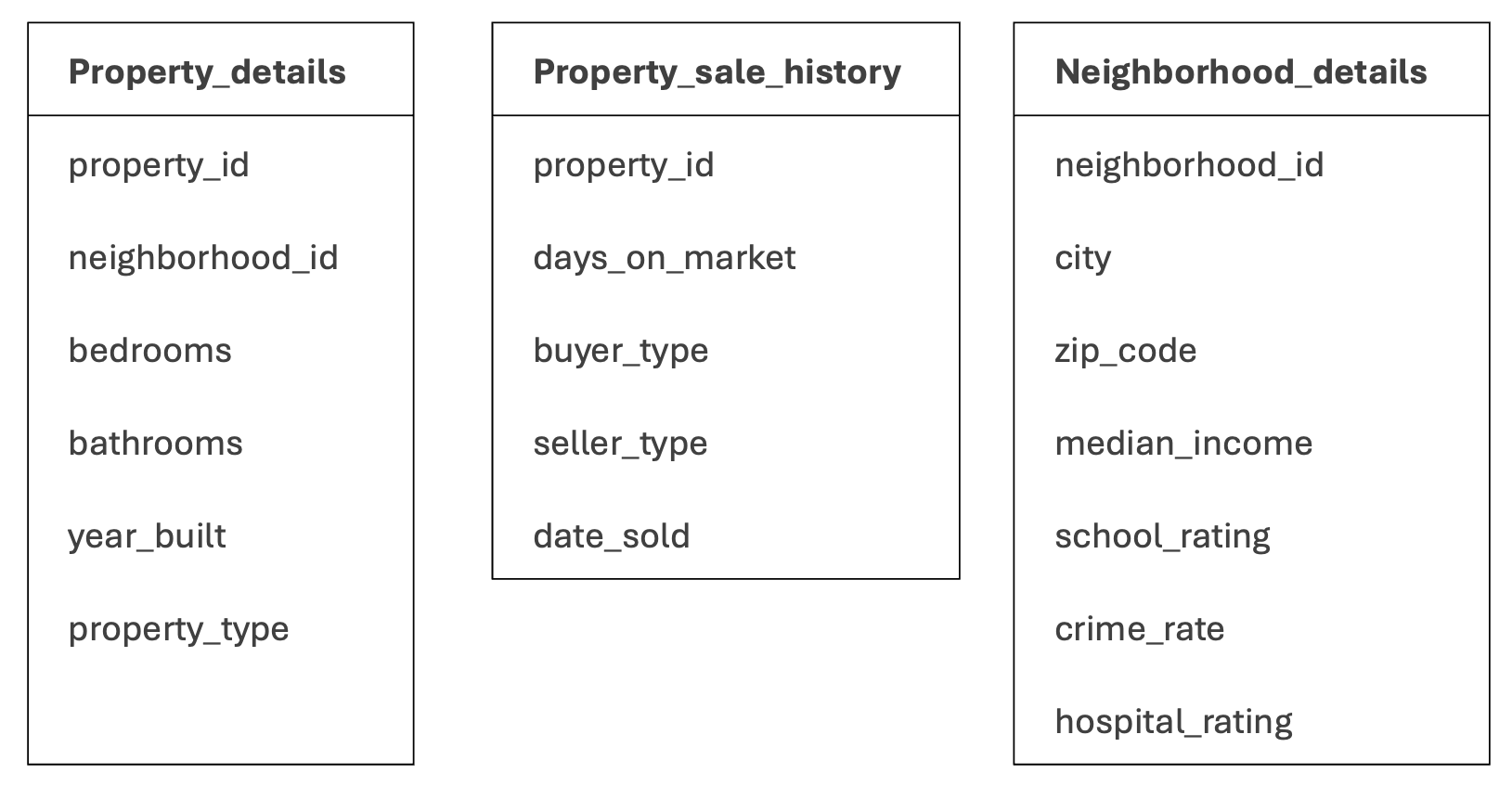
For our scenario, you will look at three data sets available within your organization as you build the first version of your algorithm:
Property sale information, being a primary dataset for the company, is compiled by a line-of-business process and put into structured JSON files in an Amazon Simple Storage Service (Amazon S3) bucket.
Neighborhood information from a survey provided by a 3rd party vendor.
Property details which are maintained in a relational database in Amazon Relational Database Service (Amazon RDS).
Here is the schema of these data sets.
Not all data is made equal, ensure data quality and relevance
Start by inspecting samples of the various data sets you’ll be working with and run some basic tests. Remember the garbage in, garbage out (GIGO) idiom; basing your model on poor quality or poorly maintained data will affect the quality of your output.
Some basic questions you will want to have an answer for are:
Is the data clean? What you are looking for is ensuring data is accurate, consistent and complete.
Is the data sufficient? This doesn’t necessarily mean that you are looking for petabytes of data, particularly when fine-tuning existing models, you can work with reasonably sized datasets.
Is the data well distributed? To avoid overfitting, you want data that is diverse and well distributed.
Let’s say that you find the results acceptable, and you believe that the data you have can help you predict the valuation of the property well. The next step is to get and then join full datasets.
Gathering and joining data in a meaningful manner
Now getting this data in one central place might not be as simple as it looks. Data volumes can be a concern, and getting data out of systems that are continuously updating the datasets can make transportation, transformation and aggregation a less than trivial task.
To make processing easier, such data must be stored in a columnar format, which makes a data warehouse a good choice. With the right data warehouse, you can join all three tables to get a comprehensive view of property characteristics, neighborhood information, and sales history. The data warehouse of your choice must have modern functionalities such as:
Compute and storage separation, which enables you to scale horizontally while optimizing costs.
Serverless features, such as data loading, so you don’t need to provision infrastructure in advance.
Sync the latest changes in the source database into the data warehouse via Change Data Capture (CDC) capabilities.
The data warehouse must support ANSI/MySQL compatible queries.
It must provide tenant-level isolation so concurrent queries do not affect enterprise-level performance.
Fast query performance.
Using ByteHouse as a data warehouse
While exploring the diverse options available in AWS Marketplace that may satisfy these requirements, I came across ByteHouse in AWS Marketplace, from BytePlus. As I started exploring it further, I was impressed to see performance-related features such as data-skipping indices, which enable the processing engine to skip unnecessary blocks and enable faster processing, and Vectorized Query Execution, which uses enhanced parallelism to improve performance. Integration with AWS Glue is extremely important for me as I can use it to run Python code and identify important features from the data.
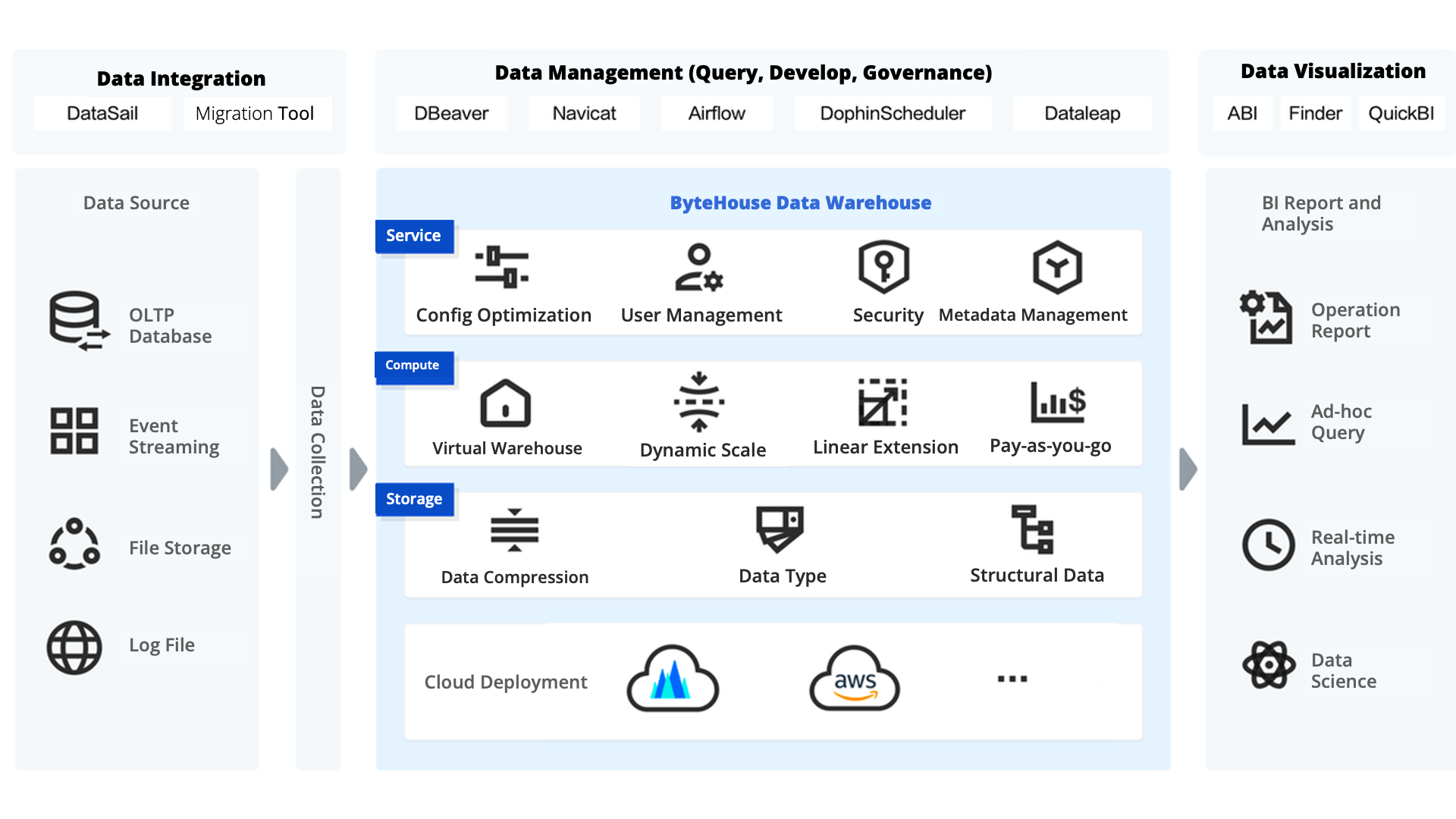
But now, the test: Can you use ByteHouse to aggregate and join large datasets on a regular basis so you can predict the valuation of a property?
Loading data into ByteHouse
The first step is to load data into ByteHouse. ByteHouse supports popular data import options, such as local file upload, Amazon S3, Amazon Kinesis, Confluent Cloud, and Kafka data streams. Here is a quick snapshot of how you can load property sales data available in the Amazon S3 bucket into the ByteHouse environment.
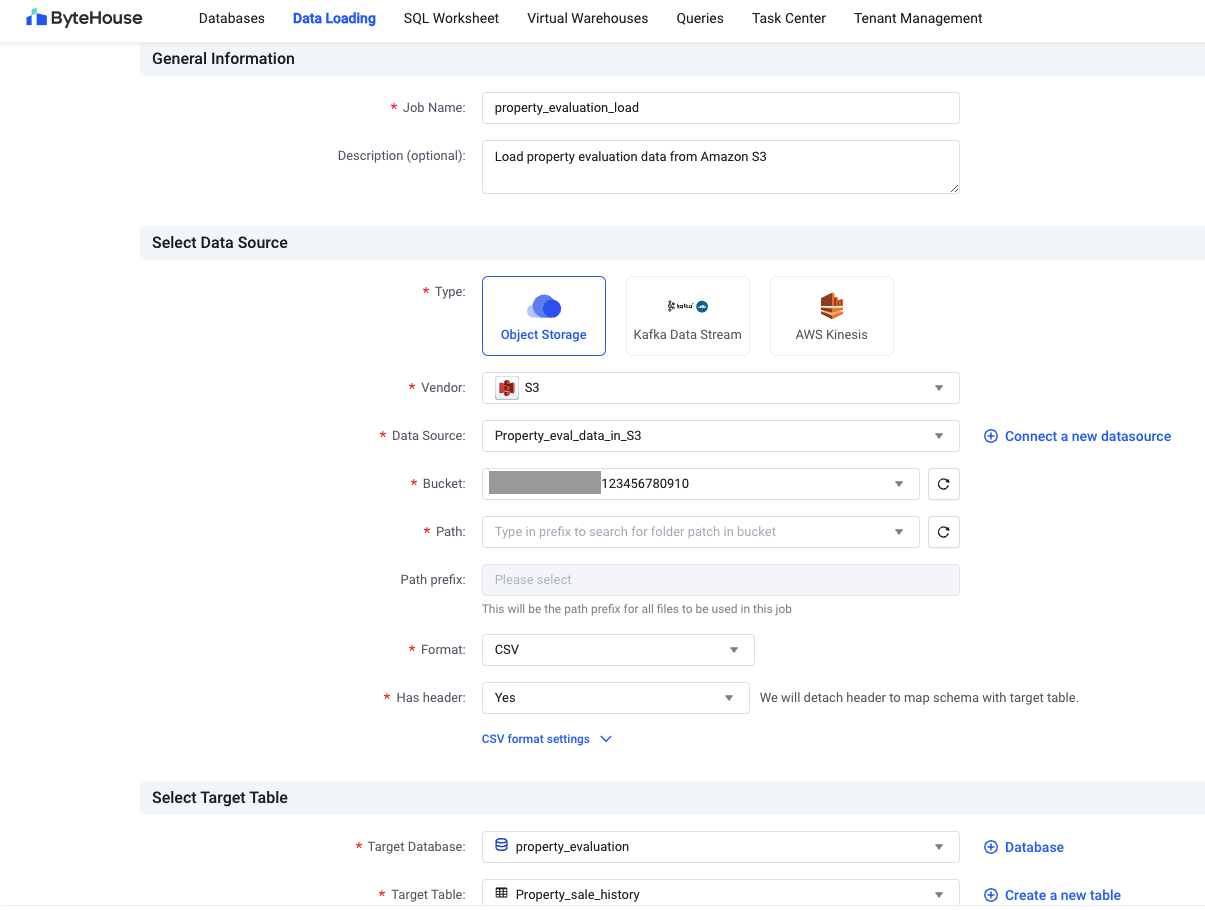
Bytehouse also provides an option in the UI that you can use to load neighborhood data directly. For loading property data from Amazon RDS, you have two options:
Use the Data Express Service (DES) capability provided by ByteHouse, which can connect to cloud-based MySQL and PostgreSQL databases.
Export data into an Amazon S3 bucket via an Amazon Database Migration Service (Amazon DMS) job regularly and then load it into ByteHouse.
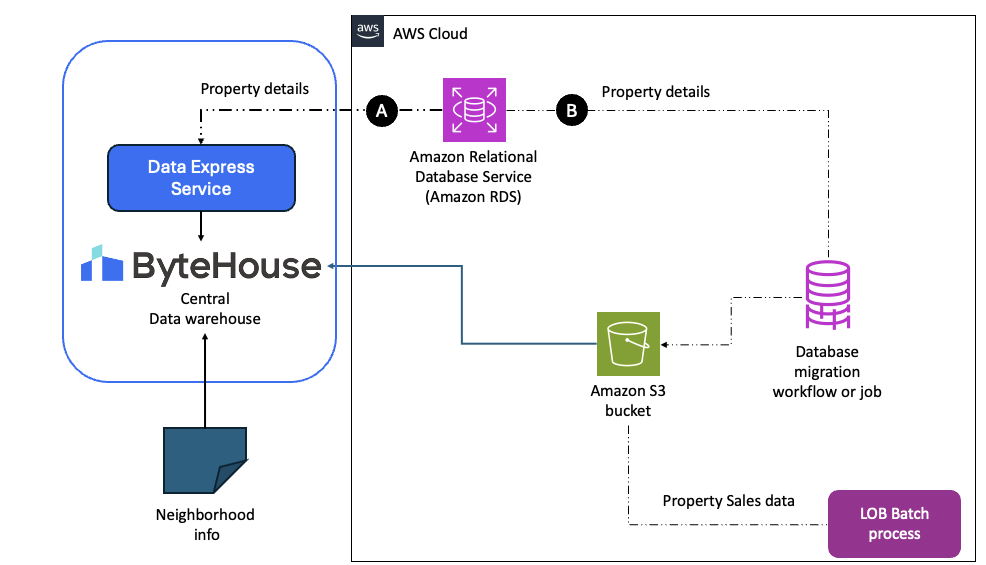
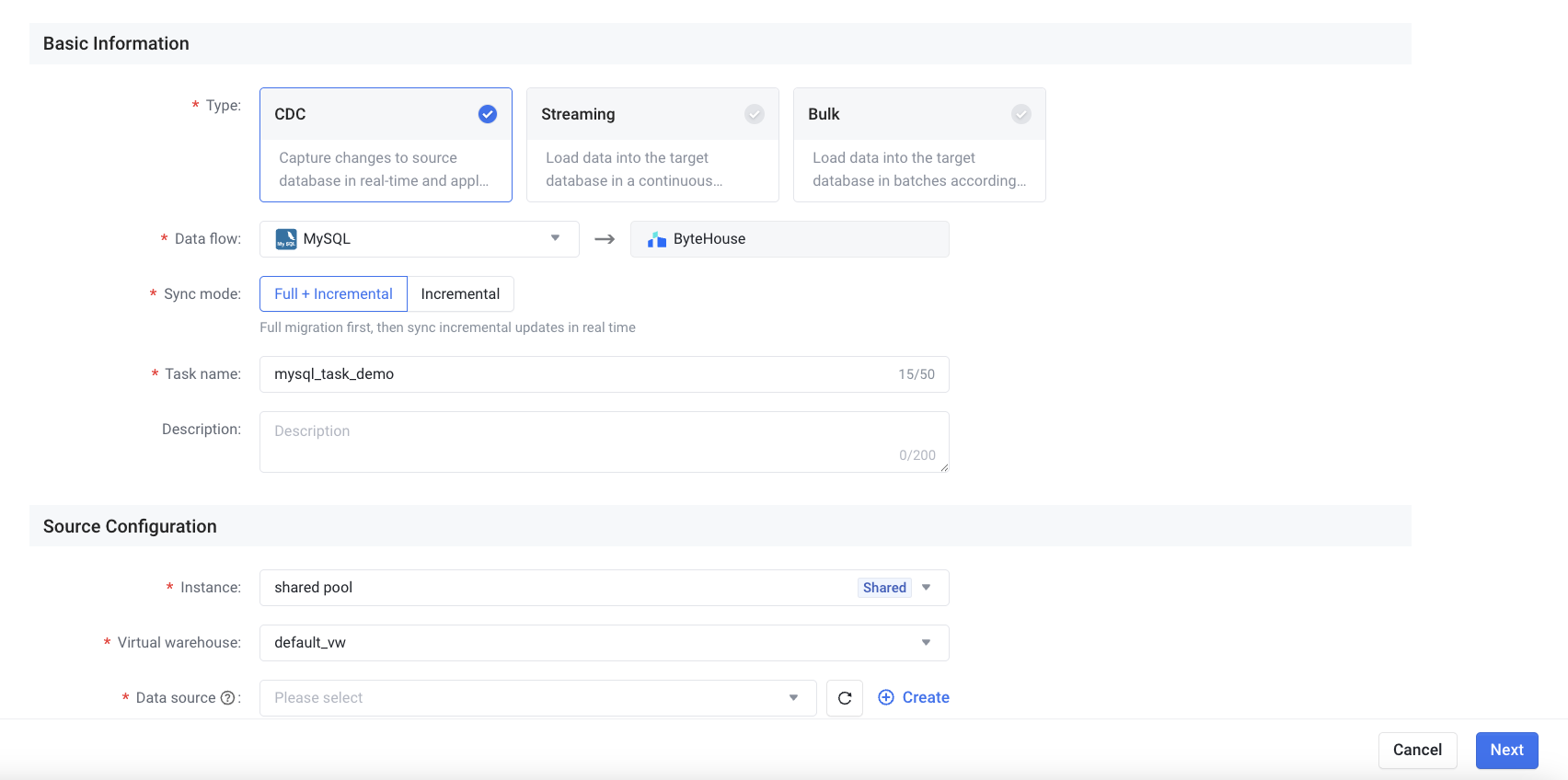
Although loading data one time is a straightforward activity, as time passes, data becomes stale. You need the latest and greatest data automatically loaded into these tables. This is where the change data capture (CDC) functionality becomes a requirement. If you’ve ever bought or sold a house, you understand the value of timing: values can rise or drop by as much as 10% in a matter of a week or two, which is why you always need the latest data.
Keeping data updated in the warehouse using Data Express Service
ByteHouse has a feature called Data Express Service (DES), which you can use to import multi-source heterogeneous data sources and data structures into ByteHouse. This feature supports different data sources, including relational databases such as MySQL, PostgreSQL, and ClickHouse, NoSQL databases such as MongoDB, Kafka streams, and S3 object storage. With Data Express Service, you can do CDC synchronization tasks that can synchronize MySQL and PostgreSQL data sources incrementally or in full (more here). Now, this functionality is handy – it means you do not need to constantly worry about keeping your data warehouse in sync. You can do a one-time load and then run CDC tasks to ensure ByteHouse has the latest and greatest data available all the time.
Once you have loaded all three datasets into Bytehouse, you can run different queries on top of your data. Here is a quick snapshot of sample rows and columns when joined together.
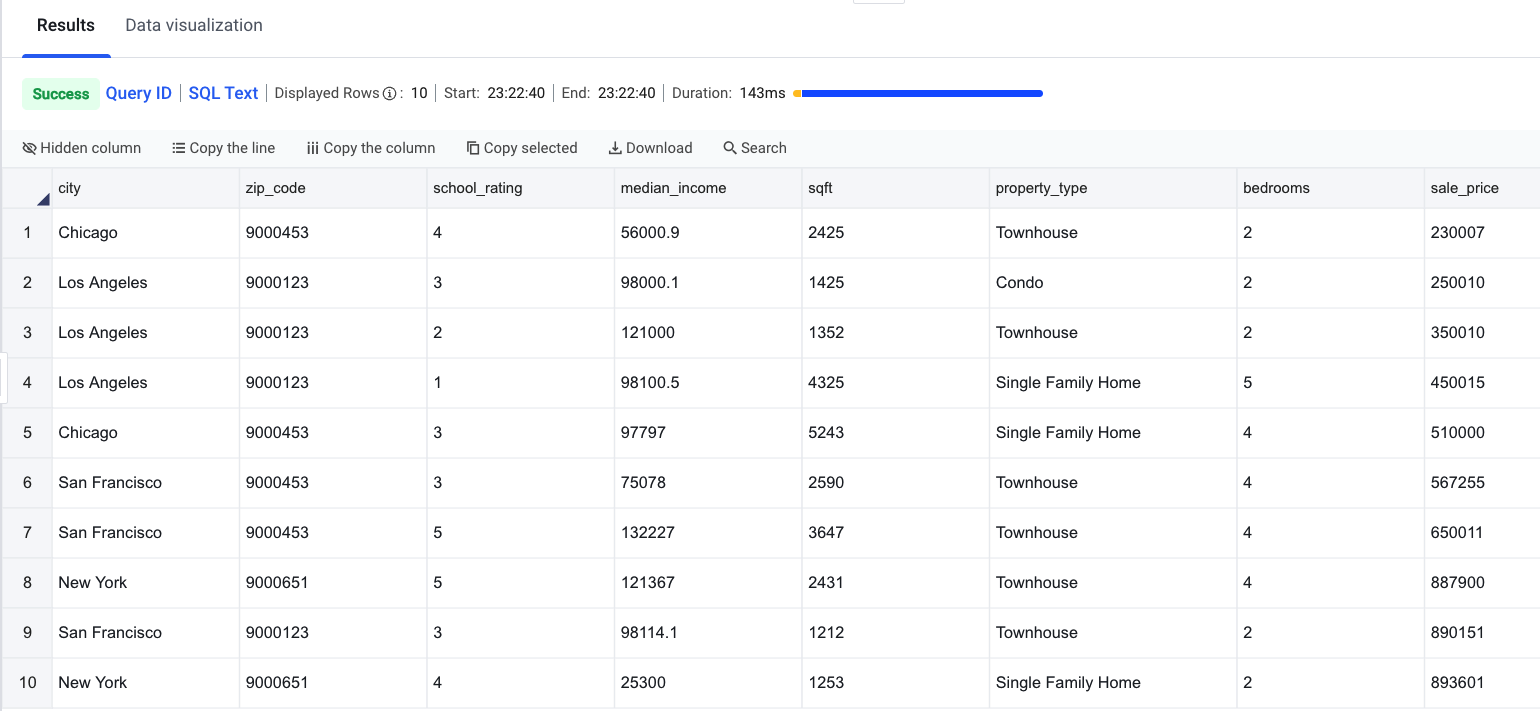
Using this approach, you can aggregate and confirm that the data will work for your use case. Once you have figured out that the data is right for solving your ML problem, I suggest creating a view so you don’t have to join datasets whenever you query.
Identifying important features for the regression problem
You now have the data you need and have figured out how to keep it up to date using ByteHouse’s Data Express service. As an ML engineer, finding important features and using them for training an ML model is the next step in and the one where the value of data can ultimately be materialized.
When it comes to using data, you know that although 18 columns might not look like a lot of data, when you multiply that by 1 million rows the total number of unique attributes and potential combinations can explode in orders of magnitude.
In real world production data sets, the actual number of columns will be in the hundreds, which, when multiplied by tens or hundreds of millions of rows, turns into a real challenge of scale across environments.
Although Machine Learning (ML) training costs have decreased, the more data, the more time and cost that will need to be invested in training the model and the larger and more compute intensive the model will end up being which may take longer to return a prediction and will require a lot more compute capacity per inference.
And there’s something all users have in common today, they all want and expect instantaneous responses. So, the key to building a model that will run quickly, inexpensively, and still deliver the expected value and experience to users lies in simplicity, efficiency and optimization.
These are some of feature selection techniques that can help:
Regularized trees, a technique that penalizes using a variable that is similar to variables selected for splitting previous tree nodes.
Lasso regression, which adds a penalty term to the cost function of regression to encourage sparsity in the coefficients.
Tree-based techniques such as Random Forest and Gradient Boosting provide us with feature importance to select features as well.
Now that you’ve aggregated your data, let’s go back to a more familiar tool, Jupyter, which you can access either from AWS Glue Studio, Amazon SageMaker Studio, or your computer to connect to ByteHouse.
Step 1: Connect to ByteHouse from your Jupyter notebook
With a few lines of Python code, you can easily connect your Jupyter Notebook to your ByteHouse data warehouse and run queries on it.
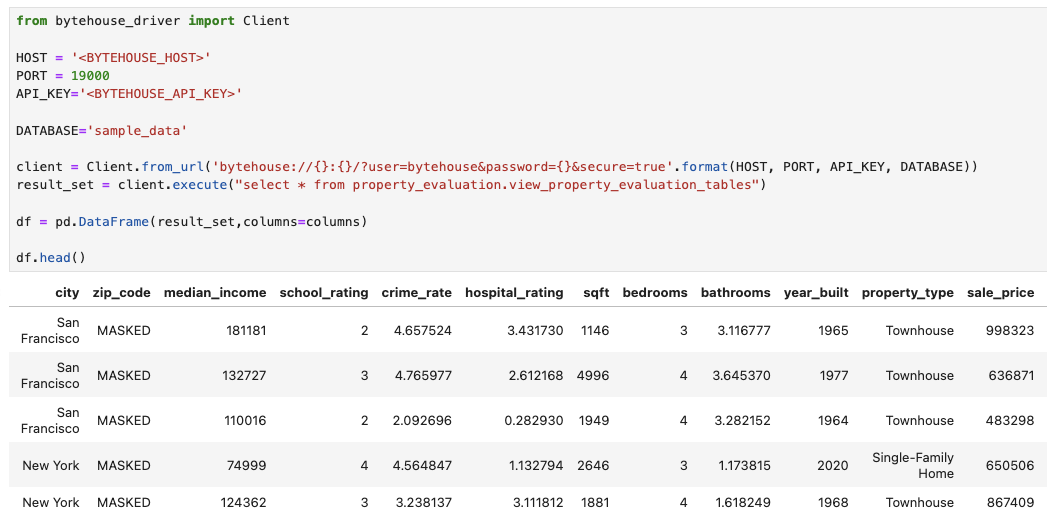
Step 2: Identify important features
Once you have connected to Bytehouse and loaded data into a Pandas data frame, you can use the scikit-learn library’s functions to split data into train and test sets. Then, train a model using the RandomForest Algorithm, as shown in the following screenshot.
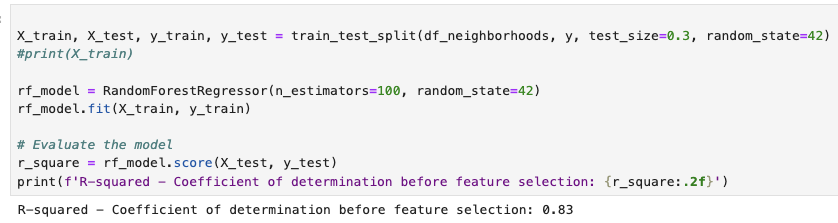
During the experimentation shown in that screenshot, I got a good enough coefficient of determination (a metric that determines whether the model is good or not). The algorithm also identified the importance of each feature. Here is a graph that shows sqft, bedrooms, median_income, and year_built as important determinants.
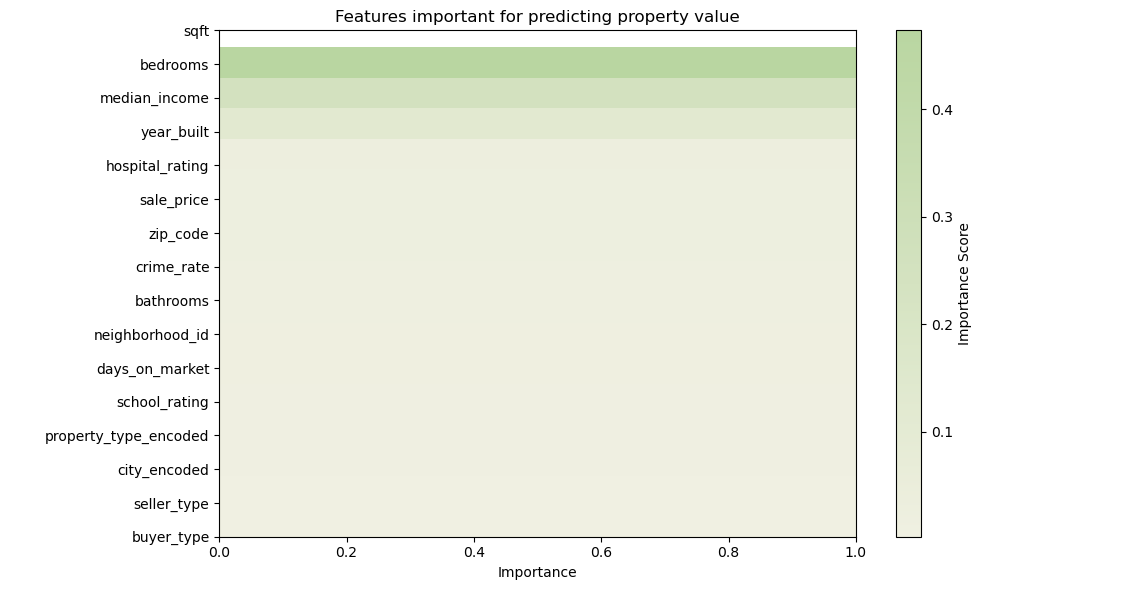
When I took just these four features and re-trained a regression model, I got 0.82 as the coefficient of determination, which was quite good. So, despite shedding more than three-quarters of the total features, I was able to train an almost equally performant ML model that is also light.
Conclusion and key takeaways
To summarize, you just learned how to locate and aggregate your data of interest on a regular basis using a petabyte-scale modern data warehouse such as ByteHouse and how to select features from the data to train a lightweight ML model that can perform predictions quickly without massive amount of compute capacity required.
If you are starting out, here is my advice:
Clearly define the use case your model is looking to solve, and look for data sources relevant to it.
Sign up for a free trial of ByteHouse in AWS Marketplace, do a one-time load, and set up CDC using Data Express Service.
Experiment and identify features that are important for your problem, and then set up ML pipelines to build ML models on a regular basis.
If you haven’t started yet, you can give ByteHouse a try for free in AWS Marketplace using your AWS account.
Why AWS Marketplace for on-demand cloud tools
Free to try. Deploy in minutes. Pay only for what you use.